Unwanted screen on start up

RonBin79

New member
Member
VIP
Local time
9:01 PM
Messages
311
Location
West Sussex
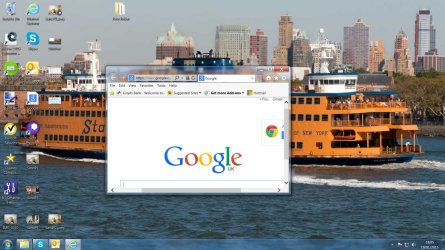
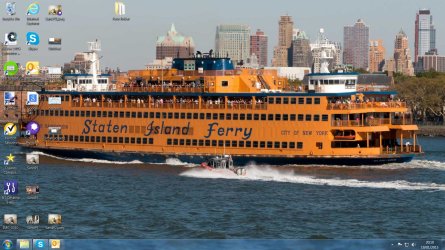
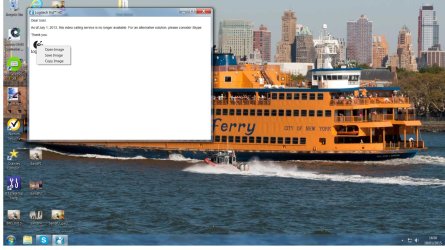
Can anyone tell me how to get rid of this annoying screen (see screen shot) which appears every time I start up my computer please also... How do I stop Google opening up in an envelope size screen??
 

Attachments

  • Untitled.jpg
    Untitled.jpg
    256.6 KB · Views: 24

My Computer

Computer Manufacturer/Model Number
Dell XP8300
OS
Windows Seven Premium
CPU
Intel Core i5-2300
Motherboard
Unknown
Memory
8GB
Graphics Card(s)
1GB ATI Raedon HD 5450
Sound Card
Integrated 7.1 with THX TrueStudio
Monitor(s) Displays
Dell 17"
Hard Drives
1 Terrabyte Serial ATA
Case
Dell (Metal)
Cooling
None
Keyboard
Dell
Mouse
Dell Laser
Internet Speed
2.8Gb
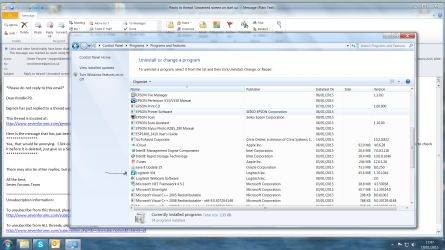
Yea, that would be annoying. Click on your Start Button, click on Control Panel, Programs and Features. See if there is anything in Programs for "Logitech Vid HD" like what is at the top of the window. I would delete that. If you want someone to check it before it is deleted, just give us a Screen Snip and it will be checked out to be sure it is the right thing to delete.
 

My Computer

Computer type
PC/Desktop
Computer Manufacturer/Model Number
Custom Build
OS
Windows 7 Home Premium 32-Bit - Build 7600 SP1
CPU
Intel Core i3-2120 3.30Ghz
Motherboard
Asus P8Z68-V LX Intel Z68 Socket H2 ATX
Memory
Kingston 4 GB DDR3 1333 mhz
Graphics Card(s)
AMD Radeon HD6670
Sound Card
Sound Blaster Audigy SE 24-Bit
Monitor(s) Displays
Asus VE228
Screen Resolution
1440 X 900
Hard Drives
OCZ Vertex 3 120 GB Sata 3 SSD ==
Kingston SH103/S3 120 G Hyper X 120 GB SSD ==
Western Digital 500 GB Caviar Green 7200 RPM ==
PSU
Corsair CX600M == 600 Watt
Case
NZXT Apollo - Silver with Clear Side Panel
Cooling
Three 120 mm Fans
Keyboard
Microsoft Natural 4000
Mouse
Microsoft Custom Optical 3000
Internet Speed
AT&T Fiber Optic Wireless Network
Antivirus
Microsoft Security Essentials
Browser
Chrome
Other Info
120 mm Blue LED Fan -- Three Blue LED Lazer Light Sticks
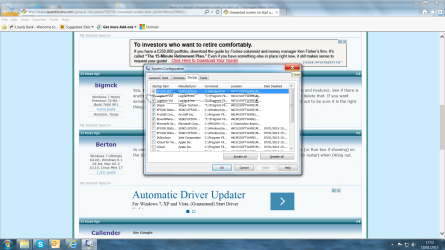
In case you might need it in the future it should work to put msconfig in the Search box [or Run box if showing] on the Start menu and in the Startup tab uncheck the Logitech entry/s. You'll be prompted to restart when OKing out.
 

My Computer

Computer type
PC/Desktop
Computer Manufacturer/Model Number
Customs, Dell, Gateway, HP, Toshiba, Acer, ASUS
OS
Windows 7 Ultimate 64-bit, Windows 8.1 64-bit, Mac OS X 10.10, Linux Mint 17, Windows 10 Pro TP
Keyboard
Microsoft
Mouse
Microsoft
Re: Google

Re: Google.

I think you mean that when you start Internet Explorer it opens Google homepage like you show in your screenshot in your other post?

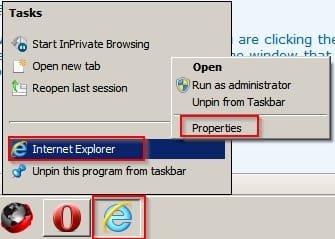
How do you start your browser? If you are clicking the IE icon on your taskbar near the bottom left of your screen - right click that icon then in the window that opens right click "Internet Explorer" and choose "Properties"

Shorcut properties.jpg

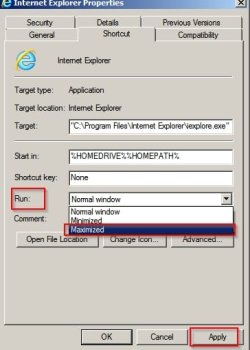
In the window that opens choose Maximised from the "Run" option and then click Apply > Ok.

Internet Explorer Properties.jpg

If you are launching your browser using some other method let us know the method used.
 

My Computer

Computer type
Laptop
Computer Manufacturer/Model Number
ASUS
OS
Microsoft Windows 7 Home Premium 64-bit 7601 Multiprocessor Free Service Pack 1
CPU
AMD C-60 APU with Radeon(tm) HD Graphics
Motherboard
ASUSTeK COMPUTER INC. X501U
Memory
4.00 GB
Graphics Card(s)
AMD Radeon HD 6290 Graphics
Sound Card
(1) AMD High Definition Audio Device (2) Realtek High Defi
Screen Resolution
1366 x 768 x 32 bits (4294967296 colors) @ 60 Hz
Hard Drives
Hitachi HTS545050A7E380 SATA Disk Device
Antivirus
Comodo CIS & FW, SecureAplus App Whitelisting, Threatfire
Browser
Cyberfox 64bit, Opera 64bit, Airfox
Other Info
Spy-The-Spy, HitmanPro.Alert, Norton Connect Safe, MJRegWatcher, BitDefender TrafficLight, Voodoo Shield, Zemana AntiMalware
Logitech screen

Berton and Bigmck, thank you very much for your reply. You will see from the screen shots that I have two entries for Logitech and I am not sure which one to delete? I use my Logitech camera for Skype,

Which entry, if any should I get rid of please??

RonBin79

Callender,
The problem is that when I click on Google it comes up in a very small square about 4"x62 and I have to either stretch it out from the corners or click on the white box in the top of the scree.

RonBin79
 

Attachments

  • Logitech.png
    Logitech.png
    210.1 KB · Views: 11
  • logitech2.png
    logitech2.png
    198 KB · Views: 9

My Computer

Computer Manufacturer/Model Number
Dell XP8300
OS
Windows Seven Premium
CPU
Intel Core i5-2300
Motherboard
Unknown
Memory
8GB
Graphics Card(s)
1GB ATI Raedon HD 5450
Sound Card
Integrated 7.1 with THX TrueStudio
Monitor(s) Displays
Dell 17"
Hard Drives
1 Terrabyte Serial ATA
Case
Dell (Metal)
Cooling
None
Keyboard
Dell
Mouse
Dell Laser
Internet Speed
2.8Gb
Small start up screen

Callender, please see the size screen I get when I try to start up either Google or Outlook, is it something to do with a setting somewhere or other please?
 

Attachments

  • Small screen1.jpg
    Small screen1.jpg
    263.7 KB · Views: 3

My Computer

Computer Manufacturer/Model Number
Dell XP8300
OS
Windows Seven Premium
CPU
Intel Core i5-2300
Motherboard
Unknown
Memory
8GB
Graphics Card(s)
1GB ATI Raedon HD 5450
Sound Card
Integrated 7.1 with THX TrueStudio
Monitor(s) Displays
Dell 17"
Hard Drives
1 Terrabyte Serial ATA
Case
Dell (Metal)
Cooling
None
Keyboard
Dell
Mouse
Dell Laser
Internet Speed
2.8Gb
Click on Google

Callender, please see the size screen I get when I try to start up either Google or Outlook, is it something to do with a setting somewhere or other please?

What are you actually clicking on? Is it possible to provide a screenshot with an arrow pointing to "Google" that you click on?
 

My Computer

Computer type
Laptop
Computer Manufacturer/Model Number
ASUS
OS
Microsoft Windows 7 Home Premium 64-bit 7601 Multiprocessor Free Service Pack 1
CPU
AMD C-60 APU with Radeon(tm) HD Graphics
Motherboard
ASUSTeK COMPUTER INC. X501U
Memory
4.00 GB
Graphics Card(s)
AMD Radeon HD 6290 Graphics
Sound Card
(1) AMD High Definition Audio Device (2) Realtek High Defi
Screen Resolution
1366 x 768 x 32 bits (4294967296 colors) @ 60 Hz
Hard Drives
Hitachi HTS545050A7E380 SATA Disk Device
Antivirus
Comodo CIS & FW, SecureAplus App Whitelisting, Threatfire
Browser
Cyberfox 64bit, Opera 64bit, Airfox
Other Info
Spy-The-Spy, HitmanPro.Alert, Norton Connect Safe, MJRegWatcher, BitDefender TrafficLight, Voodoo Shield, Zemana AntiMalware
It's the Shortcut "G" blue and white icon, hope this helps.

ronBin79
 

Attachments

  • G.jpg
    G.jpg
    302.4 KB · Views: 7

My Computer

Computer Manufacturer/Model Number
Dell XP8300
OS
Windows Seven Premium
CPU
Intel Core i5-2300
Motherboard
Unknown
Memory
8GB
Graphics Card(s)
1GB ATI Raedon HD 5450
Sound Card
Integrated 7.1 with THX TrueStudio
Monitor(s) Displays
Dell 17"
Hard Drives
1 Terrabyte Serial ATA
Case
Dell (Metal)
Cooling
None
Keyboard
Dell
Mouse
Dell Laser
Internet Speed
2.8Gb
Shortcut Icon

Yes it helps! Right click the shortcut and choose "Properties"

In the window that opens make sure that you're on the "Shortcut" tab then look for "Run"

Change the value shown to "Maximized" then click OK.
 

My Computer

Computer type
Laptop
Computer Manufacturer/Model Number
ASUS
OS
Microsoft Windows 7 Home Premium 64-bit 7601 Multiprocessor Free Service Pack 1
CPU
AMD C-60 APU with Radeon(tm) HD Graphics
Motherboard
ASUSTeK COMPUTER INC. X501U
Memory
4.00 GB
Graphics Card(s)
AMD Radeon HD 6290 Graphics
Sound Card
(1) AMD High Definition Audio Device (2) Realtek High Defi
Screen Resolution
1366 x 768 x 32 bits (4294967296 colors) @ 60 Hz
Hard Drives
Hitachi HTS545050A7E380 SATA Disk Device
Antivirus
Comodo CIS & FW, SecureAplus App Whitelisting, Threatfire
Browser
Cyberfox 64bit, Opera 64bit, Airfox
Other Info
Spy-The-Spy, HitmanPro.Alert, Norton Connect Safe, MJRegWatcher, BitDefender TrafficLight, Voodoo Shield, Zemana AntiMalware
In reply #5. You have your System Configuration at the bottom. There are two Logitech Vid. Uncheck them and you should not have the problem with the box.
 

My Computer

Computer type
PC/Desktop
Computer Manufacturer/Model Number
Custom Build
OS
Windows 7 Home Premium 32-Bit - Build 7600 SP1
CPU
Intel Core i3-2120 3.30Ghz
Motherboard
Asus P8Z68-V LX Intel Z68 Socket H2 ATX
Memory
Kingston 4 GB DDR3 1333 mhz
Graphics Card(s)
AMD Radeon HD6670
Sound Card
Sound Blaster Audigy SE 24-Bit
Monitor(s) Displays
Asus VE228
Screen Resolution
1440 X 900
Hard Drives
OCZ Vertex 3 120 GB Sata 3 SSD ==
Kingston SH103/S3 120 G Hyper X 120 GB SSD ==
Western Digital 500 GB Caviar Green 7200 RPM ==
PSU
Corsair CX600M == 600 Watt
Case
NZXT Apollo - Silver with Clear Side Panel
Cooling
Three 120 mm Fans
Keyboard
Microsoft Natural 4000
Mouse
Microsoft Custom Optical 3000
Internet Speed
AT&T Fiber Optic Wireless Network
Antivirus
Microsoft Security Essentials
Browser
Chrome
Other Info
120 mm Blue LED Fan -- Three Blue LED Lazer Light Sticks
Callender, please see the size screen I get when I try to start up either Google or Outlook, is it something to do with a setting somewhere or other please?

Or just click the square at the top right of the Google window, from then on it should always open full screen.
 

My Computer

Computer type
PC/Desktop
Computer Manufacturer/Model Number
Skylake Special #666
OS
Windows 10 Pro x64
CPU
Intel Core i7 6700K
Motherboard
Asus Sabertooth Z170 Mark 1
Memory
GSkill TridentZ RGB 16GB 3600 16-16-16-36
Graphics Card(s)
EVGA GTX 980 Ti SC x2
Sound Card
Realtek High Definition
Monitor(s) Displays
AOC G2460PG
Screen Resolution
1920 x 1080 144Hz
Hard Drives
Samsung 860 Pro 256GB, Seagate Barracuda 4TB x2
PSU
EVGA 1000 P2, EVGA White Custom Braided Cables
Case
Corsair Vengeance C70 Gunmetal Black
Cooling
Corsair H100i v2, Corsair ML120 x2, Thermal Grizzly Kryonaut
Keyboard
Logitech G910 Orion Spectrum
Mouse
Logitech G700s
Internet Speed
Verizon Fios Quantum Gateway 75/75
Antivirus
Windows Defender, Malwarebytes Free 3.8.3
Browser
Chrome
Other Info
Corsair SP120 x4, LG Blu-ray Drive, Durabrand HT-395 100 Watt Dolby Digital Amp, Corsair H2100 Wireless 7.1 Headset
Uninstall Logitech Vid in Programs and Features. It's there staring at us.

To avoid unwanted crapware freeloading on Win7 uncheck everything except your AV and any sync in msconfig>Startup and >Services (after Hiding all MS Services). Nothing else is needed unless you really can't wait to start it yourself, most are spyware posing as Updaters.
 
Callender,

I tried your instructions but cannot find Run, please see screen shot.

RonBin79
 

Attachments

  • Google shortcut.jpg
    Google shortcut.jpg
    285.8 KB · Views: 5
  • google shortcut2.png
    google shortcut2.png
    145.1 KB · Views: 0

My Computer

Computer Manufacturer/Model Number
Dell XP8300
OS
Windows Seven Premium
CPU
Intel Core i5-2300
Motherboard
Unknown
Memory
8GB
Graphics Card(s)
1GB ATI Raedon HD 5450
Sound Card
Integrated 7.1 with THX TrueStudio
Monitor(s) Displays
Dell 17"
Hard Drives
1 Terrabyte Serial ATA
Case
Dell (Metal)
Cooling
None
Keyboard
Dell
Mouse
Dell Laser
Internet Speed
2.8Gb
Google Shortcut

Okay I see the problem. You've bookmarked Google and dragged the bookmark to your desktop. Please delete that desktop shortcut then:

Navigate to: "C:\Program Files\Internet Explorer\iexplore.exe"

Right click "iexplore.exe" and choose "Send To" > "Desktop (create shortcut)

Then find the new internet explorer shortcut on your desktop and right click it. Rename it to "Google"

Once renamed - right click the "Google" shortcut and choose "Properties"

In the Target field it should read: "C:\Program Files\Internet Explorer\iexplore.exe"

Change this to: "C:\Program Files\Internet Explorer\iexplore.exe" https://encrypted.google.com/

Then in the Run field choose "Maximized"

Click Apply then OK.

Google Shortcut Properties.jpg

Sorry for the confusion!

If you like you can try downloading the attached shortcut to your desktop instead.

View attachment Google Shortcut.zip

You'd need to unzip the attached file and open the extracted folder then drag the shortcut to your desktop.
 
Last edited:

My Computer

Computer type
Laptop
Computer Manufacturer/Model Number
ASUS
OS
Microsoft Windows 7 Home Premium 64-bit 7601 Multiprocessor Free Service Pack 1
CPU
AMD C-60 APU with Radeon(tm) HD Graphics
Motherboard
ASUSTeK COMPUTER INC. X501U
Memory
4.00 GB
Graphics Card(s)
AMD Radeon HD 6290 Graphics
Sound Card
(1) AMD High Definition Audio Device (2) Realtek High Defi
Screen Resolution
1366 x 768 x 32 bits (4294967296 colors) @ 60 Hz
Hard Drives
Hitachi HTS545050A7E380 SATA Disk Device
Antivirus
Comodo CIS & FW, SecureAplus App Whitelisting, Threatfire
Browser
Cyberfox 64bit, Opera 64bit, Airfox
Other Info
Spy-The-Spy, HitmanPro.Alert, Norton Connect Safe, MJRegWatcher, BitDefender TrafficLight, Voodoo Shield, Zemana AntiMalware
cannot find Run
Try Ctrl + R. Using Search can usually do the same thing.
 

My Computer

Computer type
PC/Desktop
Computer Manufacturer/Model Number
Customs, Dell, Gateway, HP, Toshiba, Acer, ASUS
OS
Windows 7 Ultimate 64-bit, Windows 8.1 64-bit, Mac OS X 10.10, Linux Mint 17, Windows 10 Pro TP
Keyboard
Microsoft
Mouse
Microsoft
Create Google Shortcut - How to

Okay - here's a video of how to create a Google Shortcut that will open in Internet Explorer in Full Screen view when you click on the shortcut.


If you can't work out the steps shown take a look at the tutorial here:

http://www.sevenforums.com/tutorials/60274-internet-website-shortcut-create.html

You need to look at OPTION THREE Steps 1, then in Step 2 type the location shown in Step 3A or Step 3B depending on what version of Windows you are using. (32bit or 64bit).
 

My Computer

Computer type
Laptop
Computer Manufacturer/Model Number
ASUS
OS
Microsoft Windows 7 Home Premium 64-bit 7601 Multiprocessor Free Service Pack 1
CPU
AMD C-60 APU with Radeon(tm) HD Graphics
Motherboard
ASUSTeK COMPUTER INC. X501U
Memory
4.00 GB
Graphics Card(s)
AMD Radeon HD 6290 Graphics
Sound Card
(1) AMD High Definition Audio Device (2) Realtek High Defi
Screen Resolution
1366 x 768 x 32 bits (4294967296 colors) @ 60 Hz
Hard Drives
Hitachi HTS545050A7E380 SATA Disk Device
Antivirus
Comodo CIS & FW, SecureAplus App Whitelisting, Threatfire
Browser
Cyberfox 64bit, Opera 64bit, Airfox
Other Info
Spy-The-Spy, HitmanPro.Alert, Norton Connect Safe, MJRegWatcher, BitDefender TrafficLight, Voodoo Shield, Zemana AntiMalware
You are aware that you can set Google as the search in any browser's secure search box and except for Chrome it will not be allowed to spy on you and collect your search data?

I don't allow any installed Google programs or stay signed into Google site or YouTube for this reason too.

Google has become pernicious spyware that builds profiles on you and will change your surroundings into ads for your latest searches if you don't keep it in a safe, secure box someone else built to contain them.
 
Google Search

You are aware that you can set Google as the search in any browser's secure search box and except for Chrome it will not be allowed to spy on you and collect your search data?

I don't allow any installed Google programs or stay signed into Google site or YouTube for this reason too.

Google has become pernicious spyware that builds profiles on you and will change your surroundings into ads for your latest searches if you don't keep it in a safe, secure box someone else built to contain them.

My default is DuckDuckGo but I still revert to Google searches sometimes. You wouldn't believe how many anti Google privacy/ tracking measures that I have in place. I use some Google products but don't like the privacy/ tracking issues. Latest update was blocking Google Embedded Fonts tracking.
 

My Computer

Computer type
Laptop
Computer Manufacturer/Model Number
ASUS
OS
Microsoft Windows 7 Home Premium 64-bit 7601 Multiprocessor Free Service Pack 1
CPU
AMD C-60 APU with Radeon(tm) HD Graphics
Motherboard
ASUSTeK COMPUTER INC. X501U
Memory
4.00 GB
Graphics Card(s)
AMD Radeon HD 6290 Graphics
Sound Card
(1) AMD High Definition Audio Device (2) Realtek High Defi
Screen Resolution
1366 x 768 x 32 bits (4294967296 colors) @ 60 Hz
Hard Drives
Hitachi HTS545050A7E380 SATA Disk Device
Antivirus
Comodo CIS & FW, SecureAplus App Whitelisting, Threatfire
Browser
Cyberfox 64bit, Opera 64bit, Airfox
Other Info
Spy-The-Spy, HitmanPro.Alert, Norton Connect Safe, MJRegWatcher, BitDefender TrafficLight, Voodoo Shield, Zemana AntiMalware
Google small screen

Callender,

I tried your instructions and finished iup0 with two EI shortcuts, one that wouldn't work that was on the desk top and the other which is now in my systems tray??

Perhaps I should just leave it all alone befor I b....r it all up.:confused:

Ron
 

My Computer

Computer Manufacturer/Model Number
Dell XP8300
OS
Windows Seven Premium
CPU
Intel Core i5-2300
Motherboard
Unknown
Memory
8GB
Graphics Card(s)
1GB ATI Raedon HD 5450
Sound Card
Integrated 7.1 with THX TrueStudio
Monitor(s) Displays
Dell 17"
Hard Drives
1 Terrabyte Serial ATA
Case
Dell (Metal)
Cooling
None
Keyboard
Dell
Mouse
Dell Laser
Internet Speed
2.8Gb
Back
Top