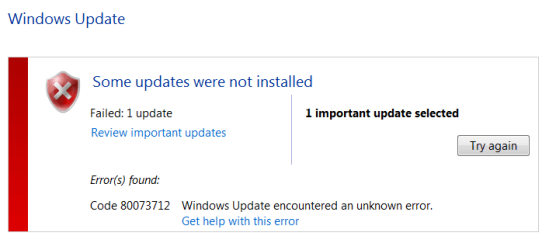
Update 3033929 not installing, error code 80073712

sfwalker

New member
Local time
1:04 PM
Messages
14
Hello,

Auto Windows updates had stopped working. Found and ran the System Update Readiness Tool and it successfully made several updates but failed to update 3033929. Attempted second time with same result. Ran the sfc /scannow and produced the CBS.log file. I zipped it up but the compressed file is still 48MB so I didn't attach it. Realized reading other posts that I could use .rar also, so now have attached the CBS.rar

Thank you.
 

Attachments

Last edited:

My Computer

Computer type
PC/Desktop
Computer Manufacturer/Model Number
Lenovo T430
OS
Windows 7 Home Premium 64bit
CPU
Intel(R) Core(TM) i5-3230M CPU @2.6Ghz 2.6GHz
Memory
4GB
Graphics Card(s)
NVIDIA® NVS 5400M Graphics with Optimus Technology
Hard Drives
320GB (7200 rpm)
Antivirus
Microsoft Security Essentials
Browser
Mozilla firefox 38.0.5
You have bitflips in the registry :(


I need to have alook at your COMPONENTS registry hive


Please copy theC:\Windows\System32\config\COMPONENTS file (no extension) to your desktop andthen compress it - upload the compressed file to your favoured fileshare site(preferably Dropbox or OneDrive) and post a link.


You may need to think about checking your hardware - specifically the RAM and the HD - for problems, as this sort of error is usually caused by failing RAM of HD controller.
 

My Computer

Computer type
Laptop
Computer Manufacturer/Model Number
Asus K52F or Lenovo B51-80
OS
Win 7 x64 Home Premium (and x86 VirtualBox VM)/Win10
CPU
i3 370M/i7 6500U
Motherboard
Asus/Lenovo
Memory
8GB - finally :)/8GB
Graphics Card(s)
it's an i3, dude!/dual Intel&nVidia
Sound Card
onboard
Monitor(s) Displays
15.6" built-in
Screen Resolution
1366x768/1920x1080
Hard Drives
750GB Seagate internal
Sundry external drives attached to other computers on the local network
1TB SSD on the Lenovo
PSU
n/a
Internet Speed
as much as I can get - usually on a dongle/phone, so <1MB/s
Antivirus
MSE/Defender
Browser
IE11/12/Edge/Chrome/FF(if I must)
Hi Noel, thank you so much for looking at my issues. I've upload the Components file to my dropbox, here is the link;
https://www.dropbox.com/s/nnawhoxzb7wmr3w/COMPONENTS.rar?dl=0

I did add extra RAM to my machine a few months ago so maybe that is the source of the problem. I've removed it for now. Before doing so I did check the RAM using a repair disk tool but it didn't discover any errors. Is there some other test option you would recommend? My machine is 3ish years old maybe the original RAM is failing.

update: I found a tool that was recommended for testing RAM. No individual errors were found testing only the original RAM in 11 passes. So presumably the new RAM is the problem and with it removed whatever fixes are made should stick.
 
Last edited:

My Computer

Computer type
PC/Desktop
Computer Manufacturer/Model Number
Lenovo T430
OS
Windows 7 Home Premium 64bit
CPU
Intel(R) Core(TM) i5-3230M CPU @2.6Ghz 2.6GHz
Memory
4GB
Graphics Card(s)
NVIDIA® NVS 5400M Graphics with Optimus Technology
Hard Drives
320GB (7200 rpm)
Antivirus
Microsoft Security Essentials
Browser
Mozilla firefox 38.0.5
OK - here's the first-pass repair...

I've uploaded a file - sfwaa.zip - to my OneDrive at Noel's OneDrive

Please download and save it to your desktop.
Right-click on the file and select Extract All, andsave to the default destination (which should be a folder on the desktop)

Create a new System Restore point

Open an Elevated Command Prompt, and run the following commands.

Code:
[COLOR=black][FONT=Segoe UI]IF EXIST   C:\Windows\System32\config\COMPONENTS.OLD1   DEL C:\Windows\System32\config\COMPONENTS.OLD1[/FONT][/COLOR]
[COLOR=black][FONT=Segoe UI]REN   C:\Windows\System32\config\COMPONENTS   COMPONENTS.OLD1[/FONT][/COLOR]
[COLOR=black][FONT=Segoe UI]COPY   "%userprofile%\desktop\wfire\COMPONENTS"    C:\Windows\System32\config[/FONT][/COLOR]
  
[COLOR=black][FONT=Segoe UI].[/FONT][/COLOR]

If you get an error with any command, STOP THERE - do not reboot! - post for instructions.

Assuming all commands go OK, reboot, and run another CheckSUR scan - post the new CheckSUR.log file.
 

My Computer

Computer type
Laptop
Computer Manufacturer/Model Number
Asus K52F or Lenovo B51-80
OS
Win 7 x64 Home Premium (and x86 VirtualBox VM)/Win10
CPU
i3 370M/i7 6500U
Motherboard
Asus/Lenovo
Memory
8GB - finally :)/8GB
Graphics Card(s)
it's an i3, dude!/dual Intel&nVidia
Sound Card
onboard
Monitor(s) Displays
15.6" built-in
Screen Resolution
1366x768/1920x1080
Hard Drives
750GB Seagate internal
Sundry external drives attached to other computers on the local network
1TB SSD on the Lenovo
PSU
n/a
Internet Speed
as much as I can get - usually on a dongle/phone, so <1MB/s
Antivirus
MSE/Defender
Browser
IE11/12/Edge/Chrome/FF(if I must)
Ugh, I received an error with the REN command. "The process cannot access the file because it is being used by another process."
 

My Computer

Computer type
PC/Desktop
Computer Manufacturer/Model Number
Lenovo T430
OS
Windows 7 Home Premium 64bit
CPU
Intel(R) Core(TM) i5-3230M CPU @2.6Ghz 2.6GHz
Memory
4GB
Graphics Card(s)
NVIDIA® NVS 5400M Graphics with Optimus Technology
Hard Drives
320GB (7200 rpm)
Antivirus
Microsoft Security Essentials
Browser
Mozilla firefox 38.0.5
OK - boot to Safe Mode, and try it there.
 

My Computer

Computer type
Laptop
Computer Manufacturer/Model Number
Asus K52F or Lenovo B51-80
OS
Win 7 x64 Home Premium (and x86 VirtualBox VM)/Win10
CPU
i3 370M/i7 6500U
Motherboard
Asus/Lenovo
Memory
8GB - finally :)/8GB
Graphics Card(s)
it's an i3, dude!/dual Intel&nVidia
Sound Card
onboard
Monitor(s) Displays
15.6" built-in
Screen Resolution
1366x768/1920x1080
Hard Drives
750GB Seagate internal
Sundry external drives attached to other computers on the local network
1TB SSD on the Lenovo
PSU
n/a
Internet Speed
as much as I can get - usually on a dongle/phone, so <1MB/s
Antivirus
MSE/Defender
Browser
IE11/12/Edge/Chrome/FF(if I must)
Was able to complete in safe mode, attached are the latest checkSUR logs. One note on following the instructions, you told me to download the sfwaa.zip but the cmd line instructions were to COPY from the sfire folder. I downloaded the sfwaa and then changed the cmd to copy from sfwaa folder.

Thank you again for all your help.
 

Attachments

My Computer

Computer type
PC/Desktop
Computer Manufacturer/Model Number
Lenovo T430
OS
Windows 7 Home Premium 64bit
CPU
Intel(R) Core(TM) i5-3230M CPU @2.6Ghz 2.6GHz
Memory
4GB
Graphics Card(s)
NVIDIA® NVS 5400M Graphics with Optimus Technology
Hard Drives
320GB (7200 rpm)
Antivirus
Microsoft Security Essentials
Browser
Mozilla firefox 38.0.5
There's the summary...
Code:
Summary:
Seconds executed: 941
 Found 17 errors
  CSI Could Not Open file Total count: 1
  CSI Manifest Missing Total count: 4
  CSI Missing Deployment Key Total count: 4
  CSI Missing Identity Total count: 1
  CSI Replacement File: CreateFile Failed Total count: 17
  CSI Payload File Missing Total count: 7

We're down to just the one bitflip now...
Code:
(f) CSI Missing Identity 0x00000000 identity amd64_cbb293ac7ba93c42c2294c6289c9ccd7_31bf3856ad364e35_11.29600.17126_none_25b47d5793304484

I'll work on that, and then we can start bringing the other errors under control

Back soon.
 

My Computer

Computer type
Laptop
Computer Manufacturer/Model Number
Asus K52F or Lenovo B51-80
OS
Win 7 x64 Home Premium (and x86 VirtualBox VM)/Win10
CPU
i3 370M/i7 6500U
Motherboard
Asus/Lenovo
Memory
8GB - finally :)/8GB
Graphics Card(s)
it's an i3, dude!/dual Intel&nVidia
Sound Card
onboard
Monitor(s) Displays
15.6" built-in
Screen Resolution
1366x768/1920x1080
Hard Drives
750GB Seagate internal
Sundry external drives attached to other computers on the local network
1TB SSD on the Lenovo
PSU
n/a
Internet Speed
as much as I can get - usually on a dongle/phone, so <1MB/s
Antivirus
MSE/Defender
Browser
IE11/12/Edge/Chrome/FF(if I must)
Hi Noel, just want to check this is still in your queue? I'm happy to wait if so, know you are helping a lot people. Very appreciative of the help you've already provided.
 

My Computer

Computer type
PC/Desktop
Computer Manufacturer/Model Number
Lenovo T430
OS
Windows 7 Home Premium 64bit
CPU
Intel(R) Core(TM) i5-3230M CPU @2.6Ghz 2.6GHz
Memory
4GB
Graphics Card(s)
NVIDIA® NVS 5400M Graphics with Optimus Technology
Hard Drives
320GB (7200 rpm)
Antivirus
Microsoft Security Essentials
Browser
Mozilla firefox 38.0.5
Sorry about that - hectic week!

OK - I think I have the bitflip fixed now.


I've uploaded a file - sfwab.zip - to my OneDrive at Noel's OneDrive

Please download and save it to your desktop.

Right-click on the file and select Extract All, andsave to the default destination (which should be a folder on the desktop)

Create a new System Restore point

Open an Elevated Command Prompt, and run the following commands.

Code:
[COLOR=black][FONT=Segoe UI]IF EXIST C:\Windows\System32\config\COMPONENTS.OLD1DEL C:\Windows\System32\config\COMPONENTS.OLD1[/FONT][/COLOR]
[COLOR=black][FONT=Segoe UI]REN C:\Windows\System32\config\COMPONENTS   COMPONENTS.OLD1[/FONT][/COLOR]
[COLOR=black][FONT=Segoe UI]COPY  "%userprofile%\desktop\sfwab\COMPONENTS" C:\Windows\System32\config[/FONT][/COLOR]
 
[COLOR=black][FONT=Segoe UI].[/FONT][/COLOR]


If you get an error with any command, STOP THERE - do not reboot! - post for instructions.

Assuming all commands go OK, reboot, and run another CheckSUR scan - post the new CheckSUR.log file.
 

My Computer

Computer type
Laptop
Computer Manufacturer/Model Number
Asus K52F or Lenovo B51-80
OS
Win 7 x64 Home Premium (and x86 VirtualBox VM)/Win10
CPU
i3 370M/i7 6500U
Motherboard
Asus/Lenovo
Memory
8GB - finally :)/8GB
Graphics Card(s)
it's an i3, dude!/dual Intel&nVidia
Sound Card
onboard
Monitor(s) Displays
15.6" built-in
Screen Resolution
1366x768/1920x1080
Hard Drives
750GB Seagate internal
Sundry external drives attached to other computers on the local network
1TB SSD on the Lenovo
PSU
n/a
Internet Speed
as much as I can get - usually on a dongle/phone, so <1MB/s
Antivirus
MSE/Defender
Browser
IE11/12/Edge/Chrome/FF(if I must)
The latest log files, if I'm reading it right looks like your bitflip fix worked. 15 other errors unresolved, mostly CSI payload.
 

Attachments

My Computer

Computer type
PC/Desktop
Computer Manufacturer/Model Number
Lenovo T430
OS
Windows 7 Home Premium 64bit
CPU
Intel(R) Core(TM) i5-3230M CPU @2.6Ghz 2.6GHz
Memory
4GB
Graphics Card(s)
NVIDIA® NVS 5400M Graphics with Optimus Technology
Hard Drives
320GB (7200 rpm)
Antivirus
Microsoft Security Essentials
Browser
Mozilla firefox 38.0.5
Didn't quite catch all the errors :(
Code:
ummary:
Seconds executed: 914
 Found 18 errors
 Fixed 3 errors
  CSI Manifest Missing Total count: 4
  CSI Catalog Missing Total count: 1
  Fixed: CSI Catalog Missing.  Total count: 1
  CSI Missing Deployment Key Total count: 4
  CSI Missing Identity Total count: 1
  Fixed: CSI Missing Identity.  Total count: 1
  CSI Missing C Mark Total count: 1
  Fixed: CSI Missing C Mark.  Total count: 1
  CSI Payload File Missing Total count: 7
Unavailable repair files:
 winsxs\manifests\amd64_c0fdc861933d0947db648ac369548ced_31bf3856ad364e35_11.2.9600.16476_none_ab1e0a0216b79505.manifest
 winsxs\manifests\amd64_0b4881e432545abdfb74fbf922bdd2af_31bf3856ad364e35_11.2.9600.16476_none_62b08cc68c2f457b.manifest
 winsxs\manifests\x86_microsoft-windows-i..rityzones.resources_31bf3856ad364e35_11.2.9600.17239_en-us_f4d1b46a3e1920f7.manifest
 winsxs\manifests\amd64_7b330273a4d9b11bf117ccc7fd7ed608_31bf3856ad364e35_11.2.9600.16476_none_c8d8daed6e2bb466.manifest

I'll post a new fix soon, then we can work on the other errors.
 

My Computer

Computer type
Laptop
Computer Manufacturer/Model Number
Asus K52F or Lenovo B51-80
OS
Win 7 x64 Home Premium (and x86 VirtualBox VM)/Win10
CPU
i3 370M/i7 6500U
Motherboard
Asus/Lenovo
Memory
8GB - finally :)/8GB
Graphics Card(s)
it's an i3, dude!/dual Intel&nVidia
Sound Card
onboard
Monitor(s) Displays
15.6" built-in
Screen Resolution
1366x768/1920x1080
Hard Drives
750GB Seagate internal
Sundry external drives attached to other computers on the local network
1TB SSD on the Lenovo
PSU
n/a
Internet Speed
as much as I can get - usually on a dongle/phone, so <1MB/s
Antivirus
MSE/Defender
Browser
IE11/12/Edge/Chrome/FF(if I must)
I've uploaded a file - sfwac.zip - to my OneDrive at Noel's OneDrive
Please download and save it.
Right-click on the downloaded file, and select Extract all…
Extract to the default location - which will create a new folder sfwac in the same place.
Open this folder - there should be one folder inside it (Manifests)

Copy the content of the Manifests folder (.manifest files) into this folder:

C:\Windows\Temp\CheckSur\Winsxs\Manifests

Now run the CheckSUR tool again (it may take a while)

Post the new CheckSUR.log file, and the CheckSUR.persist.log file.
 

My Computer

Computer type
Laptop
Computer Manufacturer/Model Number
Asus K52F or Lenovo B51-80
OS
Win 7 x64 Home Premium (and x86 VirtualBox VM)/Win10
CPU
i3 370M/i7 6500U
Motherboard
Asus/Lenovo
Memory
8GB - finally :)/8GB
Graphics Card(s)
it's an i3, dude!/dual Intel&nVidia
Sound Card
onboard
Monitor(s) Displays
15.6" built-in
Screen Resolution
1366x768/1920x1080
Hard Drives
750GB Seagate internal
Sundry external drives attached to other computers on the local network
1TB SSD on the Lenovo
PSU
n/a
Internet Speed
as much as I can get - usually on a dongle/phone, so <1MB/s
Antivirus
MSE/Defender
Browser
IE11/12/Edge/Chrome/FF(if I must)
The latest log files.
 

Attachments

My Computer

Computer type
PC/Desktop
Computer Manufacturer/Model Number
Lenovo T430
OS
Windows 7 Home Premium 64bit
CPU
Intel(R) Core(TM) i5-3230M CPU @2.6Ghz 2.6GHz
Memory
4GB
Graphics Card(s)
NVIDIA® NVS 5400M Graphics with Optimus Technology
Hard Drives
320GB (7200 rpm)
Antivirus
Microsoft Security Essentials
Browser
Mozilla firefox 38.0.5
Great! - CheckSUR is as happy as it's going to get...
Code:
Summary:
Seconds executed: 888
 Found 11 errors
 Fixed 4 errors
  CSI Manifest Missing Total count: 4
  Fixed: CSI Manifest Missing.  Total count: 4
  CSI Payload File Missing Total count: 7
Now we just have to deal with the payload files.
First, let's check that they are the only ones...

Please do another SFC /SCANNOW, and post the new CBS.log file (compressed!)
 

My Computer

Computer type
Laptop
Computer Manufacturer/Model Number
Asus K52F or Lenovo B51-80
OS
Win 7 x64 Home Premium (and x86 VirtualBox VM)/Win10
CPU
i3 370M/i7 6500U
Motherboard
Asus/Lenovo
Memory
8GB - finally :)/8GB
Graphics Card(s)
it's an i3, dude!/dual Intel&nVidia
Sound Card
onboard
Monitor(s) Displays
15.6" built-in
Screen Resolution
1366x768/1920x1080
Hard Drives
750GB Seagate internal
Sundry external drives attached to other computers on the local network
1TB SSD on the Lenovo
PSU
n/a
Internet Speed
as much as I can get - usually on a dongle/phone, so <1MB/s
Antivirus
MSE/Defender
Browser
IE11/12/Edge/Chrome/FF(if I must)
Here is the CBS.log compressed.
 

My Computer

Computer type
PC/Desktop
Computer Manufacturer/Model Number
Lenovo T430
OS
Windows 7 Home Premium 64bit
CPU
Intel(R) Core(TM) i5-3230M CPU @2.6Ghz 2.6GHz
Memory
4GB
Graphics Card(s)
NVIDIA® NVS 5400M Graphics with Optimus Technology
Hard Drives
320GB (7200 rpm)
Antivirus
Microsoft Security Essentials
Browser
Mozilla firefox 38.0.5
SFC found these problems...
Code:
	Line 214417: 2015-07-13 00:36:42, Info                  CSI    000003ee [SR] Repairing 2 components
	Line 214418: 2015-07-13 00:36:42, Info                  CSI    000003ef [SR] Beginning Verify and Repair transaction
	Line 214419: 2015-07-13 00:36:42, Info                  CSI    000003f0 [SR] Cannot repair member file [l:38{19}]"TS_Connectivity.ps1" of Microsoft-Windows-WindowsUpdateDiagnostic, Version = 6.1.7600.16385, pA = PROCESSOR_ARCHITECTURE_AMD64 (9), Culture neutral, VersionScope = 1 nonSxS, PublicKeyToken = {l:8 b:31bf3856ad364e35}, Type neutral, TypeName neutral, PublicKey neutral in the store, file is missing
	Line 214420: 2015-07-13 00:36:42, Info                  CSI    000003f1 [SR] Cannot repair member file [l:30{15}]"DiagPackage.dll" of Microsoft-Windows-WindowsUpdateDiagnostic, Version = 6.1.7600.16385, pA = PROCESSOR_ARCHITECTURE_AMD64 (9), Culture neutral, VersionScope = 1 nonSxS, PublicKeyToken = {l:8 b:31bf3856ad364e35}, Type neutral, TypeName neutral, PublicKey neutral in the store, file is missing
	Line 214421: 2015-07-13 00:36:42, Info                  CSI    000003f2 [SR] Cannot repair member file [l:38{19}]"DiagPackage.diagpkg" of Microsoft-Windows-WindowsUpdateDiagnostic, Version = 6.1.7600.16385, pA = PROCESSOR_ARCHITECTURE_AMD64 (9), Culture neutral, VersionScope = 1 nonSxS, PublicKeyToken = {l:8 b:31bf3856ad364e35}, Type neutral, TypeName neutral, PublicKey neutral in the store, file is missing
	Line 214422: 2015-07-13 00:36:42, Info                  CSI    000003f3 [SR] Cannot repair member file [l:36{18}]"Amd64\hpf2200t.exp" of prnhp003.inf, Version = 6.1.7600.16385, pA = PROCESSOR_ARCHITECTURE_AMD64 (9), Culture neutral, VersionScope = 1 nonSxS, PublicKeyToken = {l:8 b:31bf3856ad364e35}, Type = [l:24{12}]"driverUpdate", TypeName neutral, PublicKey neutral in the store, file is missing

	Line 214423: 2015-07-13 00:36:42, Info                  CSI    000003f4 [SR] Cannot repair member file [l:36{18}]"Amd64\hpf2100t.exp" of prnhp003.inf, Version = 6.1.7600.16385, pA = PROCESSOR_ARCHITECTURE_AMD64 (9), Culture neutral, VersionScope = 1 nonSxS, PublicKeyToken = {l:8 b:31bf3856ad364e35}, Type = [l:24{12}]"driverUpdate", TypeName neutral, PublicKey neutral in the store, file is missing
	Line 214424: 2015-07-13 00:36:42, Info                  CSI    000003f5 [SR] Cannot repair member file [l:36{18}]"Amd64\hpf2100t.gpd" of prnhp003.inf, Version = 6.1.7600.16385, pA = PROCESSOR_ARCHITECTURE_AMD64 (9), Culture neutral, VersionScope = 1 nonSxS, PublicKeyToken = {l:8 b:31bf3856ad364e35}, Type = [l:24{12}]"driverUpdate", TypeName neutral, PublicKey neutral in the store, file is missing
	Line 214425: 2015-07-13 00:36:42, Info                  CSI    000003f6 [SR] Cannot repair member file [l:36{18}]"Amd64\hpf2100t.xml" of prnhp003.inf, Version = 6.1.7600.16385, pA = PROCESSOR_ARCHITECTURE_AMD64 (9), Culture neutral, VersionScope = 1 nonSxS, PublicKeyToken = {l:8 b:31bf3856ad364e35}, Type = [l:24{12}]"driverUpdate", TypeName neutral, PublicKey neutral in the store, file is missing
... which fits rather nicely with the ones that CheckSUR found...
Code:
f)	CSI Payload File Missing	0x00000000	Amd64\hpf2200t.exp	amd64_prnhp003.inf_31bf3856ad364e35_6.1.7600.16385_none_2fd781a76c9dcc13	
(f)	CSI Payload File Missing	0x00000000	Amd64\hpf2100t.exp	amd64_prnhp003.inf_31bf3856ad364e35_6.1.7600.16385_none_2fd781a76c9dcc13	
(f)	CSI Payload File Missing	0x00000000	Amd64\hpf2100t.gpd	amd64_prnhp003.inf_31bf3856ad364e35_6.1.7600.16385_none_2fd781a76c9dcc13	
(f)	CSI Payload File Missing	0x00000000	Amd64\hpf2100t.xml	amd64_prnhp003.inf_31bf3856ad364e35_6.1.7600.16385_none_2fd781a76c9dcc13	
(f)	CSI Payload File Missing	0x00000000	TS_Connectivity.ps1	amd64_microsoft-windows-w..owsupdatediagnostic_31bf3856ad364e35_6.1.7600.16385_none_d8bc9f93971275e0	
(f)	CSI Payload File Missing	0x00000000	DiagPackage.dll	amd64_microsoft-windows-w..owsupdatediagnostic_31bf3856ad364e35_6.1.7600.16385_none_d8bc9f93971275e0	
(f)	CSI Payload File Missing	0x00000000	DiagPackage.diagpkg	amd64_microsoft-windows-w..owsupdatediagnostic_31bf3856ad364e35_6.1.7600.16385_none_d8bc9f93971275e0

I'll post a fix protocol later
 

My Computer

Computer type
Laptop
Computer Manufacturer/Model Number
Asus K52F or Lenovo B51-80
OS
Win 7 x64 Home Premium (and x86 VirtualBox VM)/Win10
CPU
i3 370M/i7 6500U
Motherboard
Asus/Lenovo
Memory
8GB - finally :)/8GB
Graphics Card(s)
it's an i3, dude!/dual Intel&nVidia
Sound Card
onboard
Monitor(s) Displays
15.6" built-in
Screen Resolution
1366x768/1920x1080
Hard Drives
750GB Seagate internal
Sundry external drives attached to other computers on the local network
1TB SSD on the Lenovo
PSU
n/a
Internet Speed
as much as I can get - usually on a dongle/phone, so <1MB/s
Antivirus
MSE/Defender
Browser
IE11/12/Edge/Chrome/FF(if I must)
I've uploaded a file - sfwad.zip - to my OneDrive at Noel's OneDrive
Please download and save it.

Right-click on the saved file and select Extract all...
Change the target to C:\ and click on Extract
Close all windows (it would be a good idea to print these instructions!)

Now reboot to the Repair Environment - as soon as the machine restarts, start tapping F8 - this should bring up the Advanced Boot Menu, at the top of which should be the option 'Repair my Computer'
Pick that
You'll have to log in with your username and password.

Pick the option to use a Command Prompt
At the prompt type
DIR C:\sfwad
hit the enter key - if you get a 'Not Found' error try
DIR D:\sfwad
or
DIR E:\sfwad


The drive letter in use when you find the folder will need to be substituted (for<drive>) into the following command...

XCOPY <drive>:\sfwad <drive>:\windows\winsxs /y /i /s /v /h

(e.g. XCOPY P:\wfire P:\windows\winsxs /y /i /s /v /h )


run the command (it should take almost no time) and when the prompt returns, type
EXIT
and hit the Enter key to exit Command Prompt - reboot to Normal Mode Windows.

Now run SFC /SCANNOW in an Elevated Command Prompt
then reboot and upload the new CBS.log file to your reply
 

My Computer

Computer type
Laptop
Computer Manufacturer/Model Number
Asus K52F or Lenovo B51-80
OS
Win 7 x64 Home Premium (and x86 VirtualBox VM)/Win10
CPU
i3 370M/i7 6500U
Motherboard
Asus/Lenovo
Memory
8GB - finally :)/8GB
Graphics Card(s)
it's an i3, dude!/dual Intel&nVidia
Sound Card
onboard
Monitor(s) Displays
15.6" built-in
Screen Resolution
1366x768/1920x1080
Hard Drives
750GB Seagate internal
Sundry external drives attached to other computers on the local network
1TB SSD on the Lenovo
PSU
n/a
Internet Speed
as much as I can get - usually on a dongle/phone, so <1MB/s
Antivirus
MSE/Defender
Browser
IE11/12/Edge/Chrome/FF(if I must)
This is exciting, after running the sfc scannow, received message "Windows Resource Protection found corrupt files and successfully repaired them". The CBS log is now just 685KB vs almost 50MB.

If you see no other errors do you have any suggestions for me to avoid getting in this mess again? I have removed the RAM I had added and presume it would be smart to save a Restore Point here but not sure what else I should do.

Also please let me know how I can send you some pub money. It won't pay for your time but will at least let you enjoy a few pints.
 

My Computer

Computer type
PC/Desktop
Computer Manufacturer/Model Number
Lenovo T430
OS
Windows 7 Home Premium 64bit
CPU
Intel(R) Core(TM) i5-3230M CPU @2.6Ghz 2.6GHz
Memory
4GB
Graphics Card(s)
NVIDIA® NVS 5400M Graphics with Optimus Technology
Hard Drives
320GB (7200 rpm)
Antivirus
Microsoft Security Essentials
Browser
Mozilla firefox 38.0.5
Great! - There's no errors in the background of that log, either.
Do a Check for Updates - attempt to install ONLY the oldest update found - what happens?
If it goes in OK, try any others rem.aining.
If it fails, post the C:\Windows\windowsupdate.log file
 

My Computer

Computer type
Laptop
Computer Manufacturer/Model Number
Asus K52F or Lenovo B51-80
OS
Win 7 x64 Home Premium (and x86 VirtualBox VM)/Win10
CPU
i3 370M/i7 6500U
Motherboard
Asus/Lenovo
Memory
8GB - finally :)/8GB
Graphics Card(s)
it's an i3, dude!/dual Intel&nVidia
Sound Card
onboard
Monitor(s) Displays
15.6" built-in
Screen Resolution
1366x768/1920x1080
Hard Drives
750GB Seagate internal
Sundry external drives attached to other computers on the local network
1TB SSD on the Lenovo
PSU
n/a
Internet Speed
as much as I can get - usually on a dongle/phone, so <1MB/s
Antivirus
MSE/Defender
Browser
IE11/12/Edge/Chrome/FF(if I must)
Back
Top