Update Error "WindowsUpdate_80072F78" !

Alexey2912

New member
Member
VIP
Local time
10:57 AM
Messages
1,351
Location
Honolulu
Hi there,

W7 Pro 32 bit won't auto update since 12/27/18. Last check was performed and updates installed.

Since than been getting this error, if its run.

Tried the reverse date, time sync stopped, reboot still no fix this time.

Any expert suggestions.

Thanks.
 

My Computers

System One System Two

  • Computer type
    Laptop
    Computer Manufacturer/Model Number
    Dell
    OS
    W7 Pro 32bit
    CPU
    Intel(R) Core(TM)2 CPU T7200 @ 2.00GHz
    Motherboard
    Dell Inc. 0CF456
    Memory
    4.00 GB
    Graphics Card(s)
    NVIDIA GTX 7980 512 MB
    Sound Card
    (1) HD Pro Webcam C910 (2) Bluetooth Stereo Audio (3) Si
    Hard Drives
    SSD
    Browser
    Brave
  • Computer type
    PC/Desktop
    System Manufacturer/Model Number
    Dell XPS Special Edition 8940
    OS
    W10 Pro
    CPU
    core i7 11th gen, 11700, 2.5-4.9 GHZ
    Memory
    32 GBB, 2 X16 GB @2933 MHz.
    Graphics Card(s)
    NVIDIA GeForce RTX 3070 8GB GDDR6
    Monitor(s) Displays
    Dell UltraSharp 32 4K monitor.
    Hard Drives
    1. 1TB M.2 PCIe NVMe SSD.

    2. 1TB 7200 rpm 3.5" SATA Hard Drive.
    PSU
    500W.
    Case
    Mineral White Bezel Chassis.

My Computer

Computer type
PC/Desktop
Computer Manufacturer/Model Number
HP Desktop & Compaq Laptop
OS
Win 10 x64, Linux Lite, Win 7 x64, BlackArch, & Kali
Hard Drives
Samsung 850 Pro 256Gb,
Hitachi HDD 1Tb,
Crucial MX SSD 250Gb
Segate 3Tb USB 3.0 Ext. Backup HDD
Internet Speed
150Mbps dn, 20Mbps up
Antivirus
Avast Free, Malwarebytes Anti-Exploit & Anti-Ransomware
Browser
Firefox, Chrome, Opera, & VPN
Hi thanks, starting a new thread.
 

My Computers

System One System Two

  • Computer type
    Laptop
    Computer Manufacturer/Model Number
    Dell
    OS
    W7 Pro 32bit
    CPU
    Intel(R) Core(TM)2 CPU T7200 @ 2.00GHz
    Motherboard
    Dell Inc. 0CF456
    Memory
    4.00 GB
    Graphics Card(s)
    NVIDIA GTX 7980 512 MB
    Sound Card
    (1) HD Pro Webcam C910 (2) Bluetooth Stereo Audio (3) Si
    Hard Drives
    SSD
    Browser
    Brave
  • Computer type
    PC/Desktop
    System Manufacturer/Model Number
    Dell XPS Special Edition 8940
    OS
    W10 Pro
    CPU
    core i7 11th gen, 11700, 2.5-4.9 GHZ
    Memory
    32 GBB, 2 X16 GB @2933 MHz.
    Graphics Card(s)
    NVIDIA GeForce RTX 3070 8GB GDDR6
    Monitor(s) Displays
    Dell UltraSharp 32 4K monitor.
    Hard Drives
    1. 1TB M.2 PCIe NVMe SSD.

    2. 1TB 7200 rpm 3.5" SATA Hard Drive.
    PSU
    500W.
    Case
    Mineral White Bezel Chassis.
You don't need to start a new thread just follow the posting instructions, i.e. run scans and post logs.
 

My Computer

Computer type
PC/Desktop
Computer Manufacturer/Model Number
HP Desktop & Compaq Laptop
OS
Win 10 x64, Linux Lite, Win 7 x64, BlackArch, & Kali
Hard Drives
Samsung 850 Pro 256Gb,
Hitachi HDD 1Tb,
Crucial MX SSD 250Gb
Segate 3Tb USB 3.0 Ext. Backup HDD
Internet Speed
150Mbps dn, 20Mbps up
Antivirus
Avast Free, Malwarebytes Anti-Exploit & Anti-Ransomware
Browser
Firefox, Chrome, Opera, & VPN
I can't upload the zipped windows log file, it approx 13.6 MB more than the allowed size.

Thanks again!
 

My Computers

System One System Two

  • Computer type
    Laptop
    Computer Manufacturer/Model Number
    Dell
    OS
    W7 Pro 32bit
    CPU
    Intel(R) Core(TM)2 CPU T7200 @ 2.00GHz
    Motherboard
    Dell Inc. 0CF456
    Memory
    4.00 GB
    Graphics Card(s)
    NVIDIA GTX 7980 512 MB
    Sound Card
    (1) HD Pro Webcam C910 (2) Bluetooth Stereo Audio (3) Si
    Hard Drives
    SSD
    Browser
    Brave
  • Computer type
    PC/Desktop
    System Manufacturer/Model Number
    Dell XPS Special Edition 8940
    OS
    W10 Pro
    CPU
    core i7 11th gen, 11700, 2.5-4.9 GHZ
    Memory
    32 GBB, 2 X16 GB @2933 MHz.
    Graphics Card(s)
    NVIDIA GeForce RTX 3070 8GB GDDR6
    Monitor(s) Displays
    Dell UltraSharp 32 4K monitor.
    Hard Drives
    1. 1TB M.2 PCIe NVMe SSD.

    2. 1TB 7200 rpm 3.5" SATA Hard Drive.
    PSU
    500W.
    Case
    Mineral White Bezel Chassis.

My Computers

System One System Two

  • Computer type
    Laptop
    Computer Manufacturer/Model Number
    Dell
    OS
    W7 Pro 32bit
    CPU
    Intel(R) Core(TM)2 CPU T7200 @ 2.00GHz
    Motherboard
    Dell Inc. 0CF456
    Memory
    4.00 GB
    Graphics Card(s)
    NVIDIA GTX 7980 512 MB
    Sound Card
    (1) HD Pro Webcam C910 (2) Bluetooth Stereo Audio (3) Si
    Hard Drives
    SSD
    Browser
    Brave
  • Computer type
    PC/Desktop
    System Manufacturer/Model Number
    Dell XPS Special Edition 8940
    OS
    W10 Pro
    CPU
    core i7 11th gen, 11700, 2.5-4.9 GHZ
    Memory
    32 GBB, 2 X16 GB @2933 MHz.
    Graphics Card(s)
    NVIDIA GeForce RTX 3070 8GB GDDR6
    Monitor(s) Displays
    Dell UltraSharp 32 4K monitor.
    Hard Drives
    1. 1TB M.2 PCIe NVMe SSD.

    2. 1TB 7200 rpm 3.5" SATA Hard Drive.
    PSU
    500W.
    Case
    Mineral White Bezel Chassis.
Zipped windows log file? Need to see CBS.log, CheckSUR.log, location C:\Windows\Logs\CBS and WindowsUpdate.log is at C:\Windows
The CheckSUR logs are temporary in the CBS folder and will disappear. If the CheckSUR.logs are not in the CBS folder, you'll have to run SURT again.

These three files should be below upload limit compressed/zipped. If not, you can upload each log individually! Screenshots and Files - Upload and Post in Seven Forums


My Computer

Computer type
PC/Desktop
Computer Manufacturer/Model Number
HP Desktop & Compaq Laptop
OS
Win 10 x64, Linux Lite, Win 7 x64, BlackArch, & Kali
Hard Drives
Samsung 850 Pro 256Gb,
Hitachi HDD 1Tb,
Crucial MX SSD 250Gb
Segate 3Tb USB 3.0 Ext. Backup HDD
Internet Speed
150Mbps dn, 20Mbps up
Antivirus
Avast Free, Malwarebytes Anti-Exploit & Anti-Ransomware
Browser
Firefox, Chrome, Opera, & VPN
2019-02-18 06:16:43, Info CBS Starting TrustedInstaller initialization.
2019-02-18 06:16:43, Info CBS Loaded Servicing Stack v6.1.7601.23505 with Core: C:\Windows\winsxs\x86_microsoft-windows-servicingstack_31bf3856ad364e35_6.1.7601.23505_none_0bfc08bf3ea166ba\cbscore.dll
2019-02-18 06:16:43, Info CSI 00000001@2019/2/18:01:16:43.997 WcpInitialize (wcp.dll version 0.0.0.6) called (stack @0x7152d999 @0x71c85f2b @0x71c6210b @0x1e1c99 @0x1e1236 @0x751375ae)
2019-02-18 06:16:43, Info CSI 00000002@2019/2/18:01:16:43.997 WcpInitialize (wcp.dll version 0.0.0.6) called (stack @0x7152d999 @0x71cc73c3 @0x71cc4253 @0x1e1c99 @0x1e1236 @0x751375ae)
2019-02-18 06:16:43, Info CSI 00000003@2019/2/18:01:16:43.997 WcpInitialize (wcp.dll version 0.0.0.6) called (stack @0x7152d999 @0x73304bb0 @0x7330548e @0x1e1327 @0x1e1245 @0x751375ae)
2019-02-18 06:16:43, Info CBS Ending TrustedInstaller initialization.
2019-02-18 06:16:43, Info CBS Starting the TrustedInstaller main loop.
2019-02-18 06:16:43, Info CBS TrustedInstaller service starts successfully.
2019-02-18 06:16:43, Info CBS SQM: Initializing online with Windows opt-in: False
2019-02-18 06:16:43, Info CBS SQM: Cleaning up report files older than 10 days.
2019-02-18 06:16:43, Info CBS SQM: Requesting upload of all unsent reports.
2019-02-18 06:16:43, Info CBS SQM: Failed to start upload with file pattern: C:\Windows\servicing\sqm\*_std.sqm, flags: 0x2 [HRESULT = 0x80004005 - E_FAIL]
2019-02-18 06:16:43, Info CBS SQM: Failed to start standard sample upload. [HRESULT = 0x80004005 - E_FAIL]
2019-02-18 06:16:43, Info CBS SQM: Queued 0 file(s) for upload with pattern: C:\Windows\servicing\sqm\*_all.sqm, flags: 0x6
2019-02-18 06:16:43, Info CBS SQM: Warning: Failed to upload all unsent reports. [HRESULT = 0x80004005 - E_FAIL]
2019-02-18 06:16:43, Info CBS No startup processing required, TrustedInstaller service was not set as autostart, or else a reboot is still pending.
2019-02-18 06:16:43, Info CBS NonStart: Checking to ensure startup processing was not required.
2019-02-18 06:16:44, Info CSI 00000004 IAdvancedInstallerAwareStore_ResolvePendingTransactions (call 1) (flags = 00000004, progress = NULL, phase = 0, pdwDisposition = @0xc4fa88
2019-02-18 06:16:44, Info CSI 00000005 Creating NT transaction (seq 1), objectname [6]"(null)"
2019-02-18 06:16:44, Info CSI 00000006 Created NT transaction (seq 1) result 0x00000000, handle @0x1c4
2019-02-18 06:16:44, Info CSI 00000007@2019/2/18:01:16:44.012 CSI perf trace:
CSIPERF:TXCOMMIT;616
2019-02-18 06:16:44, Info CBS NonStart: Success, startup processing not required as expected.
2019-02-18 06:16:44, Info CBS Startup processing thread terminated normally
2019-02-18 06:16:44, Info CSI 00000008 CSI Store 3078144 (0x002ef800) initialized
2019-02-18 06:16:44, Info CBS Session: 30721831_2622044227 initialized by client WindowsUpdateAgent.
2019-02-18 06:16:44, Info CBS Trusted Installer signaled for shutdown, going to exit.
2019-02-18 06:16:44, Info CBS Ending the TrustedInstaller main loop.
2019-02-18 06:16:44, Info CBS Starting TrustedInstaller finalization.
2019-02-18 06:16:44, Info CBS Ending TrustedInstaller finalization.


Contents of CBS Folder.....Log file and a few zipped.

Thanks.

 

My Computers

System One System Two

  • Computer type
    Laptop
    Computer Manufacturer/Model Number
    Dell
    OS
    W7 Pro 32bit
    CPU
    Intel(R) Core(TM)2 CPU T7200 @ 2.00GHz
    Motherboard
    Dell Inc. 0CF456
    Memory
    4.00 GB
    Graphics Card(s)
    NVIDIA GTX 7980 512 MB
    Sound Card
    (1) HD Pro Webcam C910 (2) Bluetooth Stereo Audio (3) Si
    Hard Drives
    SSD
    Browser
    Brave
  • Computer type
    PC/Desktop
    System Manufacturer/Model Number
    Dell XPS Special Edition 8940
    OS
    W10 Pro
    CPU
    core i7 11th gen, 11700, 2.5-4.9 GHZ
    Memory
    32 GBB, 2 X16 GB @2933 MHz.
    Graphics Card(s)
    NVIDIA GeForce RTX 3070 8GB GDDR6
    Monitor(s) Displays
    Dell UltraSharp 32 4K monitor.
    Hard Drives
    1. 1TB M.2 PCIe NVMe SSD.

    2. 1TB 7200 rpm 3.5" SATA Hard Drive.
    PSU
    500W.
    Case
    Mineral White Bezel Chassis.
Windows Update log, attached.

Thanks.
 

Attachments

My Computers

System One System Two

  • Computer type
    Laptop
    Computer Manufacturer/Model Number
    Dell
    OS
    W7 Pro 32bit
    CPU
    Intel(R) Core(TM)2 CPU T7200 @ 2.00GHz
    Motherboard
    Dell Inc. 0CF456
    Memory
    4.00 GB
    Graphics Card(s)
    NVIDIA GTX 7980 512 MB
    Sound Card
    (1) HD Pro Webcam C910 (2) Bluetooth Stereo Audio (3) Si
    Hard Drives
    SSD
    Browser
    Brave
  • Computer type
    PC/Desktop
    System Manufacturer/Model Number
    Dell XPS Special Edition 8940
    OS
    W10 Pro
    CPU
    core i7 11th gen, 11700, 2.5-4.9 GHZ
    Memory
    32 GBB, 2 X16 GB @2933 MHz.
    Graphics Card(s)
    NVIDIA GeForce RTX 3070 8GB GDDR6
    Monitor(s) Displays
    Dell UltraSharp 32 4K monitor.
    Hard Drives
    1. 1TB M.2 PCIe NVMe SSD.

    2. 1TB 7200 rpm 3.5" SATA Hard Drive.
    PSU
    500W.
    Case
    Mineral White Bezel Chassis.
Thanks for the WindowsUpdate.log, would you please try to upload the CBS.log and the CheckSUR.log
You will have to run SURT again for the CheckSUR.log and CheckSUR.persist.log to appear in C:\Windows\Logs\CBS
 

My Computer

Computer type
PC/Desktop
Computer Manufacturer/Model Number
HP Desktop & Compaq Laptop
OS
Win 10 x64, Linux Lite, Win 7 x64, BlackArch, & Kali
Hard Drives
Samsung 850 Pro 256Gb,
Hitachi HDD 1Tb,
Crucial MX SSD 250Gb
Segate 3Tb USB 3.0 Ext. Backup HDD
Internet Speed
150Mbps dn, 20Mbps up
Antivirus
Avast Free, Malwarebytes Anti-Exploit & Anti-Ransomware
Browser
Firefox, Chrome, Opera, & VPN
Here they are for your expert comments.

Thanks.
 

Attachments

My Computers

System One System Two

  • Computer type
    Laptop
    Computer Manufacturer/Model Number
    Dell
    OS
    W7 Pro 32bit
    CPU
    Intel(R) Core(TM)2 CPU T7200 @ 2.00GHz
    Motherboard
    Dell Inc. 0CF456
    Memory
    4.00 GB
    Graphics Card(s)
    NVIDIA GTX 7980 512 MB
    Sound Card
    (1) HD Pro Webcam C910 (2) Bluetooth Stereo Audio (3) Si
    Hard Drives
    SSD
    Browser
    Brave
  • Computer type
    PC/Desktop
    System Manufacturer/Model Number
    Dell XPS Special Edition 8940
    OS
    W10 Pro
    CPU
    core i7 11th gen, 11700, 2.5-4.9 GHZ
    Memory
    32 GBB, 2 X16 GB @2933 MHz.
    Graphics Card(s)
    NVIDIA GeForce RTX 3070 8GB GDDR6
    Monitor(s) Displays
    Dell UltraSharp 32 4K monitor.
    Hard Drives
    1. 1TB M.2 PCIe NVMe SSD.

    2. 1TB 7200 rpm 3.5" SATA Hard Drive.
    PSU
    500W.
    Case
    Mineral White Bezel Chassis.

My Computer

Computer type
PC/Desktop
Computer Manufacturer/Model Number
HP Desktop & Compaq Laptop
OS
Win 10 x64, Linux Lite, Win 7 x64, BlackArch, & Kali
Hard Drives
Samsung 850 Pro 256Gb,
Hitachi HDD 1Tb,
Crucial MX SSD 250Gb
Segate 3Tb USB 3.0 Ext. Backup HDD
Internet Speed
150Mbps dn, 20Mbps up
Antivirus
Avast Free, Malwarebytes Anti-Exploit & Anti-Ransomware
Browser
Firefox, Chrome, Opera, & VPN
Thanks again.

When I pasted " C:\Windows\SoftwareDistribution\WuRedir\9482F4B4-E343-43B6-B170-9A65BC822C77\wuredir.cab"

I gotta a download "wuredir" size 22.7 KB.
 

My Computers

System One System Two

  • Computer type
    Laptop
    Computer Manufacturer/Model Number
    Dell
    OS
    W7 Pro 32bit
    CPU
    Intel(R) Core(TM)2 CPU T7200 @ 2.00GHz
    Motherboard
    Dell Inc. 0CF456
    Memory
    4.00 GB
    Graphics Card(s)
    NVIDIA GTX 7980 512 MB
    Sound Card
    (1) HD Pro Webcam C910 (2) Bluetooth Stereo Audio (3) Si
    Hard Drives
    SSD
    Browser
    Brave
  • Computer type
    PC/Desktop
    System Manufacturer/Model Number
    Dell XPS Special Edition 8940
    OS
    W10 Pro
    CPU
    core i7 11th gen, 11700, 2.5-4.9 GHZ
    Memory
    32 GBB, 2 X16 GB @2933 MHz.
    Graphics Card(s)
    NVIDIA GeForce RTX 3070 8GB GDDR6
    Monitor(s) Displays
    Dell UltraSharp 32 4K monitor.
    Hard Drives
    1. 1TB M.2 PCIe NVMe SSD.

    2. 1TB 7200 rpm 3.5" SATA Hard Drive.
    PSU
    500W.
    Case
    Mineral White Bezel Chassis.
Good that is what I was expecting!
Click the :orb: lower left of your computer screen, in the searchbox type troubleshooter, click on Find and fix problems, under System and Security click Fix problems with Windows Update, click Advanced, apply repairs automatically should be checked, click next. Did you receive error message or link to Open Windows Update?
 

My Computer

Computer type
PC/Desktop
Computer Manufacturer/Model Number
HP Desktop & Compaq Laptop
OS
Win 10 x64, Linux Lite, Win 7 x64, BlackArch, & Kali
Hard Drives
Samsung 850 Pro 256Gb,
Hitachi HDD 1Tb,
Crucial MX SSD 250Gb
Segate 3Tb USB 3.0 Ext. Backup HDD
Internet Speed
150Mbps dn, 20Mbps up
Antivirus
Avast Free, Malwarebytes Anti-Exploit & Anti-Ransomware
Browser
Firefox, Chrome, Opera, & VPN
Thank you for the logs.
They are clean, no errors!

Please copy and paste the bold text below into your address bar at the top of your web browser. In the area that has (https://)

http://download.microsoft.com/v11/2/windowsupdate/redir/v6-win7sp1-wuredir.cab

A popup should appear. If it does, don't run it, cancel it and let me know if it appeared.

1. If I copy paste the URL, I get this response.........

This site can’t be reached The webpage at http://download.microsoft.com/v11/2/...p1-wuredir.cab might be temporarily down or it may have moved permanently to a new web address.
ERR_INVALID_RESPONSE


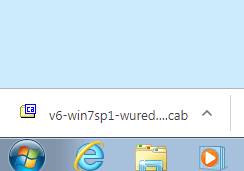
2. IF, I click on it a zipped folder as shown gets downloaded, as show in the attached file.

Thanks.
 

Attachments

  • WU Error 1.PNG
    WU Error 1.PNG
    4 KB · Views: 11

My Computers

System One System Two

  • Computer type
    Laptop
    Computer Manufacturer/Model Number
    Dell
    OS
    W7 Pro 32bit
    CPU
    Intel(R) Core(TM)2 CPU T7200 @ 2.00GHz
    Motherboard
    Dell Inc. 0CF456
    Memory
    4.00 GB
    Graphics Card(s)
    NVIDIA GTX 7980 512 MB
    Sound Card
    (1) HD Pro Webcam C910 (2) Bluetooth Stereo Audio (3) Si
    Hard Drives
    SSD
    Browser
    Brave
  • Computer type
    PC/Desktop
    System Manufacturer/Model Number
    Dell XPS Special Edition 8940
    OS
    W10 Pro
    CPU
    core i7 11th gen, 11700, 2.5-4.9 GHZ
    Memory
    32 GBB, 2 X16 GB @2933 MHz.
    Graphics Card(s)
    NVIDIA GeForce RTX 3070 8GB GDDR6
    Monitor(s) Displays
    Dell UltraSharp 32 4K monitor.
    Hard Drives
    1. 1TB M.2 PCIe NVMe SSD.

    2. 1TB 7200 rpm 3.5" SATA Hard Drive.
    PSU
    500W.
    Case
    Mineral White Bezel Chassis.
Sorry about the delay in my response.

Please upload CBS.log not whole folder. Location: C:\Windows\Logs\CBS
 

My Computer

Computer type
PC/Desktop
Computer Manufacturer/Model Number
HP Desktop & Compaq Laptop
OS
Win 10 x64, Linux Lite, Win 7 x64, BlackArch, & Kali
Hard Drives
Samsung 850 Pro 256Gb,
Hitachi HDD 1Tb,
Crucial MX SSD 250Gb
Segate 3Tb USB 3.0 Ext. Backup HDD
Internet Speed
150Mbps dn, 20Mbps up
Antivirus
Avast Free, Malwarebytes Anti-Exploit & Anti-Ransomware
Browser
Firefox, Chrome, Opera, & VPN
Back
Top