Solved update failed 80070670

Painter

New member
Member
VIP
Local time
1:47 PM
Messages
152
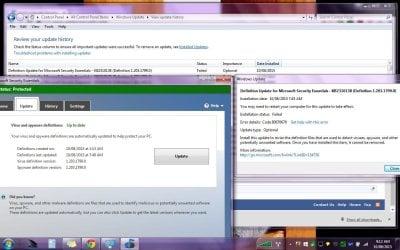
Yesterday 1.203.1791 security definitions update for Microsoft Essentials downloaded and it was the small definitions update that I usually get. Today 1.203.1799 came in through windows update and it was the entire definitions data base - over 170MB. Windows update showed that it failed on error 8070670. The application shows that it installed properly. I will remove Microsoft Essentials if windows update sends the entire security definitions date base to me again tomorrow or the next.

I restarted the PC after that. Ran repair tool scan and all is in order on my PC.

There has to be something seriously wrong with windows update. Glad I do not have the Home Edition on W10.
 

My Computer

Computer type
PC/Desktop
Computer Manufacturer/Model Number
Custom build
OS
W7Pro/64
I can find no references to the error code you quote.

Please upload your C:\Windows\windowsupdate.log file so I can take a look.
 

My Computer

Computer type
Laptop
Computer Manufacturer/Model Number
Asus K52F or Lenovo B51-80
OS
Win 7 x64 Home Premium (and x86 VirtualBox VM)/Win10
CPU
i3 370M/i7 6500U
Motherboard
Asus/Lenovo
Memory
8GB - finally :)/8GB
Graphics Card(s)
it's an i3, dude!/dual Intel&nVidia
Sound Card
onboard
Monitor(s) Displays
15.6" built-in
Screen Resolution
1366x768/1920x1080
Hard Drives
750GB Seagate internal
Sundry external drives attached to other computers on the local network
1TB SSD on the Lenovo
PSU
n/a
Internet Speed
as much as I can get - usually on a dongle/phone, so <1MB/s
Antivirus
MSE/Defender
Browser
IE11/12/Edge/Chrome/FF(if I must)
Log attached. The failure was 8/10/2015. I have a screen shot of the WU failure code 80070670.

Noticed that x1799 was returned by WU this morning. It is 2.10MB. So far it has downloaded 56.9MB. Decided to pull the plug on the internet connection so no more will download.
 

Attachments

  • MSE failed update but installed.jpg
    MSE failed update but installed.jpg
    121.3 KB · Views: 1

My Computer

Computer type
PC/Desktop
Computer Manufacturer/Model Number
Custom build
OS
W7Pro/64
The update definition offered by WU this morning was 1977 but that was the FIRST time it's been offered.
The install on the 10th was v1791, followed by v1799

There appears to be nothing whatever wrong with the install of MSE.
 

My Computer

Computer type
Laptop
Computer Manufacturer/Model Number
Asus K52F or Lenovo B51-80
OS
Win 7 x64 Home Premium (and x86 VirtualBox VM)/Win10
CPU
i3 370M/i7 6500U
Motherboard
Asus/Lenovo
Memory
8GB - finally :)/8GB
Graphics Card(s)
it's an i3, dude!/dual Intel&nVidia
Sound Card
onboard
Monitor(s) Displays
15.6" built-in
Screen Resolution
1366x768/1920x1080
Hard Drives
750GB Seagate internal
Sundry external drives attached to other computers on the local network
1TB SSD on the Lenovo
PSU
n/a
Internet Speed
as much as I can get - usually on a dongle/phone, so <1MB/s
Antivirus
MSE/Defender
Browser
IE11/12/Edge/Chrome/FF(if I must)
The Windowsupdate.log that I sent to you shows x1799 was sent to me on the 10th. The screen shot shows x1799 installed in MSE on the 10th. Windows update shows it failed on the 10th. If x1799 was sent the first time today, the 12th, then what am I looking at? MSE installed x 1991 for me today (12th) and it does not show as installed in Windows Update.

I do not think there is anything wrong with MSE either, I think windows update is screwed and does not know what the hell is going on.
 

My Computer

Computer type
PC/Desktop
Computer Manufacturer/Model Number
Custom build
OS
W7Pro/64
There is nothing wrong with WU either - read my analysis again.
 

My Computer

Computer type
Laptop
Computer Manufacturer/Model Number
Asus K52F or Lenovo B51-80
OS
Win 7 x64 Home Premium (and x86 VirtualBox VM)/Win10
CPU
i3 370M/i7 6500U
Motherboard
Asus/Lenovo
Memory
8GB - finally :)/8GB
Graphics Card(s)
it's an i3, dude!/dual Intel&nVidia
Sound Card
onboard
Monitor(s) Displays
15.6" built-in
Screen Resolution
1366x768/1920x1080
Hard Drives
750GB Seagate internal
Sundry external drives attached to other computers on the local network
1TB SSD on the Lenovo
PSU
n/a
Internet Speed
as much as I can get - usually on a dongle/phone, so <1MB/s
Antivirus
MSE/Defender
Browser
IE11/12/Edge/Chrome/FF(if I must)
Why did the entire definitions database get sent (170MB) and auto installed ?
 

My Computer

Computer type
PC/Desktop
Computer Manufacturer/Model Number
Custom build
OS
W7Pro/64
What makes you think it downloaded all 170MB each time?

I've just been offered v1977 - and it's 50KB on this machine - but this is using the perpetual Beta, so may be different.
another machine here is up to v2075, and a third is at 1991.
I installed 1977 on this machine and then did a check for updates - offered v2075 at 1.1MB
The machine with v1991 is being offered v2042 (556KB) - installed and checked again... and it's offered v2084 ad 564KB
The machine with v2075 was up-to-date when I checked it.
 

My Computer

Computer type
Laptop
Computer Manufacturer/Model Number
Asus K52F or Lenovo B51-80
OS
Win 7 x64 Home Premium (and x86 VirtualBox VM)/Win10
CPU
i3 370M/i7 6500U
Motherboard
Asus/Lenovo
Memory
8GB - finally :)/8GB
Graphics Card(s)
it's an i3, dude!/dual Intel&nVidia
Sound Card
onboard
Monitor(s) Displays
15.6" built-in
Screen Resolution
1366x768/1920x1080
Hard Drives
750GB Seagate internal
Sundry external drives attached to other computers on the local network
1TB SSD on the Lenovo
PSU
n/a
Internet Speed
as much as I can get - usually on a dongle/phone, so <1MB/s
Antivirus
MSE/Defender
Browser
IE11/12/Edge/Chrome/FF(if I must)
Today I have x2075 installed. It was around 1MB for me also.

On Aug 10th when x1799 failed I noticed that over 170MB had come in through my internet connection not too long after I logged on, so I opened Networx (traffic and bandwidth identifier) which showed the download from Program Files\Microsoft Security Client\MsMpEng exe was 175MB total. There were other downloads/uploads for other applications, but they were all under 2MB. As I stated in my opening post, MSE did not show x1799 as failed, it was WU that showed it as failed. x1799 had not been resent from WU the day I posted. I was concerned that it may come back with another 175MB. Two days later WU did resend it and it was about 2MB and installed successfully.

The only explanation I could think of was that the entire MSE definitions data base got sent in error, as it is 171MB in size. I did not think x1799 could possibly be 171MB. It seemed more likely to me that this was a WU problem but the error code proved useless so I could not confirm my suspicion. I was concerned that it may happen again if I did not take action so I asked here.
 

My Computer

Computer type
PC/Desktop
Computer Manufacturer/Model Number
Custom build
OS
W7Pro/64
The failure from WU may simply be that it had already been installed by MSE - which has its own download schedule, for which WU is simply a backup.
There is some pretty complex logic involved about what WU downloads for MSE, I believe - but I have no real knowledge.
 

My Computer

Computer type
Laptop
Computer Manufacturer/Model Number
Asus K52F or Lenovo B51-80
OS
Win 7 x64 Home Premium (and x86 VirtualBox VM)/Win10
CPU
i3 370M/i7 6500U
Motherboard
Asus/Lenovo
Memory
8GB - finally :)/8GB
Graphics Card(s)
it's an i3, dude!/dual Intel&nVidia
Sound Card
onboard
Monitor(s) Displays
15.6" built-in
Screen Resolution
1366x768/1920x1080
Hard Drives
750GB Seagate internal
Sundry external drives attached to other computers on the local network
1TB SSD on the Lenovo
PSU
n/a
Internet Speed
as much as I can get - usually on a dongle/phone, so <1MB/s
Antivirus
MSE/Defender
Browser
IE11/12/Edge/Chrome/FF(if I must)
I noticed that WU came in at 7:42am. MSE had not updated the defs on Aug 10th before or at that time.

Tnx for giving your time to the issue. As no-one else chimed in I assume there will be no answers here. As I have no control over MSE optional updates, even though I have 'notify, and I chose when to download in WU', I have no trust that his is not going to happen again. I will be uninstalling MSE/Windows Defender today. There are 3rd party antivirus apps out there that I can chose from.
 

My Computer

Computer type
PC/Desktop
Computer Manufacturer/Model Number
Custom build
OS
W7Pro/64
Back
Top