Update failing, error code 80080005

GrasshopperMZ

New member
Local time
11:57 AM
Messages
5
Hello, im having problems with updating my windows 7 (64 bit). It has been going on for some time and nothing on the internet has helped so far. I even tried updating to windows 10 but since i cannot install updates it wont work.

I would appreciate any help. Please let me know what kind of additional info should I add to this thread in order to help someone help me.

Thanks in advance!

bN54yJc
 

My Computer

Computer type
PC/Desktop
Computer Manufacturer/Model Number
unknown
OS
windows 7, 64 bit
Hi Grasshopper,

please run KB947821 (SURT), will give us the info we need

file is in C >> Windows >> Logs >>>CBS... SURT


Roy
 

My Computer

Computer type
PC/Desktop
Computer Manufacturer/Model Number
medionl/Aspire 6930G/acer x55a
OS
W7 home premium 32bit/W7HP 64bit/w10 tp insider ring
CPU
E5300 dual core
Motherboard
medion MS7366
Memory
3gb
Graphics Card(s)
Nvidia Geforce 7100 Nforce 630i
Monitor(s) Displays
avixc
Internet Speed
n (isp resticted to 72)
Antivirus
mse/pands
Browser
palemoon
Other Info
Belkin Fd7050 n USB using Railink RT2870 drivers, more upto date
Hi,

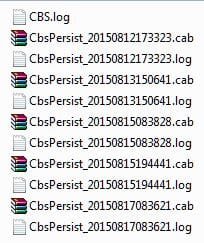
unfortunetly I don't have a file named like this in that folder. Attached are the files in the CBS folder.


I tried downloading the KB947821 online but it just says it is not applicable to my computer.
 

Attachments

  • Capture.JPG
    Capture.JPG
    26.9 KB · Views: 12

My Computer

Computer type
PC/Desktop
Computer Manufacturer/Model Number
unknown
OS
windows 7, 64 bit

My Computer

Computer type
PC/Desktop
Computer Manufacturer/Model Number
HP Desktop & Compaq Laptop
OS
Win 10 x64, Linux Lite, Win 7 x64, BlackArch, & Kali
Hard Drives
Samsung 850 Pro 256Gb,
Hitachi HDD 1Tb,
Crucial MX SSD 250Gb
Segate 3Tb USB 3.0 Ext. Backup HDD
Internet Speed
150Mbps dn, 20Mbps up
Antivirus
Avast Free, Malwarebytes Anti-Exploit & Anti-Ransomware
Browser
Firefox, Chrome, Opera, & VPN
GrasshopperMZ

Thank you for the logs!

The CheckSUR.log works.
The CheckSUR.persist.log is persistent: i.e. continue to exist; be prolonged.
Similar to .cab files within the cbs folder
Here's the relevant part of the analysis for you

Summary:
Seconds executed: 1541
Found 42 errors
CSI Manifest All Zeros Total count: 20
CBS MUM Corrupt Total count: 10
CBS Catalog Corrupt Total count: 10
CBS Registry Error Total count: 2

I most likely have all the missing manifests, cat and mums. cat/mums are always replaced in pairs.
Problematic is the registry errors, Failed to open store key

I'll work on locating the missing or corrupt files in my 300,000+ repository.
 

My Computer

Computer type
PC/Desktop
Computer Manufacturer/Model Number
HP Desktop & Compaq Laptop
OS
Win 10 x64, Linux Lite, Win 7 x64, BlackArch, & Kali
Hard Drives
Samsung 850 Pro 256Gb,
Hitachi HDD 1Tb,
Crucial MX SSD 250Gb
Segate 3Tb USB 3.0 Ext. Backup HDD
Internet Speed
150Mbps dn, 20Mbps up
Antivirus
Avast Free, Malwarebytes Anti-Exploit & Anti-Ransomware
Browser
Firefox, Chrome, Opera, & VPN
Here's the missing files

Please download from my OneDrive and run
CheckSUR to Temp.exe

Then run AutoSURT64 again & post CheckSUR.log from the CBS folder that will appear on your desktop.

Snick
 

My Computer

Computer type
PC/Desktop
Computer Manufacturer/Model Number
HP Desktop & Compaq Laptop
OS
Win 10 x64, Linux Lite, Win 7 x64, BlackArch, & Kali
Hard Drives
Samsung 850 Pro 256Gb,
Hitachi HDD 1Tb,
Crucial MX SSD 250Gb
Segate 3Tb USB 3.0 Ext. Backup HDD
Internet Speed
150Mbps dn, 20Mbps up
Antivirus
Avast Free, Malwarebytes Anti-Exploit & Anti-Ransomware
Browser
Firefox, Chrome, Opera, & VPN
GrasshopperMZ

No problem, that's why we're here to provide you with FREE HELP!
The files I sent you will fix those errors, not the below issue.
Still concerned regarding: CBS Registry Error Total count: 2
If that persists and we cannot resolve it, then the resolution would be a Repair Install/In Place Upgrade.
You cannot simply delete and reenter it,
Nor can you copy and paste another in its place, at least I've never attempted it.

From CheckSUR.log

(f) CBS Registry Error 0x00000002 Microsoft\Windows\CurrentVersion\Component Based Servicing\PackageDetect Failed to open store key

Checking Component Watchlist

Checking Packages
(f) CBS Registry Error 0x00000002 Microsoft\Windows\CurrentVersion\Component Based Servicing\Packages\ Failed to open store key

I'm hoping the packages I sent you will fix the Failed to open store key issue.
 

My Computer

Computer type
PC/Desktop
Computer Manufacturer/Model Number
HP Desktop & Compaq Laptop
OS
Win 10 x64, Linux Lite, Win 7 x64, BlackArch, & Kali
Hard Drives
Samsung 850 Pro 256Gb,
Hitachi HDD 1Tb,
Crucial MX SSD 250Gb
Segate 3Tb USB 3.0 Ext. Backup HDD
Internet Speed
150Mbps dn, 20Mbps up
Antivirus
Avast Free, Malwarebytes Anti-Exploit & Anti-Ransomware
Browser
Firefox, Chrome, Opera, & VPN
Hi Snick,

Not sure I understood you, should i run the same file you sent me before again? (AutoSURT64.exe)

Also could you elaborate on how to do that: Repair Install/In Place Upgrade?

Thank you!
 

My Computer

Computer type
PC/Desktop
Computer Manufacturer/Model Number
unknown
OS
windows 7, 64 bit
Hi Snick,

Not sure I understood you, should i run the same file you sent me before again? (AutoSURT64.exe)

Also could you elaborate on how to do that: Repair Install/In Place Upgrade?

Thank you!

Summary:
Seconds executed: 1582
Found 32 errors
Fixed 30 errors
CSI Manifest All Zeros Total count: 20
Fixed: CSI Manifest All Zeros. Total count: 20
CBS MUM Corrupt Total count: 10
Fixed: CBS MUM Corrupt. Total count: 10
CBS Registry Error Total count: 2
Fixed: CBS Paired File. Total count: 10

Yes, SURT detects missing or corrupt folders/files.
The location that SURT need the replacement files is C:\Windows\Temp\
Which is where the CheckSUR to Temp.exe places them
You then run SURT again. It takes permission from Trusted Installer and replaces the corrupt/missing files/folders with the ones in the CheckSUR folder, reestablishes control to Trusted Installer and creates a report.

If you peruse the CheckSUR.log you provided after this procedure, you will see (f) followed by (fix). As it implies it was fixed.

Still have the registry errors. Brian Drab at Sysnative.com, indicated that the only way to correct that error is a Repair Install/In-Place-Upgrade.

Softwaremaniac, the main helper win Win Update issues at Sysnative is away on vacation until August.
I would recommend you perform a Repair Install/In-Place-Upgrade.
Don't believe DISM++ is being supported for Windows 7 any more; at least I haven't been able to make it work on Win7
Dism++ | New Windows Utility

Simplix update pack is the next choice and recommended by several here on Sevenforums!
Download Simplix UpdatePack 7 - MajorGeeks

Repair Windows Without Reformatting.docx from my OneDrive
When your system finishes and you have access to your desktop, go to win update and turn it off as it will try to download hundreds of updates. When you finish with Simplix, turn back on for any updates to M$ products, like Office, etc.

Softwaremaniac, the main helper at Sysnative is away on vacation until August.
I would recommend you perform a Repair Install/In-Place-Upgrade.
Don't believe DISM++ is being supported for Windows 7 any more; at least I haven't been able to make it work on Win7
Simplix update pack is the next choice and recommended by several here on Sevenforums!
Download Simplix UpdatePack 7 - MajorGeeks


My Computer

Computer type
PC/Desktop
Computer Manufacturer/Model Number
HP Desktop & Compaq Laptop
OS
Win 10 x64, Linux Lite, Win 7 x64, BlackArch, & Kali
Hard Drives
Samsung 850 Pro 256Gb,
Hitachi HDD 1Tb,
Crucial MX SSD 250Gb
Segate 3Tb USB 3.0 Ext. Backup HDD
Internet Speed
150Mbps dn, 20Mbps up
Antivirus
Avast Free, Malwarebytes Anti-Exploit & Anti-Ransomware
Browser
Firefox, Chrome, Opera, & VPN
Back
Top