Update loop, 10 failing

Actually, someone suggested uninstalling updates until I uninstall the one that's causing errors. What do you think of that idea?
 

My Computer

Computer type
PC/Desktop
Computer Manufacturer/Model Number
need to update!
OS
7 Ultimate 64 bit
Memory
2x4Gb DDR3-SDRAM
Graphics Card(s)
t750
Monitor(s) Displays
AOC 24" yee haw and Dell 19"
Screen Resolution
1680 x 1050 @60hz
Hard Drives
Samsung 840EVO
Internet Speed
100/20
Antivirus
MSE
Browser
Firefox
Check my post#24 first.
 
Last edited:

My Computer

Computer type
Laptop
OS
Win 7 Home Premium x64/Linux Lite 2.6 x64
You could try it, couldn't hurt, seems like a lot of work.
Do you have any idea which one(s) installed prior to your problem? WU doesn't install in any particular order. If WU is in good health, that's usually the reason for failure.

I have a batch file you can modify in notepad to remove kbs. right-click>choose EDIT. Switches prevent error popup, if kb isn't installed, it skips & moves on, no restart prompt. Yes, after you finish uninstalling the kb's you want, you'll have to restart apply changes. If you want to create a batch file, when you save, change save as type from .txt to all. Then you can add suffix, .bat, .cmd, .vbs, etc. You can rename it if you wish, with .bat suffix, don't use the last two, .cmd access registry, .vbs won't work because it's not a VB Script.

Did you check your PM?

Despite my relative silence lately, I've been researching your issue. May have found solution. Working on making a batch file for you to run. I test them on my old laptop right after I do a System Image. :D
 

Attachments

Last edited:

My Computer

Computer type
Laptop
OS
Win 7 Home Premium x64/Linux Lite 2.6 x64
Well, thin' this might work, easy for you to do as well.

My thought,

Open computer, in url top of screen, it will say Computer, copy & paste C:\Windows\winsxs\Temp\PendingRenames, then in searchbox, upper right hand corner of screen, type pending.xml, when it appears right-click>choose rename. Add AAA to the beginning of xml file name, the AAA will allow you to easily find it again. Cross fingers, legs, arms, and toes (LOL) ;) Try windows update again.

Win should recreate the pending.xml file. You can always go back and rename the file to original by removing the AAA. You'll have to delete the newly created pending.xml first of course. (can't have duplicate file names in same folder).
 
Last edited:

My Computer

Computer type
Laptop
OS
Win 7 Home Premium x64/Linux Lite 2.6 x64
Check your PM (private message)
 

My Computer

Computer type
Laptop
OS
Win 7 Home Premium x64/Linux Lite 2.6 x64

My Computer

Computer type
PC/Desktop
Computer Manufacturer/Model Number
need to update!
OS
7 Ultimate 64 bit
Memory
2x4Gb DDR3-SDRAM
Graphics Card(s)
t750
Monitor(s) Displays
AOC 24" yee haw and Dell 19"
Screen Resolution
1680 x 1050 @60hz
Hard Drives
Samsung 840EVO
Internet Speed
100/20
Antivirus
MSE
Browser
Firefox
Well, thin' this might work, easy for you to do as well.

My thought,

Open computer, in url top of screen, it will say Computer, copy & paste C:\Windows\winsxs\Temp\PendingRenames, then in searchbox, upper right hand corner of screen, type pending.xml, when it appears right-click>choose rename. Add AAA to the beginning of xml file name, the AAA will allow you to easily find it again. Cross fingers, legs, arms, and toes (LOL) ;) Try windows update again.

Win should recreate the pending.xml file. You can always go back and rename the file to original by removing the AAA. You'll have to delete the newly created pending.xml first of course. (can't have duplicate file names in same folder).

Thought I would try this before the repair option. There is no pending.xml anywhere on my laptop. :D
 

My Computer

Computer type
PC/Desktop
Computer Manufacturer/Model Number
need to update!
OS
7 Ultimate 64 bit
Memory
2x4Gb DDR3-SDRAM
Graphics Card(s)
t750
Monitor(s) Displays
AOC 24" yee haw and Dell 19"
Screen Resolution
1680 x 1050 @60hz
Hard Drives
Samsung 840EVO
Internet Speed
100/20
Antivirus
MSE
Browser
Firefox
I *finally* created the USB install. I'm not sure what to do. When I click repair the options don't seem to relate to my problem. What exactly am I supposed to do?
 

My Computer

Computer type
PC/Desktop
Computer Manufacturer/Model Number
need to update!
OS
7 Ultimate 64 bit
Memory
2x4Gb DDR3-SDRAM
Graphics Card(s)
t750
Monitor(s) Displays
AOC 24" yee haw and Dell 19"
Screen Resolution
1680 x 1050 @60hz
Hard Drives
Samsung 840EVO
Internet Speed
100/20
Antivirus
MSE
Browser
Firefox
I repaired my PC using a USB drive. I upgraded and it ran me through all the items I saw in another how-to thread somewhere on this site.
I am still getting the 'reboot' now pop up.
 
Last edited:

My Computer

Computer type
PC/Desktop
Computer Manufacturer/Model Number
need to update!
OS
7 Ultimate 64 bit
Memory
2x4Gb DDR3-SDRAM
Graphics Card(s)
t750
Monitor(s) Displays
AOC 24" yee haw and Dell 19"
Screen Resolution
1680 x 1050 @60hz
Hard Drives
Samsung 840EVO
Internet Speed
100/20
Antivirus
MSE
Browser
Firefox
Where do I fall in the new/OEM/clean/repair world?

My PC is stuck in an update loop. I finally just dragged the 'update' window down to the corner of my screen and ignored it for months.

I got my key from a laptop that was given to me. A friend gave me a laptop w/ W7 ultimate. I got the key off of it and downloaded the ISO for W7U and installed it on my existing laptop. I've been using it for a year or 2 now. It's activated and all, legal as far as I know.

Do I need to do a clean install to get rid of this %^$#2$ update loop?
 
Last edited by a moderator:

My Computer

Computer type
PC/Desktop
Computer Manufacturer/Model Number
need to update!
OS
7 Ultimate 64 bit
Memory
2x4Gb DDR3-SDRAM
Graphics Card(s)
t750
Monitor(s) Displays
AOC 24" yee haw and Dell 19"
Screen Resolution
1680 x 1050 @60hz
Hard Drives
Samsung 840EVO
Internet Speed
100/20
Antivirus
MSE
Browser
Firefox

My Computer

Computer type
PC/Desktop
Computer Manufacturer/Model Number
Self built custom
OS
64-bit Windows 11 Pro for Workstations
CPU
Intel i7-8700K OC'd to 5 GHz
Motherboard
ASUS ROG Maximus XI Formula Z390
Memory
64 GB (4x16GB) G.SKILL TridentZ RGB DDR4 3600 MHz
Graphics Card(s)
ASUS ROG-STRIX-GTX1080TI-O11G-GAMING
Sound Card
Integrated
Monitor(s) Displays
2 x Samsung Odyssey G7 27"
Screen Resolution
2560x1440
Hard Drives
1TB Samsung 990 PRO M.2,
4TB Samsung 990 PRO PRO M.2,
TerraMaster F8 SSD Plus NAS
PSU
Seasonic Prime Titanium 850W
Case
Thermaltake Core P3
Cooling
Corsair Hydro H115i
Keyboard
Logitech wireless K800
Mouse
Logitech MX Master 4
Internet Speed
2 Gb/s Download and 100 Mb/s Upload
Antivirus
Malwarebyte Anti-Malware Premium
Browser
Google Chrome
Other Info
Logitech Z625 speaker system,
Logitech BRIO 4K Pro webcam,
HP Color LaserJet Pro MFP M477fdn,
APC SMART-UPS RT 1000 XL - SURT1000XLI,
Galaxy S23 Plus phone
Hello Chris, :)

Did you see if completely resetting Windows Update using OPTION THREE in the tutorial below may help with Windows Update?

http://www.sevenforums.com/tutorials/91738-windows-update-reset.html

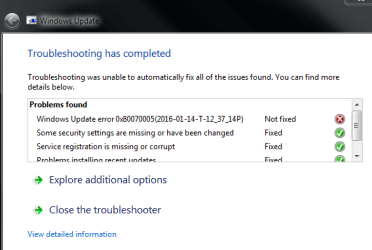
I ran it and still got the same error so I ran Mr. Fixit.

result:
also, I am still getting the 'reboot' message and I have no update history.

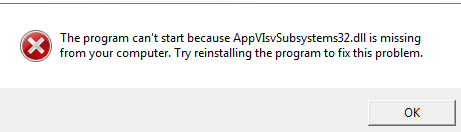
also, MS Office doesn't open anymore. I will try and repair this in programs and features. (I REINSTALLED OFFICE AND IT NOW OPENS)
 

Attachments

  • Capture.PNG
    Capture.PNG
    11.2 KB · Views: 10
  • office.PNG
    office.PNG
    2.7 KB · Views: 10
Last edited:

My Computer

Computer type
PC/Desktop
Computer Manufacturer/Model Number
need to update!
OS
7 Ultimate 64 bit
Memory
2x4Gb DDR3-SDRAM
Graphics Card(s)
t750
Monitor(s) Displays
AOC 24" yee haw and Dell 19"
Screen Resolution
1680 x 1050 @60hz
Hard Drives
Samsung 840EVO
Internet Speed
100/20
Antivirus
MSE
Browser
Firefox
Back
Top