Update loop, 10 failing

ChrisPbass

New member
Member
VIP
Local time
5:52 PM
Messages
317
Location
Fairfax, VA
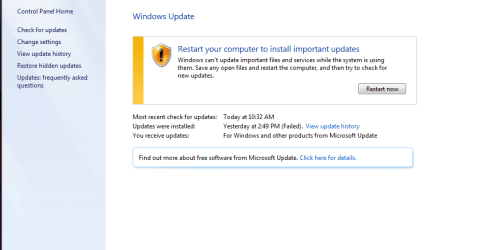
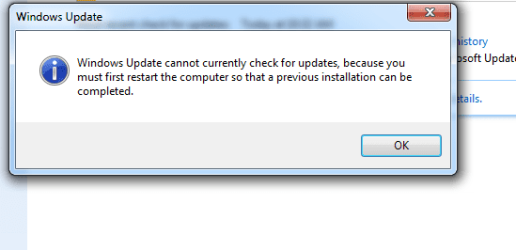
I'm being told to reboot my pc. When I do, I get the prompt to update again. rinse and repeat.
The last update to install was 3097877
The one above it is Upgrade to W10. 1511, 10586. The update failed.

I am NOT trying to upgrade.

How do I get out of this loop?

Thanks,
Chris
 

My Computer

Computer type
PC/Desktop
Computer Manufacturer/Model Number
need to update!
OS
7 Ultimate 64 bit
Memory
2x4Gb DDR3-SDRAM
Graphics Card(s)
t750
Monitor(s) Displays
AOC 24" yee haw and Dell 19"
Screen Resolution
1680 x 1050 @60hz
Hard Drives
Samsung 840EVO
Internet Speed
100/20
Antivirus
MSE
Browser
Firefox
upload some pics

ran the SURT, SFC and nothing unusual happened.

The zip limit is 8mb but my cbs.zip file is 113mb.
 

Attachments

  • cap 1.PNG
    cap 1.PNG
    22.4 KB · Views: 0
  • cap 2.PNG
    cap 2.PNG
    17.3 KB · Views: 0
  • cap 3.PNG
    cap 3.PNG
    9.2 KB · Views: 46

My Computer

Computer type
PC/Desktop
Computer Manufacturer/Model Number
need to update!
OS
7 Ultimate 64 bit
Memory
2x4Gb DDR3-SDRAM
Graphics Card(s)
t750
Monitor(s) Displays
AOC 24" yee haw and Dell 19"
Screen Resolution
1680 x 1050 @60hz
Hard Drives
Samsung 840EVO
Internet Speed
100/20
Antivirus
MSE
Browser
Firefox
Don't need the entire CBS folder, just CheckSUR.log inside folder.

I believe you have Windows Update set to:

Install updates automatically (recommended)

Open Windows Update

click Change Settings

Try changing it to either:

Check for updates but let me choose whether to download & install them

or

Download updates but let me choose whether to install them
 

My Computer

Computer type
Laptop
OS
Win 7 Home Premium x64/Linux Lite 2.6 x64

Attachments

My Computer

Computer type
PC/Desktop
Computer Manufacturer/Model Number
need to update!
OS
7 Ultimate 64 bit
Memory
2x4Gb DDR3-SDRAM
Graphics Card(s)
t750
Monitor(s) Displays
AOC 24" yee haw and Dell 19"
Screen Resolution
1680 x 1050 @60hz
Hard Drives
Samsung 840EVO
Internet Speed
100/20
Antivirus
MSE
Browser
Firefox
Unavailable repair files:
servicing\packages\Package_1_for_KB3035583~31bf3856ad364e35~amd64~~6.1.1.29.mum
servicing\packages\Package_for_KB3035583_RTM~31bf3856ad364e35~amd64~~6.1.1.29.mum
servicing\packages\Package_for_KB3035583~31bf3856ad364e35~amd64~~6.1.1.29.mum
servicing\packages\Package_1_for_KB3035583~31bf3856ad364e35~amd64~~6.1.1.29.cat
servicing\packages\Package_for_KB3035583_RTM~31bf3856ad364e35~amd64~~6.1.1.29.cat
servicing\packages\Package_for_KB3035583~31bf3856ad364e35~amd64~~6.1.1.29.cat

I'll check & see what mum & cat files I have. Hopefully all of them. ;)
 

My Computer

Computer type
Laptop
OS
Win 7 Home Premium x64/Linux Lite 2.6 x64
download zip & open, extract packages folder to desktop

Navigate to %WinDir%\Temp\CheckSUR\servicing

%WinDir% is where you have your OS, mine is C:\

C:\Windows\Temp\CheckSUR\servicing

If folder CheckSUR isn't there, create it.

right-click choose>new>folder.

Rename it to CheckSUR.

If servicing folder isn't there, create it.

Place Packages folder in it.

Run SURT again, should replace missing folders. Post CheckSUR.log again.
 

Attachments

My Computer

Computer type
Laptop
OS
Win 7 Home Premium x64/Linux Lite 2.6 x64
updated

same errors

new log
 

Attachments

My Computer

Computer type
PC/Desktop
Computer Manufacturer/Model Number
need to update!
OS
7 Ultimate 64 bit
Memory
2x4Gb DDR3-SDRAM
Graphics Card(s)
t750
Monitor(s) Displays
AOC 24" yee haw and Dell 19"
Screen Resolution
1680 x 1050 @60hz
Hard Drives
Samsung 840EVO
Internet Speed
100/20
Antivirus
MSE
Browser
Firefox
Did you change Windows update to one of the above settings I suggested?

I'll check again for the mum I missed, wouldn't be the first time I boo booed, won't be the last.

Here's the missing mum, follow the instruction as above for placement of Packages folder.
 

Attachments

My Computer

Computer type
Laptop
OS
Win 7 Home Premium x64/Linux Lite 2.6 x64
Here's link to free GWX Control Panel, peruse it and see if that will assist you.
 

My Computer

Computer type
Laptop
OS
Win 7 Home Premium x64/Linux Lite 2.6 x64
Did you change Windows update to one of the above settings I suggested?

I'll check again for the mum I missed, wouldn't be the first time I boo booed, won't be the last.

Here's the missing mum, follow the instruction as above for placement of Packages folder.

I appreciate your help!
Update is already set as you suggested.

I put the last package in there, d/l'd GWX and used it to get rid of W10 upgrade spam and rebooted. I still need to 'reboot to install updates'. I am running SURT again and will post the log once it's done.

I have not, but it seems like I should clear the cache using GWX.
Thanks,
Chris
 

My Computer

Computer type
PC/Desktop
Computer Manufacturer/Model Number
need to update!
OS
7 Ultimate 64 bit
Memory
2x4Gb DDR3-SDRAM
Graphics Card(s)
t750
Monitor(s) Displays
AOC 24" yee haw and Dell 19"
Screen Resolution
1680 x 1050 @60hz
Hard Drives
Samsung 840EVO
Internet Speed
100/20
Antivirus
MSE
Browser
Firefox
I ran the GWX program and deleted all cached updates.

Here is the checkSUR log.

=================================
Checking System Update Readiness.
Binary Version 6.1.7601.22471
Package Version 26.0
2015-11-16 07:57

Checking Windows Servicing Packages

Checking Package Manifests and Catalogs

Checking Package Watchlist

Checking Component Watchlist

Checking Packages
(f) CBS MUM Missing 0x00000002 servicing\Packages\Package_1_for_KB3035583~31bf3856ad364e35~amd64~~6.1.1.29.mum
(fix) CBS MUM Missing CBS File Replaced Package_1_for_KB3035583~31bf3856ad364e35~amd64~~6.1.1.29.mum from Cabinet: C:\Windows\CheckSur\v1.0\windows6.1-7601-x64-clientcab4.cab.
(fix) CBS Paired File CBS File also Replaced Package_1_for_KB3035583~31bf3856ad364e35~amd64~~6.1.1.29.cat from Cabinet: C:\Windows\CheckSur\v1.0\windows6.1-7601-x64-clientcab4.cab.

Checking Component Store

Summary:
Seconds executed: 321
Found 1 errors
Fixed 1 errors
CBS MUM Missing Total count: 1
Fixed: CBS MUM Missing. Total count: 1
Fixed: CBS Paired File. Total count: 1
 

My Computer

Computer type
PC/Desktop
Computer Manufacturer/Model Number
need to update!
OS
7 Ultimate 64 bit
Memory
2x4Gb DDR3-SDRAM
Graphics Card(s)
t750
Monitor(s) Displays
AOC 24" yee haw and Dell 19"
Screen Resolution
1680 x 1050 @60hz
Hard Drives
Samsung 840EVO
Internet Speed
100/20
Antivirus
MSE
Browser
Firefox
SURT repaired all your files. Appears your good to go.

If your issue is corrected, please mark post RESOLVED.

Happy Computing. :D
 

My Computer

Computer type
Laptop
OS
Win 7 Home Premium x64/Linux Lite 2.6 x64
I am still stuck in the loop.

One thing I didn't mention is that my ltop does not shut down anymore. If I try to reboot it closes everything but never powers off. I get no messages about updating it just goes to a black screen (like normal) and then I have to power it off manually.
I wonder if that is affecting the update process.

I'll post another Log later.
Thanks!
 

My Computer

Computer type
PC/Desktop
Computer Manufacturer/Model Number
need to update!
OS
7 Ultimate 64 bit
Memory
2x4Gb DDR3-SDRAM
Graphics Card(s)
t750
Monitor(s) Displays
AOC 24" yee haw and Dell 19"
Screen Resolution
1680 x 1050 @60hz
Hard Drives
Samsung 840EVO
Internet Speed
100/20
Antivirus
MSE
Browser
Firefox
I'll have to research a little more, get back to you later.
 

My Computer

Computer type
Laptop
OS
Win 7 Home Premium x64/Linux Lite 2.6 x64
bump. anyone?
 

My Computer

Computer type
PC/Desktop
Computer Manufacturer/Model Number
need to update!
OS
7 Ultimate 64 bit
Memory
2x4Gb DDR3-SDRAM
Graphics Card(s)
t750
Monitor(s) Displays
AOC 24" yee haw and Dell 19"
Screen Resolution
1680 x 1050 @60hz
Hard Drives
Samsung 840EVO
Internet Speed
100/20
Antivirus
MSE
Browser
Firefox
Sorry 'bout delay ChrisPbass, apparently my e-mail notifications are not cooperating. :(

Run attached & check WU again.

If frustration finally gets the best of you, you could Repair Install. Pretty simple, I do them all the time.

Reinstalls Windows, preserves all your installed programs & files.

You'll need Win7 DVD & 25 character Windows product key.
 

Attachments

My Computer

Computer type
Laptop
OS
Win 7 Home Premium x64/Linux Lite 2.6 x64
Sorry 'bout delay ChrisPbass, apparently my e-mail notifications are not cooperating. :(

Run attached & check WU again.

If frustration finally gets the best of you, you could Repair Install. Pretty simple, I do them all the time.

Reinstalls Windows, preserves all your installed programs & files.

You'll need Win7 DVD & 25 character Windows product key.

No problem my man. I will try the .bat file later on. I will need to create a repair USB as I don't have the DVD...so hopefully the .bat works!
 

My Computer

Computer type
PC/Desktop
Computer Manufacturer/Model Number
need to update!
OS
7 Ultimate 64 bit
Memory
2x4Gb DDR3-SDRAM
Graphics Card(s)
t750
Monitor(s) Displays
AOC 24" yee haw and Dell 19"
Screen Resolution
1680 x 1050 @60hz
Hard Drives
Samsung 840EVO
Internet Speed
100/20
Antivirus
MSE
Browser
Firefox
Be advised, repair DVD or USB is not Installation Disc.

If you have ISO you can burn DVD with ImgBurn, Britec computer has video on it.

Check your PM (private message)
 

My Computer

Computer type
Laptop
OS
Win 7 Home Premium x64/Linux Lite 2.6 x64
Be advised, repair DVD or USB is not Installation Disc.

If you have ISO you can burn DVD with ImgBurn, Britec computer has video on it.

Check your PM (private message)

Well the .bat did not fix WU but it fixed something else.
Everytime I reboot and choose my windows account I get 'welcome' and then everything freezes for 20 seconds or more. THEN I boot to the dtop and off we go.
I just rebooted after running that .bat and I didn't get the welcome hang.

So...that is good. I guess it's repair time.
 

My Computer

Computer type
PC/Desktop
Computer Manufacturer/Model Number
need to update!
OS
7 Ultimate 64 bit
Memory
2x4Gb DDR3-SDRAM
Graphics Card(s)
t750
Monitor(s) Displays
AOC 24" yee haw and Dell 19"
Screen Resolution
1680 x 1050 @60hz
Hard Drives
Samsung 840EVO
Internet Speed
100/20
Antivirus
MSE
Browser
Firefox
Back
Top