Update your Win 7 installation media

Thanks for the kind reply, Paul.


1. Rufus seems to lack the feature workking with folders. Trying to do away with ISO conversion.


2. SIW2 has created a little utility disc 17514x64-v6.iso. Can this be used as a substitute for windows iso when using Rufus to create a bootable USB thumb drive?


3. Or, would diskpart do the job? What are the commands needed?


4. How does one get around the 32GB limit of USB thumb drive?


Looking to upgrade from an old 775 x86 system, so apologies for these incoherent sounding questions.


Many thanks and best regards,
 

My Computer

Computer type
PC/Desktop
OS
Windows 7 Ultimate x86
Hi goopy,

1. Rufus seems to lack the feature working with folders. Trying to do away with ISO conversion.
I don't understand what you are saying here!

2. SIW2 has created a little utility disc 17514x64-v6.iso. Can this be used as a substitute for windows iso when using Rufus to create a bootable USB thumb drive?
I think this thread [post #2 and post #7 in particular] will help you: How to make a bootable UEFI system repair USB

4. How does one get around the 32GB limit of USB thumb drive?
I don't understand what you are saying here!

I hope this helps!
 

My Computer

Computer type
Laptop
Computer Manufacturer/Model Number
Fujitsu LIFEBOOK
OS
Win 7 HP SP1 64-bit Vista HB SP2 32-bit Linux Mint 18.3
CPU
Intel(R) Pentium(R) CPU P6200 @ 2.13GHz
Motherboard
FUJITSU FJNBB06
Memory
4.00 GB
Graphics Card(s)
Intel(R) Graphics Media Accelerator HD
Sound Card
[1] Realtek High Definition Audio [2] Intel(R) Display Audio
Screen Resolution
1366 x 768 x 32 bits (4294967296 colors) @ 59 Hz
Hard Drives
TOSHIBA MK5076GSX
Antivirus
AVG FREE
2. SIW2 has created a little utility disc

17514x86.iso

17514x64-v9.iso.

Can this be used as a substitute for windows iso when using Rufus to create a bootable USB thumb drive?

Yes, you could use Rufus to create bootable usb with that iso.

Then copy the contents of the installation media you have updated onto the usb ( you can leave my boot.wim in the sources folder. If you are copying the stuff over, explorer will ask if you want to overwrite the existing boot.wim, say no. That is because my boot.wim is much better than the standard version)
 
Last edited:

My Computers

System One System Two

  • Computer type
    PC/Desktop
    OS
    7 X64
    CPU
    i5 8400
    Motherboard
    gigabyte b365m ds3h
    Memory
    2x8gb 3200mhz
    Hard Drives
    various
    PSU
    pure power 11 400w cm
    Case
    Coolermaster
    Cooling
    cryorig m9i
  • Computer type
    PC/Desktop
    OS
    7x64
    CPU
    g5400
    Motherboard
    ga b365m ds3h
    Memory
    8gb ddr4 2400
    PSU
    xfx pro 450w
Hi SIW2,

DISM++

Thanks for the reply and screenshots, they really helped.

I have been mucking around with DISM++ and like it quite a lot. It can also let to change certain settings which is quite useful [I haven't done that but I have looked at it!]. The updating part of the process [running it several times because some updates have to be installed first] only takes about 52 minutes, whereas, using SIMPLIX takes about 180 minutes for a single image, and about 220 minutes for ALL images. Obviously these timings are on my machine.

Just three obsevations:

[1] During the integration of the updates process, there was only one update that was classed to be exclusive access. The update is KB3177467 [11-10-2016] and gave me the message With exclusive access, you will not be able to install other updates, until you restart the system. We suggest you install other updates first, then install this update last.. Well, I ran the scan for and Install updates several times. For each of those I clicked on Do not install (recommended). for the update KB3177467. On the last run, there was only upate KB3177467 left, this time I clicked on Go on installation.. Is this correct please?
BTW, the update KB3177467 [Service Stack Update 2016] supersedes the previous update KB3020369 [which must be installed if you are going to install the convenience rollup]. I can't see why this is still needed!

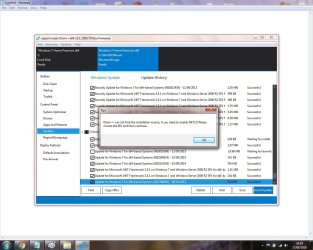
[2] I decided to click and include the Internet Explorer 11 for Windows 7 for x64-based systems update into the integration. This might, or might not have, caused the message below to appear. I just clicked OK when this appeared:

DISM++ IE11.jpg

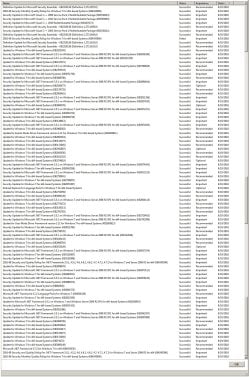
[3] When I used imagex to export, compress, and get rid of any accumulated junk that was created during the integration of the updates [which it did indeed reduce the size of the install.wim], I noticed that it also updated four other files, install_Windows 7 HOMEBASIC.clg, install_Windows 7 HOMEPREMIUM.clg, install_Windows 7 HOMEPROFESSIONAL.clg and install_Windows 7 ULTIMATE.clg. I copied the install_Windows 7 HOMEPREMIUM.clg [which is the image I updated] to a folder and opened it with SIM [Windows System Image Manager]. I want to print this file out for curiosity. I tried SysExporter etc, but I couldn't get it to print. Is there anyway that you know of please that will allow me to print this catalogue file out?

Thanks SIW2.
 

My Computer

Computer type
Laptop
Computer Manufacturer/Model Number
Fujitsu LIFEBOOK
OS
Win 7 HP SP1 64-bit Vista HB SP2 32-bit Linux Mint 18.3
CPU
Intel(R) Pentium(R) CPU P6200 @ 2.13GHz
Motherboard
FUJITSU FJNBB06
Memory
4.00 GB
Graphics Card(s)
Intel(R) Graphics Media Accelerator HD
Sound Card
[1] Realtek High Definition Audio [2] Intel(R) Display Audio
Screen Resolution
1366 x 768 x 32 bits (4294967296 colors) @ 59 Hz
Hard Drives
TOSHIBA MK5076GSX
Antivirus
AVG FREE
7UPDATER v7 is on first post. The only changes are 3 new updates added and 3 superseded have been removed. That only applies if you select to download updates.
 

My Computers

System One System Two

  • Computer type
    PC/Desktop
    OS
    7 X64
    CPU
    i5 8400
    Motherboard
    gigabyte b365m ds3h
    Memory
    2x8gb 3200mhz
    Hard Drives
    various
    PSU
    pure power 11 400w cm
    Case
    Coolermaster
    Cooling
    cryorig m9i
  • Computer type
    PC/Desktop
    OS
    7x64
    CPU
    g5400
    Motherboard
    ga b365m ds3h
    Memory
    8gb ddr4 2400
    PSU
    xfx pro 450w
Greetings SIW2, tried v6 on x64 COEM, and here are a few questions for your kind attention:


1. 7UPDATEv6.cmd could not find UpdatePatch-18.7.20.exe in the bin folder. Had to move it one level up.
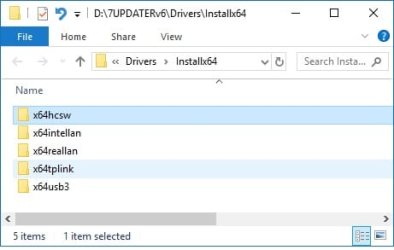
2. While the intel USB3 driver was installed, realtek lan and tplink wifi drivers failed.
3. A total of 173 updates (about 700MB) were incorporated. But after installation, a further 100 updates were found by windows updates.
4. The process created a bootiax64 file which appears to be same as the bootx64.efi provided by megahertzby. Is this meant for UEFI installation? Can the one found in win10 1803 be used?

5. Could not get install.wim to stay below 4GB despite keeping just one image. Can a NTFS formatted USB thumb drive be used for UEFI installation?


Appreciate if you could kindly point out what I may have done wrong.


many thanks and best regards,
 

My Computer

Computer type
PC/Desktop
OS
Windows 7 Ultimate x86
realtek lan and tplink wifi drivers failed

Did you install those by putting them in the drivers folder? Dism does the installation, the cmd file just makes it easier for you than typing commands yourself.
4. The process created a bootiax64 file which appears to be same as the bootx64.efi provided by megahertzby. Is this meant for UEFI installation?

Yes

5. Could not get install.wim to stay below 4GB despite keeping just one image. Can a NTFS formatted USB thumb drive be used for UEFI installation?

You will need a fat partition for efi boot. You can also have an ntfs partition for larger files. Or just split the wim.


3. A total of 173 updates (about 700MB) were incorporated. But after installation, a further 100 updates were found by windows updates.

173 sounds about right. You will always need to get some updates - graphics card driver, latest definitions for mse , net frame 4x is not native so is not updated (nf2 and 3.5 updates would have been). There are a few that are just pointless telemetry and upgrade to win10 stuff ( they weren't included), which you don't need. 100 sounds like a lot though. Maybe something to with your system.
 

My Computers

System One System Two

  • Computer type
    PC/Desktop
    OS
    7 X64
    CPU
    i5 8400
    Motherboard
    gigabyte b365m ds3h
    Memory
    2x8gb 3200mhz
    Hard Drives
    various
    PSU
    pure power 11 400w cm
    Case
    Coolermaster
    Cooling
    cryorig m9i
  • Computer type
    PC/Desktop
    OS
    7x64
    CPU
    g5400
    Motherboard
    ga b365m ds3h
    Memory
    8gb ddr4 2400
    PSU
    xfx pro 450w
Hi SIW2,

I noticed that CreateISO wasn't included in v6 or v7. It's not a problem as I just copied it over. I just thought I would mention it. It might be useful if you could attach it to post #1 for those that are new to the thread. Just a suggestion!

Would Usb7ice.zip work for creating both a Legacy - MBR and UEFI - GPT USB?
I just thought it would be a good addition after running your excellent 7UPDATER tool [rather than running something like the Windows USB/DVD Download Tool or RUFUS]!

Hi goopy,

1. 7UPDATEv6.cmd could not find UpdatePatch-18.7.20.exe in the bin folder. Had to move it one level up.
Did you extract the files first?

3. A total of 173 updates (about 700MB) were incorporated. But after installation, a further 100 updates were found by windows updates.
When I tested it, I used HOMEPREMIUM. I didn't tick any updates that weren't already ticked. On the first update run it gave me a total of 209 updates [some were ticked and some weren't]. On the second update run, it gave me a total of 95 updates [some were ticked and some weren't]. On the third update run, it gave me a total of 66 updates [some were ticked and some weren't]. In total, it installed [those that were ticked] 162 updates. I skipped the exclusive update KB3177467.
 
Last edited:

My Computer

Computer type
Laptop
Computer Manufacturer/Model Number
Fujitsu LIFEBOOK
OS
Win 7 HP SP1 64-bit Vista HB SP2 32-bit Linux Mint 18.3
CPU
Intel(R) Pentium(R) CPU P6200 @ 2.13GHz
Motherboard
FUJITSU FJNBB06
Memory
4.00 GB
Graphics Card(s)
Intel(R) Graphics Media Accelerator HD
Sound Card
[1] Realtek High Definition Audio [2] Intel(R) Display Audio
Screen Resolution
1366 x 768 x 32 bits (4294967296 colors) @ 59 Hz
Hard Drives
TOSHIBA MK5076GSX
Antivirus
AVG FREE
Would Usb7ice.zip work for creating both a Legacy - MBR and UEFI - GPT USB?

Yes, but it isn't ultra fancy. Leaving fat32 selected will support both bios and efi boot. But fat32 has a max file of 4gb. If the install.wim is bigger, you would have to split the thing.
 

My Computers

System One System Two

  • Computer type
    PC/Desktop
    OS
    7 X64
    CPU
    i5 8400
    Motherboard
    gigabyte b365m ds3h
    Memory
    2x8gb 3200mhz
    Hard Drives
    various
    PSU
    pure power 11 400w cm
    Case
    Coolermaster
    Cooling
    cryorig m9i
  • Computer type
    PC/Desktop
    OS
    7x64
    CPU
    g5400
    Motherboard
    ga b365m ds3h
    Memory
    8gb ddr4 2400
    PSU
    xfx pro 450w
OK, thanks SIW2, I did think that, but I thought I would ask anyway :thumbsup:.
 

My Computer

Computer type
Laptop
Computer Manufacturer/Model Number
Fujitsu LIFEBOOK
OS
Win 7 HP SP1 64-bit Vista HB SP2 32-bit Linux Mint 18.3
CPU
Intel(R) Pentium(R) CPU P6200 @ 2.13GHz
Motherboard
FUJITSU FJNBB06
Memory
4.00 GB
Graphics Card(s)
Intel(R) Graphics Media Accelerator HD
Sound Card
[1] Realtek High Definition Audio [2] Intel(R) Display Audio
Screen Resolution
1366 x 768 x 32 bits (4294967296 colors) @ 59 Hz
Hard Drives
TOSHIBA MK5076GSX
Antivirus
AVG FREE
Yes, but it isn't ultra fancy. Leaving fat32 selected will support both bios and efi boot. But fat32 has a max file of 4gb. If the install.wim is bigger, you would have to split the thing.

How to split?
As I found out, USB Flash disk can't have a Fat32 Partition and a NTFS Partition. Can we burn on a Double Layer DVD?
 

My Computers

System One System Two

  • Computer type
    PC/Desktop
    Computer Manufacturer/Model Number
    custom build
    OS
    Windows 7 HP 64
    CPU
    i5 6600K - 800MHz to 4200MHz
    Motherboard
    GA-Z170-HD3P
    Memory
    4+4G GSkill DDR4 3000
    Graphics Card(s)
    IG - Intel 530
    Monitor(s) Displays
    Samsung 226BW
    Screen Resolution
    1680x1050
    Hard Drives
    (1) -1 SM951 – 128GB M.2 AHCI PCIe SSD drive for Windows 7 and Lubuntu
    (2) -1 WD SATA 3 - 1T for Data
    (3) -1 WD SATA 3 - 1T for backup
    PSU
    Thermaltake 450W TR2 gold
    Keyboard
    Old and good Chicony mechanical keyboard
    Mouse
    Logitech mX performance - 9 buttons (had to disable some)
    Internet Speed
    500Mb/s
    Browser
    Firefox 64
    Other Info
    TinyWall firewall
  • Computer type
    Laptop
    System Manufacturer/Model Number
    Asus Q550LF
    OS
    Windows 7 Pro
    CPU
    i7-4500U 800MHz to 3.0GHz
    Motherboard
    Asus Q550LF
    Memory
    (4+4)G DDR3 1600
    Graphics Card(s)
    IG intel 4400 + NVIDIA GeForce GT 745M
    Sound Card
    Realtek
    Monitor(s) Displays
    LG Display LP156WF4-SPH1
    Screen Resolution
    1920 x 1080
    Hard Drives
    BX500 120G SSD for Windows and programs +
    1T HDD for data
    Internet Speed
    500 Mb/s
    Browser
    Firefox
    Other Info
    TinyWall firewall

My Computer

Computer type
Laptop
Computer Manufacturer/Model Number
Fujitsu LIFEBOOK
OS
Win 7 HP SP1 64-bit Vista HB SP2 32-bit Linux Mint 18.3
CPU
Intel(R) Pentium(R) CPU P6200 @ 2.13GHz
Motherboard
FUJITSU FJNBB06
Memory
4.00 GB
Graphics Card(s)
Intel(R) Graphics Media Accelerator HD
Sound Card
[1] Realtek High Definition Audio [2] Intel(R) Display Audio
Screen Resolution
1366 x 768 x 32 bits (4294967296 colors) @ 59 Hz
Hard Drives
TOSHIBA MK5076GSX
Antivirus
AVG FREE
Did you install those by putting them in the drivers folder? Dism does the installation, the cmd file just makes it easier for you than typing commands yourself.


Yes


You will need a fat partition for efi boot. You can also have an ntfs partition for larger files. Or just split the wim.


173 sounds about right. You will always need to get some updates - graphics card driver, latest definitions for mse , net frame 4x is not native so is not updated (nf2 and 3.5 updates would have been). There are a few that are just pointless telemetry and upgrade to win10 stuff ( they weren't included), which you don't need. 100 sounds like a lot though. Maybe something to with your system.


Thanks for kind reply SIW2.


1. All drives were in place. Boot.wim was mounted during drivers injection phase, but did not recall seeing that for install.wim. Is there a log file saved somewhere?
2. Regarding UEFI installation, requirement is USB formatted with GPT partition and FAT32, which can be easily accomplished using diskpart? Commands for diskpart?

3. The source used is plain vanilla COEM ultimate iso. See attached for additional updates downloaded.
4. 2 files were not included in your updates: the April 2015 servicing stack update (KB3020369) and the July 2016 update rollup (KB3172605) listed by megahertz in his post.

Will applying these two updates together with the latest monthly rollup (skipping those months in between) be sufficient to bring w7 up to date? Is this what your utility is trying to do?


Many thanks and best regards,
 

Attachments

  • drivers.jpg
    drivers.jpg
    35.5 KB · Views: 321
  • up0.jpg
    up0.jpg
    968.1 KB · Views: 7

My Computer

Computer type
PC/Desktop
OS
Windows 7 Ultimate x86
1. All drives were in place. Boot.wim was mounted during drivers injection phase, but did not recall seeing that for install.wim. Is there a log file saved somewhere?

I presume you mean "All driveRs were in place". If you selected YES to update, then any drivers for install.wim are integrated after the updates. Install.wim is already mounted at that point, of course..


If you said NO to Updates, AND you placed drivers in the installx64 folder, then they should have been integrated into Install.wim. If not, I may have to take a look at the .cmd file.


The log file for that is just the regular "C:\Windows\Logs\DISM\dism.log" It is likely very large.

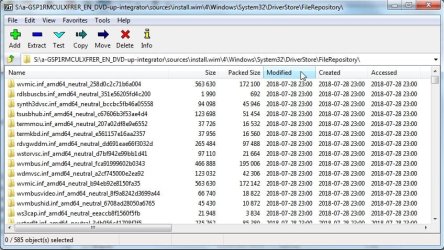
It is probably easier for you have a look at the install.wim image with 7-zip.

Look in imagenumber\windows\system32\driverstore\filerepository to check the most recent folders in there. ( Click the Modified column in 7-zip to get the more recent at the top)

filerepository-view-7zip.jpg
 

My Computers

System One System Two

  • Computer type
    PC/Desktop
    OS
    7 X64
    CPU
    i5 8400
    Motherboard
    gigabyte b365m ds3h
    Memory
    2x8gb 3200mhz
    Hard Drives
    various
    PSU
    pure power 11 400w cm
    Case
    Coolermaster
    Cooling
    cryorig m9i
  • Computer type
    PC/Desktop
    OS
    7x64
    CPU
    g5400
    Motherboard
    ga b365m ds3h
    Memory
    8gb ddr4 2400
    PSU
    xfx pro 450w
Hi SIW2,

DISM++ AND 7UPDATERv7 TOGETHER

I updated image 1 of the install.wim using DISM++, saved it, unmounted it, optimized it, and renamed it back to install.wim in the original ISO file.

Out of curiosity I decided to see if there were any extra updates the 7UPDATERv7 would find. When I came to run the latest version of 7UPDATERv7 with the August UpdatePatch [UpdatePatch-18.8.20], it said that the UpdatePatch-18.8.20.exe is not recognized as an internal or exoperable program or batch file.

I then cancelled this and decided to see how long it would take to create a new install.wim where ALL the images were updated [using the updated image 1 using DISM++ as you suggested in a previous post]. I entered N to the Download Updates. All it done was to create a file called UpdatePack7R2Wim [in about ONE second] and then exited the 7UPDATERv7. It did exactly the same thing if I entered Y.

The ultimate aim was to use the updated image 1 using DISM++, and then use 7UPDATERv7 to update ALL the other images!

Have I missed something here?

Thanks in advance.

EDIT: Has anyone else tried this, and if so, what results did you get?
 

My Computer

Computer type
Laptop
Computer Manufacturer/Model Number
Fujitsu LIFEBOOK
OS
Win 7 HP SP1 64-bit Vista HB SP2 32-bit Linux Mint 18.3
CPU
Intel(R) Pentium(R) CPU P6200 @ 2.13GHz
Motherboard
FUJITSU FJNBB06
Memory
4.00 GB
Graphics Card(s)
Intel(R) Graphics Media Accelerator HD
Sound Card
[1] Realtek High Definition Audio [2] Intel(R) Display Audio
Screen Resolution
1366 x 768 x 32 bits (4294967296 colors) @ 59 Hz
Hard Drives
TOSHIBA MK5076GSX
Antivirus
AVG FREE
Thanks Paul. I will take a look when i have time
 

My Computers

System One System Two

  • Computer type
    PC/Desktop
    OS
    7 X64
    CPU
    i5 8400
    Motherboard
    gigabyte b365m ds3h
    Memory
    2x8gb 3200mhz
    Hard Drives
    various
    PSU
    pure power 11 400w cm
    Case
    Coolermaster
    Cooling
    cryorig m9i
  • Computer type
    PC/Desktop
    OS
    7x64
    CPU
    g5400
    Motherboard
    ga b365m ds3h
    Memory
    8gb ddr4 2400
    PSU
    xfx pro 450w
Probabaly an error in the batch file. I will take a look when i have time
Thanks SIW2, your reply is appreciated :thumbsup:.
 

My Computer

Computer type
Laptop
Computer Manufacturer/Model Number
Fujitsu LIFEBOOK
OS
Win 7 HP SP1 64-bit Vista HB SP2 32-bit Linux Mint 18.3
CPU
Intel(R) Pentium(R) CPU P6200 @ 2.13GHz
Motherboard
FUJITSU FJNBB06
Memory
4.00 GB
Graphics Card(s)
Intel(R) Graphics Media Accelerator HD
Sound Card
[1] Realtek High Definition Audio [2] Intel(R) Display Audio
Screen Resolution
1366 x 768 x 32 bits (4294967296 colors) @ 59 Hz
Hard Drives
TOSHIBA MK5076GSX
Antivirus
AVG FREE
7updaterv8 on first post.
 

My Computers

System One System Two

  • Computer type
    PC/Desktop
    OS
    7 X64
    CPU
    i5 8400
    Motherboard
    gigabyte b365m ds3h
    Memory
    2x8gb 3200mhz
    Hard Drives
    various
    PSU
    pure power 11 400w cm
    Case
    Coolermaster
    Cooling
    cryorig m9i
  • Computer type
    PC/Desktop
    OS
    7x64
    CPU
    g5400
    Motherboard
    ga b365m ds3h
    Memory
    8gb ddr4 2400
    PSU
    xfx pro 450w

My Computer

Computer type
Laptop
Computer Manufacturer/Model Number
Fujitsu LIFEBOOK
OS
Win 7 HP SP1 64-bit Vista HB SP2 32-bit Linux Mint 18.3
CPU
Intel(R) Pentium(R) CPU P6200 @ 2.13GHz
Motherboard
FUJITSU FJNBB06
Memory
4.00 GB
Graphics Card(s)
Intel(R) Graphics Media Accelerator HD
Sound Card
[1] Realtek High Definition Audio [2] Intel(R) Display Audio
Screen Resolution
1366 x 768 x 32 bits (4294967296 colors) @ 59 Hz
Hard Drives
TOSHIBA MK5076GSX
Antivirus
AVG FREE
Hi SIW2,

I ran the 7UPDATERv8 and it downloaded the updates and created the downloaded file. It got to The file UpdatePack successfully created!, but when I clicked OK it dropped out of 7UPDATERv8 all together. I just wanted to see if it woud pick up any extra updates other than what DISM++ had.

Thanks in advance.
 

My Computer

Computer type
Laptop
Computer Manufacturer/Model Number
Fujitsu LIFEBOOK
OS
Win 7 HP SP1 64-bit Vista HB SP2 32-bit Linux Mint 18.3
CPU
Intel(R) Pentium(R) CPU P6200 @ 2.13GHz
Motherboard
FUJITSU FJNBB06
Memory
4.00 GB
Graphics Card(s)
Intel(R) Graphics Media Accelerator HD
Sound Card
[1] Realtek High Definition Audio [2] Intel(R) Display Audio
Screen Resolution
1366 x 768 x 32 bits (4294967296 colors) @ 59 Hz
Hard Drives
TOSHIBA MK5076GSX
Antivirus
AVG FREE
Back
Top