Update your Win 7 installation media

Clicked OK to what?

I am not aware of an OK to click.
 
Last edited:

My Computers

System One System Two

  • Computer type
    PC/Desktop
    OS
    7 X64
    CPU
    i5 8400
    Motherboard
    gigabyte b365m ds3h
    Memory
    2x8gb 3200mhz
    Hard Drives
    various
    PSU
    pure power 11 400w cm
    Case
    Coolermaster
    Cooling
    cryorig m9i
  • Computer type
    PC/Desktop
    OS
    7x64
    CPU
    g5400
    Motherboard
    ga b365m ds3h
    Memory
    8gb ddr4 2400
    PSU
    xfx pro 450w
Hi SIW2,

Clicked OK to what?
T2.jpg

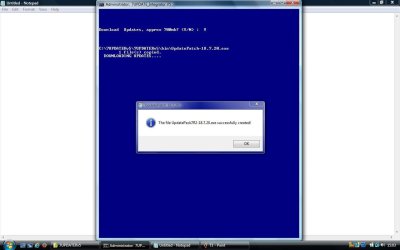
This is last months [I didn't take one this month], but it is the box where I clicked OK.
It dropped out right after clicking OK, so I didn't get to the part where you enter an image number or ALL
[*]!
 

My Computer

Computer type
Laptop
Computer Manufacturer/Model Number
Fujitsu LIFEBOOK
OS
Win 7 HP SP1 64-bit Vista HB SP2 32-bit Linux Mint 18.3
CPU
Intel(R) Pentium(R) CPU P6200 @ 2.13GHz
Motherboard
FUJITSU FJNBB06
Memory
4.00 GB
Graphics Card(s)
Intel(R) Graphics Media Accelerator HD
Sound Card
[1] Realtek High Definition Audio [2] Intel(R) Display Audio
Screen Resolution
1366 x 768 x 32 bits (4294967296 colors) @ 59 Hz
Hard Drives
TOSHIBA MK5076GSX
Antivirus
AVG FREE
Hi goopy,

DISM++ [also highly recommended by SIW2] can run on 7, 8, 8.1, 10.
I have used this and it is very easy to use!

I hope this helps!
 

My Computer

Computer type
Laptop
Computer Manufacturer/Model Number
Fujitsu LIFEBOOK
OS
Win 7 HP SP1 64-bit Vista HB SP2 32-bit Linux Mint 18.3
CPU
Intel(R) Pentium(R) CPU P6200 @ 2.13GHz
Motherboard
FUJITSU FJNBB06
Memory
4.00 GB
Graphics Card(s)
Intel(R) Graphics Media Accelerator HD
Sound Card
[1] Realtek High Definition Audio [2] Intel(R) Display Audio
Screen Resolution
1366 x 768 x 32 bits (4294967296 colors) @ 59 Hz
Hard Drives
TOSHIBA MK5076GSX
Antivirus
AVG FREE

My Computers

System One System Two

  • Computer type
    PC/Desktop
    Computer Manufacturer/Model Number
    custom build
    OS
    Windows 7 HP 64
    CPU
    i5 6600K - 800MHz to 4200MHz
    Motherboard
    GA-Z170-HD3P
    Memory
    4+4G GSkill DDR4 3000
    Graphics Card(s)
    IG - Intel 530
    Monitor(s) Displays
    Samsung 226BW
    Screen Resolution
    1680x1050
    Hard Drives
    (1) -1 SM951 – 128GB M.2 AHCI PCIe SSD drive for Windows 7 and Lubuntu
    (2) -1 WD SATA 3 - 1T for Data
    (3) -1 WD SATA 3 - 1T for backup
    PSU
    Thermaltake 450W TR2 gold
    Keyboard
    Old and good Chicony mechanical keyboard
    Mouse
    Logitech mX performance - 9 buttons (had to disable some)
    Internet Speed
    500Mb/s
    Browser
    Firefox 64
    Other Info
    TinyWall firewall
  • Computer type
    Laptop
    System Manufacturer/Model Number
    Asus Q550LF
    OS
    Windows 7 Pro
    CPU
    i7-4500U 800MHz to 3.0GHz
    Motherboard
    Asus Q550LF
    Memory
    (4+4)G DDR3 1600
    Graphics Card(s)
    IG intel 4400 + NVIDIA GeForce GT 745M
    Sound Card
    Realtek
    Monitor(s) Displays
    LG Display LP156WF4-SPH1
    Screen Resolution
    1920 x 1080
    Hard Drives
    BX500 120G SSD for Windows and programs +
    1T HDD for data
    Internet Speed
    500 Mb/s
    Browser
    Firefox
    Other Info
    TinyWall firewall
Hi Megahertz07,

The 7updaterv8.zip has no Drivers Folder.
It doesn't really matter. Just copy the Drivers folders from another 7UPDATER version into the root of 7UPDATERv8. The batch file code will find them as normal.

I hope this helps!
 

My Computer

Computer type
Laptop
Computer Manufacturer/Model Number
Fujitsu LIFEBOOK
OS
Win 7 HP SP1 64-bit Vista HB SP2 32-bit Linux Mint 18.3
CPU
Intel(R) Pentium(R) CPU P6200 @ 2.13GHz
Motherboard
FUJITSU FJNBB06
Memory
4.00 GB
Graphics Card(s)
Intel(R) Graphics Media Accelerator HD
Sound Card
[1] Realtek High Definition Audio [2] Intel(R) Display Audio
Screen Resolution
1366 x 768 x 32 bits (4294967296 colors) @ 59 Hz
Hard Drives
TOSHIBA MK5076GSX
Antivirus
AVG FREE
Hi Megahertz07,


It doesn't really matter. Just copy the Drivers folders from another 7UPDATER version into the root of 7UPDATERv8. The batch file code will find them as normal.

I hope this helps!

Paul, that was what you and I did.
I just reminded SIW2 as the link is on fist post and will be used by others.
 

My Computers

System One System Two

  • Computer type
    PC/Desktop
    Computer Manufacturer/Model Number
    custom build
    OS
    Windows 7 HP 64
    CPU
    i5 6600K - 800MHz to 4200MHz
    Motherboard
    GA-Z170-HD3P
    Memory
    4+4G GSkill DDR4 3000
    Graphics Card(s)
    IG - Intel 530
    Monitor(s) Displays
    Samsung 226BW
    Screen Resolution
    1680x1050
    Hard Drives
    (1) -1 SM951 – 128GB M.2 AHCI PCIe SSD drive for Windows 7 and Lubuntu
    (2) -1 WD SATA 3 - 1T for Data
    (3) -1 WD SATA 3 - 1T for backup
    PSU
    Thermaltake 450W TR2 gold
    Keyboard
    Old and good Chicony mechanical keyboard
    Mouse
    Logitech mX performance - 9 buttons (had to disable some)
    Internet Speed
    500Mb/s
    Browser
    Firefox 64
    Other Info
    TinyWall firewall
  • Computer type
    Laptop
    System Manufacturer/Model Number
    Asus Q550LF
    OS
    Windows 7 Pro
    CPU
    i7-4500U 800MHz to 3.0GHz
    Motherboard
    Asus Q550LF
    Memory
    (4+4)G DDR3 1600
    Graphics Card(s)
    IG intel 4400 + NVIDIA GeForce GT 745M
    Sound Card
    Realtek
    Monitor(s) Displays
    LG Display LP156WF4-SPH1
    Screen Resolution
    1920 x 1080
    Hard Drives
    BX500 120G SSD for Windows and programs +
    1T HDD for data
    Internet Speed
    500 Mb/s
    Browser
    Firefox
    Other Info
    TinyWall firewall
Hi Megahertz07,

Paul, that was what you and I did.
I just reminded SIW2 as the link is on fist post and will be used by others.
Of course :doh:.
 

My Computer

Computer type
Laptop
Computer Manufacturer/Model Number
Fujitsu LIFEBOOK
OS
Win 7 HP SP1 64-bit Vista HB SP2 32-bit Linux Mint 18.3
CPU
Intel(R) Pentium(R) CPU P6200 @ 2.13GHz
Motherboard
FUJITSU FJNBB06
Memory
4.00 GB
Graphics Card(s)
Intel(R) Graphics Media Accelerator HD
Sound Card
[1] Realtek High Definition Audio [2] Intel(R) Display Audio
Screen Resolution
1366 x 768 x 32 bits (4294967296 colors) @ 59 Hz
Hard Drives
TOSHIBA MK5076GSX
Antivirus
AVG FREE

My Computers

System One System Two

  • Computer type
    PC/Desktop
    OS
    7 X64
    CPU
    i5 8400
    Motherboard
    gigabyte b365m ds3h
    Memory
    2x8gb 3200mhz
    Hard Drives
    various
    PSU
    pure power 11 400w cm
    Case
    Coolermaster
    Cooling
    cryorig m9i
  • Computer type
    PC/Desktop
    OS
    7x64
    CPU
    g5400
    Motherboard
    ga b365m ds3h
    Memory
    8gb ddr4 2400
    PSU
    xfx pro 450w
Yes, it can.


OOPS. I have replaced it with new zip. It is still called 7updaterv8.zip


Thanks SIW2.

Would there be issue with page file turned off? Test system has 16GG RAM.
 

My Computer

Computer type
PC/Desktop
OS
Windows 7 Ultimate x86
Would there be issue with page file turned off?

No, I don't see why that would be an issue

If you turn your antivirus off it will be quicker.
 

My Computers

System One System Two

  • Computer type
    PC/Desktop
    OS
    7 X64
    CPU
    i5 8400
    Motherboard
    gigabyte b365m ds3h
    Memory
    2x8gb 3200mhz
    Hard Drives
    various
    PSU
    pure power 11 400w cm
    Case
    Coolermaster
    Cooling
    cryorig m9i
  • Computer type
    PC/Desktop
    OS
    7x64
    CPU
    g5400
    Motherboard
    ga b365m ds3h
    Memory
    8gb ddr4 2400
    PSU
    xfx pro 450w
Hi @SIW2,

Clicked OK to what?

I am not aware of an OK to click.


This is last months snapshot [I didn't take one this month], but it is the box where I clicked OK.
It dropped out right after clicking OK, so I didn't get to the part where you enter an image number or ALL [*]!

Thanks in advance.
 
Last edited:

My Computer

Computer type
Laptop
Computer Manufacturer/Model Number
Fujitsu LIFEBOOK
OS
Win 7 HP SP1 64-bit Vista HB SP2 32-bit Linux Mint 18.3
CPU
Intel(R) Pentium(R) CPU P6200 @ 2.13GHz
Motherboard
FUJITSU FJNBB06
Memory
4.00 GB
Graphics Card(s)
Intel(R) Graphics Media Accelerator HD
Sound Card
[1] Realtek High Definition Audio [2] Intel(R) Display Audio
Screen Resolution
1366 x 768 x 32 bits (4294967296 colors) @ 59 Hz
Hard Drives
TOSHIBA MK5076GSX
Antivirus
AVG FREE
No, I don't see why that would be an issue

If you turn your antivirus off it will be quicker.


Thanks SIW2. Will give it another go.

1. This DISM command was posted by KYHI on splitting install.wim into FAT32 compliant parts.
There was however a user comment that ei.cfg is required for this to work. Is it necessary to restore ei.cfg?

Code:
Dism /Split-Image /ImageFile:Z:\sources\install.wim /SWMFile:Z:\temp\install.swm /FileSize:3800
2. Would the following diskpart commands create a bootable GPT formatted USB flash drive for UEFI installation? The "convert gpt" command seems to be left out in many guides. Is it necessary?
Code:
list disk
select disk <disk number>
clean
[B]convert gpt[/B]
create partition primary
select partition 1
active
format quick fs=fat32 Label="7x64GPT"
assign letter=Z
exit
Many thanks and best regards,
 

My Computer

Computer type
PC/Desktop
OS
Windows 7 Ultimate x86
Hi goopy,

DISM++ [also highly recommended by SIW2] can run on 7, 8, 8.1, 10.
I have used this and it is very easy to use!

I hope this helps!


Thanks Paul.

Any guides / commands you would like to share?
 

My Computer

Computer type
PC/Desktop
OS
Windows 7 Ultimate x86
Hi goopy,

DISM++

Thanks Paul. Any guides / commands you would like to share?

The posts #19, #24, #30 [by SIW2] in this thread might help: Hard drive not recognized by laptop, No bootable device.

Here is the quick procedure guide:

[01] Download the latest version of DISM++ from here: https://www.chuyu.me/en/index.html
[02] Extract the files using something like 7-Zip: 7-Zip
[03] Double click the Dism++x64 application.
[04] Mount the image from the install.wim [main menu screen, click File, and select Mount Image].
[05] Highlight the mounted image [at the top].
[06] Click Updates in the left hand menu.
[07] Click Scan.
[08] Click Install Updates.
[09] If a box appears that says Update for Windows 7 for x64-based systems requires an exclusive access, click Do not install (recommended).
[10] When the Successful! box appears, click OK.
[11] Repeat steps [07], [08], [09] and [10] another THREE times.
[12] On the main menu screen, click File, and select Save Image.
[13] When the Save directly or perform an incremental save? box appears, click Direct save.
[14] On the main menu screen, click File, and select Unmount Image.
[15] Optimize [cleanup and compress] the size of the install.wim.
[16] In the left hand menu, click Toolkit, and then click ImageX.
[17] Browse to and select the install.wim that you want to export, and click Open.
[18] Click on the image that you want to export, and click Export image.
[19] In the File name: box, enter the filename install2.wim. In the Save as type: box, select Max [if NOT already selected], and click Save.
[20] When the box saying Successful! appears, click OK, then click the Red Cross.
[21] Delete install.wim and Rename install2.wim to install.wim.

That's it!

I hope this helps!
 
Last edited:

My Computer

Computer type
Laptop
Computer Manufacturer/Model Number
Fujitsu LIFEBOOK
OS
Win 7 HP SP1 64-bit Vista HB SP2 32-bit Linux Mint 18.3
CPU
Intel(R) Pentium(R) CPU P6200 @ 2.13GHz
Motherboard
FUJITSU FJNBB06
Memory
4.00 GB
Graphics Card(s)
Intel(R) Graphics Media Accelerator HD
Sound Card
[1] Realtek High Definition Audio [2] Intel(R) Display Audio
Screen Resolution
1366 x 768 x 32 bits (4294967296 colors) @ 59 Hz
Hard Drives
TOSHIBA MK5076GSX
Antivirus
AVG FREE
I just ran it without any problem.

That ok box does not come from my batch file. It comes from the download patch. I don't know what went wrong with yours. Possibly the download was incomplete/corrupted.


Hi @SIW2,


This is last months snapshot [I didn't take one this month], but it is the box where I clicked OK.
It dropped out right after clicking OK, so I didn't get to the part where you enter an image number or ALL [*]!

Thanks in advance.
 

My Computers

System One System Two

  • Computer type
    PC/Desktop
    OS
    7 X64
    CPU
    i5 8400
    Motherboard
    gigabyte b365m ds3h
    Memory
    2x8gb 3200mhz
    Hard Drives
    various
    PSU
    pure power 11 400w cm
    Case
    Coolermaster
    Cooling
    cryorig m9i
  • Computer type
    PC/Desktop
    OS
    7x64
    CPU
    g5400
    Motherboard
    ga b365m ds3h
    Memory
    8gb ddr4 2400
    PSU
    xfx pro 450w
I just ran it without any problem.
That ok box does not come from my batch file. It comes from the download patch.
I don't know what went wrong with yours. Possibly the download was incomplete/corrupted.
Thanks for the reply SIW2, it is appreciated.

I will try running it again later.
I thought it might have been because I had updated image 1 using DISM++, then saved it and unmounted it. I then ran the 7UPDATER batch file to see if there were any updates that it found that DISM++ didn't. That was when it dropped me out of the batch file.
I wondered if it had been because DISM++ created a new install.wim [with the image 1 updated] that wasn't fully recognised by 7UPDATER!

Thanks in advance.
 

My Computer

Computer type
Laptop
Computer Manufacturer/Model Number
Fujitsu LIFEBOOK
OS
Win 7 HP SP1 64-bit Vista HB SP2 32-bit Linux Mint 18.3
CPU
Intel(R) Pentium(R) CPU P6200 @ 2.13GHz
Motherboard
FUJITSU FJNBB06
Memory
4.00 GB
Graphics Card(s)
Intel(R) Graphics Media Accelerator HD
Sound Card
[1] Realtek High Definition Audio [2] Intel(R) Display Audio
Screen Resolution
1366 x 768 x 32 bits (4294967296 colors) @ 59 Hz
Hard Drives
TOSHIBA MK5076GSX
Antivirus
AVG FREE
Thanks SIW2. Will give it another go.

1. This DISM command was posted by KYHI on splitting install.wim into FAT32 compliant parts.
There was however a user comment that ei.cfg is required for this to work. Is it necessary to restore ei.cfg?

Code:
Dism /Split-Image /ImageFile:Z:\sources\install.wim /SWMFile:Z:\temp\install.swm /FileSize:3800
2. Would the following diskpart commands create a bootable GPT formatted USB flash drive for UEFI installation? The "convert gpt" command seems to be left out in many guides. Is it necessary?
Code:
list disk
select disk <disk number>
clean
[B]convert gpt[/B]
create partition primary
select partition 1
active
format quick fs=fat32 Label="7x64GPT"
assign letter=Z
exit
Many thanks and best regards,


Greetigns SIW2.


Any help with these questions?


Three more:
3. Can an updated image be used as source for future updates/drivers integration by 7updater or DISM++?
4. Can 7updater work with DISM++ modified image?
5. Can the 7updater modified image be used for system recovery?

Many thanks and best regards,
 

My Computer

Computer type
PC/Desktop
OS
Windows 7 Ultimate x86
3. Can an updated image be used as source for future updates/drivers integration by 7updater or DISM++?

Yes

4. Can 7updater work with DISM++ modified image?

Yes
5. Can the 7updater modified image be used for system recovery?

Do you mean a repair install? Yes.
 

My Computers

System One System Two

  • Computer type
    PC/Desktop
    OS
    7 X64
    CPU
    i5 8400
    Motherboard
    gigabyte b365m ds3h
    Memory
    2x8gb 3200mhz
    Hard Drives
    various
    PSU
    pure power 11 400w cm
    Case
    Coolermaster
    Cooling
    cryorig m9i
  • Computer type
    PC/Desktop
    OS
    7x64
    CPU
    g5400
    Motherboard
    ga b365m ds3h
    Memory
    8gb ddr4 2400
    PSU
    xfx pro 450w
splitting install.wim .. Is it necessary to restore ei.cfg?

I don't thnk so, but I haven't done it for a while.

There was an issue with win8.1 about split wims -something to do with finding the license agreement. Maybe that is the same with10. I never heard of it in relation to win7.

I would use wimlib for the splitting.
wimlib-imagex split Install.wim Install.swm 4000

To put swm files back into one .wim
wimlib-imagex join Install.wim Install*.swm
 

My Computers

System One System Two

  • Computer type
    PC/Desktop
    OS
    7 X64
    CPU
    i5 8400
    Motherboard
    gigabyte b365m ds3h
    Memory
    2x8gb 3200mhz
    Hard Drives
    various
    PSU
    pure power 11 400w cm
    Case
    Coolermaster
    Cooling
    cryorig m9i
  • Computer type
    PC/Desktop
    OS
    7x64
    CPU
    g5400
    Motherboard
    ga b365m ds3h
    Memory
    8gb ddr4 2400
    PSU
    xfx pro 450w
Back
Top