Update your Win 7 installation media

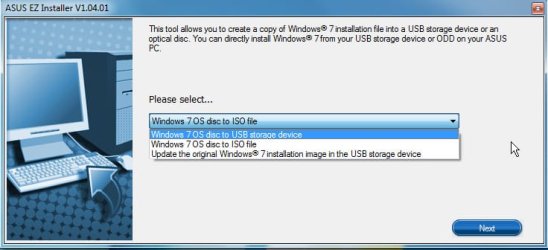
If you use ASUS-ez installer, you have to burrow down to get at the exe file:

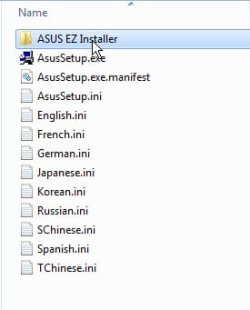
1. Extract the downloaded file SW_ASUS_EZ_Installer_W10_64_W7_64_VER10401_20190401R.zip to get this:

Then look inside the folder

asus-ez1.jpg

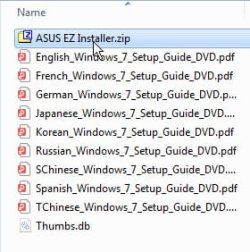
2. Then extract this zip file

asus-ez2.jpg

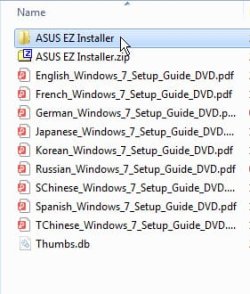
3. Then look inside the extracted folder

asus-ez3.jpg

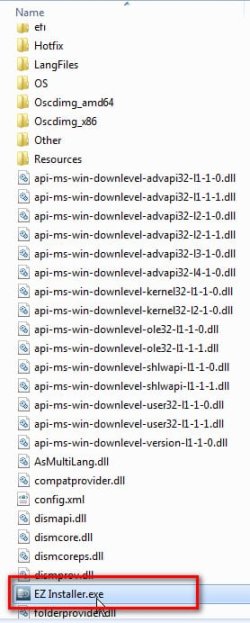
4. Then run this guy called EZInstaller.exe

asus-ez4.jpg

5. And you're off

asus-ez5.jpg
 

My Computers My Computers

System One System Two

  • Computer type
    PC/Desktop
    OS
    7 X64
    CPU
    i5 8400
    Motherboard
    gigabyte b365m ds3h
    Memory
    2x8gb 3200mhz
    Hard Drives
    various
    PSU
    pure power 11 400w cm
    Case
    Coolermaster
    Cooling
    cryorig m9i
  • Computer type
    PC/Desktop
    OS
    7x64
    CPU
    g5400
    Motherboard
    ga b365m ds3h
    Memory
    8gb ddr4 2400
    PSU
    xfx pro 450w
Here is a way to get your installation media up to date:
10 OCT 2019 includes "universal" usb3 and standard oem nvme drivers
7UPv37.zip
...
Greetings SIW2, thanks for your kind effort to keep this marvelous tool updated.
Have a couple of questions:
1. How can language packs be integrated? It seem there are two versions available, cab and msu. Would you happen to have any links to these?
2. Can DISM++ be run on the wim generated by this tool to pick up whatever updates that may have been omitted?
Many thanks and best regards,
Greeing SIW2.
Did you get a chance to look a this?
 

My Computer My Computer

Computer type
PC/Desktop
OS
Windows 7 Ultimate x86
It is much easier to use the installation media that is already the language you want.

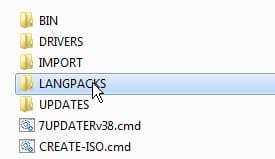
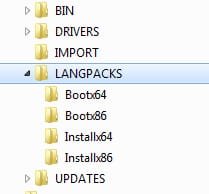
To include Language packs, place the cab files in the LANGPACKS folder before running 7UPv38.cmd

Example:

LANGPACKS\Bootx64\Microsoft-Windows-WinPE-LanguagePack_fr-fr.cab
LANGPACKS\Bootx64\WinPE-Setup-Client-Package_fr-fr.cab
LANGPACKS\Bootx64\winpe-setup_fr-fr.cab
LANGPACKS\Bootx64\WinPE-SRT-Package_fr-fr.cab

LANGPACKS\Installx64\Microsoft-Windows-Client-LanguagePack-fr-fr.cab


LANGPACKS.jpg

LANGPACKS2.jpg


Winpe langpacks are available as part of WAIK supplement https://www.microsoft.com/en-gb/download/details.aspx?id=5188. Wintoolkit and others can d/l the windows client pack and convert exe to cab
 
Last edited:

My Computers My Computers

System One System Two

  • Computer type
    PC/Desktop
    OS
    7 X64
    CPU
    i5 8400
    Motherboard
    gigabyte b365m ds3h
    Memory
    2x8gb 3200mhz
    Hard Drives
    various
    PSU
    pure power 11 400w cm
    Case
    Coolermaster
    Cooling
    cryorig m9i
  • Computer type
    PC/Desktop
    OS
    7x64
    CPU
    g5400
    Motherboard
    ga b365m ds3h
    Memory
    8gb ddr4 2400
    PSU
    xfx pro 450w
It is much easier to use the installation media that is already the language you want.

To include Language packs, place the cab files in the LANGPACKS folder before running 7UPv38.cmd

Example:

LANGPACKS\Bootx64\Microsoft-Windows-WinPE-LanguagePack_fr-fr.cab
LANGPACKS\Bootx64\WinPE-Setup-Client-Package_fr-fr.cab
LANGPACKS\Bootx64\winpe-setup_fr-fr.cab
LANGPACKS\Bootx64\WinPE-SRT-Package_fr-fr.cab

LANGPACKS\Installx64\Microsoft-Windows-Client-LanguagePack-fr-fr.cab


View attachment 409891

View attachment 409892


Winpe langpacks are available as part of WAIK supplement https://www.microsoft.com/en-gb/download/details.aspx?id=5188. Wintoolkit and others can d/l the windows client pack and convert exe to cab
That's most brilliant, SIW2. Much obliged.
Came across the following from a korean site. If one simply needs additional languages after new installation, does one just place the required cab files in the installx64 folder and ignore the bootx64?
mu_windows_7_sp1_language_pack_x64_dvd_619714 directory listing
Many thanks and best regards,
 

My Computer My Computer

Computer type
PC/Desktop
OS
Windows 7 Ultimate x86
I haven't tested, but I suspect the language you choose for setup.exe will be the one that is applied.

It might allow you choose at oobe stage if you don't use the standard windows setup.exe and instead use something else to apply the image e.g. winntsetup.

Another possibilty is to start with the DELL iso image. It includes several languages already.
 

My Computers My Computers

System One System Two

  • Computer type
    PC/Desktop
    OS
    7 X64
    CPU
    i5 8400
    Motherboard
    gigabyte b365m ds3h
    Memory
    2x8gb 3200mhz
    Hard Drives
    various
    PSU
    pure power 11 400w cm
    Case
    Coolermaster
    Cooling
    cryorig m9i
  • Computer type
    PC/Desktop
    OS
    7x64
    CPU
    g5400
    Motherboard
    ga b365m ds3h
    Memory
    8gb ddr4 2400
    PSU
    xfx pro 450w
It is much easier to use the installation media that is already the language you want.

To include Language packs, place the cab files in the LANGPACKS folder before running 7UPv38.cmd

Example:

LANGPACKS\Bootx64\Microsoft-Windows-WinPE-LanguagePack_fr-fr.cab
LANGPACKS\Bootx64\WinPE-Setup-Client-Package_fr-fr.cab
LANGPACKS\Bootx64\winpe-setup_fr-fr.cab
LANGPACKS\Bootx64\WinPE-SRT-Package_fr-fr.cab

LANGPACKS\Installx64\Microsoft-Windows-Client-LanguagePack-fr-fr.cab


View attachment 409891

View attachment 409892


Winpe langpacks are available as part of WAIK supplement https://www.microsoft.com/en-gb/download/details.aspx?id=5188. Wintoolkit and others can d/l the windows client pack and convert exe to cab
Greetings SIW2.
1. I downloaded the cabs from the mega link, and need some help with the placement of these files. Take for example zh-TW: can't find anything that would correspond to your "Microsoft-Windows-Client-LanguagePack-fr-fr.cab". So which files go to the bootx64 and installx64 folders?
Code:
WinPE-FontSupport-Package~31bf3856ad364e35~amd64~zh-TW~6.1.7601.17514.cab
Microsoft-Windows-WinPE-LanguagePack-Package~31bf3856ad364e35~amd64~zh-TW~6.1.7601.17514.cab
WinPE-Setup-Server-Package~31bf3856ad364e35~amd64~zh-TW~6.1.7601.17514.cab
WinPE-WMI-Package~31bf3856ad364e35~amd64~zh-TW~6.1.7601.17514.cab
WinPE-Setup-Client-Package~31bf3856ad364e35~amd64~zh-TW~6.1.7601.17514.cab
WinPE-Setup-Package~31bf3856ad364e35~amd64~zh-TW~6.1.7601.17514.cab
WinPE-SRT-Package~31bf3856ad364e35~amd64~zh-TW~6.1.7601.17514.cab
WinPE-Scripting-Package~31bf3856ad364e35~amd64~zh-TW~6.1.7601.17514.cab
WinPE-WDS-Tools-Package~31bf3856ad364e35~amd64~zh-TW~6.1.7601.17514.cab
2. Where does the "WinPE-FontSupport-Package.cab" file go to?
3. What's the procedure to include additional ttf fonts to the installation package?
Many thanks and best regards,
 

My Computer My Computer

Computer type
PC/Desktop
OS
Windows 7 Ultimate x86
If the cab contains the word WINPE it goes in the Langpacks\bootx64 folder.


The Microsoft-Windows-Client-LanguagePack goes in the LANGPACKS\Installx64 folder.

It is quite big. FR-FR is about 103mb. zh-HK will be bigger because of the fonts.

zh-TW Microsoft-Windows-Client-LanguagePack is hard to find. You can use zh-HK and set the system locale to zh-TW
Why one may not be able to find a zh-TW MUI language pack, and why that's okay...

You can convert exe to cab with this View attachment exe2cab.zip


Or you can use zh-TW installation media to begin with and then integrate English and whatever other languages you want

tw_windows_7_ultimate_with_sp1_x64_dvd_u_677414.iso
 
Last edited:

My Computers My Computers

System One System Two

  • Computer type
    PC/Desktop
    OS
    7 X64
    CPU
    i5 8400
    Motherboard
    gigabyte b365m ds3h
    Memory
    2x8gb 3200mhz
    Hard Drives
    various
    PSU
    pure power 11 400w cm
    Case
    Coolermaster
    Cooling
    cryorig m9i
  • Computer type
    PC/Desktop
    OS
    7x64
    CPU
    g5400
    Motherboard
    ga b365m ds3h
    Memory
    8gb ddr4 2400
    PSU
    xfx pro 450w
If the cab contains the word WINPE it goes in the Langpacks\bootx64 folder.


The Microsoft-Windows-Client-LanguagePack goes in the LANGPACKS\Installx64 folder.

It is quite big. FR-FR is about 103mb. zh-HK will be bigger because of the fonts.

zh-TW Microsoft-Windows-Client-LanguagePack is hard to find. You can use zh-HK and set the system locale to zh-TW
Why one may not be able to find a zh-TW MUI language pack, and why that's okay...

You can convert exe to cab with this View attachment 409914


Or you can use zh-TW installation media to begin with and then integrate English and whatever other languages you want

tw_windows_7_ultimate_with_sp1_x64_dvd_u_677414.iso


Greetings SIW2.

1. Didn't realise the language pack dvd was not complete. Here's a link to the missing part for those who may find it useful:
【Windows 7 SP1】Windows 7 SP1 台湾繁体语言包下载 – Linux网.com

2. If "WinPE-FontSupport-Package.cab" is placed in the boot64 folder, does it just get injected into the boo.wim? Will it get installed?

3. Can it be placed in the installed64 folder if such fonts are not require during setup?

4. Can the ttf fonts be copied to windows\fonts folder when the install.wim is stilled mounted?

Many thanks and best regards,
 

My Computer My Computer

Computer type
PC/Desktop
OS
Windows 7 Ultimate x86
2. If "WinPE-FontSupport-Package.cab" is placed in the boot64 folder, does it just get injected into the boo.wim? Will it get installed?

Obviously, it will be integrated into boot.wim and winre.wim.

3. Can it be placed in the installed64 folder if such fonts are not require during setup?

4. Can the ttf fonts be copied to windows\fonts folder when the install.wim is stilled mounted?

The way to find out is to try it.


I already advised the best way:
Or you can use zh-TW installation media to begin with and then integrate English and whatever other languages you want

tw_windows_7_ultimate_with_sp1_x64_dvd_u_677414.iso
 
Last edited:

My Computers My Computers

System One System Two

  • Computer type
    PC/Desktop
    OS
    7 X64
    CPU
    i5 8400
    Motherboard
    gigabyte b365m ds3h
    Memory
    2x8gb 3200mhz
    Hard Drives
    various
    PSU
    pure power 11 400w cm
    Case
    Coolermaster
    Cooling
    cryorig m9i
  • Computer type
    PC/Desktop
    OS
    7x64
    CPU
    g5400
    Motherboard
    ga b365m ds3h
    Memory
    8gb ddr4 2400
    PSU
    xfx pro 450w
Greetings SIW2, thanks for the v39.
1. Came across a few dism warning/error during boot.wim injection stage. Are these normal? Here are some samples:
Code:
...................
2019-10-31 15:02:38, Info                  DISM   DISM Provider Store: PID=4972 TID=4936 Connecting to the provider located at E:\7UPv39\amd64\DISM\SiloedPackageProvider.dll. - CDISMProviderStore::Internal_LoadProvider
2019-10-31 15:02:38, Warning               DISM   DISM Provider Store: PID=4972 TID=4936 Failed to load the provider: E:\7UPv39\amd64\DISM\FfuProvider.dll. - CDISMProviderStore::Internal_GetProvider(hr:0x8007007e)
2019-10-31 15:02:38, Info                  DISM   DISM Provider Store: PID=4972 TID=4936 Connecting to the provider located at E:\7UPv39\amd64\DISM\WimProvider.dll. - CDISMProviderStore::Internal_LoadProvider
2019-10-31 15:02:38, Info                  DISM   DISM Provider Store: PID=4972 TID=4936 Connecting to the provider located at E:\7UPv39\amd64\DISM\VHDProvider.dll. - CDISMProviderStore::Internal_LoadProvider
2019-10-31 15:02:38, Info                  DISM   DISM Provider Store: PID=4972 TID=4936 Connecting to the provider located at E:\7UPv39\amd64\DISM\ImagingProvider.dll. - CDISMProviderStore::Internal_LoadProvider
2019-10-31 15:02:38, Warning               DISM   DISM Provider Store: PID=4972 TID=4936 Failed to load the provider: E:\7UPv39\amd64\DISM\MetaDeployProvider.dll. - CDISMProviderStore::Internal_GetProvider(hr:0x8007007e)
.....
2019-10-31 15:02:38, Info                  DISM   DISM Provider Store: PID=4972 TID=4936 Getting the collection of providers from a local provider store type. - CDISMProviderStore::GetProviderCollection
[4972] ImageUnmarshallHandle: Reconstituting wim at E:\GRMCULXFRER_EN_DVDr\sources\boot.wim.
[4972] ImageUnmarshallHandle: Reconstituting wim at E:\GRMCULXFRER_EN_DVDr\sources\boot.wim.
2019-10-31 15:02:39, Error                 DISM   DISM Manager: PID=4972 TID=4936 Could not create the image session. The specified image is not in a valid state. - CDISMManager::ValidateDismTarget(hr:0xc1510115)
2019-10-31 15:02:39, Error                 DISM   DISM.EXE: Failed to verify the target image at 'E:\7UPv39\MOUNT'. HRESULT=C1510115
2019-10-31 15:02:39, Info                  DISM   DISM.EXE: Image session has been closed. Reboot required=no.
...............

2019-10-31 15:05:00, Info                  DISM   DISM.EXE: <----- Starting Dism.exe session ----->
2019-10-31 15:05:00, Info                  DISM   DISM.EXE: 
2019-10-31 15:05:00, Info                  DISM   DISM.EXE: Host machine information: OS Version=6.1.7601, Running architecture=amd64, Number of processors=4
2019-10-31 15:05:00, Info                  DISM   DISM.EXE: Dism.exe version: 10.0.18362.1
2019-10-31 15:05:00, Info                  DISM   DISM.EXE: Executing command line: "amd64\DISM\DISM.EXE"  /Unmount-Wim /MountDir:MOUNT /Commit
2019-10-31 15:05:00, Info                  DISM   DISM Provider Store: PID=1568 TID=1068 Getting the collection of providers from a local provider store type. - CDISMProviderStore::GetProviderCollection
2019-10-31 15:05:00, Info                  DISM   DISM Provider Store: PID=1568 TID=1068 Connecting to the provider located at E:\7UPv39\amd64\DISM\FolderProvider.dll. - CDISMProviderStore::Internal_LoadProvider
2019-10-31 15:05:00, Info                  DISM   DISM Provider Store: PID=1568 TID=1068 Connecting to the provider located at E:\7UPv39\amd64\DISM\SiloedPackageProvider.dll. - CDISMProviderStore::Internal_LoadProvider
2019-10-31 15:05:00, Warning               DISM   DISM Provider Store: PID=1568 TID=1068 Failed to load the provider: E:\7UPv39\amd64\DISM\FfuProvider.dll. - CDISMProviderStore::Internal_GetProvider(hr:0x8007007e)
2019-10-31 15:05:00, Info                  DISM   DISM Provider Store: PID=1568 TID=1068 Connecting to the provider located at E:\7UPv39\amd64\DISM\WimProvider.dll. - CDISMProviderStore::Internal_LoadProvider
2019-10-31 15:05:00, Info                  DISM   DISM Provider Store: PID=1568 TID=1068 Connecting to the provider located at E:\7UPv39\amd64\DISM\VHDProvider.dll. - CDISMProviderStore::Internal_LoadProvider
2019-10-31 15:05:00, Info                  DISM   DISM Provider Store: PID=1568 TID=1068 Connecting to the provider located at E:\7UPv39\amd64\DISM\ImagingProvider.dll. - CDISMProviderStore::Internal_LoadProvider
2019-10-31 15:05:00, Warning               DISM   DISM Provider Store: PID=1568 TID=1068 Failed to load the provider: E:\7UPv39\amd64\DISM\MetaDeployProvider.dll. - CDISMProviderStore::Internal_GetProvider(hr:0x8007007e)
2019-10-31 15:05:00, Info                  DISM   DISM.EXE: Got the collection of providers. Now enumerating them to build the command table.
...................
2019-10-31 15:05:00, Info                  DISM   DISM.EXE: Succesfully registered commands for the provider: GenericImagingManager.
[1568] ImageUnmarshallHandle: Reconstituting wim at E:\GRMCULXFRER_EN_DVDr\sources\boot.wim.
[1568] ImageUnmarshallHandle: Reconstituting wim at E:\GRMCULXFRER_EN_DVDr\sources\boot.wim.
[1568] ImageUnmarshallHandle: Reconstituting wim at E:\GRMCULXFRER_EN_DVDr\sources\boot.wim.
[1568] ImageUnmarshallHandle: Reconstituting wim at E:\GRMCULXFRER_EN_DVDr\sources\boot.wim.
[1568] ImageUnmarshallHandle: Reconstituting wim at E:\GRMCULXFRER_EN_DVDr\sources\boot.wim.
[1568] [0xc142011d] WIMCommitImageHandle:(1397)
2019-10-31 15:05:03, Error                 DISM   DISM WIM Provider: PID=1568 TID=1068 onecore\base\ntsetup\opktools\dism\providers\wimprovider\dll\wimimage.cpp:194 - CWimImage::Save(hr:0xc142011d)
2019-10-31 15:05:03, Error                 DISM   DISM WIM Provider: PID=1568 TID=1068 "Could not commit changes during unmount." - CWimImage::Unmount(hr:0xc142011d)
2019-10-31 15:05:03, Error                 DISM   DISM WIM Provider: PID=1568 TID=1068 onecore\base\ntsetup\opktools\dism\providers\wimprovider\dll\wimmanager.cpp:2650 - CWimManager::InternalOpUnmount(hr:0xc142011d)
2019-10-31 15:05:03, Error                 DISM   DISM WIM Provider: PID=1568 TID=1068 onecore\base\ntsetup\opktools\dism\providers\wimprovider\dll\wimmanager.cpp:4127 - CWimManager::InternalCmdUnmount(hr:0xc142011d)
2019-10-31 15:05:03, Error                 DISM   DISM WIM Provider: PID=1568 TID=1068 "Error executing command" - CWimManager::InternalExecuteCmd(hr:0xc142011d)
2019-10-31 15:05:03, Error                 DISM   DISM WIM Provider: PID=1568 TID=1068 onecore\base\ntsetup\opktools\dism\providers\wimprovider\dll\wimmanager.cpp:2122 - CWimManager::ExecuteCmdLine(hr:0xc142011d)
2019-10-31 15:05:03, Info                  DISM   DISM.EXE: Image session has been closed. Reboot required=no.
2019-10-31 15:05:03, Info                  DISM   DISM.EXE: 
2019-10-31 15:05:03, Info                  DISM   DISM.EXE: <----- Ending Dism.exe session ----->
.............
2019-10-31 15:05:03, Info                  DISM   DISM.EXE: <----- Starting Dism.exe session ----->
.......................
2019-10-31 15:05:03, Warning               DISM   DISM Provider Store: PID=2420 TID=4912 Failed to load the provider: E:\7UPv39\amd64\DISM\FfuProvider.dll. - CDISMProviderStore::Internal_GetProvider(hr:0x8007007e)
2019-10-31 15:05:03, Info                  DISM   DISM Provider Store: PID=2420 TID=4912 Connecting to the provider located at E:\7UPv39\amd64\DISM\WimProvider.dll. - CDISMProviderStore::Internal_LoadProvider
2019-10-31 15:05:03, Info                  DISM   DISM Provider Store: PID=2420 TID=4912 Connecting to the provider located at E:\7UPv39\amd64\DISM\VHDProvider.dll. - CDISMProviderStore::Internal_LoadProvider
2019-10-31 15:05:03, Info                  DISM   DISM Provider Store: PID=2420 TID=4912 Connecting to the provider located at E:\7UPv39\amd64\DISM\ImagingProvider.dll. - CDISMProviderStore::Internal_LoadProvider
2019-10-31 15:05:03, Warning               DISM   DISM Provider Store: PID=2420 TID=4912 Failed to load the provider: E:\7UPv39\amd64\DISM\MetaDeployProvider.dll. - CDISMProviderStore::Internal_GetProvider(hr:0x8007007e)
2019-10-31 15:05:03, Info                  DISM   DISM.EXE: Got the collection of providers. Now enumerating them to build the command table.
............................
[2420] ImageUnmarshallHandle: Reconstituting wim at E:\GRMCULXFRER_EN_DVDr\sources\boot.wim.
[2420] ImageUnmarshallHandle: Reconstituting wim at E:\GRMCULXFRER_EN_DVDr\sources\boot.wim.
[2420] [0x800706ba] RpcCommRemoveImage:(685): The RPC server is unavailable.
[2420] [0x800706ba] WIMUnmountImageHandle:(1648): The RPC server is unavailable.
[2420] [0x8007000e] StateStoreGetMountedImageWimbootEntries:(1285): Not enough storage is available to complete this operation.
[2420] [0x80004005] DeleteAndRestoreDirectory:(335): Unspecified error
[2420] [0xc1420117] DeleteAndRestoreDirectory:(336)
[2420] [0xc1420117] RestoreMountDirectory:(422)
[2420] [0xc1420117] WIMUnmountImageHandle:(1665)
[2420] [0x8144012d] 
2019-10-31 15:05:12, Warning               DISM   DISM WIM Provider: PID=2420 [WIMDeleteImageMounts:(844) -> Error unmounting image.] E:\7UPv39\mount (HRESULT=0xC1420117) - CWimManager::WimProviderMsgLogCallback
[2420] ImageUnmarshallHandle: Reconstituting wim at E:\GRMCULXFRER_EN_DVDr\sources\boot.wim.
[2420] Badly formatted drive string: D:\.  This drive will not be cleaned.
[2420] Badly formatted drive string: F:\.  This drive will not be cleaned.
2019-10-31 15:05:13, Info                  DISM   DISM.EXE: Image session has been closed. Reboot required=no.
2019-10-31 15:05:13, Info                  DISM   DISM.EXE: 
2019-10-31 15:05:13, Info                  DISM   DISM.EXE: <----- Ending Dism.exe session ----->

2. Not sure if the dotnet and vc++ are installed. Placed the file vcredist_x64_Win7_20190716.WA in the same directory as 7UPDATERv39.cmd, but didn't find any vc++ stuff under installed updates after installation. Suggestion?

Many thanks and best regards,
 

My Computer My Computer

Computer type
PC/Desktop
OS
Windows 7 Ultimate x86
vcredist_x64_Win7_20190716.WA is integrated by the Simplix pack. If you don't use Simplix, the .wa files also won't be integrated.

What were you doing to get those dism messages?
 

My Computers My Computers

System One System Two

  • Computer type
    PC/Desktop
    OS
    7 X64
    CPU
    i5 8400
    Motherboard
    gigabyte b365m ds3h
    Memory
    2x8gb 3200mhz
    Hard Drives
    various
    PSU
    pure power 11 400w cm
    Case
    Coolermaster
    Cooling
    cryorig m9i
  • Computer type
    PC/Desktop
    OS
    7x64
    CPU
    g5400
    Motherboard
    ga b365m ds3h
    Memory
    8gb ddr4 2400
    PSU
    xfx pro 450w
I ran 7updater to integrate drivers, mainly the ones provided by the tool. The error messages appeared towards the end on boot.wim injection. Haven't tried simplix.
The system is w7x64 ultimate.
 

My Computer My Computer

Computer type
PC/Desktop
OS
Windows 7 Ultimate x86
I don't know what those dism errors are. Obviously something to do with MS dism. Nothing to do with the 7Up script.

New version 7UPv40 on first post. Lang packs need to be in the root of the LANGPACK\Bootx64 and LANGPACK\Installx64 folder.
They won't be integrated if they are all in subfolders.

Well done for locating the tw lang files :-)
 

My Computers My Computers

System One System Two

  • Computer type
    PC/Desktop
    OS
    7 X64
    CPU
    i5 8400
    Motherboard
    gigabyte b365m ds3h
    Memory
    2x8gb 3200mhz
    Hard Drives
    various
    PSU
    pure power 11 400w cm
    Case
    Coolermaster
    Cooling
    cryorig m9i
  • Computer type
    PC/Desktop
    OS
    7x64
    CPU
    g5400
    Motherboard
    ga b365m ds3h
    Memory
    8gb ddr4 2400
    PSU
    xfx pro 450w
New version on first post 7UPv41.

Fixed issue with spaces in distribution folder.
Fixed issue with dism switching.
Added latest Samsung nvme drivers v3.2.0.1910
Optionally downloads latest SIMPLIX:
Code:
Added KB3125574-v4-x86-x64 with telemetry disabled (replaced individual KBs)
Added KB4523206-x86-x64 (replace KB4516655-x86-x64)
Added KB4525235-x86-x64 with disabling telemetry and processor verification (replaces KB4519976-x86-x64)
Certificate renewal similar to KB931125 and KB2917500 for November 2019

Now many fewer KBs utlised for the update session

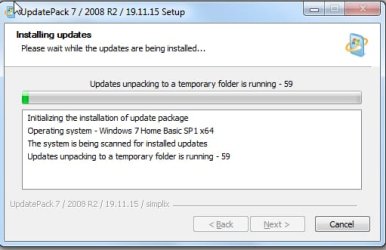
new-simplix.jpg

The number of installed updates - 59
Total installation time of UpdatePack - 49:29
 
Last edited:

My Computers My Computers

System One System Two

  • Computer type
    PC/Desktop
    OS
    7 X64
    CPU
    i5 8400
    Motherboard
    gigabyte b365m ds3h
    Memory
    2x8gb 3200mhz
    Hard Drives
    various
    PSU
    pure power 11 400w cm
    Case
    Coolermaster
    Cooling
    cryorig m9i
  • Computer type
    PC/Desktop
    OS
    7x64
    CPU
    g5400
    Motherboard
    ga b365m ds3h
    Memory
    8gb ddr4 2400
    PSU
    xfx pro 450w
I'm trying to make notes how to make a new installation disk for a fresh install on a new PC. (W7 Pro x64)

I have downloaded the 7UPv41 zip file to a folder on a different PC. In that same folder I have placed the Updates MS nvme Win7x64 zip file. What is my next step? Put a W7 ISO in the same folder? I have ordered a new DVD RW burner that does Dual Layer so I can get everything onto one DVD for the installation. What else do I need to put in that folder for burning?
 

My Computer My Computer

Computer type
PC/Desktop
Computer Manufacturer/Model Number
Home built Asus
OS
Windows 7 Pro 64bit
CPU
Intel® Core™ i3 Processor 3.7ghz
Motherboard
Asus Intel Prime H270-Pro LGA 1151 ATX
Memory
Crucial (2x8GB) DDR4-2400
Graphics Card(s)
on board
Monitor(s) Displays
BENQ GL2450HE (24 inch)
Screen Resolution
1980 x 1080
Hard Drives
C drive is SSD Crucial 500gb mostly for the OS
PSU
Corsair CX750
Case
A big black one
Cooling
Cooler Master Hyper TX3i on the processor
Keyboard
Logitech k2700 wireless
Mouse
Logitech M575 wireless trackball
Internet Speed
Just under about 7mb/s on a good day
Antivirus
Avira Free
Browser
Opera, Firefox, Chrome, and Supermium
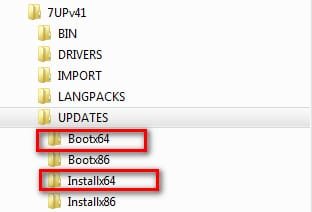
If you want to integrate the MS nvme UPDATES, they need to be extracted from the zip and copied into the UPDATES\Bootx64 folder AND into the UPDATES\Installx64 folder.

2019-11-26_053045.jpg

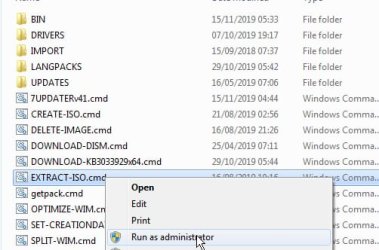
Then you need to extract the iso file onto your hard drive. You can run the extract-iso.cmd to do it for you.

2019-11-26_053230.jpg


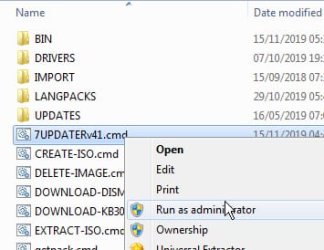
Then you need to rt click and run as administrator on the 7UPDATER.cmd

2019-11-26_053302.jpg
 

My Computers My Computers

System One System Two

  • Computer type
    PC/Desktop
    OS
    7 X64
    CPU
    i5 8400
    Motherboard
    gigabyte b365m ds3h
    Memory
    2x8gb 3200mhz
    Hard Drives
    various
    PSU
    pure power 11 400w cm
    Case
    Coolermaster
    Cooling
    cryorig m9i
  • Computer type
    PC/Desktop
    OS
    7x64
    CPU
    g5400
    Motherboard
    ga b365m ds3h
    Memory
    8gb ddr4 2400
    PSU
    xfx pro 450w
The SIMPLIX pack has been changed since I uploaded 7UPv41.

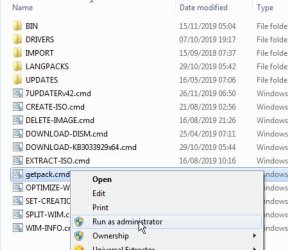
You can either download the new 7UPv42.zip or you can just replace the getpack.cmd in 7Upv41 with this one View attachment getpack.zip


If you like, you can then run getpack.cmd first, before running 7UPDATER.cmd.

2019-11-26_065138.jpg

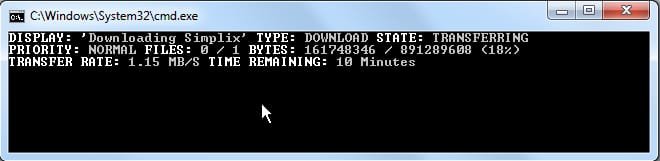
It might take several minutes to download the pack, depending on your connection speed. Quite slow for metoday.

2019-11-26_062108.jpg
 
Last edited:

My Computers My Computers

System One System Two

  • Computer type
    PC/Desktop
    OS
    7 X64
    CPU
    i5 8400
    Motherboard
    gigabyte b365m ds3h
    Memory
    2x8gb 3200mhz
    Hard Drives
    various
    PSU
    pure power 11 400w cm
    Case
    Coolermaster
    Cooling
    cryorig m9i
  • Computer type
    PC/Desktop
    OS
    7x64
    CPU
    g5400
    Motherboard
    ga b365m ds3h
    Memory
    8gb ddr4 2400
    PSU
    xfx pro 450w
New version on first post 7UPv41.
Fixed issue with spaces in distribution folder.
Fixed issue with dism switching.
Added latest Samsung nvme drivers v3.2.0.1910
Optionally downloads latest SIMPLIX:
Code:
...
Added [COLOR=Red][U][B]KB4523206-x86-x64[/B][/U][/COLOR] (replace KB4516655-x86-x64)
...
...
Thanks for v41.
Boot64.efi is missing in the updated 32bit versin. Not supported?
 

My Computer My Computer

Computer type
PC/Desktop
OS
Windows 7 Ultimate x86
Obviously, there is no bootx64.efi in 32 bit win7.
 

My Computers My Computers

System One System Two

  • Computer type
    PC/Desktop
    OS
    7 X64
    CPU
    i5 8400
    Motherboard
    gigabyte b365m ds3h
    Memory
    2x8gb 3200mhz
    Hard Drives
    various
    PSU
    pure power 11 400w cm
    Case
    Coolermaster
    Cooling
    cryorig m9i
  • Computer type
    PC/Desktop
    OS
    7x64
    CPU
    g5400
    Motherboard
    ga b365m ds3h
    Memory
    8gb ddr4 2400
    PSU
    xfx pro 450w
If you want to integrate the MS nvme UPDATES, they need to be extracted from the zip and copied into the UPDATES\Bootx64 folder AND into the UPDATES\Installx64 folder.

View attachment 410262

Then you need to extract the iso file onto your hard drive. You can run the extract-iso.cmd to do it for you.

View attachment 410263


Then you need to rt click and run as administrator on the 7UPDATER.cmd

View attachment 410264
I am sinking further and further into the unknown with this. I am just trying to get everything in one place to simplify a fresh install. I don't want to upset my running PC by changing anything in it or running updaters. How about if I just forget about including the MS nvme updates in my install disk. I can't remember why I would need them anyway, I don't know what they are but I read somewhere they were necessary? Something to do with needing them if I wanted to install on an SSD. I can leave out the SSD and use a spinner instead if that will simplify things. I'm not after a super fast gaming rig, just used for normal domestic stuff and internet. I tried on another thread here to ask someone to put together a disk for me but was informed that is against the rules. It seems like unless people have extensive knowledge the highly technical advice here (although well meant and helpful) is far too complicated. I had to ask what a root drive is a few days ago. I'm up against this sort of jargon in every post I read.
 

My Computer My Computer

Computer type
PC/Desktop
Computer Manufacturer/Model Number
Home built Asus
OS
Windows 7 Pro 64bit
CPU
Intel® Core™ i3 Processor 3.7ghz
Motherboard
Asus Intel Prime H270-Pro LGA 1151 ATX
Memory
Crucial (2x8GB) DDR4-2400
Graphics Card(s)
on board
Monitor(s) Displays
BENQ GL2450HE (24 inch)
Screen Resolution
1980 x 1080
Hard Drives
C drive is SSD Crucial 500gb mostly for the OS
PSU
Corsair CX750
Case
A big black one
Cooling
Cooler Master Hyper TX3i on the processor
Keyboard
Logitech k2700 wireless
Mouse
Logitech M575 wireless trackball
Internet Speed
Just under about 7mb/s on a good day
Antivirus
Avira Free
Browser
Opera, Firefox, Chrome, and Supermium
Back
Top