Update your Win 7 installation media

@squaremusics

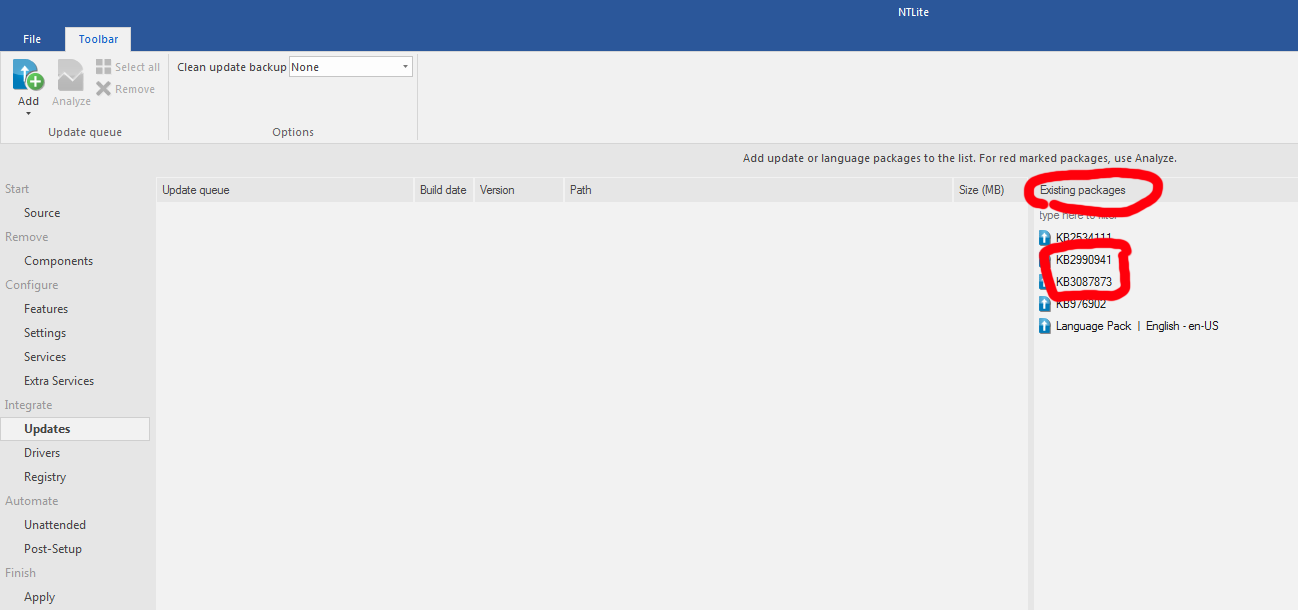
Did you install the two nvme updates ?

WD has no proprietary drivers, it needs the windows 7 nvme updates.

Attached to the bottom of my post.

I guess yes, cuz I'm using NTLite to build the iso.

HIj3SXd.png
 

My Computer My Computer

Computer type
PC/Desktop
OS
windows 7 ultimate x64
I manage to get my WD Black SN850 detected by my current Windows 7 (that installed on Samsung 970 EVO + got Samsung NVME proprietary driver), but the test speed are below average, badly. It's around 2350MB/s while the Samsung 970 EVO got 3500+MB/s.

This WD Black SN850 is PCI gen 4, but the speed is below 970 EVO which is gen 3. Although my motherboard Asus Maximus IX Apex only support PCI gen 3, I suppose at least it would compete at around 3500MB/s because this WD was suppose to run maxed at 7000MB/s. Is it because it doesn't have proprietary drivers?

And I'm still can't install windows 7 on this WD
 

My Computer My Computer

Computer type
PC/Desktop
OS
windows 7 ultimate x64
And I'm still can't install windows 7 on this WD

Have you correctly integrated the nvme updates into the installation media? Those two need to be integrated into installation media in a different way from other updates.

It is done correctly by my updater at the start of this thread.

OR, after you have integrated the updates into the running win7 on the samsung disk, you could try cloning it to the WD.
 

My Computers My Computers

System One System Two

  • Computer type
    PC/Desktop
    OS
    7 X64
    CPU
    i5 8400
    Motherboard
    gigabyte b365m ds3h
    Memory
    2x8gb 3200mhz
    Hard Drives
    various
    PSU
    pure power 11 400w cm
    Case
    Coolermaster
    Cooling
    cryorig m9i
  • Computer type
    PC/Desktop
    OS
    7x64
    CPU
    g5400
    Motherboard
    ga b365m ds3h
    Memory
    8gb ddr4 2400
    PSU
    xfx pro 450w
Have you correctly integrated the nvme updates into the installation media? Those two need to be integrated into installation media in a different way from other updates.

It is done correctly by my updater at the start of this thread.

Hmm. I'm not so sure. I'm really noob in this kind of PC problem :(

I tried your way on the first page, all seems ok, until the last chapter where i need to select which windows i want to use, i select 4 (ultimate), then it's closed. Nothing else or more steps. Is that correct?

OR, after you have integrated the updates into the running win7 on the samsung disk, you could try cloning it to the WD.

I tried to run the windows 7 from WD that I cloned it from Samsung, it run until the Windows logo, then BSOD, auto restart, logo, BSOD again, restart ... looping like that. I will try to integrate the update again, probably I forgot 2 years ago (that Samsung).
 
Last edited:

My Computer My Computer

Computer type
PC/Desktop
OS
windows 7 ultimate x64
After you select the edition, it should ask to accept the license, then it should ask where you want to install to.
 

My Computers My Computers

System One System Two

  • Computer type
    PC/Desktop
    OS
    7 X64
    CPU
    i5 8400
    Motherboard
    gigabyte b365m ds3h
    Memory
    2x8gb 3200mhz
    Hard Drives
    various
    PSU
    pure power 11 400w cm
    Case
    Coolermaster
    Cooling
    cryorig m9i
  • Computer type
    PC/Desktop
    OS
    7x64
    CPU
    g5400
    Motherboard
    ga b365m ds3h
    Memory
    8gb ddr4 2400
    PSU
    xfx pro 450w
After you select the edition, it should ask to accept the license, then it should ask where you want to install to.

If it's closed suddenly, then it means it crashed. I'll try again from beginning.

EDIT : i tried it again from beginning, its good until all 4 completed, but never ask for license then auto closed ...


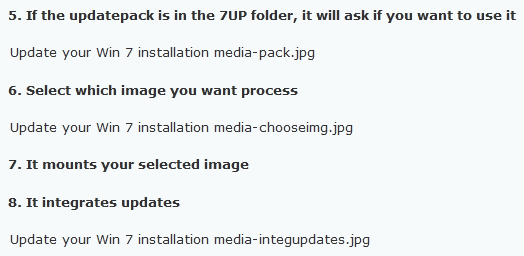
5. If the updatepack is in the 7UP folder, it will ask if you want to use it

View attachment 412322

6. Select which image you want process

View attachment 412323

7. It mounts your selected image

8. It integrates updates

View attachment 410939


Can you remake the tutorial / upload the picture again? The original post doesn't show the picture, only file name :


EDIT : nevermind, i quote it, preview and click the attachment to see the pictures. Dunno why it only shows file name only before, but it's ok.
 
Last edited:

My Computer My Computer

Computer type
PC/Desktop
OS
windows 7 ultimate x64
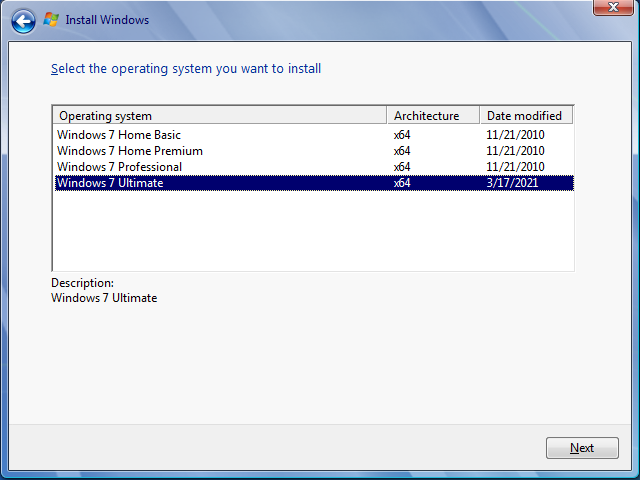
OK. It seems I'm successfully make the new ISO with your program. Although it doesn't give me confirmation "to accept the license" as you said, but it's said "complete" and then auto close afterwards.

I run the ISO, it's says date modified March 17, 2021 so it's success I guess?

we8ZHXH.png


Using Rufus, I get my USB flashdrive as bootable patched Win7 and manage to install it on the new WD Black SN850 (FINALLY), although before that I got many trouble, including not detected, burn the files into CD (but not boot able, stupid me) and many others. But for whatever reason, finally can and it works. Thank you so much for the tutorials.
 

My Computer My Computer

Computer type
PC/Desktop
OS
windows 7 ultimate x64
:-)
 

My Computers My Computers

System One System Two

  • Computer type
    PC/Desktop
    OS
    7 X64
    CPU
    i5 8400
    Motherboard
    gigabyte b365m ds3h
    Memory
    2x8gb 3200mhz
    Hard Drives
    various
    PSU
    pure power 11 400w cm
    Case
    Coolermaster
    Cooling
    cryorig m9i
  • Computer type
    PC/Desktop
    OS
    7x64
    CPU
    g5400
    Motherboard
    ga b365m ds3h
    Memory
    8gb ddr4 2400
    PSU
    xfx pro 450w
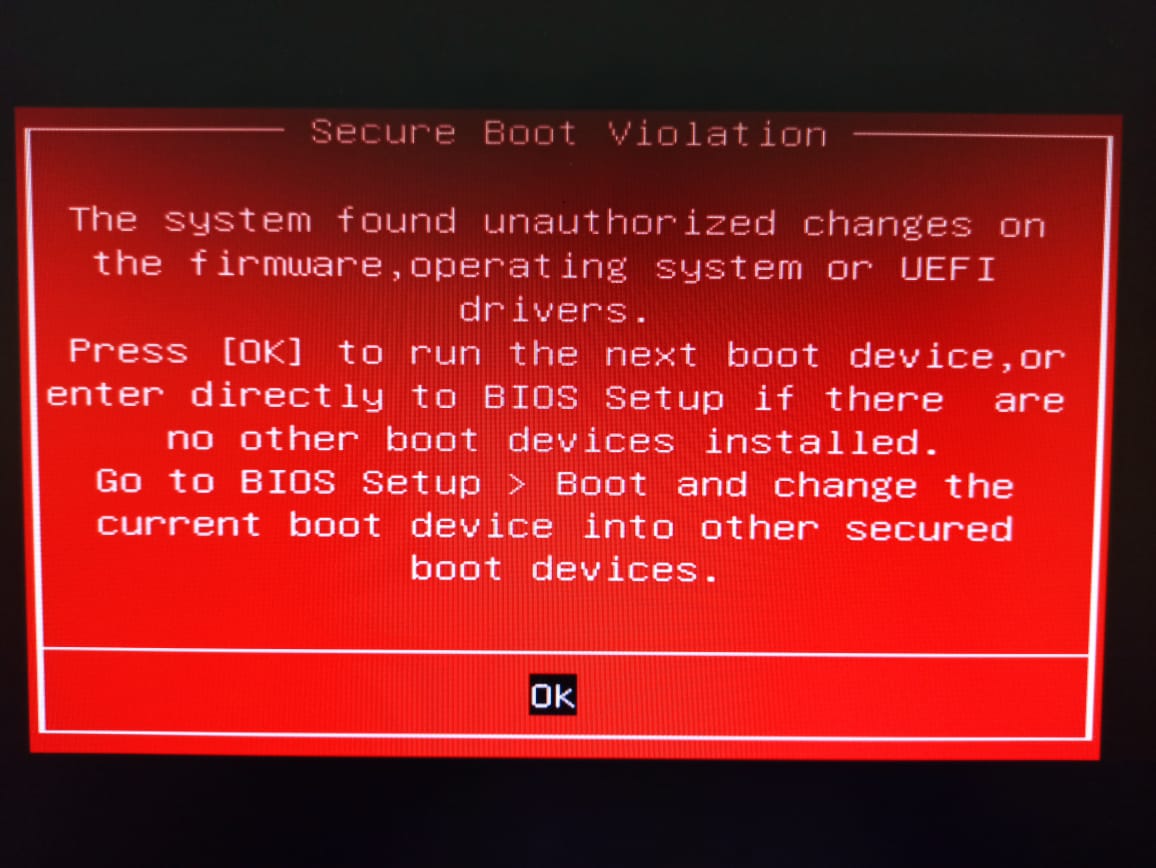
jh8jNfk.jpg


Final conflict installing Win 7 on new NVME

Some people specially ASUS motherboard's users may got this Secure Boot Violation warning sign when loading Win7. I look for info and ASUS website told me about how they protect the user's system from malware attack and by default enabling this feature (Microsoft Secure Boot). But since Win7 doesn't support Secure Boot
(Secure Boot Overview | Microsoft Docs) update system with KB3133977, the system detect the loader OS not consistent and as result boot failed. The fix is easy, only go to BIOS (advanced mode), select boot, then secure boot, OS type change from Windows UEFI Mode to Other OS, save then restart. That's all the final problem and all is good now.

I never had this problem with my Samsung 970 EVO before, probably because I never updated my win7 :p
 

My Computer My Computer

Computer type
PC/Desktop
OS
windows 7 ultimate x64
Yes, that is correct, win7 doesn't support secure boot and it must be turned off.
 
Last edited:

My Computers My Computers

System One System Two

  • Computer type
    PC/Desktop
    OS
    7 X64
    CPU
    i5 8400
    Motherboard
    gigabyte b365m ds3h
    Memory
    2x8gb 3200mhz
    Hard Drives
    various
    PSU
    pure power 11 400w cm
    Case
    Coolermaster
    Cooling
    cryorig m9i
  • Computer type
    PC/Desktop
    OS
    7x64
    CPU
    g5400
    Motherboard
    ga b365m ds3h
    Memory
    8gb ddr4 2400
    PSU
    xfx pro 450w
Yes, that is correct, win7 doesn't support secure boot and it must be turned off.

Also, I want to ask a question that (kinda) not related with this topic :

I've been few days in win7 and it's stable. Today I decided to update it into the latest one, around 100-200 important patches. After restart, windows not stable, i mean, i open program and it doesn't show up, even start menu freeze. Ultimately I'm using safe mode to rolled back into before update and it's stable again. I tried to update again, and it's unstable again, so (once again) I roll back into before update. I guess there's some fked up update there by microsoft that causing the windows freezed I guess?
 

My Computer My Computer

Computer type
PC/Desktop
OS
windows 7 ultimate x64
A lot of people use simplix, doesn't seem to cause any problems.
 

My Computers My Computers

System One System Two

  • Computer type
    PC/Desktop
    OS
    7 X64
    CPU
    i5 8400
    Motherboard
    gigabyte b365m ds3h
    Memory
    2x8gb 3200mhz
    Hard Drives
    various
    PSU
    pure power 11 400w cm
    Case
    Coolermaster
    Cooling
    cryorig m9i
  • Computer type
    PC/Desktop
    OS
    7x64
    CPU
    g5400
    Motherboard
    ga b365m ds3h
    Memory
    8gb ddr4 2400
    PSU
    xfx pro 450w
Hi SIW2,

Does it include kb971033, the WAT update, if so can i just extract it. looks like MS have pulled it, and i want to include it in the pinned Genuine tutorial.


Roy
 

My Computer My Computer

Computer type
PC/Desktop
Computer Manufacturer/Model Number
medionl/Aspire 6930G/acer x55a
OS
W7 home premium 32bit/W7HP 64bit/w10 tp insider ring
CPU
E5300 dual core
Motherboard
medion MS7366
Memory
3gb
Graphics Card(s)
Nvidia Geforce 7100 Nforce 630i
Monitor(s) Displays
avixc
Internet Speed
n (isp resticted to 72)
Antivirus
mse/pands
Browser
palemoon
Other Info
Belkin Fd7050 n USB using Railink RT2870 drivers, more upto date

My Computers My Computers

System One System Two

  • Computer type
    PC/Desktop
    OS
    7 X64
    CPU
    i5 8400
    Motherboard
    gigabyte b365m ds3h
    Memory
    2x8gb 3200mhz
    Hard Drives
    various
    PSU
    pure power 11 400w cm
    Case
    Coolermaster
    Cooling
    cryorig m9i
  • Computer type
    PC/Desktop
    OS
    7x64
    CPU
    g5400
    Motherboard
    ga b365m ds3h
    Memory
    8gb ddr4 2400
    PSU
    xfx pro 450w
I appear to be having a strange issue, and I'm not sure if it even worked at all. The 7Updater60 (I tried the 57 as well) seems to close instantly the moment I point it to the extracted ISO on the USB stick I'm using. Opening cmd as admin and opening the file itself brings up the error message with something among the lines of ""Can't open E:\sources\boot.wim" read-only: Invalid argument. Exiting with error code 47: failed to open a file. x86_64 was unexpected at the time"


I'm quite certain none of the files are read-only, they're freshly extracted.


I tested this on two Windows 7 computers with the same results. Am I missing a critical step? What's going on? :(
 

My Computer My Computer

Computer type
PC/Desktop
OS
Windows 7 Professional x64
I appear to be having a strange issue, and I'm not sure if it even worked at all. The 7Updater60 (I tried the 57 as well) seems to close instantly the moment I point it to the extracted ISO on the USB stick I'm using. Opening cmd as admin and opening the file itself brings up the error message with something among the lines of ""Can't open E:\sources\boot.wim" read-only: Invalid argument. Exiting with error code 47: failed to open a file. x86_64 was unexpected at the time"


I'm quite certain none of the files are read-only, they're freshly extracted.


I tested this on two Windows 7 computers with the same results. Am I missing a critical step? What's going on? :(

My suggestion is to not integrate the updates to the installation files as it will make it huge. Another reason is that it is updated regularly.
Run Simplix after win 7 installation and with no yellow remarks on device manager (all drivers installed).
 
Last edited:

My Computers My Computers

System One System Two

  • Computer type
    PC/Desktop
    Computer Manufacturer/Model Number
    custom build
    OS
    Windows 7 HP 64
    CPU
    i5 6600K - 800MHz to 4200MHz
    Motherboard
    GA-Z170-HD3P
    Memory
    4+4G GSkill DDR4 3000
    Graphics Card(s)
    IG - Intel 530
    Monitor(s) Displays
    Samsung 226BW
    Screen Resolution
    1680x1050
    Hard Drives
    (1) -1 SM951 – 128GB M.2 AHCI PCIe SSD drive for Windows 7 and Lubuntu
    (2) -1 WD SATA 3 - 1T for Data
    (3) -1 WD SATA 3 - 1T for backup
    PSU
    Thermaltake 450W TR2 gold
    Keyboard
    Old and good Chicony mechanical keyboard
    Mouse
    Logitech mX performance - 9 buttons (had to disable some)
    Internet Speed
    500Mb/s
    Browser
    Firefox 64
    Other Info
    TinyWall firewall
  • Computer type
    Laptop
    System Manufacturer/Model Number
    Asus Q550LF
    OS
    Windows 7 Pro
    CPU
    i7-4500U 800MHz to 3.0GHz
    Motherboard
    Asus Q550LF
    Memory
    (4+4)G DDR3 1600
    Graphics Card(s)
    IG intel 4400 + NVIDIA GeForce GT 745M
    Sound Card
    Realtek
    Monitor(s) Displays
    LG Display LP156WF4-SPH1
    Screen Resolution
    1920 x 1080
    Hard Drives
    BX500 120G SSD for Windows and programs +
    1T HDD for data
    Internet Speed
    500 Mb/s
    Browser
    Firefox
    Other Info
    TinyWall firewall
I appear to be having a strange issue, and I'm not sure if it even worked at all. The 7Updater60 (I tried the 57 as well) seems to close instantly the moment I point it to the extracted ISO on the USB stick I'm using. Opening cmd as admin and opening the file itself brings up the error message with something among the lines of ""Can't open E:\sources\boot.wim" read-only: Invalid argument. Exiting with error code 47: failed to open a file. x86_64 was unexpected at the time"


I'm quite certain none of the files are read-only, they're freshly extracted.


I tested this on two Windows 7 computers with the same results. Am I missing a critical step? What's going on? :(
I dont know what you are doing wrong.

Unless you need the drivers (usb3, storage and nvme) in the installation media, you could just run simnplix after you have installed win7.
 

My Computers My Computers

System One System Two

  • Computer type
    PC/Desktop
    OS
    7 X64
    CPU
    i5 8400
    Motherboard
    gigabyte b365m ds3h
    Memory
    2x8gb 3200mhz
    Hard Drives
    various
    PSU
    pure power 11 400w cm
    Case
    Coolermaster
    Cooling
    cryorig m9i
  • Computer type
    PC/Desktop
    OS
    7x64
    CPU
    g5400
    Motherboard
    ga b365m ds3h
    Memory
    8gb ddr4 2400
    PSU
    xfx pro 450w
I appear to be having a strange issue, and I'm not sure if it even worked at all. The 7Updater60 (I tried the 57 as well) seems to close instantly the moment I point it to the extracted ISO on the USB stick I'm using. Opening cmd as admin and opening the file itself brings up the error message with something among the lines of ""Can't open E:\sources\boot.wim" read-only: Invalid argument. Exiting with error code 47: failed to open a file. x86_64 was unexpected at the time"


I'm quite certain none of the files are read-only, they're freshly extracted.


I tested this on two Windows 7 computers with the same results. Am I missing a critical step? What's going on? :(

I had the same issue, eventually after trying a few times to update the USB stick directly I extracted the ISO to a hard drive directory, ran the updater then copied the modified folders across to the USB stick.
 

My Computer My Computer

Computer type
PC/Desktop
OS
7 pro 64
1st post oif the thread:

3. Copy and paste your installation media to a hard drive.
 

My Computers My Computers

System One System Two

  • Computer type
    PC/Desktop
    OS
    7 X64
    CPU
    i5 8400
    Motherboard
    gigabyte b365m ds3h
    Memory
    2x8gb 3200mhz
    Hard Drives
    various
    PSU
    pure power 11 400w cm
    Case
    Coolermaster
    Cooling
    cryorig m9i
  • Computer type
    PC/Desktop
    OS
    7x64
    CPU
    g5400
    Motherboard
    ga b365m ds3h
    Memory
    8gb ddr4 2400
    PSU
    xfx pro 450w
Back
Top