Update your Win 7 installation media

Hi all,
Can anyone help me ,
I've done lot of usb bootable drives,
None have worked,
Not sure what to do,
Got a win7 video card, used 7updater
Then dism++,
Then rufus to create them,
Only get the windows starting with the colored circles,
By chance could it be because I need to do something with the Seagate 1tb sata
in Order to get it to work ?
Any suggestions would be appreciated,
I followed the directions on the post for windows starting, did that still nothing works
Thanks
 

My Computers My Computers

System One System Two

  • Computer type
    PC/Desktop
    Computer Manufacturer/Model Number
    Lenovo - IdeaCentre 5i Desktop - Intel Core i5 - 8GB Memory - 1TB Hard Drive -
    OS
    windows 10 pro 64 bit
    CPU
    Intel(R) core(TM) i5-10400 CPU @ 2.90GHz
    Motherboard
    lenovo 370 A
    Memory
    Micron 8.00 GB
    Graphics Card(s)
    Intel(R) UHD Graphics 630 / Nvidia GeForce GT 1030
    Sound Card
    built in Intel corp
    Hard Drives
    Seagate sata - 1 terabyte /
  • Computer type
    PC/Desktop
    System Manufacturer/Model Number
    Dell OptiPlex 7020
    OS
    win 7 /win 10 dual boot
    CPU
    intel core i5 4570 (3.2Ghz)
    Memory
    32 Gb
    Graphics Card(s)
    Intel HD Graphics 4600
    Monitor(s) Displays
    Dell
    Hard Drives
    SSD 512Gb

My Computers My Computers

System One System Two

  • Computer type
    PC/Desktop
    OS
    7 X64
    CPU
    i5 8400
    Motherboard
    gigabyte b365m ds3h
    Memory
    2x8gb 3200mhz
    Hard Drives
    various
    PSU
    pure power 11 400w cm
    Case
    Coolermaster
    Cooling
    cryorig m9i
  • Computer type
    PC/Desktop
    OS
    7x64
    CPU
    g5400
    Motherboard
    ga b365m ds3h
    Memory
    8gb ddr4 2400
    PSU
    xfx pro 450w
SIW2
Thanks will try in the am

- - - Updated - - -

okay it let me get to install then it said the disk is mbr not gpt , but it loaded your pe tools,
trying to find out how to format gpt

IMG_20220117_152858472 s.jpg

now using cmd prompt t clean and format gpt ,
fingers crossed

- - - Updated - - -

Hi ,anyone able to help

I got to the install windows , didnt add 4. (Optional) Copy UefiSeven.verbose to the same directory to enable verbose mode
from Pierre Kim / UefiSeven . GitLab 1. Prepare Windows 7 installation USB Drive2. Rename bootx64.efi at (UsbDrive)\EFI\Boot\ to bootx64.original.efi3. Unpack bootx64.efi from UefiSeven archive and copy it to (UsbDrive)\EFI\Boot\4. (Optional) Copy UefiSeven.verbose to the same directory to enable verbose mode5. Install Windows6. Rename bootmgfw.efi at (HDD)\EFI\Microsoft\Boot\ to bootmgfw.original.efi7. Copy UefiSeven bootx64.efi to (HDD)\EFI\Microsoft\Boot\bootmgfw.efi using EFI shell
stuck here

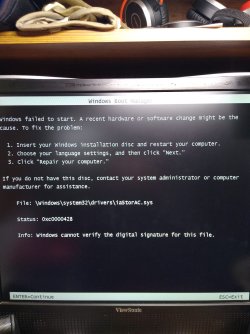
now this is what i get,
IMG_20220119_120545163 s.jpg

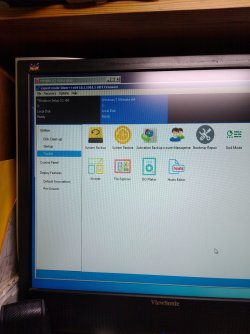
But i can get into dism and all ohters , not sure waht to do next
IMG_20220119_121834246 s.jpg


thanks almost there . any help really appreciated
When i click repair computer not sure what to do
Plus why 2 versions of windows 7 on there, can i delete one and how please
 
Last edited:

My Computers My Computers

System One System Two

  • Computer type
    PC/Desktop
    Computer Manufacturer/Model Number
    Lenovo - IdeaCentre 5i Desktop - Intel Core i5 - 8GB Memory - 1TB Hard Drive -
    OS
    windows 10 pro 64 bit
    CPU
    Intel(R) core(TM) i5-10400 CPU @ 2.90GHz
    Motherboard
    lenovo 370 A
    Memory
    Micron 8.00 GB
    Graphics Card(s)
    Intel(R) UHD Graphics 630 / Nvidia GeForce GT 1030
    Sound Card
    built in Intel corp
    Hard Drives
    Seagate sata - 1 terabyte /
  • Computer type
    PC/Desktop
    System Manufacturer/Model Number
    Dell OptiPlex 7020
    OS
    win 7 /win 10 dual boot
    CPU
    intel core i5 4570 (3.2Ghz)
    Memory
    32 Gb
    Graphics Card(s)
    Intel HD Graphics 4600
    Monitor(s) Displays
    Dell
    Hard Drives
    SSD 512Gb
X: is the ram you are booted into when running winpe. It is not on the hard disk.

If you booted the winpe in efi mode and used windows setup.exe to do the installation, the target hard disk should be gpt with a small esp partition.

The idea is to rename bootmgfw.efi in esp partition \EFI\Microsoft\Boot\ to bootmgfw.original.efi

then copy UefiSeven bootx64.efi to esp partition \EFI\Microsoft\Boot\ and rename it to bootmgfw.efi

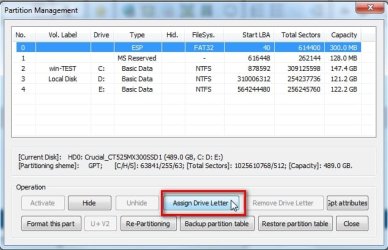
To be able to see the esp partition you can give it a letter using diskpart command or bootice . It will be a small 100mb fat32 partition.

Then after the esp partition has a letter , you can start notepad , at top right of notepad click File >Save and you can use the notepad browse window to copy and rename.

- - - Updated - - -

Your esp partition will be 100mb fat32 if created by win7 setup

bootice-add-letter1.jpg

bootice-add-letter2.jpg
 

My Computers My Computers

System One System Two

  • Computer type
    PC/Desktop
    OS
    7 X64
    CPU
    i5 8400
    Motherboard
    gigabyte b365m ds3h
    Memory
    2x8gb 3200mhz
    Hard Drives
    various
    PSU
    pure power 11 400w cm
    Case
    Coolermaster
    Cooling
    cryorig m9i
  • Computer type
    PC/Desktop
    OS
    7x64
    CPU
    g5400
    Motherboard
    ga b365m ds3h
    Memory
    8gb ddr4 2400
    PSU
    xfx pro 450w
SIW2

okay will try now
fingers crossed

did that assigned it A: then did the rest .
then where on hdd do i pit , i dont have C:\EFI\Microsoft\Boot
only C:/EFI/Boot

- - - Updated - - -
unable to do this 6. Rename bootmgfw.efi at (HDD)\EFI\Microsoft\Boot\ to bootmgfw.original.efi7. Copy UefiSeven bootx64.efi to (HDD)\EFI\Microsoft\Boot\bootmgfw.efi using EFI shell


so i put them there C:/EFI/Boot, still says no operating system found on C:/drive
any ideas

would i copy Microsoft folder from esp to hdd
 
Last edited:

My Computers My Computers

System One System Two

  • Computer type
    PC/Desktop
    Computer Manufacturer/Model Number
    Lenovo - IdeaCentre 5i Desktop - Intel Core i5 - 8GB Memory - 1TB Hard Drive -
    OS
    windows 10 pro 64 bit
    CPU
    Intel(R) core(TM) i5-10400 CPU @ 2.90GHz
    Motherboard
    lenovo 370 A
    Memory
    Micron 8.00 GB
    Graphics Card(s)
    Intel(R) UHD Graphics 630 / Nvidia GeForce GT 1030
    Sound Card
    built in Intel corp
    Hard Drives
    Seagate sata - 1 terabyte /
  • Computer type
    PC/Desktop
    System Manufacturer/Model Number
    Dell OptiPlex 7020
    OS
    win 7 /win 10 dual boot
    CPU
    intel core i5 4570 (3.2Ghz)
    Memory
    32 Gb
    Graphics Card(s)
    Intel HD Graphics 4600
    Monitor(s) Displays
    Dell
    Hard Drives
    SSD 512Gb
If you are using a recent Lenovo with 10th gen cpu, I would be surprised if it supports booting the os in bios mode.

If you want install in efi mode, boot the installation media in efi mode.

according to you screenshot of dism++ in THIS POST you have booted the media in efi mode
at the top left of the picture dism++says UEFI Firmware
https://www.sevenforums.com/attachm...stallation-media-img_20220119_121834246-s.jpg


Have a look at the hd with bootice and assign a drive letter to the esp partition.

The efi folder should be on the 100mb fat32 esp partition, not on the windows partition. You will have to give it a drive letter to see it
 

My Computers My Computers

System One System Two

  • Computer type
    PC/Desktop
    OS
    7 X64
    CPU
    i5 8400
    Motherboard
    gigabyte b365m ds3h
    Memory
    2x8gb 3200mhz
    Hard Drives
    various
    PSU
    pure power 11 400w cm
    Case
    Coolermaster
    Cooling
    cryorig m9i
  • Computer type
    PC/Desktop
    OS
    7x64
    CPU
    g5400
    Motherboard
    ga b365m ds3h
    Memory
    8gb ddr4 2400
    PSU
    xfx pro 450w
got it , yes you told me to try [FONT=&quot]uefiseven[/FONT] and it actually has worked at least further than ever before

i think i messed up a bunch,
i did it all on bootice, then notepad, added C:\efi\microsoft\boot
then put them where they suppose to be, since i couldnt find \micorsoft\ boot on my C: local disk hdd

did i do it wrong per there website was suppose to do this on the hdd after doing on esp which im assuming is my pc hdd

unable to do this 6. Rename bootmgfw.efi at (HDD)\EFI\Microsoft\Boot\ to bootmgfw.original.efi7. Copy UefiSeven bootx64.efi to (HDD)\EFI\Microsoft\Boot\bootmgfw.efi using EFI shell


any help appreciated all most there i thinkl
 

My Computers My Computers

System One System Two

  • Computer type
    PC/Desktop
    Computer Manufacturer/Model Number
    Lenovo - IdeaCentre 5i Desktop - Intel Core i5 - 8GB Memory - 1TB Hard Drive -
    OS
    windows 10 pro 64 bit
    CPU
    Intel(R) core(TM) i5-10400 CPU @ 2.90GHz
    Motherboard
    lenovo 370 A
    Memory
    Micron 8.00 GB
    Graphics Card(s)
    Intel(R) UHD Graphics 630 / Nvidia GeForce GT 1030
    Sound Card
    built in Intel corp
    Hard Drives
    Seagate sata - 1 terabyte /
  • Computer type
    PC/Desktop
    System Manufacturer/Model Number
    Dell OptiPlex 7020
    OS
    win 7 /win 10 dual boot
    CPU
    intel core i5 4570 (3.2Ghz)
    Memory
    32 Gb
    Graphics Card(s)
    Intel HD Graphics 4600
    Monitor(s) Displays
    Dell
    Hard Drives
    SSD 512Gb
unable to do this 6. Rename bootmgfw.efi at (HDD)\EFI\Microsoft\Boot\ to bootmgfw.original.efi7. Copy UefiSeven bootx64.efi to (HDD)\EFI\Microsoft\Boot\bootmgfw.efi using EFI shell


What is C: ?

Is that the partition that windows is installed onto?

The efi folder does not belong there. It belongs on the esp partition.

You cannot see the esp partition until you give it a drive letter. Only partition tools can see it.

That is why you need to use bootice to give the esp partition a drive letter

Then you can use the notepad browse window and browse to the esp partition , which now has a letter.

You dont need to use efishell, because you can copy and rename in notepad browse window.
 

My Computers My Computers

System One System Two

  • Computer type
    PC/Desktop
    OS
    7 X64
    CPU
    i5 8400
    Motherboard
    gigabyte b365m ds3h
    Memory
    2x8gb 3200mhz
    Hard Drives
    various
    PSU
    pure power 11 400w cm
    Case
    Coolermaster
    Cooling
    cryorig m9i
  • Computer type
    PC/Desktop
    OS
    7x64
    CPU
    g5400
    Motherboard
    ga b365m ds3h
    Memory
    8gb ddr4 2400
    PSU
    xfx pro 450w
SIW2

got it I think , I will start all over again in the am ,

i misunderstood there website, so the esp is the partition on the hdd , that i saw and named A: with bootice,
It doesn't go on the actual C; drive where windows is installed
i figured out how to copy and rename in notepad browse window.

Thanks

fingers crossed again, and thanks again you have alot of patience

- - - Updated - - -
SIW2
​Ive done everything you said exactly

The idea is to rename bootmgfw.efi in esp partition \EFI\Microsoft\Boot\ to bootmgfw.original.efi

then copy UefiSeven bootx64.efi to esp partition \EFI\Microsoft\Boot\ and rename it to bootmgfw.efi

To be able to see the esp partition you can give it a letter using diskpart command or bootice . It will be a small 100mb fat32 partition.

Then after the esp partition has a letter , you can start notepad , at top right of notepad click File >Save and you can use the notepad browse window to copy and rename.

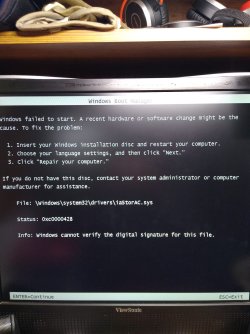
But still getting this error , ? any ideas ?


- - - Updated - - -

- - - Updated - - -

Also this is in dism , not sure what i need to do
View attachment 420852

IMG_20220121_120616117 s.jpg
 

Attachments

  • IMG_20220119_120545163 s.jpg
    IMG_20220119_120545163 s.jpg
    262.9 KB · Views: 2

My Computers My Computers

System One System Two

  • Computer type
    PC/Desktop
    Computer Manufacturer/Model Number
    Lenovo - IdeaCentre 5i Desktop - Intel Core i5 - 8GB Memory - 1TB Hard Drive -
    OS
    windows 10 pro 64 bit
    CPU
    Intel(R) core(TM) i5-10400 CPU @ 2.90GHz
    Motherboard
    lenovo 370 A
    Memory
    Micron 8.00 GB
    Graphics Card(s)
    Intel(R) UHD Graphics 630 / Nvidia GeForce GT 1030
    Sound Card
    built in Intel corp
    Hard Drives
    Seagate sata - 1 terabyte /
  • Computer type
    PC/Desktop
    System Manufacturer/Model Number
    Dell OptiPlex 7020
    OS
    win 7 /win 10 dual boot
    CPU
    intel core i5 4570 (3.2Ghz)
    Memory
    32 Gb
    Graphics Card(s)
    Intel HD Graphics 4600
    Monitor(s) Displays
    Dell
    Hard Drives
    SSD 512Gb
You could try deleting the iastorac.inf 17.9.6
 

My Computers My Computers

System One System Two

  • Computer type
    PC/Desktop
    OS
    7 X64
    CPU
    i5 8400
    Motherboard
    gigabyte b365m ds3h
    Memory
    2x8gb 3200mhz
    Hard Drives
    various
    PSU
    pure power 11 400w cm
    Case
    Coolermaster
    Cooling
    cryorig m9i
  • Computer type
    PC/Desktop
    OS
    7x64
    CPU
    g5400
    Motherboard
    ga b365m ds3h
    Memory
    8gb ddr4 2400
    PSU
    xfx pro 450w
Thanks for quick reply
can i do that in dism, the one that is booted to i mean, its yours on my usb drive

now it says msnvme.sys instead of iastori**
 

My Computers My Computers

System One System Two

  • Computer type
    PC/Desktop
    Computer Manufacturer/Model Number
    Lenovo - IdeaCentre 5i Desktop - Intel Core i5 - 8GB Memory - 1TB Hard Drive -
    OS
    windows 10 pro 64 bit
    CPU
    Intel(R) core(TM) i5-10400 CPU @ 2.90GHz
    Motherboard
    lenovo 370 A
    Memory
    Micron 8.00 GB
    Graphics Card(s)
    Intel(R) UHD Graphics 630 / Nvidia GeForce GT 1030
    Sound Card
    built in Intel corp
    Hard Drives
    Seagate sata - 1 terabyte /
  • Computer type
    PC/Desktop
    System Manufacturer/Model Number
    Dell OptiPlex 7020
    OS
    win 7 /win 10 dual boot
    CPU
    intel core i5 4570 (3.2Ghz)
    Memory
    32 Gb
    Graphics Card(s)
    Intel HD Graphics 4600
    Monitor(s) Displays
    Dell
    Hard Drives
    SSD 512Gb

My Computers My Computers

System One System Two

  • Computer type
    PC/Desktop
    OS
    7 X64
    CPU
    i5 8400
    Motherboard
    gigabyte b365m ds3h
    Memory
    2x8gb 3200mhz
    Hard Drives
    various
    PSU
    pure power 11 400w cm
    Case
    Coolermaster
    Cooling
    cryorig m9i
  • Computer type
    PC/Desktop
    OS
    7x64
    CPU
    g5400
    Motherboard
    ga b365m ds3h
    Memory
    8gb ddr4 2400
    PSU
    xfx pro 450w
did that already didnt work, just froze,

okay now different error msnvme.sys
 

My Computers My Computers

System One System Two

  • Computer type
    PC/Desktop
    Computer Manufacturer/Model Number
    Lenovo - IdeaCentre 5i Desktop - Intel Core i5 - 8GB Memory - 1TB Hard Drive -
    OS
    windows 10 pro 64 bit
    CPU
    Intel(R) core(TM) i5-10400 CPU @ 2.90GHz
    Motherboard
    lenovo 370 A
    Memory
    Micron 8.00 GB
    Graphics Card(s)
    Intel(R) UHD Graphics 630 / Nvidia GeForce GT 1030
    Sound Card
    built in Intel corp
    Hard Drives
    Seagate sata - 1 terabyte /
  • Computer type
    PC/Desktop
    System Manufacturer/Model Number
    Dell OptiPlex 7020
    OS
    win 7 /win 10 dual boot
    CPU
    intel core i5 4570 (3.2Ghz)
    Memory
    32 Gb
    Graphics Card(s)
    Intel HD Graphics 4600
    Monitor(s) Displays
    Dell
    Hard Drives
    SSD 512Gb
If disabling driver signing enforcement doesnt work, you can try deleting the msnvme driver.
 

My Computers My Computers

System One System Two

  • Computer type
    PC/Desktop
    OS
    7 X64
    CPU
    i5 8400
    Motherboard
    gigabyte b365m ds3h
    Memory
    2x8gb 3200mhz
    Hard Drives
    various
    PSU
    pure power 11 400w cm
    Case
    Coolermaster
    Cooling
    cryorig m9i
  • Computer type
    PC/Desktop
    OS
    7x64
    CPU
    g5400
    Motherboard
    ga b365m ds3h
    Memory
    8gb ddr4 2400
    PSU
    xfx pro 450w
okay will try now
 

My Computers My Computers

System One System Two

  • Computer type
    PC/Desktop
    Computer Manufacturer/Model Number
    Lenovo - IdeaCentre 5i Desktop - Intel Core i5 - 8GB Memory - 1TB Hard Drive -
    OS
    windows 10 pro 64 bit
    CPU
    Intel(R) core(TM) i5-10400 CPU @ 2.90GHz
    Motherboard
    lenovo 370 A
    Memory
    Micron 8.00 GB
    Graphics Card(s)
    Intel(R) UHD Graphics 630 / Nvidia GeForce GT 1030
    Sound Card
    built in Intel corp
    Hard Drives
    Seagate sata - 1 terabyte /
  • Computer type
    PC/Desktop
    System Manufacturer/Model Number
    Dell OptiPlex 7020
    OS
    win 7 /win 10 dual boot
    CPU
    intel core i5 4570 (3.2Ghz)
    Memory
    32 Gb
    Graphics Card(s)
    Intel HD Graphics 4600
    Monitor(s) Displays
    Dell
    Hard Drives
    SSD 512Gb
It is not required as you should already have the nvme updates installed.
 

My Computers My Computers

System One System Two

  • Computer type
    PC/Desktop
    OS
    7 X64
    CPU
    i5 8400
    Motherboard
    gigabyte b365m ds3h
    Memory
    2x8gb 3200mhz
    Hard Drives
    various
    PSU
    pure power 11 400w cm
    Case
    Coolermaster
    Cooling
    cryorig m9i
  • Computer type
    PC/Desktop
    OS
    7x64
    CPU
    g5400
    Motherboard
    ga b365m ds3h
    Memory
    8gb ddr4 2400
    PSU
    xfx pro 450w
that pc doesnt have a ssd

what in dism would that be under
 

My Computers My Computers

System One System Two

  • Computer type
    PC/Desktop
    Computer Manufacturer/Model Number
    Lenovo - IdeaCentre 5i Desktop - Intel Core i5 - 8GB Memory - 1TB Hard Drive -
    OS
    windows 10 pro 64 bit
    CPU
    Intel(R) core(TM) i5-10400 CPU @ 2.90GHz
    Motherboard
    lenovo 370 A
    Memory
    Micron 8.00 GB
    Graphics Card(s)
    Intel(R) UHD Graphics 630 / Nvidia GeForce GT 1030
    Sound Card
    built in Intel corp
    Hard Drives
    Seagate sata - 1 terabyte /
  • Computer type
    PC/Desktop
    System Manufacturer/Model Number
    Dell OptiPlex 7020
    OS
    win 7 /win 10 dual boot
    CPU
    intel core i5 4570 (3.2Ghz)
    Memory
    32 Gb
    Graphics Card(s)
    Intel HD Graphics 4600
    Monitor(s) Displays
    Dell
    Hard Drives
    SSD 512Gb
What machine are you installing win7 on?
 

My Computers My Computers

System One System Two

  • Computer type
    PC/Desktop
    OS
    7 X64
    CPU
    i5 8400
    Motherboard
    gigabyte b365m ds3h
    Memory
    2x8gb 3200mhz
    Hard Drives
    various
    PSU
    pure power 11 400w cm
    Case
    Coolermaster
    Cooling
    cryorig m9i
  • Computer type
    PC/Desktop
    OS
    7x64
    CPU
    g5400
    Motherboard
    ga b365m ds3h
    Memory
    8gb ddr4 2400
    PSU
    xfx pro 450w
the lenovo

Computer Type: PC/Desktop
System Manufacturer/Model Number: Lenovo - IdeaCentre 5i Desktop - Intel Core i5 - 8GB Memory - 1TB Hard Drive -
OS: windows 7 Ultimate 64 bit
CPU: Intel(R) core(TM) i5-10400 CPU @ 2.90GHz
Motherboard: lenovo 370 A
Memory: Micron 8.00 GB
Graphics Card: Nvidia GeForce GT 1030
Sound Card: built in Intel corp
Hard Drives: Seagate sata - 1 terabyte / WD sata internal - 1 Terabyte
Other Info: trying to install windows 7 internally and have windows 10 on a portable external drive


- - - Updated - - -

there is a ton of nmve in dism++ in storage controllers , should i remove them all

I didnt install them at all, did the 7up updater do that with simplix
 
Last edited:

My Computers My Computers

System One System Two

  • Computer type
    PC/Desktop
    Computer Manufacturer/Model Number
    Lenovo - IdeaCentre 5i Desktop - Intel Core i5 - 8GB Memory - 1TB Hard Drive -
    OS
    windows 10 pro 64 bit
    CPU
    Intel(R) core(TM) i5-10400 CPU @ 2.90GHz
    Motherboard
    lenovo 370 A
    Memory
    Micron 8.00 GB
    Graphics Card(s)
    Intel(R) UHD Graphics 630 / Nvidia GeForce GT 1030
    Sound Card
    built in Intel corp
    Hard Drives
    Seagate sata - 1 terabyte /
  • Computer type
    PC/Desktop
    System Manufacturer/Model Number
    Dell OptiPlex 7020
    OS
    win 7 /win 10 dual boot
    CPU
    intel core i5 4570 (3.2Ghz)
    Memory
    32 Gb
    Graphics Card(s)
    Intel HD Graphics 4600
    Monitor(s) Displays
    Dell
    Hard Drives
    SSD 512Gb
No, there are only a couple that are unsigned.
 

My Computers My Computers

System One System Two

  • Computer type
    PC/Desktop
    OS
    7 X64
    CPU
    i5 8400
    Motherboard
    gigabyte b365m ds3h
    Memory
    2x8gb 3200mhz
    Hard Drives
    various
    PSU
    pure power 11 400w cm
    Case
    Coolermaster
    Cooling
    cryorig m9i
  • Computer type
    PC/Desktop
    OS
    7x64
    CPU
    g5400
    Motherboard
    ga b365m ds3h
    Memory
    8gb ddr4 2400
    PSU
    xfx pro 450w
Back
Top