Update your Win 7 installation media

My Computers My Computers

System One System Two

  • Computer type
    PC/Desktop
    Computer Manufacturer/Model Number
    custom build
    OS
    Windows 7 HP 64
    CPU
    i5 6600K - 800MHz to 4200MHz
    Motherboard
    GA-Z170-HD3P
    Memory
    4+4G GSkill DDR4 3000
    Graphics Card(s)
    IG - Intel 530
    Monitor(s) Displays
    Samsung 226BW
    Screen Resolution
    1680x1050
    Hard Drives
    (1) -1 SM951 – 128GB M.2 AHCI PCIe SSD drive for Windows 7 and Lubuntu
    (2) -1 WD SATA 3 - 1T for Data
    (3) -1 WD SATA 3 - 1T for backup
    PSU
    Thermaltake 450W TR2 gold
    Keyboard
    Old and good Chicony mechanical keyboard
    Mouse
    Logitech mX performance - 9 buttons (had to disable some)
    Internet Speed
    500Mb/s
    Browser
    Firefox 64
    Other Info
    TinyWall firewall
  • Computer type
    Laptop
    System Manufacturer/Model Number
    Asus Q550LF
    OS
    Windows 7 Pro
    CPU
    i7-4500U 800MHz to 3.0GHz
    Motherboard
    Asus Q550LF
    Memory
    (4+4)G DDR3 1600
    Graphics Card(s)
    IG intel 4400 + NVIDIA GeForce GT 745M
    Sound Card
    Realtek
    Monitor(s) Displays
    LG Display LP156WF4-SPH1
    Screen Resolution
    1920 x 1080
    Hard Drives
    BX500 120G SSD for Windows and programs +
    1T HDD for data
    Internet Speed
    500 Mb/s
    Browser
    Firefox
    Other Info
    TinyWall firewall
Creating an iso from a win 7 PT-BR it didn't find boot\en-us\bootsect.exe.mui (listed in bootorder.txt) as it has boot\PT-BR\bootsect.exe.mui.

Is there a way to look for boot\*\bootsect.exe.mui?
 

My Computers My Computers

System One System Two

  • Computer type
    PC/Desktop
    Computer Manufacturer/Model Number
    custom build
    OS
    Windows 7 HP 64
    CPU
    i5 6600K - 800MHz to 4200MHz
    Motherboard
    GA-Z170-HD3P
    Memory
    4+4G GSkill DDR4 3000
    Graphics Card(s)
    IG - Intel 530
    Monitor(s) Displays
    Samsung 226BW
    Screen Resolution
    1680x1050
    Hard Drives
    (1) -1 SM951 – 128GB M.2 AHCI PCIe SSD drive for Windows 7 and Lubuntu
    (2) -1 WD SATA 3 - 1T for Data
    (3) -1 WD SATA 3 - 1T for backup
    PSU
    Thermaltake 450W TR2 gold
    Keyboard
    Old and good Chicony mechanical keyboard
    Mouse
    Logitech mX performance - 9 buttons (had to disable some)
    Internet Speed
    500Mb/s
    Browser
    Firefox 64
    Other Info
    TinyWall firewall
  • Computer type
    Laptop
    System Manufacturer/Model Number
    Asus Q550LF
    OS
    Windows 7 Pro
    CPU
    i7-4500U 800MHz to 3.0GHz
    Motherboard
    Asus Q550LF
    Memory
    (4+4)G DDR3 1600
    Graphics Card(s)
    IG intel 4400 + NVIDIA GeForce GT 745M
    Sound Card
    Realtek
    Monitor(s) Displays
    LG Display LP156WF4-SPH1
    Screen Resolution
    1920 x 1080
    Hard Drives
    BX500 120G SSD for Windows and programs +
    1T HDD for data
    Internet Speed
    500 Mb/s
    Browser
    Firefox
    Other Info
    TinyWall firewall
You could do a text substitution using gsar.exe. (gsar.exe is already in the BIN folder )

If bootorder.txt contains the line boot\en-US\bootsect.exe.mui
you can change it to the wim language using something like this:

Code:
for /f "tokens=3 delims=: " %%i in ('bin\wimlib-imagex.exe info "%WIMDir%\sources\install.wim" 1 ^| find /i "Default"') do set wimlang=%%i
echo.
rem check it - use $ each side of variable to check we aren't picking up any spaces
echo.
echo wim language is $%wimlang%$
echo.
pause

"BIN\gsar" -b  -o -sen-US -r%wimlang% "BIN\bootorder.txt" 

pause
rem have a look at bootorder.txt to see if has changed properly

notepad "BIN\bootorder.txt"

pause
rem to reset bootorder to original after creating iso.

"BIN\gsar" -b  -o -s%wimlang% -ren-US "BIN\bootorder.txt"

Alternatively, you could write the bootorder.txt from 7updater.cmd file, after finding the language of the wim.
 
Last edited:

My Computers My Computers

System One System Two

  • Computer type
    PC/Desktop
    OS
    7 X64
    CPU
    i5 8400
    Motherboard
    gigabyte b365m ds3h
    Memory
    2x8gb 3200mhz
    Hard Drives
    various
    PSU
    pure power 11 400w cm
    Case
    Coolermaster
    Cooling
    cryorig m9i
  • Computer type
    PC/Desktop
    OS
    7x64
    CPU
    g5400
    Motherboard
    ga b365m ds3h
    Memory
    8gb ddr4 2400
    PSU
    xfx pro 450w
I inserted a the modified string on Create-iso.cmd

Instead of modify the original BIN\bootorder.txt, I made a copy to the a temp folder, change language and used Temp\bootorder.txt, the on :CreateIso%WIMARCH%

Had to add -i to the string (in bootorder.txt is en-us)
"BIN\gsar" -b -i -o -sen-US -r%wimlang% "Temp\bootorder.txt"

Thanks
 

My Computers My Computers

System One System Two

  • Computer type
    PC/Desktop
    Computer Manufacturer/Model Number
    custom build
    OS
    Windows 7 HP 64
    CPU
    i5 6600K - 800MHz to 4200MHz
    Motherboard
    GA-Z170-HD3P
    Memory
    4+4G GSkill DDR4 3000
    Graphics Card(s)
    IG - Intel 530
    Monitor(s) Displays
    Samsung 226BW
    Screen Resolution
    1680x1050
    Hard Drives
    (1) -1 SM951 – 128GB M.2 AHCI PCIe SSD drive for Windows 7 and Lubuntu
    (2) -1 WD SATA 3 - 1T for Data
    (3) -1 WD SATA 3 - 1T for backup
    PSU
    Thermaltake 450W TR2 gold
    Keyboard
    Old and good Chicony mechanical keyboard
    Mouse
    Logitech mX performance - 9 buttons (had to disable some)
    Internet Speed
    500Mb/s
    Browser
    Firefox 64
    Other Info
    TinyWall firewall
  • Computer type
    Laptop
    System Manufacturer/Model Number
    Asus Q550LF
    OS
    Windows 7 Pro
    CPU
    i7-4500U 800MHz to 3.0GHz
    Motherboard
    Asus Q550LF
    Memory
    (4+4)G DDR3 1600
    Graphics Card(s)
    IG intel 4400 + NVIDIA GeForce GT 745M
    Sound Card
    Realtek
    Monitor(s) Displays
    LG Display LP156WF4-SPH1
    Screen Resolution
    1920 x 1080
    Hard Drives
    BX500 120G SSD for Windows and programs +
    1T HDD for data
    Internet Speed
    500 Mb/s
    Browser
    Firefox
    Other Info
    TinyWall firewall
On the main script you have
::for /f "tokens=1,2 delims=- skip=1" %%a in ('bin\ConvertDateHex.exe /d%ndat% /t22:26:11') Do set "HP=%%a"& set "LP=%%b"

Is :: always Rem or it can be a cmd?

You extract data from UpdatePack7R2-*.exe
for /f "tokens=1-2 delims=-" %%a in ('dir /b /a-d "%Simplix%\UpdatePack7R2-*.exe"') do set dat=%%~nb & set PACKNAM="%Simplix%\%%a-%%b"
set "mes=%dat:~3,2%" & set "den=%dat:~6,2%"
if "%mes:~1,1%"=="." (set "mes=0%dat:~3,1%"& set den=%dat:~5,2%)
set "ndat=%den%.%mes%.20%dat:~0,2%"

Then in
:home
REM if not updatepack date use current date
IF %hp% NEQ 0 ( GOTO :NEXTHOME )
for /f "tokens=1,2 delims=- skip=1" %%a in ('bin\ConvertDateHex.exe /C') Do set "HP=%%a"& set "LP=%%b"
echo.

Can you please explain, in English, what you do?
 

My Computers My Computers

System One System Two

  • Computer type
    PC/Desktop
    Computer Manufacturer/Model Number
    custom build
    OS
    Windows 7 HP 64
    CPU
    i5 6600K - 800MHz to 4200MHz
    Motherboard
    GA-Z170-HD3P
    Memory
    4+4G GSkill DDR4 3000
    Graphics Card(s)
    IG - Intel 530
    Monitor(s) Displays
    Samsung 226BW
    Screen Resolution
    1680x1050
    Hard Drives
    (1) -1 SM951 – 128GB M.2 AHCI PCIe SSD drive for Windows 7 and Lubuntu
    (2) -1 WD SATA 3 - 1T for Data
    (3) -1 WD SATA 3 - 1T for backup
    PSU
    Thermaltake 450W TR2 gold
    Keyboard
    Old and good Chicony mechanical keyboard
    Mouse
    Logitech mX performance - 9 buttons (had to disable some)
    Internet Speed
    500Mb/s
    Browser
    Firefox 64
    Other Info
    TinyWall firewall
  • Computer type
    Laptop
    System Manufacturer/Model Number
    Asus Q550LF
    OS
    Windows 7 Pro
    CPU
    i7-4500U 800MHz to 3.0GHz
    Motherboard
    Asus Q550LF
    Memory
    (4+4)G DDR3 1600
    Graphics Card(s)
    IG intel 4400 + NVIDIA GeForce GT 745M
    Sound Card
    Realtek
    Monitor(s) Displays
    LG Display LP156WF4-SPH1
    Screen Resolution
    1920 x 1080
    Hard Drives
    BX500 120G SSD for Windows and programs +
    1T HDD for data
    Internet Speed
    500 Mb/s
    Browser
    Firefox
    Other Info
    TinyWall firewall
:-)
 

My Computers My Computers

System One System Two

  • Computer type
    PC/Desktop
    OS
    7 X64
    CPU
    i5 8400
    Motherboard
    gigabyte b365m ds3h
    Memory
    2x8gb 3200mhz
    Hard Drives
    various
    PSU
    pure power 11 400w cm
    Case
    Coolermaster
    Cooling
    cryorig m9i
  • Computer type
    PC/Desktop
    OS
    7x64
    CPU
    g5400
    Motherboard
    ga b365m ds3h
    Memory
    8gb ddr4 2400
    PSU
    xfx pro 450w
On the main script you have
::for /f "tokens=1,2 delims=- skip=1" %%a in ('bin\ConvertDateHex.exe /d%ndat% /t22:26:11') Do set "HP=%%a"& set "LP=%%b"


Can you please explain, in English, what you do?


The purpose is to change the date that shows when installing. It is not essential, but helps to know when you updated it, and is good cosmetically.

It is complicated because the date is stored in the wim information in hex format in two parts Highpart and Lowpart.

Therefore we want to get those two values HP and LP in the correct format ( using Convertdate.exe ), then write that information to the wim file ( using wimlib)


1.
Code:
for /f "tokens=1,2 delims=- skip=1" %%a in ('bin\ConvertDateHex.exe [B]/d%ndat% /t22:26:11[/B]') Do set "HP=%%a"& set "LP=%%b"

That is to use the date from the Simplix update pack.

For example if you have UpdatePack7R2-19.4.10.exe:

the code /d%ndat% passes date 10.04.19 to converthexdate.exe.

(The updatepack doesn't have a time, so we just use /t22:26:11)


First,we need to grab the date 19.4.10 off UpdatePack7R2-19.4.10.exe.

Then do some string manipulation to feed 19.4.10 to converdatehex.exe as 10.04.2019

Code:
You extract data from UpdatePack7R2-*.exe
for /f "tokens=1-2 delims=-" %%a in ('dir /b /a-d "%Simplix%\UpdatePack7R2-*.exe"') do set [B]dat[/B]=%%~nb & set PACKNAM="%Simplix%\%%a-%%b"

set "mes=%dat:~3,2%" & set "den=%dat:~6,2%"
if "%mes:~1,1%"=="." (set "mes=0%dat:~3,1%"& set den=%dat:~5,2%)

[B]set "ndat=%den%.%mes%.20%dat:~0,2%"[/B]

for /f "tokens=1,2 delims=- skip=1" %%a in ('bin\ConvertDateHex.exe /d[B]%ndat%[/B] /t22:26:11') Do set "HP=%%a"& set "LP=%%b"

%den% is 10

%mes% is 04

%dat% is 19.4.10

"ndat=%den%.%mes%.20%dat:~0,2%" means %ndat% is 10.04.2019


2. But if you want to use the current date and time instead of the simplix pack date, it is much easier:

for /f "tokens=1,2 delims=- skip=1" %%a in ('bin\ConvertDateHex.exe /C') Do set "HP=%%a"& set "LP=%%b"

That is how we get the hex values for the HP (highpart) and LP (lowpart) .

3. Wimlib is then used to write those HP and LP values to the wim xml information

Code:
wimlib-imagex.exe info "%wimdir%\sources\install.wim" %INDNO% --image-property CREATIONTIME/HIGHPART=%hp% --image-property CREATIONTIME/LOWPART=%lp%


WIMlib-imagex info command

 
Last edited:

My Computers My Computers

System One System Two

  • Computer type
    PC/Desktop
    OS
    7 X64
    CPU
    i5 8400
    Motherboard
    gigabyte b365m ds3h
    Memory
    2x8gb 3200mhz
    Hard Drives
    various
    PSU
    pure power 11 400w cm
    Case
    Coolermaster
    Cooling
    cryorig m9i
  • Computer type
    PC/Desktop
    OS
    7x64
    CPU
    g5400
    Motherboard
    ga b365m ds3h
    Memory
    8gb ddr4 2400
    PSU
    xfx pro 450w
Converthexdate.exe was created by Sergey Tkachenko

Usage:
Code:
This utility converts a date and time in hexadecimal format.

It supports a command line:
/D - date in the form dd.mm.yyyy, if not specified, the current date is taken;
/T - time in the form hh:mm:ss,if not specified,will be taken the current time;
/C - the current date and time will be taken;

Example of use:

    ConvertDateHex.exe /d18.04.2019 /t20:30:09

so if you specify:
    ConvertDateHex.exe /t20
- date will be taken by the current, and while 20:00:00
    ConvertDateHex.exe /c
- the current date and time will be taken.
 

My Computers My Computers

System One System Two

  • Computer type
    PC/Desktop
    OS
    7 X64
    CPU
    i5 8400
    Motherboard
    gigabyte b365m ds3h
    Memory
    2x8gb 3200mhz
    Hard Drives
    various
    PSU
    pure power 11 400w cm
    Case
    Coolermaster
    Cooling
    cryorig m9i
  • Computer type
    PC/Desktop
    OS
    7x64
    CPU
    g5400
    Motherboard
    ga b365m ds3h
    Memory
    8gb ddr4 2400
    PSU
    xfx pro 450w
Thanks for the explanation.
So, if you have a install.wim that has already been updated with same UpdatePack7R2- how can we set Doupdate=NO to skip running updatepatch (if there is no UpdatePack7R2) and UpdatePack7R2 even if the user selected install simplix?

I changed the main 7UPDATERvX.cmd to download and use win10dism.
It seems to run quicker. Is that the reason for DOWNLOAD-DISM.cmd?
 
Last edited:

My Computers My Computers

System One System Two

  • Computer type
    PC/Desktop
    Computer Manufacturer/Model Number
    custom build
    OS
    Windows 7 HP 64
    CPU
    i5 6600K - 800MHz to 4200MHz
    Motherboard
    GA-Z170-HD3P
    Memory
    4+4G GSkill DDR4 3000
    Graphics Card(s)
    IG - Intel 530
    Monitor(s) Displays
    Samsung 226BW
    Screen Resolution
    1680x1050
    Hard Drives
    (1) -1 SM951 – 128GB M.2 AHCI PCIe SSD drive for Windows 7 and Lubuntu
    (2) -1 WD SATA 3 - 1T for Data
    (3) -1 WD SATA 3 - 1T for backup
    PSU
    Thermaltake 450W TR2 gold
    Keyboard
    Old and good Chicony mechanical keyboard
    Mouse
    Logitech mX performance - 9 buttons (had to disable some)
    Internet Speed
    500Mb/s
    Browser
    Firefox 64
    Other Info
    TinyWall firewall
  • Computer type
    Laptop
    System Manufacturer/Model Number
    Asus Q550LF
    OS
    Windows 7 Pro
    CPU
    i7-4500U 800MHz to 3.0GHz
    Motherboard
    Asus Q550LF
    Memory
    (4+4)G DDR3 1600
    Graphics Card(s)
    IG intel 4400 + NVIDIA GeForce GT 745M
    Sound Card
    Realtek
    Monitor(s) Displays
    LG Display LP156WF4-SPH1
    Screen Resolution
    1920 x 1080
    Hard Drives
    BX500 120G SSD for Windows and programs +
    1T HDD for data
    Internet Speed
    500 Mb/s
    Browser
    Firefox
    Other Info
    TinyWall firewall
how can we set Doupdate=NO to skip running updatepatch (if there is no UpdatePack7R2) and UpdatePack7R2 even if the user selected install simplix?

I don't understand the question.


1. If Updatepack is already present, it askes if you want install the updates from the pack.
Answer yes or no.
Therefore if you answer no - it does not run Updatepack.

2. If Updatepack is not present but Updatepatch is present, it asks if you want to run Updatepatch ( running the Updatepatch just downloads the 700mb Simplix Updatepack ).
Answer yes or no.
Therefore if you answer no - it does not run Updatepatch.

3. It checks to see if the user has put drivers into DRIVERS\Boot%wimarch% and/or updates into UPDATES\Boot%wimarch% folders.

i) If so, it asks if you want to mount boot.wim (presumably you do because that is why you put the drivers or updates in those folders)

ii) It integrates any DRIVERS\Boot%wimarch% and/or UPDATES\Boot%wimarch% into boot.wim image 2.

iii) It exports boot.wim image 2 into a new winre.wim file - which now has the user placed drivers/updates integrated.

iv) If you included the MS nvme updates, the new setup files are copied into the %wimdir%\sources folder - which is where they need to be.

4.It asks which image from Install.wim you want to process.

i) It integrates any DRIVERS\Install%wimarch% and/or UPDATES\Install%wimarch% into the selected install.wim image.

ii) It inserts the new winre.wim that has been created into the selected install.wim image.
 
Last edited:

My Computers My Computers

System One System Two

  • Computer type
    PC/Desktop
    OS
    7 X64
    CPU
    i5 8400
    Motherboard
    gigabyte b365m ds3h
    Memory
    2x8gb 3200mhz
    Hard Drives
    various
    PSU
    pure power 11 400w cm
    Case
    Coolermaster
    Cooling
    cryorig m9i
  • Computer type
    PC/Desktop
    OS
    7x64
    CPU
    g5400
    Motherboard
    ga b365m ds3h
    Memory
    8gb ddr4 2400
    PSU
    xfx pro 450w
If I understood right, you save the UpdatePack7R2 date to install.wim

Lets suppose I am updating a install.wim that was previous updated with a UpdatePack7R2-19.4.10.exe
Now I run the script again, with same UpdatePack7R2-19.4.10.exe
How can we extract this date from install.wim and compare to the UpdatePack7R2-19.4.10.exe on the 7UPDATERvXX folder and set Doupdate=No so I can jump the simplix update?
 

My Computers My Computers

System One System Two

  • Computer type
    PC/Desktop
    Computer Manufacturer/Model Number
    custom build
    OS
    Windows 7 HP 64
    CPU
    i5 6600K - 800MHz to 4200MHz
    Motherboard
    GA-Z170-HD3P
    Memory
    4+4G GSkill DDR4 3000
    Graphics Card(s)
    IG - Intel 530
    Monitor(s) Displays
    Samsung 226BW
    Screen Resolution
    1680x1050
    Hard Drives
    (1) -1 SM951 – 128GB M.2 AHCI PCIe SSD drive for Windows 7 and Lubuntu
    (2) -1 WD SATA 3 - 1T for Data
    (3) -1 WD SATA 3 - 1T for backup
    PSU
    Thermaltake 450W TR2 gold
    Keyboard
    Old and good Chicony mechanical keyboard
    Mouse
    Logitech mX performance - 9 buttons (had to disable some)
    Internet Speed
    500Mb/s
    Browser
    Firefox 64
    Other Info
    TinyWall firewall
  • Computer type
    Laptop
    System Manufacturer/Model Number
    Asus Q550LF
    OS
    Windows 7 Pro
    CPU
    i7-4500U 800MHz to 3.0GHz
    Motherboard
    Asus Q550LF
    Memory
    (4+4)G DDR3 1600
    Graphics Card(s)
    IG intel 4400 + NVIDIA GeForce GT 745M
    Sound Card
    Realtek
    Monitor(s) Displays
    LG Display LP156WF4-SPH1
    Screen Resolution
    1920 x 1080
    Hard Drives
    BX500 120G SSD for Windows and programs +
    1T HDD for data
    Internet Speed
    500 Mb/s
    Browser
    Firefox
    Other Info
    TinyWall firewall
There are 3 ways to use 7Updater.

METHOD 1.

Use it to download and Install Simplix updates.

You can optionally also add extra drivers and (recommended ) the ms nvme updates by placing them in DRIVERS\Boot%wimarch% and updates into UPDATES\Boot%wimarch% as well as DRIVERS\Install%wimarch% and UPDATES\Install%wimarch%.

It is not necessary to put any usb3 drivers into Install.wim - Simplix does that. But Simplix does not add anything to boot.wim - so you might want to put USB3 drivers into DRIVERS\Boot%wimarch%.

It is recommended to put the MS nvme Updates into UPDATES\Boot%wimarch% AND UPDATES\Install%wimarch%. That is because neither Simplix nor Dism++ install them correctly.


METHOD 2.

Just use it to install your own selected drivers and updates.

Say No when asked to d/l or install Simplix updates - just use it to integrate any of your drivers or updates - by placing them into
DRIVERS\Boot%wimarch% and UPDATES\Boot%wimarch% as well as DRIVERS\Install%wimarch% and UPDATES\Install%wimarch%


METHOD 3

Fastest method for having ALL images updated.

Integrate Updates into Image 1 of Install.wim using Dism++

Say No to downloading/installing Simplix updates ( because you already used Dism++)

Put any extra drivers or updates you want into DRIVERS\Boot%wimarch% and UPDATES\Boot%wimarch% as well as DRIVERS\Install%wimarch% and UPDATES\Install%wimarch%.

Recommend you put MS nvme updates into UPDATES\Boot%wimarch% AND UPDATES\Install%wimarch% - because Dism++ does not install them correctly.

Select to Process ALL images.

You will end up with ALL images containing the Dism++ updates you already put into Image 1 - as well as anything extra you added to the folders.

This is the quickest method for getting ALL images updated.
 
Last edited:

My Computers My Computers

System One System Two

  • Computer type
    PC/Desktop
    OS
    7 X64
    CPU
    i5 8400
    Motherboard
    gigabyte b365m ds3h
    Memory
    2x8gb 3200mhz
    Hard Drives
    various
    PSU
    pure power 11 400w cm
    Case
    Coolermaster
    Cooling
    cryorig m9i
  • Computer type
    PC/Desktop
    OS
    7x64
    CPU
    g5400
    Motherboard
    ga b365m ds3h
    Memory
    8gb ddr4 2400
    PSU
    xfx pro 450w
If I understood right, you save the UpdatePack7R2 date to install.wim

No. It uses the current date.

You can use the Updatepack date instead if you really want - you need to remove the :: from the front of

::for /f "tokens=1,2 delims=- skip=1" %%a in ('bin\ConvertDateHex.exe /d%ndat% /t22:26:11') do set "HP=%%a"& set "LP=%%b"

How can we extract this date from install.wim and compare to the UpdatePack7R2-19.4.10.exe on the 7UPDATERvXX folder and set Doupdate=No so I can jump the simplix update?

I have no idea. Never thought about it.

Can probably be done by using wimlib-imagex info to extract the date from the wim.
WIMINFO
 

My Computers My Computers

System One System Two

  • Computer type
    PC/Desktop
    OS
    7 X64
    CPU
    i5 8400
    Motherboard
    gigabyte b365m ds3h
    Memory
    2x8gb 3200mhz
    Hard Drives
    various
    PSU
    pure power 11 400w cm
    Case
    Coolermaster
    Cooling
    cryorig m9i
  • Computer type
    PC/Desktop
    OS
    7x64
    CPU
    g5400
    Motherboard
    ga b365m ds3h
    Memory
    8gb ddr4 2400
    PSU
    xfx pro 450w
Thanks again.
Always learn much from you.
 

My Computers My Computers

System One System Two

  • Computer type
    PC/Desktop
    Computer Manufacturer/Model Number
    custom build
    OS
    Windows 7 HP 64
    CPU
    i5 6600K - 800MHz to 4200MHz
    Motherboard
    GA-Z170-HD3P
    Memory
    4+4G GSkill DDR4 3000
    Graphics Card(s)
    IG - Intel 530
    Monitor(s) Displays
    Samsung 226BW
    Screen Resolution
    1680x1050
    Hard Drives
    (1) -1 SM951 – 128GB M.2 AHCI PCIe SSD drive for Windows 7 and Lubuntu
    (2) -1 WD SATA 3 - 1T for Data
    (3) -1 WD SATA 3 - 1T for backup
    PSU
    Thermaltake 450W TR2 gold
    Keyboard
    Old and good Chicony mechanical keyboard
    Mouse
    Logitech mX performance - 9 buttons (had to disable some)
    Internet Speed
    500Mb/s
    Browser
    Firefox 64
    Other Info
    TinyWall firewall
  • Computer type
    Laptop
    System Manufacturer/Model Number
    Asus Q550LF
    OS
    Windows 7 Pro
    CPU
    i7-4500U 800MHz to 3.0GHz
    Motherboard
    Asus Q550LF
    Memory
    (4+4)G DDR3 1600
    Graphics Card(s)
    IG intel 4400 + NVIDIA GeForce GT 745M
    Sound Card
    Realtek
    Monitor(s) Displays
    LG Display LP156WF4-SPH1
    Screen Resolution
    1920 x 1080
    Hard Drives
    BX500 120G SSD for Windows and programs +
    1T HDD for data
    Internet Speed
    500 Mb/s
    Browser
    Firefox
    Other Info
    TinyWall firewall
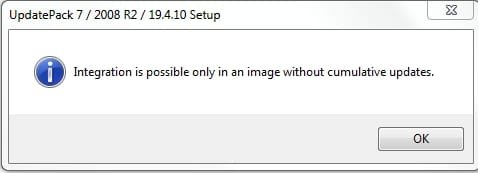
If you run Simplix against an image that already contains pending cumulative updates, it will just tell it can't run because of that.

So it won't work if you have run Simplix or Dism++ on that image already. It used to - but Simplix has changed it.
Though it should work on an image that has been updated, applied to a partition, then sysprepped and captured.

SIMPLIX-CUMULATIVE-UPDATES.jpg
 
Last edited:

My Computers My Computers

System One System Two

  • Computer type
    PC/Desktop
    OS
    7 X64
    CPU
    i5 8400
    Motherboard
    gigabyte b365m ds3h
    Memory
    2x8gb 3200mhz
    Hard Drives
    various
    PSU
    pure power 11 400w cm
    Case
    Coolermaster
    Cooling
    cryorig m9i
  • Computer type
    PC/Desktop
    OS
    7x64
    CPU
    g5400
    Motherboard
    ga b365m ds3h
    Memory
    8gb ddr4 2400
    PSU
    xfx pro 450w
New version 22D.
Cleaned up the cmd file. Messages are better. Prompts to download latest version dism if using win7 host.
Split-wim and Optimize-wim cmd files now use the host architecture version of wimlib ( allegedly quicker on x64 system). Bootorder.txt is adjusted for non en-US wims when using create-iso.cmd
 

My Computers My Computers

System One System Two

  • Computer type
    PC/Desktop
    OS
    7 X64
    CPU
    i5 8400
    Motherboard
    gigabyte b365m ds3h
    Memory
    2x8gb 3200mhz
    Hard Drives
    various
    PSU
    pure power 11 400w cm
    Case
    Coolermaster
    Cooling
    cryorig m9i
  • Computer type
    PC/Desktop
    OS
    7x64
    CPU
    g5400
    Motherboard
    ga b365m ds3h
    Memory
    8gb ddr4 2400
    PSU
    xfx pro 450w
Hello,

I was wondering if using your update script would it be possible to exclude certain updates from being incorporated (e.g. meltdown or telemetry tracking) or is it an all or nothing proposition? Also how would one add drivers for the recovery console? Would adding them to the two directories make them available in the recovery console? Thank you.
 

My Computer My Computer

Computer type
PC/Desktop
OS
Windows 7 Pro 64bit
I was wondering if using your update script would it be possible to exclude certain updates from being incorporated (e.g. meltdown or telemetry tracking)

1. If you select to download simplix there is no telemetry included.
Meltdown protection is not activated.

Also how would one add drivers for the recovery console? Would adding them to the two directories make them available in the recovery console?

2. Any drivers you put in DRIVERS\bootx64 ( or DRIVERS\bootx86 if you updating x86 image) will be integrated into both boot.wim and winre.wim ( which is where the recovery options are).

If you want the same drivers in Install.wim, place them in DRIVERS\Installx64 folder.

[Note: Simplix automatically takes care of usb3 drivers for Install.wim. So you only need to put usb3 drivers in the DRIVERS\bootx64 folder.]


3. If you have added drivers/updates (e.g. the MS nvme updates on first post) to those folders, then the script will ask if you want to mount boot.wim.

Obviously, the answer is Yes.

V22 now on first post has added messages to make it more obvious to the user.
 
Last edited:

My Computers My Computers

System One System Two

  • Computer type
    PC/Desktop
    OS
    7 X64
    CPU
    i5 8400
    Motherboard
    gigabyte b365m ds3h
    Memory
    2x8gb 3200mhz
    Hard Drives
    various
    PSU
    pure power 11 400w cm
    Case
    Coolermaster
    Cooling
    cryorig m9i
  • Computer type
    PC/Desktop
    OS
    7x64
    CPU
    g5400
    Motherboard
    ga b365m ds3h
    Memory
    8gb ddr4 2400
    PSU
    xfx pro 450w
Hi,

Thanks. I actually need to add in my Areca RAID drivers in there. As for updates I am trying to block there are three of them (outside of the general telemetry and windows 10 upgrade fiasco):

KB3108669
KB3150220
KB4056894

They interfere with a program that I use. Can I exclude them or no? Thanks.
 

My Computer My Computer

Computer type
PC/Desktop
OS
Windows 7 Pro 64bit
Back
Top