Update your Win 7 installation media

SIW2,
to have a USB Win7 installation disk that boots as Legacy and/or UEFI:
- Copy the Win7 installation iso to a Fat32 and add EFI\Boot folder (with bootx64.efi)
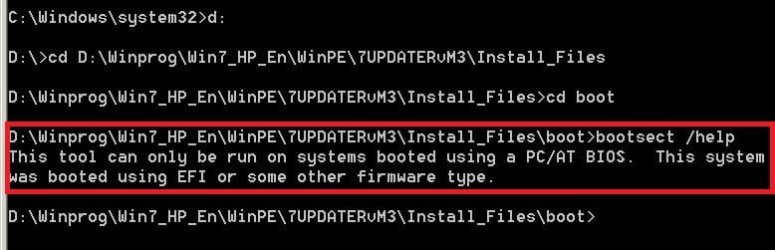
As my computer is UEFI, I have to boot a Win 7 installation DVD as Legacy and use WinPe repair CMD to use the command F:\Boot\bootsect.exe /nt60 F: (F: is the USB Win7 installation disk).

Is there a way to transfer F:\Boot\bootsect.exe /nt60 F: (F: is the USB Win7 installation disk) from a UEFI windows computer using a cmd file?
I can use BOOTICE_v1.3.4.0 (bootice [device] /mbr /instal /type=nt60) or Usb7ice.exe but I prefer to learn from you using cmd.
 

My Computers My Computers

System One System Two

  • Computer type
    PC/Desktop
    Computer Manufacturer/Model Number
    custom build
    OS
    Windows 7 HP 64
    CPU
    i5 6600K - 800MHz to 4200MHz
    Motherboard
    GA-Z170-HD3P
    Memory
    4+4G GSkill DDR4 3000
    Graphics Card(s)
    IG - Intel 530
    Monitor(s) Displays
    Samsung 226BW
    Screen Resolution
    1680x1050
    Hard Drives
    (1) -1 SM951 – 128GB M.2 AHCI PCIe SSD drive for Windows 7 and Lubuntu
    (2) -1 WD SATA 3 - 1T for Data
    (3) -1 WD SATA 3 - 1T for backup
    PSU
    Thermaltake 450W TR2 gold
    Keyboard
    Old and good Chicony mechanical keyboard
    Mouse
    Logitech mX performance - 9 buttons (had to disable some)
    Internet Speed
    500Mb/s
    Browser
    Firefox 64
    Other Info
    TinyWall firewall
  • Computer type
    Laptop
    System Manufacturer/Model Number
    Asus Q550LF
    OS
    Windows 7 Pro
    CPU
    i7-4500U 800MHz to 3.0GHz
    Motherboard
    Asus Q550LF
    Memory
    (4+4)G DDR3 1600
    Graphics Card(s)
    IG intel 4400 + NVIDIA GeForce GT 745M
    Sound Card
    Realtek
    Monitor(s) Displays
    LG Display LP156WF4-SPH1
    Screen Resolution
    1920 x 1080
    Hard Drives
    BX500 120G SSD for Windows and programs +
    1T HDD for data
    Internet Speed
    500 Mb/s
    Browser
    Firefox
    Other Info
    TinyWall firewall
Not sure what you are asking.

You can also download it using gwt.exe -win7

That will download WAIK_3 tools including bootsect.

You probably don't need to use it. Usually the pbr is written by the format process.
 

My Computers My Computers

System One System Two

  • Computer type
    PC/Desktop
    OS
    7 X64
    CPU
    i5 8400
    Motherboard
    gigabyte b365m ds3h
    Memory
    2x8gb 3200mhz
    Hard Drives
    various
    PSU
    pure power 11 400w cm
    Case
    Coolermaster
    Cooling
    cryorig m9i
  • Computer type
    PC/Desktop
    OS
    7x64
    CPU
    g5400
    Motherboard
    ga b365m ds3h
    Memory
    8gb ddr4 2400
    PSU
    xfx pro 450w
To make a USB flash disk UEFI boot able you just copy the Win 7 x64 Installation files (with efi\boot) to a the USB flash disk Fat32 formatted. But it won't boot as legacy.
What is the best way to make it also legacy boot able using a UEFI computer?
 

Attachments

  • BootSect.JPG
    BootSect.JPG
    38.8 KB · Views: 3
Last edited:

My Computers My Computers

System One System Two

  • Computer type
    PC/Desktop
    Computer Manufacturer/Model Number
    custom build
    OS
    Windows 7 HP 64
    CPU
    i5 6600K - 800MHz to 4200MHz
    Motherboard
    GA-Z170-HD3P
    Memory
    4+4G GSkill DDR4 3000
    Graphics Card(s)
    IG - Intel 530
    Monitor(s) Displays
    Samsung 226BW
    Screen Resolution
    1680x1050
    Hard Drives
    (1) -1 SM951 – 128GB M.2 AHCI PCIe SSD drive for Windows 7 and Lubuntu
    (2) -1 WD SATA 3 - 1T for Data
    (3) -1 WD SATA 3 - 1T for backup
    PSU
    Thermaltake 450W TR2 gold
    Keyboard
    Old and good Chicony mechanical keyboard
    Mouse
    Logitech mX performance - 9 buttons (had to disable some)
    Internet Speed
    500Mb/s
    Browser
    Firefox 64
    Other Info
    TinyWall firewall
  • Computer type
    Laptop
    System Manufacturer/Model Number
    Asus Q550LF
    OS
    Windows 7 Pro
    CPU
    i7-4500U 800MHz to 3.0GHz
    Motherboard
    Asus Q550LF
    Memory
    (4+4)G DDR3 1600
    Graphics Card(s)
    IG intel 4400 + NVIDIA GeForce GT 745M
    Sound Card
    Realtek
    Monitor(s) Displays
    LG Display LP156WF4-SPH1
    Screen Resolution
    1920 x 1080
    Hard Drives
    BX500 120G SSD for Windows and programs +
    1T HDD for data
    Internet Speed
    500 Mb/s
    Browser
    Firefox
    Other Info
    TinyWall firewall
What did you use to format the stick? Most tools nowadays will write the boot code during format.

You can check. Format using any modern partition manager, or diskpart. Then check the boot code using bootice. It will tell you what the mbr and pbr is and if there is an Active partition..

Some usb sticks that come from the manufacturer already formatted may not have that.

Code:
diskpart
lis dis
sel dis [your usb stick]
clean
cre par pri
act
format FS=FAT32 LABEL="whatever" QUICK
exi


If you don't want to reformat using diskpart, or similar, then use bootice commands.
 
Last edited:

My Computers My Computers

System One System Two

  • Computer type
    PC/Desktop
    OS
    7 X64
    CPU
    i5 8400
    Motherboard
    gigabyte b365m ds3h
    Memory
    2x8gb 3200mhz
    Hard Drives
    various
    PSU
    pure power 11 400w cm
    Case
    Coolermaster
    Cooling
    cryorig m9i
  • Computer type
    PC/Desktop
    OS
    7x64
    CPU
    g5400
    Motherboard
    ga b365m ds3h
    Memory
    8gb ddr4 2400
    PSU
    xfx pro 450w
SIW2, I wanted to do it on a cmd script.
- Bootice cmd ins't working (bootice [device] /mbr /instal /type=nt60) It opens the normal window.
- Win 7 bootsect.exe can set the MBR on the flash disk but it doesn't work on a EFI computer.
- Win 10 bootsect.exe does work on a EFI computer but can't set the MBR on the flash disk (only on internal disk).
- I've tried Diskpart . The problem is that it will launch Diskpart but won't accept the next commands on the script.

Any ideas how to format a disk and set it active on a cmd script?
 

My Computers My Computers

System One System Two

  • Computer type
    PC/Desktop
    Computer Manufacturer/Model Number
    custom build
    OS
    Windows 7 HP 64
    CPU
    i5 6600K - 800MHz to 4200MHz
    Motherboard
    GA-Z170-HD3P
    Memory
    4+4G GSkill DDR4 3000
    Graphics Card(s)
    IG - Intel 530
    Monitor(s) Displays
    Samsung 226BW
    Screen Resolution
    1680x1050
    Hard Drives
    (1) -1 SM951 – 128GB M.2 AHCI PCIe SSD drive for Windows 7 and Lubuntu
    (2) -1 WD SATA 3 - 1T for Data
    (3) -1 WD SATA 3 - 1T for backup
    PSU
    Thermaltake 450W TR2 gold
    Keyboard
    Old and good Chicony mechanical keyboard
    Mouse
    Logitech mX performance - 9 buttons (had to disable some)
    Internet Speed
    500Mb/s
    Browser
    Firefox 64
    Other Info
    TinyWall firewall
  • Computer type
    Laptop
    System Manufacturer/Model Number
    Asus Q550LF
    OS
    Windows 7 Pro
    CPU
    i7-4500U 800MHz to 3.0GHz
    Motherboard
    Asus Q550LF
    Memory
    (4+4)G DDR3 1600
    Graphics Card(s)
    IG intel 4400 + NVIDIA GeForce GT 745M
    Sound Card
    Realtek
    Monitor(s) Displays
    LG Display LP156WF4-SPH1
    Screen Resolution
    1920 x 1080
    Hard Drives
    BX500 120G SSD for Windows and programs +
    1T HDD for data
    Internet Speed
    500 Mb/s
    Browser
    Firefox
    Other Info
    TinyWall firewall
Bootice cmd ins't working

:confused: How are you doing it? Maybe try using v1.3.3 View attachment BootIce.zip


launch Diskpart but won't accept the next commands on the script

put the commands in a text file.
DISKPART /s something.txt

You will have to be careful. Operate on the wrong disk and you could be in a mess.
 
Last edited:

My Computers My Computers

System One System Two

  • Computer type
    PC/Desktop
    OS
    7 X64
    CPU
    i5 8400
    Motherboard
    gigabyte b365m ds3h
    Memory
    2x8gb 3200mhz
    Hard Drives
    various
    PSU
    pure power 11 400w cm
    Case
    Coolermaster
    Cooling
    cryorig m9i
  • Computer type
    PC/Desktop
    OS
    7x64
    CPU
    g5400
    Motherboard
    ga b365m ds3h
    Memory
    8gb ddr4 2400
    PSU
    xfx pro 450w
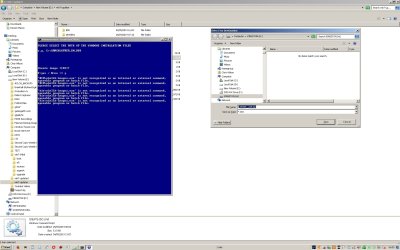
I have done something silly I think and have the last f the creating an iso hanging. I downloaded from MS the current Win 7 64 bit pro image, dumped its files in a folder called Win7-64bit and ran your lovely app to load the m.2 Intel drivers and also downloaded the current updates. All seemed to go well and the Win7-64bit folder shows today's date files in its midst. But when i try to create an iso image on a USB stick I see the following screen. I think I am missing something obvious. I pointed the installation media site at Win7-64bit folder, with your updater in a different folder. I THINK it's in that area I am missing thee point ;) Does the attached screen shot suggest where my stupidity lies please, and many thanks for your work on this app!
 

Attachments

  • problem.jpg
    problem.jpg
    161.2 KB · Views: 3

My Computer My Computer

Computer type
PC/Desktop
Computer Manufacturer/Model Number
Custom
OS
Win 7 Pro 64 Bit
CPU
Intel i5-4670K @ 3.4 GHz
Motherboard
Gigabyte GA-Z97X-Gaming 3
Memory
16 gig
Graphics Card(s)
On board
Hard Drives
SSD C: Drive
2 off 1 gig SATA in software RAID1 as D: Drive
Antivirus
Avast
Browser
Firefox
My mistake. I must have included an earlier version of the CREATE-ISO.cmd .

Easy to fix. Just copy the two files from bin\wimlibx86 into the bin folder.

Alternatively, replace CREATE-ISO.cmd with this version: View attachment CREATE-ISO.zip


to create an iso image on a USB stick

If you trying to create a bootable usb stick, you don't really need to create an iso first.

You can create an iso, if you like, then use something like Rufus to prep the stick and extract the contents from the iso onto the usb stick.

Rufus

That is probably simplest for those who don't know how to do it themselves.
 
Last edited:

My Computers My Computers

System One System Two

  • Computer type
    PC/Desktop
    OS
    7 X64
    CPU
    i5 8400
    Motherboard
    gigabyte b365m ds3h
    Memory
    2x8gb 3200mhz
    Hard Drives
    various
    PSU
    pure power 11 400w cm
    Case
    Coolermaster
    Cooling
    cryorig m9i
  • Computer type
    PC/Desktop
    OS
    7x64
    CPU
    g5400
    Motherboard
    ga b365m ds3h
    Memory
    8gb ddr4 2400
    PSU
    xfx pro 450w
Thank you very much for the fast reply, I replaced the CREATE-ISO.cmd file and it appears to have worked now although I had to write the iso to the hard drive first as it said there was insufficient space on a 32gB USB stick, and when it had written the bootable iso the hard drive it again wouldn't copy to the stick until I formatted it NTFS. Is that OK and would it have written the original iso to the stick direct had I pre formatted the stick NTFS?


Is there a quick sanity check to see if I have actually managed to insert all the Win 7 updates before trying to use the iso in anger? The iso file size is 4,818,681,856 bytes.


Sorry for all the questions but a friend and I can see ourselves finding this ability to pack a bootable disc with various drivers and pre update Windows 7 extremely useful. Again, many thanks :)
 

My Computer My Computer

Computer type
PC/Desktop
Computer Manufacturer/Model Number
Custom
OS
Win 7 Pro 64 Bit
CPU
Intel i5-4670K @ 3.4 GHz
Motherboard
Gigabyte GA-Z97X-Gaming 3
Memory
16 gig
Graphics Card(s)
On board
Hard Drives
SSD C: Drive
2 off 1 gig SATA in software RAID1 as D: Drive
Antivirus
Avast
Browser
Firefox
Is there a quick sanity check to see if I have actually managed to insert all the Win 7 updates

The service build will tell you.

If you let it name the iso, the service build should be part of the iso name.

The idea is that if you create another in a couple of months, it will contain more updates and the build number will be higher so you know which is which.

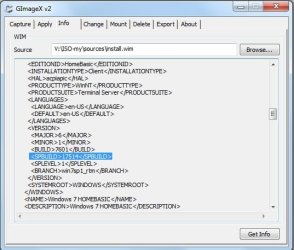
The original service build (SPBUILD) for win7 with SP1 was 17514.

If you run CREATE-ISO.cmd the iso name would be BUILD_SPBUILD_LANGUAGE_ARCHITECTURE.iso

Therefore 7601_24408_en-US_x64.iso has been updated to a higher service build.


A simple way to get the service build from the wim using a UI is Gimagex.

GImageX v2.2.0 Released - AutoIt Consulting


gimagex-info.jpg


If you want to make another in a couple of months, you will need to download the most recent version of 7updater. Simplix needs to use fresh installation media - it won't run against an image that already contains pending cumulative updates.


Probably not worth doing it too often. If you install 7601_24408 in a month or two, windows update will pick up the few additional updates since then.
 
Last edited:

My Computers My Computers

System One System Two

  • Computer type
    PC/Desktop
    OS
    7 X64
    CPU
    i5 8400
    Motherboard
    gigabyte b365m ds3h
    Memory
    2x8gb 3200mhz
    Hard Drives
    various
    PSU
    pure power 11 400w cm
    Case
    Coolermaster
    Cooling
    cryorig m9i
  • Computer type
    PC/Desktop
    OS
    7x64
    CPU
    g5400
    Motherboard
    ga b365m ds3h
    Memory
    8gb ddr4 2400
    PSU
    xfx pro 450w
Is that OK and would it have written the original iso to the stick direct had I pre formatted the stick NTFS?

Yes. FAT32 filesystem has a max file size limit of 4gb.
 

My Computers My Computers

System One System Two

  • Computer type
    PC/Desktop
    OS
    7 X64
    CPU
    i5 8400
    Motherboard
    gigabyte b365m ds3h
    Memory
    2x8gb 3200mhz
    Hard Drives
    various
    PSU
    pure power 11 400w cm
    Case
    Coolermaster
    Cooling
    cryorig m9i
  • Computer type
    PC/Desktop
    OS
    7x64
    CPU
    g5400
    Motherboard
    ga b365m ds3h
    Memory
    8gb ddr4 2400
    PSU
    xfx pro 450w
MegaHertZ,

You might want to ask the user to confirm it again. You can't be sure what they will end up formatting.

Most cockups happen between the chair and the keyboard. This is why I don't include that option - I prefer they use rufus, or similar. Then they take responsibilty.
 

My Computers My Computers

System One System Two

  • Computer type
    PC/Desktop
    OS
    7 X64
    CPU
    i5 8400
    Motherboard
    gigabyte b365m ds3h
    Memory
    2x8gb 3200mhz
    Hard Drives
    various
    PSU
    pure power 11 400w cm
    Case
    Coolermaster
    Cooling
    cryorig m9i
  • Computer type
    PC/Desktop
    OS
    7x64
    CPU
    g5400
    Motherboard
    ga b365m ds3h
    Memory
    8gb ddr4 2400
    PSU
    xfx pro 450w
As I wrote you before, my version of your 7updater is for my private use. Won't make it public.
I know that any operation with diskpart has a risk.

On my sub cmd CREATE_USB.cmd

:selDisk
ECHO.
echo PLEASE SELECT THE USB DISK TO BE BOOTABLE
ECHO. & ECHO.
start /wait BIN\pecmd load BIN\getUSB.ini
call BIN\setUSBpath.cmd
del BIN\setUSBpath.cmd >nul
IF '%USBpath%'=='' goto :selDisk
if not exist %USBpath% (
echo No Disk selected
goto :selDisk
)

echo.
set USBpath=%USBpath:~1,-2%
echo.
Vol %USBpath%
echo DISK VOLUME IS %USBpath%

:ConfirmD
ECHO. & ECHO Confirm? & ECHO.
SET YESNO=
SET /P YESNO="Y=YES / N=NO => "
echo.
IF /I NOT '%YESNO%'=='Y' IF /I NOT '%YESNO%'=='N' goto :ConfirmD

IF /I '%YESNO%'=='N' (goto :selDisk)

:Format
echo.
Vol %USBpath%
echo.
echo.
echo DISK %USBpath% will be formatted and
echo ALL files and foldes will be erased
echo.

:ConfirmF
ECHO. & ECHO Confirm? & ECHO.
SET YESNO='N'
SET /P YESNO="Y=YES / N=NO => "
echo.
IF /I NOT '%YESNO%'=='Y' IF /I NOT '%YESNO%'=='N' goto :ConfirmF

IF /I '%YESNO%'=='N' (goto :selDisk)

diskpart /s Bin\Udiskpart.txt

and Udiskpart.txt
select volume %USBpath%
clean
create partition primary
Format FS=FAT32 LABEL=Win7_Inst QUICK
active
exit

So I asked to confirm twice and I select a volume, not a disk (yes, I know, clean will clean all disk)
I have tested many times without any issues.
 
Last edited:

My Computers My Computers

System One System Two

  • Computer type
    PC/Desktop
    Computer Manufacturer/Model Number
    custom build
    OS
    Windows 7 HP 64
    CPU
    i5 6600K - 800MHz to 4200MHz
    Motherboard
    GA-Z170-HD3P
    Memory
    4+4G GSkill DDR4 3000
    Graphics Card(s)
    IG - Intel 530
    Monitor(s) Displays
    Samsung 226BW
    Screen Resolution
    1680x1050
    Hard Drives
    (1) -1 SM951 – 128GB M.2 AHCI PCIe SSD drive for Windows 7 and Lubuntu
    (2) -1 WD SATA 3 - 1T for Data
    (3) -1 WD SATA 3 - 1T for backup
    PSU
    Thermaltake 450W TR2 gold
    Keyboard
    Old and good Chicony mechanical keyboard
    Mouse
    Logitech mX performance - 9 buttons (had to disable some)
    Internet Speed
    500Mb/s
    Browser
    Firefox 64
    Other Info
    TinyWall firewall
  • Computer type
    Laptop
    System Manufacturer/Model Number
    Asus Q550LF
    OS
    Windows 7 Pro
    CPU
    i7-4500U 800MHz to 3.0GHz
    Motherboard
    Asus Q550LF
    Memory
    (4+4)G DDR3 1600
    Graphics Card(s)
    IG intel 4400 + NVIDIA GeForce GT 745M
    Sound Card
    Realtek
    Monitor(s) Displays
    LG Display LP156WF4-SPH1
    Screen Resolution
    1920 x 1080
    Hard Drives
    BX500 120G SSD for Windows and programs +
    1T HDD for data
    Internet Speed
    500 Mb/s
    Browser
    Firefox
    Other Info
    TinyWall firewall
SIW2
You created and added some register entry's:
reg.exe load HKLM\PE_DEF "%MountDir%\windows\system32\config\DEFAULT"
reg.exe load HKLM\PE_SOFT "%MountDir%\windows\system32\config\SOFTWARE"
reg.exe load HKLM\PE_SYS "%MountDir%\windows\system32\config\SYSTEM"
echo.
reg.exe import bin\DEFSYS.reg
echo.
reg.exe unload HKLM\PE_DEF
reg.exe unload HKLM\PE_SOFT
reg.exe unload HKLM\PE_SYS

Then you added Peshl file and folders to System32.
Then you created WinRE.wim and copied to System32\Recovery on Install.wim

Could you please explain what is that all about (create a GUI to recovery option?) ?
 

My Computers My Computers

System One System Two

  • Computer type
    PC/Desktop
    Computer Manufacturer/Model Number
    custom build
    OS
    Windows 7 HP 64
    CPU
    i5 6600K - 800MHz to 4200MHz
    Motherboard
    GA-Z170-HD3P
    Memory
    4+4G GSkill DDR4 3000
    Graphics Card(s)
    IG - Intel 530
    Monitor(s) Displays
    Samsung 226BW
    Screen Resolution
    1680x1050
    Hard Drives
    (1) -1 SM951 – 128GB M.2 AHCI PCIe SSD drive for Windows 7 and Lubuntu
    (2) -1 WD SATA 3 - 1T for Data
    (3) -1 WD SATA 3 - 1T for backup
    PSU
    Thermaltake 450W TR2 gold
    Keyboard
    Old and good Chicony mechanical keyboard
    Mouse
    Logitech mX performance - 9 buttons (had to disable some)
    Internet Speed
    500Mb/s
    Browser
    Firefox 64
    Other Info
    TinyWall firewall
  • Computer type
    Laptop
    System Manufacturer/Model Number
    Asus Q550LF
    OS
    Windows 7 Pro
    CPU
    i7-4500U 800MHz to 3.0GHz
    Motherboard
    Asus Q550LF
    Memory
    (4+4)G DDR3 1600
    Graphics Card(s)
    IG intel 4400 + NVIDIA GeForce GT 745M
    Sound Card
    Realtek
    Monitor(s) Displays
    LG Display LP156WF4-SPH1
    Screen Resolution
    1920 x 1080
    Hard Drives
    BX500 120G SSD for Windows and programs +
    1T HDD for data
    Internet Speed
    500 Mb/s
    Browser
    Firefox
    Other Info
    TinyWall firewall
SIW2
Could you please explain what is that all about (create a GUI to recovery option?) ?


Reg entries add some functionality to the bootable wims - e.g. ability to see hidden folders and file extensions. Winpeshl.ini file is to launch recovery environment as the shell for winre.wim
 

My Computers My Computers

System One System Two

  • Computer type
    PC/Desktop
    OS
    7 X64
    CPU
    i5 8400
    Motherboard
    gigabyte b365m ds3h
    Memory
    2x8gb 3200mhz
    Hard Drives
    various
    PSU
    pure power 11 400w cm
    Case
    Coolermaster
    Cooling
    cryorig m9i
  • Computer type
    PC/Desktop
    OS
    7x64
    CPU
    g5400
    Motherboard
    ga b365m ds3h
    Memory
    8gb ddr4 2400
    PSU
    xfx pro 450w
Thanks.
 

My Computers My Computers

System One System Two

  • Computer type
    PC/Desktop
    Computer Manufacturer/Model Number
    custom build
    OS
    Windows 7 HP 64
    CPU
    i5 6600K - 800MHz to 4200MHz
    Motherboard
    GA-Z170-HD3P
    Memory
    4+4G GSkill DDR4 3000
    Graphics Card(s)
    IG - Intel 530
    Monitor(s) Displays
    Samsung 226BW
    Screen Resolution
    1680x1050
    Hard Drives
    (1) -1 SM951 – 128GB M.2 AHCI PCIe SSD drive for Windows 7 and Lubuntu
    (2) -1 WD SATA 3 - 1T for Data
    (3) -1 WD SATA 3 - 1T for backup
    PSU
    Thermaltake 450W TR2 gold
    Keyboard
    Old and good Chicony mechanical keyboard
    Mouse
    Logitech mX performance - 9 buttons (had to disable some)
    Internet Speed
    500Mb/s
    Browser
    Firefox 64
    Other Info
    TinyWall firewall
  • Computer type
    Laptop
    System Manufacturer/Model Number
    Asus Q550LF
    OS
    Windows 7 Pro
    CPU
    i7-4500U 800MHz to 3.0GHz
    Motherboard
    Asus Q550LF
    Memory
    (4+4)G DDR3 1600
    Graphics Card(s)
    IG intel 4400 + NVIDIA GeForce GT 745M
    Sound Card
    Realtek
    Monitor(s) Displays
    LG Display LP156WF4-SPH1
    Screen Resolution
    1920 x 1080
    Hard Drives
    BX500 120G SSD for Windows and programs +
    1T HDD for data
    Internet Speed
    500 Mb/s
    Browser
    Firefox
    Other Info
    TinyWall firewall
New version 7updaterv23 on first post. Simplix version 19.5.15 . Also added separate cmd file for wim-info.
 

My Computers My Computers

System One System Two

  • Computer type
    PC/Desktop
    OS
    7 X64
    CPU
    i5 8400
    Motherboard
    gigabyte b365m ds3h
    Memory
    2x8gb 3200mhz
    Hard Drives
    various
    PSU
    pure power 11 400w cm
    Case
    Coolermaster
    Cooling
    cryorig m9i
  • Computer type
    PC/Desktop
    OS
    7x64
    CPU
    g5400
    Motherboard
    ga b365m ds3h
    Memory
    8gb ddr4 2400
    PSU
    xfx pro 450w
Fat32 Disk Size Support

Everyone that keeps saying Fat32 has a 4GB limit is confusing the 32bit RAM limit with Drive Limit <quote>That said, FAT/FAT32 can actually format up to 16TB hard drives and most operating systems support up to 2TB. Microsoft has set a 32GB partition size limit for the FAT/FAT32 file system to promote NTFS, which is generally more efficient when working with large partitions.</quote> Yes it does work as I have several 8GB, 16GB and 32GB flash drives formated with Fat32 for UEFI use. What happens is anything more then 8GB and Windows 7+ opt for either ExFat or NTFS as the format. :sarc:


Now that I've gotten that off my chest, glad to see a solid discussion on how to get USB 3 support into both the Installer and the installation since I depend on VPC 2007 that doesn't work on anything later the Win7
 

My Computer My Computer

Computer type
PC/Desktop
Computer Manufacturer/Model Number
White Box
OS
Win7-64/Sp1 Ultimate
CPU
AMD Ryzen 5 1600
Motherboard
Asrock B450m Pro
Memory
64GB
Graphics Card(s)
GTX 1060 6GB
Hard Drives
Boot = Crucial MX500 250GB M2 Sata/AHCI
LSI 9211-8i HBA/IT card
Port1 = 1x Team Group GX2 256GB SSD (boot)
1x Crucial MX500 1TB (Raid 1 storage)
2x Team Group GX2 1TB (storage)
Port2 = 1x Team Group GX2 256GB SSD (boot)
1x Crucial MX500 1TB
PSU
EVGA B450
Keyboard
88 key (TKL) mechanical
Are you confusing partition size with file size, perchance?
 

My Computers My Computers

System One System Two

  • Computer type
    PC/Desktop
    OS
    7 X64
    CPU
    i5 8400
    Motherboard
    gigabyte b365m ds3h
    Memory
    2x8gb 3200mhz
    Hard Drives
    various
    PSU
    pure power 11 400w cm
    Case
    Coolermaster
    Cooling
    cryorig m9i
  • Computer type
    PC/Desktop
    OS
    7x64
    CPU
    g5400
    Motherboard
    ga b365m ds3h
    Memory
    8gb ddr4 2400
    PSU
    xfx pro 450w
Started from the beginning of the thread and kept seeing the 4GB limit being listed as a Fat32 limit - finally got to the point that someone clairified they were talking about a File Size Limit, not disk format limit as I was assuming.


Hoping to get a working flash drive with USB 3 support in the installer and to add it for my new Ryzen Build.
 

My Computer My Computer

Computer type
PC/Desktop
Computer Manufacturer/Model Number
White Box
OS
Win7-64/Sp1 Ultimate
CPU
AMD Ryzen 5 1600
Motherboard
Asrock B450m Pro
Memory
64GB
Graphics Card(s)
GTX 1060 6GB
Hard Drives
Boot = Crucial MX500 250GB M2 Sata/AHCI
LSI 9211-8i HBA/IT card
Port1 = 1x Team Group GX2 256GB SSD (boot)
1x Crucial MX500 1TB (Raid 1 storage)
2x Team Group GX2 1TB (storage)
Port2 = 1x Team Group GX2 256GB SSD (boot)
1x Crucial MX500 1TB
PSU
EVGA B450
Keyboard
88 key (TKL) mechanical
Back
Top