Update your Win 7 installation media

My Computers My Computers

System One System Two

  • Computer type
    PC/Desktop
    Computer Manufacturer/Model Number
    custom build
    OS
    Windows 7 HP 64
    CPU
    i5 6600K - 800MHz to 4200MHz
    Motherboard
    GA-Z170-HD3P
    Memory
    4+4G GSkill DDR4 3000
    Graphics Card(s)
    IG - Intel 530
    Monitor(s) Displays
    Samsung 226BW
    Screen Resolution
    1680x1050
    Hard Drives
    (1) -1 SM951 – 128GB M.2 AHCI PCIe SSD drive for Windows 7 and Lubuntu
    (2) -1 WD SATA 3 - 1T for Data
    (3) -1 WD SATA 3 - 1T for backup
    PSU
    Thermaltake 450W TR2 gold
    Keyboard
    Old and good Chicony mechanical keyboard
    Mouse
    Logitech mX performance - 9 buttons (had to disable some)
    Internet Speed
    500Mb/s
    Browser
    Firefox 64
    Other Info
    TinyWall firewall
  • Computer type
    Laptop
    System Manufacturer/Model Number
    Asus Q550LF
    OS
    Windows 7 Pro
    CPU
    i7-4500U 800MHz to 3.0GHz
    Motherboard
    Asus Q550LF
    Memory
    (4+4)G DDR3 1600
    Graphics Card(s)
    IG intel 4400 + NVIDIA GeForce GT 745M
    Sound Card
    Realtek
    Monitor(s) Displays
    LG Display LP156WF4-SPH1
    Screen Resolution
    1920 x 1080
    Hard Drives
    BX500 120G SSD for Windows and programs +
    1T HDD for data
    Internet Speed
    500 Mb/s
    Browser
    Firefox
    Other Info
    TinyWall firewall
7Updater-v23 Failed

Have the usb 3 drivers for Win7 from Asrock (Asrock b450m pro board) and ran 7Updater. It threw several errors involving image already mounted/open (not sure why) when I ran it first time. Seemed to complete the update/patching yet no USB 3 support in the installer.
 

My Computer My Computer

Computer type
PC/Desktop
Computer Manufacturer/Model Number
White Box
OS
Win7-64/Sp1 Ultimate
CPU
AMD Ryzen 5 1600
Motherboard
Asrock B450m Pro
Memory
64GB
Graphics Card(s)
GTX 1060 6GB
Hard Drives
Boot = Crucial MX500 250GB M2 Sata/AHCI
LSI 9211-8i HBA/IT card
Port1 = 1x Team Group GX2 256GB SSD (boot)
1x Crucial MX500 1TB (Raid 1 storage)
2x Team Group GX2 1TB (storage)
Port2 = 1x Team Group GX2 256GB SSD (boot)
1x Crucial MX500 1TB
PSU
EVGA B450
Keyboard
88 key (TKL) mechanical
If you don't succeed the first time, try it again. Seems that somehow I screwed the script up (not sure what I did) but the 2nd run went w/o errors


Errors that DISM throws
[4108] [0x80070003] FIOEnumerateReparsePoints:(615): The system cannot find the path specified.
[4108] [0x80070003] CleanupDeleteUnmountedStubs:(607): The system cannot find the path specified.
[4108] Badly formatted drive string: I:\. This drive will not be cleaned.
[4108] Badly formatted drive string: O:\. This drive will not be cleaned.


DISM DISM Provider Store: PID=4692 TID=1132 Failed to load the provider: C:\Windows\system32\Dism\SiloedPackageProvider.dll. - CDISMProviderStore::Internal_GetProvider(hr:0x8007007e)


I'm seeing several of these in the DISM Log - Could it be due to the errors on the first run?


Have to restore the bootable image as something went badly wrong - Used up all the space on the drive
 
Last edited:

My Computer My Computer

Computer type
PC/Desktop
Computer Manufacturer/Model Number
White Box
OS
Win7-64/Sp1 Ultimate
CPU
AMD Ryzen 5 1600
Motherboard
Asrock B450m Pro
Memory
64GB
Graphics Card(s)
GTX 1060 6GB
Hard Drives
Boot = Crucial MX500 250GB M2 Sata/AHCI
LSI 9211-8i HBA/IT card
Port1 = 1x Team Group GX2 256GB SSD (boot)
1x Crucial MX500 1TB (Raid 1 storage)
2x Team Group GX2 1TB (storage)
Port2 = 1x Team Group GX2 256GB SSD (boot)
1x Crucial MX500 1TB
PSU
EVGA B450
Keyboard
88 key (TKL) mechanical
After rebuilding the ISO using the install disk (needed for the WIn7 USB/DVD tool), Ran the updater again along with adding in Simplex Updates (167 of them). The USB/DVD tool decided to not copy the boot.sec to either flash drive (not a major issue) as the EFI folder is there and it should boot.
 

My Computer My Computer

Computer type
PC/Desktop
Computer Manufacturer/Model Number
White Box
OS
Win7-64/Sp1 Ultimate
CPU
AMD Ryzen 5 1600
Motherboard
Asrock B450m Pro
Memory
64GB
Graphics Card(s)
GTX 1060 6GB
Hard Drives
Boot = Crucial MX500 250GB M2 Sata/AHCI
LSI 9211-8i HBA/IT card
Port1 = 1x Team Group GX2 256GB SSD (boot)
1x Crucial MX500 1TB (Raid 1 storage)
2x Team Group GX2 1TB (storage)
Port2 = 1x Team Group GX2 256GB SSD (boot)
1x Crucial MX500 1TB
PSU
EVGA B450
Keyboard
88 key (TKL) mechanical
This was after getting an error message stating the image wasn't fully unmounted - not sure why it's stating the image wasn't fully unmounted unless there's a script issue and yes, I've already downloaded the latest version again in case it was borked


O'kay, I'm getting this as an error message


Error: 0xc1510115

The specified image is invalid.
Unmount the image or clean up the Wim and then try again.


The second Error


Image File : G:\sources\boot.wim
Image Index : 2

Error: 0xc142011d

The specified mounted image cannot be committed back into the WIM. This occurs when an image has been through a partial unmount or when an image is still being mounted. If this image was unmounted with commit earlier, then the commit probably succeeded. Please validate that this is the case and then unmount without commit.
 

My Computer My Computer

Computer type
PC/Desktop
Computer Manufacturer/Model Number
White Box
OS
Win7-64/Sp1 Ultimate
CPU
AMD Ryzen 5 1600
Motherboard
Asrock B450m Pro
Memory
64GB
Graphics Card(s)
GTX 1060 6GB
Hard Drives
Boot = Crucial MX500 250GB M2 Sata/AHCI
LSI 9211-8i HBA/IT card
Port1 = 1x Team Group GX2 256GB SSD (boot)
1x Crucial MX500 1TB (Raid 1 storage)
2x Team Group GX2 1TB (storage)
Port2 = 1x Team Group GX2 256GB SSD (boot)
1x Crucial MX500 1TB
PSU
EVGA B450
Keyboard
88 key (TKL) mechanical
I'm not a dev and have no idea why the script is having trouble - the only thing I want is to add the USB 3 drivers and the NVME update to the boot and install images. I'm not adding any simplex or other updates at this time due to the error
 

My Computer My Computer

Computer type
PC/Desktop
Computer Manufacturer/Model Number
White Box
OS
Win7-64/Sp1 Ultimate
CPU
AMD Ryzen 5 1600
Motherboard
Asrock B450m Pro
Memory
64GB
Graphics Card(s)
GTX 1060 6GB
Hard Drives
Boot = Crucial MX500 250GB M2 Sata/AHCI
LSI 9211-8i HBA/IT card
Port1 = 1x Team Group GX2 256GB SSD (boot)
1x Crucial MX500 1TB (Raid 1 storage)
2x Team Group GX2 1TB (storage)
Port2 = 1x Team Group GX2 256GB SSD (boot)
1x Crucial MX500 1TB
PSU
EVGA B450
Keyboard
88 key (TKL) mechanical

My Computers My Computers

System One System Two

  • Computer type
    PC/Desktop
    OS
    7 X64
    CPU
    i5 8400
    Motherboard
    gigabyte b365m ds3h
    Memory
    2x8gb 3200mhz
    Hard Drives
    various
    PSU
    pure power 11 400w cm
    Case
    Coolermaster
    Cooling
    cryorig m9i
  • Computer type
    PC/Desktop
    OS
    7x64
    CPU
    g5400
    Motherboard
    ga b365m ds3h
    Memory
    8gb ddr4 2400
    PSU
    xfx pro 450w
It's taken some effort but I now have the USB working but no NVME support though that's beginning to look to be an Motherboard and AMD issue
 

My Computer My Computer

Computer type
PC/Desktop
Computer Manufacturer/Model Number
White Box
OS
Win7-64/Sp1 Ultimate
CPU
AMD Ryzen 5 1600
Motherboard
Asrock B450m Pro
Memory
64GB
Graphics Card(s)
GTX 1060 6GB
Hard Drives
Boot = Crucial MX500 250GB M2 Sata/AHCI
LSI 9211-8i HBA/IT card
Port1 = 1x Team Group GX2 256GB SSD (boot)
1x Crucial MX500 1TB (Raid 1 storage)
2x Team Group GX2 1TB (storage)
Port2 = 1x Team Group GX2 256GB SSD (boot)
1x Crucial MX500 1TB
PSU
EVGA B450
Keyboard
88 key (TKL) mechanical
Had to go back to the instructions on where to set the NVME Update - Might work now as it wasn't being integrated
 

My Computer My Computer

Computer type
PC/Desktop
Computer Manufacturer/Model Number
White Box
OS
Win7-64/Sp1 Ultimate
CPU
AMD Ryzen 5 1600
Motherboard
Asrock B450m Pro
Memory
64GB
Graphics Card(s)
GTX 1060 6GB
Hard Drives
Boot = Crucial MX500 250GB M2 Sata/AHCI
LSI 9211-8i HBA/IT card
Port1 = 1x Team Group GX2 256GB SSD (boot)
1x Crucial MX500 1TB (Raid 1 storage)
2x Team Group GX2 1TB (storage)
Port2 = 1x Team Group GX2 256GB SSD (boot)
1x Crucial MX500 1TB
PSU
EVGA B450
Keyboard
88 key (TKL) mechanical
Seems that the DISM script is causing some confusion as it's trying to integrate the Drivers and Windows Updates once again - Gives the Ivalid WIM file message.


CHECKING FOR UPDATES IN UPDATES\Installx64


Deployment Image Servicing and Management tool
Version: 10.0.17763.1


Error: 0xc1510115

The specified image is invalid.
Unmount the image or clean up the Wim and then try again.

The DISM log file can be found at C:\Windows\Logs\DISM\dism.log


CHECKING FOR DRIVERS IN "DRIVERS\Installx64"


Deployment Image Servicing and Management tool
Version: 10.0.17763.1


Error: 0xc1510115

The specified image is invalid.
Unmount the image or clean up the Wim and then try again.
 

My Computer My Computer

Computer type
PC/Desktop
Computer Manufacturer/Model Number
White Box
OS
Win7-64/Sp1 Ultimate
CPU
AMD Ryzen 5 1600
Motherboard
Asrock B450m Pro
Memory
64GB
Graphics Card(s)
GTX 1060 6GB
Hard Drives
Boot = Crucial MX500 250GB M2 Sata/AHCI
LSI 9211-8i HBA/IT card
Port1 = 1x Team Group GX2 256GB SSD (boot)
1x Crucial MX500 1TB (Raid 1 storage)
2x Team Group GX2 1TB (storage)
Port2 = 1x Team Group GX2 256GB SSD (boot)
1x Crucial MX500 1TB
PSU
EVGA B450
Keyboard
88 key (TKL) mechanical
Well the installer now sees the NVME and handles the USB 3 (Kbd/ms) but now I have an issue with it wanting a missing CD/DVD driver ? and it wont allow me to continue the installation.
 

My Computer My Computer

Computer type
PC/Desktop
Computer Manufacturer/Model Number
White Box
OS
Win7-64/Sp1 Ultimate
CPU
AMD Ryzen 5 1600
Motherboard
Asrock B450m Pro
Memory
64GB
Graphics Card(s)
GTX 1060 6GB
Hard Drives
Boot = Crucial MX500 250GB M2 Sata/AHCI
LSI 9211-8i HBA/IT card
Port1 = 1x Team Group GX2 256GB SSD (boot)
1x Crucial MX500 1TB (Raid 1 storage)
2x Team Group GX2 1TB (storage)
Port2 = 1x Team Group GX2 256GB SSD (boot)
1x Crucial MX500 1TB
PSU
EVGA B450
Keyboard
88 key (TKL) mechanical
Sounds like the sources\setup files haven't been updated. Something got messed up - possibly because you didn't have empty mount folders.
 

My Computers My Computers

System One System Two

  • Computer type
    PC/Desktop
    OS
    7 X64
    CPU
    i5 8400
    Motherboard
    gigabyte b365m ds3h
    Memory
    2x8gb 3200mhz
    Hard Drives
    various
    PSU
    pure power 11 400w cm
    Case
    Coolermaster
    Cooling
    cryorig m9i
  • Computer type
    PC/Desktop
    OS
    7x64
    CPU
    g5400
    Motherboard
    ga b365m ds3h
    Memory
    8gb ddr4 2400
    PSU
    xfx pro 450w
So the only thing I should have in the folder is the Sources and WIM files?


What your instructions state is to copy the source installation files (screen shot shows all of them) to the drive. If that's not what's needed, then I can certainly clean them up
 

My Computer My Computer

Computer type
PC/Desktop
Computer Manufacturer/Model Number
White Box
OS
Win7-64/Sp1 Ultimate
CPU
AMD Ryzen 5 1600
Motherboard
Asrock B450m Pro
Memory
64GB
Graphics Card(s)
GTX 1060 6GB
Hard Drives
Boot = Crucial MX500 250GB M2 Sata/AHCI
LSI 9211-8i HBA/IT card
Port1 = 1x Team Group GX2 256GB SSD (boot)
1x Crucial MX500 1TB (Raid 1 storage)
2x Team Group GX2 1TB (storage)
Port2 = 1x Team Group GX2 256GB SSD (boot)
1x Crucial MX500 1TB
PSU
EVGA B450
Keyboard
88 key (TKL) mechanical
Beginning to wonder if the DVD burner issue is related to Lite Scribe, which is a feature it has. The installer is picking it up and wanting a driver for it, which is blocking the install as it insists on a driver. I'll test by unplugging it later today to see if that solves that problem. Hopefully the NVME drive is now visible so I can install Win7.
 

My Computer My Computer

Computer type
PC/Desktop
Computer Manufacturer/Model Number
White Box
OS
Win7-64/Sp1 Ultimate
CPU
AMD Ryzen 5 1600
Motherboard
Asrock B450m Pro
Memory
64GB
Graphics Card(s)
GTX 1060 6GB
Hard Drives
Boot = Crucial MX500 250GB M2 Sata/AHCI
LSI 9211-8i HBA/IT card
Port1 = 1x Team Group GX2 256GB SSD (boot)
1x Crucial MX500 1TB (Raid 1 storage)
2x Team Group GX2 1TB (storage)
Port2 = 1x Team Group GX2 256GB SSD (boot)
1x Crucial MX500 1TB
PSU
EVGA B450
Keyboard
88 key (TKL) mechanical
Newbie alert!! Am I right or wrong in thinking the files within UPDATES-MS-Nvme-Win7x64.zip

should be added to the 7UPDATERv24/IMPORT directory at the start of things, along with any drivers to the DRIVER directories for (in my case) 64 bit? Or should the UPDATES-MS-Nvme-Win7x64.zip contents go into the UPDATES folder? Thanks. If I have ******** it up is the UpdatePack7R2 stored somewhere to use again, or do I need to re-download via my pitiful, out in the sticks, connection? ;) Thanks!
 

My Computer My Computer

Computer type
PC/Desktop
Computer Manufacturer/Model Number
Custom
OS
Win 7 Pro 64 Bit
CPU
Intel i5-4670K @ 3.4 GHz
Motherboard
Gigabyte GA-Z97X-Gaming 3
Memory
16 gig
Graphics Card(s)
On board
Hard Drives
SSD C: Drive
2 off 1 gig SATA in software RAID1 as D: Drive
Antivirus
Avast
Browser
Firefox
Basil,

UPDATES-MS-Nvme-Win7x64.zip contents go into the UPDATES folder?

NVME updates go in the UPDATES\Bootx64 folder AND in the UPDATES\Installx64 folder.

is the UpdatePack7R2 stored somewhere to use again

Yes it will still be there. It is downloaded right next to the .cmd files.
 

My Computers My Computers

System One System Two

  • Computer type
    PC/Desktop
    OS
    7 X64
    CPU
    i5 8400
    Motherboard
    gigabyte b365m ds3h
    Memory
    2x8gb 3200mhz
    Hard Drives
    various
    PSU
    pure power 11 400w cm
    Case
    Coolermaster
    Cooling
    cryorig m9i
  • Computer type
    PC/Desktop
    OS
    7x64
    CPU
    g5400
    Motherboard
    ga b365m ds3h
    Memory
    8gb ddr4 2400
    PSU
    xfx pro 450w
So the only thing I should have in the folder is the Sources and WIM files?


What your instructions state is to copy the source installation files (screen shot shows all of them) to the drive. If that's not what's needed, then I can certainly clean them up

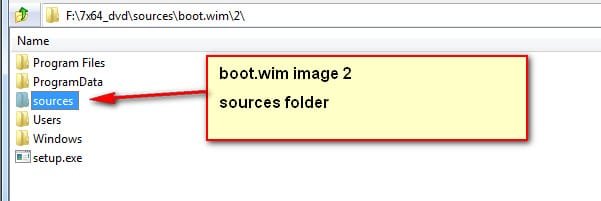
What should happen is that boot.wim ( image 2 ) has the nvme updates integrated.

Install.wim ( whatever image you selected) has the nvme updates integrated.

The sources folder from boot.wim ( image2 ) is then extracted to the installation media folder.

That means the updated files in boot.wim sources folder match the files in installation media sources folder.

If they don't match, then setup.exe that runs from boot.wim will not recognize the installation media.


bootwim-image2-sources.jpg


installation media-sources.jpg
 

My Computers My Computers

System One System Two

  • Computer type
    PC/Desktop
    OS
    7 X64
    CPU
    i5 8400
    Motherboard
    gigabyte b365m ds3h
    Memory
    2x8gb 3200mhz
    Hard Drives
    various
    PSU
    pure power 11 400w cm
    Case
    Coolermaster
    Cooling
    cryorig m9i
  • Computer type
    PC/Desktop
    OS
    7x64
    CPU
    g5400
    Motherboard
    ga b365m ds3h
    Memory
    8gb ddr4 2400
    PSU
    xfx pro 450w
Basil,


NVME updates go in the UPDATES\Bootx64 folder AND in the UPDATES\Installx64 folder.


Yes it will still be there. It is downloaded right next to the .cmd files.


Thanks, another seemingly successfully loaded bootable USB created, a very useful tool indeed.


If I wanted to add all the current Gigabyte drivers for my MB to a USB ISO, from the Gigabyte page for this MB, how do I know what files from the Gigabyte driver pages to extract? Some directories contain just an .exe file. Some directories have zips there that contain a myriad of directories, sub directories and files within. Thanks
 

My Computer My Computer

Computer type
PC/Desktop
Computer Manufacturer/Model Number
Custom
OS
Win 7 Pro 64 Bit
CPU
Intel i5-4670K @ 3.4 GHz
Motherboard
Gigabyte GA-Z97X-Gaming 3
Memory
16 gig
Graphics Card(s)
On board
Hard Drives
SSD C: Drive
2 off 1 gig SATA in software RAID1 as D: Drive
Antivirus
Avast
Browser
Firefox
Drivers need to be .inf .cat and sys to be integrated.

You can probably extract them from .exe using 7-zip or uniextract
 

My Computers My Computers

System One System Two

  • Computer type
    PC/Desktop
    OS
    7 X64
    CPU
    i5 8400
    Motherboard
    gigabyte b365m ds3h
    Memory
    2x8gb 3200mhz
    Hard Drives
    various
    PSU
    pure power 11 400w cm
    Case
    Coolermaster
    Cooling
    cryorig m9i
  • Computer type
    PC/Desktop
    OS
    7x64
    CPU
    g5400
    Motherboard
    ga b365m ds3h
    Memory
    8gb ddr4 2400
    PSU
    xfx pro 450w
WinDef on 10 told me that v23 has a trojan - maybe why I was having so many problems with it as v24 is clean. Well that didn't work again - using win10 always throws an error when dismounting the boot.wim after adding the NVME updates - all of the USB 3 drivers go in w/o issue so I'm not sure what the issue is other then Win10 - suspect WinDef as you can't disable it AFAIK


Will run it on a Win7 system
 

My Computer My Computer

Computer type
PC/Desktop
Computer Manufacturer/Model Number
White Box
OS
Win7-64/Sp1 Ultimate
CPU
AMD Ryzen 5 1600
Motherboard
Asrock B450m Pro
Memory
64GB
Graphics Card(s)
GTX 1060 6GB
Hard Drives
Boot = Crucial MX500 250GB M2 Sata/AHCI
LSI 9211-8i HBA/IT card
Port1 = 1x Team Group GX2 256GB SSD (boot)
1x Crucial MX500 1TB (Raid 1 storage)
2x Team Group GX2 1TB (storage)
Port2 = 1x Team Group GX2 256GB SSD (boot)
1x Crucial MX500 1TB
PSU
EVGA B450
Keyboard
88 key (TKL) mechanical
Back
Top