
You are using an out of date browser. It may not display this or other websites correctly.
You should upgrade or use an alternative browser.
You should upgrade or use an alternative browser.
Update your Win 7 installation media
- Thread starter SIW2
- Start date

- Local time
- 12:18 AM
- Messages
- 16,786
Version 28 on first post.
No updatepatch this time - using bits to download updatepack instead.
New USB3.0/3.1 "universal" drivers included.
No updatepatch this time - using bits to download updatepack instead.
New USB3.0/3.1 "universal" drivers included.
My Computers
System One System Two
-
- Computer type
- PC/Desktop
- OS
- 7 X64
- CPU
- i5 8400
- Motherboard
- gigabyte b365m ds3h
- Memory
- 2x8gb 3200mhz
- Hard Drives
- various
- PSU
- pure power 11 400w cm
- Case
- Coolermaster
- Cooling
- cryorig m9i
-
- Computer type
- PC/Desktop
- OS
- 7x64
- CPU
- g5400
- Motherboard
- ga b365m ds3h
- Memory
- 8gb ddr4 2400
- PSU
- xfx pro 450w
Pro version gone from menu
Hi, Has this already been answered? If so, apologies in advance. I couldn't find it.
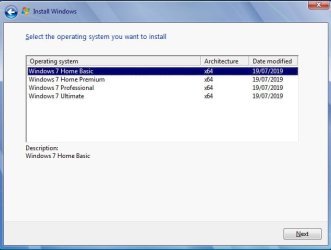
I'm trying to do a new install of Win7 Pro 64 on a Lenovo T460s. I kept getting the "A required CD/DVD driver device driver is missing..." error when trying to run the installation. As far as I can tell this occurred because the SSD is PCIe NVMe and not SATA, so I used the 7UPDATERv28.cmd in this thread to update the Windows 7 Pro x64 on my installation USB. That cured the original error, but now the Windows 7 Pro x64 image seems to be gone from the "Select the operating system you want to install..." pop-up. The three versions I didn't update (Home Basic, Home Premium and Ultimate) are still there.
I'm completely ignorant as far as the installation file structure and functionality so I don't know where to start to troubleshoot this.
Thanks for any help.
Update: Installing Ultimate instead worked fine, except of course I can't use my Pro Product Key....
Hi, Has this already been answered? If so, apologies in advance. I couldn't find it.
I'm trying to do a new install of Win7 Pro 64 on a Lenovo T460s. I kept getting the "A required CD/DVD driver device driver is missing..." error when trying to run the installation. As far as I can tell this occurred because the SSD is PCIe NVMe and not SATA, so I used the 7UPDATERv28.cmd in this thread to update the Windows 7 Pro x64 on my installation USB. That cured the original error, but now the Windows 7 Pro x64 image seems to be gone from the "Select the operating system you want to install..." pop-up. The three versions I didn't update (Home Basic, Home Premium and Ultimate) are still there.
I'm completely ignorant as far as the installation file structure and functionality so I don't know where to start to troubleshoot this.
Thanks for any help.
Update: Installing Ultimate instead worked fine, except of course I can't use my Pro Product Key....
Last edited:
My Computer
- Computer type
- Laptop
- Computer Manufacturer/Model Number
- Lenovo T460s
- OS
- nothing yet...trying to install Windows 7 Pro 64
- CPU
- i5 6300U
- Hard Drives
- 256GB M.2 OPAL2
- Local time
- 12:18 AM
- Messages
- 16,786
Not sure how you managed to do that 
You could install a lower edition and then change the edition upwards. But you say you haven't updated those so it would be pointless.
Have a look at the wim with 7-zip and see how many are showing. Or use the wim-info.cmd which is next to 7updater.cmd to query install.wim
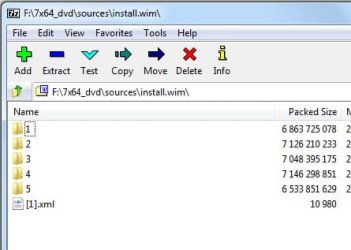
If you still have 4 images, it might just need the name and description added. The one you updated will be larger than the others, obviously.
You could install a lower edition and then change the edition upwards. But you say you haven't updated those so it would be pointless.
Have a look at the wim with 7-zip and see how many are showing. Or use the wim-info.cmd which is next to 7updater.cmd to query install.wim
If you still have 4 images, it might just need the name and description added. The one you updated will be larger than the others, obviously.
My Computers
System One System Two
-
- Computer type
- PC/Desktop
- OS
- 7 X64
- CPU
- i5 8400
- Motherboard
- gigabyte b365m ds3h
- Memory
- 2x8gb 3200mhz
- Hard Drives
- various
- PSU
- pure power 11 400w cm
- Case
- Coolermaster
- Cooling
- cryorig m9i
-
- Computer type
- PC/Desktop
- OS
- 7x64
- CPU
- g5400
- Motherboard
- ga b365m ds3h
- Memory
- 8gb ddr4 2400
- PSU
- xfx pro 450w
Hi SIW2, thanks for your answer.
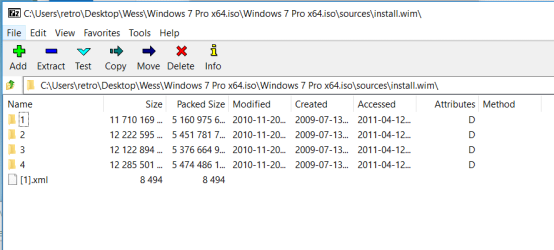
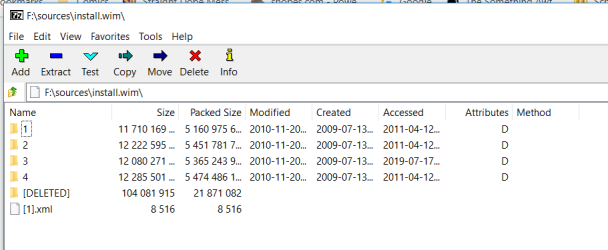
This is what I have looking at the install.wim file on the original install disk compared to the bootable USB install thumb drive I made. I applied 7UPDATER to image 3 on the thumb drive which is the Pro version. Note that Image 3 is smaller on the updated one. I assume that this indicates some problem with the file? While running 7UPDATER no errors were reported. I sat and watched the screen. It seemed to exit all steps cleanly.
Should I be worried about the "DELETED" image?
I didn't even know you could look at an image using 7-zip. Already extremely helpful!
This is what I have looking at the install.wim file on the original install disk compared to the bootable USB install thumb drive I made. I applied 7UPDATER to image 3 on the thumb drive which is the Pro version. Note that Image 3 is smaller on the updated one. I assume that this indicates some problem with the file? While running 7UPDATER no errors were reported. I sat and watched the screen. It seemed to exit all steps cleanly.
Should I be worried about the "DELETED" image?
I didn't even know you could look at an image using 7-zip. Already extremely helpful!
Attachments
My Computer
- Computer type
- Laptop
- Computer Manufacturer/Model Number
- Lenovo T460s
- OS
- nothing yet...trying to install Windows 7 Pro 64
- CPU
- i5 6300U
- Hard Drives
- 256GB M.2 OPAL2
- Local time
- 12:18 AM
- Messages
- 16,786
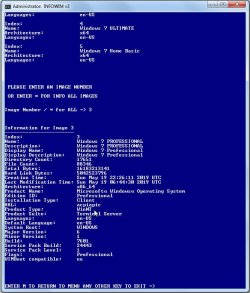
If you use wim-info.cmd first then we can see if anything is missing.
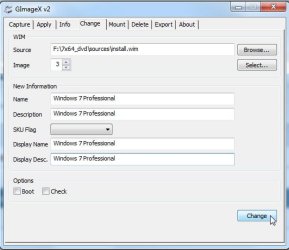
We haven't had this error before, after we have identified the problem info can be added using
gimagex View attachment gimagex.zip
Click the Change tab.
Browse to the wim.
Select image 3
add missing info
click change
We haven't had this error before, after we have identified the problem info can be added using
gimagex View attachment gimagex.zip
Click the Change tab.
Browse to the wim.
Select image 3
add missing info
click change
My Computers
System One System Two
-
- Computer type
- PC/Desktop
- OS
- 7 X64
- CPU
- i5 8400
- Motherboard
- gigabyte b365m ds3h
- Memory
- 2x8gb 3200mhz
- Hard Drives
- various
- PSU
- pure power 11 400w cm
- Case
- Coolermaster
- Cooling
- cryorig m9i
-
- Computer type
- PC/Desktop
- OS
- 7x64
- CPU
- g5400
- Motherboard
- ga b365m ds3h
- Memory
- 8gb ddr4 2400
- PSU
- xfx pro 450w
My Computer
- Computer type
- Laptop
- Computer Manufacturer/Model Number
- Lenovo T460s
- OS
- nothing yet...trying to install Windows 7 Pro 64
- CPU
- i5 6300U
- Hard Drives
- 256GB M.2 OPAL2
You could install a lower edition and then change the edition upwards. But you say you haven't updated those so it would be pointless.
Just wanted to mention that, if I am understanding your suggestion, I think I tried this... I installed both Home Premium and Ultimate "successfully", but they seem to have none of the drivers they need. In the Device Manager all the Other Devices are "Unknown". It doesn't even report the hardware. Thus, I have no functioning USB to try to install Pro from my install media while in Home Premium or Ultimate. I considered seeing if I could only update the drivers on Home Premium without messing with the NVMe update and without causing the Home Premium to disappear from the menu, but I haven't tried this yet.
I'm assuming this is unrelated to problem of the disappearance of the Pro version from my pop-up menu... But just in case, I thought I'd mention it.
My Computer
- Computer type
- Laptop
- Computer Manufacturer/Model Number
- Lenovo T460s
- OS
- nothing yet...trying to install Windows 7 Pro 64
- CPU
- i5 6300U
- Hard Drives
- 256GB M.2 OPAL2

My suggestion is to start over again.
Make sure your antivirus is disabled when running the script.
To make it faster and smaller, don't slipstream the updates. Only add the drivers (USB and MVMe) to ALL editions.
You can install the updates after the installation running UpdatePack7R2
Make sure your antivirus is disabled when running the script.
To make it faster and smaller, don't slipstream the updates. Only add the drivers (USB and MVMe) to ALL editions.
You can install the updates after the installation running UpdatePack7R2
My Computers
System One System Two
-
- Computer type
- PC/Desktop
- Computer Manufacturer/Model Number
- custom build
- OS
- Windows 7 HP 64
- CPU
- i5 6600K - 800MHz to 4200MHz
- Motherboard
- GA-Z170-HD3P
- Memory
- 4+4G GSkill DDR4 3000
- Graphics Card(s)
- IG - Intel 530
- Monitor(s) Displays
- Samsung 226BW
- Screen Resolution
- 1680x1050
- Hard Drives
- (1) -1 SM951 – 128GB M.2 AHCI PCIe SSD drive for Windows 7 and Lubuntu
(2) -1 WD SATA 3 - 1T for Data
(3) -1 WD SATA 3 - 1T for backup
- PSU
- Thermaltake 450W TR2 gold
- Keyboard
- Old and good Chicony mechanical keyboard
- Mouse
- Logitech mX performance - 9 buttons (had to disable some)
- Internet Speed
- 500Mb/s
- Browser
- Firefox 64
- Other Info
- TinyWall firewall
-
- Computer type
- Laptop
- System Manufacturer/Model Number
- Asus Q550LF
- OS
- Windows 7 Pro
- CPU
- i7-4500U 800MHz to 3.0GHz
- Motherboard
- Asus Q550LF
- Memory
- (4+4)G DDR3 1600
- Graphics Card(s)
- IG intel 4400 + NVIDIA GeForce GT 745M
- Sound Card
- Realtek
- Monitor(s) Displays
- LG Display LP156WF4-SPH1
- Screen Resolution
- 1920 x 1080
- Hard Drives
- BX500 120G SSD for Windows and programs +
1T HDD for data
- Internet Speed
- 500 Mb/s
- Browser
- Firefox
- Other Info
- TinyWall firewall
- Local time
- 12:18 AM
- Messages
- 16,786
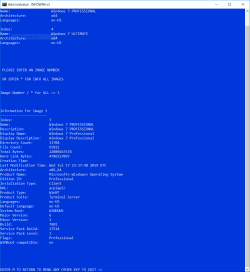
The service pack build is still showing as 17514. Curiously, the creation time is missing.
My Computers
System One System Two
-
- Computer type
- PC/Desktop
- OS
- 7 X64
- CPU
- i5 8400
- Motherboard
- gigabyte b365m ds3h
- Memory
- 2x8gb 3200mhz
- Hard Drives
- various
- PSU
- pure power 11 400w cm
- Case
- Coolermaster
- Cooling
- cryorig m9i
-
- Computer type
- PC/Desktop
- OS
- 7x64
- CPU
- g5400
- Motherboard
- ga b365m ds3h
- Memory
- 8gb ddr4 2400
- PSU
- xfx pro 450w
- Local time
- 12:18 AM
- Messages
- 16,786
My suggestion is to start over again.
Make sure your antivirus is disabled when running the script.
To make it faster and smaller, don't slipstream the updates. Only add the drivers (USB and MVMe) to ALL editions.
You can install the updates after the installation running UpdatePack7R2
The universal usb3/3.1 drivers are already in the correct folders with 7updater28.
You do need to copy the Microsoft nvme updates into the UPDATES\installx64 folder, and the UPDATES\bootx64 folder.
You could also include the oem nvme drivers. They need to be in the DRIVERS\Installx64 and DRIVERS\bootx64 folders.
My Computers
System One System Two
-
- Computer type
- PC/Desktop
- OS
- 7 X64
- CPU
- i5 8400
- Motherboard
- gigabyte b365m ds3h
- Memory
- 2x8gb 3200mhz
- Hard Drives
- various
- PSU
- pure power 11 400w cm
- Case
- Coolermaster
- Cooling
- cryorig m9i
-
- Computer type
- PC/Desktop
- OS
- 7x64
- CPU
- g5400
- Motherboard
- ga b365m ds3h
- Memory
- 8gb ddr4 2400
- PSU
- xfx pro 450w
I'm sorry, I tried several things with various results, but none making any progress. From this I conclude I'm not understanding your directions correctly. Can I repeat back what I'm understanding and you can correct me?
This is what I understand I am to do:
This is what I understand I am to do:
- Make sure all virus protection is disabled.
- Download NVME-DRIVERS-OEMx64.zip and extract.
- Copy ~\Samsung NVMe\secnvme.catto ~\7UPDATERv28\DRIVERS\Bootx64\ and to ~\7UPDATERv28\DRIVERS\Installx64\
~\Samsung NVMe\secnvme.inf
~\Samsung NVMe\secnvme.sys
~\Samsung NVMe\secnvmeF.sys
- Download UPDATES-MS-Nvme-Win7x64.zip and extract.
- Copy ~\Nvme-hotfixx64\Windows6.1-KB2990941-v3-x64.msuto ~\7UPDATERv28\UPDATES\Bootx64\ and to ~\7UPDATERv28\UPDATES\Installx64\
~\Nvme-hotfixx64\Windows6.1-KB3087873-v2-x64.msu
- Run 7UPDATERv28.cmd (as admin), answering N to the SIMPLIX question and answering * to update all images.
My Computer
- Computer type
- Laptop
- Computer Manufacturer/Model Number
- Lenovo T460s
- OS
- nothing yet...trying to install Windows 7 Pro 64
- CPU
- i5 6300U
- Hard Drives
- 256GB M.2 OPAL2
- Local time
- 12:18 AM
- Messages
- 16,786
Yes
My Computers
System One System Two
-
- Computer type
- PC/Desktop
- OS
- 7 X64
- CPU
- i5 8400
- Motherboard
- gigabyte b365m ds3h
- Memory
- 2x8gb 3200mhz
- Hard Drives
- various
- PSU
- pure power 11 400w cm
- Case
- Coolermaster
- Cooling
- cryorig m9i
-
- Computer type
- PC/Desktop
- OS
- 7x64
- CPU
- g5400
- Motherboard
- ga b365m ds3h
- Memory
- 8gb ddr4 2400
- PSU
- xfx pro 450w
- Local time
- 12:18 AM
- Messages
- 16,786
marley10
The creation date is missing from your earlier screenshot. The code is quite complicated there, possibly your system is having an issue with it.
Place this file here: View attachment SET-CREATIONDATE.zip
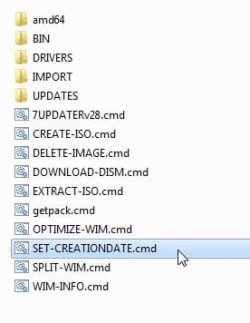
then run it and select the install.wim you have made - it will add the current date and time as the creation date to each image .
The creation date is missing from your earlier screenshot. The code is quite complicated there, possibly your system is having an issue with it.
Place this file here: View attachment SET-CREATIONDATE.zip
then run it and select the install.wim you have made - it will add the current date and time as the creation date to each image .
Last edited:
My Computers
System One System Two
-
- Computer type
- PC/Desktop
- OS
- 7 X64
- CPU
- i5 8400
- Motherboard
- gigabyte b365m ds3h
- Memory
- 2x8gb 3200mhz
- Hard Drives
- various
- PSU
- pure power 11 400w cm
- Case
- Coolermaster
- Cooling
- cryorig m9i
-
- Computer type
- PC/Desktop
- OS
- 7x64
- CPU
- g5400
- Motherboard
- ga b365m ds3h
- Memory
- 8gb ddr4 2400
- PSU
- xfx pro 450w
- Local time
- 12:18 AM
- Messages
- 16,786
New version v29 on first post. Simplified some code.
My Computers
System One System Two
-
- Computer type
- PC/Desktop
- OS
- 7 X64
- CPU
- i5 8400
- Motherboard
- gigabyte b365m ds3h
- Memory
- 2x8gb 3200mhz
- Hard Drives
- various
- PSU
- pure power 11 400w cm
- Case
- Coolermaster
- Cooling
- cryorig m9i
-
- Computer type
- PC/Desktop
- OS
- 7x64
- CPU
- g5400
- Motherboard
- ga b365m ds3h
- Memory
- 8gb ddr4 2400
- PSU
- xfx pro 450w
divewatch45
New member
- Local time
- 6:18 PM
- Messages
- 1
Hello SIW2. Thank you for this tool. I seem to be having the same issues as marley10 where I am attempting to build a Win7 installer that has USB3 and NVME drivers included.
The 7UPDATERv29 was able to recognize the drivers to include and I used it to update the PROFESSIONAL image. However, when I use WIM-INFO to check the install.wim, the image (number 3 for professional) is lacking a creation time.
I tried using your SET-CREATIONDATE tool but it is giving me a weird situation. If I run it without administrator mode, I can pick the WIM file but then it fails because it cannot modify the file. If I run it in administrator mode, it cannot find wimlibx64 even though it exists in the bin\ directory.
The 7UPDATERv29 was able to recognize the drivers to include and I used it to update the PROFESSIONAL image. However, when I use WIM-INFO to check the install.wim, the image (number 3 for professional) is lacking a creation time.
I tried using your SET-CREATIONDATE tool but it is giving me a weird situation. If I run it without administrator mode, I can pick the WIM file but then it fails because it cannot modify the file. If I run it in administrator mode, it cannot find wimlibx64 even though it exists in the bin\ directory.
My Computer
- Computer type
- PC/Desktop
- OS
- Windows 7 Pro 64
- Local time
- 12:18 AM
- Messages
- 16,786
My Computers
System One System Two
-
- Computer type
- PC/Desktop
- OS
- 7 X64
- CPU
- i5 8400
- Motherboard
- gigabyte b365m ds3h
- Memory
- 2x8gb 3200mhz
- Hard Drives
- various
- PSU
- pure power 11 400w cm
- Case
- Coolermaster
- Cooling
- cryorig m9i
-
- Computer type
- PC/Desktop
- OS
- 7x64
- CPU
- g5400
- Motherboard
- ga b365m ds3h
- Memory
- 8gb ddr4 2400
- PSU
- xfx pro 450w
- Local time
- 12:18 AM
- Messages
- 16,786
New version 30 on first post. Fixed issue a couple of people had with the date.
My Computers
System One System Two
-
- Computer type
- PC/Desktop
- OS
- 7 X64
- CPU
- i5 8400
- Motherboard
- gigabyte b365m ds3h
- Memory
- 2x8gb 3200mhz
- Hard Drives
- various
- PSU
- pure power 11 400w cm
- Case
- Coolermaster
- Cooling
- cryorig m9i
-
- Computer type
- PC/Desktop
- OS
- 7x64
- CPU
- g5400
- Motherboard
- ga b365m ds3h
- Memory
- 8gb ddr4 2400
- PSU
- xfx pro 450w
- Local time
- 12:18 AM
- Messages
- 16,786
If anybody has the DELL media, it can be changed to regular media like this:
G13k9.zip
Extract the zip to get this:
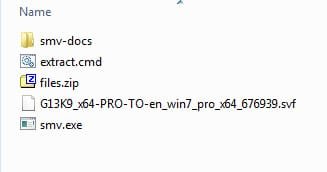
Copy/move the dell iso into the same folder
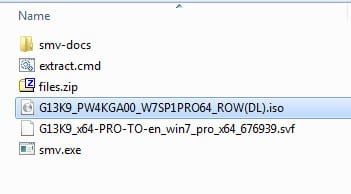
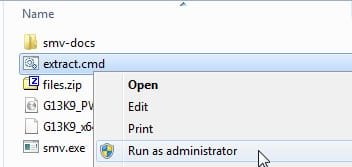
Rt click the extract.cmd and run as administrator
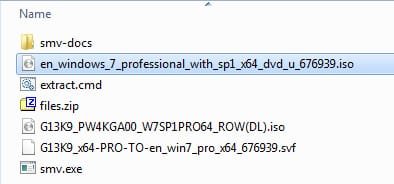
Approx one minute later:
G13k9.zip
Extract the zip to get this:
Copy/move the dell iso into the same folder
Rt click the extract.cmd and run as administrator
Approx one minute later:
My Computers
System One System Two
-
- Computer type
- PC/Desktop
- OS
- 7 X64
- CPU
- i5 8400
- Motherboard
- gigabyte b365m ds3h
- Memory
- 2x8gb 3200mhz
- Hard Drives
- various
- PSU
- pure power 11 400w cm
- Case
- Coolermaster
- Cooling
- cryorig m9i
-
- Computer type
- PC/Desktop
- OS
- 7x64
- CPU
- g5400
- Motherboard
- ga b365m ds3h
- Memory
- 8gb ddr4 2400
- PSU
- xfx pro 450w
Hold the phone. My original post may be incorrect.... Will repost shortly.
Corrected post:
When I used v29 to update all 4 images (Home Basic, Home Premium, Prof, Ultimate), without making any additions to the original as-downloaded 7UPDATER directories, my creation dates are now all there, and I can see all the versions when I run the installation setup. However, according to WIM-INFO the install.wim file hasn't changed.
(Note: I did "successfully" install 7 Professional from the USB at this point, but I still have the problem that none of my driver hardware is recognized. All are listed as "unknown" in the Device Manager, as before.)
This is the output of WIM-INFO from install.wim both before and after running 7UPDATERv29. When I look at its contents using 7zip it still has only 4 images. I didn't think to look at the size or modification date of the install.wim file itself before I deleted it.
Gonna try a few more things and play with the SET-CREATIONDATE script next. Thanks.
Information for Image 1
-----------------------
Index: 1
Name: Windows 7 HOMEBASIC
Description: Windows 7 HOMEBASIC
Display Name: Windows 7 Home Basic
Display Description: Windows 7 Home Basic
Directory Count: 13365
File Count: 64285
Total Bytes: 11710161360
Hard Link Bytes: 4497873056
Creation Time: Sun Nov 21 04:39:25 2010 UTC
Last Modification Time: Tue Apr 12 08:59:58 2011 UTC
Architecture: x86_64
Product Name: Microsoft® Windows® Operating System
Edition ID: HomeBasic
Installation Type: Client
HAL: acpiapic
Product Type: WinNT
Product Suite: Terminal Server
Languages: en-US
Default Language: en-US
System Root: WINDOWS
Major Version: 6
Minor Version: 1
Build: 7601
Service Pack Build: 17514
Service Pack Level: 1
Flags: HomeBasic
WIMBoot compatible: no
Information for Image 2
-----------------------
Index: 2
Name: Windows 7 HOMEPREMIUM
Description: Windows 7 HOMEPREMIUM
Display Name: Windows 7 Home Premium
Display Description: Windows 7 Home Premium
Directory Count: 13614
File Count: 65339
Total Bytes: 12222587449
Hard Link Bytes: 4912986404
Creation Time: Sun Nov 21 04:39:25 2010 UTC
Last Modification Time: Tue Apr 12 09:00:58 2011 UTC
Architecture: x86_64
Product Name: Microsoft® Windows® Operating System
Edition ID: HomePremium
Installation Type: Client
HAL: acpiapic
Product Type: WinNT
Product Suite: Terminal Server
Languages: en-US
Default Language: en-US
System Root: WINDOWS
Major Version: 6
Minor Version: 1
Build: 7601
Service Pack Build: 17514
Service Pack Level: 1
Flags: HomePremium
WIMBoot compatible: no
Information for Image 3
-----------------------
Index: 3
Name: Windows 7 PROFESSIONAL
Description: Windows 7 PROFESSIONAL
Display Name: Windows 7 Professional
Display Description: Windows 7 Professional
Directory Count: 13701
File Count: 65851
Total Bytes: 12122886417
Hard Link Bytes: 4786527097
Creation Time: Sun Nov 21 04:39:25 2010 UTC
Last Modification Time: Tue Apr 12 09:01:59 2011 UTC
Architecture: x86_64
Product Name: Microsoft® Windows® Operating System
Edition ID: Professional
Installation Type: Client
HAL: acpiapic
Product Type: WinNT
Product Suite: Terminal Server
Languages: en-US
Default Language: en-US
System Root: WINDOWS
Major Version: 6
Minor Version: 1
Build: 7601
Service Pack Build: 17514
Service Pack Level: 1
Flags: Professional
WIMBoot compatible: no
Information for Image 4
-----------------------
Index: 4
Name: Windows 7 ULTIMATE
Description: Windows 7 ULTIMATE
Display Name: Windows 7 Ultimate
Display Description: Windows 7 Ultimate
Directory Count: 13737
File Count: 66029
Total Bytes: 12285492779
Hard Link Bytes: 4947144081
Creation Time: Sun Nov 21 04:39:25 2010 UTC
Last Modification Time: Tue Apr 12 09:03:02 2011 UTC
Architecture: x86_64
Product Name: Microsoft® Windows® Operating System
Edition ID: Ultimate
Installation Type: Client
HAL: acpiapic
Product Type: WinNT
Product Suite: Terminal Server
Languages: en-US
Default Language: en-US
System Root: WINDOWS
Major Version: 6
Minor Version: 1
Build: 7601
Service Pack Build: 17514
Service Pack Level: 1
Flags: Ultimate
WIMBoot compatible: no
Information for Image 1
-----------------------
Index: 1
Name: Windows 7 HOMEBASIC
Description: Windows 7 HOMEBASIC
Display Name: Windows 7 Home Basic
Display Description: Windows 7 Home Basic
Directory Count: 13368
File Count: 64255
Total Bytes: 11669754377
Hard Link Bytes: 4497873056
Creation Time: Sun Nov 21 04:39:25 2010 UTC
Last Modification Time: Fri Jul 19 22:26:12 2019 UTC
Architecture: x86_64
Product Name: Microsoft® Windows® Operating System
Edition ID: HomeBasic
Installation Type: Client
HAL: acpiapic
Product Type: WinNT
Product Suite: Terminal Server
Languages: en-US
Default Language: en-US
System Root: WINDOWS
Major Version: 6
Minor Version: 1
Build: 7601
Service Pack Build: 17514
Service Pack Level: 1
Flags: HomeBasic
WIMBoot compatible: no
Information for Image 2
-----------------------
Index: 2
Name: Windows 7 HOMEPREMIUM
Description: Windows 7 HOMEPREMIUM
Display Name: Windows 7 Home Premium
Display Description: Windows 7 Home Premium
Directory Count: 13614
File Count: 65339
Total Bytes: 12222587449
Hard Link Bytes: 4912986404
Creation Time: Sun Nov 21 04:39:25 2010 UTC
Last Modification Time: Tue Apr 12 09:00:58 2011 UTC
Architecture: x86_64
Product Name: Microsoft® Windows® Operating System
Edition ID: HomePremium
Installation Type: Client
HAL: acpiapic
Product Type: WinNT
Product Suite: Terminal Server
Languages: en-US
Default Language: en-US
System Root: WINDOWS
Major Version: 6
Minor Version: 1
Build: 7601
Service Pack Build: 17514
Service Pack Level: 1
Flags: HomePremium
WIMBoot compatible: no
Information for Image 3
-----------------------
Index: 3
Name: Windows 7 PROFESSIONAL
Description: Windows 7 PROFESSIONAL
Display Name: Windows 7 Professional
Display Description: Windows 7 Professional
Directory Count: 13701
File Count: 65851
Total Bytes: 12122886417
Hard Link Bytes: 4786527097
Creation Time: Sun Nov 21 04:39:25 2010 UTC
Last Modification Time: Tue Apr 12 09:01:59 2011 UTC
Architecture: x86_64
Product Name: Microsoft® Windows® Operating System
Edition ID: Professional
Installation Type: Client
HAL: acpiapic
Product Type: WinNT
Product Suite: Terminal Server
Languages: en-US
Default Language: en-US
System Root: WINDOWS
Major Version: 6
Minor Version: 1
Build: 7601
Service Pack Build: 17514
Service Pack Level: 1
Flags: Professional
WIMBoot compatible: no
Information for Image 4
-----------------------
Index: 4
Name: Windows 7 ULTIMATE
Description: Windows 7 ULTIMATE
Display Name: Windows 7 Ultimate
Display Description: Windows 7 Ultimate
Directory Count: 13737
File Count: 66029
Total Bytes: 12285492779
Hard Link Bytes: 4947144081
Creation Time: Sun Nov 21 04:39:25 2010 UTC
Last Modification Time: Tue Apr 12 09:03:02 2011 UTC
Architecture: x86_64
Product Name: Microsoft® Windows® Operating System
Edition ID: Ultimate
Installation Type: Client
HAL: acpiapic
Product Type: WinNT
Product Suite: Terminal Server
Languages: en-US
Default Language: en-US
System Root: WINDOWS
Major Version: 6
Minor Version: 1
Build: 7601
Service Pack Build: 17514
Service Pack Level: 1
Flags: Ultimate
WIMBoot compatible: no
Corrected post:
When I used v29 to update all 4 images (Home Basic, Home Premium, Prof, Ultimate), without making any additions to the original as-downloaded 7UPDATER directories, my creation dates are now all there, and I can see all the versions when I run the installation setup. However, according to WIM-INFO the install.wim file hasn't changed.
(Note: I did "successfully" install 7 Professional from the USB at this point, but I still have the problem that none of my driver hardware is recognized. All are listed as "unknown" in the Device Manager, as before.)
This is the output of WIM-INFO from install.wim both before and after running 7UPDATERv29. When I look at its contents using 7zip it still has only 4 images. I didn't think to look at the size or modification date of the install.wim file itself before I deleted it.
Gonna try a few more things and play with the SET-CREATIONDATE script next. Thanks.
Information for Image 1
-----------------------
Index: 1
Name: Windows 7 HOMEBASIC
Description: Windows 7 HOMEBASIC
Display Name: Windows 7 Home Basic
Display Description: Windows 7 Home Basic
Directory Count: 13365
File Count: 64285
Total Bytes: 11710161360
Hard Link Bytes: 4497873056
Creation Time: Sun Nov 21 04:39:25 2010 UTC
Last Modification Time: Tue Apr 12 08:59:58 2011 UTC
Architecture: x86_64
Product Name: Microsoft® Windows® Operating System
Edition ID: HomeBasic
Installation Type: Client
HAL: acpiapic
Product Type: WinNT
Product Suite: Terminal Server
Languages: en-US
Default Language: en-US
System Root: WINDOWS
Major Version: 6
Minor Version: 1
Build: 7601
Service Pack Build: 17514
Service Pack Level: 1
Flags: HomeBasic
WIMBoot compatible: no
Information for Image 2
-----------------------
Index: 2
Name: Windows 7 HOMEPREMIUM
Description: Windows 7 HOMEPREMIUM
Display Name: Windows 7 Home Premium
Display Description: Windows 7 Home Premium
Directory Count: 13614
File Count: 65339
Total Bytes: 12222587449
Hard Link Bytes: 4912986404
Creation Time: Sun Nov 21 04:39:25 2010 UTC
Last Modification Time: Tue Apr 12 09:00:58 2011 UTC
Architecture: x86_64
Product Name: Microsoft® Windows® Operating System
Edition ID: HomePremium
Installation Type: Client
HAL: acpiapic
Product Type: WinNT
Product Suite: Terminal Server
Languages: en-US
Default Language: en-US
System Root: WINDOWS
Major Version: 6
Minor Version: 1
Build: 7601
Service Pack Build: 17514
Service Pack Level: 1
Flags: HomePremium
WIMBoot compatible: no
Information for Image 3
-----------------------
Index: 3
Name: Windows 7 PROFESSIONAL
Description: Windows 7 PROFESSIONAL
Display Name: Windows 7 Professional
Display Description: Windows 7 Professional
Directory Count: 13701
File Count: 65851
Total Bytes: 12122886417
Hard Link Bytes: 4786527097
Creation Time: Sun Nov 21 04:39:25 2010 UTC
Last Modification Time: Tue Apr 12 09:01:59 2011 UTC
Architecture: x86_64
Product Name: Microsoft® Windows® Operating System
Edition ID: Professional
Installation Type: Client
HAL: acpiapic
Product Type: WinNT
Product Suite: Terminal Server
Languages: en-US
Default Language: en-US
System Root: WINDOWS
Major Version: 6
Minor Version: 1
Build: 7601
Service Pack Build: 17514
Service Pack Level: 1
Flags: Professional
WIMBoot compatible: no
Information for Image 4
-----------------------
Index: 4
Name: Windows 7 ULTIMATE
Description: Windows 7 ULTIMATE
Display Name: Windows 7 Ultimate
Display Description: Windows 7 Ultimate
Directory Count: 13737
File Count: 66029
Total Bytes: 12285492779
Hard Link Bytes: 4947144081
Creation Time: Sun Nov 21 04:39:25 2010 UTC
Last Modification Time: Tue Apr 12 09:03:02 2011 UTC
Architecture: x86_64
Product Name: Microsoft® Windows® Operating System
Edition ID: Ultimate
Installation Type: Client
HAL: acpiapic
Product Type: WinNT
Product Suite: Terminal Server
Languages: en-US
Default Language: en-US
System Root: WINDOWS
Major Version: 6
Minor Version: 1
Build: 7601
Service Pack Build: 17514
Service Pack Level: 1
Flags: Ultimate
WIMBoot compatible: no
Information for Image 1
-----------------------
Index: 1
Name: Windows 7 HOMEBASIC
Description: Windows 7 HOMEBASIC
Display Name: Windows 7 Home Basic
Display Description: Windows 7 Home Basic
Directory Count: 13368
File Count: 64255
Total Bytes: 11669754377
Hard Link Bytes: 4497873056
Creation Time: Sun Nov 21 04:39:25 2010 UTC
Last Modification Time: Fri Jul 19 22:26:12 2019 UTC
Architecture: x86_64
Product Name: Microsoft® Windows® Operating System
Edition ID: HomeBasic
Installation Type: Client
HAL: acpiapic
Product Type: WinNT
Product Suite: Terminal Server
Languages: en-US
Default Language: en-US
System Root: WINDOWS
Major Version: 6
Minor Version: 1
Build: 7601
Service Pack Build: 17514
Service Pack Level: 1
Flags: HomeBasic
WIMBoot compatible: no
Information for Image 2
-----------------------
Index: 2
Name: Windows 7 HOMEPREMIUM
Description: Windows 7 HOMEPREMIUM
Display Name: Windows 7 Home Premium
Display Description: Windows 7 Home Premium
Directory Count: 13614
File Count: 65339
Total Bytes: 12222587449
Hard Link Bytes: 4912986404
Creation Time: Sun Nov 21 04:39:25 2010 UTC
Last Modification Time: Tue Apr 12 09:00:58 2011 UTC
Architecture: x86_64
Product Name: Microsoft® Windows® Operating System
Edition ID: HomePremium
Installation Type: Client
HAL: acpiapic
Product Type: WinNT
Product Suite: Terminal Server
Languages: en-US
Default Language: en-US
System Root: WINDOWS
Major Version: 6
Minor Version: 1
Build: 7601
Service Pack Build: 17514
Service Pack Level: 1
Flags: HomePremium
WIMBoot compatible: no
Information for Image 3
-----------------------
Index: 3
Name: Windows 7 PROFESSIONAL
Description: Windows 7 PROFESSIONAL
Display Name: Windows 7 Professional
Display Description: Windows 7 Professional
Directory Count: 13701
File Count: 65851
Total Bytes: 12122886417
Hard Link Bytes: 4786527097
Creation Time: Sun Nov 21 04:39:25 2010 UTC
Last Modification Time: Tue Apr 12 09:01:59 2011 UTC
Architecture: x86_64
Product Name: Microsoft® Windows® Operating System
Edition ID: Professional
Installation Type: Client
HAL: acpiapic
Product Type: WinNT
Product Suite: Terminal Server
Languages: en-US
Default Language: en-US
System Root: WINDOWS
Major Version: 6
Minor Version: 1
Build: 7601
Service Pack Build: 17514
Service Pack Level: 1
Flags: Professional
WIMBoot compatible: no
Information for Image 4
-----------------------
Index: 4
Name: Windows 7 ULTIMATE
Description: Windows 7 ULTIMATE
Display Name: Windows 7 Ultimate
Display Description: Windows 7 Ultimate
Directory Count: 13737
File Count: 66029
Total Bytes: 12285492779
Hard Link Bytes: 4947144081
Creation Time: Sun Nov 21 04:39:25 2010 UTC
Last Modification Time: Tue Apr 12 09:03:02 2011 UTC
Architecture: x86_64
Product Name: Microsoft® Windows® Operating System
Edition ID: Ultimate
Installation Type: Client
HAL: acpiapic
Product Type: WinNT
Product Suite: Terminal Server
Languages: en-US
Default Language: en-US
System Root: WINDOWS
Major Version: 6
Minor Version: 1
Build: 7601
Service Pack Build: 17514
Service Pack Level: 1
Flags: Ultimate
WIMBoot compatible: no
Last edited:
My Computer
- Computer type
- Laptop
- Computer Manufacturer/Model Number
- Lenovo T460s
- OS
- nothing yet...trying to install Windows 7 Pro 64
- CPU
- i5 6300U
- Hard Drives
- 256GB M.2 OPAL2
Similar threads
- Replies
- 18
- Views
- 7K

- Replies
- 12
- Views
- 7K

- Replies
- 1
- Views
- 4K

- Replies
- 5
- Views
- 6K

