Update your Win 7 installation media

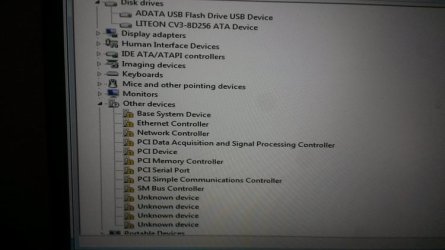
The device manager yellow bangs indicate that windows 7 driverstore does not have drivers for those devices.

You would need to get them from your motherboard manufacturer site.

The "universal" usb3 drivers are working, and it sees your LiteOn CV3 Solid-State Drive (sata3 SSD) so you need the drivers for the devices with yellow bangs

Have you got an nvme disk in addition to the liteon ssd disk?

The win7x64 drivers for the other devices are here:
laptops and netbooks :: thinkpad t series laptops :: thinkpad t460 Lenovo PC Support - US


HOLY SH-T!!!! I think I have progress!!!

So, going on the assumption that only HomeBasic was being modified by 7UPDATER, I went ahead and installed HomeBasic. Everything proceeds as before, except now I have functioning USBs in Windows 7! Unfortunately, all the other drivers and devices that were missing before are still missing, including ethernet. Please tell me this is consistent with not having the NVMe drivers working??

Actual "screen shots" of the Lenovo after Home Basic install. First are shots of the Device Manager showing some of the missing drivers and hardware ids:

marley10.jpg

Holy crap! A working USB 3!!! So beautiful...

View attachment 408926
 
Last edited:

My Computers My Computers

System One System Two

  • Computer type
    PC/Desktop
    OS
    7 X64
    CPU
    i5 8400
    Motherboard
    gigabyte b365m ds3h
    Memory
    2x8gb 3200mhz
    Hard Drives
    various
    PSU
    pure power 11 400w cm
    Case
    Coolermaster
    Cooling
    cryorig m9i
  • Computer type
    PC/Desktop
    OS
    7x64
    CPU
    g5400
    Motherboard
    ga b365m ds3h
    Memory
    8gb ddr4 2400
    PSU
    xfx pro 450w
marley10


After you have installed the relevant drivers, you can change the edition from home basic to Pro.

One way is to use anytime upgrade ( type upgrade into start search box)

enter your pro key and click next. It will run for a minute and tell you it has failed. ( that is because the upgrade cannot check your key online) Reboot and it will complete upgrading to pro edition. You then need to enter your key in the normal way to activate.
 
Last edited:

My Computers My Computers

System One System Two

  • Computer type
    PC/Desktop
    OS
    7 X64
    CPU
    i5 8400
    Motherboard
    gigabyte b365m ds3h
    Memory
    2x8gb 3200mhz
    Hard Drives
    various
    PSU
    pure power 11 400w cm
    Case
    Coolermaster
    Cooling
    cryorig m9i
  • Computer type
    PC/Desktop
    OS
    7x64
    CPU
    g5400
    Motherboard
    ga b365m ds3h
    Memory
    8gb ddr4 2400
    PSU
    xfx pro 450w
What operating system are you running it on?
Have you turned off your antivirus?

are pecmd.exe and getwimdir.ini in the bin folder?


View attachment 408908


I found the issue the folder had file in it that where marked read only. I right clicked properties on the folder, unchecked read only and applied it to folder and sub folders. Its running now.
 

My Computer My Computer

Computer type
PC/Desktop
OS
win7x64
Er... I didn't know what the Liteon was or that it was an SSD. I had been ignoring that question for the moment. Are you saying that I don't have a Samsung 256GB SSD M.2 Opal2, I've got a Liteon CV3-8d256 SSD??? These aren't the same thing are they? And that the computer is communicating with it just fine, so that means I don't need the NVMe drivers after all??

So my problem is that my MS-direct install media doesn't have a bunch of OTHER drivers this hardware needs?

So, basically, I should get the bloody thing working somehow, and then make an install iso of the working Win7 Pro for future installs, and forget the factory-direct installation media?

Can you see a light bulb over my head at this point? Can you hear my cursing from there?
 

My Computer My Computer

Computer type
Laptop
Computer Manufacturer/Model Number
Lenovo T460s
OS
nothing yet...trying to install Windows 7 Pro 64
CPU
i5 6300U
Hard Drives
256GB M.2 OPAL2
WTF! Yes, duh. The Liteon is SATA not NVMe. More light bulbs coming on.
 

My Computer My Computer

Computer type
Laptop
Computer Manufacturer/Model Number
Lenovo T460s
OS
nothing yet...trying to install Windows 7 Pro 64
CPU
i5 6300U
Hard Drives
256GB M.2 OPAL2
marley10

After you have installed the relevant drivers, you can change the edition from home basic to Pro.

One way is to use anytime upgrade ( type upgrade into start search box)

enter your pro key and click next. It will run for a minute and tell you it has failed. ( that is because the upgrade cannot check your key online) Reboot and it will complete upgrading to pro edition. You then need to enter your key in the normal way to activate.

Thanks for the driver link SIW2. No doubt that has saved me a lot of time. Still working on those.

The following resolved my Win7Pro problem:

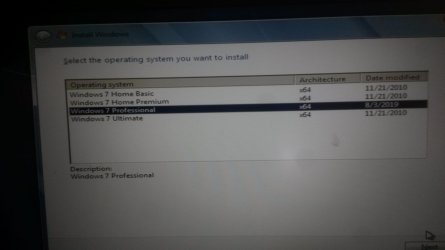
For some reason on my system the 7UPDATER script seems to only update one image each time I run it. When I was selecting just the Win7Pro image 3 running v28, it was updating it, but also making Win7Pro disappear off the list of versions seen by Setup. When I selected * to update all, it seemed to only update the HomeBasic image 1. I'm not sure if HomeBasic disappeared from the Setup list after running 7UPDATERv28 with "*" or not. And I *thought* that the Win7Pro was still missing, but maybe I'm incorrect about that.

When I started running V30, the Win7Pro appeared on the Setup list again, but it still wasn't updated, as evidenced by no changes in modification times and no functioning USB3s after install. So, an hour ago, I ran 7UPDATERv30 again on the same media I'd already ran it using * (when HomeBasic image 1 only was successfully updated, as evidenced by the working USB3 and its new modification date in install.wim). This second time I ran 7UPDATER, I only updated the Win7Pro image 3. This seems to have worked. Now my install.wim shows that both HomeBasic and Win7Pro have new modification dates (yesterday and today respectively), and I just successfully installed Win7Pro with functioning USB3s on the Lenovo. (Halle-F-in'-lujah!)

Interestingly, for the first time ever, the Setup list of versions FINALLY shows a different and correct modification date for the Win7Pro. Note however, that the date for the HomeBasic version here STILL doesn't agree with the install.wim modification date for it. I guess if this ever comes up again for anyone else, this goofiness might be worth looking into...

20190803_125805.jpg
 

My Computer My Computer

Computer type
Laptop
Computer Manufacturer/Model Number
Lenovo T460s
OS
nothing yet...trying to install Windows 7 Pro 64
CPU
i5 6300U
Hard Drives
256GB M.2 OPAL2
Huh. I guess I just sort of answered the weird date question too. I found the answer to "what" but not to "why".

Below is part of my install.wim info after running 7UPDATERv30 twice, first updating using "*" and again using "3". Notice that Image 1 HomeBasic has a new modification date but the original creation date, whereas Image 3 Pro has a new modification date AND a new creation date. I changed NOTHING between running 7UPDATER "*" and "3". Clearly, when Setup is running it is taking the Creation Date and using it as the Modification Date for each image.

Code:
Information for Image 1
-----------------------
Index:                  1
Name:                   Windows 7 HOMEBASIC
Description:            Windows 7 HOMEBASIC
Display Name:           Windows 7 Home Basic
Display Description:    Windows 7 Home Basic
Directory Count:        13368
File Count:             64255
Total Bytes:            11669767841
Hard Link Bytes:        4497873056
Creation Time:          Sun Nov 21 04:39:25 2010 UTC
Last Modification Time: Fri Aug 02 18:15:16 2019 UTC
Architecture:           x86_64
Product Name:           Microsoft® Windows® Operating System
Edition ID:             HomeBasic
Installation Type:      Client
HAL:                    acpiapic
Product Type:           WinNT
Product Suite:          Terminal Server
Languages:              en-US 
Default Language:       en-US
System Root:            WINDOWS
Major Version:          6
Minor Version:          1
Build:                  7601
Service Pack Build:     17514
Service Pack Level:     1
Flags:                  HomeBasic
WIMBoot compatible:     no

Information for Image 2
-----------------------
Index:                  2
Name:                   Windows 7 HOMEPREMIUM
Description:            Windows 7 HOMEPREMIUM
Display Name:           Windows 7 Home Premium
Display Description:    Windows 7 Home Premium
Directory Count:        13614
File Count:             65339
Total Bytes:            12222587449
Hard Link Bytes:        4912986404
Creation Time:          Sun Nov 21 04:39:25 2010 UTC
Last Modification Time: Tue Apr 12 09:00:58 2011 UTC
Architecture:           x86_64
Product Name:           Microsoft® Windows® Operating System
Edition ID:             HomePremium
Installation Type:      Client
HAL:                    acpiapic
Product Type:           WinNT
Product Suite:          Terminal Server
Languages:              en-US 
Default Language:       en-US
System Root:            WINDOWS
Major Version:          6
Minor Version:          1
Build:                  7601
Service Pack Build:     17514
Service Pack Level:     1
Flags:                  HomePremium
WIMBoot compatible:     no

Information for Image 3
-----------------------
Index:                  3
Name:                   Windows 7 PROFESSIONAL
Description:            Windows 7 PROFESSIONAL
Display Name:           Windows 7 Professional
Display Description:    Windows 7 Professional
Directory Count:        13704
File Count:             65821
Total Bytes:            12082778278
Hard Link Bytes:        4786527097
Creation Time:          Sat Aug 03 12:52:15 2019 UTC
Last Modification Time: Sat Aug 03 19:50:27 2019 UTC
Architecture:           x86_64
Product Name:           Microsoft® Windows® Operating System
Edition ID:             Professional
Installation Type:      Client
HAL:                    acpiapic
Product Type:           WinNT
Product Suite:          Terminal Server
Languages:              en-US 
Default Language:       en-US
System Root:            WINDOWS
Major Version:          6
Minor Version:          1
Build:                  7601
Service Pack Build:     17514
Service Pack Level:     1
Flags:                  Professional
WIMBoot compatible:     no
 

My Computer My Computer

Computer type
Laptop
Computer Manufacturer/Model Number
Lenovo T460s
OS
nothing yet...trying to install Windows 7 Pro 64
CPU
i5 6300U
Hard Drives
256GB M.2 OPAL2
Clearly, when Setup is running it is taking the Creation Date and using it as the Modification Date for each image.
Yes, that is normal. I don't know why MS decided to do that.


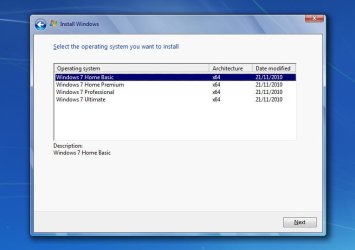
Here is untouched installation media


MS_standard-install-media.jpg


What MS call Modification date is drawn from the creation date field in the xml information. What they call operating system is drawn from the displayname field.

The date will change if the wim is applied, then captured. Makes sense because that would be the date the wim image was created.

Maybe MS figured it would help people applying the image, making changes ( adding drivers/updates/ personalization) sysprep and capture for deployment.
 

My Computers My Computers

System One System Two

  • Computer type
    PC/Desktop
    OS
    7 X64
    CPU
    i5 8400
    Motherboard
    gigabyte b365m ds3h
    Memory
    2x8gb 3200mhz
    Hard Drives
    various
    PSU
    pure power 11 400w cm
    Case
    Coolermaster
    Cooling
    cryorig m9i
  • Computer type
    PC/Desktop
    OS
    7x64
    CPU
    g5400
    Motherboard
    ga b365m ds3h
    Memory
    8gb ddr4 2400
    PSU
    xfx pro 450w
Yes, that is normal. I don't know why MS decided to do that.

Of course.

Does that explain why HomeBasic's Creation Date in the install.wim file wasn't changed (using *) but Pro's was (using 3)?
 

My Computer My Computer

Computer type
Laptop
Computer Manufacturer/Model Number
Lenovo T460s
OS
nothing yet...trying to install Windows 7 Pro 64
CPU
i5 6300U
Hard Drives
256GB M.2 OPAL2
What MS call Modification date is drawn from the creation date field in the xml information. What they call operating system is drawn from the displayname field.

Is there a way to edit the 'display name' and the 'display description' information in a batch file? currently I do this with the WinToolkit, but I would want to do this in a batch file too, so that my image-creation-process would be fully automated.
 

My Computer My Computer

Computer type
PC/Desktop
OS
Windows 7 Professional x64
CPU
9900KS
Motherboard
ASRock Z390M Pro4
Memory
32GB DDR4
Graphics Card(s)
GeForce GT 640
Sound Card
Renkforce MX 0103USB
Hard Drives
Samsung 850 EVO Basic 250GB
Cooling
Be Quiet! shadow rock lp and one case fan.
Mouse
Logitech MX Anywhere 2S
Internet Speed
~80mb/s down, 15mb/s up
Browser
mostly Chrome
As far as i know only wimlib has the function to change any image property via command line.

wimlib - Main page


You can call it from a batch file:

info WIMFILE [IMAGE [NEW_NAME [NEW_DESC]]]

Code:
wimlib-imagex info path_to_wim index_number --image-property DISPLAYNAME="new_name" --image-property DISPLAYDESCRIPTION="new_desription"
 
Last edited:

My Computers My Computers

System One System Two

  • Computer type
    PC/Desktop
    OS
    7 X64
    CPU
    i5 8400
    Motherboard
    gigabyte b365m ds3h
    Memory
    2x8gb 3200mhz
    Hard Drives
    various
    PSU
    pure power 11 400w cm
    Case
    Coolermaster
    Cooling
    cryorig m9i
  • Computer type
    PC/Desktop
    OS
    7x64
    CPU
    g5400
    Motherboard
    ga b365m ds3h
    Memory
    8gb ddr4 2400
    PSU
    xfx pro 450w
OMG, thank you so much, this works like it's supposed to.
Now I am able to fully automate the creation process of my SP2-ISOs, great.
 

My Computer My Computer

Computer type
PC/Desktop
OS
Windows 7 Professional x64
CPU
9900KS
Motherboard
ASRock Z390M Pro4
Memory
32GB DDR4
Graphics Card(s)
GeForce GT 640
Sound Card
Renkforce MX 0103USB
Hard Drives
Samsung 850 EVO Basic 250GB
Cooling
Be Quiet! shadow rock lp and one case fan.
Mouse
Logitech MX Anywhere 2S
Internet Speed
~80mb/s down, 15mb/s up
Browser
mostly Chrome
Updater error

I am trying to get this thing to work for me. However I get an error when attempting to run the Updater. Running from elevated prompt(Admin). One of the issues is when I get to the first screen, the blue one where you select the source, although the error has already occurred the text is flashing so quickly it is hard to read it.

Anyway this is the error I was finally able to read:
" 'Bin /setwimdirpath.cmd' is not recognized as an external or internal command, operable program or batch file. Could not find c:\Install\Win7 updater \7updaterv30\Bin\setWindirpatch.cmd"


C:\Install\ is where I was attempting to run the updater from. I have also tried it from the desktop.


I originally attempted this on a Win10 machine but couldn't even read the text error message. Tried again on a Win7 machine and I was able to finally see what was being displayed.


I am able to view the Updater batch file and can see the line with the above input.
 

My Computer My Computer

Computer type
PC/Desktop
Computer Manufacturer/Model Number
Custom Build
OS
Win7 Pro 64/Win10 Pro 64
CPU
Various
Motherboard
Various
Do you get the browse for installation media window?

The problem might be the long path with spaces.

MOVE the 7updater30 folder directly to the root of the drive, so you have C:\7updater30 folder.
 

My Computers My Computers

System One System Two

  • Computer type
    PC/Desktop
    OS
    7 X64
    CPU
    i5 8400
    Motherboard
    gigabyte b365m ds3h
    Memory
    2x8gb 3200mhz
    Hard Drives
    various
    PSU
    pure power 11 400w cm
    Case
    Coolermaster
    Cooling
    cryorig m9i
  • Computer type
    PC/Desktop
    OS
    7x64
    CPU
    g5400
    Motherboard
    ga b365m ds3h
    Memory
    8gb ddr4 2400
    PSU
    xfx pro 450w
Do you get the browse for installation media window?

The problem might be the long path with spaces.

MOVE the 7updater30 folder directly to the root of the drive, so you have C:\7updater30 folder.


Yes, it was that window that displayed the error. And it looks like the long file name was the issue. Attempting again as I'm typing this.


All seemed to update okay. However when attempting to boot to the created USB Win7 still does not seem to work with a USB 3 port. It works with a USB 2 port. But then it still does not see the installed NVMe drive. I can live with the USB 2 limitation but I really want to install onto an NVMe drive.

Guess I'm going to have to read through the whole topic to refresh as I think this was discussed previously.
 
Last edited:

My Computer My Computer

Computer type
PC/Desktop
Computer Manufacturer/Model Number
Custom Build
OS
Win7 Pro 64/Win10 Pro 64
CPU
Various
Motherboard
Various
7UPv31 on first post. Uses win10 dism by default, includes "universal" intel usb3 drivers.


Simplix :

  • Added KB4474419-v2-x86-x64 (replaces KB4474419-x86-x64)
  • Added KB4512506-x86-x64 with disabled telemetry and cpu check (replaces KB2563227-x86-x64, KB2732487-v2-x86-x64, KB2763523-x86-x64, KB2813347-x86-x64 and KB4507449-x86-x64)
 
Last edited:

My Computers My Computers

System One System Two

  • Computer type
    PC/Desktop
    OS
    7 X64
    CPU
    i5 8400
    Motherboard
    gigabyte b365m ds3h
    Memory
    2x8gb 3200mhz
    Hard Drives
    various
    PSU
    pure power 11 400w cm
    Case
    Coolermaster
    Cooling
    cryorig m9i
  • Computer type
    PC/Desktop
    OS
    7x64
    CPU
    g5400
    Motherboard
    ga b365m ds3h
    Memory
    8gb ddr4 2400
    PSU
    xfx pro 450w
getting back to win 10 win 7 dual boot

Hi, just reading all comments from original subject post.
Having trouble getting this new machine to work.
I downloaded all your files, particularly driver files for samsung ssd (thank you), installed them in the usb iso.
When attempting to install win 7 in the new partion on the ssd, installation wants an updated version of: secnvme.inf and will not continue. Help please?
 

My Computer My Computer

Computer type
Laptop
Computer Manufacturer/Model Number
hp envy x360 convert 15-dr0023 tx
OS
windows 10 home 64 bit
CPU
intel
Memory
16mb
Hard Drives
1tb samsung pm981 mzvlb1t0halr-000h1 nand ssd
Other Info
brand new delivered 19/08/2019

My Computers My Computers

System One System Two

  • Computer type
    PC/Desktop
    OS
    7 X64
    CPU
    i5 8400
    Motherboard
    gigabyte b365m ds3h
    Memory
    2x8gb 3200mhz
    Hard Drives
    various
    PSU
    pure power 11 400w cm
    Case
    Coolermaster
    Cooling
    cryorig m9i
  • Computer type
    PC/Desktop
    OS
    7x64
    CPU
    g5400
    Motherboard
    ga b365m ds3h
    Memory
    8gb ddr4 2400
    PSU
    xfx pro 450w
Hi SIW2, thanks for the updated driver, it too gets to the same spot in the install recognises the secnvme.inf file and ....can not load the nvme driver, please contact your vendor for an updated driver.... same problem.
Samsung have nothing for ssd drivers except an exe file (need the system running for that to work, sorta the cart before the horse).
Any suggestions? regards, walrusdownunder.

p.s. I have updated exact laptop specs and ssd info in system profile.
 

My Computer My Computer

Computer type
Laptop
Computer Manufacturer/Model Number
hp envy x360 convert 15-dr0023 tx
OS
windows 10 home 64 bit
CPU
intel
Memory
16mb
Hard Drives
1tb samsung pm981 mzvlb1t0halr-000h1 nand ssd
Other Info
brand new delivered 19/08/2019
Last edited:

My Computers My Computers

System One System Two

  • Computer type
    PC/Desktop
    OS
    7 X64
    CPU
    i5 8400
    Motherboard
    gigabyte b365m ds3h
    Memory
    2x8gb 3200mhz
    Hard Drives
    various
    PSU
    pure power 11 400w cm
    Case
    Coolermaster
    Cooling
    cryorig m9i
  • Computer type
    PC/Desktop
    OS
    7x64
    CPU
    g5400
    Motherboard
    ga b365m ds3h
    Memory
    8gb ddr4 2400
    PSU
    xfx pro 450w
Back
Top