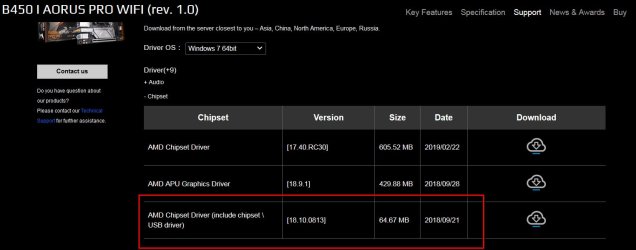
Update your Win 7 installation media

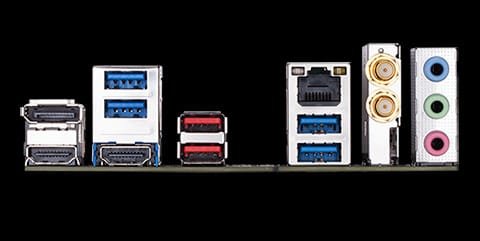
B450-I.jpg
 

My Computers My Computers

System One System Two

  • Computer type
    PC/Desktop
    OS
    7 X64
    CPU
    i5 8400
    Motherboard
    gigabyte b365m ds3h
    Memory
    2x8gb 3200mhz
    Hard Drives
    various
    PSU
    pure power 11 400w cm
    Case
    Coolermaster
    Cooling
    cryorig m9i
  • Computer type
    PC/Desktop
    OS
    7x64
    CPU
    g5400
    Motherboard
    ga b365m ds3h
    Memory
    8gb ddr4 2400
    PSU
    xfx pro 450w
CPU-based ports rather than chipset ports

According to the specs:

Integrated in the APU:
4 x USB 3.1 Gen 1 ports on the back panel
 

My Computers My Computers

System One System Two

  • Computer type
    PC/Desktop
    OS
    7 X64
    CPU
    i5 8400
    Motherboard
    gigabyte b365m ds3h
    Memory
    2x8gb 3200mhz
    Hard Drives
    various
    PSU
    pure power 11 400w cm
    Case
    Coolermaster
    Cooling
    cryorig m9i
  • Computer type
    PC/Desktop
    OS
    7x64
    CPU
    g5400
    Motherboard
    ga b365m ds3h
    Memory
    8gb ddr4 2400
    PSU
    xfx pro 450w
Otherwise, you could try and integrate drivers using winpe.

Dism++ will run in winpe.
Interesting suggestion. I confess I'm not familiar with WinPE or Dism++ (in fact I was only introduced to Dism yesterday when I first ran it manually in an attempt to integrate the drivers via someone else's guide). But it looks like WinPE can run from flash drive. I have other flash drives available, so... would it be accurate to say I should create a separate bootable flash drive with just WinPE, Dism++, and the appropriate driver on it? Is there a guide on doing so? Moreover, which specific driver file(s) from the 7Upgrade package should be loaded using this method?


The bracketless ports look interesting as a backup option.


EDIT:
According to the specs:

Integrated in the APU:
4 x USB 3.1 Gen 1 ports on the back panel
That's weird, because there are only two 3.1 ports on the back panel. There are four 3.0 ports. But whatever - as long as whatever's plugged into that header would work.


Will look into the chipset file you highlighted this evening, thanks for that. Would still appreciate if I knew which driver file(s) in the 7Update package are also related to this.
 

My Computer My Computer

Computer type
PC/Desktop
OS
Win7 Pro x64
CPU
AMD Ryzen 7 2700X
Motherboard
Gigabyte Aorus B450 I Pro Wifi
Memory
32GB (Corsair Vengeance)
Graphics Card(s)
Radeon RX 560 4GB (Gigabyte)
Sound Card
Realtek (onboard)
Hard Drives
WD SSD 500GB / WD HDD 1TB
Browser
Firefox (Main), Opera (Alt)
Other Info
TP-Link Archer T3U Wireless NIC (onboard wifi wasn't Win7 compatible)
Boot.wim in the updated installation media you used is winpe. You can run dism++ from there.
 

My Computers My Computers

System One System Two

  • Computer type
    PC/Desktop
    OS
    7 X64
    CPU
    i5 8400
    Motherboard
    gigabyte b365m ds3h
    Memory
    2x8gb 3200mhz
    Hard Drives
    various
    PSU
    pure power 11 400w cm
    Case
    Coolermaster
    Cooling
    cryorig m9i
  • Computer type
    PC/Desktop
    OS
    7x64
    CPU
    g5400
    Motherboard
    ga b365m ds3h
    Memory
    8gb ddr4 2400
    PSU
    xfx pro 450w
Boot.wim in the updated installation media you used is winpe. You can run dism++ from there.
I don't quite follow at the moment, but I'll take another look when I'm back at the machine this afternoon. Would I run Dism++ from the command prompt when booting from the installation media?
 

My Computer My Computer

Computer type
PC/Desktop
OS
Win7 Pro x64
CPU
AMD Ryzen 7 2700X
Motherboard
Gigabyte Aorus B450 I Pro Wifi
Memory
32GB (Corsair Vengeance)
Graphics Card(s)
Radeon RX 560 4GB (Gigabyte)
Sound Card
Realtek (onboard)
Hard Drives
WD SSD 500GB / WD HDD 1TB
Browser
Firefox (Main), Opera (Alt)
Other Info
TP-Link Archer T3U Wireless NIC (onboard wifi wasn't Win7 compatible)
run Dism++ from the command prompt when booting from the installation media?

Yes, you could do it that way.

Presumably the usb stick is recognized when you have booted the installation media.

Therefore:

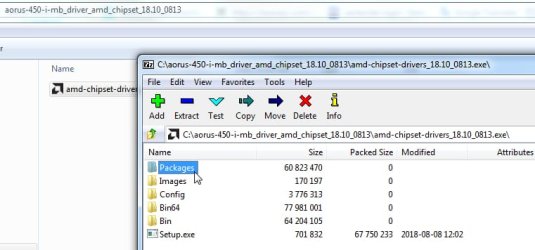
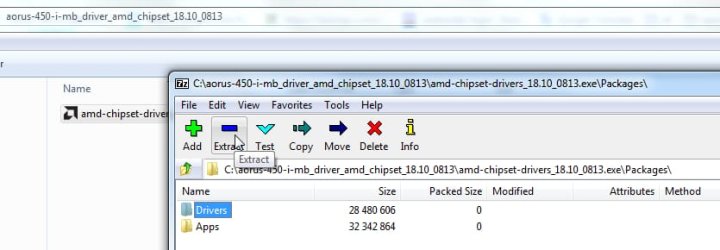
1. extract dism++ from the zip file onto the usb stick


2. extract the drivers onto the usb stick


using7-zip to extract driver folder

drivers-1.jpg

drivers-2.jpg


3. Then boot from the usb stick and use cmd prompt ( or notepad browse dialog) to run dism++
 

My Computers My Computers

System One System Two

  • Computer type
    PC/Desktop
    OS
    7 X64
    CPU
    i5 8400
    Motherboard
    gigabyte b365m ds3h
    Memory
    2x8gb 3200mhz
    Hard Drives
    various
    PSU
    pure power 11 400w cm
    Case
    Coolermaster
    Cooling
    cryorig m9i
  • Computer type
    PC/Desktop
    OS
    7x64
    CPU
    g5400
    Motherboard
    ga b365m ds3h
    Memory
    8gb ddr4 2400
    PSU
    xfx pro 450w
Even though there are usb3 drivers included in the aorus chipset package, they might not work for usb3 on the newer mobos.

Most likely you would need a pcie to usb3 card

Or


There are now modded drivers which should allow the rear usb3 ports to work for win7

This driver folder contains the modded Ryzen APU's Video display and motherboard/usb drivers on the 300/400/500 series motherboards
Ryzen_APU_Anniversary_B14_Win7_SHA1.7z — Yandex.Disk
password xiaofengmod

You aren't using vega graphics, so you don't need the big video driver that is in there . The rest of them should be useful and will hopefully get those rear usb3 ports usable.


EDIT: UPDATE the DRIVER. 2020.02.15
Graphics driver update to 20.2.1, fixed the Vulkan API problem.

This driver support win7, win8.1.

B20 Driver package download link that can be integrated into the WIN7/8.1 original image: Ryzen_APU_iCafe_B20_win7_Win8.1_SHA256.7z — Yandex.Disk
(When using this driver package in WIN7, the image or system must integrate the SHA256 patch:https://www.microsoft.com/en-us/download/details.aspx?id=46148)

PASSWORD:xiaofengmod

canonkong
 
Last edited:

My Computers My Computers

System One System Two

  • Computer type
    PC/Desktop
    OS
    7 X64
    CPU
    i5 8400
    Motherboard
    gigabyte b365m ds3h
    Memory
    2x8gb 3200mhz
    Hard Drives
    various
    PSU
    pure power 11 400w cm
    Case
    Coolermaster
    Cooling
    cryorig m9i
  • Computer type
    PC/Desktop
    OS
    7x64
    CPU
    g5400
    Motherboard
    ga b365m ds3h
    Memory
    8gb ddr4 2400
    PSU
    xfx pro 450w
Here it is without the vega video drivers:
Ryzen_B14_Win7_novideo.zip


EDIT:

The following driver package already contains all the supporting drivers of AMD, so there is no need to install the AMD CHIPSET DRIVER.
Because its 2.0.0.48 USB driver of the official driver will cause the system 0x000000C2:BAD_POOL_CALLER BSOD.

Mod driver package of B25 version which can be integrated into win7 / 8.1 / original image (Based on the latest official amd Radeon Edition graphics driver),

Link: Ryzen_APU_iCafe_B25_win7_Win8.1_SHA256.7z — Yandex.Disk

For win7 to use this package, image pre integration of sha256 patch is required: click download:https://www.microsoft.com/en-us/download/details.aspx?id=46148


UPDATE the DRIVER. 2020.03.07
The following drivers are pure Ryzen APU graphics drivers without other drivers. They are installed using AMD ’s official installer.
After downloading and decompressing, run setup to install, which is the same as the official driver installation method.
This driver is divided into a regular version with a graphics control panel and an icafe version without a graphics control panel.
20.2.2 Regular version:Win7-Radeon-Software-Adrenalin-2020-Edition-20.2.2-Mar5__Ryzen_APU_Only.7z — Yandex.Disk

20.3.1 icafe version:Radeon-iCafe-20.3.1-Win7-64Bit_Ryzen_APU_Only.7z — Yandex.Disk

20.4.2 Regular version: Win7-Radeon-Software-Adrenalin-2020-Edition-20.4.2-Apr23-APU-Only.7z — Yandex.Disk

Canonkong

password:xiaofengmod
 
Last edited:

My Computers My Computers

System One System Two

  • Computer type
    PC/Desktop
    OS
    7 X64
    CPU
    i5 8400
    Motherboard
    gigabyte b365m ds3h
    Memory
    2x8gb 3200mhz
    Hard Drives
    various
    PSU
    pure power 11 400w cm
    Case
    Coolermaster
    Cooling
    cryorig m9i
  • Computer type
    PC/Desktop
    OS
    7x64
    CPU
    g5400
    Motherboard
    ga b365m ds3h
    Memory
    8gb ddr4 2400
    PSU
    xfx pro 450w
Most likely you would need a pcie to usb3 card
This will likely not be possible since the mobo only has the one PCIe slot, which is currently being used by the GPU (and as you said, no Vega graphics - I looked into that, but the only ones available were either downgrades to Ryzen 5 or in the more expensive 3rd gen, or both).


You could successfully argue that some of my problems are because of the limits of my case and mobo, and it's definitely true that I ended up with a more ambitious project than I intended. This was my first mITX build, actually, and I liked the ventilation options for the case in particular (as well as it being large enough to support some full-sized GPUs).


The rest of these suggestions sound great though - I really appreciate you digging those up! I'll see what I can do with them over the next day or two.
 

My Computer My Computer

Computer type
PC/Desktop
OS
Win7 Pro x64
CPU
AMD Ryzen 7 2700X
Motherboard
Gigabyte Aorus B450 I Pro Wifi
Memory
32GB (Corsair Vengeance)
Graphics Card(s)
Radeon RX 560 4GB (Gigabyte)
Sound Card
Realtek (onboard)
Hard Drives
WD SSD 500GB / WD HDD 1TB
Browser
Firefox (Main), Opera (Alt)
Other Info
TP-Link Archer T3U Wireless NIC (onboard wifi wasn't Win7 compatible)
Ok, so I've added Dism++, the chipset drivers and the modded drivers to the flash drive. Booted from the flash drive and here's what I tried:


First, tried the "load drivers" function of the repair just to see if it would work without using Dism++. I selected the USB30 drivers from the chipset package, specifically the folder \Packages\Drivers\SBDrv\USB30_ZP. The machine froze and had to be hard shutdown (not entirely unforseeable).


Second, I ran Dism++ from the command prompt and added the same folder, as well as the 64-bit versions of the drivers found in USB31_PT (I have not yet tried the modded drivers - want to try the chipset ones alone first). However, I'm not sure what to do next.


All of the saving and applying options I see ask me to choose an image. Do I choose the install.wim on the flash drive? If so, wouldn't I need to do a full reinstall of Win7 using that new install.wim for it to work? I can see why one might want to run Dism++ from the side of the machine making the image. And I'm happy to format the SSD and start over if that's what it takes. Or alternately, am I supposed to choose a wim file on the installed copy on the SSD? I figure it had to have me choose the C: volume for some reason, right?


So the TL;DR is: after I add the drivers, how do I apply the changes?
 

My Computer My Computer

Computer type
PC/Desktop
OS
Win7 Pro x64
CPU
AMD Ryzen 7 2700X
Motherboard
Gigabyte Aorus B450 I Pro Wifi
Memory
32GB (Corsair Vengeance)
Graphics Card(s)
Radeon RX 560 4GB (Gigabyte)
Sound Card
Realtek (onboard)
Hard Drives
WD SSD 500GB / WD HDD 1TB
Browser
Firefox (Main), Opera (Alt)
Other Info
TP-Link Archer T3U Wireless NIC (onboard wifi wasn't Win7 compatible)
When you run dism++ from winpe it should show the virtual drive you are currently booted into in winpe ( X:).

It should also find any other windows installations on the machine and list them at the top pane.

In the top pane, you then click the windows installation you want to process which should highlight it in blue.

Then click "Open Session"

Then click Drivers in the left pane.

Then click the ADD button and browse to the folder of drivers you wish to add.

No "saving" or "applying" required.
 

My Computers My Computers

System One System Two

  • Computer type
    PC/Desktop
    OS
    7 X64
    CPU
    i5 8400
    Motherboard
    gigabyte b365m ds3h
    Memory
    2x8gb 3200mhz
    Hard Drives
    various
    PSU
    pure power 11 400w cm
    Case
    Coolermaster
    Cooling
    cryorig m9i
  • Computer type
    PC/Desktop
    OS
    7x64
    CPU
    g5400
    Motherboard
    ga b365m ds3h
    Memory
    8gb ddr4 2400
    PSU
    xfx pro 450w
Ok, I understand. I retried and still no luck.

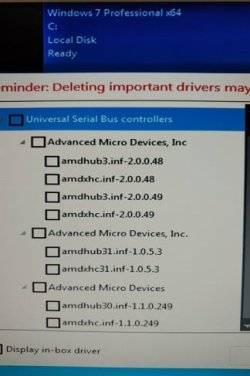
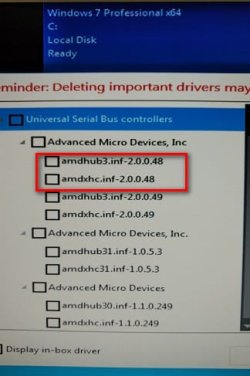
Attached is the list of drivers I added (sorry for the phone pic, obviously couldn't take a screenshot from the boot media). This list includes the ones from the modded driver pack, and a few locations in the AMD Chipset pack (the only locations which came up on a search for anything USB related). Full list of locations:
\Ryzen_B14_Win7_novideo\Chipset_IODrivers\Universal Serial Bus Controller
\AMD-Chipset-Drivers\Packages\Drivers\SBDrv\Bolton\USB30\amdhub\W764A
\AMD-Chipset-Drivers\Packages\Drivers\SBDrv\Bolton\USB30\amdxhc\W764A
\AMD-Chipset-Drivers\Packages\Drivers\SBDrv\hseries\USB30\amdhub\W764A
\AMD-Chipset-Drivers\Packages\Drivers\SBDrv\hseries\USB30\amdxhc\W764A
\AMD-Chipset-Drivers\Packages\Drivers\SBDrv\USB30_ZP\amdhub\W764A
\AMD-Chipset-Drivers\Packages\Drivers\SBDrv\USB30_ZP\amdxhc\W764A
\AMD-Chipset-Drivers\Packages\Drivers\SBDrv\USB31_PT\amdhub\W764A
\AMD-Chipset-Drivers\Packages\Drivers\SBDrv\USB31_PT\amdxhc\W764A

Some of them seem to have been duplicates as Dism++ reported a success but nothing new was added to the list.

As before, the KB and mouse have power until the locally installed Win7 takes over - specifically, they cut out during the animated Windows logo screen (I'm even able to select start windows normally beforehand). Then the computer name screen appears and I have no input.

Any suggestions / things I might be doing wrong? Or am I stuck rolling the dice on that USB2 header? And even if that works, what would this mean for my ability to use the 3.0 ports after the install is finished?
 

Attachments

  • IMG_20191230_2017013.jpg
    IMG_20191230_2017013.jpg
    24.9 KB · Views: 87

My Computer My Computer

Computer type
PC/Desktop
OS
Win7 Pro x64
CPU
AMD Ryzen 7 2700X
Motherboard
Gigabyte Aorus B450 I Pro Wifi
Memory
32GB (Corsair Vengeance)
Graphics Card(s)
Radeon RX 560 4GB (Gigabyte)
Sound Card
Realtek (onboard)
Hard Drives
WD SSD 500GB / WD HDD 1TB
Browser
Firefox (Main), Opera (Alt)
Other Info
TP-Link Archer T3U Wireless NIC (onboard wifi wasn't Win7 compatible)
Did you integrate the other drivers in the Ryzen_B14_Win7_novideo folder?

The Storage Controllers and System Devices are there for a reason.

If they get the on cpu usb working, it will be the rear blue ports as listed in the manual.

aorus-usb.jpg

click03.jpg


Also - according to Canonkong the 2.0.0.48 are no good - so might be worth uninstalling those.
IMG_20191230_2017013.jpg
 

My Computers My Computers

System One System Two

  • Computer type
    PC/Desktop
    OS
    7 X64
    CPU
    i5 8400
    Motherboard
    gigabyte b365m ds3h
    Memory
    2x8gb 3200mhz
    Hard Drives
    various
    PSU
    pure power 11 400w cm
    Case
    Coolermaster
    Cooling
    cryorig m9i
  • Computer type
    PC/Desktop
    OS
    7x64
    CPU
    g5400
    Motherboard
    ga b365m ds3h
    Memory
    8gb ddr4 2400
    PSU
    xfx pro 450w
Did you integrate the other drivers in the Ryzen_B14_Win7_novideo folder?

The Storage Controllers and System Devices are there for a reason.

If they get the on cpu usb working, it will be the ports as listed in the manual.
I did not originally try them, but I did this time. Still no luck. I tried every port on the case just now (all the 3.0s, the 3.1s, and the case 3.0s).


Since my last post I also tried to integrate the drivers from the "USB Installation Tool" on the Gigabyte page. There's now a somewhat sizeable collection of drivers on board (several of them from other brands), but still nothing.


EDIT: I removed the 2.0.0.48 drivers. Still no luck. Though it just occurred to me that maybe some of these drivers are conflicting? Maybe I should wipe the drive and start with a fresh copy of the install media from after I ran your scripts? (Then just add back the Ryzen_B14 folder)
 

My Computer My Computer

Computer type
PC/Desktop
OS
Win7 Pro x64
CPU
AMD Ryzen 7 2700X
Motherboard
Gigabyte Aorus B450 I Pro Wifi
Memory
32GB (Corsair Vengeance)
Graphics Card(s)
Radeon RX 560 4GB (Gigabyte)
Sound Card
Realtek (onboard)
Hard Drives
WD SSD 500GB / WD HDD 1TB
Browser
Firefox (Main), Opera (Alt)
Other Info
TP-Link Archer T3U Wireless NIC (onboard wifi wasn't Win7 compatible)
Though it just occurred to me that maybe some of these drivers are conflicting? Maybe I should wipe the drive and start with a fresh copy of the install media from after I ran your scripts? (Then just add back the Ryzen_B14 folder)

That's possible. Canonkong
 
Last edited:

My Computers My Computers

System One System Two

  • Computer type
    PC/Desktop
    OS
    7 X64
    CPU
    i5 8400
    Motherboard
    gigabyte b365m ds3h
    Memory
    2x8gb 3200mhz
    Hard Drives
    various
    PSU
    pure power 11 400w cm
    Case
    Coolermaster
    Cooling
    cryorig m9i
  • Computer type
    PC/Desktop
    OS
    7x64
    CPU
    g5400
    Motherboard
    ga b365m ds3h
    Memory
    8gb ddr4 2400
    PSU
    xfx pro 450w
That's possible. You could try formatting the target partition(i.e. the current windows partition), quick format NTFS.
Then use dism++ to :
1.apply the image
2.uninstall any usb drivers from the applied image
3.then install the drivers from Ryzen_B14 folder into the applied image.

Then boot into the HD.

If you don't want to fiddle with diskpart, you could use bootice to format the partition
View attachment 410604
I actually formatted it through the disk options in the bootable media. Then I tried to do a fresh install using the install.wim I already had, which I thought would saddle me with all the same drivers, but it did not - the driver list I found in dism++ when it was complete was devoid of any drivers (except some printer driver which was already there before). Loaded the Ryzen_B14 drivers only and it actually worked this time! Go figure. I wonder what was conflicting.


Next up is getting the wifi and GPU drivers installed (and then praying it doesn't have any problems activating the ancient product key I have for it). We'll see how that goes. For now, thanks a ton! It's great to talk to someone who doesn't just berate me for not wanting to put Win10 on this thing (as if I don't already have a Win10 machine and hate it).
 

My Computer My Computer

Computer type
PC/Desktop
OS
Win7 Pro x64
CPU
AMD Ryzen 7 2700X
Motherboard
Gigabyte Aorus B450 I Pro Wifi
Memory
32GB (Corsair Vengeance)
Graphics Card(s)
Radeon RX 560 4GB (Gigabyte)
Sound Card
Realtek (onboard)
Hard Drives
WD SSD 500GB / WD HDD 1TB
Browser
Firefox (Main), Opera (Alt)
Other Info
TP-Link Archer T3U Wireless NIC (onboard wifi wasn't Win7 compatible)
Loaded the Ryzen_B14 drivers only and it actually worked this time!


:D

Are all 4 blue rear usb ports working now?
 
Last edited:

My Computers My Computers

System One System Two

  • Computer type
    PC/Desktop
    OS
    7 X64
    CPU
    i5 8400
    Motherboard
    gigabyte b365m ds3h
    Memory
    2x8gb 3200mhz
    Hard Drives
    various
    PSU
    pure power 11 400w cm
    Case
    Coolermaster
    Cooling
    cryorig m9i
  • Computer type
    PC/Desktop
    OS
    7x64
    CPU
    g5400
    Motherboard
    ga b365m ds3h
    Memory
    8gb ddr4 2400
    PSU
    xfx pro 450w
:D

Are all 4 blue rear usb ports working now?
Yep, as well as the red ones (USB3.1) and the case ports.


We'll see if I need to bug you again, eh? And if there's any other info from my build/situation which might help you use this as a better case study, let me know what info I can provide.
 

My Computer My Computer

Computer type
PC/Desktop
OS
Win7 Pro x64
CPU
AMD Ryzen 7 2700X
Motherboard
Gigabyte Aorus B450 I Pro Wifi
Memory
32GB (Corsair Vengeance)
Graphics Card(s)
Radeon RX 560 4GB (Gigabyte)
Sound Card
Realtek (onboard)
Hard Drives
WD SSD 500GB / WD HDD 1TB
Browser
Firefox (Main), Opera (Alt)
Other Info
TP-Link Archer T3U Wireless NIC (onboard wifi wasn't Win7 compatible)
Thanks so much for this. I haven't built my system yet, but when I do, I expect this thread is going to be very useful.
 

My Computer My Computer

Computer type
PC/Desktop
Computer Manufacturer/Model Number
Custom
OS
Windows 7 Ultimate x64
CPU
Intel i5 @ 4.2Ghz
Motherboard
Gigabyte Z97X
Memory
Corsair Dominator 8GB
Graphics Card(s)
Nvidia GTX780Ti
Hard Drives
Lots.. lol
Browser
Firefox
I ran "7UPv44", put my files in the folders, drivers, updates. ran the simplix built in thing. It got to the end and just ended, no congratualtions complete or anything.
The files from the ISO extracted were exactly the same, only the wim and moutn was updated. -

Obviously it didnt work for me since SP1 alone is 900mb. and i included many other windows update, the fiels provided and all the drivers from my laptop files.


- why cant i just install from USB to SSD using the xtracted iso and trhe original cd from my Laptop.
None of the drivers i have show up in the option and i still get the error:
unable to install :
"requires standard NVMe controller"
- even if i add ever single driver on the planet

Sorry guys, but this is the reason i made a post at 6am, becuase i knew spending 4hrs running this thing would notwork for.

- I just need whatever the hell the driver is that allows my ssd install to be recognised on isntall - and apparently it doesnt exist anywhere.
/ also what format should the SSD be in when this whole install process begins>?
 

My Computer My Computer

Computer type
PC/Desktop
OS
Windows 7 x64bit
Browser
Chrome
Back
Top