Update your Win 7 installation media

I Am Also Trying To Get The Laptop's Internal Keyboard/Touchpad Working.

EDIT: Got The Keyboard Working, But Not The Touchpad, Please Help!
 
Last edited:

My Computers My Computers

System One System Two

  • Computer type
    Laptop
    Computer Manufacturer/Model Number
    Lenovo
    OS
    Windows 10 Home x64
    CPU
    Intel Core i7-10750H
    Memory
    16GB
  • Computer type
    PC/Desktop
SIW2

thanks
i cant find how to do this, online help fro diskgenius doent answer this
OR you can load the .vhdx file in diskgenius and clone it to the target partition.Free Download DiskGenius Online
im trying the clone partition now
 

My Computers My Computers

System One System Two

  • Computer type
    PC/Desktop
    Computer Manufacturer/Model Number
    Lenovo - IdeaCentre 5i Desktop - Intel Core i5 - 8GB Memory - 1TB Hard Drive -
    OS
    windows 10 pro 64 bit
    CPU
    Intel(R) core(TM) i5-10400 CPU @ 2.90GHz
    Motherboard
    lenovo 370 A
    Memory
    Micron 8.00 GB
    Graphics Card(s)
    Intel(R) UHD Graphics 630 / Nvidia GeForce GT 1030
    Sound Card
    built in Intel corp
    Hard Drives
    Seagate sata - 1 terabyte /
  • Computer type
    PC/Desktop
    System Manufacturer/Model Number
    Dell OptiPlex 7020
    OS
    win 7 /win 10 dual boot
    CPU
    intel core i5 4570 (3.2Ghz)
    Memory
    32 Gb
    Graphics Card(s)
    Intel HD Graphics 4600
    Monitor(s) Displays
    Dell
    Hard Drives
    SSD 512Gb
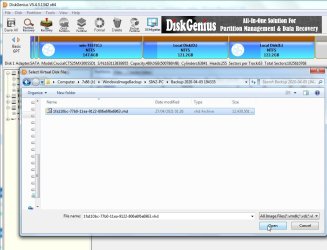
Click Disk then select "open virtual disk" from the menu

dg-open-virtual-disk1.jpg

browse to the .vhdx file and clcik open

dg-open-virtual-disk2.jpg

It will load at the right pane of diskgenius and then you can perform any operations as you would with a real disk.

for example select the partition that is inside the .vhdx and select clone partition. If there are several partitions, clone ( i.e. copy ) one at a time.
 

My Computers My Computers

System One System Two

  • Computer type
    PC/Desktop
    OS
    7 X64
    CPU
    i5 8400
    Motherboard
    gigabyte b365m ds3h
    Memory
    2x8gb 3200mhz
    Hard Drives
    various
    PSU
    pure power 11 400w cm
    Case
    Coolermaster
    Cooling
    cryorig m9i
  • Computer type
    PC/Desktop
    OS
    7x64
    CPU
    g5400
    Motherboard
    ga b365m ds3h
    Memory
    8gb ddr4 2400
    PSU
    xfx pro 450w
SIW2

Thanks as usual
im working on it now

- - - Updated - - -

SIW2

do I only apply boot code ,and fix os drive when i click fix os drive letter it says E:\windowsSYSTEM32\CONFIG\SOFTWARE HIVE NOT FOUND then for boot code i change to E: I hit E:/ the4n up comes command line says could not map drive partition to the associated volume device objects:F:\Etc\ntrepair9x86\ntrepair9x86>Thanks

also in clone [FONT=&quot].vhdx[/FONT] there was 3 , but if i clone they erase the previous one, not sure how to fix,

Can i just install windows 10 and then use system image
 

My Computers My Computers

System One System Two

  • Computer type
    PC/Desktop
    Computer Manufacturer/Model Number
    Lenovo - IdeaCentre 5i Desktop - Intel Core i5 - 8GB Memory - 1TB Hard Drive -
    OS
    windows 10 pro 64 bit
    CPU
    Intel(R) core(TM) i5-10400 CPU @ 2.90GHz
    Motherboard
    lenovo 370 A
    Memory
    Micron 8.00 GB
    Graphics Card(s)
    Intel(R) UHD Graphics 630 / Nvidia GeForce GT 1030
    Sound Card
    built in Intel corp
    Hard Drives
    Seagate sata - 1 terabyte /
  • Computer type
    PC/Desktop
    System Manufacturer/Model Number
    Dell OptiPlex 7020
    OS
    win 7 /win 10 dual boot
    CPU
    intel core i5 4570 (3.2Ghz)
    Memory
    32 Gb
    Graphics Card(s)
    Intel HD Graphics 4600
    Monitor(s) Displays
    Dell
    Hard Drives
    SSD 512Gb
also in clone .vhdx there was 3 , but if i clone they erase the previous one, not sure how to fix

That is because it copies the contents of the mounted vhdx partition to the target partition you point it at.

Therefore if you want to copy 3 partitions from the .vhdx you must create the three target partitions first. Then copy each one to its target partition.

Presumably one of them is the small system partition - for efi systems that is an esp partition - so you need to create an esp partition on the target disk and copy the contents of the esp partition in the vhdx to the target esp partition you just created.

Presumably the other two are basic data partitions, so just create two regular partitions to copy those to.

Then do the os letter fix and finally create the boot menu entry.

I have done it a few times, but it was a while ago.
 

My Computers My Computers

System One System Two

  • Computer type
    PC/Desktop
    OS
    7 X64
    CPU
    i5 8400
    Motherboard
    gigabyte b365m ds3h
    Memory
    2x8gb 3200mhz
    Hard Drives
    various
    PSU
    pure power 11 400w cm
    Case
    Coolermaster
    Cooling
    cryorig m9i
  • Computer type
    PC/Desktop
    OS
    7x64
    CPU
    g5400
    Motherboard
    ga b365m ds3h
    Memory
    8gb ddr4 2400
    PSU
    xfx pro 450w
SIW2
ohhh , okay makes sense, sorry you have to explain everything so deep
thanks again, will let you know if it works , tyvm
question is the os fix drive going to be the esp, or regular drive which in this case is will be F: since esp will be E:
correct
 

My Computers My Computers

System One System Two

  • Computer type
    PC/Desktop
    Computer Manufacturer/Model Number
    Lenovo - IdeaCentre 5i Desktop - Intel Core i5 - 8GB Memory - 1TB Hard Drive -
    OS
    windows 10 pro 64 bit
    CPU
    Intel(R) core(TM) i5-10400 CPU @ 2.90GHz
    Motherboard
    lenovo 370 A
    Memory
    Micron 8.00 GB
    Graphics Card(s)
    Intel(R) UHD Graphics 630 / Nvidia GeForce GT 1030
    Sound Card
    built in Intel corp
    Hard Drives
    Seagate sata - 1 terabyte /
  • Computer type
    PC/Desktop
    System Manufacturer/Model Number
    Dell OptiPlex 7020
    OS
    win 7 /win 10 dual boot
    CPU
    intel core i5 4570 (3.2Ghz)
    Memory
    32 Gb
    Graphics Card(s)
    Intel HD Graphics 4600
    Monitor(s) Displays
    Dell
    Hard Drives
    SSD 512Gb
7UPv64G now on first post . It is the luxury version which integrates extra goodies into the bootable wim files. It is a bigger download than the regular 7UPv64F.

- - - Updated - - -

question is the os fix drive going to be the esp, or regular drive which in this case is will be F: since esp will be E:
correct

It sounds like you have created the first partition (esp) which is currently E:

and another partition for windows which is currently F:

The "fix os drive letter" needs to be pointed at the os partition ( the windows partition). It should show in the dropdown.

as shown here
 
Last edited:

My Computers My Computers

System One System Two

  • Computer type
    PC/Desktop
    OS
    7 X64
    CPU
    i5 8400
    Motherboard
    gigabyte b365m ds3h
    Memory
    2x8gb 3200mhz
    Hard Drives
    various
    PSU
    pure power 11 400w cm
    Case
    Coolermaster
    Cooling
    cryorig m9i
  • Computer type
    PC/Desktop
    OS
    7x64
    CPU
    g5400
    Motherboard
    ga b365m ds3h
    Memory
    8gb ddr4 2400
    PSU
    xfx pro 450w
SIW2
Thanks going to try it now ,
thanks again and again , you really are the best

esp or mbr wont let me clone it , error overflow ?
any ideas
 

My Computers My Computers

System One System Two

  • Computer type
    PC/Desktop
    Computer Manufacturer/Model Number
    Lenovo - IdeaCentre 5i Desktop - Intel Core i5 - 8GB Memory - 1TB Hard Drive -
    OS
    windows 10 pro 64 bit
    CPU
    Intel(R) core(TM) i5-10400 CPU @ 2.90GHz
    Motherboard
    lenovo 370 A
    Memory
    Micron 8.00 GB
    Graphics Card(s)
    Intel(R) UHD Graphics 630 / Nvidia GeForce GT 1030
    Sound Card
    built in Intel corp
    Hard Drives
    Seagate sata - 1 terabyte /
  • Computer type
    PC/Desktop
    System Manufacturer/Model Number
    Dell OptiPlex 7020
    OS
    win 7 /win 10 dual boot
    CPU
    intel core i5 4570 (3.2Ghz)
    Memory
    32 Gb
    Graphics Card(s)
    Intel HD Graphics 4600
    Monitor(s) Displays
    Dell
    Hard Drives
    SSD 512Gb
not sure waht that error is.

did you create an esp partition on the target disk? Most motherbaords expect an esp partition on a gpt boot disk

It is a special type of partition so you rt click unallocated space and select create esp/msr

then you could just copy the files from the vhdx esp to the target disk esp if you like. If you click the files tab you can see them and rt click and copy the files to the target. Or you can populate the esp afterwards using the bcdboot command, which you need to do anyway.


If you have already created a basic partition called E:, you can delete it, to create unallocated space. Then rt click that unllocated space and select create esp/msr
 

My Computers My Computers

System One System Two

  • Computer type
    PC/Desktop
    OS
    7 X64
    CPU
    i5 8400
    Motherboard
    gigabyte b365m ds3h
    Memory
    2x8gb 3200mhz
    Hard Drives
    various
    PSU
    pure power 11 400w cm
    Case
    Coolermaster
    Cooling
    cryorig m9i
  • Computer type
    PC/Desktop
    OS
    7x64
    CPU
    g5400
    Motherboard
    ga b365m ds3h
    Memory
    8gb ddr4 2400
    PSU
    xfx pro 450w
SIW2
no , sorry how do i create an esp partition thru disk management or diskgenius
and how do i know which one, esp/msr


thanks again
 

My Computers My Computers

System One System Two

  • Computer type
    PC/Desktop
    Computer Manufacturer/Model Number
    Lenovo - IdeaCentre 5i Desktop - Intel Core i5 - 8GB Memory - 1TB Hard Drive -
    OS
    windows 10 pro 64 bit
    CPU
    Intel(R) core(TM) i5-10400 CPU @ 2.90GHz
    Motherboard
    lenovo 370 A
    Memory
    Micron 8.00 GB
    Graphics Card(s)
    Intel(R) UHD Graphics 630 / Nvidia GeForce GT 1030
    Sound Card
    built in Intel corp
    Hard Drives
    Seagate sata - 1 terabyte /
  • Computer type
    PC/Desktop
    System Manufacturer/Model Number
    Dell OptiPlex 7020
    OS
    win 7 /win 10 dual boot
    CPU
    intel core i5 4570 (3.2Ghz)
    Memory
    32 Gb
    Graphics Card(s)
    Intel HD Graphics 4600
    Monitor(s) Displays
    Dell
    Hard Drives
    SSD 512Gb
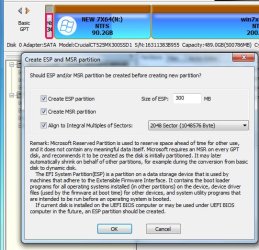
In disk genius, rt click unallocated space and select "create esp/msr" on the menu

In this pic there is a small amount of unallocated space on the right . It is outlined in red in the tiny picture below. Rt click the unallocated space and select create esp\msr

dg-esp-1.jpg

OK whatever it says as default

dg-esp-2.jpg

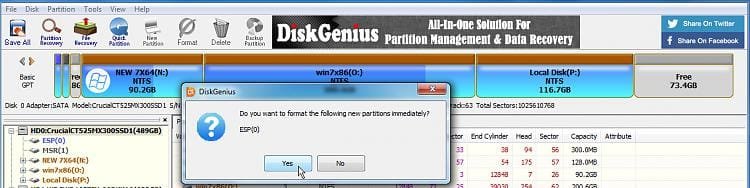
Do you want to format it now ? answer Yes

dg-esp-3.jpg


dg-esp-4.jpg
 

My Computers My Computers

System One System Two

  • Computer type
    PC/Desktop
    OS
    7 X64
    CPU
    i5 8400
    Motherboard
    gigabyte b365m ds3h
    Memory
    2x8gb 3200mhz
    Hard Drives
    various
    PSU
    pure power 11 400w cm
    Case
    Coolermaster
    Cooling
    cryorig m9i
  • Computer type
    PC/Desktop
    OS
    7x64
    CPU
    g5400
    Motherboard
    ga b365m ds3h
    Memory
    8gb ddr4 2400
    PSU
    xfx pro 450w
SIW2

thanks again will try now

- - - Updated - - -

SIW2

i did it exactly as you said, but it formatted the esp it FAT16 , it never gave me option to change to FAT32
did I do something wrong ?

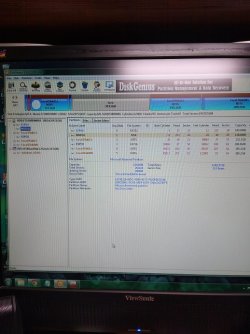
does esp0 belong to winodws 7 right?
thanks


uploading pic
 

Attachments

  • IMG_20220510_103641603 j.jpg
    IMG_20220510_103641603 j.jpg
    111.7 KB · Views: 3
Last edited:

My Computers My Computers

System One System Two

  • Computer type
    PC/Desktop
    Computer Manufacturer/Model Number
    Lenovo - IdeaCentre 5i Desktop - Intel Core i5 - 8GB Memory - 1TB Hard Drive -
    OS
    windows 10 pro 64 bit
    CPU
    Intel(R) core(TM) i5-10400 CPU @ 2.90GHz
    Motherboard
    lenovo 370 A
    Memory
    Micron 8.00 GB
    Graphics Card(s)
    Intel(R) UHD Graphics 630 / Nvidia GeForce GT 1030
    Sound Card
    built in Intel corp
    Hard Drives
    Seagate sata - 1 terabyte /
  • Computer type
    PC/Desktop
    System Manufacturer/Model Number
    Dell OptiPlex 7020
    OS
    win 7 /win 10 dual boot
    CPU
    intel core i5 4570 (3.2Ghz)
    Memory
    32 Gb
    Graphics Card(s)
    Intel HD Graphics 4600
    Monitor(s) Displays
    Dell
    Hard Drives
    SSD 512Gb
It says the esp0 is fat32 in your screenshot. Not to be confused with tiny msr partition.

How come you have 2 esp partitions on that disk?
 

My Computers My Computers

System One System Two

  • Computer type
    PC/Desktop
    OS
    7 X64
    CPU
    i5 8400
    Motherboard
    gigabyte b365m ds3h
    Memory
    2x8gb 3200mhz
    Hard Drives
    various
    PSU
    pure power 11 400w cm
    Case
    Coolermaster
    Cooling
    cryorig m9i
  • Computer type
    PC/Desktop
    OS
    7x64
    CPU
    g5400
    Motherboard
    ga b365m ds3h
    Memory
    8gb ddr4 2400
    PSU
    xfx pro 450w
SIW2
Hi
Yes there is esp0 for windows 7, cuz I'm on the 7 partition doing this.
The esp3 I created for win 10 but it formatted it fat16
Did I do it right ?
Cuz I haven't cloned win 10 os yet, wanted to get the rest built 1st

Thanks again , I really appreciate you

Question am I supposed to put esp, on same partition as win 10 ?

I'm at work or would take pics of vhdx,s asap I will.
 

My Computers My Computers

System One System Two

  • Computer type
    PC/Desktop
    Computer Manufacturer/Model Number
    Lenovo - IdeaCentre 5i Desktop - Intel Core i5 - 8GB Memory - 1TB Hard Drive -
    OS
    windows 10 pro 64 bit
    CPU
    Intel(R) core(TM) i5-10400 CPU @ 2.90GHz
    Motherboard
    lenovo 370 A
    Memory
    Micron 8.00 GB
    Graphics Card(s)
    Intel(R) UHD Graphics 630 / Nvidia GeForce GT 1030
    Sound Card
    built in Intel corp
    Hard Drives
    Seagate sata - 1 terabyte /
  • Computer type
    PC/Desktop
    System Manufacturer/Model Number
    Dell OptiPlex 7020
    OS
    win 7 /win 10 dual boot
    CPU
    intel core i5 4570 (3.2Ghz)
    Memory
    32 Gb
    Graphics Card(s)
    Intel HD Graphics 4600
    Monitor(s) Displays
    Dell
    Hard Drives
    SSD 512Gb
Each disk should have only one esp.

Because you already have an esp on that disk, you dont need another. win7 and win10 use the same esp. It is where the critical boot files live.

Apply/clone/copy the win10 to a spare partition

fix the os letter of the win10 partition

create a boot menu entry for the win10 partition .

Use the existing esp0.
 

My Computers My Computers

System One System Two

  • Computer type
    PC/Desktop
    OS
    7 X64
    CPU
    i5 8400
    Motherboard
    gigabyte b365m ds3h
    Memory
    2x8gb 3200mhz
    Hard Drives
    various
    PSU
    pure power 11 400w cm
    Case
    Coolermaster
    Cooling
    cryorig m9i
  • Computer type
    PC/Desktop
    OS
    7x64
    CPU
    g5400
    Motherboard
    ga b365m ds3h
    Memory
    8gb ddr4 2400
    PSU
    xfx pro 450w
SIW2,
so I just copy my new esp vhdx into the 0 one ?
I'm sorry I misunderstood I thought I had to clone all 3 of the vhdx,s from the system image on usb stick
To partition
Sorry thanks for your patience again.
 

My Computers My Computers

System One System Two

  • Computer type
    PC/Desktop
    Computer Manufacturer/Model Number
    Lenovo - IdeaCentre 5i Desktop - Intel Core i5 - 8GB Memory - 1TB Hard Drive -
    OS
    windows 10 pro 64 bit
    CPU
    Intel(R) core(TM) i5-10400 CPU @ 2.90GHz
    Motherboard
    lenovo 370 A
    Memory
    Micron 8.00 GB
    Graphics Card(s)
    Intel(R) UHD Graphics 630 / Nvidia GeForce GT 1030
    Sound Card
    built in Intel corp
    Hard Drives
    Seagate sata - 1 terabyte /
  • Computer type
    PC/Desktop
    System Manufacturer/Model Number
    Dell OptiPlex 7020
    OS
    win 7 /win 10 dual boot
    CPU
    intel core i5 4570 (3.2Ghz)
    Memory
    32 Gb
    Graphics Card(s)
    Intel HD Graphics 4600
    Monitor(s) Displays
    Dell
    Hard Drives
    SSD 512Gb
You already have an esp partition on the target disk.

You dont need to copy it from the vhdx

just copy the other two partitions.

then fix the os letter of the win10 partition

then add the boot menu entry.

If you re doing it from within win7, to add the boot menu entry, you had better use bcdboot that is included with nt6repair.
 

My Computers My Computers

System One System Two

  • Computer type
    PC/Desktop
    OS
    7 X64
    CPU
    i5 8400
    Motherboard
    gigabyte b365m ds3h
    Memory
    2x8gb 3200mhz
    Hard Drives
    various
    PSU
    pure power 11 400w cm
    Case
    Coolermaster
    Cooling
    cryorig m9i
  • Computer type
    PC/Desktop
    OS
    7x64
    CPU
    g5400
    Motherboard
    ga b365m ds3h
    Memory
    8gb ddr4 2400
    PSU
    xfx pro 450w
SIW2,
Okay I think I got it, so windows 10 doesn't need its own esp, or copied to esp, win 7 esp will do both, correct?
And the other 2, 1 is win 10, 1 is msr , so msr would be copied or ?
Then copy actual win 10 image of c: to E drive,
Yes I downloaded the net repair you sent me.

Thanks
 

My Computers My Computers

System One System Two

  • Computer type
    PC/Desktop
    Computer Manufacturer/Model Number
    Lenovo - IdeaCentre 5i Desktop - Intel Core i5 - 8GB Memory - 1TB Hard Drive -
    OS
    windows 10 pro 64 bit
    CPU
    Intel(R) core(TM) i5-10400 CPU @ 2.90GHz
    Motherboard
    lenovo 370 A
    Memory
    Micron 8.00 GB
    Graphics Card(s)
    Intel(R) UHD Graphics 630 / Nvidia GeForce GT 1030
    Sound Card
    built in Intel corp
    Hard Drives
    Seagate sata - 1 terabyte /
  • Computer type
    PC/Desktop
    System Manufacturer/Model Number
    Dell OptiPlex 7020
    OS
    win 7 /win 10 dual boot
    CPU
    intel core i5 4570 (3.2Ghz)
    Memory
    32 Gb
    Graphics Card(s)
    Intel HD Graphics 4600
    Monitor(s) Displays
    Dell
    Hard Drives
    SSD 512Gb
msr is not strictly necessary.


going from your screenshot:

I suggest delete the esp3
copy/clone win10 from the vhdx to the target disk
fix the os letter on win10 partition
use bcdboot to populate the existing esp0 with the additional entries for win10
 

My Computers My Computers

System One System Two

  • Computer type
    PC/Desktop
    OS
    7 X64
    CPU
    i5 8400
    Motherboard
    gigabyte b365m ds3h
    Memory
    2x8gb 3200mhz
    Hard Drives
    various
    PSU
    pure power 11 400w cm
    Case
    Coolermaster
    Cooling
    cryorig m9i
  • Computer type
    PC/Desktop
    OS
    7x64
    CPU
    g5400
    Motherboard
    ga b365m ds3h
    Memory
    8gb ddr4 2400
    PSU
    xfx pro 450w
SIW2
Thanks will try it in a couple hours,
Thanks again for all you've done for me

- - - Updated - - -

SIW2

hi,
how do i add a boot menu entry using nt6repair,
dont want to mess up anymore thanks again, do i just apply whats there or do i need to change something
thanks
is that the boot code, just apply or what to change to please ?
 

My Computers My Computers

System One System Two

  • Computer type
    PC/Desktop
    Computer Manufacturer/Model Number
    Lenovo - IdeaCentre 5i Desktop - Intel Core i5 - 8GB Memory - 1TB Hard Drive -
    OS
    windows 10 pro 64 bit
    CPU
    Intel(R) core(TM) i5-10400 CPU @ 2.90GHz
    Motherboard
    lenovo 370 A
    Memory
    Micron 8.00 GB
    Graphics Card(s)
    Intel(R) UHD Graphics 630 / Nvidia GeForce GT 1030
    Sound Card
    built in Intel corp
    Hard Drives
    Seagate sata - 1 terabyte /
  • Computer type
    PC/Desktop
    System Manufacturer/Model Number
    Dell OptiPlex 7020
    OS
    win 7 /win 10 dual boot
    CPU
    intel core i5 4570 (3.2Ghz)
    Memory
    32 Gb
    Graphics Card(s)
    Intel HD Graphics 4600
    Monitor(s) Displays
    Dell
    Hard Drives
    SSD 512Gb
Back
Top