- Local time
- 5:32 PM
- Messages
- 16,785
If the esp partition does not have a letter you can assign a letter to it with diskgenius first.
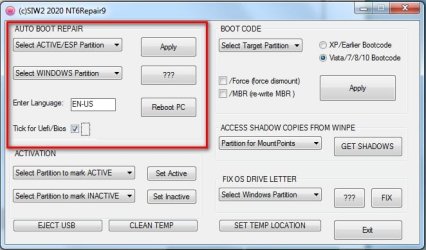
Select the esp partition in the dropdown that says "Select ACTIVE/ESP partition"
Select the win10 partition in the dropdown that says "Select Windows partition"
Tick the box that says Uefi/bios.
Click Apply
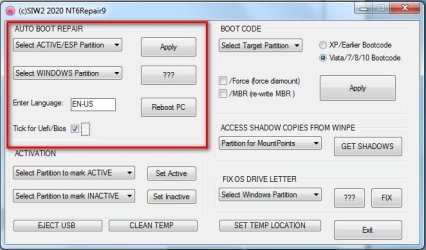
Select the esp partition in the dropdown that says "Select ACTIVE/ESP partition"
Select the win10 partition in the dropdown that says "Select Windows partition"
Tick the box that says Uefi/bios.
Click Apply
My Computers
System One System Two
-
- Computer type
- PC/Desktop
- OS
- 7 X64
- CPU
- i5 8400
- Motherboard
- gigabyte b365m ds3h
- Memory
- 2x8gb 3200mhz
- Hard Drives
- various
- PSU
- pure power 11 400w cm
- Case
- Coolermaster
- Cooling
- cryorig m9i
-
- Computer type
- PC/Desktop
- OS
- 7x64
- CPU
- g5400
- Motherboard
- ga b365m ds3h
- Memory
- 8gb ddr4 2400
- PSU
- xfx pro 450w