Update your Win 7 installation media

August 2024 "patch Tuesday" was only yesterday.
It usually takes 2 - 3 days for Simplix to release the new update pack.
Be patient a little longer.
 

My Computer

Computer type
PC/Desktop
Computer Manufacturer/Model Number
Dell OptiPlex 9020
OS
Windows 7 Professional SP1 64-bit
CPU
Intel Core i7-4790 3.60 GHz
Memory
32 GB DDR3-1600 MHz
Graphics Card(s)
Integrated Intel HD Graphics 4600
Monitor(s) Displays
Viewsonic 32" LCD
Hard Drives
Kingston SATA 3 240 GB SSD
Internet Speed
Spectrum Internet 1000 Mbps
I have downloaded and un-zipped the driver.
should I integrate it into Win7 installation media, or install the driver after Win7 OS install finished?
working on HP 800 G4/G5 computer with Intel 9th gen CPU (i5-9500/9600). the un-zipped file looks for the latter case, i.e. install it when Win7 OS install finished.


btw, Simplix failed today. will try it later.
my install needs, USB3.1 (NOT USB 3.0) driver, graphics driver, and hopefully Simplix update.


Thanks,


My Computers

System One System Two

  • Computer type
    PC/Desktop
    Computer Manufacturer/Model Number
    HP Elite 800 G5
    OS
    Windows 7 Pro 64-bit
    CPU
    I7-9700
    Memory
    32 GB
  • Computer type
    Laptop
    System Manufacturer/Model Number
    ASUS UX305C
    OS
    Windows 7 Pro 64-bit
I have downloaded and un-zipped the driver.
should I integrate it into Win7 installation media, or install the driver after Win7 OS install finished?
working on HP 800 G4/G5 computer with Intel 9th gen CPU (i5-9500/9600). the un-zipped file looks for the latter case, i.e. install it when Win7 OS install finished.
btw, Simplix failed today. will try it later.
my install needs, USB3.1 (NOT USB 3.0) driver, graphics driver, and hopefully Simplix update.
Thanks,
Since HP doesn't officially have Windows 7 drivers for the HP 800 G4/G5 you will be lucky if you find any. BTW, did you try any Windows 10 drivers from HP to see if they would work?

I have various computers from 2 years old to 22 years old. They have Windows XP, 7, 10 and 11. I normally only put supported operating systems on specific computers. When I deviate from that I don't always find drivers. Sometimes even these drivers are generic Microsoft ones that aren't the fastest.
 

My Computers

System One System Two

  • Computer type
    PC/Desktop
    Computer Manufacturer/Model Number
    Custom build
    OS
    Windows 7 Home Premium 64-bits
    CPU
    AMD FX-8350
    Motherboard
    Gigabyte GA-990FXA-UD3 (AM3+)
    Memory
    GSKILL Ripjaw-X PC3 12800 8GB (2x4GB)
    Graphics Card(s)
    ASUS ROG STRIX GTX 1060 6GB
    Sound Card
    Integrated
    Monitor(s) Displays
    Asus VE228H (21.5-in)
    Screen Resolution
    1920x1080 60Hz
    Hard Drives
    SAMSUNG 870 EVO 2.5 Inch SATA SSD (1TB)
    SAMSUNG 870 EVO 2.5 Inch SATA SSD (1TB)
    SAMSUNG 870 EVO 2.5 Inch SATA SSD (1TB)
    PSU
    Corsair RM750x (750 watts)
    Case
    Corsair Carbide Series 200R
    Cooling
    Corsair Hydro Series H60 (CWCH60)
    Keyboard
    Logitech Elite
    Mouse
    Logitech M510 Wireless Mouse
    Internet Speed
    Comcast Gigabit Extra (1200Mbps down / 35Mbps up)
    Antivirus
    Malwarebytes
    Browser
    Firefox, Edge, Chrome
    Other Info
    ASUS DRW-24B1ST DVD-RW (24X) optical drive
    Seagate Expansion Desk (5TB) external SATA/USB HDD
    Comcast XB8 Internet Gateway
  • Computer type
    PC/Desktop
    System Manufacturer/Model Number
    Custom
    OS
    Windows 7 Pro (64-bit)
    CPU
    AMD Phenom II 960T X4
    Motherboard
    ASUS M4N82 Deluxe
    Memory
    Corsair XMS2 DDR2-800 8GB (4x2GB)
    Graphics Card(s)
    ASUS ENGTX560 DCII OC/2DI/1GD5 1GB
    Monitor(s) Displays
    Samsung 930B 19-inch LCD
    Screen Resolution
    1280x1024
    Hard Drives
    Samsung SSD 870 EVO 1000 GB (Windows 10)
    Seagate ST1000DM003 1000 GB (Windows 7)
    PSU
    Antec TruePower (new) TP-650
    Case
    Antec Three Hundred
    Cooling
    AMD stock cooler from FX8350
    Mouse
    Logitech M100
    Internet Speed
    Xfinity Gigabit Extra 1200/35 Mbps
SIW2, I did everything in Post #1 including the integration of the current SIMPLIX updates. It all seemed to go well. I used the provided .cmd to create the ISO, and used Rufus to create the bootable USB. Windows 7 launched from the USB but there was still no mouse or keyboard. My computer is running an Asrock Z790 Lightning WiFi motherboard, which does not have the legacy USB2 chipset.
 

My Computer

Computer Manufacturer/Model Number
Custom
OS
Windows 7 Ultimate x64 SP1
CPU
E8400 E0 stepping @ 4.05GHz
Motherboard
Abit IP35-E, BIOS v.18b1
Memory
2x2GB + 2x1GB Mushkin
Graphics Card(s)
eVGA GTS 250SC
Sound Card
Onboard
Monitor(s) Displays
Sony FW900
Screen Resolution
1600x1024
Hard Drives
WD Black 1TB SATA
PSU
Corsair 550W
Case
CM Scout
Cooling
Scythe Mugen2
Keyboard
PS2
Mouse
PS2
Internet Speed
FiOS
grab a win10 iso file and replace sources\install.wim (or install.esd ) with your updated win7 install.wim

dont know how well win7 will work on an asrock z790 have a look at win raid forum and see if anybody there has done it
 

My Computers

System One System Two

  • Computer type
    PC/Desktop
    OS
    7 X64
    CPU
    i5 8400
    Motherboard
    gigabyte b365m ds3h
    Memory
    2x8gb 3200mhz
    Hard Drives
    various
    PSU
    pure power 11 400w cm
    Case
    Coolermaster
    Cooling
    cryorig m9i
  • Computer type
    PC/Desktop
    OS
    7x64
    CPU
    g5400
    Motherboard
    ga b365m ds3h
    Memory
    8gb ddr4 2400
    PSU
    xfx pro 450w
Hmm, but what I'm trying to do is get my old Win7 drive from my last Z370 motherboard build (I had Win10 as primary on that board, but the Win7 drive was also running there as I had - and still have - old legacy stuff that won't run on anything past Win7) "updated" so that it will run on this new '790 board.
 

My Computer

Computer Manufacturer/Model Number
Custom
OS
Windows 7 Ultimate x64 SP1
CPU
E8400 E0 stepping @ 4.05GHz
Motherboard
Abit IP35-E, BIOS v.18b1
Memory
2x2GB + 2x1GB Mushkin
Graphics Card(s)
eVGA GTS 250SC
Sound Card
Onboard
Monitor(s) Displays
Sony FW900
Screen Resolution
1600x1024
Hard Drives
WD Black 1TB SATA
PSU
Corsair 550W
Case
CM Scout
Cooling
Scythe Mugen2
Keyboard
PS2
Mouse
PS2
Internet Speed
FiOS

My Computers

System One System Two

  • Computer type
    PC/Desktop
    OS
    7 X64
    CPU
    i5 8400
    Motherboard
    gigabyte b365m ds3h
    Memory
    2x8gb 3200mhz
    Hard Drives
    various
    PSU
    pure power 11 400w cm
    Case
    Coolermaster
    Cooling
    cryorig m9i
  • Computer type
    PC/Desktop
    OS
    7x64
    CPU
    g5400
    Motherboard
    ga b365m ds3h
    Memory
    8gb ddr4 2400
    PSU
    xfx pro 450w
The i5-13600K does have E-cores.
 

My Computer

Computer Manufacturer/Model Number
Custom
OS
Windows 7 Ultimate x64 SP1
CPU
E8400 E0 stepping @ 4.05GHz
Motherboard
Abit IP35-E, BIOS v.18b1
Memory
2x2GB + 2x1GB Mushkin
Graphics Card(s)
eVGA GTS 250SC
Sound Card
Onboard
Monitor(s) Displays
Sony FW900
Screen Resolution
1600x1024
Hard Drives
WD Black 1TB SATA
PSU
Corsair 550W
Case
CM Scout
Cooling
Scythe Mugen2
Keyboard
PS2
Mouse
PS2
Internet Speed
FiOS
I tested this one, working fine on HP 800 G4/G5.

per signature timestamp (driver version 21.20.16.5068), canonkong made it year 2019. so it's good for 8th/9th gen CPUs which came out before 2019.

newer CPUs after year 2019 may need newer version of this driver or using SDI (last version I obtained, driver version 21.20.16.5077, a little newer) .


My Computers

System One System Two

  • Computer type
    PC/Desktop
    Computer Manufacturer/Model Number
    HP Elite 800 G5
    OS
    Windows 7 Pro 64-bit
    CPU
    I7-9700
    Memory
    32 GB
  • Computer type
    Laptop
    System Manufacturer/Model Number
    ASUS UX305C
    OS
    Windows 7 Pro 64-bit
Howdy! I want to create an updated installation media for W7x86 (32-bit) to install on some older retro boxes with 2002/2003 era (Athlon XP) processors that do not support SSE2. As of early 2018 (March or April), Microsoft released a number of updates for Windows 7 that removed support for processors lacking SSE2.

I was wondering if I could exclude those updates from being integrated via UpdatePack7R2 and how? I don't mind if it results in being patched only through 2017 updates, but nothing later. TIA!
 

My Computer

OS
Windows XP
You could mount the wim image and point dism++ at it

https://github.com/Chuyu-Team/Dism-.../download/v10.1.1002.2/Dism++10.1.1002.1B.zip

Download the following "wsusscn3.cab" file and put it into the dism++ "Config" folder.
https://github.com/Chuyu-Team/Dism-...wsusscn3_dfbfdb1c5bab3a6782937078878554ad.cab

mount the image ( this example is win7 x64 but it is the same process for x86 )

click open session

in the left pane click updates

click scan

choose what to integrate ( suggested updates are already ticked)

then scan again and put in whatever other updates you want

then scan a third time

when you are satisfied you have integrated the updates you want

Save the image

Unmount the image

the process is quite quick if you do it on an ssd

- - - Updated - - -

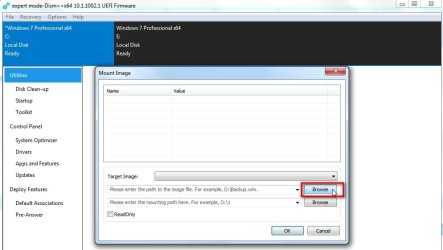
FILE>Mount Image
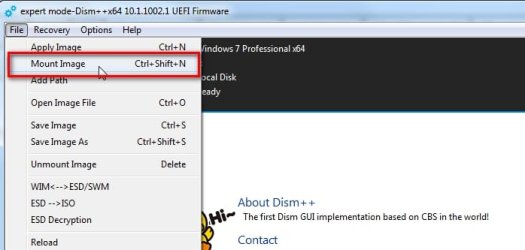
dism++-mount1.jpg

Browse to the wim file

dism++-mount2.jpg

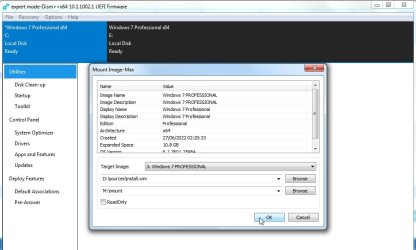
Browse to the mount folder ( can be any EMPTY folder )
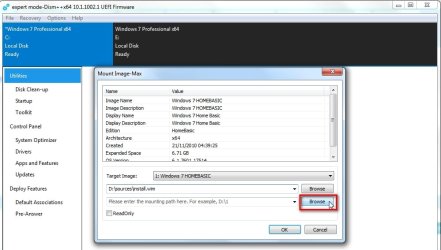
dism++-mount3.jpg

In the dropdown select the Edition you want to mount
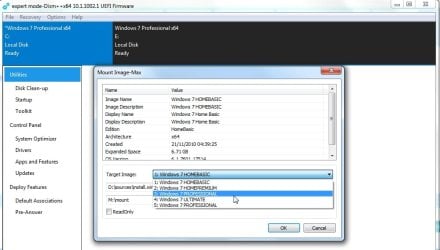
dism++-mount4.jpg

Click OK

dism++-mount5.jpg

- - - Updated - - -

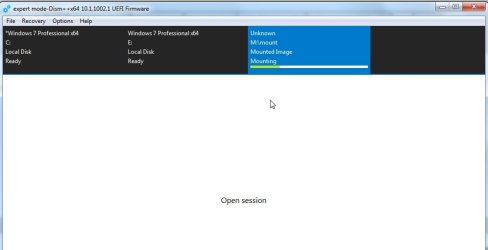
It is mounting

dism++-mount6.jpg

click open session

dism++-mount7.jpg

- - - Updated - - -

Click Updates in the left pane

Click Scan

*****************************************************************************************************************
Alternative method - you could click Updates in the left pane then instead of Scan button , click ADD button and browse to these two that you need to download first


prerequisite for the convenience update
https://www.microsoft.com/en-us/download/details.aspx?id=46827

then the "convenience" update which is a big rollup
http://download.windowsupdate.com/d..._ba1ff5537312561795cc04db0b02fbb0a74b2cbd.msu

That should cover the updates between SP1 and April 2016

After putting those two in then click Scan and see if you want anything else

- - - Updated - - -

**********************

Another alternative

:ar: 17.12.15.zip
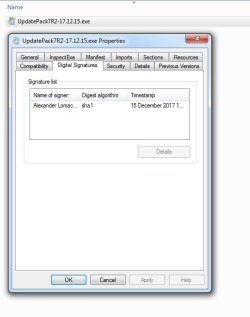
17.12.15-dig-sig.jpg
 
Last edited:

My Computers

System One System Two

  • Computer type
    PC/Desktop
    OS
    7 X64
    CPU
    i5 8400
    Motherboard
    gigabyte b365m ds3h
    Memory
    2x8gb 3200mhz
    Hard Drives
    various
    PSU
    pure power 11 400w cm
    Case
    Coolermaster
    Cooling
    cryorig m9i
  • Computer type
    PC/Desktop
    OS
    7x64
    CPU
    g5400
    Motherboard
    ga b365m ds3h
    Memory
    8gb ddr4 2400
    PSU
    xfx pro 450w

My Computer

OS
Windows XP
:-)
 

My Computers

System One System Two

  • Computer type
    PC/Desktop
    OS
    7 X64
    CPU
    i5 8400
    Motherboard
    gigabyte b365m ds3h
    Memory
    2x8gb 3200mhz
    Hard Drives
    various
    PSU
    pure power 11 400w cm
    Case
    Coolermaster
    Cooling
    cryorig m9i
  • Computer type
    PC/Desktop
    OS
    7x64
    CPU
    g5400
    Motherboard
    ga b365m ds3h
    Memory
    8gb ddr4 2400
    PSU
    xfx pro 450w
OK I tried it out but no go. It hangs during boot before SETUP can run, with either DVD or USB drive. An unmodded copy of W7 SP1-U installs fine but even just integrating only the convenience rollup (and prereqs) from 2016 is breaking something, so I think it is one (or more) of the post-SP1 updates to blame. I've spent too much time on this. I'll just use the Simplix UpdatePack post-install. Thanks for linking to that older release! I tried searching for older releases but couldn't find any going back that far.

FWIW, W7 performance is fairly painful on such an older system anyway, even with 3GB RAM and decent graphics card e.g. Radeon 9600 PRO. I do not recommend it. Especially those lacking SSE2, probably best to stick with Windows XP (or one of the lightweight Linux distros). Thanks again for the help!

Edit: remind me not to tell you sometime about the five hours I spent initially on this project trying to get W7 loaded onto HDD connected to integrated SATA 150 port that turned out to NOT be bootable (SATA ports were intended for secondary storage only)! W7 'installed' fine but when time to boot from the drive, NOPE. Only took me five hours to figure that one out. :huh::eek::o
 

My Computer

OS
Windows XP
Upgrade from XP, you might try Windows 10 X86 slimdown version. its size is similar to XP. but supports GPT SSD modern networking, running stable.

my XP machine went this way. it wouldn't run Windows 7 (freezing-up)
 

My Computers

System One System Two

  • Computer type
    PC/Desktop
    Computer Manufacturer/Model Number
    HP Elite 800 G5
    OS
    Windows 7 Pro 64-bit
    CPU
    I7-9700
    Memory
    32 GB
  • Computer type
    Laptop
    System Manufacturer/Model Number
    ASUS UX305C
    OS
    Windows 7 Pro 64-bit
Installs without a hitch from unmodded install bits of W7 SP1-U from Microsoft. Mucking around with the ISO seems to break something. I don't know what. But after using Simplix post-installation to bring it up-to-date with all the Windows Updates (supported by processors lacking SSE2), NETFX, etc. makes performance a bit awful. Last version of Firefox supporting processors without SSE2 was 48, which isn't any more useable on a lot of sites than IE11. Don't know about Chrome. I doubt the bottleneck with this system is the HDD, mostly it's the Athlon XP.
 

My Computer

OS
Windows XP
Hello, SIW2.

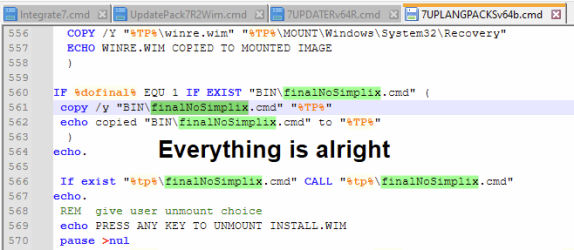
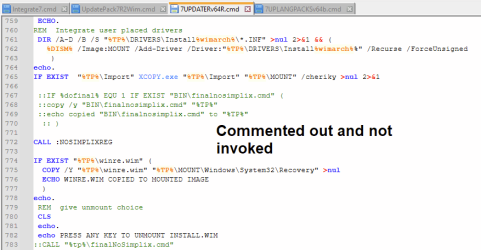
I've just stumbled upon an odd inconsistency in 7UPDATER.cmd and 7UPLANGPACKS.cmd. As far as I understood, the latter one doesn't invoke finalNoSimplix.cmd. Right now I'm digging into figuring out how it affects the final results. I'm attaching the screenshots:

image.pngimage.png

Is it something that needs to be fixed? If it's not the case, why does it work like that?
 

My Computers

System One System Two

  • Computer type
    Laptop
    Computer Manufacturer/Model Number
    Lenovo Legion 5 15ARH05H
    OS
    Windows 7/10 x64
    CPU
    AMD Ryzen 5 4600H
    Motherboard
    LNVNB 161216
    Memory
    2x8 DDR4 3200
    Graphics Card(s)
    RTX 2060 (laptop)
    Hard Drives
    NVMe 475 GB
    NVMe 953 GB
    Antivirus
    Windows Defender
    Browser
    Firefox
  • Computer type
    PC/Desktop
    Antivirus
    Common sense
SIW2:

Will you eventually be releasing a new version to replace 7UPv64R?

The browser issues that occurred last month with WS2008R2 security updates has been resolved, so it appears that Simplix UpdatePack7R2 will continue to be updated every month until January 2026.
 

My Computer

Computer type
PC/Desktop
Computer Manufacturer/Model Number
Dell OptiPlex 9020
OS
Windows 7 Professional SP1 64-bit
CPU
Intel Core i7-4790 3.60 GHz
Memory
32 GB DDR3-1600 MHz
Graphics Card(s)
Integrated Intel HD Graphics 4600
Monitor(s) Displays
Viewsonic 32" LCD
Hard Drives
Kingston SATA 3 240 GB SSD
Internet Speed
Spectrum Internet 1000 Mbps
Hello, SIW2.

is it something that needs to be fixed?

The answer is in your screenshot. There is a subroutine called instead of calling the external batch.

- - - Updated - - -

SIW2:

Will you eventually be releasing a new version to replace 7UPv64R?


Is there something that needs changing?
 

My Computers

System One System Two

  • Computer type
    PC/Desktop
    OS
    7 X64
    CPU
    i5 8400
    Motherboard
    gigabyte b365m ds3h
    Memory
    2x8gb 3200mhz
    Hard Drives
    various
    PSU
    pure power 11 400w cm
    Case
    Coolermaster
    Cooling
    cryorig m9i
  • Computer type
    PC/Desktop
    OS
    7x64
    CPU
    g5400
    Motherboard
    ga b365m ds3h
    Memory
    8gb ddr4 2400
    PSU
    xfx pro 450w
I need guidance. I tried to create final version of W7 using 7updaterv64r but it adds IE11 spyware to my image. How to exclude this plague? All tutorials here says it is optional install, but Script does not asks a question about including this. It was forced without asking. NTLite warns about consequences of deleting/uninstalling this after has been already added :(
Strangely - only 40 updates has been added. People were mentioning 140-170.
All I need is just clean operating system. Without their crap like like IE, WMP, Viewer, touchscreen input and natural dictionary (fail!). Without just them - entire image is 2,5GB smaller!
Additionally - Simplix does not contains all drivers. There is still some z170 chipset drv missing and Intel WiFi + usb3.0 hub
 

My Computers

System One System Two

  • OS
    w7rt, w7x64 pro, w10ltsc
  • Computer type
    PC/Desktop
Back
Top