Update your Win 7 installation media

My Computers My Computers

System One System Two

  • Computer type
    PC/Desktop
    Computer Manufacturer/Model Number
    HP Elite 800 G5
    OS
    Windows 7 Pro 64-bit
    CPU
    I7-9700
    Memory
    32 GB
  • Computer type
    Laptop
    System Manufacturer/Model Number
    ASUS UX305C
    OS
    Windows 7 Pro 64-bit

My Computers My Computers

System One System Two

  • Computer type
    PC/Desktop
    OS
    7 X64
    CPU
    i5 8400
    Motherboard
    gigabyte b365m ds3h
    Memory
    2x8gb 3200mhz
    Hard Drives
    various
    PSU
    pure power 11 400w cm
    Case
    Coolermaster
    Cooling
    cryorig m9i
  • Computer type
    PC/Desktop
    OS
    7x64
    CPU
    g5400
    Motherboard
    ga b365m ds3h
    Memory
    8gb ddr4 2400
    PSU
    xfx pro 450w
Thank SIW2 for that wonderful guide, I have made it.

However, it's working for CSM BIOS only. I recall original MR can run CSM/UEFI both. am I missing something?

below is error when run GPT BIOS. (CSM BIOS ok)
 

Attachments

  • test.jpg
    test.jpg
    167 KB · Views: 0
Last edited:

My Computers My Computers

System One System Two

  • Computer type
    PC/Desktop
    Computer Manufacturer/Model Number
    HP Elite 800 G5
    OS
    Windows 7 Pro 64-bit
    CPU
    I7-9700
    Memory
    32 GB
  • Computer type
    Laptop
    System Manufacturer/Model Number
    ASUS UX305C
    OS
    Windows 7 Pro 64-bit
Open a different thread about your 3rd party program. Fixing errors in macrium media is a separate subject.
 
Last edited:

My Computers My Computers

System One System Two

  • Computer type
    PC/Desktop
    OS
    7 X64
    CPU
    i5 8400
    Motherboard
    gigabyte b365m ds3h
    Memory
    2x8gb 3200mhz
    Hard Drives
    various
    PSU
    pure power 11 400w cm
    Case
    Coolermaster
    Cooling
    cryorig m9i
  • Computer type
    PC/Desktop
    OS
    7x64
    CPU
    g5400
    Motherboard
    ga b365m ds3h
    Memory
    8gb ddr4 2400
    PSU
    xfx pro 450w
ty vm for this guide, im following this to install w7 on my laptop.
i got the cd/dvd error (need usb3 drivers)

going to try this
 

My Computer My Computer

OS
windows 7x64
If you don't know how to burn an iso, or extract it to bootable usb,, anybody here can explain it.

I can burn an ISO and I have used Rufus before. I want to cut down on any errors I make. What bootable USB maker do you prefer and what settings should I select for a W7 installation?
 

My Computer My Computer

Computer type
PC/Desktop
OS
W 7 Ultimate x64
7UPv64M.zip on first page. Updated to wimlib 1.4.1 updated to winntsetup v531


What bootable USB maker do you prefer and what settings should I select for a W7 installation?

No special tools required. Format usb stick to fat32 and mark the partition active, which can be done with diskmgmt.

If the install.wim is over 4gb split it. Copy the distribution files and folders onto the usb stick.

Supports both bios and efi boot (for win7x64).
 

My Computers My Computers

System One System Two

  • Computer type
    PC/Desktop
    OS
    7 X64
    CPU
    i5 8400
    Motherboard
    gigabyte b365m ds3h
    Memory
    2x8gb 3200mhz
    Hard Drives
    various
    PSU
    pure power 11 400w cm
    Case
    Coolermaster
    Cooling
    cryorig m9i
  • Computer type
    PC/Desktop
    OS
    7x64
    CPU
    g5400
    Motherboard
    ga b365m ds3h
    Memory
    8gb ddr4 2400
    PSU
    xfx pro 450w
S1W2

Thank you very much for the advice.
 

My Computer My Computer

Computer type
PC/Desktop
OS
W 7 Ultimate x64
7UPv64N.zip on first post.

Now uses community nvme driver for samsung 980 and 990 support and updated realtek net drivers.
 
Last edited:

My Computers My Computers

System One System Two

  • Computer type
    PC/Desktop
    OS
    7 X64
    CPU
    i5 8400
    Motherboard
    gigabyte b365m ds3h
    Memory
    2x8gb 3200mhz
    Hard Drives
    various
    PSU
    pure power 11 400w cm
    Case
    Coolermaster
    Cooling
    cryorig m9i
  • Computer type
    PC/Desktop
    OS
    7x64
    CPU
    g5400
    Motherboard
    ga b365m ds3h
    Memory
    8gb ddr4 2400
    PSU
    xfx pro 450w
Sounds like you have what you need.. :-)
Hello,
What if I only need to install all the drivers mentioned, in boot.wim, install.win and winre.wim?
Thank you.
 

My Computer My Computer

Computer type
PC/Desktop
OS
windows 7 x64
You might also need the driverframework update, sha2 updates and import the registry blobs depending on which drivers you need.

It is easier to run 7updater without simplix pack if that is what you want. It reconstructs winre for you as well.
 

My Computers My Computers

System One System Two

  • Computer type
    PC/Desktop
    OS
    7 X64
    CPU
    i5 8400
    Motherboard
    gigabyte b365m ds3h
    Memory
    2x8gb 3200mhz
    Hard Drives
    various
    PSU
    pure power 11 400w cm
    Case
    Coolermaster
    Cooling
    cryorig m9i
  • Computer type
    PC/Desktop
    OS
    7x64
    CPU
    g5400
    Motherboard
    ga b365m ds3h
    Memory
    8gb ddr4 2400
    PSU
    xfx pro 450w
You might also need the driverframework update, sha2 updates and import the registry blobs depending on which drivers you need.
It is easier to run 7updater without simplix pack if that is what you want. It reconstructs winre for you as well.

Thank you for your rapid response.
Yes I understand that.
What I mean is as follows. I only need to install the AHCI/RAID, USB 3.x supported UASP and NVMe for PCI-e bus M-key drivers and related updates, but nothing else. No any regular Windows updates and "nice" features. Just simple Windows 7 x64.

I tried a similar solution with many different updates and features and I suspect it affected the Bittorrent client over VPN. The exchange speed dropped 50-100 times with all other conditions being the same, fully installed drivers and these various updates and features. Well, at least exclude this possibility.

Again thank you very much for your kind and rapid response.
 

My Computer My Computer

Computer type
PC/Desktop
OS
windows 7 x64
Simplix updatepack7R2 seems to have trouble integrating .Net Framework 4.8 on 32-bit windows 7:

Code:
Addon - Microsoft .NET Framework 4.8
Addon  - copy file error:  Windows\Microsoft.NET\assembly\GAC_MSIL\System.Windows.Input.Manipulations\v4.0_4.0.0.0__b77a5c561934e089\System.Windows.Forms.DataVisualization.Design.dll
Addon  - copy file error:  Windows\Microsoft.NET\assembly\GAC_MSIL\System.Windows.Forms.DataVisualization\v4.0_4.0.0.0__31bf3856ad364e35\System.Windows.Forms.DataVisualization.dll
Addon  - copy file error:  Windows\Microsoft.NET\assembly\GAC_MSIL\System.Security.Principal\v4.0_4.0.0.0__b03f5f7f11d50a3a\System.Security.Cryptography.X509Certificates.dll
Addon  - copy file error:  Windows\Microsoft.NET\assembly\GAC_MSIL\System.Security.Cryptography.Primitives\v4.0_4.0.0.0__b03f5f7f11d50a3a\System.Security.Cryptography.Primitives.dll
Addon  - copy file error:  Windows\Microsoft.NET\assembly\GAC_MSIL\System.Security.Cryptography.Algorithms\v4.0_4.0.0.0__b03f5f7f11d50a3a\System.Security.Cryptography.Algorithms.dll
Addon  - copy file error:  Windows\Microsoft.NET\assembly\GAC_MSIL\System.Runtime.Serialization.Primitives\v4.0_4.0.0.0__b03f5f7f11d50a3a\System.Runtime.Serialization.Primitives.dll
Addon  - copy file error:  Windows\Microsoft.NET\assembly\GAC_MSIL\System.Runtime.Serialization.Formatters.Soap\v4.0_4.0.0.0__b03f5f7f11d50a3a\System.Runtime.Serialization.Formatters.Soap.dll
Addon  - copy file error:  Windows\Microsoft.NET\assembly\GAC_MSIL\System.Runtime.Serialization.Formatters\v4.0_4.0.0.0__b03f5f7f11d50a3a\System.Runtime.Serialization.Formatters.dll
Addon  - copy file error:  Windows\Microsoft.NET\assembly\GAC_MSIL\System.Runtime.Numerics\v4.0_4.0.0.0__b03f5f7f11d50a3a\System.Runtime.InteropServices.WindowsRuntime.dll
Addon  - copy file error:  Windows\Microsoft.NET\assembly\GAC_MSIL\System.Runtime.Numerics\v4.0_4.0.0.0__b03f5f7f11d50a3a\System.Runtime.InteropServices.RuntimeInformation.dll
Addon  - copy file error:  Windows\Microsoft.NET\assembly\GAC_MSIL\System.Runtime.CompilerServices.VisualC\v4.0_4.0.0.0__b03f5f7f11d50a3a\System.Runtime.CompilerServices.VisualC.dll
Addon  - copy file error:  Windows\Microsoft.NET\assembly\GAC_MSIL\System.DirectoryServices.AccountManagement\v4.0_4.0.0.0__b77a5c561934e089\System.DirectoryServices.AccountManagement.dll
Addon  - copy file error:  Windows\Microsoft.NET\assembly\GAC_MSIL\System.Diagnostics.TextWriterTraceListener\v4.0_4.0.0.0__b03f5f7f11d50a3a\System.Diagnostics.TextWriterTraceListener.dll
Addon  - copy file error:  Windows\Microsoft.NET\assembly\GAC_MSIL\System.ComponentModel.DataAnnotations\v4.0_4.0.0.0__31bf3856ad364e35\System.ComponentModel.Composition.Registration.dll
Addon  - copy file error:  Windows\Microsoft.NET\assembly\GAC_MSIL\Microsoft.Workflow.Compiler\v4.0_4.0.0.0__31bf3856ad364e35\Microsoft.Windows.ApplicationServer.Applications.dll
Addon  - copy file error:  Windows\Microsoft.NET\assembly\GAC_MSIL\Microsoft.VisualBasic.Compatibility.Data\v4.0_10.0.0.0__b03f5f7f11d50a3a\Microsoft.VisualBasic.Compatibility.Data.dll
Addon  - copy file error:  Windows\Microsoft.NET\assembly\GAC_32\Microsoft.VisualBasic.Activities.Compiler\v4.0_10.0.0.0__b03f5f7f11d50a3a\Microsoft.VisualBasic.Activities.Compiler.dll

And when you start the next session you get:
View attachment 420081

Looked around and found some leftover files and folders that werent deleted:
View attachment 420082

Deleted them and the error goes away and the updater continues to work but .Net Framework 4.8 still fails to copy over - so not installed?

Edit:
Seems like ultimate is the only version that has .net framework 4.8 integrated successfully:

The installation log of UpdatePack 7 / 2008 R2 / 21.8.11Installation start t - Pastebin.com

....sooo.......anyone managed to fix this or is this still an issue just for me....?
 

My Computer My Computer

Computer type
PC/Desktop
Computer Manufacturer/Model Number
custom build
OS
The one I am using to register is my Windows 7 Professional x64 one.
CPU
Intel Core i7-3970x
Motherboard
Asus Rampage 4 Extreme
Memory
Cosair Dominator Platinum
Graphics Card(s)
2x eVGA GTX 770 4GB CLassified with ACX cooler
Antivirus
I have KIS 2016 which is an internet security suite....?
Browser
Fiefox
....sooo.......anyone managed to fix this or is this still an issue just for me....?

It worked when I used Win Toolkit and the addon dotNetFx48_<date>_x64.WA

Sorry that's not a fix for use with Simplix but it does mean the .NET Framework 4.8 can be integrated.


How to do it:

Run "WinToolkit.exe"

Click the button "All-In-One Integrator".

Press Ctrl+W to and browse to your WIM file.

Once that's done, double click the listing in the box and this brings up a new window.
Click "Skip" at the bottom (no preset).

Click the "Addons" tab, then "Add > Add Addons" at the top.

Browse to the included file:
"Win Toolkit\dotNetFx48_<date>_x64.WA"

Click "Start" at the top to slipstream the addon.

On my system this went quite fast - it slipstreamed in less than 4 minutes, which is faster than the time it was taking to install .NET Framework 4.8 at first logon, which was the way I used to do it. Also this Addon pack is a more up to date.

Once it's finished, close the All-In-One Integrator window, then close the Win Toolkit window.
 

My Computer My Computer

Computer type
PC/Desktop
OS
Windows 10 x64
7UPv64P on first post. Updated wimlib to wimlib-1.14.3 . Updated bcdbootdisk to v18
 

My Computers My Computers

System One System Two

  • Computer type
    PC/Desktop
    OS
    7 X64
    CPU
    i5 8400
    Motherboard
    gigabyte b365m ds3h
    Memory
    2x8gb 3200mhz
    Hard Drives
    various
    PSU
    pure power 11 400w cm
    Case
    Coolermaster
    Cooling
    cryorig m9i
  • Computer type
    PC/Desktop
    OS
    7x64
    CPU
    g5400
    Motherboard
    ga b365m ds3h
    Memory
    8gb ddr4 2400
    PSU
    xfx pro 450w
You beat me to it.
I was going to ask you after October 2023 "patch Tuesday" if you plan to release a new version.
I now have a copy and will put it to use after the new Simplix update pack and WA add-ons are released.
:thumbsup:
 

My Computer My Computer

Computer type
PC/Desktop
Computer Manufacturer/Model Number
Dell OptiPlex 9020
OS
Windows 7 Professional SP1 64-bit
CPU
Intel Core i7-4790 3.60 GHz
Memory
32 GB DDR3-1600 MHz
Graphics Card(s)
Integrated Intel HD Graphics 4600
Monitor(s) Displays
Viewsonic 32" LCD
Hard Drives
Kingston SATA 3 240 GB SSD
Internet Speed
Spectrum Internet 1000 Mbps
Sup guys,

first of all thanks a lot for the work that's been put on keeping this thread alive!

I've managed to successfully update and install Win 7 Professional X64 on newer hardware (13th Gen intel) several times, but been struggling with Windows 7 Ultimate N X64 lately. I use both the regular and the simplix pack and everything works during installation, but upon starting Windows for the first time, none of my USB input devices work and I can't get past the initial setup where you enter a user and a PC name.

Any help would be much appreciated!

Cheers
 

My Computers My Computers

System One System Two

  • OS
    Win 7
  • Computer type
    PC/Desktop
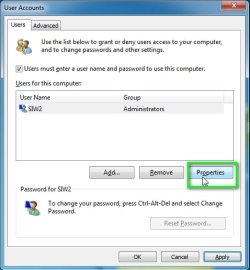
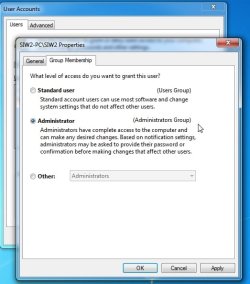
SIW2 I have done the update a few years ago successfully . I am doing something wrong this time All I see is error elevated permissions required.
I am the administrator, right click has no option as admin. user accnt is administrator Me. Ya I want to install to an NVMe HDD on the ITX board You have replied to me about.
 

My Computer My Computer

Computer type
PC/Desktop
Computer Manufacturer/Model Number
custom
OS
windows 7 pro 64bit
CPU
intel 7
Motherboard
ASUS Z97-A
Memory
8 gig Skill ddr3 2133
Graphics Card(s)
intel integrated
Hard Drives
1 tb ssd 6gbps
Antivirus
none
Browser
Firefox
Last edited:

My Computers My Computers

System One System Two

  • Computer type
    PC/Desktop
    OS
    7 X64
    CPU
    i5 8400
    Motherboard
    gigabyte b365m ds3h
    Memory
    2x8gb 3200mhz
    Hard Drives
    various
    PSU
    pure power 11 400w cm
    Case
    Coolermaster
    Cooling
    cryorig m9i
  • Computer type
    PC/Desktop
    OS
    7x64
    CPU
    g5400
    Motherboard
    ga b365m ds3h
    Memory
    8gb ddr4 2400
    PSU
    xfx pro 450w
Thank you SIW2
ISO is modified now I will install the Nvme
This SSD HDD is hanging every time I shut down.

- - - Updated - - -

I am getting no where with this. I can not get the NVMe to show from within windows so there is no option to install from the SSD modified install media. I have tried to create USB media with boot success but still no NVME to install to. I must note The drive is mounted in the onboard NVMe slot. IT shows in the BIOS
The win7 media says no signed drivers regardless of where I point it. I have SIW2 drivers installed on two ssd drives nether will see the NVMe
Nor will any of my modified media copies done with 7UPv64p
I have one more option I have a new PCIe NVMe adapter card. If you think the system will see it if installled there.
This whole things is on the recent install of a Jingsha micro ITX system

- - - Updated - - -

I tried to get raw NVME drivers from PNY that is the maker of this NVMe its a PNY 1TB PCIe Gen3 X4
 

My Computer My Computer

Computer type
PC/Desktop
Computer Manufacturer/Model Number
custom
OS
windows 7 pro 64bit
CPU
intel 7
Motherboard
ASUS Z97-A
Memory
8 gig Skill ddr3 2133
Graphics Card(s)
intel integrated
Hard Drives
1 tb ssd 6gbps
Antivirus
none
Browser
Firefox
Back
Top