
Updating my BIOS?

scamander

New member
Member
VIP
Local time
8:20 PM
Messages
118
Location
Brighton
Hi all,

My PC seems to keep turning itself on after I power off and apparently a common issue is that you need to update your bios.

My Motherboard is GIGABYTE GA-78LMT-USB3 AMD 760G (Socket AM3+) Micro-ATX Motherboard. Using System Tools I've found out that my BIOS version/date is "Award Software International, Inc. F2, 10/08/2012".

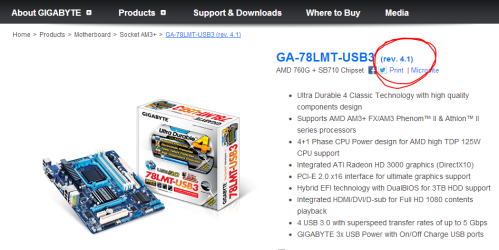
I think I've discovered the correct motherboard on this site

This is how far I've got - unsure what I need, or should download from the options there (and even if I have the right site). Obviously I'm really cautious about all of this so would really appreciate any help or advice?

cheers

Scam
 

My Computer

Computer type
PC/Desktop
Computer Manufacturer/Model Number
Gladiator X8320-HD Piledriver Eight-Core
OS
Windows 7 Home Premium 64 bit
CPU
AMD FX-8320 3.50GHz (4.00GHz Turbo) Socket AM3+ 8-Core Proce
Motherboard
GIGABYTE GA-78LMT-USB3 AMD 760G (Socket AM3+) Micro-ATX Mot
Memory
16GB Corsair (2x8192) 1333MHz DDR3 Dual-Channel Memory (32GB
Graphics Card(s)
Radeon HD 7850 1024MB GDDR5 PCI-Express
Monitor(s) Displays
AOC 936swa
Hard Drives
2TB (7200rpm) SATA 3GB/s (SATA II) Hard Drive
seagate ST2000DMOO1-9YN164
PSU
600W Corsair Builder Series 600CX 80PLUS Bronze Power Supply
Hi,

Its a good idea to be cautious. Please check on your motherboard to see whether its a Rev. 4.1. If it is, then that is indeed the BIOS to download and install, and that is the correct site.

Capture.PNG

Regards,
Golden
 

My Computer

Computer type
PC/Desktop
Computer Manufacturer/Model Number
Golden Mk. I.4
OS
Windows 10 Pro x64 ; Xubuntu x64
CPU
Intel i7 860 @ 2.80 GHz O/C'ed to 4.0GHz
Motherboard
Gigabyte P55A-UD3R Rev.1. Award BIOS F13
Memory
16GB Corsair Vengance DDR3 @ 661 MHz Dual Channel (9-9-9-24)
Graphics Card(s)
EVGA NVidia GTX 560 1024MB
Sound Card
Realtek Integrated
Monitor(s) Displays
Dual Samsung SyncMaster 2494HS
Screen Resolution
1920*1080 and 1920*1080
Hard Drives
1*Samsung 840 EVO 120GB SSD;
1*OCZ Vertex 2 60GB SSD;
2*Samsung F3 SpinPoint 1TB in RAID0;
1*Samsung F1 SpinPoint 1TB;
2*Western Digital 1TB External USB 3.0
1*Western Digital 500GB External USB 3.0
1*Seagate 500GB External USB 2.0
PSU
Thermaltake ToughPower QFan 750W
Case
Thermaltake Element S VK60001W2Z
Cooling
Corsair H60 Water Cooling, 2*230mm and 2*80mm case fans
Keyboard
Logitech G110
Mouse
Logitech MX518
cheers golden!
 

My Computer

Computer type
PC/Desktop
Computer Manufacturer/Model Number
Gladiator X8320-HD Piledriver Eight-Core
OS
Windows 7 Home Premium 64 bit
CPU
AMD FX-8320 3.50GHz (4.00GHz Turbo) Socket AM3+ 8-Core Proce
Motherboard
GIGABYTE GA-78LMT-USB3 AMD 760G (Socket AM3+) Micro-ATX Mot
Memory
16GB Corsair (2x8192) 1333MHz DDR3 Dual-Channel Memory (32GB
Graphics Card(s)
Radeon HD 7850 1024MB GDDR5 PCI-Express
Monitor(s) Displays
AOC 936swa
Hard Drives
2TB (7200rpm) SATA 3GB/s (SATA II) Hard Drive
seagate ST2000DMOO1-9YN164
PSU
600W Corsair Builder Series 600CX 80PLUS Bronze Power Supply
There are BIOS options that when set will turn your PC on without you having to press the power button. Settings such as Wake on LAN, Wake on ring, Power on by keyboard or mouse. I'd check these settings to make sure they are disabled before flashing my BIOS. Your motherboard manual should list these settings and how to change them.
 

My Computer

Computer type
PC/Desktop
Computer Manufacturer/Model Number
Home Built
OS
Windows 10 Education 64 bit
CPU
AMD Phenom II X4 980 Black Edition Deneb 3.7GHz
Motherboard
Asus M4N68T-M V2 µATX Motherboard
Memory
8GB 4GBx2 Kingston PC10600 DDR3 1333 Memory
Graphics Card(s)
Zotac NVIDIA Geforce GT640 2 Gig DDR3 PCIe
Sound Card
VIA VT1708s High Definition Audio 8-channel Onboard
Monitor(s) Displays
22" LG E2242 1080p and 2 19" I-INC AG191D
Screen Resolution
1280x1024 - 1920x1080 - 1280x1024
Hard Drives
Crucial M100 256 GB SSD and 500 GB WD Blue SATA
PSU
Thermaltake TR 620
Case
Power Up Black ATX Mid-Tower Case
Cooling
Stock heatsink and fan
Keyboard
Logitech Wireless K350 Wave
Mouse
Logitech Wireless M570 Trackman Wheel
Internet Speed
80 Mbps Down 30 Mbps Up
Antivirus
Windows Defender
Browser
Internet Explorer 11
Other Info
HP DVD1040e Lightscribe - External USB2
I wouldn't jump into updating your gigabyte mobo BIOS just yet. I made the mistake of doing that on my Gigabyte mobo (GA 890GPA UD3H) and suddenly, my 1600-speed memory would only run at 1033! Fortunately, like I always do, I made a backup of the previous BIOS, so I reflashed using that, and my memory worked at full speed again. And yes, I did go into the updated BIOS and try to set the memory speed -- and when I did that, the mobo crashed on boot. Since then, Gigabyte has removed that newer version of the BIOS from their download page -- and the latest one there now is the same "old" one that I'm using. So, with BIOS versions, newer is not always better.
 

My Computer

Computer type
PC/Desktop
Computer Manufacturer/Model Number
Custom
OS
Win7 Pro 32-bit, Win8 Pro 32-bit
CPU
AMD Phenom II X6 1090T
Motherboard
Gigabyte
Memory
4GB ddr3 1300
Graphics Card(s)
AMD HD 4290 onboard
Sound Card
Builtin Realtek HD Audio
Monitor(s) Displays
Samsung 24" widescreen, LG 23" widescreen
Screen Resolution
1920x1200/1920x1080
Hard Drives
Kingston 256GB SSD
Keyboard
Logitech Illuminated Keyboard
Mouse
Logitech M705 wireless mouse
Antivirus
Norton Av 2013
Browser
IE v10
Back
Top