Solved upgrade from xp 32 to win7 64 with dvd

My Computer My Computer

At a glance

W 7 64-bit UltimateIntel Q9550 Yorkfield8GB Dominator 8500C5DATI : XFX 5870
Computer Manufacturer/Model Number
* BFK Customs *
OS
W 7 64-bit Ultimate
CPU
Intel Q9550 Yorkfield
Motherboard
ASUS P5Q Pro
Memory
8GB Dominator 8500C5D
Graphics Card(s)
ATI : XFX 5870
Sound Card
Realtek HD Audio 7-1
Monitor(s) Displays
1x 47" LCD HDMI & 3x 26" LCD HDMI
Screen Resolution
1920x1080P & 1920x1200
Hard Drives
1x 80GB Intel X25-M G2 SSD : 1x 500GB & 1x 640GB WD Caviar Black(s)
PSU
Corsair 620HX
Case
Cooler Master RC-690
Cooling
Tuniq Tower 120, 2x 140mm and 3x 120mm case fans
Keyboard
Microsoft 500
Mouse
Razer Diamondback 3G
Internet Speed
14 Mb/s
Other Info
1x Koutech 3Gb/s SATA HDD Hot Swap Rack
Use this tutorial to make a bootable USB stick with the ISO files and boot from the stick to install.


USB Windows 7 Installation Key Drive - Create
I think I did this already using method 1?
I followed the steps PART 2 - How to create a bootable Windows 7 USB Flash Drive but can't get the computer to actually boot up from the usb flash drive, maybe my pc is too old to do it?

method 2 is no good since i have xp32 and trying to 'upgrade' to win764
 

My Computer My Computer

At a glance

Windows XP 32 bitIntel Core 2 Duo E6400 (Socket 775 LGA) 2.14GHzDDR2, 2x1024NVIDIA GeForce 7300 GS
Computer Manufacturer/Model Number
Mesh Computers
OS
Windows XP 32 bit
CPU
Intel Core 2 Duo E6400 (Socket 775 LGA) 2.14GHz
Motherboard
ASUS P5NSLI
Memory
DDR2, 2x1024
Graphics Card(s)
NVIDIA GeForce 7300 GS
Sound Card
SoundMAX HD Audio 0
Hard Drives
Maxtor 6V300F0
Check in the bios whether the computer can boot from usb or not. If it cant you need to run out and buy a blank dvd or 2.
 

My Computer My Computer

At a glance

Windows 7 x64 pro/ Windows 7 x86 Pro/ XP SP3 x86
Computer Manufacturer/Model Number
Too many to describe...
OS
Windows 7 x64 pro/ Windows 7 x86 Pro/ XP SP3 x86
I had this problem, if your motherboard has it enable 'usb legacy support'.

Also after I enabled that it still failed and I found a tutorial that said I need the 'Bootsect.exe /nt60 L:' off the cd

I found this was the best tutorial after 30mins of looking, my dvd drive was broke and my windows was corrupt.

How To Boot And Install Windows 7 From USB Flash Drive
 

My Computer My Computer

At a glance

Windows 7 Professional (x64/SP1) /Linux Mint 16Intel i5-3570k 3.40 GHz @ 4.6 GHz8GB (2133MHz) DDR3Asus GTX560 Ti (Nvidia)
Computer type
PC/Desktop
Computer Manufacturer/Model Number
GIGABYTE Rig (Custom)
OS
Windows 7 Professional (x64/SP1) /Linux Mint 16
CPU
Intel i5-3570k 3.40 GHz @ 4.6 GHz
Motherboard
GIGABYTE Z77X-D3H
Memory
8GB (2133MHz) DDR3
Graphics Card(s)
Asus GTX560 Ti (Nvidia)
Monitor(s) Displays
HP 23", Acer 19" and a Dell 17"
Screen Resolution
1080p, 1440x900 and 1280x1024
Hard Drives
Sandisk Extreme 120GB (SSD), WD 2TB green and 4 other HDDs
PSU
Antec 620w High Current Gamer
Case
Corsair Obsidian 600D
Cooling
CPU - Antec KÜHLER H₂O 920
Keyboard
Steelseries 6Gv2
Mouse
Roccat LUA
Internet Speed
4 - 6mb/s
Antivirus
ESET NOD32
Browser
Chrome/Firefox
Other Info
Intel Gigabit CT (PCIE NIC) and Thinkpad T61p,
Have backup all your DATA?
Looking at your spec's, Pc is not to old for USB boot.
 

My Computer My Computer

At a glance

ME/XP/Vista/Win7
OS
ME/XP/Vista/Win7
I figured this meant I just needed to load it from boot menu so i selected "removable device" as the #1 boot option
my mistake, I didn't realise "removable device" was not my usb!

put USB disc above "SATA1 Maxtor drive" in the hard drive boot menu and hard drive in position #1 and #2 in the overall boot menu.... pc boots from usb

so now what happens is I get
'windows is loading files...' then 'starting windows' and the install windows 7 program loads up. I selected 'custom/advance' and appear to install it and automatically reboots

as it reboots i enter bios and put the usb device down the order so it doesn't run the install again

it starts windows
'setup is updating registry settings'
'setup is starting services'
then goes back into install menu and says 'completing installation...'
then reboots again and i get a black screen but see the mouse cursor
eventually it reboots again

i get options to boot 'earlier version of windows, windows 7 or windows recovery console'

i choose windows 7

starting windows appears and then i get a black screen with my mouse cursor showing again

still waiting for it to do something..... doesn't look good :( using laptop now
 

My Computer My Computer

At a glance

Windows XP 32 bitIntel Core 2 Duo E6400 (Socket 775 LGA) 2.14GHzDDR2, 2x1024NVIDIA GeForce 7300 GS
Computer Manufacturer/Model Number
Mesh Computers
OS
Windows XP 32 bit
CPU
Intel Core 2 Duo E6400 (Socket 775 LGA) 2.14GHz
Motherboard
ASUS P5NSLI
Memory
DDR2, 2x1024
Graphics Card(s)
NVIDIA GeForce 7300 GS
Sound Card
SoundMAX HD Audio 0
Hard Drives
Maxtor 6V300F0
Seems that you installed on another legacy drive and you have 2 boots.
 

My Computer My Computer

At a glance

Windows 7 x64 Ultimate SP1I5 875K UnlockedKingston HyperX Genesis DDR3-1600MHz 9-9-9-27...EVGA GeForce GTX 570 HD 732 MHz GPU 1280 MB, ...
Computer Manufacturer/Model Number
Asus
OS
Windows 7 x64 Ultimate SP1
CPU
I5 875K Unlocked
Motherboard
P7P55D-E-PRO
Memory
Kingston HyperX Genesis DDR3-1600MHz 9-9-9-27 @ 1.65V XMP
Graphics Card(s)
EVGA GeForce GTX 570 HD 732 MHz GPU 1280 MB, 152 GB Mem
Sound Card
Onboard Via 1828S
Monitor(s) Displays
Samsung T240 HD
Screen Resolution
Dual 1920X1200 1027X768
Hard Drives
OCZ Vertex II Extended Sandforce SSD 60 Gig 2X WD Black Caviar 1 terabyte 6GBS Transer Sata 3 Marvell Chip
PSU
Corsair Gold fully Modular 80 Plus 850
Case
Coolermaster Half X Full Tower
Cooling
Noctua NH-U12P
Keyboard
MS
Mouse
MS
Internet Speed
Fast enough
Other Info
My fridge has a water tap
Seems that you installed on another legacy drive and you have 2 boots.
hmm ok don't understand what this means though:( do you know what to do about it?
 

My Computer My Computer

At a glance

Windows XP 32 bitIntel Core 2 Duo E6400 (Socket 775 LGA) 2.14GHzDDR2, 2x1024NVIDIA GeForce 7300 GS
Computer Manufacturer/Model Number
Mesh Computers
OS
Windows XP 32 bit
CPU
Intel Core 2 Duo E6400 (Socket 775 LGA) 2.14GHz
Motherboard
ASUS P5NSLI
Memory
DDR2, 2x1024
Graphics Card(s)
NVIDIA GeForce 7300 GS
Sound Card
SoundMAX HD Audio 0
Hard Drives
Maxtor 6V300F0
Choose "Earlier Version of Windows" on the Windows Boot Menu given at startup to see if XP is still on the machine.

If so you can try running the Win7 installer from XP desktop to Custom install using the steps given by Zardoc in post #31.

If this fails, try booting the Win 7 installer to do a Custom Install, using Drive Options to delete all partitions, create New one(s) as you wish, then format before installing to first partition. Screenshots depicting these exact steps are here: http://www.sevenforums.com/tutorials/1649-clean-install-windows-7-a.html

If this fails, next wipe the HD of all code to try install: http://www.sevenforums.com/tutorials/91339-ssd-hdd-optimize-windows-reinstallation.html

Next try resetting the CMOS: http://pcsupport.about.com/od/fixtheproblem/tp/clearcmos.htm

If all fails, time to test the RAM using memtest86 CD for 5-6 passes and HD using maker's diagnostic/repair extended CD scan: http://www.carrona.org/hddiag.html

Please report back what happens with each step including exact error messages if any.
 
Last edited:
Thanks I will try. Not sure about booting from DVD, that was my original problem but will try dvd and if not go back to usb boot.
 

My Computer My Computer

At a glance

Windows XP 32 bitIntel Core 2 Duo E6400 (Socket 775 LGA) 2.14GHzDDR2, 2x1024NVIDIA GeForce 7300 GS
Computer Manufacturer/Model Number
Mesh Computers
OS
Windows XP 32 bit
CPU
Intel Core 2 Duo E6400 (Socket 775 LGA) 2.14GHz
Motherboard
ASUS P5NSLI
Memory
DDR2, 2x1024
Graphics Card(s)
NVIDIA GeForce 7300 GS
Sound Card
SoundMAX HD Audio 0
Hard Drives
Maxtor 6V300F0
How many drives do you have? And how many partitions?

Unplug drives that you are not using.

Try install again.

If you've downloaded Windows 7 installation files onto a USB flash drive, insert the drive into your computer. Setup should start automatically. If it doesn't, click the Start button, click Computer, double-click the drive, and then double-click setup.exe

On the Install Windows page, click Install now.

On the Get important updates for installation page, we recommend getting the latest updates to help ensure a successful installation, and to help protect your computer against security threats. Your computer will need to be connected to the Internet during Windows 7 installation to get these updates.

On the Please read the license terms page, if you accept the license terms, click I accept the license terms, and then click Next.

On the Which type of installation do you want? page, click Custom.

Choose the partition containing Windows XP (this is often the computer's C: drive),

Use the advanced options and format the partition or the drive you want to install windows on.
 

My Computer My Computer

At a glance

Windows 7 x64 Ultimate SP1I5 875K UnlockedKingston HyperX Genesis DDR3-1600MHz 9-9-9-27...EVGA GeForce GTX 570 HD 732 MHz GPU 1280 MB, ...
Computer Manufacturer/Model Number
Asus
OS
Windows 7 x64 Ultimate SP1
CPU
I5 875K Unlocked
Motherboard
P7P55D-E-PRO
Memory
Kingston HyperX Genesis DDR3-1600MHz 9-9-9-27 @ 1.65V XMP
Graphics Card(s)
EVGA GeForce GTX 570 HD 732 MHz GPU 1280 MB, 152 GB Mem
Sound Card
Onboard Via 1828S
Monitor(s) Displays
Samsung T240 HD
Screen Resolution
Dual 1920X1200 1027X768
Hard Drives
OCZ Vertex II Extended Sandforce SSD 60 Gig 2X WD Black Caviar 1 terabyte 6GBS Transer Sata 3 Marvell Chip
PSU
Corsair Gold fully Modular 80 Plus 850
Case
Coolermaster Half X Full Tower
Cooling
Noctua NH-U12P
Keyboard
MS
Mouse
MS
Internet Speed
Fast enough
Other Info
My fridge has a water tap
Everything I do ends in a black screen although I see the mouse cursor... ??:(

I have wiped the HD of all the code using the SSD/HDD method posted. Earlier versions of windows (xp32) are gone

I have reset the BIOS to default. I have to do this all the time since everytime I try and install win7 the pc auto reboots as part of that install and I need to be ready to enter BIOS and reset to default otherwise pc will boot up USB device first and then put me back to the start of the win7 install where I'm selecting language.

There is only one main hard drive, a maxtor 300gb, other than that there is only my usb flash drive with the win7 setup.exe documents on it I got from the ISO download. Only one partition after wiping the code using the SDD/HDD method. The win7 DVD I've got has never worked.

The situation right now:-

I've started the win7 install and ended up with a black screen after 2 automatic reboots presumably as part of that install. Ended up having to force a reboot and I get the message 'windows did not shut down successfully.....' with options

1.Safe mode (when I try this it says loading windows files, then comes up setup is preparing your computer for first use, then get error message saying 'windows cannot complete installation in safe mode. To continue installing windows, restart the computer.' - so i click ok and it says 'setup will continue after restarting your computer' then reboots, says starting windows (i.e. skips option of running safe mode) with windows logo in centre of screen but then I just get a black screen with mouse cursor so end up having to force reboot)

2.Safe mode with networking (when I try this the same happens as with running normal safe mode)

3.Safe mode with command prompt (when I try this the same happens as with running normal safe mode)

4.Start windows normally (when I try this it says starting windows with logo loading in centre then just black screen with mouse cursor so I end up having to force reboot)

I have never managed to get as far as this screen. I guess I could be getting this screen but can't actually see it since screen is black :(

2444d1231630498-clean-install-windows-7-step11.jpg
 

My Computer My Computer

At a glance

Windows XP 32 bitIntel Core 2 Duo E6400 (Socket 775 LGA) 2.14GHzDDR2, 2x1024NVIDIA GeForce 7300 GS
Computer Manufacturer/Model Number
Mesh Computers
OS
Windows XP 32 bit
CPU
Intel Core 2 Duo E6400 (Socket 775 LGA) 2.14GHz
Motherboard
ASUS P5NSLI
Memory
DDR2, 2x1024
Graphics Card(s)
NVIDIA GeForce 7300 GS
Sound Card
SoundMAX HD Audio 0
Hard Drives
Maxtor 6V300F0
If you have onboard Graphic's, remove Graphic card, & reboot.
How far will install go now?
 

My Computer My Computer

At a glance

ME/XP/Vista/Win7
OS
ME/XP/Vista/Win7
If you have onboard Graphic's, remove Graphic card, & reboot.
How far will install go now?
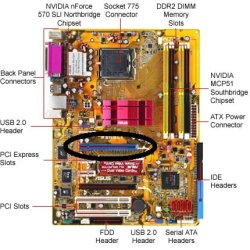
sorry but how do I remove graphic card, what am I looking for exactly? some sort of card slotted into the motherboard? pc came with geforce 7300 gs, I'm not sure where it is!
here is a picture of the motherboard
test__p5nsli-1.jpg


I've tried loading win7 install from boot then going into repair windows instead of install and found no problems, tried the memory option (full search option) which took like 2 or 3 hours but found no problems at 95%, next i noticed it was back to black screen so presumably it rebooted again
 

My Computer My Computer

At a glance

Windows XP 32 bitIntel Core 2 Duo E6400 (Socket 775 LGA) 2.14GHzDDR2, 2x1024NVIDIA GeForce 7300 GS
Computer Manufacturer/Model Number
Mesh Computers
OS
Windows XP 32 bit
CPU
Intel Core 2 Duo E6400 (Socket 775 LGA) 2.14GHz
Motherboard
ASUS P5NSLI
Memory
DDR2, 2x1024
Graphics Card(s)
NVIDIA GeForce 7300 GS
Sound Card
SoundMAX HD Audio 0
Hard Drives
Maxtor 6V300F0
If you have onboard Graphic's, remove Graphic card, & reboot.
How far will install go now?
sorry but how do I remove graphic card, what am I looking for exactly? some sort of card slotted into the motherboard? pc came with geforce 7300 gs, I'm not sure where it is!
here is a picture of the motherboard
test__p5nsli-1.jpg


I've tried loading win7 install from boot then going into repair windows instead of install and found no problems, tried the memory option (full search option) which took like 2 or 3 hours but found no problems at 95%, next i noticed it was back to black screen so presumably it rebooted again

The 7300GS is located in the PCI slot

test__p5nsli-1.jpg
 

My Computer My Computer

At a glance

Windows 10 Pro x64, Arch LinuxIntel Core 2 Quad Q8200 OC'd 3.08GHz8GB DDR2 900MhzMSI GT730 2GB GDDR5 (Kepler)
Computer type
PC/Desktop
Computer Manufacturer/Model Number
Custom Build
OS
Windows 10 Pro x64, Arch Linux
CPU
Intel Core 2 Quad Q8200 OC'd 3.08GHz
Motherboard
Asus Rampage formula LGA775
Memory
8GB DDR2 900Mhz
Graphics Card(s)
MSI GT730 2GB GDDR5 (Kepler)
Sound Card
Supreme FX2
Monitor(s) Displays
Samsung LS22F350 LED
Screen Resolution
1080P
Hard Drives
Kingston SSDNow UV400 120GB, 500GB Hitachi, 2TB Samsung, 500GB Seagate FreeAgent, 640GB Samsung, 160GB Toshiba (Arch)
PSU
AeroCool 500W Bronze
Cooling
Cooler Master V6 + 3X fans
Keyboard
Prolink keyboard
Mouse
Logitech M705
Internet Speed
1MiB/s
Browser
Chrome Beta
I just pull it out them slot then?
 

My Computer My Computer

At a glance

Windows XP 32 bitIntel Core 2 Duo E6400 (Socket 775 LGA) 2.14GHzDDR2, 2x1024NVIDIA GeForce 7300 GS
Computer Manufacturer/Model Number
Mesh Computers
OS
Windows XP 32 bit
CPU
Intel Core 2 Duo E6400 (Socket 775 LGA) 2.14GHz
Motherboard
ASUS P5NSLI
Memory
DDR2, 2x1024
Graphics Card(s)
NVIDIA GeForce 7300 GS
Sound Card
SoundMAX HD Audio 0
Hard Drives
Maxtor 6V300F0
Yes just remove it and revert back to the onboard card
 

My Computer My Computer

At a glance

Windows 10 Pro x64, Arch LinuxIntel Core 2 Quad Q8200 OC'd 3.08GHz8GB DDR2 900MhzMSI GT730 2GB GDDR5 (Kepler)
Computer type
PC/Desktop
Computer Manufacturer/Model Number
Custom Build
OS
Windows 10 Pro x64, Arch Linux
CPU
Intel Core 2 Quad Q8200 OC'd 3.08GHz
Motherboard
Asus Rampage formula LGA775
Memory
8GB DDR2 900Mhz
Graphics Card(s)
MSI GT730 2GB GDDR5 (Kepler)
Sound Card
Supreme FX2
Monitor(s) Displays
Samsung LS22F350 LED
Screen Resolution
1080P
Hard Drives
Kingston SSDNow UV400 120GB, 500GB Hitachi, 2TB Samsung, 500GB Seagate FreeAgent, 640GB Samsung, 160GB Toshiba (Arch)
PSU
AeroCool 500W Bronze
Cooling
Cooler Master V6 + 3X fans
Keyboard
Prolink keyboard
Mouse
Logitech M705
Internet Speed
1MiB/s
Browser
Chrome Beta
Make sure to set onboard graphics to default in BIOS if you remove the card or you'll have no video at all.

Another method is to access the Device Manager during install to uninstall the Display adapter which may be hanging the install, forcing installer to default to Standard VGA adapter updated later when it starts.

http://www.sevenforums.com/tutorials/15856-device-manager-access-during-windows-7-installation.html

What is the SATA controller setting in BIOS? Did you reset the CMOS as suggested?

Have you tested the HD and RAM as suggested, and removed all but 2gb of RAM to try install?

Try unplugging the DVD drive as well as all other HD's and peripherals. Make sure HD is plugged into DISK0.
 
Fixed! Thanks for help all:)

I tried pulling out the geforce graphics card but it was a bit stiff so I just pulled out the cable that was connecting it to my monitor. Booted up pc and no more black screen:) Was able to setup login name and load up win7 for first time. Not sure what that cable was actually doing??

thanks again!
 
Last edited:

My Computer My Computer

At a glance

Windows XP 32 bitIntel Core 2 Duo E6400 (Socket 775 LGA) 2.14GHzDDR2, 2x1024NVIDIA GeForce 7300 GS
Computer Manufacturer/Model Number
Mesh Computers
OS
Windows XP 32 bit
CPU
Intel Core 2 Duo E6400 (Socket 775 LGA) 2.14GHz
Motherboard
ASUS P5NSLI
Memory
DDR2, 2x1024
Graphics Card(s)
NVIDIA GeForce 7300 GS
Sound Card
SoundMAX HD Audio 0
Hard Drives
Maxtor 6V300F0
Back
Top