upgrading XP to Win 7 inside Virtual Windows xp?

user659

New member
Local time
7:58 PM
Messages
12
I'm running Win 7 Professional and have Virtual Windows XP set up.
I want to use a screen capture program so that I can create a demo
on how to upgrade from XP to W7.

Is it possible to use my Win 7 Upgrade CD and go through an Upgrade
of XP within the Virtual Windows XP? I realize that I won't be able to
activate W7 after the install (because I don't have a second licence)
but that's OK. I just want to capture the process.

What would be really great about this is that I can run a screen capture
program outside of the Virtual XP and then be able to capture the upgrade
process live. Even the Win 7 installation restarts would be captured because
the capture program would just be capturing the contents of a Window.
 

My Computer My Computer

Computer Manufacturer/Model Number
Touch Screens
OS
64 bit Win 7 Professional
CPU
Intel Pentium Dual-Core ES400 2.7GHZ
Motherboard
ASUS P5E3W5
Memory
4G
Graphics Card(s)
NVIDIA GeForce 9800 GT 1G
Sound Card
Integrated
Monitor(s) Displays
Envision, ASUC
Hard Drives
Samsung 160 GB, WDC 160GB
I haven't done it, but you should be able to. What are you using to virtualize XP ??
 

My Computer My Computer

Computer Manufacturer/Model Number
Dell Optiplex
OS
Windows 7 Professional 64 bit
Memory
4096
Nothing special. Just what came with Windows Professional.
 

My Computer My Computer

Computer Manufacturer/Model Number
Touch Screens
OS
64 bit Win 7 Professional
CPU
Intel Pentium Dual-Core ES400 2.7GHZ
Motherboard
ASUS P5E3W5
Memory
4G
Graphics Card(s)
NVIDIA GeForce 9800 GT 1G
Sound Card
Integrated
Monitor(s) Displays
Envision, ASUC
Hard Drives
Samsung 160 GB, WDC 160GB
I'm not so sure, maybe, try it.

I will be skeptical though as the XP mode (If thats what you are using) version of XP has a special License i do believe so it may or may not let you, best thing is to try it first, if it works, uninstall and reinstall XP mode and then do your project.

Lucky
 

My Computer My Computer

Computer Manufacturer/Model Number
The HAFmeister (Custom)
OS
Windows 7 Ultimate x64 RTM + SP1
CPU
Intel Core i7 950 3.06GHZ (OC'd to 3.99Ghz)
Motherboard
Asus Rampage III Extreme x58 SATA 6GB & USB 3.0
Memory
6GB OCZ Reaper HPC Edition PC3-16000 (set 1606Mhz 8-8-8-26)
Graphics Card(s)
EVGA Nvidia Geforce GTX 570
Sound Card
Creative SB X-Fi Titanium Fatal1ty Professional Series
Monitor(s) Displays
Samsung SM2433BW 24" Widescreen Monitor
Screen Resolution
1920x1200
Hard Drives
Western Digital Caviar Black 500GB 32Mb Buffer SATA II
Western Digital Caviar Black 750GB 32Mb Buffer SATA II
Western Digital Caviar Blue 500GB 16Mb Buffer SATA II
Western Digital My Book Essential Edition 750GB USB
Samsung Spinpoint 2TB SATA II
PSU
Thermaltake Toughpower 1200w (Modular)
Case
CoolerMaster HAF-932
Cooling
Zalman Reserator XT and ZM-WB5 Plus - GPU uses Stock coolers
Keyboard
Logitech G510
Mouse
Logitech G9 Gaming Mouse
Internet Speed
3MB Profile - 350-400kbs (Real-Speed)
Other Info
IcyBox Hot-Swap Bay,
Logitech G27 Steering Wheel,
Xbox 360 Wirless Elite Controller with Microsoft Reciever and
Play & Charge Kit,
Belkin USB Wireless Adaptor,
GAME Generic Controller (Playstation Looky-Likey),
Epson SX125 All-in-One.
I don't it would be supported in XP Mode since I don't think that's a true virtual machine.

I believe it would under something like VirtualBox though.
 

My Computer My Computer

Computer Manufacturer/Model Number
Dell Optiplex
OS
Windows 7 Professional 64 bit
Memory
4096
I don't it would be supported in XP Mode since I don't think that's a true virtual machine.

I believe it would under something like VirtualBox though.

Not a true virtual machine? What an odd statement to make, a good example of that you should never offer your assistance on a tech related forum if you really don't know an answer, only based on what you think. Simply by Googling you had easily found how wrong you are.

Windows XP Mode is of course a fully functional, real and true virtual machine running a complete Windows XP Professional Service Pack 3 on Microsoft Virtual PC. It can be upgraded as any other computer running XP.

To the OP's question: Yes, you can do that. However, I really do not see the point because as you certainly know, you can not in-place upgrade to Seven from XP, so it would be a clean install, making your video tutorial as any of the large number of "How to install Windows 7" tutorials already available.

Only valid and 100% sure working method to in-place upgrade XP to Seven is via Vista (in-place XP to Vista and continue with in-place Vista to Seven).

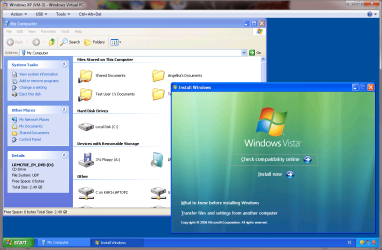
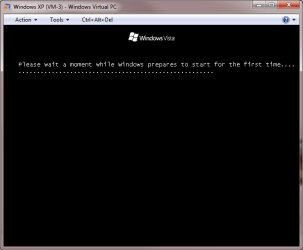
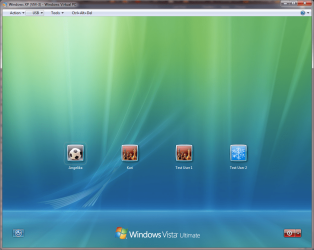
Just to show this is possible, I in-place upgraded one of my XP Mode virtual machines to get screenshots:

Starting as any normal in-place upgrade, from desktop of old OS:

XP_to_Vista_in-place_upgrade_0.PNG

Advance as in any installation:

XP_to_Vista_in-place_upgrade_1.PNG
XP_to_Vista_in-place_upgrade_3.PNG
XP_to_Vista_in-place_upgrade_4.PNG

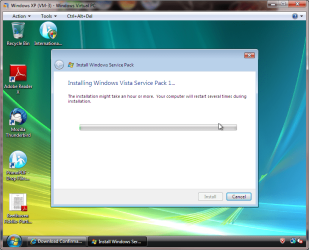
And the final product, already installing service pack to make installing Virtual PC integration components possible:

XP_to_Vista_in-place_upgrade_5.PNG

That's it. Everything is as it was, including user accounts from XP Mode. Only the OS has changed. Only important thing to remember is to uninstall Virtual PC integration components from XP Mode before upgrading, and then re-install them after upgrading.

Kari
 
Last edited:

My Computer My Computer

Computer type
Laptop
Computer Manufacturer/Model Number
HP ENVY 17-1150eg
OS
Windows 10 Pro x64 EN-GB
CPU
1.6 GHz Intel Core i7-720QM Processor
Memory
6 GB
Graphics Card(s)
ATI Mobility Radeon HD 5850 Graphics
Sound Card
Beats sound system with integrated subwoofer
Monitor(s) Displays
17" laptop display, 22" LED and 32" Full HD TV through HDMI
Screen Resolution
1600*900 (1), 1920*1080 (2&3)
Hard Drives
Internal: 2 x 500 GB SATA Hard Disk Drive 7200 rpm
External: 2TB for backups, 3TB USB3 network drive for media
Cooling
As Envy runs a bit warm, I have it on a Cooler Master pad
Keyboard
Logitech diNovo Media Desktop Laser (bluetooth)
Mouse
Logitech Performance Mouse MX
Internet Speed
50/10 Mbps VDSL
Antivirus
Windows Defender 4.3.9431.0
Browser
Maxthon 3.5.2., IE11
Thank you very much Keri for going to the trouble of showing me your screenshots.
I'll give it a try.

Although others have produced upgrade guides, I want to create this one as a live video by using Wisdom Autoscreen Recorder 3. I can add my voice narrative to the process as it proceeds.
 

My Computer My Computer

Computer Manufacturer/Model Number
Touch Screens
OS
64 bit Win 7 Professional
CPU
Intel Pentium Dual-Core ES400 2.7GHZ
Motherboard
ASUS P5E3W5
Memory
4G
Graphics Card(s)
NVIDIA GeForce 9800 GT 1G
Sound Card
Integrated
Monitor(s) Displays
Envision, ASUC
Hard Drives
Samsung 160 GB, WDC 160GB
Well, I gave it a try. The jury is still out.

The first odd thing was that the system rejected my 64 bit Win 7 Pro Upgrade CD, claiming system incompatability. But it then accepted the 32 bit CD.

Is Virtual XP just a 32 bit system, regardless of whether the native Win 7 Pro currently installed and the PC are both 64 bit?

The next thing that scared me was that the partition that was identified for installation was the only one on the C drive and was very large - well over 100 GB.
I began to fear that the intallation might end up replacing my current Win 7 installation and sticking it into a Windows.old folder. Would I end up with a new but 32 bit Win 7 installation? So, I cancelled the installation.

Any thoughts, anyone?
 

My Computer My Computer

Computer Manufacturer/Model Number
Touch Screens
OS
64 bit Win 7 Professional
CPU
Intel Pentium Dual-Core ES400 2.7GHZ
Motherboard
ASUS P5E3W5
Memory
4G
Graphics Card(s)
NVIDIA GeForce 9800 GT 1G
Sound Card
Integrated
Monitor(s) Displays
Envision, ASUC
Hard Drives
Samsung 160 GB, WDC 160GB
Microsoft Virtual PC can only run 32-bit virtual machines, so each and every virtual machine (including XP Mode) you have running on Virtual PC is always automatically 32-bit. You can not install a 64-bit OS to Virtual PC vm. It's possible on vm's running on VirtualBox or VMware.

If you were running the Seven installation on XP Mode, the C: drive shown is the virtual one belonging to XP Mode, not the physical one of your host computer. Check the actual size of XP Mode's virtual hard disk from XP Mode's settings.

Kari
 

My Computer My Computer

Computer type
Laptop
Computer Manufacturer/Model Number
HP ENVY 17-1150eg
OS
Windows 10 Pro x64 EN-GB
CPU
1.6 GHz Intel Core i7-720QM Processor
Memory
6 GB
Graphics Card(s)
ATI Mobility Radeon HD 5850 Graphics
Sound Card
Beats sound system with integrated subwoofer
Monitor(s) Displays
17" laptop display, 22" LED and 32" Full HD TV through HDMI
Screen Resolution
1600*900 (1), 1920*1080 (2&3)
Hard Drives
Internal: 2 x 500 GB SATA Hard Disk Drive 7200 rpm
External: 2TB for backups, 3TB USB3 network drive for media
Cooling
As Envy runs a bit warm, I have it on a Cooler Master pad
Keyboard
Logitech diNovo Media Desktop Laser (bluetooth)
Mouse
Logitech Performance Mouse MX
Internet Speed
50/10 Mbps VDSL
Antivirus
Windows Defender 4.3.9431.0
Browser
Maxthon 3.5.2., IE11
Once again, Kari, thanks. You must sit up nights, watching for posts. ;-)

I've been scanning websites to educate myself and just saw the statement that Virtual PC only supports 32 bit viirtual machines. OK on that.

Some of the web postings are bit old and can be misleading, but I gather
that I should stick with the default - differentaing disk method.

So, I'm reading your reply that the C drive and its large partition that
was reported when I was going through the Win 7 upgrade attempt
only refers to a virtual drive.Indeed, I just checked the Properties for the XP C drive and see that it is, indeed, stated as a Virtual HD.

Is the size of that Virtual drive set by default?

Anyway, I'll now try the XP to Win 7 Upgrade again, without sweating.
 

My Computer My Computer

Computer Manufacturer/Model Number
Touch Screens
OS
64 bit Win 7 Professional
CPU
Intel Pentium Dual-Core ES400 2.7GHZ
Motherboard
ASUS P5E3W5
Memory
4G
Graphics Card(s)
NVIDIA GeForce 9800 GT 1G
Sound Card
Integrated
Monitor(s) Displays
Envision, ASUC
Hard Drives
Samsung 160 GB, WDC 160GB
Is the size of that Virtual drive set by default?
If you accept the default settings when creating a virtual machine in Virtual PC, the disk size is dynamic i.e. it can grow or shrink, depending on if you add or remove data. You can also set a fixed size. A Virtual PC vhd can be maximum 127 GB.

An advantage using dynamic disks is that they only use as much from your physical, host system's HD's than they need; even Virtual PC normally reports its vhd as 127 GB, it's because it reports the maximum size. The actual size on host's disk is smaller, just what is actually used.

XP Mode creates when installed a dynamic vhd, meaning it only takes a few gigs from your host hd when installed but reports the disk size as 127 GB (130,000 MB). This is how much data you can add to it, the actual vhd file grows up to maximum if and when needed.

Kari
 

My Computer My Computer

Computer type
Laptop
Computer Manufacturer/Model Number
HP ENVY 17-1150eg
OS
Windows 10 Pro x64 EN-GB
CPU
1.6 GHz Intel Core i7-720QM Processor
Memory
6 GB
Graphics Card(s)
ATI Mobility Radeon HD 5850 Graphics
Sound Card
Beats sound system with integrated subwoofer
Monitor(s) Displays
17" laptop display, 22" LED and 32" Full HD TV through HDMI
Screen Resolution
1600*900 (1), 1920*1080 (2&3)
Hard Drives
Internal: 2 x 500 GB SATA Hard Disk Drive 7200 rpm
External: 2TB for backups, 3TB USB3 network drive for media
Cooling
As Envy runs a bit warm, I have it on a Cooler Master pad
Keyboard
Logitech diNovo Media Desktop Laser (bluetooth)
Mouse
Logitech Performance Mouse MX
Internet Speed
50/10 Mbps VDSL
Antivirus
Windows Defender 4.3.9431.0
Browser
Maxthon 3.5.2., IE11
OK, here is the final story.
It worked.

Using a 32 bit Windows 7 Pro Upgrade CD, I was able to perform
an upgrade of the XP in the Windows XP Virtual machine to a 32 bit Windows 7
Pro version.

What did surprise me was that I was also able to Activate it using
the product key that came with Win 7 Pro. I had expected the Activation to fail
because, in essence, I was activating a second Win 7 system with a key that I had used to activate the first system. Admittedly, both Win 7 systems are on the same pc but I thought that the Virtual machine would be considered a net new machine.

Just thinking crazy for the moment, does this mean that I could now, within my new Virtual Win 7 Pro system, download and install XP mode and end up with a
XP Virtual system within a Win 7 virtual system within a native Win 7 system?

Good Grief, Charley Brown!
 

My Computer My Computer

Computer Manufacturer/Model Number
Touch Screens
OS
64 bit Win 7 Professional
CPU
Intel Pentium Dual-Core ES400 2.7GHZ
Motherboard
ASUS P5E3W5
Memory
4G
Graphics Card(s)
NVIDIA GeForce 9800 GT 1G
Sound Card
Integrated
Monitor(s) Displays
Envision, ASUC
Hard Drives
Samsung 160 GB, WDC 160GB
@user659

Please try XP mode in Windows 7 VM in Windows 7 and then post your screen shots and let us know how well it works. I would like to see that. -WS
 

My Computer My Computer

Computer type
PC/Desktop
Computer Manufacturer/Model Number
Dell OP7010
OS
Windows 7 Enterprise (x64); Windows Server 2008 R2 (x64)
Memory
16GB
Monitor(s) Displays
4 Dell 24" LCD
Screen Resolution
1280x1024
Keyboard
Dell
Mouse
Dell Optical
Internet Speed
40meg
I thought I replied but I may have goofed.

So, here's a repeat.
IT WORKED.

Using a 32 bit Win 7 Pro Upgrade CD, I was able to upgrade the XP in the XP Virtual machine to a 32 bit Win 7 Pro system.

Oddly, I was able to Activate it using the same licence key that I used when I installed the native 64 bit Win 7 Pro system. I expected the Activation to fail because, in effect, I was using it to activate two Win 7 systems. Maybe it worked because both Win systems are on the same pc? Hmmmmmmmmm.

Anyway, here's a crazy idea that I will not pursue. Now that I have Win7 Pro running in a virtual machine, can I use it to download Windows Virtual XP and end up with a Virtual XP within a Virtual Win 7 Pro within a native Win 7 Pro?
 

My Computer My Computer

Computer Manufacturer/Model Number
Touch Screens
OS
64 bit Win 7 Professional
CPU
Intel Pentium Dual-Core ES400 2.7GHZ
Motherboard
ASUS P5E3W5
Memory
4G
Graphics Card(s)
NVIDIA GeForce 9800 GT 1G
Sound Card
Integrated
Monitor(s) Displays
Envision, ASUC
Hard Drives
Samsung 160 GB, WDC 160GB
I don't it would be supported in XP Mode since I don't think that's a true virtual machine.

I believe it would under something like VirtualBox though.

Not a true virtual machine? What an odd statement to make, a good example of that you should never offer your assistance on a tech related forum if you really don't know an answer, only based on what you think. Simply by Googling you had easily found how wrong you are.

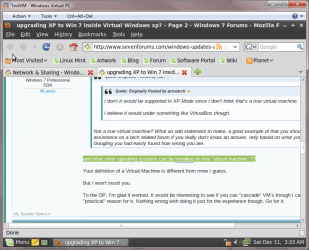
and what other operating systems can be installed on that "virtual machine" ??

Your definition of a Virtual Machine is different from mine I guess.

But I won't insult you.

To the OP, I'm glad it worked. It would be interesting to see if you can "cascade" VM's though I can't think of any "practical" reason for it. Nothing wrong with doing it just for the experience though. Go for it.
 

My Computer My Computer

Computer Manufacturer/Model Number
Dell Optiplex
OS
Windows 7 Professional 64 bit
Memory
4096
@user659

Let's make this clear: you have wiped your XP Mode and replaced it with Windows 7, doing a custom, clean install. If you did not format the XP Mode virtual hard disk when doing this, you have your XP Mode files in Windows 7 windows.old folder. If you formatted virtual hard disk, all files are gone. XP can not be in-place upgraded to Seven, keeping the apps, files and folders.

As such, you have done nothing that every computer user who can enter Windows 7 DVD to drive couldn't do.

Please believe me, I am not trying to underestimate or disparage you or your enthusiasm. New things in life, as well as in computing, are often found by people doing things in untraditional ways. I think this positive and supportive attitude of mine came clear on my earlier posts, showing you in-place upgrading XP with Vista is possible. But not with Seven.

Now you have done something really dumb (please understand, this is the truth, not an insult), activating your virtual Windows 7 with the same product key you have already used on your real computer. This is going to cause you problems. If I was you, I would unregister, uninstall that product key from virtual 7 as soon as possible. This post shows you how.

Then remove this virtual machine and reinstall XP Mode. After that, if you want to experiment with installing Seven on a virtual PC machine, create a new virtual machine and download a free 90-day trial version of Windows 7 Enterprise and experiment with it, rather than your original. Download and more info here: Windows 7 Enterprise | Trial, Evaluation, Test, Download

I hope your understand me.


@pricetech

You told the OP XP Mode is not a true virtual machine. It is not truth. I'm not saying you lied, I'm just saying you clearly don't know what you were talking about. XP Mode is a real, complete, fully working virtual machine. I repeat what I said: If you don't know the subject you are talking, you should not offer your assistance only based on what you think. I'm sure you agree with that; if you posted an issue or problem here, you most surely would like to have valid answers and solutions, rather than untruths from someone who really does not know the answer.

You are right saying that we seem to define virtual machine differently. For me, a virtual machine is a virtual computer running a so called guest operating system on host computer, using a virtualization application such as Virtual PC, VirtualBox or VMware to do this. Like XP Mode running on Virtual PC, or XP installed on VirtualBox.

Your last post clearly shows what I'm talking about. In defending your earlier untruth, you now mix a virtual machine and a virtualization application used to create virtual machines. As mentioned, XP Mode is a true, complete virtual machine. You don't install other operating systems in XP Mode. You install them in virtual machines. If you want to install for instance Ubuntu Linux in Microsoft Virtual PC, here's how to do it: http://social.technet.microsoft.com...t/thread/5cb46633-2143-4062-b0e1-8c27ce9b909a

Please try to understand I am saying this only because I think the OP needs real, valid information, instead of rumors and opinions. That is my only motive for posting here.

Kari
 
Last edited:

My Computer My Computer

Computer type
Laptop
Computer Manufacturer/Model Number
HP ENVY 17-1150eg
OS
Windows 10 Pro x64 EN-GB
CPU
1.6 GHz Intel Core i7-720QM Processor
Memory
6 GB
Graphics Card(s)
ATI Mobility Radeon HD 5850 Graphics
Sound Card
Beats sound system with integrated subwoofer
Monitor(s) Displays
17" laptop display, 22" LED and 32" Full HD TV through HDMI
Screen Resolution
1600*900 (1), 1920*1080 (2&3)
Hard Drives
Internal: 2 x 500 GB SATA Hard Disk Drive 7200 rpm
External: 2TB for backups, 3TB USB3 network drive for media
Cooling
As Envy runs a bit warm, I have it on a Cooler Master pad
Keyboard
Logitech diNovo Media Desktop Laser (bluetooth)
Mouse
Logitech Performance Mouse MX
Internet Speed
50/10 Mbps VDSL
Antivirus
Windows Defender 4.3.9431.0
Browser
Maxthon 3.5.2., IE11
Hi kari

I appreciate your concern but don't fret nor disparage me too much.
I started out with one simple objective - to be able to do a complete live video recording of an upgrade from XP to Win 7 (when I had no real XP system to utilize) . That's been achieved without having to stick a camcorder in front of the screen.

The other steps became a simple, interesting intellectual challenge with the side effect of increasing my knowledge level. I don't regard that as being dumb. I've learned a lot and you have kindly helped me to do that.

Clearly, I have no need of a Virtual Win 7 system. Now that I've achieved my objective, I'll delete Virt W7 and re-install Virtual XP.

As a final techinical point, I found that I could not turn on the Integration feature.

Regards.
 

My Computer My Computer

Computer Manufacturer/Model Number
Touch Screens
OS
64 bit Win 7 Professional
CPU
Intel Pentium Dual-Core ES400 2.7GHZ
Motherboard
ASUS P5E3W5
Memory
4G
Graphics Card(s)
NVIDIA GeForce 9800 GT 1G
Sound Card
Integrated
Monitor(s) Displays
Envision, ASUC
Hard Drives
Samsung 160 GB, WDC 160GB
Please uninstall the product key on that virtual machine first, before removing it!

Integration features should be first uninstalled on XP Mode, then reinstalled and re-enabled on a new upgraded OS. Works flawlessly done this way.

I repeat what I said: I was most definitely not trying to disparage you. Quite the opposite. I admire your enthusiasm. But if you want to do a tutorial of how to install Seven, use a new virtual machine and that free trial version of Seven instead. Using the same product key was a big mistake which can cause you problems.

Kari
 

My Computer My Computer

Computer type
Laptop
Computer Manufacturer/Model Number
HP ENVY 17-1150eg
OS
Windows 10 Pro x64 EN-GB
CPU
1.6 GHz Intel Core i7-720QM Processor
Memory
6 GB
Graphics Card(s)
ATI Mobility Radeon HD 5850 Graphics
Sound Card
Beats sound system with integrated subwoofer
Monitor(s) Displays
17" laptop display, 22" LED and 32" Full HD TV through HDMI
Screen Resolution
1600*900 (1), 1920*1080 (2&3)
Hard Drives
Internal: 2 x 500 GB SATA Hard Disk Drive 7200 rpm
External: 2TB for backups, 3TB USB3 network drive for media
Cooling
As Envy runs a bit warm, I have it on a Cooler Master pad
Keyboard
Logitech diNovo Media Desktop Laser (bluetooth)
Mouse
Logitech Performance Mouse MX
Internet Speed
50/10 Mbps VDSL
Antivirus
Windows Defender 4.3.9431.0
Browser
Maxthon 3.5.2., IE11
You really are online fulltime! Amazing and appreciated.

Thanks again.

I am not aware of a free trial version of Windows 7.

There's just too much to learn! And, at 71 years of age,
not enough time for me to learn it all. I'm not a computer professional. Just an old fart hobbyist who chairs a small computer club for seniors.

Unfortunately, I had a heart-pumping, knee-jerk reaction to your previous note and deleted the Virtual system without first cancelling/negating the Activation. OK, your "dumb" adjective has some authenticity to it after all. Hopefully the Microsoft police squad won't be too keen to cross the Canadian border to put me in chains. ;-)
 

My Computer My Computer

Computer Manufacturer/Model Number
Touch Screens
OS
64 bit Win 7 Professional
CPU
Intel Pentium Dual-Core ES400 2.7GHZ
Motherboard
ASUS P5E3W5
Memory
4G
Graphics Card(s)
NVIDIA GeForce 9800 GT 1G
Sound Card
Integrated
Monitor(s) Displays
Envision, ASUC
Hard Drives
Samsung 160 GB, WDC 160GB
If you are going to have some problems in the future, Windows telling you it's not genuine, we can help you here to reactivate it or at least give some tips on how and what to do. I'm sorry I used the word dumb, but I tried and tried to find an expression that would make you to understand that using the same, valid product key twice is a sure way to get problems.

Let's hope everything is OK.

Really admiring your attitude and enthusiasm. You really are a geek, in its most positive meaning :)

Kari

EDIT:
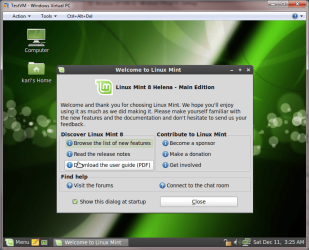
and what other operating systems can be installed on that "virtual machine" ??
Linux Mint running on a Microsoft Virtual PC virtual machine:

Linux_on_VirtualPC_1.PNG
Linux_on_VirtualPC_2.PNG
 
Last edited:

My Computer My Computer

Computer type
Laptop
Computer Manufacturer/Model Number
HP ENVY 17-1150eg
OS
Windows 10 Pro x64 EN-GB
CPU
1.6 GHz Intel Core i7-720QM Processor
Memory
6 GB
Graphics Card(s)
ATI Mobility Radeon HD 5850 Graphics
Sound Card
Beats sound system with integrated subwoofer
Monitor(s) Displays
17" laptop display, 22" LED and 32" Full HD TV through HDMI
Screen Resolution
1600*900 (1), 1920*1080 (2&3)
Hard Drives
Internal: 2 x 500 GB SATA Hard Disk Drive 7200 rpm
External: 2TB for backups, 3TB USB3 network drive for media
Cooling
As Envy runs a bit warm, I have it on a Cooler Master pad
Keyboard
Logitech diNovo Media Desktop Laser (bluetooth)
Mouse
Logitech Performance Mouse MX
Internet Speed
50/10 Mbps VDSL
Antivirus
Windows Defender 4.3.9431.0
Browser
Maxthon 3.5.2., IE11
Back
Top