
USB 3.0 compatible with USB 2.0

deerpark243

New member
Local time
9:19 PM
Messages
9
I just bought a Dell XPS 8500 and it has 3 3.0 usb ports. My Western Digital external hard drive is usb 2.0. I bought a usb 3.0 cable and the mini side to the external hard drive seems to fit but it's really tight, am i suppose to have a converter or is it ok to run like it is? And is it damaging my external hardrive or my pc running it this way?and by doing this would it just run at a usb 2.0 speed? sorry for so many questions, I'm new here.
Deerpark243
 

My Computer

Computer Manufacturer/Model Number
Dell XPS 8500 Fast TrackConfig04
OS
California Windows 7 home premium x64 bit
CPU
3rd Generation Intel Core i7-3770, turboboost up to 3.90 GHz
Memory
8GB Dual Channel DDR3 1600 MHz-2 Dimms
Graphics Card(s)
AMD Radeon HD7570 1GB GDDR5
Sound Card
Realteck High Definition Audo
Monitor(s) Displays
HP 2011x
Screen Resolution
1600 x 900
Hard Drives
1TB 7200 RPM SATA Hard Drive 6.0 b/s
Keyboard
Versapoint wireless
Mouse
Logitech wireless
Internet Speed
Slow: in between cable and DSL
Other Info
Wireless:Dell wireless 1703 802.11 B/G/N, Bluetooth V4o+LE
Optical drive:16xcdxdvd burner (DVd + RW
Hi there,


If your External hard drive is a USB 2.0 device, you will not see an increase in performance by plugging it into a USB 3.0 socket on your computer. There will not be an advantage to you using a usb 3.0 cable in your USB 2.0 device either. I would use your original cable that came with the external hard drive.
Unfortunately you will be stuck on usb 2.0 speeds as far as I am aware.
 

My Computer

OS
Windows 7 Professional x64
Thank you Mr Smith...
 

My Computer

Computer Manufacturer/Model Number
Dell XPS 8500 Fast TrackConfig04
OS
California Windows 7 home premium x64 bit
CPU
3rd Generation Intel Core i7-3770, turboboost up to 3.90 GHz
Memory
8GB Dual Channel DDR3 1600 MHz-2 Dimms
Graphics Card(s)
AMD Radeon HD7570 1GB GDDR5
Sound Card
Realteck High Definition Audo
Monitor(s) Displays
HP 2011x
Screen Resolution
1600 x 900
Hard Drives
1TB 7200 RPM SATA Hard Drive 6.0 b/s
Keyboard
Versapoint wireless
Mouse
Logitech wireless
Internet Speed
Slow: in between cable and DSL
Other Info
Wireless:Dell wireless 1703 802.11 B/G/N, Bluetooth V4o+LE
Optical drive:16xcdxdvd burner (DVd + RW
Afa the speed goes, try the USB 2.0 cable and see how it goes. I have a 500 GB Seagate USB 2.0 external. I bought a couple of SIIG USB 3.0 cards and USB 3.0 docking stations. While I was waiting for the docks to arrive I plugged the Seagate into the SIIG. I got at least a 15% increase in sequential read/write speeds. Copying a GB file on was consistently 24 MB/s when plugged into a USB 2.0 port. Plugged into the SIIG I was getting transfers consistently in the 28 to 31 MB/s range.

But USB 3.0 tends to vary quite a bit. I've seen a lot of people with USB 3.0 native to the machine, complain they weren't very fast. You might get lucky like I did though. :)
 

My Computer

Computer Manufacturer/Model Number
HP Media Center
OS
Windows 7 32 bit
CPU
AMD 5200+ dual core
Memory
2 GB
Graphics Card(s)
NVidia GeForce 6150SE 128 MB
Monitor(s) Displays
CRT
Screen Resolution
1280x1024
Hard Drives
500 GB Sata internal :

SIIG USB 3.0 docking stations w/WD Caviar Black 6 Gb/s drives
Keyboard
PS/2
Mouse
PS/2 Wheel Mouse
Other Info
SIIG USB 3.0 PCIexpress card.
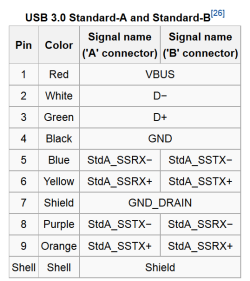
Per the USB 3 specs, the USB 3 ports has both USB 2 and USB 3 wiring. On this diagram pins 1-4 are for USB 2 and 5-9 are for USB 3 and the controllers will determine what to use. It will use USB 3 if available on both ends and will use USB 2 as a fallback.

USB 3.PNG

Jim :cool:
 

My Computer

Computer type
PC/Desktop
Computer Manufacturer/Model Number
Home Built
OS
Windows 8.1 Pro w/Media Center 64bit, Windows 7 HP 64bit
CPU
Phenom II X6 1100T
Motherboard
ASUS M5A99X EVO
Memory
Crucial Balistic 8gb DDR3-1866 CL9
Graphics Card(s)
MSI R6850 Cyclone IGD5 PE
Sound Card
On Board
Monitor(s) Displays
ASUS VE258Q 25" LED with DVI-HDMI-DisplayPort
Screen Resolution
1920 x 1080
Hard Drives
Two WD Cavier Black 2TB Sata III, WD My Book Essential 2TB USB 3.0
PSU
Seasonic X650 80 Plus GOLD Modular
Case
Corsair 400R
Cooling
Antec Kuhler H2O 620, Two 120mm and four 140mm
Keyboard
Logitech K120
Mouse
Logitech Marble Mouse USB, Logitech Precision Game Pad
Internet Speed
15MB
Antivirus
Norton IS 2013, Malwarebytes Pro Beta 2
Browser
IE-11, FF-27
Other Info
APC UPS ES 750, Netgear WNR3500L Gigabit & Wireless N Router with SamKnows Test Program, Motorola SB6120 Gigabit Cable Modem. Brother HL-2170W Laser Printer, Epson V300 Scanner
Adapters

Thank you Phone man. So I will still need an adapter for my external drive usb 2.0 mini port?Or is there such a thing?

Thank you
 
Last edited:

My Computer

Computer Manufacturer/Model Number
Dell XPS 8500 Fast TrackConfig04
OS
California Windows 7 home premium x64 bit
CPU
3rd Generation Intel Core i7-3770, turboboost up to 3.90 GHz
Memory
8GB Dual Channel DDR3 1600 MHz-2 Dimms
Graphics Card(s)
AMD Radeon HD7570 1GB GDDR5
Sound Card
Realteck High Definition Audo
Monitor(s) Displays
HP 2011x
Screen Resolution
1600 x 900
Hard Drives
1TB 7200 RPM SATA Hard Drive 6.0 b/s
Keyboard
Versapoint wireless
Mouse
Logitech wireless
Internet Speed
Slow: in between cable and DSL
Other Info
Wireless:Dell wireless 1703 802.11 B/G/N, Bluetooth V4o+LE
Optical drive:16xcdxdvd burner (DVd + RW
Unless I'm missing something. You have a USB 3.0 port on the PC. You have an external USB 2.0 HD. Plug the USB 2.0 cable that came with the HD into the USB 3.0 port. That's what "backward compatible" means. That's all I did with my Seagate external.
 

My Computer

Computer Manufacturer/Model Number
HP Media Center
OS
Windows 7 32 bit
CPU
AMD 5200+ dual core
Memory
2 GB
Graphics Card(s)
NVidia GeForce 6150SE 128 MB
Monitor(s) Displays
CRT
Screen Resolution
1280x1024
Hard Drives
500 GB Sata internal :

SIIG USB 3.0 docking stations w/WD Caviar Black 6 Gb/s drives
Keyboard
PS/2
Mouse
PS/2 Wheel Mouse
Other Info
SIIG USB 3.0 PCIexpress card.
I have a mini USB 2.0 on my external hard drive. I have 3 3.0 USB ports on my PC.So l inserted the mini 3.0 USB into the external USB 2.0 mini port. And seems to be working OK but I don't think it is at 3.0 speed. Sorry for the confusion.(and the regular size USB 3.0 into my PC).
 

My Computer

Computer Manufacturer/Model Number
Dell XPS 8500 Fast TrackConfig04
OS
California Windows 7 home premium x64 bit
CPU
3rd Generation Intel Core i7-3770, turboboost up to 3.90 GHz
Memory
8GB Dual Channel DDR3 1600 MHz-2 Dimms
Graphics Card(s)
AMD Radeon HD7570 1GB GDDR5
Sound Card
Realteck High Definition Audo
Monitor(s) Displays
HP 2011x
Screen Resolution
1600 x 900
Hard Drives
1TB 7200 RPM SATA Hard Drive 6.0 b/s
Keyboard
Versapoint wireless
Mouse
Logitech wireless
Internet Speed
Slow: in between cable and DSL
Other Info
Wireless:Dell wireless 1703 802.11 B/G/N, Bluetooth V4o+LE
Optical drive:16xcdxdvd burner (DVd + RW
You have it backwards. I feel like I'm banging my head against the wall. USB 3.0 ports, you just plug the USB 2.0 connector in. It fits just as if the port was a USB 2.0 port. You can't tell by looking except the connector has a blue plastic strip inside instead of white. You will not get USB 3.0 speeds. But you may get better than USB 2.0. Then again you may not.

Just use the cable that came with the HD. I think this is the third time so I'm done.
 

My Computer

Computer Manufacturer/Model Number
HP Media Center
OS
Windows 7 32 bit
CPU
AMD 5200+ dual core
Memory
2 GB
Graphics Card(s)
NVidia GeForce 6150SE 128 MB
Monitor(s) Displays
CRT
Screen Resolution
1280x1024
Hard Drives
500 GB Sata internal :

SIIG USB 3.0 docking stations w/WD Caviar Black 6 Gb/s drives
Keyboard
PS/2
Mouse
PS/2 Wheel Mouse
Other Info
SIIG USB 3.0 PCIexpress card.
Sorry i'm annoying you, I have it set like you said and it seems like it is a lot faster.

Deerpark243
 

My Computer

Computer Manufacturer/Model Number
Dell XPS 8500 Fast TrackConfig04
OS
California Windows 7 home premium x64 bit
CPU
3rd Generation Intel Core i7-3770, turboboost up to 3.90 GHz
Memory
8GB Dual Channel DDR3 1600 MHz-2 Dimms
Graphics Card(s)
AMD Radeon HD7570 1GB GDDR5
Sound Card
Realteck High Definition Audo
Monitor(s) Displays
HP 2011x
Screen Resolution
1600 x 900
Hard Drives
1TB 7200 RPM SATA Hard Drive 6.0 b/s
Keyboard
Versapoint wireless
Mouse
Logitech wireless
Internet Speed
Slow: in between cable and DSL
Other Info
Wireless:Dell wireless 1703 802.11 B/G/N, Bluetooth V4o+LE
Optical drive:16xcdxdvd burner (DVd + RW
USB is USB, in terms of the full-size connectors. Just plug the drive in and it works. As with anything else in the ccomputer world, the data rate will be whatever to slowest link is. So if the drive is USB 2.0 and the port is 3.0...then it will run at 2.0 speeds.
 

My Computer

OS
Windows 7 Ultimate x64 SP1
CPU
Intel Core i7-2600
Motherboard
Gigabyte GA-P67A-UD3P-B3
Memory
12 GB Patriot Extreme DDR3-1333
Graphics Card(s)
Nvidia GTX 470
Monitor(s) Displays
Dell UltraSharp 2209WA
Hard Drives
OCZ Agility3 240 GB, WD5001AALS, WD7501AALS
PSU
OCZ ModStream 700W
Case
CoolerMaster HAF 912 Advanced
Cooling
CoolerMaster Hyper 212 Plus
Thank you
 

My Computer

Computer Manufacturer/Model Number
Dell XPS 8500 Fast TrackConfig04
OS
California Windows 7 home premium x64 bit
CPU
3rd Generation Intel Core i7-3770, turboboost up to 3.90 GHz
Memory
8GB Dual Channel DDR3 1600 MHz-2 Dimms
Graphics Card(s)
AMD Radeon HD7570 1GB GDDR5
Sound Card
Realteck High Definition Audo
Monitor(s) Displays
HP 2011x
Screen Resolution
1600 x 900
Hard Drives
1TB 7200 RPM SATA Hard Drive 6.0 b/s
Keyboard
Versapoint wireless
Mouse
Logitech wireless
Internet Speed
Slow: in between cable and DSL
Other Info
Wireless:Dell wireless 1703 802.11 B/G/N, Bluetooth V4o+LE
Optical drive:16xcdxdvd burner (DVd + RW
Back
Top