Solved USB 3.0 hardware only running at USB 2 speeds

Icarus

User
Member
Local time
9:59 AM
Messages
45
Location
Ontario, Canada
I have been trying for a while to get my USB 3.0 HDD dock to run at USB 3.0 speeds. I returned the Vantec dock I had as I was told it was defective, but this new Syba SY-ENC35026 one does the same. I have reinstalled windows a few times and tried various drivers too.

Since I have found that nothing plugged into my usb 3.0 ports (tried the ones directly on the motherboard and front panel,) runs at super-speed. My Samsung Note 3 nor a usb 3 stick I have run at the correct speed. UsbTreeView shows all these devices running/connected at Hi-speed (usb 2.)

Any ideas? I have tried a few drivers from MSI and Intel to no avail and the device manager seems to show all working correctly/3.0 drivers installed, I just can't get them to connect at usb 3.0 speeds :( For example the WD Black drives I use in the docks only run at 40-45 MB/s and they should be 2x+ that at usb 3.0. I have tried multiple 3.0 cables too. I went so far as to swap motherboards with a Gigabyte one and it was the same so got another MSI and its the same too. Does the same on an old computer with the same Win 7 64 bit downstairs even. I'm pretty stumped now :(

Thanks for the help :)
 
Last edited:

My Computer My Computer

At a glance

Windows 10 Pro 64biti7 4790kKingston HyperX 32GB... (to replace huge NVidia driver fail)
Computer type
PC/Desktop
Computer Manufacturer/Model Number
Self Built
OS
Windows 10 Pro 64bit
CPU
i7 4790k
Motherboard
MSI Gaming 5
Memory
Kingston HyperX 32GB
Graphics Card(s)
... (to replace huge NVidia driver fail)
Monitor(s) Displays
30" HP ZR30W; 27" Samsung 275T
Screen Resolution
2560x1600; 1920x1200
Hard Drives
2x240GB Intel 530 SSD Raid-0;
2x1TB Crucial MX500
PSU
Antec Signature SG-850
Case
Lian Li X2000F
Cooling
BeQuiet! Dark Rock 3
Keyboard
G.Skill KM360
Mouse
Logitech G502
Other Info
Logitech Z5500 5.1
Do you have all the properly drivers for the USB 3.0 ports installed?

Here's your motherboard's product page, I presume: MSI USA - Computer, Laptop, Notebook, Desktop, Mainboard, Graphics and more

Not speed related, but with my own motherboard the USB 3.0 ports won't work at all until the drivers are installed inside Windows... so I have to move my mouse and keyboard to 2.0 ports until then, but they're not 3.0 devices anyway.

Suffice it to say, if you have a USB 3.0 device, make sure you have properly installed their drivers.
 

My Computer My Computer

At a glance

Windows 10 Home x64AMD FX-8320 @ 3.5 GHz4 x 2 GB G Skill Ripjaws DDR3-1600EVGA Nvidia GTX 550 Ti 1 GB
Computer type
PC/Desktop
Computer Manufacturer/Model Number
Custom Build
OS
Windows 10 Home x64
CPU
AMD FX-8320 @ 3.5 GHz
Motherboard
Gigabyte GA-990FXA-UD3 (rev. 4.0)
Memory
4 x 2 GB G Skill Ripjaws DDR3-1600
Graphics Card(s)
EVGA Nvidia GTX 550 Ti 1 GB
Sound Card
Realtek
Monitor(s) Displays
Acer S201HL
Screen Resolution
1600x900
Hard Drives
1 x 240 GB OCZ SSD
1 x 60 GB Intel SSD
1 x 1 TB Samsung HDD
PSU
Silverstone Strider 750w Modular
Case
Antec 300 Illusion
Cooling
Air
Keyboard
Microsoft
Mouse
HP
Antivirus
Microsoft Security Essentials
Browser
Google Chrome
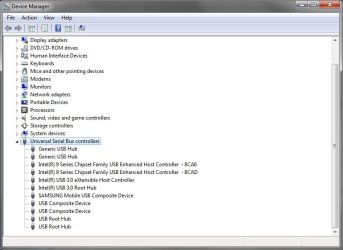
Yes, as mentioned I have tried the MSI and Intel drivers. They seem to be installed fine in the Device Manager and working, but just not letting me got usb 3 speeds/connection with anything.
 

Attachments

  • usbdm.jpg
    usbdm.jpg
    45.6 KB · Views: 4

My Computer My Computer

At a glance

Windows 10 Pro 64biti7 4790kKingston HyperX 32GB... (to replace huge NVidia driver fail)
Computer type
PC/Desktop
Computer Manufacturer/Model Number
Self Built
OS
Windows 10 Pro 64bit
CPU
i7 4790k
Motherboard
MSI Gaming 5
Memory
Kingston HyperX 32GB
Graphics Card(s)
... (to replace huge NVidia driver fail)
Monitor(s) Displays
30" HP ZR30W; 27" Samsung 275T
Screen Resolution
2560x1600; 1920x1200
Hard Drives
2x240GB Intel 530 SSD Raid-0;
2x1TB Crucial MX500
PSU
Antec Signature SG-850
Case
Lian Li X2000F
Cooling
BeQuiet! Dark Rock 3
Keyboard
G.Skill KM360
Mouse
Logitech G502
Other Info
Logitech Z5500 5.1
I have tested speeds with the usb 3 dock and only get 40-45MB/s with any of my WD Black drives (should be 2x+ that.)

I always get the message about using a usb 3 port for so and so device no matter what port or device I try.
 

My Computer My Computer

At a glance

Windows 10 Pro 64biti7 4790kKingston HyperX 32GB... (to replace huge NVidia driver fail)
Computer type
PC/Desktop
Computer Manufacturer/Model Number
Self Built
OS
Windows 10 Pro 64bit
CPU
i7 4790k
Motherboard
MSI Gaming 5
Memory
Kingston HyperX 32GB
Graphics Card(s)
... (to replace huge NVidia driver fail)
Monitor(s) Displays
30" HP ZR30W; 27" Samsung 275T
Screen Resolution
2560x1600; 1920x1200
Hard Drives
2x240GB Intel 530 SSD Raid-0;
2x1TB Crucial MX500
PSU
Antec Signature SG-850
Case
Lian Li X2000F
Cooling
BeQuiet! Dark Rock 3
Keyboard
G.Skill KM360
Mouse
Logitech G502
Other Info
Logitech Z5500 5.1
If .. as other helper said.. proper drivers are in fact installed.. you have bad hardware.. replace it .
 

My Computer My Computer

At a glance

Win 7 Home Premium SP1 32 bitAMD Athlon 64 X2 5000B4.00 GB Dual-Channel DDR2 @ 370MHz (6-6-6-18)Acer E181H (1366x768@60Hz) 64MB GeForce 6150 ...
Computer type
PC/Desktop
Computer Manufacturer/Model Number
Dell optiplex 740
OS
Win 7 Home Premium SP1 32 bit
CPU
AMD Athlon 64 X2 5000B
Motherboard
Dell Inc. 0YP696 (Socket M2 )
Memory
4.00 GB Dual-Channel DDR2 @ 370MHz (6-6-6-18)
Graphics Card(s)
Acer E181H (1366x768@60Hz) 64MB GeForce 6150 LE (Dell)
Sound Card
SigmaTel High Definition Audio CODEC
Monitor(s) Displays
Acer E181H (1366x768@60Hz) 64MB GeForce 6150 LE (Dell)
Hard Drives
699GB Seagate ST375064 0NS SCSI Disk Device (ATA)
Case
Mini tower
Internet Speed
Ping 36 ms, Download 57.71 mbps , Upload 11.79mbps
Antivirus
Free Avast. Pro paid Mbam , Free Sas
Browser
Palemoon .
I have replaced the hdd dock 2x now (tried a Vantec and this Syba) and the motherboard 3x (tried my original MSI Gaming 5, swapped in a GB, then went back to a new MSI) and reinstalled Windows and the drivers many many times as well as a couple usb 3 sticks (I have a new one coming in the next few days.)
 

My Computer My Computer

At a glance

Windows 10 Pro 64biti7 4790kKingston HyperX 32GB... (to replace huge NVidia driver fail)
Computer type
PC/Desktop
Computer Manufacturer/Model Number
Self Built
OS
Windows 10 Pro 64bit
CPU
i7 4790k
Motherboard
MSI Gaming 5
Memory
Kingston HyperX 32GB
Graphics Card(s)
... (to replace huge NVidia driver fail)
Monitor(s) Displays
30" HP ZR30W; 27" Samsung 275T
Screen Resolution
2560x1600; 1920x1200
Hard Drives
2x240GB Intel 530 SSD Raid-0;
2x1TB Crucial MX500
PSU
Antec Signature SG-850
Case
Lian Li X2000F
Cooling
BeQuiet! Dark Rock 3
Keyboard
G.Skill KM360
Mouse
Logitech G502
Other Info
Logitech Z5500 5.1
And the devices you're using are USB 3.0 devices?

Have you tried turning off the USB Power Saving Feature in the Power Options?
 

My Computer My Computer

At a glance

Windows 10 Home x64AMD FX-8320 @ 3.5 GHz4 x 2 GB G Skill Ripjaws DDR3-1600EVGA Nvidia GTX 550 Ti 1 GB
Computer type
PC/Desktop
Computer Manufacturer/Model Number
Custom Build
OS
Windows 10 Home x64
CPU
AMD FX-8320 @ 3.5 GHz
Motherboard
Gigabyte GA-990FXA-UD3 (rev. 4.0)
Memory
4 x 2 GB G Skill Ripjaws DDR3-1600
Graphics Card(s)
EVGA Nvidia GTX 550 Ti 1 GB
Sound Card
Realtek
Monitor(s) Displays
Acer S201HL
Screen Resolution
1600x900
Hard Drives
1 x 240 GB OCZ SSD
1 x 60 GB Intel SSD
1 x 1 TB Samsung HDD
PSU
Silverstone Strider 750w Modular
Case
Antec 300 Illusion
Cooling
Air
Keyboard
Microsoft
Mouse
HP
Antivirus
Microsoft Security Essentials
Browser
Google Chrome
Yes, its a Syba usb 3.0 SY-ENC35026 dock with a few WD Blacks, and a couple crappy Lexar usb 3 sticks (I am waiting for my Sandisk Extreme to show up,) and my Samsung Note 3 I have been testing with. I need to pull the extra ssd I have out of my old system and try it with the dock too, but not done that yet (these WD Blacks should be 2x+ this rate I'm getting anyways if running at usb 3.)

Edit: yes I have disabled power saving functions in the Power Options and Device Manager.
 

My Computer My Computer

At a glance

Windows 10 Pro 64biti7 4790kKingston HyperX 32GB... (to replace huge NVidia driver fail)
Computer type
PC/Desktop
Computer Manufacturer/Model Number
Self Built
OS
Windows 10 Pro 64bit
CPU
i7 4790k
Motherboard
MSI Gaming 5
Memory
Kingston HyperX 32GB
Graphics Card(s)
... (to replace huge NVidia driver fail)
Monitor(s) Displays
30" HP ZR30W; 27" Samsung 275T
Screen Resolution
2560x1600; 1920x1200
Hard Drives
2x240GB Intel 530 SSD Raid-0;
2x1TB Crucial MX500
PSU
Antec Signature SG-850
Case
Lian Li X2000F
Cooling
BeQuiet! Dark Rock 3
Keyboard
G.Skill KM360
Mouse
Logitech G502
Other Info
Logitech Z5500 5.1
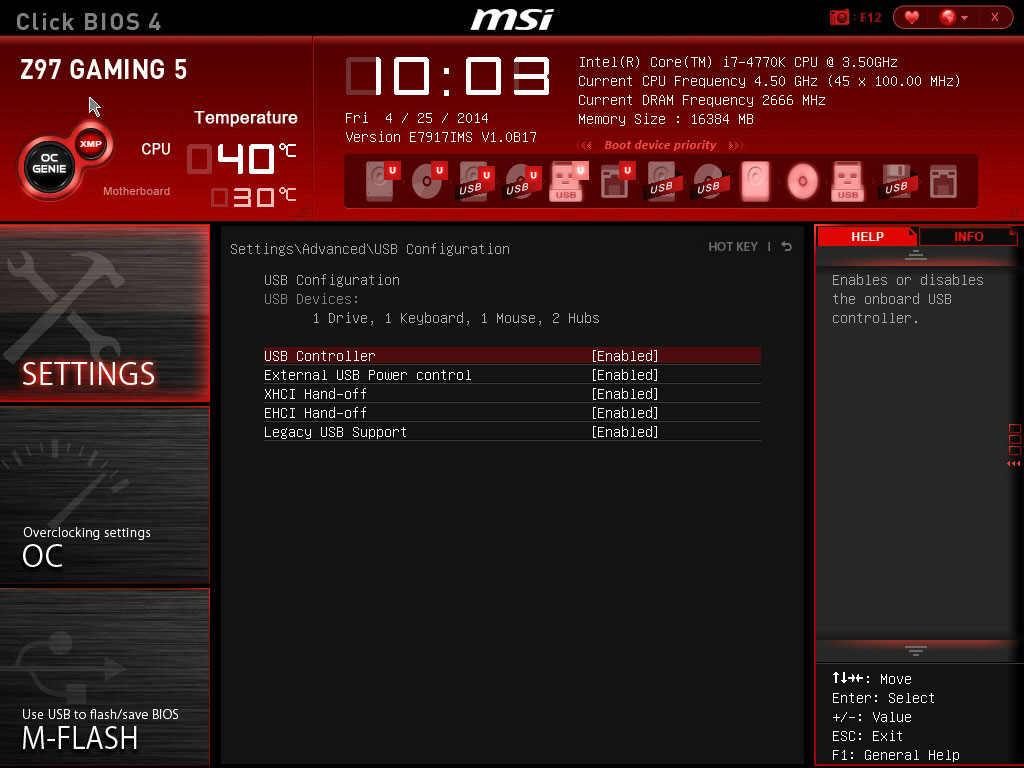
Hmmm. Does the BIOS have any option(s) for enabling or disabled USB 3.0 support?
 

My Computer My Computer

At a glance

Windows 10 Home x64AMD FX-8320 @ 3.5 GHz4 x 2 GB G Skill Ripjaws DDR3-1600EVGA Nvidia GTX 550 Ti 1 GB
Computer type
PC/Desktop
Computer Manufacturer/Model Number
Custom Build
OS
Windows 10 Home x64
CPU
AMD FX-8320 @ 3.5 GHz
Motherboard
Gigabyte GA-990FXA-UD3 (rev. 4.0)
Memory
4 x 2 GB G Skill Ripjaws DDR3-1600
Graphics Card(s)
EVGA Nvidia GTX 550 Ti 1 GB
Sound Card
Realtek
Monitor(s) Displays
Acer S201HL
Screen Resolution
1600x900
Hard Drives
1 x 240 GB OCZ SSD
1 x 60 GB Intel SSD
1 x 1 TB Samsung HDD
PSU
Silverstone Strider 750w Modular
Case
Antec 300 Illusion
Cooling
Air
Keyboard
Microsoft
Mouse
HP
Antivirus
Microsoft Security Essentials
Browser
Google Chrome
This is all that was in it about USB (it is all enabled/default like you see here):
bios_11.jpg
 

My Computer My Computer

At a glance

Windows 10 Pro 64biti7 4790kKingston HyperX 32GB... (to replace huge NVidia driver fail)
Computer type
PC/Desktop
Computer Manufacturer/Model Number
Self Built
OS
Windows 10 Pro 64bit
CPU
i7 4790k
Motherboard
MSI Gaming 5
Memory
Kingston HyperX 32GB
Graphics Card(s)
... (to replace huge NVidia driver fail)
Monitor(s) Displays
30" HP ZR30W; 27" Samsung 275T
Screen Resolution
2560x1600; 1920x1200
Hard Drives
2x240GB Intel 530 SSD Raid-0;
2x1TB Crucial MX500
PSU
Antec Signature SG-850
Case
Lian Li X2000F
Cooling
BeQuiet! Dark Rock 3
Keyboard
G.Skill KM360
Mouse
Logitech G502
Other Info
Logitech Z5500 5.1
Hmmm, I see in Device Manager "USB 3.0 eXtensible Host Controller" which is one of the things to check for to make sure USB 3.0 is running at SuperSpeed... try right clicking on "USB 3.0 eXtensible Host Controller" and hitting "Update Driver Software," then choose "Search Automatically for update driver software."

Read that that was a solution for someone not getting 3.0 speeds.

I've been running through this page:
How to determine whether a USB 3.0 device is operating at SuperSpeed? - Microsoft Windows USB Core Team Blog - Site Home - MSDN Blogs

Someone had to contact Dell support and they told them to try Windows 8... and with Windows 8 all USB 3.0 ports ran at 3.0 speeds, with Windows 7 went back to 2.0 speeds again.

However, I'm not saying take that drastic step, yet. lol.
 

My Computer My Computer

At a glance

Windows 10 Home x64AMD FX-8320 @ 3.5 GHz4 x 2 GB G Skill Ripjaws DDR3-1600EVGA Nvidia GTX 550 Ti 1 GB
Computer type
PC/Desktop
Computer Manufacturer/Model Number
Custom Build
OS
Windows 10 Home x64
CPU
AMD FX-8320 @ 3.5 GHz
Motherboard
Gigabyte GA-990FXA-UD3 (rev. 4.0)
Memory
4 x 2 GB G Skill Ripjaws DDR3-1600
Graphics Card(s)
EVGA Nvidia GTX 550 Ti 1 GB
Sound Card
Realtek
Monitor(s) Displays
Acer S201HL
Screen Resolution
1600x900
Hard Drives
1 x 240 GB OCZ SSD
1 x 60 GB Intel SSD
1 x 1 TB Samsung HDD
PSU
Silverstone Strider 750w Modular
Case
Antec 300 Illusion
Cooling
Air
Keyboard
Microsoft
Mouse
HP
Antivirus
Microsoft Security Essentials
Browser
Google Chrome
According to Intel support it is all installed right.
I know from file transfers and UsbTreeView and Intel that its only running at usb 2 speeds though.
 

My Computer My Computer

At a glance

Windows 10 Pro 64biti7 4790kKingston HyperX 32GB... (to replace huge NVidia driver fail)
Computer type
PC/Desktop
Computer Manufacturer/Model Number
Self Built
OS
Windows 10 Pro 64bit
CPU
i7 4790k
Motherboard
MSI Gaming 5
Memory
Kingston HyperX 32GB
Graphics Card(s)
... (to replace huge NVidia driver fail)
Monitor(s) Displays
30" HP ZR30W; 27" Samsung 275T
Screen Resolution
2560x1600; 1920x1200
Hard Drives
2x240GB Intel 530 SSD Raid-0;
2x1TB Crucial MX500
PSU
Antec Signature SG-850
Case
Lian Li X2000F
Cooling
BeQuiet! Dark Rock 3
Keyboard
G.Skill KM360
Mouse
Logitech G502
Other Info
Logitech Z5500 5.1
I'm at a loss then.
 

My Computer My Computer

At a glance

Windows 10 Home x64AMD FX-8320 @ 3.5 GHz4 x 2 GB G Skill Ripjaws DDR3-1600EVGA Nvidia GTX 550 Ti 1 GB
Computer type
PC/Desktop
Computer Manufacturer/Model Number
Custom Build
OS
Windows 10 Home x64
CPU
AMD FX-8320 @ 3.5 GHz
Motherboard
Gigabyte GA-990FXA-UD3 (rev. 4.0)
Memory
4 x 2 GB G Skill Ripjaws DDR3-1600
Graphics Card(s)
EVGA Nvidia GTX 550 Ti 1 GB
Sound Card
Realtek
Monitor(s) Displays
Acer S201HL
Screen Resolution
1600x900
Hard Drives
1 x 240 GB OCZ SSD
1 x 60 GB Intel SSD
1 x 1 TB Samsung HDD
PSU
Silverstone Strider 750w Modular
Case
Antec 300 Illusion
Cooling
Air
Keyboard
Microsoft
Mouse
HP
Antivirus
Microsoft Security Essentials
Browser
Google Chrome
I appreciate all the help, thank you :) I think Intel is at a loss too from their email I just got, lol... Still waiting to see what else MSI has to say other than update you BIOS (which I am running the newest.)

I can see a single device not working for what ever reason, but not all of them connected running slow :(
 

My Computer My Computer

At a glance

Windows 10 Pro 64biti7 4790kKingston HyperX 32GB... (to replace huge NVidia driver fail)
Computer type
PC/Desktop
Computer Manufacturer/Model Number
Self Built
OS
Windows 10 Pro 64bit
CPU
i7 4790k
Motherboard
MSI Gaming 5
Memory
Kingston HyperX 32GB
Graphics Card(s)
... (to replace huge NVidia driver fail)
Monitor(s) Displays
30" HP ZR30W; 27" Samsung 275T
Screen Resolution
2560x1600; 1920x1200
Hard Drives
2x240GB Intel 530 SSD Raid-0;
2x1TB Crucial MX500
PSU
Antec Signature SG-850
Case
Lian Li X2000F
Cooling
BeQuiet! Dark Rock 3
Keyboard
G.Skill KM360
Mouse
Logitech G502
Other Info
Logitech Z5500 5.1
No problem.

Yea, if everything is up to date, software and driver wise... I can only think there's possibly a fluke somewhere in the USB controller itself.
 

My Computer My Computer

At a glance

Windows 10 Home x64AMD FX-8320 @ 3.5 GHz4 x 2 GB G Skill Ripjaws DDR3-1600EVGA Nvidia GTX 550 Ti 1 GB
Computer type
PC/Desktop
Computer Manufacturer/Model Number
Custom Build
OS
Windows 10 Home x64
CPU
AMD FX-8320 @ 3.5 GHz
Motherboard
Gigabyte GA-990FXA-UD3 (rev. 4.0)
Memory
4 x 2 GB G Skill Ripjaws DDR3-1600
Graphics Card(s)
EVGA Nvidia GTX 550 Ti 1 GB
Sound Card
Realtek
Monitor(s) Displays
Acer S201HL
Screen Resolution
1600x900
Hard Drives
1 x 240 GB OCZ SSD
1 x 60 GB Intel SSD
1 x 1 TB Samsung HDD
PSU
Silverstone Strider 750w Modular
Case
Antec 300 Illusion
Cooling
Air
Keyboard
Microsoft
Mouse
HP
Antivirus
Microsoft Security Essentials
Browser
Google Chrome
Yes, will wait and see what else MSI and Syba have to say. I should email Samsung to for ideas.

I'll keep this updated and if anyone else has ideas please let me know :)
 

My Computer My Computer

At a glance

Windows 10 Pro 64biti7 4790kKingston HyperX 32GB... (to replace huge NVidia driver fail)
Computer type
PC/Desktop
Computer Manufacturer/Model Number
Self Built
OS
Windows 10 Pro 64bit
CPU
i7 4790k
Motherboard
MSI Gaming 5
Memory
Kingston HyperX 32GB
Graphics Card(s)
... (to replace huge NVidia driver fail)
Monitor(s) Displays
30" HP ZR30W; 27" Samsung 275T
Screen Resolution
2560x1600; 1920x1200
Hard Drives
2x240GB Intel 530 SSD Raid-0;
2x1TB Crucial MX500
PSU
Antec Signature SG-850
Case
Lian Li X2000F
Cooling
BeQuiet! Dark Rock 3
Keyboard
G.Skill KM360
Mouse
Logitech G502
Other Info
Logitech Z5500 5.1
If your 3.0 drivers are up to date AND your Intel inf drivers are installed and current you have faulty hardware.
 

My Computer My Computer

At a glance

Windows 7 Ultimate x64Intel Core 2 Duo E840016GB OCZ GoldNVidia 9600GT 1024MB
OS
Windows 7 Ultimate x64
CPU
Intel Core 2 Duo E8400
Motherboard
Gigabyte GA-EP45-UD3P
Memory
16GB OCZ Gold
Graphics Card(s)
NVidia 9600GT 1024MB
Sound Card
Focusrite Saffire Pro 40
Monitor(s) Displays
2x Samsung 2433BW
Screen Resolution
1920 x 1200
Hard Drives
Corsair Force 3 120GB SSD
PSU
BeQuiet Straightpower 600W White
Case
Lian Li Rack
Cooling
Arctic Freezer Pro
Keyboard
MS Wireless Keyboard 3000
Mouse
MS Wireless Mouse 5000
Internet Speed
8MB
If your 3.0 drivers are up to date AND your Intel inf drivers are installed and current you have faulty hardware.

All of it is faulty? I don't buy that.
 

My Computer My Computer

At a glance

Windows 10 Pro 64biti7 4790kKingston HyperX 32GB... (to replace huge NVidia driver fail)
Computer type
PC/Desktop
Computer Manufacturer/Model Number
Self Built
OS
Windows 10 Pro 64bit
CPU
i7 4790k
Motherboard
MSI Gaming 5
Memory
Kingston HyperX 32GB
Graphics Card(s)
... (to replace huge NVidia driver fail)
Monitor(s) Displays
30" HP ZR30W; 27" Samsung 275T
Screen Resolution
2560x1600; 1920x1200
Hard Drives
2x240GB Intel 530 SSD Raid-0;
2x1TB Crucial MX500
PSU
Antec Signature SG-850
Case
Lian Li X2000F
Cooling
BeQuiet! Dark Rock 3
Keyboard
G.Skill KM360
Mouse
Logitech G502
Other Info
Logitech Z5500 5.1
I'd be inclined to pick up or borrow an external USB 3.0 HDD. My Hitachi Touro Mobile usually transfers data at around 100Mbs, whereas my USB 3.0 sticks (Kingston Data Travellers) all chug along at about 10Mbs. I'd want to rule out the HDD dock first and foremost as it's just adding another component into the mix. I wouldn't use USB sticks to determine or compare USB 3.0 speeds either, they also seem to be slower than hard drives.
 

My Computer My Computer

At a glance

W7 Pro x64 SP1 | W10 Pro IP x64 | W8.1 Pro x6...i7-4790k @ 4GHz (4.4GHz Boost)16GB DDR3 Kingston HyperX Fury @ 1600MHz CL 9...EVGA GTX 980 Classified
Computer type
PC/Desktop
Computer Manufacturer/Model Number
Custom Build
OS
W7 Pro x64 SP1 | W10 Pro IP x64 | W8.1 Pro x64 VM | Linux Mint VM
CPU
i7-4790k @ 4GHz (4.4GHz Boost)
Motherboard
ASUS Sabertooth Z87 (BIOS Rev 2004)
Memory
16GB DDR3 Kingston HyperX Fury @ 1600MHz CL 9-9-9-27
Graphics Card(s)
EVGA GTX 980 Classified
Sound Card
Realtek Onboard
Monitor(s) Displays
Samsung S27D390
Screen Resolution
1920 x 1080
Hard Drives
240GB Intel 520 Series SSD |
Samsung 850 EVO 120GB SSD |
2TB WD Caviar Black |
2TB WD Caviar Green
PSU
Corsair HX850-80 Gold Modular
Case
Cooler Master Silencio 650
Cooling
Corsair H80i w/2 x Corsair SP120 | 2 x 120mm Noctua NF-S12B
Keyboard
Microsoft Sidewinder X4
Mouse
Gigabyte M6900 optical
Internet Speed
152mb
Antivirus
F-Secure
Browser
Firefox 38.0
Other Info
Backup Rig: Win 7 Pro 64-bit | AMD A10-5800k | ASUS F2A85-V Pro | 8GB Samsung DDR3 @1600MHz | 120GB Toshiba SDD | 2TB Seagate HDD | Cooler Master Silencio 550
I just ordered a USB 3 Sandisk Extreme stick. Should be here tomorrow. I know what you mean Boozad but I had already ordered it and like the size of the sticks vs drives for portable stuff.

Syba emailed me and they seem to be hinting the controller may be not working right on the dock, but that doesn't explain the Samsung Note 3.

I've got a few WD Blacks I use for the dock so don't want to buy another drive at the moment, but not sure what else to try and am stumped right now...
 

My Computer My Computer

At a glance

Windows 10 Pro 64biti7 4790kKingston HyperX 32GB... (to replace huge NVidia driver fail)
Computer type
PC/Desktop
Computer Manufacturer/Model Number
Self Built
OS
Windows 10 Pro 64bit
CPU
i7 4790k
Motherboard
MSI Gaming 5
Memory
Kingston HyperX 32GB
Graphics Card(s)
... (to replace huge NVidia driver fail)
Monitor(s) Displays
30" HP ZR30W; 27" Samsung 275T
Screen Resolution
2560x1600; 1920x1200
Hard Drives
2x240GB Intel 530 SSD Raid-0;
2x1TB Crucial MX500
PSU
Antec Signature SG-850
Case
Lian Li X2000F
Cooling
BeQuiet! Dark Rock 3
Keyboard
G.Skill KM360
Mouse
Logitech G502
Other Info
Logitech Z5500 5.1
Back
Top