USB 3.0 no longer works

RT1036

New member
Local time
12:21 PM
Messages
5
I bought an HP Pavilion 2 years ago. AMD A-10 proc with 8gig mem. Worked fine for 6 months. HDMI quit working. Started using VGA. Bought Seagate USB 3.0 2 TByte for backup. Worked fine. 18 months later MSI MS-7778 motherboard started giving me trouble on start up. I'd push the power button and the computer would lock up before getting to the point where I could enter 'setup'. I'd restart a few times and it would work okay from there. The problem kept getting worse over time until I would have to try to restart 50 to 100 times. It finally got to the point where it wouldn't boot up at all, no matter how many times I tried. I bought a new ASUS mother board and that problem was solved. But, the USB 3.0 ports would not work. Took the board back and bought the upgraded ASUS A88XM-A mother board. Still, I can't get the rear panel USB 3.0 ports to work as USB 3.0. They only work as 2.0. The front panel USB 3.0 ports don't work at all. I have downloaded the latest drivers from ASUS and re-installed them several times. I've also tried an USB 3.0 thumb drive in all ports. It isn't recognized by any of the ports. As a side note, the front panel card reader no longer works either.

Any help would be appreciated.

Thanks

Rick
 

My Computer My Computer

Computer type
PC/Desktop
Computer Manufacturer/Model Number
HP
OS
Windows 7 Home Premium
CPU
AMD A10-5700
Motherboard
A88XM-A
Memory
8 Gig
Hard Drives
2 TB
Antivirus
AVG
Browser
Chrome
Hello and welcome RT mate run these first

http://www.sevenforums.com/tutorials/1538-sfc-scannow-command-system-file-checker.html

http://www.sevenforums.com/tutorials/433-disk-check.html < use the /f and /r options in Option2 if necessary

http://www.superantispyware.com/

http://www.malwarebytes.org/products/malwarebytes_free/

http://www.bleepingcomputer.com/download/adwcleaner/

download from bleeping computer – delete any rubbishthese find.

Then if no go run this sounds a bit drastic but it will scan everything from power up and doesn't involve Windows Download Kaspersky Rescue Disk 10


My Computer My Computer

Computer type
PC/Desktop
Computer Manufacturer/Model Number
Own build (new) Desk1 / Asus ROG Win 7 / Desk2 1st build
OS
Desk1 7 Home Prem / Desk2 10 Pro / Main lap Asus ROG 10 Pro 2 laptop Toshiba 7 Pro Asus P2520 7 & 10
CPU
Desk1 i5 3750K / Laptop i7 GTX 860M / Desk2 i5 2500
Motherboard
Desk1 Asus P877-V / Desk2 Gigabyte H67 UD3H / Laptop ?
Memory
Desk1 8GB (1866) / Desk2 16GB (1333) / Laptop 8Gb DDR3
Graphics Card(s)
Desk 1& 2NVidia GTX 650 & Laptops on board Intel
Sound Card
Desk 1 & 2 -XONAR DG Realtek High Def audio Laptop
Monitor(s) Displays
Desk 1 Benq HD 2450 / Desk2 Philips 24" / Laptop 17.5"
Screen Resolution
1920x1080 D1 & D2 & Laptop 1
Hard Drives
Desk1 Samsung 120GB 830 SSD
Asus ROG 256GB 850 Pro SSD
Desk2 Samsung 840 256 SSD
Toshiba 120GB EVO
PSU
Desk 1 Corsair HX 1050/ Laptop ? / Desk 2 Corsair HX 650
Case
Desk 1 Cooler HAF XM ? Toshiba laptop / Desk2 Coolermaster
Cooling
Fans on all Desk1 -2 Desk2 - all Coolermasters 5 Laptop ?
Keyboard
Desk 1 MS Sidewinder X6 Desk 2 MS Sidewinder X 4
Mouse
Desk 1&2 - Gigabyte MS 900 gamer - laptop - Logitec wireless
Internet Speed
ADSL2+
Other Info
One other Desktop (tester) and spare Toshba laptop both with SSD's
Running Kaspersky 2016 ISS on all machines config'd identically
Logitec audio stereo systems on each machine (x3)
Canon MG5250MFC
Router/modem TP-Link running WPA2SK
Can you also post a screenshot of Device Manager with USB Controllers expanded.
 

My Computer My Computer

Computer type
PC/Desktop
Computer Manufacturer/Model Number
Custom Build
OS
W7 Pro x64 SP1 | W10 Pro IP x64 | W8.1 Pro x64 VM | Linux Mint VM
CPU
i7-4790k @ 4GHz (4.4GHz Boost)
Motherboard
ASUS Sabertooth Z87 (BIOS Rev 2004)
Memory
16GB DDR3 Kingston HyperX Fury @ 1600MHz CL 9-9-9-27
Graphics Card(s)
EVGA GTX 980 Classified
Sound Card
Realtek Onboard
Monitor(s) Displays
Samsung S27D390
Screen Resolution
1920 x 1080
Hard Drives
240GB Intel 520 Series SSD |
Samsung 850 EVO 120GB SSD |
2TB WD Caviar Black |
2TB WD Caviar Green
PSU
Corsair HX850-80 Gold Modular
Case
Cooler Master Silencio 650
Cooling
Corsair H80i w/2 x Corsair SP120 | 2 x 120mm Noctua NF-S12B
Keyboard
Microsoft Sidewinder X4
Mouse
Gigabyte M6900 optical
Internet Speed
152mb
Antivirus
F-Secure
Browser
Firefox 38.0
Other Info
Backup Rig: Win 7 Pro 64-bit | AMD A10-5800k | ASUS F2A85-V Pro | 8GB Samsung DDR3 @1600MHz | 120GB Toshiba SDD | 2TB Seagate HDD | Cooler Master Silencio 550
Yep I will agree with Boozad and for some really in depth stuff do this

Using HW Info general components

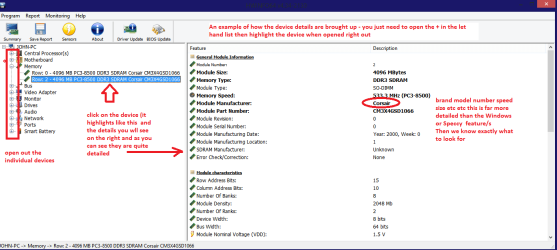
DownloadHW Info and pick the right bit version - HWiNFO, HWiNFO32/64 - Download - (copy andpaste this site into the search bar) If you do not need the running informationin the smaller right hand panel close it. In the left hand window click on the+ for the individual device groupings and they will open out to the variouscomponents.

Go onopening out further until you get to the device itself. click on it and it willhighlight. In the right hand window there will be a very detailed descriptionof that device as in brand, speeds model number etc etc These are very detailedand are just what is needed for searching for drivers etc.

See my picfor an example - in this I have opened out one my components and then highlighted one of the one you need andyou can see the detail.

My pic is only an example and you should open out "Ports"
 

Attachments

  • HW DEVICES INFO  RAM.PNG
    HW DEVICES INFO RAM.PNG
    34.2 KB · Views: 1

My Computer My Computer

Computer type
PC/Desktop
Computer Manufacturer/Model Number
Own build (new) Desk1 / Asus ROG Win 7 / Desk2 1st build
OS
Desk1 7 Home Prem / Desk2 10 Pro / Main lap Asus ROG 10 Pro 2 laptop Toshiba 7 Pro Asus P2520 7 & 10
CPU
Desk1 i5 3750K / Laptop i7 GTX 860M / Desk2 i5 2500
Motherboard
Desk1 Asus P877-V / Desk2 Gigabyte H67 UD3H / Laptop ?
Memory
Desk1 8GB (1866) / Desk2 16GB (1333) / Laptop 8Gb DDR3
Graphics Card(s)
Desk 1& 2NVidia GTX 650 & Laptops on board Intel
Sound Card
Desk 1 & 2 -XONAR DG Realtek High Def audio Laptop
Monitor(s) Displays
Desk 1 Benq HD 2450 / Desk2 Philips 24" / Laptop 17.5"
Screen Resolution
1920x1080 D1 & D2 & Laptop 1
Hard Drives
Desk1 Samsung 120GB 830 SSD
Asus ROG 256GB 850 Pro SSD
Desk2 Samsung 840 256 SSD
Toshiba 120GB EVO
PSU
Desk 1 Corsair HX 1050/ Laptop ? / Desk 2 Corsair HX 650
Case
Desk 1 Cooler HAF XM ? Toshiba laptop / Desk2 Coolermaster
Cooling
Fans on all Desk1 -2 Desk2 - all Coolermasters 5 Laptop ?
Keyboard
Desk 1 MS Sidewinder X6 Desk 2 MS Sidewinder X 4
Mouse
Desk 1&2 - Gigabyte MS 900 gamer - laptop - Logitec wireless
Internet Speed
ADSL2+
Other Info
One other Desktop (tester) and spare Toshba laptop both with SSD's
Running Kaspersky 2016 ISS on all machines config'd identically
Logitec audio stereo systems on each machine (x3)
Canon MG5250MFC
Router/modem TP-Link running WPA2SK
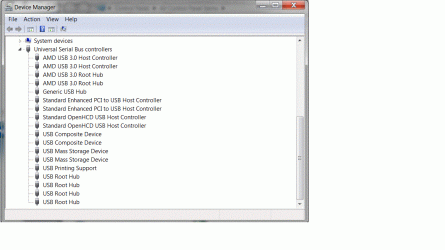
USB controllers screenshot

Can you also post a screenshot of Device Manager with USB Controllers expanded.

The screenshot is attached. Sorry. I don't know how to embed it in a message.
 

Attachments

  • USB controllers.gif
    USB controllers.gif
    68.1 KB · Views: 2
Last edited:

My Computer My Computer

Computer type
PC/Desktop
Computer Manufacturer/Model Number
HP
OS
Windows 7 Home Premium
CPU
AMD A10-5700
Motherboard
A88XM-A
Memory
8 Gig
Hard Drives
2 TB
Antivirus
AVG
Browser
Chrome
Can you check the driver dates for all USB 3.0 entries (Right click > Properties > Driver). The latest chipset drivers (2014/06/10) contain the latest USB 3.0 drivers. If you need it it's linked below.


Download


I don't see an eXtensible Host Controller which would be your front USB 3.0 ports, I'll have to go and fire up my AMD rig to check the Device Manager. You did connect the front ports up to the USB 3.0 midboard header header yes? I believe this is it.

ASUS_A88XM-PLUS_01.jpg
 
Last edited:

My Computer My Computer

Computer type
PC/Desktop
Computer Manufacturer/Model Number
Custom Build
OS
W7 Pro x64 SP1 | W10 Pro IP x64 | W8.1 Pro x64 VM | Linux Mint VM
CPU
i7-4790k @ 4GHz (4.4GHz Boost)
Motherboard
ASUS Sabertooth Z87 (BIOS Rev 2004)
Memory
16GB DDR3 Kingston HyperX Fury @ 1600MHz CL 9-9-9-27
Graphics Card(s)
EVGA GTX 980 Classified
Sound Card
Realtek Onboard
Monitor(s) Displays
Samsung S27D390
Screen Resolution
1920 x 1080
Hard Drives
240GB Intel 520 Series SSD |
Samsung 850 EVO 120GB SSD |
2TB WD Caviar Black |
2TB WD Caviar Green
PSU
Corsair HX850-80 Gold Modular
Case
Cooler Master Silencio 650
Cooling
Corsair H80i w/2 x Corsair SP120 | 2 x 120mm Noctua NF-S12B
Keyboard
Microsoft Sidewinder X4
Mouse
Gigabyte M6900 optical
Internet Speed
152mb
Antivirus
F-Secure
Browser
Firefox 38.0
Other Info
Backup Rig: Win 7 Pro 64-bit | AMD A10-5800k | ASUS F2A85-V Pro | 8GB Samsung DDR3 @1600MHz | 120GB Toshiba SDD | 2TB Seagate HDD | Cooler Master Silencio 550
Can you check the driver dates for all USB 3.0 entries (Right click > Properties > Driver). The latest chipset drivers (2014/06/10) contain the latest USB 3.0 drivers. If you need it it's linked below.


Download


I don't see an eXtensible Host Controller which would be your front USB 3.0 ports, I'll have to go and fire up my AMD rig to check the Device Manager. You did connect the front ports up to the USB 3.0 midboard header header yes? I believe this is it.

View attachment 337579

The dates on the drivers are 5/28/2013. I am guessing that AMD uses amdxhc.sys for an eXtensensible Host Controller that's at C:\windows\system32\DRIVERS\amdxhc.sys. Of course, I could be wrong. I was wrong once.:D

I followed your link and downloaded the chipset. I drilled down until I found the amdxhc.sys and it's dated the same as what I have installed. Yes, I do have the front panel plugged into the USB3_34 socket. Don't forget that the rear panel USB 3.0 connectors, the Blue ones, only work as USB 2.0. I've also discovered that the front panel card reader doesn't work, either. Fun time with 'puters.
 
Last edited:

My Computer My Computer

Computer type
PC/Desktop
Computer Manufacturer/Model Number
HP
OS
Windows 7 Home Premium
CPU
AMD A10-5700
Motherboard
A88XM-A
Memory
8 Gig
Hard Drives
2 TB
Antivirus
AVG
Browser
Chrome
ASUS AMD boards usually use ASMedia for their midboard headers so I couldn't answer that one definitively. I'm usually wrong at least once per thread.
 

My Computer My Computer

Computer type
PC/Desktop
Computer Manufacturer/Model Number
Custom Build
OS
W7 Pro x64 SP1 | W10 Pro IP x64 | W8.1 Pro x64 VM | Linux Mint VM
CPU
i7-4790k @ 4GHz (4.4GHz Boost)
Motherboard
ASUS Sabertooth Z87 (BIOS Rev 2004)
Memory
16GB DDR3 Kingston HyperX Fury @ 1600MHz CL 9-9-9-27
Graphics Card(s)
EVGA GTX 980 Classified
Sound Card
Realtek Onboard
Monitor(s) Displays
Samsung S27D390
Screen Resolution
1920 x 1080
Hard Drives
240GB Intel 520 Series SSD |
Samsung 850 EVO 120GB SSD |
2TB WD Caviar Black |
2TB WD Caviar Green
PSU
Corsair HX850-80 Gold Modular
Case
Cooler Master Silencio 650
Cooling
Corsair H80i w/2 x Corsair SP120 | 2 x 120mm Noctua NF-S12B
Keyboard
Microsoft Sidewinder X4
Mouse
Gigabyte M6900 optical
Internet Speed
152mb
Antivirus
F-Secure
Browser
Firefox 38.0
Other Info
Backup Rig: Win 7 Pro 64-bit | AMD A10-5800k | ASUS F2A85-V Pro | 8GB Samsung DDR3 @1600MHz | 120GB Toshiba SDD | 2TB Seagate HDD | Cooler Master Silencio 550
Back
Top