
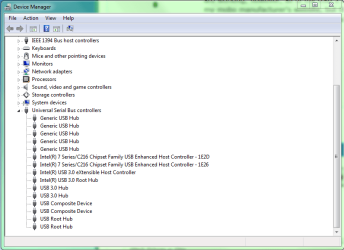
Hey there! After having a power supply failure, and then a new power supply installed, none of my USB 3.0 ports are working; however, all of my USB 2.0 ports still do work. I've installed the latest drivers for the USB ports from my mobo manufacturer's website, but that didn't seem to help. I'd really appreciate someone's help troubleshooting and I'd be happy to provide whatever additional information might be of assistance! EDIT: I've noticed going to the device manager window seems a common first troubleshooting step, so I've included a snip of what that looks like for me.
Attachments
Last edited:
My Computer
At a glance
Windows 7 Home Premium 64bitIntel i5-3570k 4-core @ 3.4Ghz8Gb DDR3Nvidia GTX 680
- Computer type
- PC/Desktop
- Computer Manufacturer/Model Number
- Custom Build
- OS
- Windows 7 Home Premium 64bit
- CPU
- Intel i5-3570k 4-core @ 3.4Ghz
- Motherboard
- Gigabyte Z77X-UD5H
- Memory
- 8Gb DDR3
- Graphics Card(s)
- Nvidia GTX 680
- Sound Card
- Realtek HD Audio
- Monitor(s) Displays
- Samsung T24B350
- Screen Resolution
- 1920x1080@60Hz
- Hard Drives
- C: 240Gb Seagate 600 Series SATA III MLC SSD
D: 40Gb Mushkin Callisto SSD
E: 1Tb WD HD
- PSU
- Cooler Master M2 Silent Pro 1000W
- Case
- Cooler Master HAF 932
- Cooling
- Just fans that came with the case (there were a lot).
- Keyboard
- Das Mechanical
- Mouse
- Razer Deathadder
- Antivirus
- Microsoft Security Essentials
- Browser
- Chrome

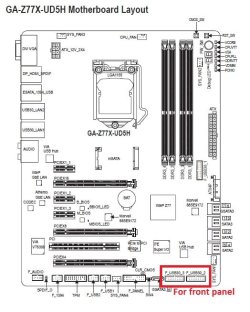

 All the 3.0 ones seem to be working fine in Windows 7 (a couple of them required me to plug my phone in twice to get the option to switch to 3.0 on my phone, but I assume that's kind of normal). This kinda implies i just need to plug in my front panel USB's, right?
 I'm afraid I have to go to work now, but I'll report back with the results of testing the ports in Linux.


