USB 3.0 ports not working after upgrading power supply

I got that USB 3.0 flash drive that you recommended, but the only ones available were also USB 2.0 backwards compatible, so I'm not really sure how to test whether or not I'm getting the 3.0 or 2.0 connectivity. The flash drive produced way more consistent results overall than my phone though (which is kind of annoying, but I guess a separate less important issue). On all of my tests with the flash drive, I was able to get at least USB 2.0 connectivity on the first plug-in, but I'm not really sure how to test the 3.0 issue. Any advice would be much appreciated!
 

My Computer My Computer

At a glance

Windows 7 Home Premium 64bitIntel i5-3570k 4-core @ 3.4Ghz8Gb DDR3Nvidia GTX 680
Computer type
PC/Desktop
Computer Manufacturer/Model Number
Custom Build
OS
Windows 7 Home Premium 64bit
CPU
Intel i5-3570k 4-core @ 3.4Ghz
Motherboard
Gigabyte Z77X-UD5H
Memory
8Gb DDR3
Graphics Card(s)
Nvidia GTX 680
Sound Card
Realtek HD Audio
Monitor(s) Displays
Samsung T24B350
Screen Resolution
1920x1080@60Hz
Hard Drives
C: 240Gb Seagate 600 Series SATA III MLC SSD
D: 40Gb Mushkin Callisto SSD
E: 1Tb WD HD
PSU
Cooler Master M2 Silent Pro 1000W
Case
Cooler Master HAF 932
Cooling
Just fans that came with the case (there were a lot).
Keyboard
Das Mechanical
Mouse
Razer Deathadder
Antivirus
Microsoft Security Essentials
Browser
Chrome
I would first plug to a USB 2.0 port and copy a large file to it, and check the speed (expand details on copy dialog).
Then plug in to USB 3.0 and copy again. It is supposed to be noticeably faster. What does the packaging tell you the speed would be? (Not all brands tell though).
 

My Computer My Computer

At a glance

Windows 7 Ultimate x64 SP1AMD Phenom 2 1090T2x8GB Kingston HyperX Fury Black 1600Mhz Unga...MSI GTX 970 Gaming 4G
Computer type
PC/Desktop
Computer Manufacturer/Model Number
Custom Build
OS
Windows 7 Ultimate x64 SP1
CPU
AMD Phenom 2 1090T
Motherboard
Gigabyte GA-890FXA-UD5
Memory
2x8GB Kingston HyperX Fury Black 1600Mhz Unganged
Graphics Card(s)
MSI GTX 970 Gaming 4G
Sound Card
Realtek On-Board HD 7.1 Audio / Logitech G35
Monitor(s) Displays
3xAcer GD245HQ
Screen Resolution
1920x1080
Hard Drives
Samsung 850 Pro 512GB SSD - OS /
WD Caviar Black SATA 3 - 1 TBx2 - Dynamic RAID 0 /
WD Caviar Green SATA 2 - 640GBx2 - Dynamic RAID 0 /
WD Caviar Green SATA 2 - 640GB - Internal Backup /
Seagate Barracude SATA 3 - 3TB - External Backup/ Sync
PSU
HighPower 1000W
Case
Cooler Master HAF 932
Cooling
Noctua NH-D14
Keyboard
Logitech G19
Mouse
Logitech G500
Internet Speed
100/4 Mbit Cable (100GB quota)
Antivirus
ZoneAlarm Extreme Security / MBAM Pro / MBAE Free / SAS Free
Browser
IE 11 - Firefox - Chrome
Other Info
Logitech F710/ G27/ G940/ Z5500 // TrackIR 5 // Nvidia 3D Surround Vision
Alrighty! I'll begin the testing. It says on the front that their USB 3.0 speeds are "10x FASTER than USB 2.0**". When I looked at the back, it says they're basing that off of a 3.5MB/s 2.0 write speed. 35MB/s sounds a little insane to me though, like my hard drives might be the bottleneck at that point, but I'm not sure. Anyway, we'll see what the testing shows.
 

My Computer My Computer

At a glance

Windows 7 Home Premium 64bitIntel i5-3570k 4-core @ 3.4Ghz8Gb DDR3Nvidia GTX 680
Computer type
PC/Desktop
Computer Manufacturer/Model Number
Custom Build
OS
Windows 7 Home Premium 64bit
CPU
Intel i5-3570k 4-core @ 3.4Ghz
Motherboard
Gigabyte Z77X-UD5H
Memory
8Gb DDR3
Graphics Card(s)
Nvidia GTX 680
Sound Card
Realtek HD Audio
Monitor(s) Displays
Samsung T24B350
Screen Resolution
1920x1080@60Hz
Hard Drives
C: 240Gb Seagate 600 Series SATA III MLC SSD
D: 40Gb Mushkin Callisto SSD
E: 1Tb WD HD
PSU
Cooler Master M2 Silent Pro 1000W
Case
Cooler Master HAF 932
Cooling
Just fans that came with the case (there were a lot).
Keyboard
Das Mechanical
Mouse
Razer Deathadder
Antivirus
Microsoft Security Essentials
Browser
Chrome
HDD are 90-100MB/s. It won't bottleneck. But I wonder if we will see a difference with that speed, it is on the down side of USB 3.0 speeds.

But shouldn't discourage even before starting :)
 

My Computer My Computer

At a glance

Windows 7 Ultimate x64 SP1AMD Phenom 2 1090T2x8GB Kingston HyperX Fury Black 1600Mhz Unga...MSI GTX 970 Gaming 4G
Computer type
PC/Desktop
Computer Manufacturer/Model Number
Custom Build
OS
Windows 7 Ultimate x64 SP1
CPU
AMD Phenom 2 1090T
Motherboard
Gigabyte GA-890FXA-UD5
Memory
2x8GB Kingston HyperX Fury Black 1600Mhz Unganged
Graphics Card(s)
MSI GTX 970 Gaming 4G
Sound Card
Realtek On-Board HD 7.1 Audio / Logitech G35
Monitor(s) Displays
3xAcer GD245HQ
Screen Resolution
1920x1080
Hard Drives
Samsung 850 Pro 512GB SSD - OS /
WD Caviar Black SATA 3 - 1 TBx2 - Dynamic RAID 0 /
WD Caviar Green SATA 2 - 640GBx2 - Dynamic RAID 0 /
WD Caviar Green SATA 2 - 640GB - Internal Backup /
Seagate Barracude SATA 3 - 3TB - External Backup/ Sync
PSU
HighPower 1000W
Case
Cooler Master HAF 932
Cooling
Noctua NH-D14
Keyboard
Logitech G19
Mouse
Logitech G500
Internet Speed
100/4 Mbit Cable (100GB quota)
Antivirus
ZoneAlarm Extreme Security / MBAM Pro / MBAE Free / SAS Free
Browser
IE 11 - Firefox - Chrome
Other Info
Logitech F710/ G27/ G940/ Z5500 // TrackIR 5 // Nvidia 3D Surround Vision
Hmm, so, I tested one USB 3.0 port from each of my two sets of two front panel USB 3.0 ports and compared it to the speeds I got from a USB 2.0 port on the back panel.

On the back panel (i.e. 2.0), it began at around 30 MB/s but quickly settled and stayed at around 14 MB/s. On the front panel USB 3.0 ports, it would start at around 40-50MB/s but then it quickly dropped and settled around 20-22MB/s. That doesn't seem like a hugely significant jump to me, but maybe you'll think differently. Just in case it's relevant, for all of the testing I used a 3.75GB .mkv file. I could try this testing for all six USB 2.0 ports and all eight USB 3.0 ports, but then I'd need to start getting a spreadsheet or something going to keep track of 'em. :(

EDIT: Whoops, sorry; I didn't see that you'd replied before I had the chance to update with results. Yeah, it definitely does seem to be on the low side of USB 3.0 then. :/
 

My Computer My Computer

At a glance

Windows 7 Home Premium 64bitIntel i5-3570k 4-core @ 3.4Ghz8Gb DDR3Nvidia GTX 680
Computer type
PC/Desktop
Computer Manufacturer/Model Number
Custom Build
OS
Windows 7 Home Premium 64bit
CPU
Intel i5-3570k 4-core @ 3.4Ghz
Motherboard
Gigabyte Z77X-UD5H
Memory
8Gb DDR3
Graphics Card(s)
Nvidia GTX 680
Sound Card
Realtek HD Audio
Monitor(s) Displays
Samsung T24B350
Screen Resolution
1920x1080@60Hz
Hard Drives
C: 240Gb Seagate 600 Series SATA III MLC SSD
D: 40Gb Mushkin Callisto SSD
E: 1Tb WD HD
PSU
Cooler Master M2 Silent Pro 1000W
Case
Cooler Master HAF 932
Cooling
Just fans that came with the case (there were a lot).
Keyboard
Das Mechanical
Mouse
Razer Deathadder
Antivirus
Microsoft Security Essentials
Browser
Chrome

My Computer My Computer

At a glance

Windows 7 Ultimate x64 SP1AMD Phenom 2 1090T2x8GB Kingston HyperX Fury Black 1600Mhz Unga...MSI GTX 970 Gaming 4G
Computer type
PC/Desktop
Computer Manufacturer/Model Number
Custom Build
OS
Windows 7 Ultimate x64 SP1
CPU
AMD Phenom 2 1090T
Motherboard
Gigabyte GA-890FXA-UD5
Memory
2x8GB Kingston HyperX Fury Black 1600Mhz Unganged
Graphics Card(s)
MSI GTX 970 Gaming 4G
Sound Card
Realtek On-Board HD 7.1 Audio / Logitech G35
Monitor(s) Displays
3xAcer GD245HQ
Screen Resolution
1920x1080
Hard Drives
Samsung 850 Pro 512GB SSD - OS /
WD Caviar Black SATA 3 - 1 TBx2 - Dynamic RAID 0 /
WD Caviar Green SATA 2 - 640GBx2 - Dynamic RAID 0 /
WD Caviar Green SATA 2 - 640GB - Internal Backup /
Seagate Barracude SATA 3 - 3TB - External Backup/ Sync
PSU
HighPower 1000W
Case
Cooler Master HAF 932
Cooling
Noctua NH-D14
Keyboard
Logitech G19
Mouse
Logitech G500
Internet Speed
100/4 Mbit Cable (100GB quota)
Antivirus
ZoneAlarm Extreme Security / MBAM Pro / MBAE Free / SAS Free
Browser
IE 11 - Firefox - Chrome
Other Info
Logitech F710/ G27/ G940/ Z5500 // TrackIR 5 // Nvidia 3D Surround Vision
Remember the key words. (UP TO)

Speed ratings are UP TO xxxxx speed. Your millage may vary.

USB 2.0 and 3.0 speeds vary a lot according to the system and data being transferred.
I have found that eSata can also vary according to system and external drive being use. Along with the type of data being transfered.

The exact rhyme and reason to all this I have not studied, I just except what I get.

My best transfer speeds come from using a internal ssd and a hot swap ssd off the motherboards sata connection.
 

My Computer My Computer

At a glance

Windows 10 Pro. 64/ version 1709 Windows 7 Pr...Intel i7-6800K @ 4.3Corsair Platinum 16 gig @2400EVGA GTX 1070 OC
Computer type
PC/Desktop
Computer Manufacturer/Model Number
Home made Desktop
OS
Windows 10 Pro. 64/ version 1709 Windows 7 Pro/64
CPU
Intel i7-6800K @ 4.3
Motherboard
ASUS X-99 Deluxe II
Memory
Corsair Platinum 16 gig @2400
Graphics Card(s)
EVGA GTX 1070 OC
Monitor(s) Displays
Asus 27" LED LCD/VE278Q
Screen Resolution
1920-1080 or 1280-720 HDMI
Hard Drives
INTEL SSD 730-240 Gb Sata 3.0/
PSU
EVGA Platium 1200W
Case
Phanteks Luxe Tempered Glass 8 fans/ one radiator
Cooling
XSPC/ Water Cooled CPU
Keyboard
Das 4 Professional
Mouse
Logitech M705/MX Anywhere 2-S
Internet Speed
100 mbits
Antivirus
Microsoft Security Essentials/ Malwarebytes Premium 3.0/ SAS
Browser
I.E. 11 default/Firefox/ ISP Time Warner Cable/Spectrum
Other Info
LG BluRay Burner/
Sound system-KLipsch-THX/
Icy Dock ssd Hot Swap bays.
Alrighty, I've attached the "results" of my testing as a notepad file, as recommended. I hope the formatting isn't too peculiar--I tried to make it easy to follow. Pretty much all of the USB 2.0 ports started off somewhere around 20+ MB/s and then slowly drifted down to that 14 MB/s by halfway through the copy/pasting process. Eventually they'd start fluctuating between about 13.8 and 13.5 MB/s. The USB 3.0 ports are even less responsive than they were the last time I tried to test them. All those "no response" readings are based off at least 4 (probably more like 6) goes at removing and re-plugging in the flash drive. At least this confirms the problem isn't just with my phone...
 

Attachments

My Computer My Computer

At a glance

Windows 7 Home Premium 64bitIntel i5-3570k 4-core @ 3.4Ghz8Gb DDR3Nvidia GTX 680
Computer type
PC/Desktop
Computer Manufacturer/Model Number
Custom Build
OS
Windows 7 Home Premium 64bit
CPU
Intel i5-3570k 4-core @ 3.4Ghz
Motherboard
Gigabyte Z77X-UD5H
Memory
8Gb DDR3
Graphics Card(s)
Nvidia GTX 680
Sound Card
Realtek HD Audio
Monitor(s) Displays
Samsung T24B350
Screen Resolution
1920x1080@60Hz
Hard Drives
C: 240Gb Seagate 600 Series SATA III MLC SSD
D: 40Gb Mushkin Callisto SSD
E: 1Tb WD HD
PSU
Cooler Master M2 Silent Pro 1000W
Case
Cooler Master HAF 932
Cooling
Just fans that came with the case (there were a lot).
Keyboard
Das Mechanical
Mouse
Razer Deathadder
Antivirus
Microsoft Security Essentials
Browser
Chrome
Hmm, the 2 times recognized was with USB 2.0 speeds. The ports are working though. I guess they wouldn't work if USB 3.0 chip was damaged. Can you see the drive in Disk Management when plugged in to one of the unresponsive USB 3.0 ports?

Re-install the USB 3.0 driver from motherboard support site
Then if no go, try running this MS FixIt https://support.microsoft.com/en-us/mats/hardware_device_problems/en-us
 

My Computer My Computer

At a glance

Windows 7 Ultimate x64 SP1AMD Phenom 2 1090T2x8GB Kingston HyperX Fury Black 1600Mhz Unga...MSI GTX 970 Gaming 4G
Computer type
PC/Desktop
Computer Manufacturer/Model Number
Custom Build
OS
Windows 7 Ultimate x64 SP1
CPU
AMD Phenom 2 1090T
Motherboard
Gigabyte GA-890FXA-UD5
Memory
2x8GB Kingston HyperX Fury Black 1600Mhz Unganged
Graphics Card(s)
MSI GTX 970 Gaming 4G
Sound Card
Realtek On-Board HD 7.1 Audio / Logitech G35
Monitor(s) Displays
3xAcer GD245HQ
Screen Resolution
1920x1080
Hard Drives
Samsung 850 Pro 512GB SSD - OS /
WD Caviar Black SATA 3 - 1 TBx2 - Dynamic RAID 0 /
WD Caviar Green SATA 2 - 640GBx2 - Dynamic RAID 0 /
WD Caviar Green SATA 2 - 640GB - Internal Backup /
Seagate Barracude SATA 3 - 3TB - External Backup/ Sync
PSU
HighPower 1000W
Case
Cooler Master HAF 932
Cooling
Noctua NH-D14
Keyboard
Logitech G19
Mouse
Logitech G500
Internet Speed
100/4 Mbit Cable (100GB quota)
Antivirus
ZoneAlarm Extreme Security / MBAM Pro / MBAE Free / SAS Free
Browser
IE 11 - Firefox - Chrome
Other Info
Logitech F710/ G27/ G940/ Z5500 // TrackIR 5 // Nvidia 3D Surround Vision
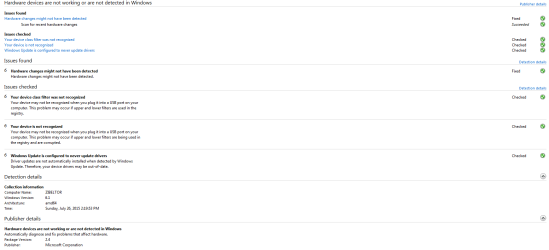
Alrighty, I reinstalled the USB 3.0 drivers again, but they didn't seem to change anything. I'm not sure what you mean by "Disk Management"? Like, the Windows Explorer window where I see my hard drives and removable devices? No luck there. If you mean the device manager window, I don't see anything there either. I've attached the results of the FixIt program, but it didn't seem to actually fix anything. The flash drive is still not being detected in a consistent way; I got one detection at apparently 2.0 speeds after several attempts (and the drive was plugged in for about 30 seconds before it was detected).
 

Attachments

  • USB_fixit.PNG
    USB_fixit.PNG
    24.2 KB · Views: 1

My Computer My Computer

At a glance

Windows 7 Home Premium 64bitIntel i5-3570k 4-core @ 3.4Ghz8Gb DDR3Nvidia GTX 680
Computer type
PC/Desktop
Computer Manufacturer/Model Number
Custom Build
OS
Windows 7 Home Premium 64bit
CPU
Intel i5-3570k 4-core @ 3.4Ghz
Motherboard
Gigabyte Z77X-UD5H
Memory
8Gb DDR3
Graphics Card(s)
Nvidia GTX 680
Sound Card
Realtek HD Audio
Monitor(s) Displays
Samsung T24B350
Screen Resolution
1920x1080@60Hz
Hard Drives
C: 240Gb Seagate 600 Series SATA III MLC SSD
D: 40Gb Mushkin Callisto SSD
E: 1Tb WD HD
PSU
Cooler Master M2 Silent Pro 1000W
Case
Cooler Master HAF 932
Cooling
Just fans that came with the case (there were a lot).
Keyboard
Das Mechanical
Mouse
Razer Deathadder
Antivirus
Microsoft Security Essentials
Browser
Chrome
Right click computer and "manage", then Disk Management, or just Win+R then diskmgmt.msc
 

My Computer My Computer

At a glance

Windows 7 Ultimate x64 SP1AMD Phenom 2 1090T2x8GB Kingston HyperX Fury Black 1600Mhz Unga...MSI GTX 970 Gaming 4G
Computer type
PC/Desktop
Computer Manufacturer/Model Number
Custom Build
OS
Windows 7 Ultimate x64 SP1
CPU
AMD Phenom 2 1090T
Motherboard
Gigabyte GA-890FXA-UD5
Memory
2x8GB Kingston HyperX Fury Black 1600Mhz Unganged
Graphics Card(s)
MSI GTX 970 Gaming 4G
Sound Card
Realtek On-Board HD 7.1 Audio / Logitech G35
Monitor(s) Displays
3xAcer GD245HQ
Screen Resolution
1920x1080
Hard Drives
Samsung 850 Pro 512GB SSD - OS /
WD Caviar Black SATA 3 - 1 TBx2 - Dynamic RAID 0 /
WD Caviar Green SATA 2 - 640GBx2 - Dynamic RAID 0 /
WD Caviar Green SATA 2 - 640GB - Internal Backup /
Seagate Barracude SATA 3 - 3TB - External Backup/ Sync
PSU
HighPower 1000W
Case
Cooler Master HAF 932
Cooling
Noctua NH-D14
Keyboard
Logitech G19
Mouse
Logitech G500
Internet Speed
100/4 Mbit Cable (100GB quota)
Antivirus
ZoneAlarm Extreme Security / MBAM Pro / MBAE Free / SAS Free
Browser
IE 11 - Firefox - Chrome
Other Info
Logitech F710/ G27/ G940/ Z5500 // TrackIR 5 // Nvidia 3D Surround Vision
Oh; interesting. No, I don't see it there either (except when it does get recognized ~ 2/10 times).
 

My Computer My Computer

At a glance

Windows 7 Home Premium 64bitIntel i5-3570k 4-core @ 3.4Ghz8Gb DDR3Nvidia GTX 680
Computer type
PC/Desktop
Computer Manufacturer/Model Number
Custom Build
OS
Windows 7 Home Premium 64bit
CPU
Intel i5-3570k 4-core @ 3.4Ghz
Motherboard
Gigabyte Z77X-UD5H
Memory
8Gb DDR3
Graphics Card(s)
Nvidia GTX 680
Sound Card
Realtek HD Audio
Monitor(s) Displays
Samsung T24B350
Screen Resolution
1920x1080@60Hz
Hard Drives
C: 240Gb Seagate 600 Series SATA III MLC SSD
D: 40Gb Mushkin Callisto SSD
E: 1Tb WD HD
PSU
Cooler Master M2 Silent Pro 1000W
Case
Cooler Master HAF 932
Cooling
Just fans that came with the case (there were a lot).
Keyboard
Das Mechanical
Mouse
Razer Deathadder
Antivirus
Microsoft Security Essentials
Browser
Chrome
Ok, I got a few things to try more before calling it a hardware issue, but these become intrusive so backup :)

DriveCleanup
- Make an image backup of C if possible (for example with Macrium free if you don't have a paid software - http://www.sevenforums.com/tutorials/73828-imaging-free-macrium.html)
- Create a manual System Restore point - http://www.sevenforums.com/tutorials/700-system-restore.html
- Remove all devices other than keyboard and mouse
- Restart PC
- Run DriveCleanup as admin - Drive Tools for Windows
- Restart PC
- Scan files and registry with CCleaner free
- Restart PC
- Try the problem devices now
- If you see any issues with your current working devices, restore to the Restore point/or image backup you have made.

** DriveCleanup is supposed to remove any and all drivers for unattached devices, so you will see them re-install upon attaching.
 

My Computer My Computer

At a glance

Windows 7 Ultimate x64 SP1AMD Phenom 2 1090T2x8GB Kingston HyperX Fury Black 1600Mhz Unga...MSI GTX 970 Gaming 4G
Computer type
PC/Desktop
Computer Manufacturer/Model Number
Custom Build
OS
Windows 7 Ultimate x64 SP1
CPU
AMD Phenom 2 1090T
Motherboard
Gigabyte GA-890FXA-UD5
Memory
2x8GB Kingston HyperX Fury Black 1600Mhz Unganged
Graphics Card(s)
MSI GTX 970 Gaming 4G
Sound Card
Realtek On-Board HD 7.1 Audio / Logitech G35
Monitor(s) Displays
3xAcer GD245HQ
Screen Resolution
1920x1080
Hard Drives
Samsung 850 Pro 512GB SSD - OS /
WD Caviar Black SATA 3 - 1 TBx2 - Dynamic RAID 0 /
WD Caviar Green SATA 2 - 640GBx2 - Dynamic RAID 0 /
WD Caviar Green SATA 2 - 640GB - Internal Backup /
Seagate Barracude SATA 3 - 3TB - External Backup/ Sync
PSU
HighPower 1000W
Case
Cooler Master HAF 932
Cooling
Noctua NH-D14
Keyboard
Logitech G19
Mouse
Logitech G500
Internet Speed
100/4 Mbit Cable (100GB quota)
Antivirus
ZoneAlarm Extreme Security / MBAM Pro / MBAE Free / SAS Free
Browser
IE 11 - Firefox - Chrome
Other Info
Logitech F710/ G27/ G940/ Z5500 // TrackIR 5 // Nvidia 3D Surround Vision
Alrighty; I followed the steps you suggested, but I'm not certain that the DriveCleanup tool worked. I did have to reinstall some drivers, but all that popped up was a little DOS window with a bunch of instructions I wasn't sure how to utilize and then at the end of the text, it said "Press any key to close." Is that how it's supposed to work? If so, I'm afraid it didn't seem to have any effect on the connectivity/detection issue. :(
 

My Computer My Computer

At a glance

Windows 7 Home Premium 64bitIntel i5-3570k 4-core @ 3.4Ghz8Gb DDR3Nvidia GTX 680
Computer type
PC/Desktop
Computer Manufacturer/Model Number
Custom Build
OS
Windows 7 Home Premium 64bit
CPU
Intel i5-3570k 4-core @ 3.4Ghz
Motherboard
Gigabyte Z77X-UD5H
Memory
8Gb DDR3
Graphics Card(s)
Nvidia GTX 680
Sound Card
Realtek HD Audio
Monitor(s) Displays
Samsung T24B350
Screen Resolution
1920x1080@60Hz
Hard Drives
C: 240Gb Seagate 600 Series SATA III MLC SSD
D: 40Gb Mushkin Callisto SSD
E: 1Tb WD HD
PSU
Cooler Master M2 Silent Pro 1000W
Case
Cooler Master HAF 932
Cooling
Just fans that came with the case (there were a lot).
Keyboard
Das Mechanical
Mouse
Razer Deathadder
Antivirus
Microsoft Security Essentials
Browser
Chrome
Ok, final one from me :)

Make absolutely sure you have at least created a manual System Restore point (as said in previous post), this may fix this issue but break others, in that case restore to the point you created:

Delete the upper and lower filters for USB host controllers and hubs

How to Delete the UpperFilters and LowerFilters Registry Values

You will need to delete them for the following GUID:
USB host controllers and hubs - 36FC9E60-C465-11CF-8056-444553540000

If (after a restart) this fails too, restore to the point you created in order to avoid any issues you are not yet aware.

In that case, perhaps you can use an add-on PCIe USB 3.0 card like:
Amazon.com: Anker® Uspeed USB 3.0 PCI-E Express Card with 4 USB 3.0 Ports and 5V 4-Pin Power Connector for Desktops [VL805 Chipset]: Electronics
or
Rosewill RC-505 - 2-Port USB 3.0 PCI Express Card - Newegg.com
 

My Computer My Computer

At a glance

Windows 7 Ultimate x64 SP1AMD Phenom 2 1090T2x8GB Kingston HyperX Fury Black 1600Mhz Unga...MSI GTX 970 Gaming 4G
Computer type
PC/Desktop
Computer Manufacturer/Model Number
Custom Build
OS
Windows 7 Ultimate x64 SP1
CPU
AMD Phenom 2 1090T
Motherboard
Gigabyte GA-890FXA-UD5
Memory
2x8GB Kingston HyperX Fury Black 1600Mhz Unganged
Graphics Card(s)
MSI GTX 970 Gaming 4G
Sound Card
Realtek On-Board HD 7.1 Audio / Logitech G35
Monitor(s) Displays
3xAcer GD245HQ
Screen Resolution
1920x1080
Hard Drives
Samsung 850 Pro 512GB SSD - OS /
WD Caviar Black SATA 3 - 1 TBx2 - Dynamic RAID 0 /
WD Caviar Green SATA 2 - 640GBx2 - Dynamic RAID 0 /
WD Caviar Green SATA 2 - 640GB - Internal Backup /
Seagate Barracude SATA 3 - 3TB - External Backup/ Sync
PSU
HighPower 1000W
Case
Cooler Master HAF 932
Cooling
Noctua NH-D14
Keyboard
Logitech G19
Mouse
Logitech G500
Internet Speed
100/4 Mbit Cable (100GB quota)
Antivirus
ZoneAlarm Extreme Security / MBAM Pro / MBAE Free / SAS Free
Browser
IE 11 - Firefox - Chrome
Other Info
Logitech F710/ G27/ G940/ Z5500 // TrackIR 5 // Nvidia 3D Surround Vision
Alrighty, thanks for the continued support! I'm afraid I'm going to be out of town until next week, so these troubleshooting steps will have to wait for a while. Thanks for the suggestion re: add-on PCIe USB 3.0 cards! I didn't even know they made those (and so cheap!) :geek:

I'll probably just end up buying a new case soon enough though. Aren't they supposed to be coming out with the next generation of USB soon anyway, or is it already out? Seems like I might as well just upgrade and sort of do a hermit crab style thing with all my hardware (let it shed it's older, crusty, and beat up shell and move into a nicer, newer shell with more features :P). I really do appreciate all your help though! Once I get back, I'll make sure to do another post with the results of the UpperFilters/LowerFilters fiddling.
 

My Computer My Computer

At a glance

Windows 7 Home Premium 64bitIntel i5-3570k 4-core @ 3.4Ghz8Gb DDR3Nvidia GTX 680
Computer type
PC/Desktop
Computer Manufacturer/Model Number
Custom Build
OS
Windows 7 Home Premium 64bit
CPU
Intel i5-3570k 4-core @ 3.4Ghz
Motherboard
Gigabyte Z77X-UD5H
Memory
8Gb DDR3
Graphics Card(s)
Nvidia GTX 680
Sound Card
Realtek HD Audio
Monitor(s) Displays
Samsung T24B350
Screen Resolution
1920x1080@60Hz
Hard Drives
C: 240Gb Seagate 600 Series SATA III MLC SSD
D: 40Gb Mushkin Callisto SSD
E: 1Tb WD HD
PSU
Cooler Master M2 Silent Pro 1000W
Case
Cooler Master HAF 932
Cooling
Just fans that came with the case (there were a lot).
Keyboard
Das Mechanical
Mouse
Razer Deathadder
Antivirus
Microsoft Security Essentials
Browser
Chrome
No problem, we will be here :)
 

My Computer My Computer

At a glance

Windows 7 Ultimate x64 SP1AMD Phenom 2 1090T2x8GB Kingston HyperX Fury Black 1600Mhz Unga...MSI GTX 970 Gaming 4G
Computer type
PC/Desktop
Computer Manufacturer/Model Number
Custom Build
OS
Windows 7 Ultimate x64 SP1
CPU
AMD Phenom 2 1090T
Motherboard
Gigabyte GA-890FXA-UD5
Memory
2x8GB Kingston HyperX Fury Black 1600Mhz Unganged
Graphics Card(s)
MSI GTX 970 Gaming 4G
Sound Card
Realtek On-Board HD 7.1 Audio / Logitech G35
Monitor(s) Displays
3xAcer GD245HQ
Screen Resolution
1920x1080
Hard Drives
Samsung 850 Pro 512GB SSD - OS /
WD Caviar Black SATA 3 - 1 TBx2 - Dynamic RAID 0 /
WD Caviar Green SATA 2 - 640GBx2 - Dynamic RAID 0 /
WD Caviar Green SATA 2 - 640GB - Internal Backup /
Seagate Barracude SATA 3 - 3TB - External Backup/ Sync
PSU
HighPower 1000W
Case
Cooler Master HAF 932
Cooling
Noctua NH-D14
Keyboard
Logitech G19
Mouse
Logitech G500
Internet Speed
100/4 Mbit Cable (100GB quota)
Antivirus
ZoneAlarm Extreme Security / MBAM Pro / MBAE Free / SAS Free
Browser
IE 11 - Firefox - Chrome
Other Info
Logitech F710/ G27/ G940/ Z5500 // TrackIR 5 // Nvidia 3D Surround Vision

My Computer My Computer

At a glance

Windows 10 Pro. 64/ version 1709 Windows 7 Pr...Intel i7-6800K @ 4.3Corsair Platinum 16 gig @2400EVGA GTX 1070 OC
Computer type
PC/Desktop
Computer Manufacturer/Model Number
Home made Desktop
OS
Windows 10 Pro. 64/ version 1709 Windows 7 Pro/64
CPU
Intel i7-6800K @ 4.3
Motherboard
ASUS X-99 Deluxe II
Memory
Corsair Platinum 16 gig @2400
Graphics Card(s)
EVGA GTX 1070 OC
Monitor(s) Displays
Asus 27" LED LCD/VE278Q
Screen Resolution
1920-1080 or 1280-720 HDMI
Hard Drives
INTEL SSD 730-240 Gb Sata 3.0/
PSU
EVGA Platium 1200W
Case
Phanteks Luxe Tempered Glass 8 fans/ one radiator
Cooling
XSPC/ Water Cooled CPU
Keyboard
Das 4 Professional
Mouse
Logitech M705/MX Anywhere 2-S
Internet Speed
100 mbits
Antivirus
Microsoft Security Essentials/ Malwarebytes Premium 3.0/ SAS
Browser
I.E. 11 default/Firefox/ ISP Time Warner Cable/Spectrum
Other Info
LG BluRay Burner/
Sound system-KLipsch-THX/
Icy Dock ssd Hot Swap bays.
Back
Top