Solved USB Device not Recognised

In Mice and Pointing Devices in Device Manager. I have 2 entrys
HID-compliant mouse
HID\VID_046D&PID_C526&REV_0500&MI_00
HID\VID_046D&PID_C526&MI_00
HID_DEVICE_SYSTEM_MOUSE
HID_DEVICE_UP:0001_U:0002
HID_DEVICE
---
PS/2 Compatible Mouse
ACPI\SYN1B20
*SYN1B20
-
This was posted in #15

Based on that, the unknown device is not your mouse since the PIDs are different.

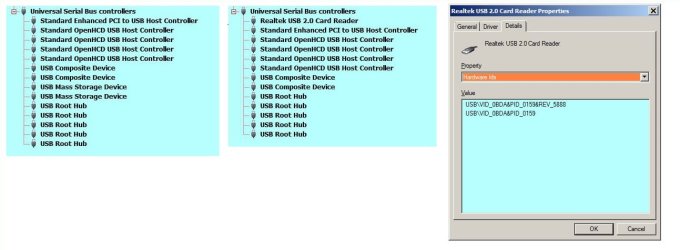
I had that problem once before and it turned out to be a card reader, which I never use, that required a driver reinstall.
 

My Computer

Computer type
Laptop
Computer Manufacturer/Model Number
Dell M6500 Precision Work Station
OS
Windows 7 Pro SP1 64 bit
Memory
8 GB
Screen Resolution
1920x
Internet Speed
30 Mbps
Antivirus
Norton Security
Browser
IE 11
Based on that, the unknown device is not your mouse since the PIDs are different.

I had that problem once before and it turned out to be a card reader, which I never use, that required a driver reinstall.
Thanks for that info. I only installed the card reader drivers recently to play back files recorded on my dash cam.
 

My Computer

Computer Manufacturer/Model Number
Look in my Signature.
OS
Win7 H.Prem. 32bit+SP1
Did you try comparing the PIDs for your card reader to that of the problem device?
 

My Computer

Computer type
Laptop
Computer Manufacturer/Model Number
Dell M6500 Precision Work Station
OS
Windows 7 Pro SP1 64 bit
Memory
8 GB
Screen Resolution
1920x
Internet Speed
30 Mbps
Antivirus
Norton Security
Browser
IE 11

My Computer

Computer Manufacturer/Model Number
Look in my Signature.
OS
Win7 H.Prem. 32bit+SP1
I know what you mean. I can't find mine listed in Device Manager and I don't have any cards to insert into it. I only asked since your reply sounded like it might have been the problem.
 

My Computer

Computer type
Laptop
Computer Manufacturer/Model Number
Dell M6500 Precision Work Station
OS
Windows 7 Pro SP1 64 bit
Memory
8 GB
Screen Resolution
1920x
Internet Speed
30 Mbps
Antivirus
Norton Security
Browser
IE 11
A Card Reader should show in its own separate node, in Device Manager, named "Memory Technology Devices". Unless, say for example, you have an Card Reader integrated into the computer, and it is switched off in BIOS.
 

My Computer

Computer type
PC/Desktop
OS
Windows 7 x64, Vista x64, 8.1 smartphone
CPU
Intel E8400 65W 64-bit
Motherboard
Gigabyte EP45-UD3LR
Memory
DDR2 2 x 2GB, 1GB x 2
Graphics Card(s)
XFX Radeon HD5750
Sound Card
AMD High Definition Audio; Realtek High Definition Audio
Monitor(s) Displays
iiyama prolite X2377HDS
Screen Resolution
1920 x 1080
Hard Drives
500GB 7200 rpm Seagate ST3500413AS 16MB, 500GB 5400 rpm Toshiba MQ02ABF050H 32MB, 200GB 7200 rpm Seagate ST3200820AS 8MB, 2TB 7200 rpm Western Digital WD20EZRX 64MB
PSU
Enermax Liberty Modular
Case
Antec P193 Midi Tower
Keyboard
Mionix ZIBAL 60
Mouse
Razer USB 2.0 Diamondback Mouse or Huion Graphics Tablet
Browser
Internet Explorer, Lunascape, Firefox, Opera, Avast Safezone
I didn't check the BIOS. However, the device was installed by the vendor (cyberpowerpc). When I install the driver disc in my G: drive (CD-ROM) and tell Windows to open the disc, it shows the device as drive F:. Drive F: is not shown in Windows Explorer but it is shown when I run msinfo32 as a CD-Rom drive.
 

My Computer

Computer type
Laptop
Computer Manufacturer/Model Number
Dell M6500 Precision Work Station
OS
Windows 7 Pro SP1 64 bit
Memory
8 GB
Screen Resolution
1920x
Internet Speed
30 Mbps
Antivirus
Norton Security
Browser
IE 11
I installed my card reader drivers and the entry might not show in device manager unless it's being used. Will look next time I use it.
 

My Computer

Computer Manufacturer/Model Number
Look in my Signature.
OS
Win7 H.Prem. 32bit+SP1
Thanks. I wanted my system to be good for 10 years so I added a bunch of things when I ordered it. Turns out, 11 years later, I have never used the floppy drive or the card reader.

Look forward to what you find.
 

My Computer

Computer type
Laptop
Computer Manufacturer/Model Number
Dell M6500 Precision Work Station
OS
Windows 7 Pro SP1 64 bit
Memory
8 GB
Screen Resolution
1920x
Internet Speed
30 Mbps
Antivirus
Norton Security
Browser
IE 11
Thanks. I wanted my system to be good for 10 years so I added a bunch of things when I ordered it. Turns out, 11 years later, I have never used the floppy drive or the card reader.

Look forward to what you find.

Here is the data/info you have been waiting for. Hope it helps.

RR.jpg
 

My Computer

Computer Manufacturer/Model Number
Look in my Signature.
OS
Win7 H.Prem. 32bit+SP1
There's got to be something else connected.

It's not your card reader causing the problem.

Run regedit.exe.

Go here-

HKEY_LOCAL_MACHINE\SYSTEM\CurrentControlSet\Control\Class\{36FC9E60-C465-11CF-8056-444553540000}

The problem device is in the 0021 subkey.

While there, you can check what others things are connected.
 

My Computer

Computer type
Laptop
Computer Manufacturer/Model Number
Dell M6500 Precision Work Station
OS
Windows 7 Pro SP1 64 bit
Memory
8 GB
Screen Resolution
1920x
Internet Speed
30 Mbps
Antivirus
Norton Security
Browser
IE 11
If you remember, the error appeared when only my cordless mouse was attached.and has now cleared it's self.
I never use Regedit as it can cause too many problems.
Thanks again.
 

My Computer

Computer Manufacturer/Model Number
Look in my Signature.
OS
Win7 H.Prem. 32bit+SP1
I'm glad your problem is solved.

regedit is only dangerous if you don't save the registry before changing it. I asked you to run it just to look at things, not change anything. I didn't realize your problem has gone away.
 

My Computer

Computer type
Laptop
Computer Manufacturer/Model Number
Dell M6500 Precision Work Station
OS
Windows 7 Pro SP1 64 bit
Memory
8 GB
Screen Resolution
1920x
Internet Speed
30 Mbps
Antivirus
Norton Security
Browser
IE 11
Back
Top