USB Devices not showing up...

BoardsOfCanada

New member
Local time
1:33 PM
Messages
19
Hi people, new to the forum.

I've had a problem for sometime now, for about a month whenever I plug in a USB device (such as an external hard drive) it says that the device is now ready to use, but it simply won't show up on my computer.

I've tried a few other USB devices since I noticed this problem, and it does the same thing. They simply won't show up.

I've never had this problem before, I'm guessing it's perhaps because I had to reintsall power dvd 11 as it was bugging out on me, and it suddenly came up with an install shield error detector (I've read that powerdvd11 can be very buggy, so I've since purchased CorrelWinDVD11 to play my blu-rays). Or it could be because my dvd and bd rom suddenly went missing, so I followed some instructions on google on how to delete some paths, restart the computer, and sure enough, they showed up again.

I really don't know what's causing this, and if there's anything I can do to solve it.

I also must note that with my old usb devices, they still show up fine, but anything new, such as an external usb hard drive or a new memory stick, or anything new usb related, won't show up.

This is obviously becoming very annoying as I'm planning on buying a new camcorder in the future to do some editing, but these usb devices, even with a mouse, just won't show up and my computer doesn't detect it!

Is this a common problem, and if so, how can I fix it? (By the way, I tried renaming the paths in the driver device manager, but it comes up with an error message and does nothing).

I hope I don't have to reinstall windows 7 again, as I could lose everything (which is the reason I got the extra 600TB USB external hub).

Plus, it's a custom built PC, which an old friend who no longer lives locally anymore, fixed it up for me and did the partitions, installed the software for the graphics card and everything (I know nothing about these kinds of things).

Thanks in advance-

BOC.
 

My Computer

OS
Windows 7 64 bit
Check it if it is showing in the Disk Management Window. Maybe a flash memory does not contain a letter. Like E or F for example at My Computer and required to identify a letter for it..
 

My Computer

Computer Manufacturer/Model Number
Acer 4730Z
OS
Windows 7 Ultimate Edition, 64 Bit Build 7600
CPU
Intel Pentium Dual Core
Motherboard
Aspire 4730Z (uPGA-478)
Memory
2.00 GB Dual-Channel DDR2 @ 332MHz (5-5-5-15)
Graphics Card(s)
Mobile Intel(R) 4 Series Express Chipset Family
Sound Card
High Definition Audio Device
Monitor(s) Displays
Generic PnP Monitor (1280x800@60Hz)
Screen Resolution
1280x800 @60 Hz
Hard Drives
156GB Hitachi Hitachi HTS542516K9SA00 ATA Device (SATA)
I tried to give it a letter, it shows up, but does nothing, it's practically useless.

This is the error message it comes up with:
 

Attachments

  • USB Error.png
    USB Error.png
    55 KB · Views: 224

My Computer

OS
Windows 7 64 bit

My Computer

Computer type
PC/Desktop
Computer Manufacturer/Model Number
Home Built Desktop By DataTech
OS
Windows 7 Ultimate X64 SP1
CPU
Intel i5-2550K, Differing ~4.4-4.8GHz No built in GPU
Motherboard
ASUS P8Z68-V PRO/GEN3
Memory
16GB G.Skill Sniper 1866MHz @ 2133MHz 2x8GB
Graphics Card(s)
ASUS GTX650TIB-DC2OC-2GD5, (650TI Boost)
Sound Card
Onboard Realtek 5-1
Monitor(s) Displays
Samsung P2570HD
Screen Resolution
1920x1080
Hard Drives
Samsung 840 Pro 256GB SSD for OS, 500GB Seagate Constellation (Enterprise drive) for Data
PSU
Corsair HX650W
Case
Inwin Dragon Rider
Cooling
Hyper 212 EVO w/two Noctua fans, push-pull, @1300 RPM
Keyboard
E-Z Eyes, bright yellow keys with large characters
Mouse
steelseries SENSEI Laser Pro Gaming
Internet Speed
48-51Mbs Mbs down, 11 Mbs up Xfinity Cable
Antivirus
Norton Internet Security 2013
Browser
IE 10, Opera, Pale Moon if needed
Other Info
4 case fans, LG BluRay-RE, ASUS DVD-RW, Mr. Fusion power supply, 1.21 gigawatts.
Thanks for that!

I've bookmarked the page, I'll try it tomorrow as it's very late and I have to be up early for work tomorrow. Just hope that it works as it looks like it might take awhile.

One question though- is this a common issue with windows 7 64 bit on a desktop? I've always had a laptop before and never had this problem.

I really, REALLY miss having good 'ol XP. Those system restore points were pretty handy weren't they?

Regards-

BOC.
 

My Computer

OS
Windows 7 64 bit

My Computer

Computer Manufacturer/Model Number
Sony Vaio C series VPCCB35FN laptop
OS
MS Windows 7 Home Premium 64-bit SP1
CPU
IntelCore [email protected]; Sandy Bridge 32nm Tech.
Motherboard
Sony Vaio Version:C609NJYJ
Memory
4096Mb RAM; Single ChannelDDR3@665MHz; DRAM Freq:662MHz
Graphics Card(s)
AMD Radeon HD 6630M; GPU:Whistler;BIOS Core&mem Clock:123.36
Sound Card
REALTEK High Definition Audio Device; INTEL Display Card
Monitor(s) Displays
Generic PnP Intel HD;Resolution:1920*1040 Pixels; BPP:32bits
Screen Resolution
Current Resolution:1920*1080 Pixels; Monitor Frequency:60Hz
Hard Drives
Internal HD:TOSHIBA MK5061GSY; Real Size:488 GB;NTFS; 3 Partitions; SATA; HEADS:16

External HDD: WD Elements 1023 PORTABLE; Estimated Size: 1TB; NTFS; 3 Partitions
Cooling
Lateral Exhaust with a Cooling Pad Placed Beneath.
Keyboard
Logitech Bluetooth+ Generic Integrated K-B
Mouse
Logitech Bluetooth
Internet Speed
2MBPS
Other Info
1)Trend Micro Titanium Maximum Security Suite Version:3
2)SAS-PRO

3)MBAM--PRO


4)WATERFOX+IE9 +WOT+LINKEXTEND+ DRWEBCUREIT LINK CHECKER

5)SPYWAREBLASTER

6) WINPATROL PLUS

7) SANDBOXIE and
8) A BIT OF COMMON SENSE.
We see USB issues often but in all types of machines. sometimes a Windows update will throw a wrench and other time it's USB drivers. One more thing, try the new devices in another PC if possible.
 

My Computer

Computer type
PC/Desktop
Computer Manufacturer/Model Number
Home Built Desktop By DataTech
OS
Windows 7 Ultimate X64 SP1
CPU
Intel i5-2550K, Differing ~4.4-4.8GHz No built in GPU
Motherboard
ASUS P8Z68-V PRO/GEN3
Memory
16GB G.Skill Sniper 1866MHz @ 2133MHz 2x8GB
Graphics Card(s)
ASUS GTX650TIB-DC2OC-2GD5, (650TI Boost)
Sound Card
Onboard Realtek 5-1
Monitor(s) Displays
Samsung P2570HD
Screen Resolution
1920x1080
Hard Drives
Samsung 840 Pro 256GB SSD for OS, 500GB Seagate Constellation (Enterprise drive) for Data
PSU
Corsair HX650W
Case
Inwin Dragon Rider
Cooling
Hyper 212 EVO w/two Noctua fans, push-pull, @1300 RPM
Keyboard
E-Z Eyes, bright yellow keys with large characters
Mouse
steelseries SENSEI Laser Pro Gaming
Internet Speed
48-51Mbs Mbs down, 11 Mbs up Xfinity Cable
Antivirus
Norton Internet Security 2013
Browser
IE 10, Opera, Pale Moon if needed
Other Info
4 case fans, LG BluRay-RE, ASUS DVD-RW, Mr. Fusion power supply, 1.21 gigawatts.
Thanks.

I tried the other devices in my 32 bit laptop, I just plug and play, and they seem fine.

Regards-

BOC.
 

My Computer

OS
Windows 7 64 bit
Britton30's first link should be of enormous help! Just in case, have you tried the Microsoft Fixit center? Microsoft Fix it Solution Center: troubleshooting software issues

Tips for solving problems with USB devices

Regards,
sreedhav

You are yet to inform the forum whether your last post was after trying Britton30,s suggestions in the links which he so kindly provided. If you have not done the remedial steps outlined in them,please do so now! Kindly let all the viewers eagerly watching the thread,the results.

regards.
 

My Computer

Computer Manufacturer/Model Number
Sony Vaio C series VPCCB35FN laptop
OS
MS Windows 7 Home Premium 64-bit SP1
CPU
IntelCore [email protected]; Sandy Bridge 32nm Tech.
Motherboard
Sony Vaio Version:C609NJYJ
Memory
4096Mb RAM; Single ChannelDDR3@665MHz; DRAM Freq:662MHz
Graphics Card(s)
AMD Radeon HD 6630M; GPU:Whistler;BIOS Core&mem Clock:123.36
Sound Card
REALTEK High Definition Audio Device; INTEL Display Card
Monitor(s) Displays
Generic PnP Intel HD;Resolution:1920*1040 Pixels; BPP:32bits
Screen Resolution
Current Resolution:1920*1080 Pixels; Monitor Frequency:60Hz
Hard Drives
Internal HD:TOSHIBA MK5061GSY; Real Size:488 GB;NTFS; 3 Partitions; SATA; HEADS:16

External HDD: WD Elements 1023 PORTABLE; Estimated Size: 1TB; NTFS; 3 Partitions
Cooling
Lateral Exhaust with a Cooling Pad Placed Beneath.
Keyboard
Logitech Bluetooth+ Generic Integrated K-B
Mouse
Logitech Bluetooth
Internet Speed
2MBPS
Other Info
1)Trend Micro Titanium Maximum Security Suite Version:3
2)SAS-PRO

3)MBAM--PRO


4)WATERFOX+IE9 +WOT+LINKEXTEND+ DRWEBCUREIT LINK CHECKER

5)SPYWAREBLASTER

6) WINPATROL PLUS

7) SANDBOXIE and
8) A BIT OF COMMON SENSE.
Hi there.

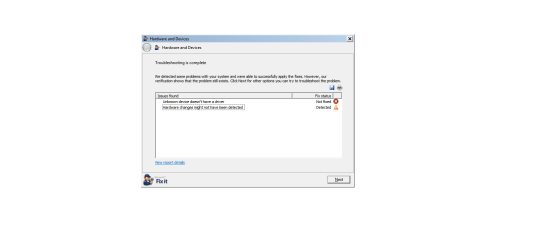
I DID try the microsoft fix it program, but it was unable to solve the problem. I've attached a picture to show the error message.

As I have alot of work to do right now, I'll have to try Britton30's solution (which I'm grateful for him/her posting, and I'll try it when I have spare time as I'm taking a breaker from my web designer) and will try it when I'm free. As SOON as I've tried it, I'll let you know if it's worked or not. Fingers crossed, it will. ;)
 

Attachments

  • Hrdware not detected.png
    Hrdware not detected.png
    13.1 KB · Views: 57

My Computer

OS
Windows 7 64 bit
Well, I have a large gray beard. :D Let us now the outcome when possible. That was a strange error message. I sound a broken record, one more thing to try is a restore point before the issue started, if one is available. Are the new devices USB 3?
 

My Computer

Computer type
PC/Desktop
Computer Manufacturer/Model Number
Home Built Desktop By DataTech
OS
Windows 7 Ultimate X64 SP1
CPU
Intel i5-2550K, Differing ~4.4-4.8GHz No built in GPU
Motherboard
ASUS P8Z68-V PRO/GEN3
Memory
16GB G.Skill Sniper 1866MHz @ 2133MHz 2x8GB
Graphics Card(s)
ASUS GTX650TIB-DC2OC-2GD5, (650TI Boost)
Sound Card
Onboard Realtek 5-1
Monitor(s) Displays
Samsung P2570HD
Screen Resolution
1920x1080
Hard Drives
Samsung 840 Pro 256GB SSD for OS, 500GB Seagate Constellation (Enterprise drive) for Data
PSU
Corsair HX650W
Case
Inwin Dragon Rider
Cooling
Hyper 212 EVO w/two Noctua fans, push-pull, @1300 RPM
Keyboard
E-Z Eyes, bright yellow keys with large characters
Mouse
steelseries SENSEI Laser Pro Gaming
Internet Speed
48-51Mbs Mbs down, 11 Mbs up Xfinity Cable
Antivirus
Norton Internet Security 2013
Browser
IE 10, Opera, Pale Moon if needed
Other Info
4 case fans, LG BluRay-RE, ASUS DVD-RW, Mr. Fusion power supply, 1.21 gigawatts.
Hi there, sorry to keep you waiting. :D

No, the the devices aren't USB 3 as they work on my laptop which have USB 2, I tried a system restore point, only problem is that on windows 7 there aren't any system restore points (which is what I miss about XP, you had loads of them!).

Looks like I may have to do a system reboot (as what was mentioned before, if I disable the usb points that are faded it may work. Problem is, none of mine are faded. I spoke with a friend about this who is an IT expert and sent him an invite to try and resolve the issue, and we tried it several times, but no matter how many times we tried, it just wouldn't work!)

Looks like I may have to reinstall windows 7. My HDD is partitioned, is it true that the stuff that is saved on your partition stays there? I have a custom built PC, so installing it is VERY time consuming.

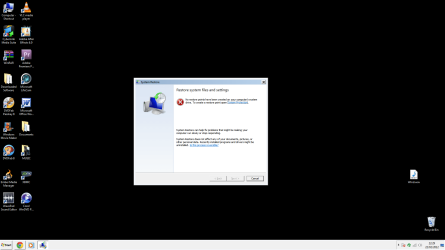
Here is the error message I get when I open system restore. Which is quite strange, as I do seem to remember creating one.
 

Attachments

  • System Restore Error.png
    System Restore Error.png
    49.2 KB · Views: 13

My Computer

OS
Windows 7 64 bit
How about uninstalling all USB devices in device mgr? Reboot and see if Windows will install some driver that will work.
Yes what is on a partition, other than what you reinstall on, will stay there. You'll likely have to reinstall programs though, even if they are already installed on the other partition.
 

My Computer

Computer type
PC/Desktop
Computer Manufacturer/Model Number
Home Built Desktop By DataTech
OS
Windows 7 Ultimate X64 SP1
CPU
Intel i5-2550K, Differing ~4.4-4.8GHz No built in GPU
Motherboard
ASUS P8Z68-V PRO/GEN3
Memory
16GB G.Skill Sniper 1866MHz @ 2133MHz 2x8GB
Graphics Card(s)
ASUS GTX650TIB-DC2OC-2GD5, (650TI Boost)
Sound Card
Onboard Realtek 5-1
Monitor(s) Displays
Samsung P2570HD
Screen Resolution
1920x1080
Hard Drives
Samsung 840 Pro 256GB SSD for OS, 500GB Seagate Constellation (Enterprise drive) for Data
PSU
Corsair HX650W
Case
Inwin Dragon Rider
Cooling
Hyper 212 EVO w/two Noctua fans, push-pull, @1300 RPM
Keyboard
E-Z Eyes, bright yellow keys with large characters
Mouse
steelseries SENSEI Laser Pro Gaming
Internet Speed
48-51Mbs Mbs down, 11 Mbs up Xfinity Cable
Antivirus
Norton Internet Security 2013
Browser
IE 10, Opera, Pale Moon if needed
Other Info
4 case fans, LG BluRay-RE, ASUS DVD-RW, Mr. Fusion power supply, 1.21 gigawatts.
2019; problem still persists ...

Notice: The last post in this thread was 2625 days ago. If your post is not directly related to this discussion please consider making a new thread.


yes, it is still a problem in 2019. simple fix for me (as suggested by necrotic) is to check to see if it has a drive letter. mine didn't. i will be giving my usb drives letters starting with r, s, t, ... because i am multibooting and the system assigns c:, d:, e:, ... to installed hdd/ssd


ok, gave it a drive letter, right away autoplay wizard opens and asks me what i want to do


so, problem still persists, but has easy solution. i suspect original post has other issue. 2625 days later, i hope problem is resolved; op is probably on win 10, which is a resolution, of sorts
 

My Computer

Computer type
PC/Desktop
Computer Manufacturer/Model Number
hamidbuilt
OS
debian, mint, mx, 7
CPU
ryzen 7 2700
Motherboard
asrock b450 itx ac
Memory
g.skill ddr4 3200
Graphics Card(s)
evga gtx 750 ti
Monitor(s) Displays
aoc gsync
Screen Resolution
1920x1080
Hard Drives
evoplus m.2
PSU
stryker fanless (kingwin)
Case
fractal design nano s window
Keyboard
logitech
Mouse
logitech trackball
Internet Speed
dsl, one step above analog modem
Antivirus
me. i am the antivirus. i remove mcafee and norton
Browser
pale moon, sea monkey, vivaldi, firefox
Other Info
i started programming with punch cards on fortran
Back
Top