USB Drive Letter

pmokover

New member
Local time
9:17 AM
Messages
31
I have an external USB hard drive. I want it to always be assigned the drive letter N whenever I connect it to any of my PCs even if there are unused letters before N and even if I disconnect it from the PC then reconnect it at a later time.

Is there anything I can do in Windows 7 or on the drive itself to make that happen? (Maybe in the drive's autorun.inf file?)

Note: Manually changing the drive letter in Disk Management will not accomplish this because the drive will not necessarily be assigned the same letter after it is disconnected/reconnected.

Thanks
Peter
 
Last edited:

My Computer

OS
Windows 7
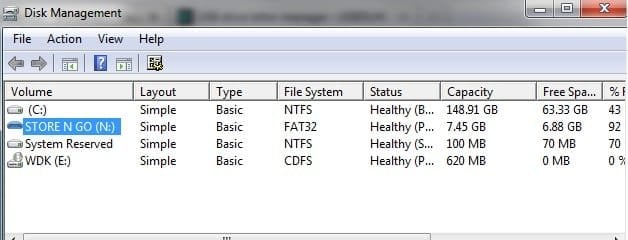
Call up Disk Management. Find your device. Right click. Change drive letter and paths.
 

Attachments

  • map.jpg
    map.jpg
    23.5 KB · Views: 71

My Computer

Computer Manufacturer/Model Number
Dell and Custom
OS
Systems 1 and 2: Windows 7 Enterprise x64, Win 8 Developer
CPU
System 1: i7 [email protected], System 2: AMD FX-4100 Zambezi 3.6G
Motherboard
System 1:Dell 06NWYK System 2: ASUS M5A97 AM3+
Memory
System 1: 8GB System 2: 8GB
Graphics Card(s)
System 1: ATI FirePro V4800 System 2: Radeon HD 6850
Sound Card
System 1: onboard System 2: onboard
Monitor(s) Displays
System1: Viewsonic HDMI 24"
Screen Resolution
System 1: 1920x1080 System 2: 1920x1080
Hard Drives
System 1: Mirrored .5B drives System 2: Seagate Barracuda ST1000DM003 1TB 7200 RPM 64MB Cache SATA 6.0Gb/s
Case
System 1: Dell System 2: Cooler Master
Internet Speed
10 MBPS
Call up Disk Management. Find your device. Right click. Change drive letter and paths.

Thanks for the suggestion but that does not accomplish what I am trying to accomplish. That will allow me to manually change the drive letter of my external hard drive however when I disconnect the drive from the PC and then reconnect it at a later time it will not necessarily get that same drive letter again.

So, to clarify, my question is how do I "force" my external USB hard drive to always be assigned the letter N even after it is disconnected then re-connected and even if there are other unused letters before N?

Thanks
Peter
 

My Computer

OS
Windows 7
Setting drive letters once isnt particularly helpful. Drive letters are saved but they are not reserved when the drive is not attached. They are recycled as a result of which assignment of a particular letter to a particular former drive is lost.

What you can do is to manually assign higher letters to external drives. That way, they'll be far away so from the default lowest free letters. Also, try using the same usb port everytime for a particular device.

You can also try the "USB Drive Letter Manager".

USB drive letter manager - USBDLM
 

My Computer

Computer Manufacturer/Model Number
Too many to describe...
OS
Windows 7 x64 pro/ Windows 7 x86 Pro/ XP SP3 x86
You can also try the "USB Drive Letter Manager".

Bill2:

Thanks. I have been experimenting with USB Drive Letter Manager. I just wanted to see if there is a way to do this directly in Windows or perhaps by putting something in the drive's autorun.inf file.

Peter
 

My Computer

OS
Windows 7

My Computer

Computer type
PC/Desktop
Computer Manufacturer/Model Number
Self built custom
OS
64-bit Windows 11 Pro for Workstations
CPU
Intel i7-8700K OC'd to 5 GHz
Motherboard
ASUS ROG Maximus XI Formula Z390
Memory
64 GB (4x16GB) G.SKILL TridentZ RGB DDR4 3600 MHz
Graphics Card(s)
ASUS ROG-STRIX-GTX1080TI-O11G-GAMING
Sound Card
Integrated
Monitor(s) Displays
2 x Samsung Odyssey G7 27"
Screen Resolution
2560x1440
Hard Drives
1TB Samsung 990 PRO M.2,
4TB Samsung 990 PRO PRO M.2,
TerraMaster F8 SSD Plus NAS
PSU
Seasonic Prime Titanium 850W
Case
Thermaltake Core P3
Cooling
Corsair Hydro H115i
Keyboard
Logitech wireless K800
Mouse
Logitech MX Master 4
Internet Speed
2 Gb/s Download and 100 Mb/s Upload
Antivirus
Malwarebyte Anti-Malware Premium
Browser
Google Chrome
Other Info
Logitech Z625 speaker system,
Logitech BRIO 4K Pro webcam,
HP Color LaserJet Pro MFP M477fdn,
APC SMART-UPS RT 1000 XL - SURT1000XLI,
Galaxy S23 Plus phone
I appreciate the suggestion on how to change a drive letter but that's not exactly what I am trying to do. I am trying to ensure that a particular external drive will always be assigned the letter N whenever it is connected to the PC. The method you presented will work OK for a drive that is always connected to the PC (such as an internal drive) but I am talking about an external drive which gets connected/disconnected frequently.

Changing the drive letter manually - whether through Disk Management or editing the registry - will indeed change the letter until the drive is disconnected from the PC and then reconnected at a later time. When the drive is reconnected later it will not necessarily be given the same letter. I would then have to manually change the letter again.

What I am looking for is something that will "force" the external drive to always be assigned the same letter even when it is disconnected/reconnected. As of now the USB Drive Letter Manager seems to be the only way to accomplish this - but I am still open to other ideas anyone may have.

Peter
 

My Computer

OS
Windows 7
When you disconnect and then re-connect your drive after manually setting the drive letter, it gets re-assigned a different letter?
 

My Computer

OS
XP / Win7 x64 Pro
CPU
Intel Quad-Core Q9450 @ 3.2GHz
Motherboard
Asus P5-E
Memory
2x2GB GSkill DDR2
Graphics Card(s)
NVIDIA GeForce 8600 GTS (EVGA)
Monitor(s) Displays
Dell 2408WFP
Screen Resolution
1920x1200
FliGi7:

1. I connect my external USB drive and then manually change the drive letter to N.
2. I then disconnect my external drive from the PC.
3. A week later I reconnect my external drive to the PC. Most likely it will be assigned whatever the lowest available letter is at that moment. It may or may not be N.

Peter
 

My Computer

OS
Windows 7
if you assign manually a drive letter to a USB device, the next time it will be the same letter again.
 

My Computer

Computer Manufacturer/Model Number
Home made
OS
Win7 pro 64
CPU
Core i5-750
Motherboard
GA-P55M-UD4
Memory
4GB Patriot DDR3
Graphics Card(s)
ATI RADEON HD5450
Hard Drives
SSD Crucial CT250BX100SSD1 ATA
Internet Speed
DSL
Antivirus
Avast free
if you assign manually a drive letter to a USB device, the next time it will be the same letter again.

I sure do wish that were true but it isn't. It may or may not be assigned the same letter next time. Most likely it will be assigned the lowest available letter at the moment. That is even more true if other USB devices have been connected and disconnected in the interim and even more so if one of them happened to get the same letter as the original device in question (while it was disconnected).

Peter
 

My Computer

OS
Windows 7
I think the problem we're having here is that this defies the logic of how Windows inherently assigns drive letters. Manually assigning an external drive a letter (especially a letter higher in the alphabet that is not likely to be incrementally assigned) should persist across dis/re-connects (and does, from my experience). So, what you're experiencing is hard to understand and diagnose.

You keep using a combination of the phrase "may not necessarily" for the letter being properly re-assigned, so I'm trying to figure out what is leading you to use this phrase. If the letter has not been re-assigned one time out of 30, then it is very unlikely that there is a problem with the system and rather there has been an anomaly between the two times of connection that doesn't happen as a rule and thus we should try to figure out. However, if the drive letter does not get properly reassigned more often than not, then that is a different process of logic to figure it out. So, what in your experiences, specifically, are leading you to say that it doesn't "necessarily" or "may not" get the letter re-assigned properly outside of the commonly known situations of either a drive with the same letter assigned to it was plugged in during the time the other drive was unplugged or the drive letter chosen was D: which could be the first available/assigned letter to any external device and will thus be re-assigned often.
 

My Computer

OS
XP / Win7 x64 Pro
CPU
Intel Quad-Core Q9450 @ 3.2GHz
Motherboard
Asus P5-E
Memory
2x2GB GSkill DDR2
Graphics Card(s)
NVIDIA GeForce 8600 GTS (EVGA)
Monitor(s) Displays
Dell 2408WFP
Screen Resolution
1920x1200
I'll try to clarify:

When I said "may not necessarily" what I meant is that occasionally it does get reassigned the same drive letter but most of the time it does not. Most of the time when I dis/reconnect it gets assigned the lowest available letter at that moment (which in my case is usually E). I want this particular external drive to always be N.

To further clarify: If I disconnect then reconnect within a minute or so and do not dis/reconnect any other USB devices in that time my external drive almost always does get reassigned the same drive letter. However, if the time from disconnect to reconnect is a few days (rather than a minute) and I have connected and disconnected other USB devices in that time my external drive almost never gets reassigned N. It gets the lowest available letter.

My objective is to have this particular external drive always be N regardless of anything else that has happened on the PC since the last time.

Peter
 

My Computer

OS
Windows 7
Just to clarify, you have manually set the drive letter for the specific device through both disk management and the registry (rebooting after you set it) and the drive still does not get re-assigned the letter N if it is plugged back in several days later?

Does it get assigned the proper letter when plugged back in if no other devices have been plugged in between? What specific external drive is this that you are assigning a letter to and what other devices are you plugging in between the time you connect this drive?
 

My Computer

OS
XP / Win7 x64 Pro
CPU
Intel Quad-Core Q9450 @ 3.2GHz
Motherboard
Asus P5-E
Memory
2x2GB GSkill DDR2
Graphics Card(s)
NVIDIA GeForce 8600 GTS (EVGA)
Monitor(s) Displays
Dell 2408WFP
Screen Resolution
1920x1200
I manually change the drive letter to N using Disk Management. I have not changed the drive letter by editing the registry. My understanding is that whether you make the change using Disk Management it just makes the registry change for you.

If I disconnect the external drive (N) and then reconnect it a few days later it almost always gets assigned the then lowest available letter, not N. Occasionally it has been reassigned N but rarely.

The other USB devices that get connected/disconnected on this PC are other external hard drives and flash drives.

Peter
 

My Computer

OS
Windows 7
I would recommend making the registry change as it may not be safe to assume that change is already being made as there is obviously some problem with this change persisting. So, do that and reboot and see if that works.

Are you using any two similar (or same model) external drives?
 

My Computer

OS
XP / Win7 x64 Pro
CPU
Intel Quad-Core Q9450 @ 3.2GHz
Motherboard
Asus P5-E
Memory
2x2GB GSkill DDR2
Graphics Card(s)
NVIDIA GeForce 8600 GTS (EVGA)
Monitor(s) Displays
Dell 2408WFP
Screen Resolution
1920x1200
I tried a couple of times a while ago to make the change by editing the registry but the results were no different. There's no reason I can't try it again.

Yes, I have two similar external drives but they are never used at the same time.

I have found that whenever I connect any USB hard drive or flash drive it gets assigned the lowest available available letter at the moment regardless of what letter it had last time.

Peter
 

My Computer

OS
Windows 7
Solution

First, thanks to everyone who contributed to this thread. Some great feedback here.

For the bebefit of anyone who may find this thread in the future the best solution as of now seems to be a small utility called "USB Drive Letter Manager" which someone mentioned earlier in the thread. I have been testing it on one of my PCs and so far it does exactly what I want. I have assigned a drive letter to each of several USB storage devices (hard drives & flash drives) and when I connect them to the PC they always get the letter I assigned - regardless of what other USB devices have been connected/disconnected in the interim and regardless of what the other drive letters are available at the moment.

Peter
 

My Computer

OS
Windows 7
If you have two Western Digital WD1600AAJS external drives and are connecting/re-connecting them at different intervals, you may have this problem. Even though they have different serial numbers, I believe Windows only maintains drive letter associations based on the drive model and volume and not the serial. So, two of the same drives could cause issues like this.
 

My Computer

OS
XP / Win7 x64 Pro
CPU
Intel Quad-Core Q9450 @ 3.2GHz
Motherboard
Asus P5-E
Memory
2x2GB GSkill DDR2
Graphics Card(s)
NVIDIA GeForce 8600 GTS (EVGA)
Monitor(s) Displays
Dell 2408WFP
Screen Resolution
1920x1200
Back
Top