Solved USB drives no longer recognized

msalton1

New member
Member
VIP
Local time
8:00 PM
Messages
325
Motherboard: Asus Maximus VI Hero (socket 1150) i5 4670K
Win 7 Pro x64


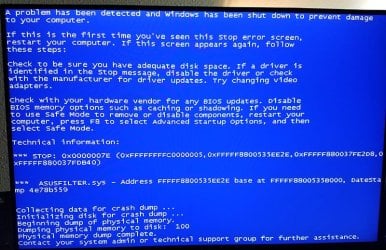
A while back, I started getting the occasional blue screen with stop error 0x0000007E, also mentioning asusfilter.sys, which seems to be a USB hub filter driver. Recently, it occurred more frequently.


Now my USB thumb drives aren't being recognized. My smartphones have no problem being read. I tried reinstalling the latest intel chipset drivers, but no good. Below is a screenshot of Device Driver.


Any ideas?
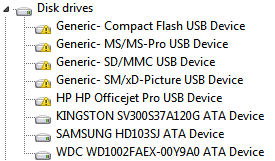

Device Mgr.PNG
 

My Computer

Computer type
PC/Desktop
Computer Manufacturer/Model Number
custom
OS
windows 7 Pro 64 Bit
CPU
i5 4670K
Motherboard
Asus Max Hero 1150 socket
Memory
16GB DDR3@933mhz
Graphics Card(s)
Radeon R9 390 8192mb
Monitor(s) Displays
Dell U2415 x3
Screen Resolution
1920 (5760) x 1200 x3
Hard Drives
System: Kingston 128GB SSD

Installing to Samsung 860 EVO 500GB
WD Black 2 TB & 1 TB
PSU
Corsair CX750M
Cooling
Hyper 312
Internet Speed
50mbps
Do you have any other USB devices plugged in at the same time you try and use a thumb drive?

Run Whocrashed once and report back what it says.


Resplendence Software - WhoCrashed, automatic crash dump analyzer

You can try removing all USB devices with the free portable utility called USBDeview. But be carfull with mouse and keyboard. You should use a PS/2 connected mouse if you do this. Many people don't even own one.

You may want to try sfc /scannow in an elevated Admin command prompt.

Something tells me there is failing hardware or some software that is messing with USB functionality. Did you install any software or drivers recently prior to this happening?

View any installed/connected USB device on your system
 

My Computer

Computer type
PC/Desktop
OS
Windows 7 Ultimate x64
Hi F22. Thanks for your response.


Do you have any other USB devices plugged in at the same time you try and use a thumb drive?

USB devices: Yes, but no more than I have had for several years.

Run Whocrashed once and report back what it says.
Unfortunately, I installed a new version of CCleaner and forgot to uncheck the default 'Memory Dumps' & 'Windows Log Files', so they're gone. But I have uploaded a saved number of events into an evtx file from the last crash.

A bit more history on those crashes:

The last time it blue screened was on 08/25. That day, it was crashing every 10 mins or so. Prior, it would crash once every month or so. Some measures I took (on 08/25):


  • I first restored a macrium image a few days old to see if the problem would resolve. It didn't.
  • I updated my display drivers, since it had been quite some time (ATI AMD Raeon R9 390 series - MSI)
  • I uninstalled Acronis True Image, since each crash had reference pointing to an ATI application error (switched to Macrium months ago anyway). I also disabled all Acronis services (ATI is poorly written and its uninstallation process has historically been problematic, leaving clutter behind).
  • Since asusfilter.sys seems to be a usb hub driver, I reinstalled the latest chipset drivers for my motherboard
You may want to try sfc /scannow in an elevated Admin command prompt.

Something tells me there is failing hardware or some software that is messing with USB functionality. Did you install any software or drivers recently prior to this happening?
I'll run sfc later today.

It seems to be a driver issue. It doesn't seem to be loading. 'Why' is the question. I may try disabling the HP Office Pro devices (USB slots which I never use anyway.) & the Rosewill Front Panel Device station 'devices (slots, which I do use).

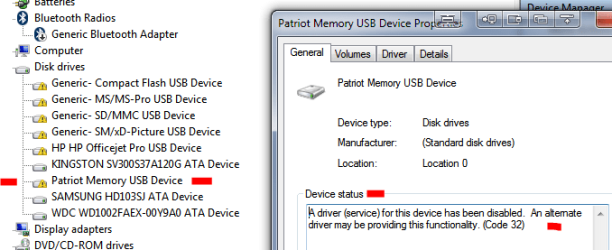
In addition to the evtx file, I've also attached a screenshot of devman with a thumb drive inserted. As you can see, it does show up, but is disabled.


NOTE: It seems I can't upload the evtx file, so I've converted it to text. If the evtx file is better, how can I upload it?


View attachment 08-25_2-11p_Events.txt


DevMan.PNG
 

My Computer

Computer type
PC/Desktop
Computer Manufacturer/Model Number
custom
OS
windows 7 Pro 64 Bit
CPU
i5 4670K
Motherboard
Asus Max Hero 1150 socket
Memory
16GB DDR3@933mhz
Graphics Card(s)
Radeon R9 390 8192mb
Monitor(s) Displays
Dell U2415 x3
Screen Resolution
1920 (5760) x 1200 x3
Hard Drives
System: Kingston 128GB SSD

Installing to Samsung 860 EVO 500GB
WD Black 2 TB & 1 TB
PSU
Corsair CX750M
Cooling
Hyper 312
Internet Speed
50mbps
Disabling the HP Office Pro and Rosewill devices had no effect.
 

My Computer

Computer type
PC/Desktop
Computer Manufacturer/Model Number
custom
OS
windows 7 Pro 64 Bit
CPU
i5 4670K
Motherboard
Asus Max Hero 1150 socket
Memory
16GB DDR3@933mhz
Graphics Card(s)
Radeon R9 390 8192mb
Monitor(s) Displays
Dell U2415 x3
Screen Resolution
1920 (5760) x 1200 x3
Hard Drives
System: Kingston 128GB SSD

Installing to Samsung 860 EVO 500GB
WD Black 2 TB & 1 TB
PSU
Corsair CX750M
Cooling
Hyper 312
Internet Speed
50mbps
Are you using external USB hubs & connecting a lot of devices to them, if so are these hubs self powered or are they using USB power?.
 

My Computer

Computer type
PC/Desktop
Computer Manufacturer/Model Number
Self built using existing case
OS
Windows 7 Home Premium 64 bit sp1
CPU
Intel i5 3570 3.4Ghz Ivy Bridge SKT 1155 quad core
Motherboard
Gigabyte Z77-HD3 SKT 1155 2xSata 3, 4x USB 3.0
Memory
G-Skill Rip Jaws 16Gb (8x2) DDR3 -1600 PC3 12800 CL 10 red
Graphics Card(s)
Gigabyte NVIDIA GT610 1Gb DDR3 810/1200 PCI-E 2.0 Silent
Sound Card
NVIDIA High Definition & Realtech High Definition Audio
Monitor(s) Displays
2 x Philips 226V4L 16:9 aspect ratio
Screen Resolution
1920 x 1080 HD
Hard Drives
Samsung 840 Pro 256gb SSD, SATA 3.
Hitachi Touro Portable 1tb, USB 3.0 HDD used for image b/ups.
PSU
Corsair VS450
Case
Codeng
Cooling
PSU fan & CPU fan
Keyboard
Logitech
Mouse
Logitech Wireless trackball M570
Internet Speed
Wireless 3G. 3mg down & 550kb up.
Antivirus
Bitdefender Internet Security 2020
Browser
Opera (Current Version) & Firefox
Other Info
MS Office 2013 Pro. Davis weather station software. MGE Nova 600 avr UPS.

My Computer

Computer type
PC/Desktop
Computer Manufacturer/Model Number
custom
OS
windows 7 Pro 64 Bit
CPU
i5 4670K
Motherboard
Asus Max Hero 1150 socket
Memory
16GB DDR3@933mhz
Graphics Card(s)
Radeon R9 390 8192mb
Monitor(s) Displays
Dell U2415 x3
Screen Resolution
1920 (5760) x 1200 x3
Hard Drives
System: Kingston 128GB SSD

Installing to Samsung 860 EVO 500GB
WD Black 2 TB & 1 TB
PSU
Corsair CX750M
Cooling
Hyper 312
Internet Speed
50mbps
Have you actually tested the USB thumb drives to see if they are OK.
 

My Computer

Computer type
PC/Desktop
Computer Manufacturer/Model Number
Self built using existing case
OS
Windows 7 Home Premium 64 bit sp1
CPU
Intel i5 3570 3.4Ghz Ivy Bridge SKT 1155 quad core
Motherboard
Gigabyte Z77-HD3 SKT 1155 2xSata 3, 4x USB 3.0
Memory
G-Skill Rip Jaws 16Gb (8x2) DDR3 -1600 PC3 12800 CL 10 red
Graphics Card(s)
Gigabyte NVIDIA GT610 1Gb DDR3 810/1200 PCI-E 2.0 Silent
Sound Card
NVIDIA High Definition & Realtech High Definition Audio
Monitor(s) Displays
2 x Philips 226V4L 16:9 aspect ratio
Screen Resolution
1920 x 1080 HD
Hard Drives
Samsung 840 Pro 256gb SSD, SATA 3.
Hitachi Touro Portable 1tb, USB 3.0 HDD used for image b/ups.
PSU
Corsair VS450
Case
Codeng
Cooling
PSU fan & CPU fan
Keyboard
Logitech
Mouse
Logitech Wireless trackball M570
Internet Speed
Wireless 3G. 3mg down & 550kb up.
Antivirus
Bitdefender Internet Security 2020
Browser
Opera (Current Version) & Firefox
Other Info
MS Office 2013 Pro. Davis weather station software. MGE Nova 600 avr UPS.
Have you actually tested the USB thumb drives to see if they are OK.


Yes. Several thumb drives, and all work in other machines here.
 

My Computer

Computer type
PC/Desktop
Computer Manufacturer/Model Number
custom
OS
windows 7 Pro 64 Bit
CPU
i5 4670K
Motherboard
Asus Max Hero 1150 socket
Memory
16GB DDR3@933mhz
Graphics Card(s)
Radeon R9 390 8192mb
Monitor(s) Displays
Dell U2415 x3
Screen Resolution
1920 (5760) x 1200 x3
Hard Drives
System: Kingston 128GB SSD

Installing to Samsung 860 EVO 500GB
WD Black 2 TB & 1 TB
PSU
Corsair CX750M
Cooling
Hyper 312
Internet Speed
50mbps
Whoops...here's the screenshot of devman with thumb drive plugged in. It does show up in devman, but is disabled (I disabled the other devices [which are card & usb slots] for testing):


DevMan.PNG
 

My Computer

Computer type
PC/Desktop
Computer Manufacturer/Model Number
custom
OS
windows 7 Pro 64 Bit
CPU
i5 4670K
Motherboard
Asus Max Hero 1150 socket
Memory
16GB DDR3@933mhz
Graphics Card(s)
Radeon R9 390 8192mb
Monitor(s) Displays
Dell U2415 x3
Screen Resolution
1920 (5760) x 1200 x3
Hard Drives
System: Kingston 128GB SSD

Installing to Samsung 860 EVO 500GB
WD Black 2 TB & 1 TB
PSU
Corsair CX750M
Cooling
Hyper 312
Internet Speed
50mbps

My Computer

Computer type
PC/Desktop
Computer Manufacturer/Model Number
Self built using existing case
OS
Windows 7 Home Premium 64 bit sp1
CPU
Intel i5 3570 3.4Ghz Ivy Bridge SKT 1155 quad core
Motherboard
Gigabyte Z77-HD3 SKT 1155 2xSata 3, 4x USB 3.0
Memory
G-Skill Rip Jaws 16Gb (8x2) DDR3 -1600 PC3 12800 CL 10 red
Graphics Card(s)
Gigabyte NVIDIA GT610 1Gb DDR3 810/1200 PCI-E 2.0 Silent
Sound Card
NVIDIA High Definition & Realtech High Definition Audio
Monitor(s) Displays
2 x Philips 226V4L 16:9 aspect ratio
Screen Resolution
1920 x 1080 HD
Hard Drives
Samsung 840 Pro 256gb SSD, SATA 3.
Hitachi Touro Portable 1tb, USB 3.0 HDD used for image b/ups.
PSU
Corsair VS450
Case
Codeng
Cooling
PSU fan & CPU fan
Keyboard
Logitech
Mouse
Logitech Wireless trackball M570
Internet Speed
Wireless 3G. 3mg down & 550kb up.
Antivirus
Bitdefender Internet Security 2020
Browser
Opera (Current Version) & Firefox
Other Info
MS Office 2013 Pro. Davis weather station software. MGE Nova 600 avr UPS.
According to your log there, it looks like a driver or dll from Acronis is indeed a cause for concern. I would make sure there's no traces of it anywhere.

Run everything.exe and search for TrueImageMonitor.exe.

You may want to run Autoruns and make sure there is nothing related to Acronis booting up. But don't disable or uninstall anything you shouldn't. In fact, go to File in Autoruns and save the ARN file. Zip the file and upload here.

The reason why you couldn't post your log file is because you didn't zip it and this forum will only allow certain file types to be uploaded. Zip is one.

Downloads - voidtools

Autoruns for Windows - Windows Sysinternals | Microsoft Docs
 

My Computer

Computer type
PC/Desktop
OS
Windows 7 Ultimate x64
[FONT=&quot]The disabled 'Generic' and HP devices are empty slots on an HP OfficeJet Pro 8630 printer/scanner and won't show up in DevMan unless a card/drive is inserted. Those slots don't ever get used. Since this issue, when enabled, they are banged out, showing the same message as the patriot memory seen in the screenshot at end of post #3 (a driver service for this device...).[/FONT]

[FONT=&quot]The Patriot Memory Device is a thumbdrive. It's not disabled but is also banged out and does not appear in DevMan. The only devices that appear in DevMan are ATA devices.[/FONT]

[FONT=&quot]The HP OfficeJet is connected via USB. I can print and scan without issue. This problem seems only to effect any USB drive connected. I have tried several different thumbdrives. All of the drives behave as the patriot does, yet are fine in other machines.[/FONT]

[FONT=&quot]This seems very much like a driver ‘failing to load’ issue to me. Also, I mentioned in my OP that I reinstalled the chipset drivers, but it was the Asus usb 3 driver I reinstalled, which of course isn’t useful here. [/FONT]

[FONT=&quot]Another clue might be the fact that since the trouble of the system no longer recognizing usb drives, I have had no more bluescreens. Below is a screenshot of the bluescreen:[/FONT]
[FONT=&quot]
[/FONT]
[FONT=&quot]asusfilterbluescreen.jpg[/FONT]
 

My Computer

Computer type
PC/Desktop
Computer Manufacturer/Model Number
custom
OS
windows 7 Pro 64 Bit
CPU
i5 4670K
Motherboard
Asus Max Hero 1150 socket
Memory
16GB DDR3@933mhz
Graphics Card(s)
Radeon R9 390 8192mb
Monitor(s) Displays
Dell U2415 x3
Screen Resolution
1920 (5760) x 1200 x3
Hard Drives
System: Kingston 128GB SSD

Installing to Samsung 860 EVO 500GB
WD Black 2 TB & 1 TB
PSU
Corsair CX750M
Cooling
Hyper 312
Internet Speed
50mbps
According to your log there, it looks like a driver or dll from Acronis is indeed a cause for concern. I would make sure there's no traces of it anywhere.

Run everything.exe and search for TrueImageMonitor.exe.

You may want to run Autoruns and make sure there is nothing related to Acronis booting up. But don't disable or uninstall anything you shouldn't. In fact, go to File in Autoruns and save the ARN file. Zip the file and upload here.

The reason why you couldn't post your log file is because you didn't zip it and this forum will only allow certain file types to be uploaded. Zip is one.

Downloads - voidtools

Autoruns for Windows - Windows Sysinternals | Microsoft Docs


Sorry I missed this when I last posted. The event logs were from 08/25, which is the last time I bluescreened. It also is the last time I was able to read thumbdrives. I posted more information earlier this morn, including a screencap of the bluescreen. I mentioned in that post that I did not install new chipset drivers (as I said I did in OP).


Thanks for the zip tip. The autoruns file is attached.


View attachment Autorun_09-16.zip


Edit: BTW, SFC did not find any integrity violations.
 

My Computer

Computer type
PC/Desktop
Computer Manufacturer/Model Number
custom
OS
windows 7 Pro 64 Bit
CPU
i5 4670K
Motherboard
Asus Max Hero 1150 socket
Memory
16GB DDR3@933mhz
Graphics Card(s)
Radeon R9 390 8192mb
Monitor(s) Displays
Dell U2415 x3
Screen Resolution
1920 (5760) x 1200 x3
Hard Drives
System: Kingston 128GB SSD

Installing to Samsung 860 EVO 500GB
WD Black 2 TB & 1 TB
PSU
Corsair CX750M
Cooling
Hyper 312
Internet Speed
50mbps
In Autoruns under the Everything tab, search for TrueSight.sys, right click it and scan at Virus Total.


It looks like you disabled all of the Acronis entries. Can you run Whocrashed now and report what it says.
 

My Computer

Computer type
PC/Desktop
OS
Windows 7 Ultimate x64
Truesight.sys verified. As to whocrashed, no memory dumps found. Since the last crash (08/25/18), I installed a new version of CCleaner & forgot to change the default setting for deleting memory dumps (why they set that as default, I'll never know).


But a bit more info. I've decided that I will restore the oldest macrium image of my system drive that I can find. I keep backups and archives on offline drives, which I either insert in a Thermaltake drive dock or use calbes to plug into an Akasa sata front panel. Neither will present the drive, nor does it show up in disk management. It shows up in DevMan as banged out (same error messages as in earlier screenshots).


Restarting the system (leaving the drive inserted) will show the drive as expected. I can eject it (via the systray icon), but reinserting it will not read and present drive. This does not happen with the thumbdrives (they show in bios and can be booted from but will not show in windows under any circumstances, except in DevMan, banged out).


When I try to reinsert the sata drive, I get a 'Device driver software not successfully installed' error.


I don't have time to restore an older (Macrium) image tonight, and I'd like to search some other offline drives for an even older image.


I appreciate you and Ranger's help. If you have any other ideas, I'll monitor the thread. I hope to restore the older image in the next day or two. I guess, if the older image doesn't correct the problem, it must be hardware related.


But it sure does feel like a driver/software issue, particularly given the error message in the drive properties dialog in DevMan:


"A driver service for this device has been disabled. An alternate driver may be providing this functionality".
 

My Computer

Computer type
PC/Desktop
Computer Manufacturer/Model Number
custom
OS
windows 7 Pro 64 Bit
CPU
i5 4670K
Motherboard
Asus Max Hero 1150 socket
Memory
16GB DDR3@933mhz
Graphics Card(s)
Radeon R9 390 8192mb
Monitor(s) Displays
Dell U2415 x3
Screen Resolution
1920 (5760) x 1200 x3
Hard Drives
System: Kingston 128GB SSD

Installing to Samsung 860 EVO 500GB
WD Black 2 TB & 1 TB
PSU
Corsair CX750M
Cooling
Hyper 312
Internet Speed
50mbps
When it crashes again immediately run Whocrashed, or disable Ccleaner altogether.
 

My Computer

Computer type
PC/Desktop
OS
Windows 7 Ultimate x64
It turns out the issue was caused by Acronis Disk Director. I lived with the issue for a while because I was too busy to deal with it. I had decided to reinstall windows and bought a larger SSD to do so. I went to use DD to format the SSD and found that DD wasn't recognizing any of my HDs. I uninstalled it using Revo, clearing out the reg entries, then reinstalled DD. After formatting the disk, I tried a USB drive and the system mounted and read it. Go figure. I'm going to reinstall win 7 anyway, since this install is 5 years old. Thanks for your help.
 

My Computer

Computer type
PC/Desktop
Computer Manufacturer/Model Number
custom
OS
windows 7 Pro 64 Bit
CPU
i5 4670K
Motherboard
Asus Max Hero 1150 socket
Memory
16GB DDR3@933mhz
Graphics Card(s)
Radeon R9 390 8192mb
Monitor(s) Displays
Dell U2415 x3
Screen Resolution
1920 (5760) x 1200 x3
Hard Drives
System: Kingston 128GB SSD

Installing to Samsung 860 EVO 500GB
WD Black 2 TB & 1 TB
PSU
Corsair CX750M
Cooling
Hyper 312
Internet Speed
50mbps
And as I noted in post #11 I thought it was Acronis.

Check out AOMEI Backupper. It's straight forward to use. I even used it to clone a netbook and clone back to a netbook via USB.

Glad you fixed it. :thumbsup:
 

My Computer

Computer type
PC/Desktop
OS
Windows 7 Ultimate x64
True, #11. The surprise is that it was DD (which has always been trouble-free) rather than TI, which is crapware IMO (ATI used to be great back in the day).


As far as ATI, I've switched to Macrium (paid on my main machine, free on the others). It seriously outshines ATI. Costs more, particularly for upgrades (compared to ATI), but worth it. A really polished program. I'll check out AOMEI, though. I'm always on the hung to good software. I generally just use Macrium rescue to boot to PE, but I also like the look of AOMEI PE Builder.


Again, I appreciate the help and insight you offered. Much appreciated!
 

My Computer

Computer type
PC/Desktop
Computer Manufacturer/Model Number
custom
OS
windows 7 Pro 64 Bit
CPU
i5 4670K
Motherboard
Asus Max Hero 1150 socket
Memory
16GB DDR3@933mhz
Graphics Card(s)
Radeon R9 390 8192mb
Monitor(s) Displays
Dell U2415 x3
Screen Resolution
1920 (5760) x 1200 x3
Hard Drives
System: Kingston 128GB SSD

Installing to Samsung 860 EVO 500GB
WD Black 2 TB & 1 TB
PSU
Corsair CX750M
Cooling
Hyper 312
Internet Speed
50mbps
Standalone PEBuilder is a bit quirky. Best thing is to get it to download the pe base from Aomei server.

Aomei Backupper is very good - easy to use also.The built in pe creation tool in this works well.

Aomei Partition Asssistant (Standard edition is free) is the best free partitioner. The built in pe creation tool in this works well.
 

My Computers

System One System Two

  • Computer type
    PC/Desktop
    OS
    7 X64
    CPU
    i5 8400
    Motherboard
    gigabyte b365m ds3h
    Memory
    2x8gb 3200mhz
    Hard Drives
    various
    PSU
    pure power 11 400w cm
    Case
    Coolermaster
    Cooling
    cryorig m9i
  • Computer type
    PC/Desktop
    OS
    7x64
    CPU
    g5400
    Motherboard
    ga b365m ds3h
    Memory
    8gb ddr4 2400
    PSU
    xfx pro 450w
Back
Top