Solved USB Mass Storage Device Problems

Detrolord

New member
Local time
6:32 AM
Messages
17
Hello People I need help pretty bad i tried alot of things and took me 4 hrs just attempting every single fix i find.
OK lets get started Problem is i can't connect any kind of Portable Hard Drive in this laptop, i am able to connect in a different computer actually 4 different computers except this one so the HD is not a fault. Also no Reformatting Until i get my files

This every thing i have tried to fix it.
http://www.sevenforums.com/tutorials/165554-usb-driver-general-fix-problems.html?filter


My Laptop is
Windows 7 Home Premium
Used PCs and Laptops are Windows 7,8 and a XP to test the hardrive
All Drivers are fully Updated
Used CMD
Used System Restore
Used Safemode
Scanned for Antivirus,Malware,Adware
Used Device Manager to uninstall the driver and reinstall
1TB
Updated WD Universal Firmware
SES Driver
Disabled Antivirus
Used 5 diff cords
Used Windows Fix

Okay my analyst
1.USB Mass Driver tried to reinstall it delete the INFCACHE.1
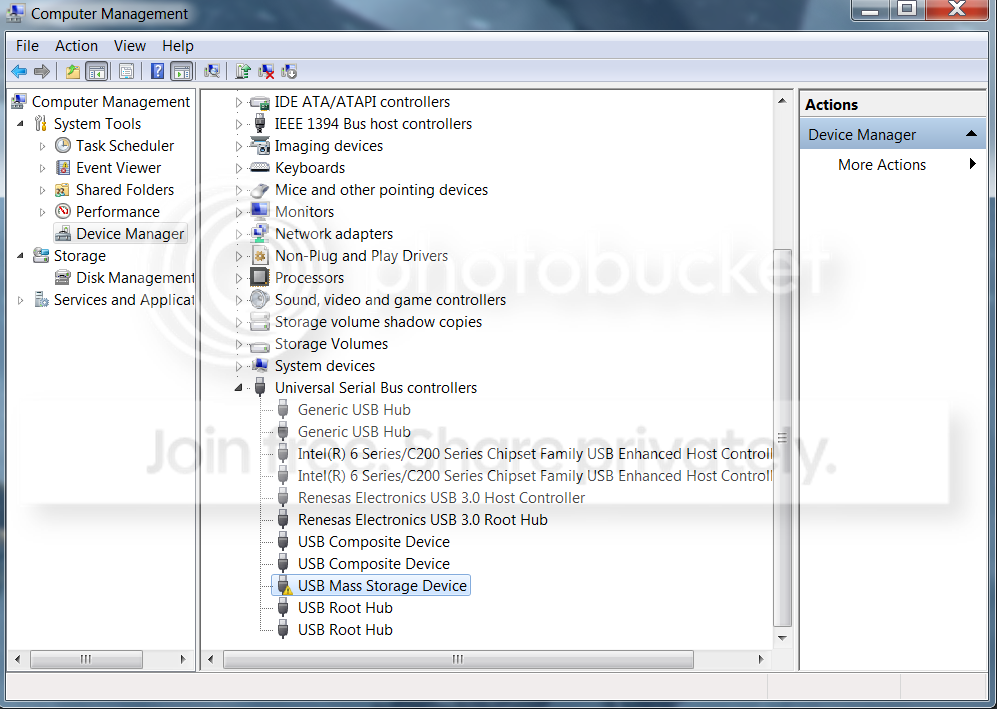

2.Its Up to Date
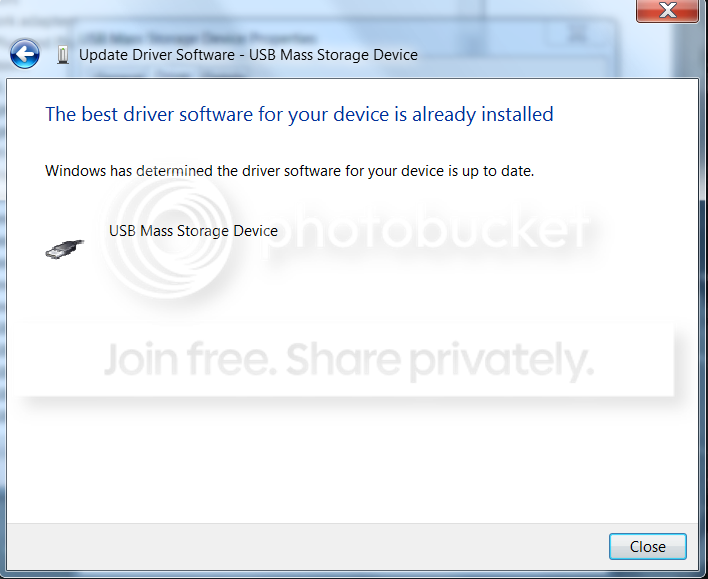

3.Its Visible in the Devices and Printer


4. For some Reason Windows can't Verify it
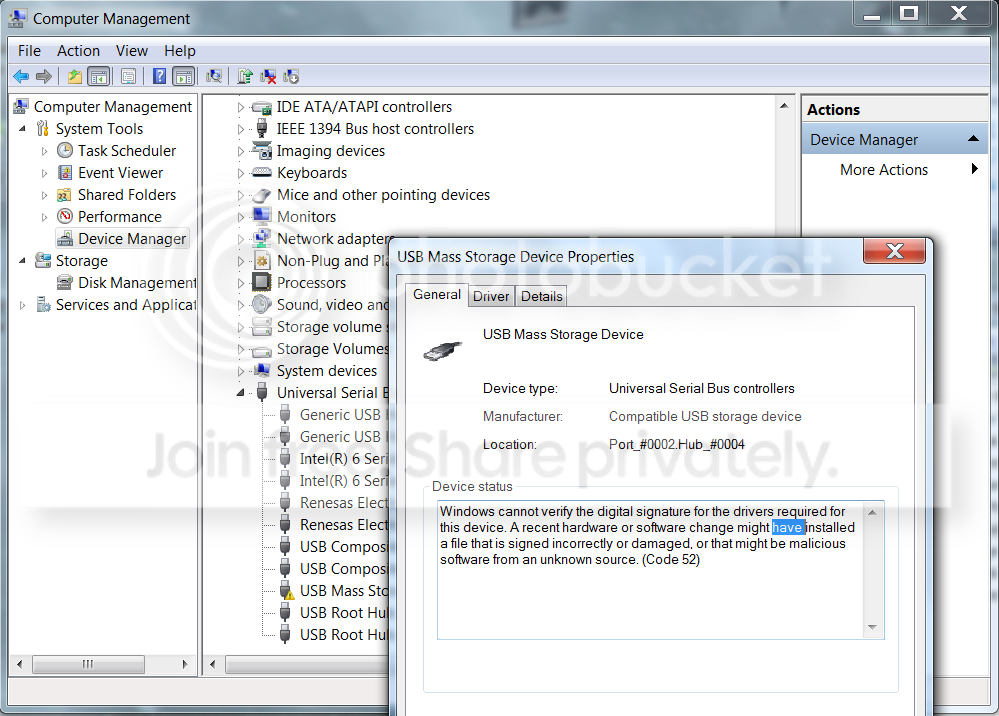

5. Also its not visible in Disk Management(so i can't designate a new letter or Initialize it)


6. All Drivers ive installed to fix this
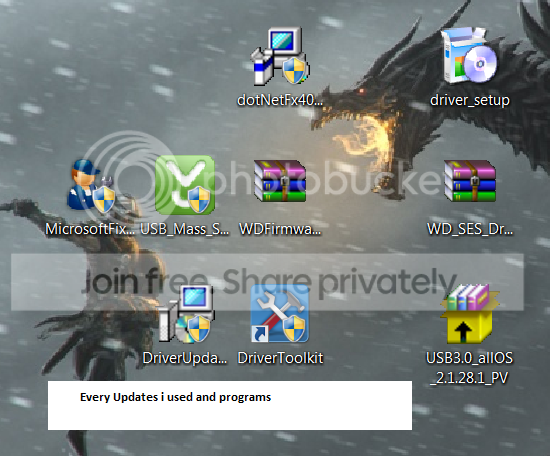

7. Hard is not showing
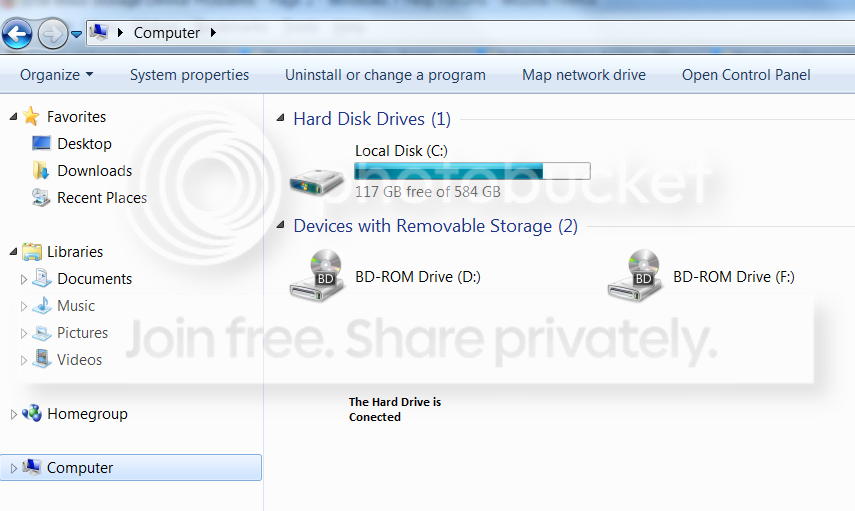

8. Another Disk Management

Thank you for helping!
 
Last edited:

My Computer

Computer type
Laptop
Computer Manufacturer/Model Number
Vaio F Series Laptop
OS
Windows 7 Home Premuim
CPU
Intel Core i7
Graphics Card(s)
NVIDIA GEFORCE W/ CUDA
Hard Drives
500GB Unknown
Antivirus
AVG
Browser
Mozilla, Chrome, IE

My Computer

Computer type
PC/Desktop
Computer Manufacturer/Model Number
self build
OS
win 7 ultimate32bit, Win8.1pro wmc 32bit
CPU
amd phenom x4 9600
Motherboard
asus m2n32-sli deluxe
Memory
corsair twinxs 2x2gb
Graphics Card(s)
2x nvidia 1gb 8500gt
Sound Card
onboard
Monitor(s) Displays
23" PB Viseo 233d
Screen Resolution
1920x1080
Hard Drives
maxtor sata 500gb
maxtor sata 320gb
fujitsu sata200gb
PSU
oryxx tornado 750w
Case
thermaltake xaser lll
Cooling
artic freezer64 pro + 7 case fans
How large is the drive? Just one partition? If it's over 2TB then it's GPT instead of MBR. Still should be readable by Win7 Home Premium, but I'm just asking.

What other computers ARE able to use this drive? What are their OS's?

Was it formatted by a Mac? Windows? Is it FAT32 or NTFS, or maybe exFAT?

What shows up, if anything, when you look in "My Computer" rather than "Devices and Printers"?

Even though the drive doesn't show up in Disk Management with a drive letter, does the "mass storage device" drive show up in Windows Explorer (at the bottom, with a name rather than a drive letter)? This would indicate that the drive has connected to Windows in MTP mode (like a camera, or cell phone, neither of which get drive letters assigned but both of which can be accessed through proper software provided by the hardware vendor or some 3rd-party) rather than in MSC mode (which would give it a drive letter, making it generically available for use by 100% of Windows and 3rd-party software programs).
 

My Computer

Computer type
PC/Desktop
Computer Manufacturer/Model Number
Home-built, two systems (1) and (2)
OS
Windows 7 Pro x64 (1), Win7 Pro X64 (2)
CPU
i5-3350p 3.1Ghz/6MB-cache (1); E8400 3.0Ghz/6MB-cache (2)
Motherboard
ASUS P8Z77-V Pro (1); ASUS P5Q3 (2)
Memory
8GB PC3-12800 DDR3 (1); 4GB PC3-10600 DDR3 (2)
Graphics Card(s)
ATI HD7750 (1), (see TV cards); ATI R7 250 (2)
Sound Card
Realtek ALC892 HD Audio (1); Realtek ALC1200 HD Audio (2)
Monitor(s) Displays
Eizo HD2441W LCD, Eizo S2433W (1); Eizo 24" S2433W (2)
Screen Resolution
1920x1200, 1920x1200 (1); 1920x1200 (2)
Hard Drives
(1) 1TB SATA-II (7200RPM), 2x2TB SATA-III (7200RPM), 250GB SATA-III (10000RPM) for OS; 2x2TB external USB 3.0

(2) 320GB SATA-II (7200RPM), 750GB SATA-II (7200RPM), 150GB SATA-II (10000RPM) for OS; 2TB external USB 3.0
PSU
Nesteq ECS-6001 600W (1); Nesteq ECS-5001 500W (2)
Case
Acousti-Case 360 (1) and (2)
Cooling
Noctua NH-U12P SE2 for CPU, 2x120mm case fans (1) and (2)
Keyboard
IBM PS/2 (1) and (2)
Mouse
Logitech MX Revolution wireless (1); Microsoft wired (2)
Internet Speed
100mbps down / 10mbps up
Antivirus
Microsoft Security Essentials; Malwarebyte Anti-Malware Pro
Browser
Firefox
Other Info
Ceton InfiniTV 4-tuner cablecard-enabled TV card as well as Hauppauge HVR-2250 OTA/ATSC 2-tuner TV card in (1), running under Win7 WMC
Some research suggests that this drive and its external enclosure may require special SES drivers from WD, apparently being a SCSI device.

See this article on the WD forum.

The article pointed to a WD page to get the proper x64 or x86 SES drivers.

The user still had problems, and discovered that USBSTOR.INF and USBSTOR.PNF were somehow missing, as described by this other article.

When the user recovered these final two missing file to the driver directory, now Windows was finally able to see the drive.


I don't know why this should all be necessary, or what the unique circumstances of this particular ASUS laptop were, but the articles seem very relevant to your situation. Sounds identical.

Again, I'm still very curious as to more details on the other four computers you say you COULD access this drive from without difficulty, and what makes this particular laptop of yours unique.
 

My Computer

Computer type
PC/Desktop
Computer Manufacturer/Model Number
Home-built, two systems (1) and (2)
OS
Windows 7 Pro x64 (1), Win7 Pro X64 (2)
CPU
i5-3350p 3.1Ghz/6MB-cache (1); E8400 3.0Ghz/6MB-cache (2)
Motherboard
ASUS P8Z77-V Pro (1); ASUS P5Q3 (2)
Memory
8GB PC3-12800 DDR3 (1); 4GB PC3-10600 DDR3 (2)
Graphics Card(s)
ATI HD7750 (1), (see TV cards); ATI R7 250 (2)
Sound Card
Realtek ALC892 HD Audio (1); Realtek ALC1200 HD Audio (2)
Monitor(s) Displays
Eizo HD2441W LCD, Eizo S2433W (1); Eizo 24" S2433W (2)
Screen Resolution
1920x1200, 1920x1200 (1); 1920x1200 (2)
Hard Drives
(1) 1TB SATA-II (7200RPM), 2x2TB SATA-III (7200RPM), 250GB SATA-III (10000RPM) for OS; 2x2TB external USB 3.0

(2) 320GB SATA-II (7200RPM), 750GB SATA-II (7200RPM), 150GB SATA-II (10000RPM) for OS; 2TB external USB 3.0
PSU
Nesteq ECS-6001 600W (1); Nesteq ECS-5001 500W (2)
Case
Acousti-Case 360 (1) and (2)
Cooling
Noctua NH-U12P SE2 for CPU, 2x120mm case fans (1) and (2)
Keyboard
IBM PS/2 (1) and (2)
Mouse
Logitech MX Revolution wireless (1); Microsoft wired (2)
Internet Speed
100mbps down / 10mbps up
Antivirus
Microsoft Security Essentials; Malwarebyte Anti-Malware Pro
Browser
Firefox
Other Info
Ceton InfiniTV 4-tuner cablecard-enabled TV card as well as Hauppauge HVR-2250 OTA/ATSC 2-tuner TV card in (1), running under Win7 WMC
Also, do you have it plugged into a USB 3.0 socket on the laptop?

Have you tried plugging it into a USB 2.0 socket on the laptop?


Other users with similar problems blame out-of-date ASMedia USB 3.0 drivers:

found it to be a driver issue, the latest ASMedia usb 3 driver on the ASUS website (v1.14.3.0) is over 12 months old, I found a later driver (v1.16.2.0) from October 2012 and that sorted everything out after a reboot. The site I found the driver on is called STATION DRIVERS and the drivers full title is Asmedia ASM1041/ASM1042 USB3 Controller Driver
 

My Computer

Computer type
PC/Desktop
Computer Manufacturer/Model Number
Home-built, two systems (1) and (2)
OS
Windows 7 Pro x64 (1), Win7 Pro X64 (2)
CPU
i5-3350p 3.1Ghz/6MB-cache (1); E8400 3.0Ghz/6MB-cache (2)
Motherboard
ASUS P8Z77-V Pro (1); ASUS P5Q3 (2)
Memory
8GB PC3-12800 DDR3 (1); 4GB PC3-10600 DDR3 (2)
Graphics Card(s)
ATI HD7750 (1), (see TV cards); ATI R7 250 (2)
Sound Card
Realtek ALC892 HD Audio (1); Realtek ALC1200 HD Audio (2)
Monitor(s) Displays
Eizo HD2441W LCD, Eizo S2433W (1); Eizo 24" S2433W (2)
Screen Resolution
1920x1200, 1920x1200 (1); 1920x1200 (2)
Hard Drives
(1) 1TB SATA-II (7200RPM), 2x2TB SATA-III (7200RPM), 250GB SATA-III (10000RPM) for OS; 2x2TB external USB 3.0

(2) 320GB SATA-II (7200RPM), 750GB SATA-II (7200RPM), 150GB SATA-II (10000RPM) for OS; 2TB external USB 3.0
PSU
Nesteq ECS-6001 600W (1); Nesteq ECS-5001 500W (2)
Case
Acousti-Case 360 (1) and (2)
Cooling
Noctua NH-U12P SE2 for CPU, 2x120mm case fans (1) and (2)
Keyboard
IBM PS/2 (1) and (2)
Mouse
Logitech MX Revolution wireless (1); Microsoft wired (2)
Internet Speed
100mbps down / 10mbps up
Antivirus
Microsoft Security Essentials; Malwarebyte Anti-Malware Pro
Browser
Firefox
Other Info
Ceton InfiniTV 4-tuner cablecard-enabled TV card as well as Hauppauge HVR-2250 OTA/ATSC 2-tuner TV card in (1), running under Win7 WMC
Another user with similar problem also had to install the SES drivers from WD.

Also, got a special cable from WD: Connect the HDD with "Y" Cable (Western Digital sent me this cable Part Number 4064-705073-000)

Also, mentions under-powered USB port because of inadequate power supply in the laptop.
 

My Computer

Computer type
PC/Desktop
Computer Manufacturer/Model Number
Home-built, two systems (1) and (2)
OS
Windows 7 Pro x64 (1), Win7 Pro X64 (2)
CPU
i5-3350p 3.1Ghz/6MB-cache (1); E8400 3.0Ghz/6MB-cache (2)
Motherboard
ASUS P8Z77-V Pro (1); ASUS P5Q3 (2)
Memory
8GB PC3-12800 DDR3 (1); 4GB PC3-10600 DDR3 (2)
Graphics Card(s)
ATI HD7750 (1), (see TV cards); ATI R7 250 (2)
Sound Card
Realtek ALC892 HD Audio (1); Realtek ALC1200 HD Audio (2)
Monitor(s) Displays
Eizo HD2441W LCD, Eizo S2433W (1); Eizo 24" S2433W (2)
Screen Resolution
1920x1200, 1920x1200 (1); 1920x1200 (2)
Hard Drives
(1) 1TB SATA-II (7200RPM), 2x2TB SATA-III (7200RPM), 250GB SATA-III (10000RPM) for OS; 2x2TB external USB 3.0

(2) 320GB SATA-II (7200RPM), 750GB SATA-II (7200RPM), 150GB SATA-II (10000RPM) for OS; 2TB external USB 3.0
PSU
Nesteq ECS-6001 600W (1); Nesteq ECS-5001 500W (2)
Case
Acousti-Case 360 (1) and (2)
Cooling
Noctua NH-U12P SE2 for CPU, 2x120mm case fans (1) and (2)
Keyboard
IBM PS/2 (1) and (2)
Mouse
Logitech MX Revolution wireless (1); Microsoft wired (2)
Internet Speed
100mbps down / 10mbps up
Antivirus
Microsoft Security Essentials; Malwarebyte Anti-Malware Pro
Browser
Firefox
Other Info
Ceton InfiniTV 4-tuner cablecard-enabled TV card as well as Hauppauge HVR-2250 OTA/ATSC 2-tuner TV card in (1), running under Win7 WMC
Another thought.
Do you have Safe Boot activated in bios?
 

My Computer

Computer type
PC/Desktop
Computer Manufacturer/Model Number
Home made Desktop
OS
Windows 10 Pro. 64/ version 1709 Windows 7 Pro/64
CPU
Intel i7-6800K @ 4.3
Motherboard
ASUS X-99 Deluxe II
Memory
Corsair Platinum 16 gig @2400
Graphics Card(s)
EVGA GTX 1070 OC
Monitor(s) Displays
Asus 27" LED LCD/VE278Q
Screen Resolution
1920-1080 or 1280-720 HDMI
Hard Drives
INTEL SSD 730-240 Gb Sata 3.0/
PSU
EVGA Platium 1200W
Case
Phanteks Luxe Tempered Glass 8 fans/ one radiator
Cooling
XSPC/ Water Cooled CPU
Keyboard
Das 4 Professional
Mouse
Logitech M705/MX Anywhere 2-S
Internet Speed
100 mbits
Antivirus
Microsoft Security Essentials/ Malwarebytes Premium 3.0/ SAS
Browser
I.E. 11 default/Firefox/ ISP Time Warner Cable/Spectrum
Other Info
LG BluRay Burner/
Sound system-KLipsch-THX/
Icy Dock ssd Hot Swap bays.
How large is the drive? Just one partition? If it's over 2TB then it's GPT instead of MBR. Still should be readable by Win7 Home Premium, but I'm just asking.

What other computers ARE able to use this drive? What are their OS's?

Was it formatted by a Mac? Windows? Is it FAT32 or NTFS, or maybe exFAT?

What shows up, if anything, when you look in "My Computer" rather than "Devices and Printers"?

Even though the drive doesn't show up in Disk Management with a drive letter, does the "mass storage device" drive show up in Windows Explorer (at the bottom, with a name rather than a drive letter)? This would indicate that the drive has connected to Windows in MTP mode (like a camera, or cell phone, neither of which get drive letters assigned but both of which can be accessed through proper software provided by the hardware vendor or some 3rd-party) rather than in MSC mode (which would give it a drive letter, making it generically available for use by 100% of Windows and 3rd-party software programs).
1 TB i tried multi portable HD in this laptop
 

My Computer

Computer type
Laptop
Computer Manufacturer/Model Number
Vaio F Series Laptop
OS
Windows 7 Home Premuim
CPU
Intel Core i7
Graphics Card(s)
NVIDIA GEFORCE W/ CUDA
Hard Drives
500GB Unknown
Antivirus
AVG
Browser
Mozilla, Chrome, IE
Another user with similar problem also had to install the SES drivers from WD.

Also, got a special cable from WD: Connect the HDD with "Y" Cable (Western Digital sent me this cable Part Number 4064-705073-000)

Also, mentions under-powered USB port because of inadequate power supply in the laptop.
I don't Think so cause the Portable HD works in 5 different computer except this 1 i also used 4 different kind of wirings around 10 usb wires well its kinda d same let me read the thing ty
 

My Computer

Computer type
Laptop
Computer Manufacturer/Model Number
Vaio F Series Laptop
OS
Windows 7 Home Premuim
CPU
Intel Core i7
Graphics Card(s)
NVIDIA GEFORCE W/ CUDA
Hard Drives
500GB Unknown
Antivirus
AVG
Browser
Mozilla, Chrome, IE

My Computer

Computer type
Laptop
Computer Manufacturer/Model Number
Vaio F Series Laptop
OS
Windows 7 Home Premuim
CPU
Intel Core i7
Graphics Card(s)
NVIDIA GEFORCE W/ CUDA
Hard Drives
500GB Unknown
Antivirus
AVG
Browser
Mozilla, Chrome, IE
I think its the USB port maybe not enough power?
not sure
 

My Computer

Computer type
Laptop
Computer Manufacturer/Model Number
Vaio F Series Laptop
OS
Windows 7 Home Premuim
CPU
Intel Core i7
Graphics Card(s)
NVIDIA GEFORCE W/ CUDA
Hard Drives
500GB Unknown
Antivirus
AVG
Browser
Mozilla, Chrome, IE
Hi Detrolord, Welcome to the forums, Have you tried the drivers from Western Digital ? WD Support / Downloads / My Passport / My Passport Essential (USB 3.0) Also try redownloading the motherboard chipset and card reader drivers and reinstalling them :)
Didn't work
But did you try to install the SES drivers from WD that I mentioned were available from this page?? Be sure to pick 32-bit or 64-bit driver version.

Did you try it in a USB 2.0 socket?
 

My Computer

Computer type
PC/Desktop
Computer Manufacturer/Model Number
Home-built, two systems (1) and (2)
OS
Windows 7 Pro x64 (1), Win7 Pro X64 (2)
CPU
i5-3350p 3.1Ghz/6MB-cache (1); E8400 3.0Ghz/6MB-cache (2)
Motherboard
ASUS P8Z77-V Pro (1); ASUS P5Q3 (2)
Memory
8GB PC3-12800 DDR3 (1); 4GB PC3-10600 DDR3 (2)
Graphics Card(s)
ATI HD7750 (1), (see TV cards); ATI R7 250 (2)
Sound Card
Realtek ALC892 HD Audio (1); Realtek ALC1200 HD Audio (2)
Monitor(s) Displays
Eizo HD2441W LCD, Eizo S2433W (1); Eizo 24" S2433W (2)
Screen Resolution
1920x1200, 1920x1200 (1); 1920x1200 (2)
Hard Drives
(1) 1TB SATA-II (7200RPM), 2x2TB SATA-III (7200RPM), 250GB SATA-III (10000RPM) for OS; 2x2TB external USB 3.0

(2) 320GB SATA-II (7200RPM), 750GB SATA-II (7200RPM), 150GB SATA-II (10000RPM) for OS; 2TB external USB 3.0
PSU
Nesteq ECS-6001 600W (1); Nesteq ECS-5001 500W (2)
Case
Acousti-Case 360 (1) and (2)
Cooling
Noctua NH-U12P SE2 for CPU, 2x120mm case fans (1) and (2)
Keyboard
IBM PS/2 (1) and (2)
Mouse
Logitech MX Revolution wireless (1); Microsoft wired (2)
Internet Speed
100mbps down / 10mbps up
Antivirus
Microsoft Security Essentials; Malwarebyte Anti-Malware Pro
Browser
Firefox
Other Info
Ceton InfiniTV 4-tuner cablecard-enabled TV card as well as Hauppauge HVR-2250 OTA/ATSC 2-tuner TV card in (1), running under Win7 WMC
Hi Detrolord, Welcome to the forums, Have you tried the drivers from Western Digital ? WD Support / Downloads / My Passport / My Passport Essential (USB 3.0) Also try redownloading the motherboard chipset and card reader drivers and reinstalling them :)
Didn't work
But did you try to install the SES drivers from WD that I mentioned were available from this page?? Be sure to pick 32-bit or 64-bit driver version.

Did you try it in a USB 2.0 socket?
yea i did didnt work
 

My Computer

Computer type
Laptop
Computer Manufacturer/Model Number
Vaio F Series Laptop
OS
Windows 7 Home Premuim
CPU
Intel Core i7
Graphics Card(s)
NVIDIA GEFORCE W/ CUDA
Hard Drives
500GB Unknown
Antivirus
AVG
Browser
Mozilla, Chrome, IE
Well, I've exhausted my research results and suggestions. Sounds like you've tried everything that could be thought of.

The "giant clue" here is that this device shows up as a "mass storage device", which suggests to me MTP connection mode like a camera or phone or portable music player operating in MTP mode, which shows up in Windows Explorer at the bottom of its drive letters with its own name rather than with a drive letter. If you then click on that name to expand it, you'll perhaps see "phone" and "card", or "internal storage" and "external storage", or something generic like that... rather than drive letters.

Surely this is a driver issue of some sort. If Windows is not complaining about not being able to install proper drivers for the newly recognized hardware, then it must be "satisfied"... though clearly it's not.

Windows assigns drive letters when removable devices/drives running in MSC mode (not MTP mode) are connected with USB cable, but Windows Explorer (via drag and drop, etc.) can actually support devices connected in either connection mode. In contrast, most normal programs are written to only support MSC mode via drive letter, whereas manufacturer's provided proprietary software typically is the only software outside of Windows Explorer that can support MTP connections since they do not have a drive letter.

So... it's obvious that there's something missing in the Sony Vaio laptop's setup that prevents Windows 7 Home Premium from correctly installing the drivers for the WD drive, and instead mis-recognizing it and handling it as a "mass storage device". Obvously not right. You say you've had success with this drive on other WINDOWS MACHINES (I asked you several times if these were Mac or Windows, but you never answered explicitly) I assume. So it's obviously something about the Vaio which is at the heart of your problem.

As you would expect, a true "compatible" generic external USB hard drive should be automatically handled by Windows 7. I myself ONLY use Verbatim 2TB Store 'n' Save external USB 3.0 drives in all the machines I build for myself, family and friends, because (1) they are ABSOLUTELY RELIABLE, (2) they are relatively inexpensive, (3) they have worked without a software or hardware problem on EVERY machine I've ever connected them to, (4) they work perfectly in USB 2.0 or USB 3.0 mode, (5) can be positioned horizontally or vertically, (6) are almost silent, (7) they come with a small piece of "green" background software which runs on your PC to spin-down the drive after 10 minutes (or whatever you set) of inactivity, and (8) come with a 7 year warranty!!!

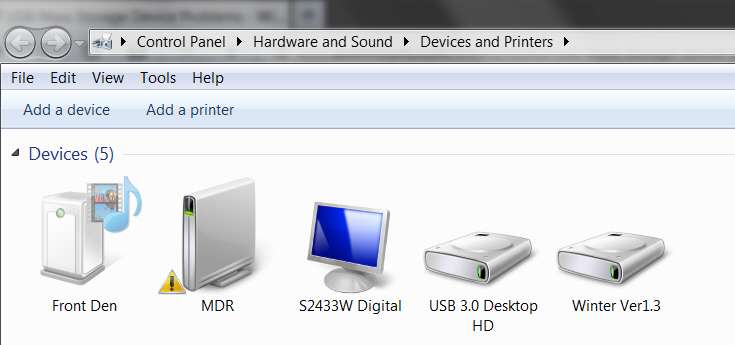
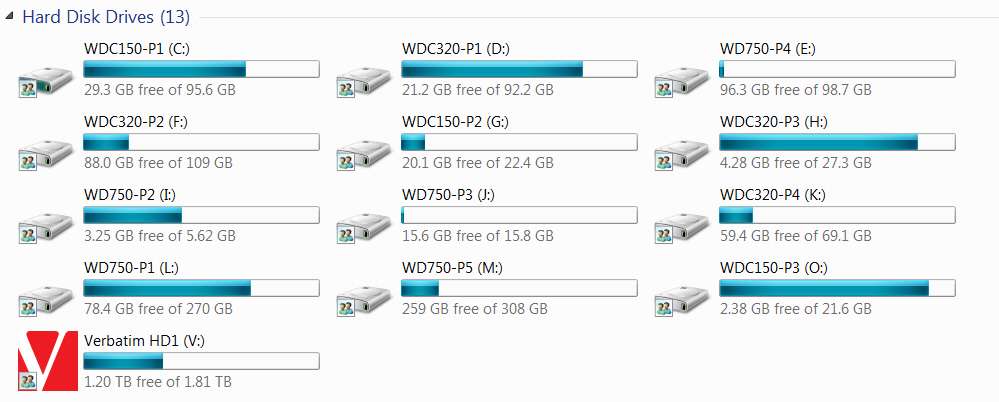
And as you'd expect, the drive connects in MSC mode to Windows, gets a drive letter assigned (and also shows up in the "safely remove hardware" icon in the System Tray, something which MTP-connected devices to not do since they are handled differently by Windows and don't need to be "safely removed" before unplugging the USB cable), and shows up in Windows as a "HD" rather than as a "mass storage device".

For example, here's my external Verbatim 2TB USB 3.0 drive (drive letter V):

9d0h.jpg


ubne.jpg


376u.jpg
 

My Computer

Computer type
PC/Desktop
Computer Manufacturer/Model Number
Home-built, two systems (1) and (2)
OS
Windows 7 Pro x64 (1), Win7 Pro X64 (2)
CPU
i5-3350p 3.1Ghz/6MB-cache (1); E8400 3.0Ghz/6MB-cache (2)
Motherboard
ASUS P8Z77-V Pro (1); ASUS P5Q3 (2)
Memory
8GB PC3-12800 DDR3 (1); 4GB PC3-10600 DDR3 (2)
Graphics Card(s)
ATI HD7750 (1), (see TV cards); ATI R7 250 (2)
Sound Card
Realtek ALC892 HD Audio (1); Realtek ALC1200 HD Audio (2)
Monitor(s) Displays
Eizo HD2441W LCD, Eizo S2433W (1); Eizo 24" S2433W (2)
Screen Resolution
1920x1200, 1920x1200 (1); 1920x1200 (2)
Hard Drives
(1) 1TB SATA-II (7200RPM), 2x2TB SATA-III (7200RPM), 250GB SATA-III (10000RPM) for OS; 2x2TB external USB 3.0

(2) 320GB SATA-II (7200RPM), 750GB SATA-II (7200RPM), 150GB SATA-II (10000RPM) for OS; 2TB external USB 3.0
PSU
Nesteq ECS-6001 600W (1); Nesteq ECS-5001 500W (2)
Case
Acousti-Case 360 (1) and (2)
Cooling
Noctua NH-U12P SE2 for CPU, 2x120mm case fans (1) and (2)
Keyboard
IBM PS/2 (1) and (2)
Mouse
Logitech MX Revolution wireless (1); Microsoft wired (2)
Internet Speed
100mbps down / 10mbps up
Antivirus
Microsoft Security Essentials; Malwarebyte Anti-Malware Pro
Browser
Firefox
Other Info
Ceton InfiniTV 4-tuner cablecard-enabled TV card as well as Hauppauge HVR-2250 OTA/ATSC 2-tuner TV card in (1), running under Win7 WMC
Last edited:

My Computer

Computer type
PC/Desktop
Computer Manufacturer/Model Number
Home made Desktop
OS
Windows 10 Pro. 64/ version 1709 Windows 7 Pro/64
CPU
Intel i7-6800K @ 4.3
Motherboard
ASUS X-99 Deluxe II
Memory
Corsair Platinum 16 gig @2400
Graphics Card(s)
EVGA GTX 1070 OC
Monitor(s) Displays
Asus 27" LED LCD/VE278Q
Screen Resolution
1920-1080 or 1280-720 HDMI
Hard Drives
INTEL SSD 730-240 Gb Sata 3.0/
PSU
EVGA Platium 1200W
Case
Phanteks Luxe Tempered Glass 8 fans/ one radiator
Cooling
XSPC/ Water Cooled CPU
Keyboard
Das 4 Professional
Mouse
Logitech M705/MX Anywhere 2-S
Internet Speed
100 mbits
Antivirus
Microsoft Security Essentials/ Malwarebytes Premium 3.0/ SAS
Browser
I.E. 11 default/Firefox/ ISP Time Warner Cable/Spectrum
Other Info
LG BluRay Burner/
Sound system-KLipsch-THX/
Icy Dock ssd Hot Swap bays.

My Computer

Computer type
PC/Desktop
Computer Manufacturer/Model Number
Home-built, two systems (1) and (2)
OS
Windows 7 Pro x64 (1), Win7 Pro X64 (2)
CPU
i5-3350p 3.1Ghz/6MB-cache (1); E8400 3.0Ghz/6MB-cache (2)
Motherboard
ASUS P8Z77-V Pro (1); ASUS P5Q3 (2)
Memory
8GB PC3-12800 DDR3 (1); 4GB PC3-10600 DDR3 (2)
Graphics Card(s)
ATI HD7750 (1), (see TV cards); ATI R7 250 (2)
Sound Card
Realtek ALC892 HD Audio (1); Realtek ALC1200 HD Audio (2)
Monitor(s) Displays
Eizo HD2441W LCD, Eizo S2433W (1); Eizo 24" S2433W (2)
Screen Resolution
1920x1200, 1920x1200 (1); 1920x1200 (2)
Hard Drives
(1) 1TB SATA-II (7200RPM), 2x2TB SATA-III (7200RPM), 250GB SATA-III (10000RPM) for OS; 2x2TB external USB 3.0

(2) 320GB SATA-II (7200RPM), 750GB SATA-II (7200RPM), 150GB SATA-II (10000RPM) for OS; 2TB external USB 3.0
PSU
Nesteq ECS-6001 600W (1); Nesteq ECS-5001 500W (2)
Case
Acousti-Case 360 (1) and (2)
Cooling
Noctua NH-U12P SE2 for CPU, 2x120mm case fans (1) and (2)
Keyboard
IBM PS/2 (1) and (2)
Mouse
Logitech MX Revolution wireless (1); Microsoft wired (2)
Internet Speed
100mbps down / 10mbps up
Antivirus
Microsoft Security Essentials; Malwarebyte Anti-Malware Pro
Browser
Firefox
Other Info
Ceton InfiniTV 4-tuner cablecard-enabled TV card as well as Hauppauge HVR-2250 OTA/ATSC 2-tuner TV card in (1), running under Win7 WMC
Post #1 screen shot looks nothing like the picture in post #14
Count the drives and partitions.
 

My Computer

Computer type
PC/Desktop
Computer Manufacturer/Model Number
Home made Desktop
OS
Windows 10 Pro. 64/ version 1709 Windows 7 Pro/64
CPU
Intel i7-6800K @ 4.3
Motherboard
ASUS X-99 Deluxe II
Memory
Corsair Platinum 16 gig @2400
Graphics Card(s)
EVGA GTX 1070 OC
Monitor(s) Displays
Asus 27" LED LCD/VE278Q
Screen Resolution
1920-1080 or 1280-720 HDMI
Hard Drives
INTEL SSD 730-240 Gb Sata 3.0/
PSU
EVGA Platium 1200W
Case
Phanteks Luxe Tempered Glass 8 fans/ one radiator
Cooling
XSPC/ Water Cooled CPU
Keyboard
Das 4 Professional
Mouse
Logitech M705/MX Anywhere 2-S
Internet Speed
100 mbits
Antivirus
Microsoft Security Essentials/ Malwarebytes Premium 3.0/ SAS
Browser
I.E. 11 default/Firefox/ ISP Time Warner Cable/Spectrum
Other Info
LG BluRay Burner/
Sound system-KLipsch-THX/
Icy Dock ssd Hot Swap bays.
Hmm its all 1 Windows 8 Desktop, 3 Windows 7 Laptop, 1 XP Laptop all used and running
 

My Computer

Computer type
Laptop
Computer Manufacturer/Model Number
Vaio F Series Laptop
OS
Windows 7 Home Premuim
CPU
Intel Core i7
Graphics Card(s)
NVIDIA GEFORCE W/ CUDA
Hard Drives
500GB Unknown
Antivirus
AVG
Browser
Mozilla, Chrome, IE
Post #1 screen shot looks nothing like the picture in post #14
Count the drives and partitions.
Post #14 is my configuration, not OP's.

There was no need for me to post a screenshot from DISKMGMT, as I was only trying to highlight that my Verbatim USB drive showed up as "HD" rather than "mass storage device" as was shown by OP.

Are you asking to see my DISKMGMT? The discussion here is for OP, not for me.
 

My Computer

Computer type
PC/Desktop
Computer Manufacturer/Model Number
Home-built, two systems (1) and (2)
OS
Windows 7 Pro x64 (1), Win7 Pro X64 (2)
CPU
i5-3350p 3.1Ghz/6MB-cache (1); E8400 3.0Ghz/6MB-cache (2)
Motherboard
ASUS P8Z77-V Pro (1); ASUS P5Q3 (2)
Memory
8GB PC3-12800 DDR3 (1); 4GB PC3-10600 DDR3 (2)
Graphics Card(s)
ATI HD7750 (1), (see TV cards); ATI R7 250 (2)
Sound Card
Realtek ALC892 HD Audio (1); Realtek ALC1200 HD Audio (2)
Monitor(s) Displays
Eizo HD2441W LCD, Eizo S2433W (1); Eizo 24" S2433W (2)
Screen Resolution
1920x1200, 1920x1200 (1); 1920x1200 (2)
Hard Drives
(1) 1TB SATA-II (7200RPM), 2x2TB SATA-III (7200RPM), 250GB SATA-III (10000RPM) for OS; 2x2TB external USB 3.0

(2) 320GB SATA-II (7200RPM), 750GB SATA-II (7200RPM), 150GB SATA-II (10000RPM) for OS; 2TB external USB 3.0
PSU
Nesteq ECS-6001 600W (1); Nesteq ECS-5001 500W (2)
Case
Acousti-Case 360 (1) and (2)
Cooling
Noctua NH-U12P SE2 for CPU, 2x120mm case fans (1) and (2)
Keyboard
IBM PS/2 (1) and (2)
Mouse
Logitech MX Revolution wireless (1); Microsoft wired (2)
Internet Speed
100mbps down / 10mbps up
Antivirus
Microsoft Security Essentials; Malwarebyte Anti-Malware Pro
Browser
Firefox
Other Info
Ceton InfiniTV 4-tuner cablecard-enabled TV card as well as Hauppauge HVR-2250 OTA/ATSC 2-tuner TV card in (1), running under Win7 WMC
Sorry my mistake.

Detrolord sorry I got lost is the shuffles.
Are you still having problems?
Did you check and see if this laptop is using UEFI bios and if Safe Boot is engaged.
Have you tried to use any other drive in the USB port on that computer and did it work?
 

My Computer

Computer type
PC/Desktop
Computer Manufacturer/Model Number
Home made Desktop
OS
Windows 10 Pro. 64/ version 1709 Windows 7 Pro/64
CPU
Intel i7-6800K @ 4.3
Motherboard
ASUS X-99 Deluxe II
Memory
Corsair Platinum 16 gig @2400
Graphics Card(s)
EVGA GTX 1070 OC
Monitor(s) Displays
Asus 27" LED LCD/VE278Q
Screen Resolution
1920-1080 or 1280-720 HDMI
Hard Drives
INTEL SSD 730-240 Gb Sata 3.0/
PSU
EVGA Platium 1200W
Case
Phanteks Luxe Tempered Glass 8 fans/ one radiator
Cooling
XSPC/ Water Cooled CPU
Keyboard
Das 4 Professional
Mouse
Logitech M705/MX Anywhere 2-S
Internet Speed
100 mbits
Antivirus
Microsoft Security Essentials/ Malwarebytes Premium 3.0/ SAS
Browser
I.E. 11 default/Firefox/ ISP Time Warner Cable/Spectrum
Other Info
LG BluRay Burner/
Sound system-KLipsch-THX/
Icy Dock ssd Hot Swap bays.
Back
Top