usb not showing space and not opening?

maifs

maifs
Member
VIP
Local time
4:51 AM
Messages
133
Location
Lahore
hi....
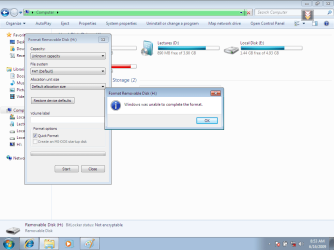
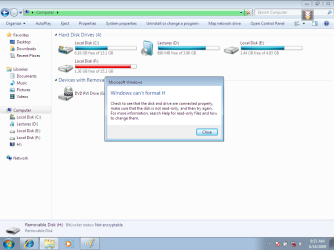
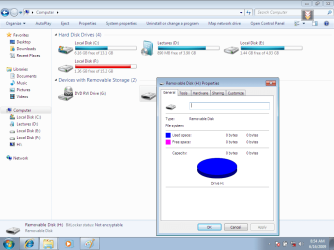
my usb drive is not showing any space or data.

last time , i made it bootable of win7.

and then i copied the win7 all files into usb drive.

then i deleted that file and choose the eject option to making it off.

i ejected it for 5 to 6 times.

after that my usb not working.

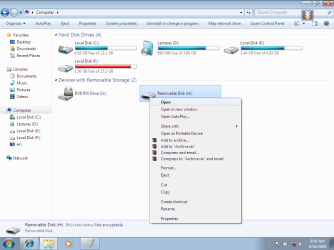
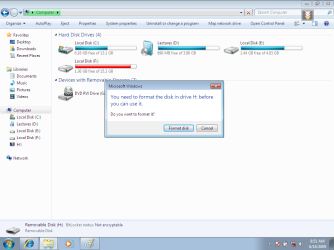
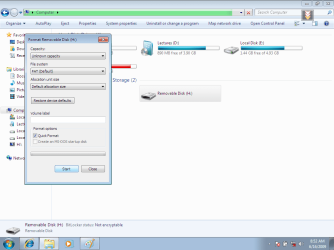
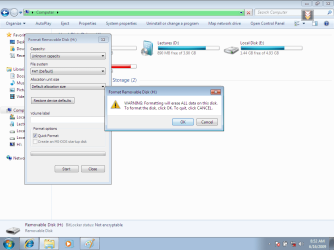
when i try to open it then these messages come.

i take pictues of it. soo see them.

http://0maifs0.googlepages.com/0.png
 

Attachments

  • 0.png
    0.png
    33.1 KB · Views: 65
  • 01.png
    01.png
    39.5 KB · Views: 47
  • 02.png
    02.png
    38.1 KB · Views: 64
  • 03.png
    03.png
    36 KB · Views: 62
  • 04.png
    04.png
    39 KB · Views: 51
  • 05.png
    05.png
    37.7 KB · Views: 45
  • 06.png
    06.png
    38.1 KB · Views: 51
  • 07.png
    07.png
    40.3 KB · Views: 184
  • 08.png
    08.png
    42.6 KB · Views: 193

My Computer My Computer

At a glance

windows7mobile AMD Athlon(tm) XP-M 2600+, 1514 Mhz, 1...768 MB
Computer Manufacturer/Model Number
Gericom/755CI
OS
windows7
CPU
mobile AMD Athlon(tm) XP-M 2600+, 1514 Mhz, 1 Core(s), 1 Log
Motherboard
Gericom 755CI 1.0,BIOS: American Megatrends Inc. 1.04G 07/09
Memory
768 MB
Monitor(s) Displays
15 inches TFT(XGA 1024x786)
Screen Resolution
1024x786
Hard Drives
40GB
Keyboard
compaq
Mouse
IBM
Internet Speed
512KB
Change the file system to NTFS and format.

What happens then?
 

My Computer My Computer

At a glance

Windows 8.1 PRO3rd Generation Intel Core i7‐3612QM CPU @ 2.1...8GB DDR3NVIDIA GeForce GT 525M (128 bit), 1GB Grpahics
Computer type
PC/Desktop
Computer Manufacturer/Model Number
DELL VOSTRO 3650
OS
Windows 8.1 PRO
CPU
3rd Generation Intel Core i7‐3612QM CPU @ 2.10GHZ
Memory
8GB DDR3
Graphics Card(s)
NVIDIA GeForce GT 525M (128 bit), 1GB Grpahics
Screen Resolution
1920X1080
Hard Drives
750GB 5400RPM
Hi maifs,

Do you have another USB drive to check with? Is this the only one you're having problems with? What I have noticed from your images is the green bar at the top. I would try again, this time wait until the green bar has finished its progression. Basically, it is reading and indexing the contents of the USB drive you have inserted to make it easily accessible. During this time, you cannot access the device to format it because it is in use by the indexing service.
 

My Computer My Computer

At a glance

Windows 8.1 Pro RTM x64Intel Core-i5-3570K 4-core @ 3.4GHz (Ivy Brid...4 x 4GB DDR3-1600 Corsair Vengeance CMZ8GX3M2...MSI GeForce GTX770 Gaming OC 2GB
Computer type
PC/Desktop
Computer Manufacturer/Model Number
Dwarf Dwf/11/2012 r09/2013
OS
Windows 8.1 Pro RTM x64
CPU
Intel Core-i5-3570K 4-core @ 3.4GHz (Ivy Bridge) (OC 4.4GHz)
Motherboard
ASRock Z77 Extreme4-M
Memory
4 x 4GB DDR3-1600 Corsair Vengeance CMZ8GX3M2A1600C9B (16GB)
Graphics Card(s)
MSI GeForce GTX770 Gaming OC 2GB
Sound Card
Realtek High Definition on board solution (ALC 898)
Monitor(s) Displays
ViewSonic VA1912w Widescreen (VGA)
Screen Resolution
1440x900
Hard Drives
OCZ Agility 3 SSD 120GB SATA III x2 (RAID 0)
Samsung HD501LJ 500GB SATA II x2
Hitachi HDS721010CLA332 1TB SATA II
Iomega 1.5TB Ext USB 2.0
WD 2.0TB Ext USB 3.0
PSU
XFX Pro Series 850W Semi-Modular
Case
Gigabyte IF233
Cooling
1 x 120mm Front Inlet 1 x 120mm Rear Exhaust
Keyboard
Microsoft Comfort Curve Keyboard 3000 (USB)
Mouse
Microsoft Comfort Mouse 3000 for Business (USB)
Internet Speed
NetGear DG834Gv3 ADSL Modem/Router (Ethernet) ~4.0 Mb/s (O2)
Antivirus
Avast! 8.0.1497
Browser
IE 11
Other Info
Optical Drive: HL-DT-ST BD-RE BH10LS30 SATA Bluray
Lexmark S305 Printer/Scanner/Copier (USB)
WEI Score: 8.1/8.1/8.5/8.5/8.25
Asus Eee PC 1011PX Netbook (Windows 7 x86 Starter)
Hi maifs,

Do you have another USB drive to check with? Is this the only one you're having problems with? What I have noticed from your images is the green bar at the top. I would try again, this time wait until the green bar has finished its progression. Basically, it is reading and indexing the contents of the USB drive you have inserted to make it easily accessible. During this time, you cannot access the device to format it because it is in use by the indexing service.

But look at his last two images. It's finished, yet still reading as 0bytes
 

My Computer My Computer

At a glance

Windows 8.1 PRO3rd Generation Intel Core i7‐3612QM CPU @ 2.1...8GB DDR3NVIDIA GeForce GT 525M (128 bit), 1GB Grpahics
Computer type
PC/Desktop
Computer Manufacturer/Model Number
DELL VOSTRO 3650
OS
Windows 8.1 PRO
CPU
3rd Generation Intel Core i7‐3612QM CPU @ 2.10GHZ
Memory
8GB DDR3
Graphics Card(s)
NVIDIA GeForce GT 525M (128 bit), 1GB Grpahics
Screen Resolution
1920X1080
Hard Drives
750GB 5400RPM
this usb is in already ntfs.
this is not issuing that wheather it finishes green bar at top or not.
i tried many times when its finish.
yes i tried it too , other usbs works properly.
 

My Computer My Computer

At a glance

windows7mobile AMD Athlon(tm) XP-M 2600+, 1514 Mhz, 1...768 MB
Computer Manufacturer/Model Number
Gericom/755CI
OS
windows7
CPU
mobile AMD Athlon(tm) XP-M 2600+, 1514 Mhz, 1 Core(s), 1 Log
Motherboard
Gericom 755CI 1.0,BIOS: American Megatrends Inc. 1.04G 07/09
Memory
768 MB
Monitor(s) Displays
15 inches TFT(XGA 1024x786)
Screen Resolution
1024x786
Hard Drives
40GB
Keyboard
compaq
Mouse
IBM
Internet Speed
512KB
Your USB flash drive probably needs its "launcher" program re-installed.

It was probably deleted or corrupted when you made the flash drive bootable.

Go to the manufacturer's website and see if they have a launcher you can download and install on the USB drive.
 

My Computer My Computer

At a glance

windows 7 x64 Home Premiumintel q6600g.skill 8gb ddr2 1066 (pc2 8500)evga geforce 9800 gtx 512 mb
Computer Manufacturer/Model Number
me / #1
OS
windows 7 x64 Home Premium
CPU
intel q6600
Motherboard
gigbyte ga ep45 ud3l
Memory
g.skill 8gb ddr2 1066 (pc2 8500)
Graphics Card(s)
evga geforce 9800 gtx 512 mb
Screen Resolution
1680 x 1050
Hard Drives
wd caviar black 500 gb
wd caviar black 1tb
wd elements 1tb external hd x2
PSU
raidmax 500w
Case
smilodon (yes, t'was the pretty blue lites that got me!)
How did you "make it bootable of Windows 7." ?

Did it boot ?

If so, to boot from it, was it by:

1. Changing the BIOS select, or

2. Using a 'BootMgr' entry from the 'boot-up' screen ?
 

My Computer My Computer

At a glance

XP_Pro, W7_7201, W7RC.vhd, SciLinux5.3, Fedor...AMD 64x21 gigDunno
Computer Manufacturer/Model Number
Gateway GT5056
OS
XP_Pro, W7_7201, W7RC.vhd, SciLinux5.3, Fedora12, Fedora9_2x, OpenSolaris_09-06
CPU
AMD 64x2
Motherboard
Yes
Memory
1 gig
Graphics Card(s)
Dunno
Sound Card
Realtek something
Monitor(s) Displays
Samsung SyncMaster 940MW w/TV
Screen Resolution
1280x1024
Hard Drives
250 GB WD, USB Seagate Freedesk 1.5 T
Internet Speed
Cable modem
Other Info
1 + 1 = 10b,
7 + 7 = 16o,
a + b = 15h.
it didnt boot from usb.
i tried this.

Step 1: Format the Drive
The steps here are to use the command line to format the disk properly using the diskpart utility. [Be warned: this will erase everything on your drive. Be careful.]
1.Plug in your USB Flash Drive
2.Open a command prompt as administrator (Right click on Start > All Programs > Accessories > Command Prompt and select “Run as administrator”
3.Find the drive number of your USB Drive by typing the following into the Command Prompt window:
diskpart
list disk
The number of your USB drive will listed. You’ll need this for the next step. I’ll assume that the USB flash drive is disk 1.
4.Format the drive by typing the next instructions into the same window. Replace the number “1” with the number of your disk below.
select disk 1
clean
create partition primary
select partition 1
active
format fs=NTFS
assign
exit
When that is done you’ll have a formatted USB flash drive ready to be made bootable.

Step#2:
Creating bootable USB flash drive
Download Windows 7 iso (32-bit) file to your desktop (The download link is no longer valid).
Download and install WinRAR.
Right-click on the Windows 7 iso file and select Extract files. Extract the files to a folder (you can name the folder any name you want, but for illustration purpose, I name it win-7) in your desktop.
....................Extract files.....
In your command prompt, cd to the windows 7 folder.
cd Desktop/win-7 (Change the destination to the folder that you have extracted)
cd boot
bootsect /nt60 X: (X is the drive latter of your USB drive )
Step#3:
Now, copy all the files from the Windows 7 folder to the USB flash drive.
Reboot the computer. Remember to change the first boot device to your USB drive in the BIOS.
You should be able to install Windows 7 from your USB flash drive now.
..................xcopy d:\*.* /s/e/f e:\
 

My Computer My Computer

At a glance

windows7mobile AMD Athlon(tm) XP-M 2600+, 1514 Mhz, 1...768 MB
Computer Manufacturer/Model Number
Gericom/755CI
OS
windows7
CPU
mobile AMD Athlon(tm) XP-M 2600+, 1514 Mhz, 1 Core(s), 1 Log
Motherboard
Gericom 755CI 1.0,BIOS: American Megatrends Inc. 1.04G 07/09
Memory
768 MB
Monitor(s) Displays
15 inches TFT(XGA 1024x786)
Screen Resolution
1024x786
Hard Drives
40GB
Keyboard
compaq
Mouse
IBM
Internet Speed
512KB
i have found the solution of this.
i found a utility program which force it to format and lastly my usb has been formatted noww.
 

My Computer My Computer

At a glance

windows7mobile AMD Athlon(tm) XP-M 2600+, 1514 Mhz, 1...768 MB
Computer Manufacturer/Model Number
Gericom/755CI
OS
windows7
CPU
mobile AMD Athlon(tm) XP-M 2600+, 1514 Mhz, 1 Core(s), 1 Log
Motherboard
Gericom 755CI 1.0,BIOS: American Megatrends Inc. 1.04G 07/09
Memory
768 MB
Monitor(s) Displays
15 inches TFT(XGA 1024x786)
Screen Resolution
1024x786
Hard Drives
40GB
Keyboard
compaq
Mouse
IBM
Internet Speed
512KB
i have found the solution of this.
i found a utility program which force it to format and lastly my usb has been formatted noww.
Good to hear!

Should we now guess as to which utility that is ???
 

My Computer My Computer

At a glance

XP_Pro, W7_7201, W7RC.vhd, SciLinux5.3, Fedor...AMD 64x21 gigDunno
Computer Manufacturer/Model Number
Gateway GT5056
OS
XP_Pro, W7_7201, W7RC.vhd, SciLinux5.3, Fedora12, Fedora9_2x, OpenSolaris_09-06
CPU
AMD 64x2
Motherboard
Yes
Memory
1 gig
Graphics Card(s)
Dunno
Sound Card
Realtek something
Monitor(s) Displays
Samsung SyncMaster 940MW w/TV
Screen Resolution
1280x1024
Hard Drives
250 GB WD, USB Seagate Freedesk 1.5 T
Internet Speed
Cable modem
Other Info
1 + 1 = 10b,
7 + 7 = 16o,
a + b = 15h.
usb disk format
 

My Computer My Computer

At a glance

windows7mobile AMD Athlon(tm) XP-M 2600+, 1514 Mhz, 1...768 MB
Computer Manufacturer/Model Number
Gericom/755CI
OS
windows7
CPU
mobile AMD Athlon(tm) XP-M 2600+, 1514 Mhz, 1 Core(s), 1 Log
Motherboard
Gericom 755CI 1.0,BIOS: American Megatrends Inc. 1.04G 07/09
Memory
768 MB
Monitor(s) Displays
15 inches TFT(XGA 1024x786)
Screen Resolution
1024x786
Hard Drives
40GB
Keyboard
compaq
Mouse
IBM
Internet Speed
512KB
Back
Top