- Local time
- 6:48 PM
- Messages
- 568
My apology for the long post...
I have some issues with the USB ports on my PC with the Gigabyte GA-Z77X-UP5 TH motherboard. The PC has seven USB3 and two USB2 ports. The two USB ports are used for the mouse and the keyboard, while the USB3 ports are for removable media.
The system had been working just fine with the USB ports, and still does, but now the USB3 port connected devices show up as USB2 devices. Windows warns me about "This device can perform faster..." if connected to the USB3 port. It's certainly odd, since the only two USB2 ports are used by the mouse and keyboard. The rest of the USB ports are 3.0.
Since I don't use USB devices much, I am not certain when this issue first surfaced and why the port settings have been changed? And yes, the USB3 ports did work as USB3 and ports' color is blue.
The device manager shows the USB devices as:
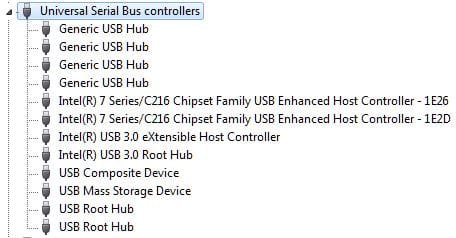
It's hard to see what is what in the device manager. The USB Device Tree Viewer has a better view, the USB device types are indicated in red:

The USB mass storage device is a single USB3 flash drive plugged into different USB3 ports, back and the front of the PC. The picture above had merged the different port views into one.
The driver for all of the USB3 ports shows up as:
That's the Windows 7 default driver for USB ports.
The USB 3.0 driver shows up as:
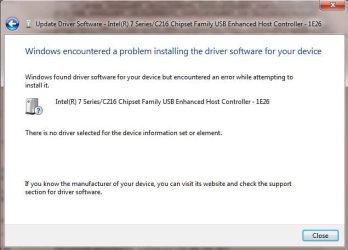
Looks simple enough, just update the driver for the USB 3.0 ports, the system already has it anyway. Well, it's never as simple as it seems. Trying to update the driver for the USB EHC - 1E2D gives this error:
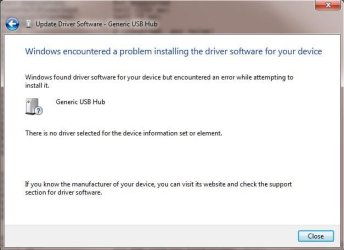
The driver update for the generic USB hub also fails:
Removing the ports results in Windows 7 auto-detecting them and installs the wrong driver. I am pretty lost as how to restore the USB 3.0 ports. Any suggestion would be welcome.
TIA...
I have some issues with the USB ports on my PC with the Gigabyte GA-Z77X-UP5 TH motherboard. The PC has seven USB3 and two USB2 ports. The two USB ports are used for the mouse and the keyboard, while the USB3 ports are for removable media.
The system had been working just fine with the USB ports, and still does, but now the USB3 port connected devices show up as USB2 devices. Windows warns me about "This device can perform faster..." if connected to the USB3 port. It's certainly odd, since the only two USB2 ports are used by the mouse and keyboard. The rest of the USB ports are 3.0.
Since I don't use USB devices much, I am not certain when this issue first surfaced and why the port settings have been changed? And yes, the USB3 ports did work as USB3 and ports' color is blue.
The device manager shows the USB devices as:
It's hard to see what is what in the device manager. The USB Device Tree Viewer has a better view, the USB device types are indicated in red:
The USB mass storage device is a single USB3 flash drive plugged into different USB3 ports, back and the front of the PC. The picture above had merged the different port views into one.
The driver for all of the USB3 ports shows up as:
Driver : C:\Windows\system32\DRIVERS\usbhub.sys (Version: 6.1.7601.18328 Date: 2006-06-21)
Driver Inf : C:\Windows\INF\usb.inf
That's the Windows 7 default driver for USB ports.
The USB 3.0 driver shows up as:
Driver : C:\Windows\system32\DRIVERS\iusb3hub.sys (Version: 1.0.5.235 Date: 2012-05-21)
Driver Inf : C:\Windows\INF\oem57.inf
Looks simple enough, just update the driver for the USB 3.0 ports, the system already has it anyway. Well, it's never as simple as it seems. Trying to update the driver for the USB EHC - 1E2D gives this error:
The driver update for the generic USB hub also fails:
Removing the ports results in Windows 7 auto-detecting them and installs the wrong driver. I am pretty lost as how to restore the USB 3.0 ports. Any suggestion would be welcome.
TIA...
My Computer
- Computer type
- PC/Desktop
- Computer Manufacturer/Model Number
- Custom built at Home
- OS
- Windows 7 64-bit, Windows 8.1 64-bit, OSX El Capitan, Windows 10 (VMware)
- CPU
- Intel i5-3350P 3.1 GHz
- Motherboard
- Gigabyte GA-Z77X-UP5 TH
- Memory
- 16 GBs GSkill Sniper
- Graphics Card(s)
- Radeon HD 7850
- Sound Card
- VIA HD Audio
- Monitor(s) Displays
- Dell U2410 24"
- Screen Resolution
- 1920x1200
- Hard Drives
- 1 x Intel 520 240 GBs
1 x Seagate 1TBs SATA 2.0,
1 x Seagate 1TBs eSATA 2.0
- PSU
- Thermaltake 850W
- Case
- Antec P183
- Cooling
- Noctua NH-D14 Heatsink 2 x 120mm fans, 4 x 120mm case fans
- Keyboard
- Dell Multimedia keyboard
- Mouse
- Logitech Trackball
- Internet Speed
- 28.5 Mb/s