USB Port Stopped Working after Power Surge

TimG

New member
Local time
7:47 AM
Messages
13
Hi

After a power surge on hub port when attaching a card reader to a front USB port one of my external hard drives disappeared.

The drive works fine and is now on another USB port.

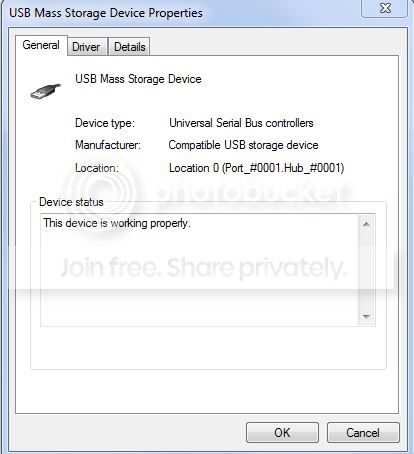
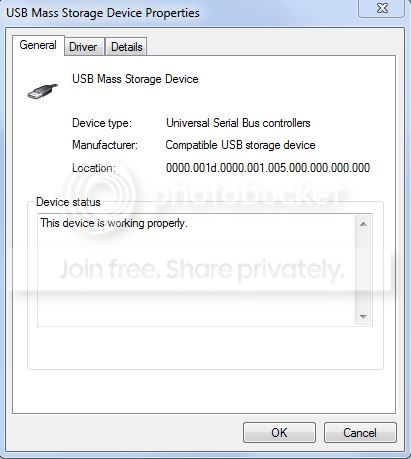
The non functioning rear USB port has the following properties (image 1) and the location address looks weird compared to the functioning USB port below it (image 2):

1
USB0_zps6ad24934.jpg


2
USB1_zpsc4f42d3c.jpg


I have tried uninstalling/reinstalling the driver and disabling/enabling, rebooting etc and it still will not work.

Any suggestions are welcome.

Thanks

Tim


My system specs:Windows 7 Professional 64 bit 6.1 Build 7601
Intel i7-3770 @3.40GHz
ASRock B75 Pro3-M
Memory: 32.00 GB
(1) Hitachi HCS5C1050CLA382 ATA Device
(2) WD 10EADS External USB Device
(3) WD Ext HDD 1021 USB Device
 

My Computer My Computer

At a glance

Microsoft Windows 7 Professional 64-bit 7601 ...Intel(R) Core(TM) i7-4790 CPU @ 3.60GHz32.00 GBIntel(R) HD Graphics 4600
Computer type
PC/Desktop
Computer Manufacturer/Model Number
Custom
OS
Microsoft Windows 7 Professional 64-bit 7601 Multiprocessor Free Service Pack 1
CPU
Intel(R) Core(TM) i7-4790 CPU @ 3.60GHz
Motherboard
Gigabyte Technology Co., Ltd. B85M-DS3H-A
Memory
32.00 GB
Graphics Card(s)
Intel(R) HD Graphics 4600
Sound Card
Realtek High Definition Audio
Monitor(s) Displays
HP x23LED
Screen Resolution
1920 x 1080 x 32 bits (4294967296 colors) @ 60 Hz
Hard Drives
(1) ST1000DM 003-1SB102 SCSI Disk Device
(2) ASMT 2115 USB Device
(3) WD Ext HDD 1021 USB Device
(4) WD Ext HDD 1021 USB Device
(5) WD Ext HDD 1021 USB Device
After a power surge on hub port when attaching a card reader to a front USB port
How do you know there was a power surge at this time?

I am not sure your first screen shot is of the port, I note it says device. But I agree, the location looks bad.

I have tried uninstalling/reinstalling the driver and disabling/enabling, rebooting etc and it still will not work.
Have you totally shut "off" your computer? Not just reboot, or "shutdown", but totally off by unplugging from the wall (or setting the master power switch on the back of your PSU - IF it has the option - to off). This is the only way to totally remove all voltages, in particular the ATX Form Factor required +5Vsb standby voltage PC power supplies supply when the computer is simply shutdown (which is really standby mode).

Note there are several "Wake on..." commands set in the BIOS Setup Menu that use this +5Vsb voltage to keep various circuits and settings "alive" when the computer is in standby mode. These include Wake on Mouse and Wake on Keyboard - which obviously rely on USB. That means USB ports are still alive even when you have exited Windows and shutdown the computer.

If me, I would uninstall your device and the drivers, shutdown, then remove power from the computer for 10 - 15 seconds to ensure all standby settings are released. Then connect and boot and see if the device is detected, drivers load, and it works.

I am assuming you have inspected the interior to ensure the necessary wires from the front panel USB ports are securely connected to the motherboard.

That said, if by "power surge" you mean the USB connector for the card reader was not perfectly aligned when you tried to connect it and you "shorted" the +5V that was present in the computer's USB port to another contact (possibly seeing or hearing the "zap"), then the controller for that pair of ports may now be bad.
 

My Computer My Computer

At a glance

Windows 7 Profession 64-bitIntel Core i7-860 QuadMushkin 4x2Gb PC12800Gigabyte GTX260 896Mb
Computer Manufacturer/Model Number
BrightWorks Systems B4
OS
Windows 7 Profession 64-bit
CPU
Intel Core i7-860 Quad
Motherboard
Gigabyte P55-UD4P
Memory
Mushkin 4x2Gb PC12800
Graphics Card(s)
Gigabyte GTX260 896Mb
Sound Card
Integrated 7.1 HD Dolby
Monitor(s) Displays
2 Samsung 2220wm-HAS 22"
Screen Resolution
1680 x 1050 | 1680 x 1050
Hard Drives
WD HE 1Tb
PSU
Corsair TX-750W
Case
Ultra M998
Cooling
OEM
Keyboard
MS Wireless Comfort 5000
Mouse
MS Wireless 5000
Internet Speed
Cable and pretty darn fast
Thanks for the reply..

I managed to grab a screenshot of the power surge warning (1) but forgot to post the image.

1
pwrsurge_zps21f41a1e.jpg


I will try the steps you outlined when I'm back home and will post back the results.
 

My Computer My Computer

At a glance

Microsoft Windows 7 Professional 64-bit 7601 ...Intel(R) Core(TM) i7-4790 CPU @ 3.60GHz32.00 GBIntel(R) HD Graphics 4600
Computer type
PC/Desktop
Computer Manufacturer/Model Number
Custom
OS
Microsoft Windows 7 Professional 64-bit 7601 Multiprocessor Free Service Pack 1
CPU
Intel(R) Core(TM) i7-4790 CPU @ 3.60GHz
Motherboard
Gigabyte Technology Co., Ltd. B85M-DS3H-A
Memory
32.00 GB
Graphics Card(s)
Intel(R) HD Graphics 4600
Sound Card
Realtek High Definition Audio
Monitor(s) Displays
HP x23LED
Screen Resolution
1920 x 1080 x 32 bits (4294967296 colors) @ 60 Hz
Hard Drives
(1) ST1000DM 003-1SB102 SCSI Disk Device
(2) ASMT 2115 USB Device
(3) WD Ext HDD 1021 USB Device
(4) WD Ext HDD 1021 USB Device
(5) WD Ext HDD 1021 USB Device
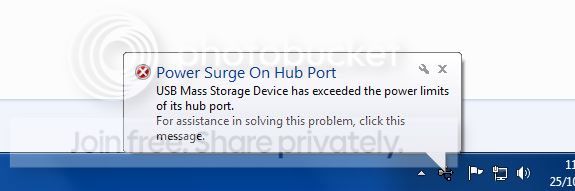
That is telling me connected devices are attempting to pull more current than the port is capable of delivering. That is not a surge.

Generally, using USB devices that have their own external power supplies is best to prevent these type errors.
 

My Computer My Computer

At a glance

Windows 7 Profession 64-bitIntel Core i7-860 QuadMushkin 4x2Gb PC12800Gigabyte GTX260 896Mb
Computer Manufacturer/Model Number
BrightWorks Systems B4
OS
Windows 7 Profession 64-bit
CPU
Intel Core i7-860 Quad
Motherboard
Gigabyte P55-UD4P
Memory
Mushkin 4x2Gb PC12800
Graphics Card(s)
Gigabyte GTX260 896Mb
Sound Card
Integrated 7.1 HD Dolby
Monitor(s) Displays
2 Samsung 2220wm-HAS 22"
Screen Resolution
1680 x 1050 | 1680 x 1050
Hard Drives
WD HE 1Tb
PSU
Corsair TX-750W
Case
Ultra M998
Cooling
OEM
Keyboard
MS Wireless Comfort 5000
Mouse
MS Wireless 5000
Internet Speed
Cable and pretty darn fast
I would totally uninstall the device from device manager; then reboot and let windows re-detect and reinstall and see if that helps to resolve the issue. If you did somehow short out the usb controller on te motherboard as one of the others mentioned; then you may have to replace the controller if that is possible.
 

My Computer My Computer

At a glance

Windows 7 ultimate 64-bitIntel I7 2600K 3.4ghzCorsair 16gb ddr3 1600mhzNvidia Geforce gt 430
Computer type
PC/Desktop
Computer Manufacturer/Model Number
custom built
OS
Windows 7 ultimate 64-bit
CPU
Intel I7 2600K 3.4ghz
Motherboard
Asus Evo P8P67
Memory
Corsair 16gb ddr3 1600mhz
Graphics Card(s)
Nvidia Geforce gt 430
Sound Card
Sound Blaster Titanium x-fi pci express
Monitor(s) Displays
Dell E198WFP
Hard Drives
1 western digital 2TB drive.
PSU
Antec 1200 watt
Case
Inwin Dragon Rider
Cooling
6 case supplied cooling fans
Keyboard
logitech mk700
Mouse
logitech m705
Internet Speed
25-50mbps download; 10mbps upload(i think)
Antivirus
avg free 2014
Browser
mozilla firefox
Other Info
Also have a pretty bad speaker setup which is a klipsch promedia 5.1 surround speaker setup with huge subwoofer and lg blu ray player/writer. Also a hp officejet pro 8600 plus wireless all in one and a logitech s7500 webcam.
Back
Top