Solved USB ports no longer working

rosawoodsii

New member
Local time
4:46 AM
Messages
78
Location
midcoast Maine, USA
I have a Toshiba Satellite laptop which has an ELAN touchpad. Since I detest touchpads, I've always used a mouse instead. Today, my mouse stopped working. I checked the batteries, they're good; even changed the batteries. The mouse won't work. So, I plugged in a wired mouse that I know works. That's not recognized either. Okay...then I plugged in, one after another, three different flash drives in two different ports. Not recognized.

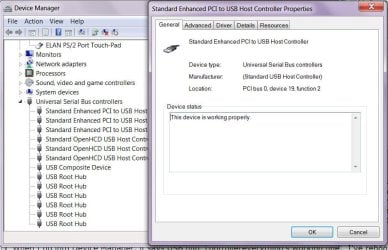
When I go into Device Manager, it says USB hub, controllers, etc, are all working properly, but obviously they're not. I've rebooted twice, but that doesn't clear the problem either. I'm not sure what to do at this point.
 

Attachments
  • Capture.JPG
    Capture.JPG
    82.4 KB · Views: 1

My Computer My Computer

Computer type
Laptop
Computer Manufacturer/Model Number
Acer Aspire 5250 Windows 7, HP 15-f272wm Windows 10
OS
Windows 7 Home Premium 64 bit, Windows 10 64 bit
CPU
AMD E-300 APU dual processors with Radion graphiics
Memory
4 GB
Internet Speed
15 Mbps on a good day
Antivirus
Norton Internet Security
Browser
Firefox, Chrome
Hi,
If it has batteries it would be a Bluetooth device not a usb device although it uses a usb port the signal is not working anymore.
How to fix ?
Try a wired mouse ?
 

My Computer My Computer

Computer type
PC/Desktop
Computer Manufacturer/Model Number
Custom assembled by me :}
OS
Win-7-Pro64bit 7-H-Prem-64bit
CPU
i7-5930K 2nd i9-9940x both water blocked VRM's too
Motherboard
ASUS SABERTOOTH X99 2nd ASUS x299 Apex
Memory
Trident-z 3200C14 2nd Trident-z 3600C16
Graphics Card(s)
EVGA 1080ti ftw3 2nd Titan Xp both water blocked
Sound Card
Built-in Realtek
Monitor(s) Displays
1-AOC G2460PG 24"G-Sync 144Hz/ 2nd 1-ASUS VG248QE 24" 144Hz
Screen Resolution
1920 x 1080 144Hz
Hard Drives
2-Samsung M.2 Evo & Evo Plus
2-Samsung 850 EVO 500GB SSD's/ 3-2.5 W.D. Black 1tb-&3-1tb/3-3.5 WD Black 1tb hdd's
PSU
EVGA SuperNOVA 1000-P2 2nd 1200-P2
Case
2-Corsair Obsidian Series 450D Black ATX Mid Tower
Cooling
Custom water loops
Keyboard
Logitech G710+/ 2nd Logitech G910
Mouse
2-RedDragon M901 Perdition 16400 dpi Gaming mouse = wired
Internet Speed
Comcast Ping 19ms 89.31mbps download speed 6.12mbps upload
Antivirus
Malwarebytes Pro/ Superantispyware Pro
Browser
FireFox & Pale moon
Other Info
2nd ASUS X299 Apex/Intel i9-9940x with Custom water loop/7H-Prem-x64/Corsair 450D case/Ram Trident-z 3600C16 4x8gb / Samsung970Evo plus 500gb SSD/Dual ssd EZ swap evo/PSU EVGA SuperNova 1200w-P2 80+Platinum/GPU Titan Xp /8-ML-140 on push-pull on 2-280GTX rads
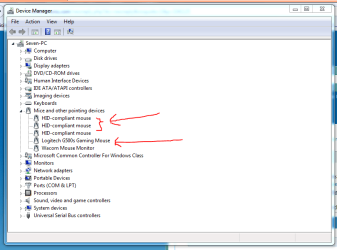
When you plug the wired mouse in, can you see the mouse in Device Manager? It will be an HID device and be listed like this:

Mouse2.PNG

Note the HID devices, and then the line with my actual mouse. Your actual mouse may not show up like that. It may only show as a HID device.

One thing that you could try is to reinstall the USB drivers if you haven't already.
 

My Computer My Computer

Computer type
PC/Desktop
Computer Manufacturer/Model Number
Mellon Labs (custom build)
OS
Win 7 Pro x64/Win 10 Pro x64 dual boot
CPU
AMD FX 8350 Vishera @ 4200
Motherboard
ASUS M5A97 R2.0
Memory
16 GB Mushkin Blackline DDR3-2400 @ 1866 (9-10-10-10-31)
Graphics Card(s)
XFX Radeon R9 280 Double D Black Edition
Sound Card
Realtek HD Audio on MB. Sounds great.
Monitor(s) Displays
Acer 24", Acer 22"
Screen Resolution
3840 x 1080
Hard Drives
1 x Mushkin Chronos 120 GB SSD (Win 10)
1 x Samsung 850 EVO 250 GB SSD (Win 7)
1 x WD 1TB SATA Blue
1 x WD 1TB SATA Green
PSU
Corsair TX-750
Case
CoolerMaster HAF 912+
Cooling
Coolermaster Seidon 240M Liquid AIO. 6 case fans
Keyboard
Logitech G710+
Mouse
Logitech G500s
Internet Speed
Much better since I got fiber, but still way overpriced.
Antivirus
MSE, Malware Bytes for scanning
Browser
Firefox
Other Info
Corsair VOID USB headphones.

A Mellon Labs X-1 - LCD Smartie driven system status display.

Brought to you by the letter E
Power down, unplug the power pack and remove the battery. Also unplug all USB devices. Now press and hold the power button say 5 seconds or so. This will completely drain any residual power left in the system. Now put the battery back in, plug the power pack in. Boot up and see if it works now. I would test with the wired mouse first. USB ports have an overcurrent protection circuit that when tripped, requires a complete power removal to reset.
 

My Computer My Computer

Computer type
PC/Desktop
Computer Manufacturer/Model Number
Home Built
OS
Windows 10 Education 64 bit
CPU
AMD Phenom II X4 980 Black Edition Deneb 3.7GHz
Motherboard
Asus M4N68T-M V2 µATX Motherboard
Memory
8GB 4GBx2 Kingston PC10600 DDR3 1333 Memory
Graphics Card(s)
Zotac NVIDIA Geforce GT640 2 Gig DDR3 PCIe
Sound Card
VIA VT1708s High Definition Audio 8-channel Onboard
Monitor(s) Displays
22" LG E2242 1080p and 2 19" I-INC AG191D
Screen Resolution
1280x1024 - 1920x1080 - 1280x1024
Hard Drives
Crucial M100 256 GB SSD and 500 GB WD Blue SATA
PSU
Thermaltake TR 620
Case
Power Up Black ATX Mid-Tower Case
Cooling
Stock heatsink and fan
Keyboard
Logitech Wireless K350 Wave
Mouse
Logitech Wireless M570 Trackman Wheel
Internet Speed
80 Mbps Down 30 Mbps Up
Antivirus
Windows Defender
Browser
Internet Explorer 11
Other Info
HP DVD1040e Lightscribe - External USB2
Hmm. Never got any notices of replies. Thanks for taking the time to respond.

The USB devices are now working---sporadically--after I powered down for the fourth time and left the computer off for a half hour. I'm going to do the powerdown recommended by alphanumeric and hope that clears it up. If not, I'll reinstall the USB device drivers, but...exactly how do I do that?
 

My Computer My Computer

Computer type
Laptop
Computer Manufacturer/Model Number
Acer Aspire 5250 Windows 7, HP 15-f272wm Windows 10
OS
Windows 7 Home Premium 64 bit, Windows 10 64 bit
CPU
AMD E-300 APU dual processors with Radion graphiics
Memory
4 GB
Internet Speed
15 Mbps on a good day
Antivirus
Norton Internet Security
Browser
Firefox, Chrome
USB drivers are universal and included with Windows, as far as I know. One way to force the reinstall is to go to the Universal Serial Bus Controllers section in Device Manager and right click - uninstall what's listed. That could be tricky as your mouse is going to stop working at some point. Other than that, reinstalling your chip-set drivers maybe?
 

My Computer My Computer

Computer type
PC/Desktop
Computer Manufacturer/Model Number
Home Built
OS
Windows 10 Education 64 bit
CPU
AMD Phenom II X4 980 Black Edition Deneb 3.7GHz
Motherboard
Asus M4N68T-M V2 µATX Motherboard
Memory
8GB 4GBx2 Kingston PC10600 DDR3 1333 Memory
Graphics Card(s)
Zotac NVIDIA Geforce GT640 2 Gig DDR3 PCIe
Sound Card
VIA VT1708s High Definition Audio 8-channel Onboard
Monitor(s) Displays
22" LG E2242 1080p and 2 19" I-INC AG191D
Screen Resolution
1280x1024 - 1920x1080 - 1280x1024
Hard Drives
Crucial M100 256 GB SSD and 500 GB WD Blue SATA
PSU
Thermaltake TR 620
Case
Power Up Black ATX Mid-Tower Case
Cooling
Stock heatsink and fan
Keyboard
Logitech Wireless K350 Wave
Mouse
Logitech Wireless M570 Trackman Wheel
Internet Speed
80 Mbps Down 30 Mbps Up
Antivirus
Windows Defender
Browser
Internet Explorer 11
Other Info
HP DVD1040e Lightscribe - External USB2
Hi,
If it has batteries it would be a Bluetooth device not a usb device although it uses a usb port the signal is not working anymore.
How to fix ?
Try a wired mouse ?

I am curious enough about this that I had to respond. My Toshiba doesn't have Bluetooth. I've used battery powered USB mouse since they came out, and when I bought this one, it said nothing about Bluetooth. So, why do you think that all battery powered mice are Bluetooth?
 

My Computer My Computer

Computer type
Laptop
Computer Manufacturer/Model Number
Acer Aspire 5250 Windows 7, HP 15-f272wm Windows 10
OS
Windows 7 Home Premium 64 bit, Windows 10 64 bit
CPU
AMD E-300 APU dual processors with Radion graphiics
Memory
4 GB
Internet Speed
15 Mbps on a good day
Antivirus
Norton Internet Security
Browser
Firefox, Chrome

My Computer My Computer

Computer type
PC/Desktop
Computer Manufacturer/Model Number
Home made Desktop
OS
Windows 10 Pro. 64/ version 1709 Windows 7 Pro/64
CPU
Intel i7-6800K @ 4.3
Motherboard
ASUS X-99 Deluxe II
Memory
Corsair Platinum 16 gig @2400
Graphics Card(s)
EVGA GTX 1070 OC
Monitor(s) Displays
Asus 27" LED LCD/VE278Q
Screen Resolution
1920-1080 or 1280-720 HDMI
Hard Drives
INTEL SSD 730-240 Gb Sata 3.0/
PSU
EVGA Platium 1200W
Case
Phanteks Luxe Tempered Glass 8 fans/ one radiator
Cooling
XSPC/ Water Cooled CPU
Keyboard
Das 4 Professional
Mouse
Logitech M705/MX Anywhere 2-S
Internet Speed
100 mbits
Antivirus
Microsoft Security Essentials/ Malwarebytes Premium 3.0/ SAS
Browser
I.E. 11 default/Firefox/ ISP Time Warner Cable/Spectrum
Other Info
LG BluRay Burner/
Sound system-KLipsch-THX/
Icy Dock ssd Hot Swap bays.
Hi,
Yea wireless it's still not a usb wired mouse which has been advised to test one with the usb port.
 

My Computer My Computer

Computer type
PC/Desktop
Computer Manufacturer/Model Number
Custom assembled by me :}
OS
Win-7-Pro64bit 7-H-Prem-64bit
CPU
i7-5930K 2nd i9-9940x both water blocked VRM's too
Motherboard
ASUS SABERTOOTH X99 2nd ASUS x299 Apex
Memory
Trident-z 3200C14 2nd Trident-z 3600C16
Graphics Card(s)
EVGA 1080ti ftw3 2nd Titan Xp both water blocked
Sound Card
Built-in Realtek
Monitor(s) Displays
1-AOC G2460PG 24"G-Sync 144Hz/ 2nd 1-ASUS VG248QE 24" 144Hz
Screen Resolution
1920 x 1080 144Hz
Hard Drives
2-Samsung M.2 Evo & Evo Plus
2-Samsung 850 EVO 500GB SSD's/ 3-2.5 W.D. Black 1tb-&3-1tb/3-3.5 WD Black 1tb hdd's
PSU
EVGA SuperNOVA 1000-P2 2nd 1200-P2
Case
2-Corsair Obsidian Series 450D Black ATX Mid Tower
Cooling
Custom water loops
Keyboard
Logitech G710+/ 2nd Logitech G910
Mouse
2-RedDragon M901 Perdition 16400 dpi Gaming mouse = wired
Internet Speed
Comcast Ping 19ms 89.31mbps download speed 6.12mbps upload
Antivirus
Malwarebytes Pro/ Superantispyware Pro
Browser
FireFox & Pale moon
Other Info
2nd ASUS X299 Apex/Intel i9-9940x with Custom water loop/7H-Prem-x64/Corsair 450D case/Ram Trident-z 3600C16 4x8gb / Samsung970Evo plus 500gb SSD/Dual ssd EZ swap evo/PSU EVGA SuperNova 1200w-P2 80+Platinum/GPU Titan Xp /8-ML-140 on push-pull on 2-280GTX rads
There is true blue-tooth and proprietary blue-tooth. My Logitech keyboards and mice are advertised as Blue-tooth but won't work with anything other than the unifying receiver that comes with them. Logitech uses their own proprietary communication. As far as the PC is concerned though, they appear as a wired device. The Unifying receiver just emulates the normal signals a standard USB mouse or keyboard sends to the PC. It has no idea if they are wireless or not. No special drivers needed. The bonus to that is they work in the BIOS, and on other devices like my Raspberry Pi. The downside is I can't link them directly to the Blue-tooth receiver in my laptop, I have to use the Unifying receiver dongle. If I install the unifying software I get battery status and I can link and unlink devices. It's not needed for normal use though.

In my earlier post, I recommended using the Wired mouse first, in case it was the wireless mouse that caused the USB ports to shut down in the first place. Namely the USB receiver. If it's failing and shorting out the ports you don't want to plug it in until you know they are working with something else, like a standard USB mouse. Then plug it in and see what happens. If they go down again chuck that mouse in the bin.
 

My Computer My Computer

Computer type
PC/Desktop
Computer Manufacturer/Model Number
Home Built
OS
Windows 10 Education 64 bit
CPU
AMD Phenom II X4 980 Black Edition Deneb 3.7GHz
Motherboard
Asus M4N68T-M V2 µATX Motherboard
Memory
8GB 4GBx2 Kingston PC10600 DDR3 1333 Memory
Graphics Card(s)
Zotac NVIDIA Geforce GT640 2 Gig DDR3 PCIe
Sound Card
VIA VT1708s High Definition Audio 8-channel Onboard
Monitor(s) Displays
22" LG E2242 1080p and 2 19" I-INC AG191D
Screen Resolution
1280x1024 - 1920x1080 - 1280x1024
Hard Drives
Crucial M100 256 GB SSD and 500 GB WD Blue SATA
PSU
Thermaltake TR 620
Case
Power Up Black ATX Mid-Tower Case
Cooling
Stock heatsink and fan
Keyboard
Logitech Wireless K350 Wave
Mouse
Logitech Wireless M570 Trackman Wheel
Internet Speed
80 Mbps Down 30 Mbps Up
Antivirus
Windows Defender
Browser
Internet Explorer 11
Other Info
HP DVD1040e Lightscribe - External USB2
The problem occurs with both wired and wireless mice, and all that I have are Logitech. I had a hub that I plugged into one of the USB ports, but everytime I plugged it in, the mouse (whichever one I was using) would stop working. I also have a USB external speaker--USB used for charging--and when I plug that into the second USB port, the mouse also stops working. So the problem seems to be the ports themselves, not the mice.

I did the battery drain, and for the time being, everything seems to be working, at least for the last 24 hours. I tossed the hub since it was a pain in the butt anyway, I have the speaker plugged in so it can charge, but it won't charge (brand-new), so I'm not sure if I have a problem with the speaker or whether the USB port isn't doing its job.
 

My Computer My Computer

Computer type
Laptop
Computer Manufacturer/Model Number
Acer Aspire 5250 Windows 7, HP 15-f272wm Windows 10
OS
Windows 7 Home Premium 64 bit, Windows 10 64 bit
CPU
AMD E-300 APU dual processors with Radion graphiics
Memory
4 GB
Internet Speed
15 Mbps on a good day
Antivirus
Norton Internet Security
Browser
Firefox, Chrome
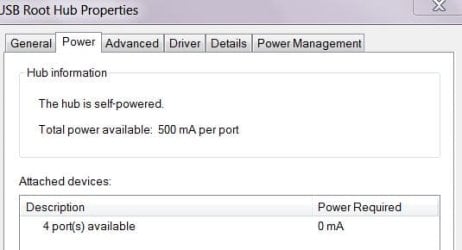
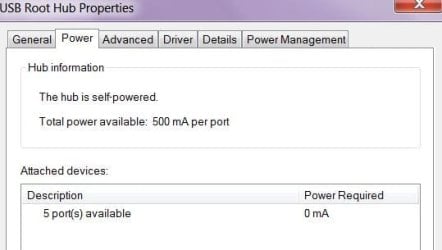
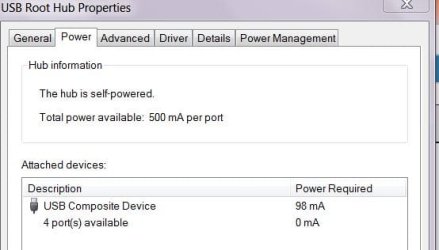
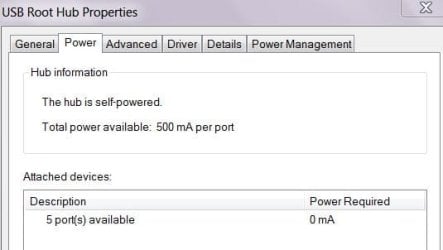
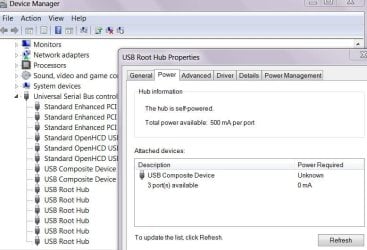
If you open Device Manager, then go to Universal Serial Devices and right click USB Root Hub. There should be a Power Tab. In there it will show you the current being drawn by devices. It sounds like your USB ports may have been damaged or are failing? I'm not sure how to confirm it one way or the other though?
 

My Computer My Computer

Computer type
PC/Desktop
Computer Manufacturer/Model Number
Home Built
OS
Windows 10 Education 64 bit
CPU
AMD Phenom II X4 980 Black Edition Deneb 3.7GHz
Motherboard
Asus M4N68T-M V2 µATX Motherboard
Memory
8GB 4GBx2 Kingston PC10600 DDR3 1333 Memory
Graphics Card(s)
Zotac NVIDIA Geforce GT640 2 Gig DDR3 PCIe
Sound Card
VIA VT1708s High Definition Audio 8-channel Onboard
Monitor(s) Displays
22" LG E2242 1080p and 2 19" I-INC AG191D
Screen Resolution
1280x1024 - 1920x1080 - 1280x1024
Hard Drives
Crucial M100 256 GB SSD and 500 GB WD Blue SATA
PSU
Thermaltake TR 620
Case
Power Up Black ATX Mid-Tower Case
Cooling
Stock heatsink and fan
Keyboard
Logitech Wireless K350 Wave
Mouse
Logitech Wireless M570 Trackman Wheel
Internet Speed
80 Mbps Down 30 Mbps Up
Antivirus
Windows Defender
Browser
Internet Explorer 11
Other Info
HP DVD1040e Lightscribe - External USB2
There are 6 USB Root Hubs listed. Snips attached, but I'm not really sure what this is telling me. I have 2 places to plug in, so I assume those are the USB Composite Devices.
 

Attachments

  • Hub 2.JPG
    Hub 2.JPG
    23.6 KB · Views: 14
  • Hub 3.JPG
    Hub 3.JPG
    24.4 KB · Views: 14
  • Hub 4.JPG
    Hub 4.JPG
    20.5 KB · Views: 14
  • Hub 5.JPG
    Hub 5.JPG
    23.3 KB · Views: 14
  • Hub 6.JPG
    Hub 6.JPG
    23.8 KB · Views: 14
  • Hub 1.JPG
    Hub 1.JPG
    65.2 KB · Views: 0

My Computer My Computer

Computer type
Laptop
Computer Manufacturer/Model Number
Acer Aspire 5250 Windows 7, HP 15-f272wm Windows 10
OS
Windows 7 Home Premium 64 bit, Windows 10 64 bit
CPU
AMD E-300 APU dual processors with Radion graphiics
Memory
4 GB
Internet Speed
15 Mbps on a good day
Antivirus
Norton Internet Security
Browser
Firefox, Chrome
If you saw one with a high current draw, it would be an issue, and tell you what device was overloading the USB ports. I'm not sure why you have so many listings with only 2 ports to plug into. Laptops will use some USB ports internally for things like the keyboard and trackpad. That's still a lot though? I only have two USB Hubs listed on this desktop PC? It has 10 USB ports total. I'm running out of ideas and things to check.
 

My Computer My Computer

Computer type
PC/Desktop
Computer Manufacturer/Model Number
Home Built
OS
Windows 10 Education 64 bit
CPU
AMD Phenom II X4 980 Black Edition Deneb 3.7GHz
Motherboard
Asus M4N68T-M V2 µATX Motherboard
Memory
8GB 4GBx2 Kingston PC10600 DDR3 1333 Memory
Graphics Card(s)
Zotac NVIDIA Geforce GT640 2 Gig DDR3 PCIe
Sound Card
VIA VT1708s High Definition Audio 8-channel Onboard
Monitor(s) Displays
22" LG E2242 1080p and 2 19" I-INC AG191D
Screen Resolution
1280x1024 - 1920x1080 - 1280x1024
Hard Drives
Crucial M100 256 GB SSD and 500 GB WD Blue SATA
PSU
Thermaltake TR 620
Case
Power Up Black ATX Mid-Tower Case
Cooling
Stock heatsink and fan
Keyboard
Logitech Wireless K350 Wave
Mouse
Logitech Wireless M570 Trackman Wheel
Internet Speed
80 Mbps Down 30 Mbps Up
Antivirus
Windows Defender
Browser
Internet Explorer 11
Other Info
HP DVD1040e Lightscribe - External USB2
Since I never got back to anyone, I thought I'd just fill you all in. Apparently it was the particular device I was trying to use, an external XBOOM speaker. I even got a new one and it did the same thing. When I bought a different brand, the problem went away. Both the old and the new XBOOM speakers are completely nonfunctional, as if they completely shorted out inside.

I'm not sure this is a resolution, since before the start of this thread the speaker was working just fine, but I'll mark it closed anyway, and thank you to everyone for your suggestions.
 

My Computer My Computer

Computer type
Laptop
Computer Manufacturer/Model Number
Acer Aspire 5250 Windows 7, HP 15-f272wm Windows 10
OS
Windows 7 Home Premium 64 bit, Windows 10 64 bit
CPU
AMD E-300 APU dual processors with Radion graphiics
Memory
4 GB
Internet Speed
15 Mbps on a good day
Antivirus
Norton Internet Security
Browser
Firefox, Chrome
Back
Top