USB Ports On Mother Board Not Working

chinu2710

New member
Local time
11:58 PM
Messages
27
Hey Guys,
I guess there is too much text in this pos:shock:t but I wanted to give you all a clear description of my problem please help. I have attached few screen shots as well.

I have some problems with my USB ports. I have 2 ports in front and 4 at the back (on the mother board). All these ports were working fine, since last 2-3 weeks there seems to be some problem with it.

I have a webcam that I connect via the back USB port, I never disconnect it. Recently the power supply unit failed when I tried to start the pc. So I replaced it with a new one, everything was back to normal.

Then after a few days or a week I opened my pc because it one of the front USB ports was not detecting my flash drive, while doing this I disconnected all the wires from the back of the CPU including the webcam.

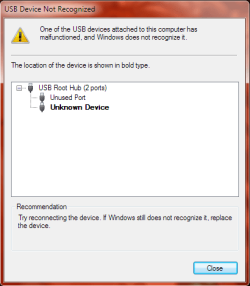
When I restarted the pc the back USB ports stopped detecting any devices, there was a pop up stating, "One of the USB devices attached to this computer has malfunctioned and Windows does not recognize it"
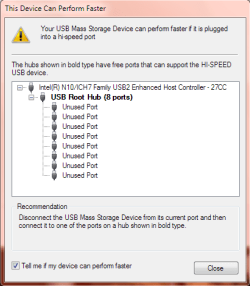
So I tried connecting it in the front port, there came a pop up stating, "Your USB Mass Storage Device can perform faster if it is plugged into a hi-speed port"

I never use to get a message like this in the past and another thing I noticed was that the transfer speed has also reduced drastically. I was copying a few movies to my friend’s flash drive and it took ages,

Transferring at a speed of 800-900 kb/second:(. The transfer speed was pretty fast on XP and on the same port, I always use the front ports. This is the first time I tried to transfer file on Win 7, my friend using Win 7 gets speed around 30-50mb/sec.

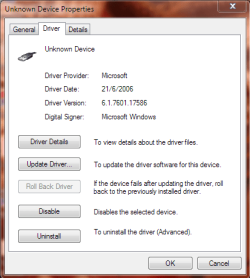
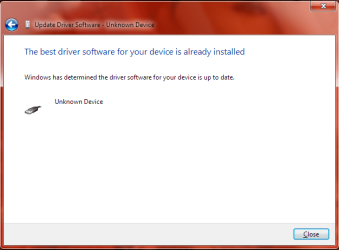
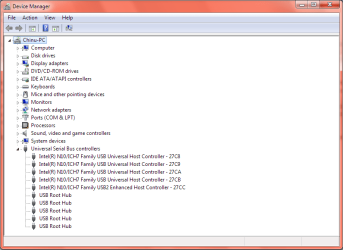
I have the latest windows updates installed, I have checked for driver updates on Intel site and I already have the latest drivers. I have reinstalled all USB ports from device manager.
I don't know if this is a software or a hardware issue.:confused:
Please guys help me, I can't find a solution anywhere.

Thanks,
Chinu
 

Attachments
  • Device Manager.png
    Device Manager.png
    18.7 KB · Views: 37
  • Device Not Recognised.png
    Device Not Recognised.png
    12.2 KB · Views: 38
  • Unknown Device.png
    Unknown Device.png
    16.5 KB · Views: 27
  • Speed.png
    Speed.png
    11.8 KB · Views: 28
  • Up to date drivers.png
    Up to date drivers.png
    19.8 KB · Views: 30

My Computer My Computer

At a glance

Windows 7 Ultimate 32bitIntel(R) Core(TM)2 Duo CPU E7300 @ 2.66GHz (2...2048MB RAMIntel(R) G33/G31 Express Chipset Family
Computer Manufacturer/Model Number
Intel DG31GL
OS
Windows 7 Ultimate 32bit
CPU
Intel(R) Core(TM)2 Duo CPU E7300 @ 2.66GHz (2 CPUs), ~2
Memory
2048MB RAM
Graphics Card(s)
Intel(R) G33/G31 Express Chipset Family
Screen Resolution
1280 x 1024(p) (60.020Hz)
Hard Drives
Seagate Barracuda 7200.10 250 Gbytes
Guys please help I am waiting :) for a reply
 

My Computer My Computer

At a glance

Windows 7 Ultimate 32bitIntel(R) Core(TM)2 Duo CPU E7300 @ 2.66GHz (2...2048MB RAMIntel(R) G33/G31 Express Chipset Family
Computer Manufacturer/Model Number
Intel DG31GL
OS
Windows 7 Ultimate 32bit
CPU
Intel(R) Core(TM)2 Duo CPU E7300 @ 2.66GHz (2 CPUs), ~2
Memory
2048MB RAM
Graphics Card(s)
Intel(R) G33/G31 Express Chipset Family
Screen Resolution
1280 x 1024(p) (60.020Hz)
Hard Drives
Seagate Barracuda 7200.10 250 Gbytes
Recently the power supply unit failed when I tried to start the pc. So I replaced it with a new one, everything was back to normal.

I don't know if this is a software or a hardware issue.:confused:
Please guys help me, I can't find a solution anywhere.

It's not uncommon for a PSU failing to do damage to other components, like the mobo for instance, when it goes.

A long shot, but check your USB setting in BIOS and make sure they are set to USB 2.0/Hi-Speed etc. (could have been reset)
 

My Computer My Computer

At a glance

8 Pro x64i7 3770K 4.6GHz16GB G.Skill Trident X 2666mhzx2 EVGA 780 Ti Superclocked SLI
Computer type
PC/Desktop
Computer Manufacturer/Model Number
Systems by SmartEyeball
OS
8 Pro x64
CPU
i7 3770K 4.6GHz
Motherboard
ASUS P8Z77 WS
Memory
16GB G.Skill Trident X 2666mhz
Graphics Card(s)
x2 EVGA 780 Ti Superclocked SLI
Sound Card
SB X-FI Surround 5.1 PRO USB / ATH-AD900 Headphones
Monitor(s) Displays
x3 Dell U2410 / 58" Samsung
Screen Resolution
5760*1200/ 1920*1200
Hard Drives
2x Intel 520 240GB (RAID 0) * 2x WD Caviar Blacks 2TB (RAID 0) * 2TB WD Caviar Black * Sony Optirac DVD
PSU
Silverstone Strider Evolution 1200W
Case
Thermaltake Level 10 GT Snow Edition
Cooling
Noctua NH-D14
Keyboard
Topre Realforce // Ducky Shine MX Black // Filco Ninja TKL
Mouse
Thermaltake Theron (Highly Recommended) + Razer Imperator
Antivirus
MSE
Browser
IE, FF, WaterFox
Other Info
GT Extreme V2 Sim Racing Cockpit + 40" LCD and K/B Mouse stand ▼
Fanatec CSR Elite Wheel + Clubsport V1 Pedals + CSR shifter/7G-H ▼Saitek X52 Pro ▼ TrackIR 5 Pro
Buttkicker v2 Seat Rumbler with Dedicated 5.1 and Sub Woofer attached to frame ▼
=
Bloody Big Grin
Which settings are you not sure about? The BIOS or within Windows?


To access the BIOS you need to hit F2 as the machine is POSTing (starting up- before it gets to windows)

I can't find a manual to the exact steps, but have a hunt around the options for USB. There should be a function that shows 'Hi-Speed'

If that is enabled, then we look at software and do a port by port device plug in test.
 
Last edited:

My Computer My Computer

At a glance

8 Pro x64i7 3770K 4.6GHz16GB G.Skill Trident X 2666mhzx2 EVGA 780 Ti Superclocked SLI
Computer type
PC/Desktop
Computer Manufacturer/Model Number
Systems by SmartEyeball
OS
8 Pro x64
CPU
i7 3770K 4.6GHz
Motherboard
ASUS P8Z77 WS
Memory
16GB G.Skill Trident X 2666mhz
Graphics Card(s)
x2 EVGA 780 Ti Superclocked SLI
Sound Card
SB X-FI Surround 5.1 PRO USB / ATH-AD900 Headphones
Monitor(s) Displays
x3 Dell U2410 / 58" Samsung
Screen Resolution
5760*1200/ 1920*1200
Hard Drives
2x Intel 520 240GB (RAID 0) * 2x WD Caviar Blacks 2TB (RAID 0) * 2TB WD Caviar Black * Sony Optirac DVD
PSU
Silverstone Strider Evolution 1200W
Case
Thermaltake Level 10 GT Snow Edition
Cooling
Noctua NH-D14
Keyboard
Topre Realforce // Ducky Shine MX Black // Filco Ninja TKL
Mouse
Thermaltake Theron (Highly Recommended) + Razer Imperator
Antivirus
MSE
Browser
IE, FF, WaterFox
Other Info
GT Extreme V2 Sim Racing Cockpit + 40" LCD and K/B Mouse stand ▼
Fanatec CSR Elite Wheel + Clubsport V1 Pedals + CSR shifter/7G-H ▼Saitek X52 Pro ▼ TrackIR 5 Pro
Buttkicker v2 Seat Rumbler with Dedicated 5.1 and Sub Woofer attached to frame ▼
=
Bloody Big Grin
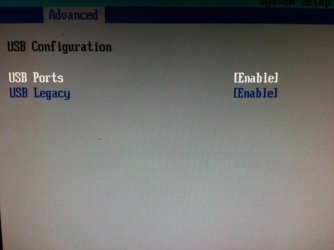
I tried to look into the bios settings only thing I found was the screen shot that I have attached. Disabled it restarted the PC, then enabled but no use still the same problem. Please tell me what to do now :)
 

Attachments

  • IMG_0717.jpg
    IMG_0717.jpg
    282.7 KB · Views: 17

My Computer My Computer

At a glance

Windows 7 Ultimate 32bitIntel(R) Core(TM)2 Duo CPU E7300 @ 2.66GHz (2...2048MB RAMIntel(R) G33/G31 Express Chipset Family
Computer Manufacturer/Model Number
Intel DG31GL
OS
Windows 7 Ultimate 32bit
CPU
Intel(R) Core(TM)2 Duo CPU E7300 @ 2.66GHz (2 CPUs), ~2
Memory
2048MB RAM
Graphics Card(s)
Intel(R) G33/G31 Express Chipset Family
Screen Resolution
1280 x 1024(p) (60.020Hz)
Hard Drives
Seagate Barracuda 7200.10 250 Gbytes
You may have lost functionality on some USB ports which could have shorted out or become disconnected. Check the wiring carefully.

If you cannot find the problem you can use a USB hub if you need more ports than what remain, or take it to a shop to test why some ports aren't working.
 
I would also suggest you carefully check your rewiring

"Your USB Mass Storage Device can perform faster if it is plugged into a hi-speed port"
This is typically the message you get when you plug a USB 3 device into a USB 2 port.
 

My Computer My Computer

At a glance

Windows 7x64 Home Premium SP1Intel i7 2600kG.Skill Ripjaws (DDR3-1600) 2x4GBNvidia GeForce GTS 450; Intel HD Graphics 300...
Computer type
PC/Desktop
Computer Manufacturer/Model Number
Own build
OS
Windows 7x64 Home Premium SP1
CPU
Intel i7 2600k
Motherboard
ASUS P8Z68 Deluxe
Memory
G.Skill Ripjaws (DDR3-1600) 2x4GB
Graphics Card(s)
Nvidia GeForce GTS 450; Intel HD Graphics 3000(GT2+)
Monitor(s) Displays
Dell Ultrasharp IPS panel U2311H, Samsung SyncMaster P2350
Screen Resolution
1920x1080
Hard Drives
Samsung 850 Pro SSD 256GB, Samsung SSD 840 120GB, Seagates 1TB Barracuda ST31000528AS x2
PSU
Seasonic M12II 520W
Case
Lian Li Lancool PC-K60
Cooling
Case: 1x120mm, 3x140mm CPU: Hyper 212+
Keyboard
Logitech MK520 (wireless)
Mouse
Logitech MK520
Internet Speed
6-7 Mbps
Antivirus
Norton Security Premium, Malwarebytes on 2 (MSE on 3rd PC)
Browser
FireFox
Other Info
Audio: Logitech Z523 2.1
I tried to look into the bios settings only thing I found was the screen shot that I have attached. Disabled it restarted the PC, then enabled but no use still the same problem. Please tell me what to do now :)

Might want to try the same for USB Legacy.
 

My Computer My Computer

At a glance

Windows 7 Ultimate x64
OS
Windows 7 Ultimate x64
Just in case your USB ports on your motherboard are not able to be fixed, you can get a 4 or 5 USB port card that you can add to a pci slot on your motherboard.

A few years ago, my USBs on an older otherboard died & I got a PCI to USB card to keep me going until I was able to replace the motherboard. Those cards don't cost much.
 

My Computer My Computer

At a glance

Windows 7 Professional 64 Bit SP1Intel i7-3770K. Mild Overclock to 4.2 GhzCrucial Ballistix Sport 32GB DDR3-1600 (PC3-1...Intel 4000 - On CPU
Computer type
PC/Desktop
Computer Manufacturer/Model Number
Custom Build
OS
Windows 7 Professional 64 Bit SP1
CPU
Intel i7-3770K. Mild Overclock to 4.2 Ghz
Motherboard
ASUS Sabertooth Z77
Memory
Crucial Ballistix Sport 32GB DDR3-1600 (PC3-12800)
Graphics Card(s)
Intel 4000 - On CPU
Sound Card
On Board
Monitor(s) Displays
HP w2408h
Screen Resolution
1920 x 1200
Hard Drives
Samsung 840 Pro 256Gb SSD, --
Two - WDC WD1001FALS-00J7B0 SATA
PSU
Antec EarthWatts Green Series 650 Watt ATX
Case
Fractal Design Core 3000 ATX
Cooling
Corsair H80i Water Cooled
Keyboard
Logitech Illuminated
Mouse
Logitech Wireless Trackball M570 + Touchpad T650
Internet Speed
9.5 Mbps down - 25.4 Mbps upload
Antivirus
MSE
Browser
IE 10, Chrome
  • Like
Reactions: mjf
Thank you guys for trying to help but nothing seems to work...... I even formatted and reinstalled Win7 but no use :(
Guess I'll have to do what TBoyd has suggested....If you guys think there is anything else that might work please suggest :)
 

My Computer My Computer

At a glance

Windows 7 Ultimate 32bitIntel(R) Core(TM)2 Duo CPU E7300 @ 2.66GHz (2...2048MB RAMIntel(R) G33/G31 Express Chipset Family
Computer Manufacturer/Model Number
Intel DG31GL
OS
Windows 7 Ultimate 32bit
CPU
Intel(R) Core(TM)2 Duo CPU E7300 @ 2.66GHz (2 CPUs), ~2
Memory
2048MB RAM
Graphics Card(s)
Intel(R) G33/G31 Express Chipset Family
Screen Resolution
1280 x 1024(p) (60.020Hz)
Hard Drives
Seagate Barracuda 7200.10 250 Gbytes
Just in case your USB ports on your motherboard are not able to be fixed, you can get a 4 or 5 USB port card that you can add to a pci slot on your motherboard.

Do I just buy any PCI card or anything specific that I should look for according to my motherboard? Also wanted to know if USB 3.0 would work on my PC? Is there a combined card for USB 2.0 and 3.0 or do I have to buy 2 separate cards if I want USB 3.0 as well?

Thanks,
Chinu
 

My Computer My Computer

At a glance

Windows 7 Ultimate 32bitIntel(R) Core(TM)2 Duo CPU E7300 @ 2.66GHz (2...2048MB RAMIntel(R) G33/G31 Express Chipset Family
Computer Manufacturer/Model Number
Intel DG31GL
OS
Windows 7 Ultimate 32bit
CPU
Intel(R) Core(TM)2 Duo CPU E7300 @ 2.66GHz (2 CPUs), ~2
Memory
2048MB RAM
Graphics Card(s)
Intel(R) G33/G31 Express Chipset Family
Screen Resolution
1280 x 1024(p) (60.020Hz)
Hard Drives
Seagate Barracuda 7200.10 250 Gbytes
Just in case your USB ports on your motherboard are not able to be fixed, you can get a 4 or 5 USB port card that you can add to a pci slot on your motherboard.

Do I just buy any PCI card or anything specific that I should look for according to my motherboard? Also wanted to know if USB 3.0 would work on my PC? Is there a combined card for USB 2.0 and 3.0 or do I have to buy 2 separate cards if I want USB 3.0 as well?

Thanks,
Chinu

I'd check to make sure there were free slots available, and then what type of slots they are (typically PCI on older machines, PCI-e on newer).

Don't know if there are cards that have both 2.0 and 3.0.
 

My Computer My Computer

At a glance

Windows 7 Ultimate x64
OS
Windows 7 Ultimate x64
If you need more than 2 more USB ports, go for the USB 2 PCIe card. All of the USB 3 cards I've seen only have 2 ports, while the USB 2 cards will have 4 or 5 - (4 external & some have 1 additional internal).

I wouldn't be concerned with USB 3 until your next PC upgrade.
 

My Computer My Computer

At a glance

Windows 7 Professional 64 Bit SP1Intel i7-3770K. Mild Overclock to 4.2 GhzCrucial Ballistix Sport 32GB DDR3-1600 (PC3-1...Intel 4000 - On CPU
Computer type
PC/Desktop
Computer Manufacturer/Model Number
Custom Build
OS
Windows 7 Professional 64 Bit SP1
CPU
Intel i7-3770K. Mild Overclock to 4.2 Ghz
Motherboard
ASUS Sabertooth Z77
Memory
Crucial Ballistix Sport 32GB DDR3-1600 (PC3-12800)
Graphics Card(s)
Intel 4000 - On CPU
Sound Card
On Board
Monitor(s) Displays
HP w2408h
Screen Resolution
1920 x 1200
Hard Drives
Samsung 840 Pro 256Gb SSD, --
Two - WDC WD1001FALS-00J7B0 SATA
PSU
Antec EarthWatts Green Series 650 Watt ATX
Case
Fractal Design Core 3000 ATX
Cooling
Corsair H80i Water Cooled
Keyboard
Logitech Illuminated
Mouse
Logitech Wireless Trackball M570 + Touchpad T650
Internet Speed
9.5 Mbps down - 25.4 Mbps upload
Antivirus
MSE
Browser
IE 10, Chrome
You should also check if you have a PCIe x1 or PCIe x16 slot.
Also check for a full height or half height bracket.
 

My Computer My Computer

At a glance

Windows 7x64 Home Premium SP1Intel i7 2600kG.Skill Ripjaws (DDR3-1600) 2x4GBNvidia GeForce GTS 450; Intel HD Graphics 300...
Computer type
PC/Desktop
Computer Manufacturer/Model Number
Own build
OS
Windows 7x64 Home Premium SP1
CPU
Intel i7 2600k
Motherboard
ASUS P8Z68 Deluxe
Memory
G.Skill Ripjaws (DDR3-1600) 2x4GB
Graphics Card(s)
Nvidia GeForce GTS 450; Intel HD Graphics 3000(GT2+)
Monitor(s) Displays
Dell Ultrasharp IPS panel U2311H, Samsung SyncMaster P2350
Screen Resolution
1920x1080
Hard Drives
Samsung 850 Pro SSD 256GB, Samsung SSD 840 120GB, Seagates 1TB Barracuda ST31000528AS x2
PSU
Seasonic M12II 520W
Case
Lian Li Lancool PC-K60
Cooling
Case: 1x120mm, 3x140mm CPU: Hyper 212+
Keyboard
Logitech MK520 (wireless)
Mouse
Logitech MK520
Internet Speed
6-7 Mbps
Antivirus
Norton Security Premium, Malwarebytes on 2 (MSE on 3rd PC)
Browser
FireFox
Other Info
Audio: Logitech Z523 2.1
Back
Top