USB - Safe to Remove Hardware Balloon Missing

ZaphodB

New member
Power User
VIP
Local time
4:52 PM
Messages
203
Hi Folks!

I hope someone can help. I have several Win 7 HP SP1 machines. All do the same when clicking on the 'Safely Remove Hardware and Eject Media' icon in the system tray - except one.

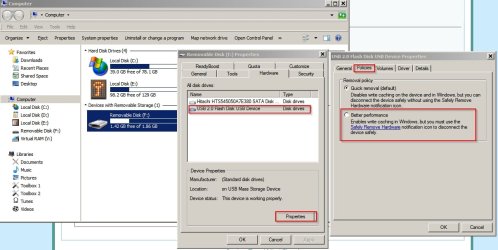
With the machines that do what I want, I click on the icon and get a list of USB devices. I click on the one I want to eject and get a confirmatory message 'The USB Mass Storage Device can now be safely removed from the computer' (see below).

Safe%20To%20Remove%20Hardware.png


One machine doesn't produce this message (presumably because write-caching is disabled?).

How can I get this machine to produce the same 'Safe To Remove Hardware' message? Everything I have tried hasn't worked so far!

Cheers

Zaph
 

My Computer

Computer type
Laptop
Computer Manufacturer/Model Number
DELL Inspiron 1525 / Sony VAIO VGN FW21L / Zoostorm 7877-0095
OS
Windows 7 Home Premium SP1 64-bit (now looking at Linux Mint!)
CPU
Core2 Duo T5750 2GHz/Core2 Duo T5800 2GHz/Core i5 3300 3.1GH
Motherboard
DELL 0U990C / "SONY Corp VAIO" (??) / GA-H61M-DS2 DVI
Memory
4Gb / 4Gb / 8Gb
Graphics Card(s)
Intel 965 Express/ATi Mob Radeon HD 3400/AMD Radeon R7 200
Hard Drives
WD 750Gb Black (WD7500BPKT) - DELL
WD 1Tb Black (WD10JPLX) - SONY
ST 2Tb Barracuda (2000DM001) - Zoostorm
Internet Speed
VM Fibre 100 Mbps
Antivirus
Kaspersky IS 2019 / Kaspersky IS 2019 / Kaspersky IS 2019
Browser
Chrome 76.0.3809 / Chrome 79.0.3945 / Chrome 76.0.3809
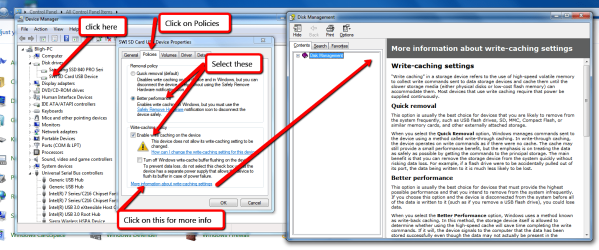
Have you tried this. Attach a device into a USB port that you want to use "Safe to Remove Hardware". Open Control Panel, select Device Manager & follow the screen shots I have posted.

Enable_Write_caching_on_USB_devices.png
 

My Computer

Computer type
PC/Desktop
Computer Manufacturer/Model Number
Self built using existing case
OS
Windows 7 Home Premium 64 bit sp1
CPU
Intel i5 3570 3.4Ghz Ivy Bridge SKT 1155 quad core
Motherboard
Gigabyte Z77-HD3 SKT 1155 2xSata 3, 4x USB 3.0
Memory
G-Skill Rip Jaws 16Gb (8x2) DDR3 -1600 PC3 12800 CL 10 red
Graphics Card(s)
Gigabyte NVIDIA GT610 1Gb DDR3 810/1200 PCI-E 2.0 Silent
Sound Card
NVIDIA High Definition & Realtech High Definition Audio
Monitor(s) Displays
2 x Philips 226V4L 16:9 aspect ratio
Screen Resolution
1920 x 1080 HD
Hard Drives
Samsung 840 Pro 256gb SSD, SATA 3.
Hitachi Touro Portable 1tb, USB 3.0 HDD used for image b/ups.
PSU
Corsair VS450
Case
Codeng
Cooling
PSU fan & CPU fan
Keyboard
Logitech
Mouse
Logitech Wireless trackball M570
Internet Speed
Wireless 3G. 3mg down & 550kb up.
Antivirus
Bitdefender Internet Security 2020
Browser
Opera (Current Version) & Firefox
Other Info
MS Office 2013 Pro. Davis weather station software. MGE Nova 600 avr UPS.
How does one get a Policy tab on Windows 7 Home premium?
 

My Computer

Computer type
PC/Desktop
Computer Manufacturer/Model Number
Dell, Acer, eMachine
OS
Home Premium and Pro 32 bit and 64 bit (4 computers)
Browser
Palemoon
@plodr. The Policies tab that is shown is under Device Manager, which you can find in Control Panel. Then by using the screen shots I have shown in Device Manager under Disk Drives, you will probably need to have a thumb drive on external hard drive inserted into one of the USB ports.

The screen shots are fairly self explanatory & if you move your mouse over the screen shot & left click it will enlarge it for.
 

My Computer

Computer type
PC/Desktop
Computer Manufacturer/Model Number
Self built using existing case
OS
Windows 7 Home Premium 64 bit sp1
CPU
Intel i5 3570 3.4Ghz Ivy Bridge SKT 1155 quad core
Motherboard
Gigabyte Z77-HD3 SKT 1155 2xSata 3, 4x USB 3.0
Memory
G-Skill Rip Jaws 16Gb (8x2) DDR3 -1600 PC3 12800 CL 10 red
Graphics Card(s)
Gigabyte NVIDIA GT610 1Gb DDR3 810/1200 PCI-E 2.0 Silent
Sound Card
NVIDIA High Definition & Realtech High Definition Audio
Monitor(s) Displays
2 x Philips 226V4L 16:9 aspect ratio
Screen Resolution
1920 x 1080 HD
Hard Drives
Samsung 840 Pro 256gb SSD, SATA 3.
Hitachi Touro Portable 1tb, USB 3.0 HDD used for image b/ups.
PSU
Corsair VS450
Case
Codeng
Cooling
PSU fan & CPU fan
Keyboard
Logitech
Mouse
Logitech Wireless trackball M570
Internet Speed
Wireless 3G. 3mg down & 550kb up.
Antivirus
Bitdefender Internet Security 2020
Browser
Opera (Current Version) & Firefox
Other Info
MS Office 2013 Pro. Davis weather station software. MGE Nova 600 avr UPS.
Hi Ranger 4

I don't get the same options as you do - specifically I don't get the Write Caching Policy Options in the lower part of the Properties dialog box as you show in your screen grab.

This is what I get:

Device%20Manager%20-%20USB.png


This actually shouldn't matter as I have two machines - one that gives the confirmation dialog that I want and the other that doesn't - but both have the Write Caching Policy part missing (as shown above).

So I'm still puzzled!

Zaph
 

My Computer

Computer type
Laptop
Computer Manufacturer/Model Number
DELL Inspiron 1525 / Sony VAIO VGN FW21L / Zoostorm 7877-0095
OS
Windows 7 Home Premium SP1 64-bit (now looking at Linux Mint!)
CPU
Core2 Duo T5750 2GHz/Core2 Duo T5800 2GHz/Core i5 3300 3.1GH
Motherboard
DELL 0U990C / "SONY Corp VAIO" (??) / GA-H61M-DS2 DVI
Memory
4Gb / 4Gb / 8Gb
Graphics Card(s)
Intel 965 Express/ATi Mob Radeon HD 3400/AMD Radeon R7 200
Hard Drives
WD 750Gb Black (WD7500BPKT) - DELL
WD 1Tb Black (WD10JPLX) - SONY
ST 2Tb Barracuda (2000DM001) - Zoostorm
Internet Speed
VM Fibre 100 Mbps
Antivirus
Kaspersky IS 2019 / Kaspersky IS 2019 / Kaspersky IS 2019
Browser
Chrome 76.0.3809 / Chrome 79.0.3945 / Chrome 76.0.3809
My Computer

Computer type
Laptop
Computer Manufacturer/Model Number
ASUS
OS
Microsoft Windows 7 Home Premium 64-bit 7601 Multiprocessor Free Service Pack 1
CPU
AMD C-60 APU with Radeon(tm) HD Graphics
Motherboard
ASUSTeK COMPUTER INC. X501U
Memory
4.00 GB
Graphics Card(s)
AMD Radeon HD 6290 Graphics
Sound Card
(1) AMD High Definition Audio Device (2) Realtek High Defi
Screen Resolution
1366 x 768 x 32 bits (4294967296 colors) @ 60 Hz
Hard Drives
Hitachi HTS545050A7E380 SATA Disk Device
Antivirus
Comodo CIS & FW, SecureAplus App Whitelisting, Threatfire
Browser
Cyberfox 64bit, Opera 64bit, Airfox
Other Info
Spy-The-Spy, HitmanPro.Alert, Norton Connect Safe, MJRegWatcher, BitDefender TrafficLight, Voodoo Shield, Zemana AntiMalware
This Forum tutorial may provide some help as well.

http://www.sevenforums.com/tutorials/10169-safely-remove-hardware-eject-device.html

This section copied from Disk Management does seem that Write Caching is not available in all cases. It is available on my computer, but it seems that it is not available on others. What the reason for that is, I don't know.

How can I change the write-caching setting for this device?
"Most consumer-oriented storage devices such as USB flash drives, SD or MMC memory cards, or consumer external disk drives do not allow you to change the device’s caching settings. Internal SATA or serial-attached SCSI hard drives shipped with Windows do typically allow you to change the settings, although this can only be guaranteed by the manufacturer of the device. To understand the caching features offered by a given device and determine which settings best suit your needs, consult the documentation provided by the manufacturer."
 

My Computer

Computer type
PC/Desktop
Computer Manufacturer/Model Number
Self built using existing case
OS
Windows 7 Home Premium 64 bit sp1
CPU
Intel i5 3570 3.4Ghz Ivy Bridge SKT 1155 quad core
Motherboard
Gigabyte Z77-HD3 SKT 1155 2xSata 3, 4x USB 3.0
Memory
G-Skill Rip Jaws 16Gb (8x2) DDR3 -1600 PC3 12800 CL 10 red
Graphics Card(s)
Gigabyte NVIDIA GT610 1Gb DDR3 810/1200 PCI-E 2.0 Silent
Sound Card
NVIDIA High Definition & Realtech High Definition Audio
Monitor(s) Displays
2 x Philips 226V4L 16:9 aspect ratio
Screen Resolution
1920 x 1080 HD
Hard Drives
Samsung 840 Pro 256gb SSD, SATA 3.
Hitachi Touro Portable 1tb, USB 3.0 HDD used for image b/ups.
PSU
Corsair VS450
Case
Codeng
Cooling
PSU fan & CPU fan
Keyboard
Logitech
Mouse
Logitech Wireless trackball M570
Internet Speed
Wireless 3G. 3mg down & 550kb up.
Antivirus
Bitdefender Internet Security 2020
Browser
Opera (Current Version) & Firefox
Other Info
MS Office 2013 Pro. Davis weather station software. MGE Nova 600 avr UPS.
Hi again Callender

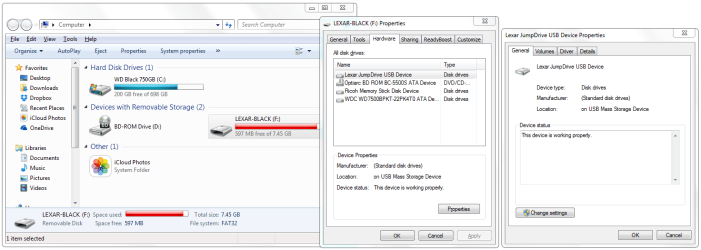
I'm not getting what you're seeing. I right click on the USB stick in 'Computer' and this is what I get ...

No 'Policies' tab under USB Device Properties (see below).

Is this because my machine is running Win 7 Home Premium and not Professional, Enterprise or Ultimate (see OP)??

Zaph
 

Attachments

  • USB Stick Properties.png
    USB Stick Properties.png
    110.4 KB · Views: 2

My Computer

Computer type
Laptop
Computer Manufacturer/Model Number
DELL Inspiron 1525 / Sony VAIO VGN FW21L / Zoostorm 7877-0095
OS
Windows 7 Home Premium SP1 64-bit (now looking at Linux Mint!)
CPU
Core2 Duo T5750 2GHz/Core2 Duo T5800 2GHz/Core i5 3300 3.1GH
Motherboard
DELL 0U990C / "SONY Corp VAIO" (??) / GA-H61M-DS2 DVI
Memory
4Gb / 4Gb / 8Gb
Graphics Card(s)
Intel 965 Express/ATi Mob Radeon HD 3400/AMD Radeon R7 200
Hard Drives
WD 750Gb Black (WD7500BPKT) - DELL
WD 1Tb Black (WD10JPLX) - SONY
ST 2Tb Barracuda (2000DM001) - Zoostorm
Internet Speed
VM Fibre 100 Mbps
Antivirus
Kaspersky IS 2019 / Kaspersky IS 2019 / Kaspersky IS 2019
Browser
Chrome 76.0.3809 / Chrome 79.0.3945 / Chrome 76.0.3809
@ZaphodB. In the screen shot you have posted in Post #8, click on Change Settings in the last small window. Policies should show up in the change settings window.

I use Windows 7 Home Premium so that should not be the reason.
 

My Computer

Computer type
PC/Desktop
Computer Manufacturer/Model Number
Self built using existing case
OS
Windows 7 Home Premium 64 bit sp1
CPU
Intel i5 3570 3.4Ghz Ivy Bridge SKT 1155 quad core
Motherboard
Gigabyte Z77-HD3 SKT 1155 2xSata 3, 4x USB 3.0
Memory
G-Skill Rip Jaws 16Gb (8x2) DDR3 -1600 PC3 12800 CL 10 red
Graphics Card(s)
Gigabyte NVIDIA GT610 1Gb DDR3 810/1200 PCI-E 2.0 Silent
Sound Card
NVIDIA High Definition & Realtech High Definition Audio
Monitor(s) Displays
2 x Philips 226V4L 16:9 aspect ratio
Screen Resolution
1920 x 1080 HD
Hard Drives
Samsung 840 Pro 256gb SSD, SATA 3.
Hitachi Touro Portable 1tb, USB 3.0 HDD used for image b/ups.
PSU
Corsair VS450
Case
Codeng
Cooling
PSU fan & CPU fan
Keyboard
Logitech
Mouse
Logitech Wireless trackball M570
Internet Speed
Wireless 3G. 3mg down & 550kb up.
Antivirus
Bitdefender Internet Security 2020
Browser
Opera (Current Version) & Firefox
Other Info
MS Office 2013 Pro. Davis weather station software. MGE Nova 600 avr UPS.
Back
Top