Safe To Remove Hardware

sparker781

New member
Member
Local time
10:15 PM
Messages
82
Location
Malden, MA
I am running into a weird issue not really sure where to put it. As an example whenever I have my external drive connected and I want to right click on the "Safely Remove Hardware and Eject Media" icon which is the usb icon and a green check mark..Well normally I would be able to right click and choose eject however lately whenever I right click I do not get the eject option, I merely get an option to go into devices and printers...Any idea what could be causing this?

Thanks
 

My Computer

Computer type
PC/Desktop
Computer Manufacturer/Model Number
Dell Inspiron 530
OS
Winodws 7 Ultimate 32 Bit
CPU
2.80 GHz
Memory
3GB
Monitor(s) Displays
AOC
Hard Drives
Main Hard Drive is 500gb

Second Hard Drive is 1TB
Keyboard
Dell Keyboard
Mouse
Dell Optical Mouse
Antivirus
AVG Internet Security 2014
Browser
Mozilla Firefox
Well it isn't just my external drive...I just found out its any USB device I have plugged in. I now have my PC controller olugged in and its doing the same thing.....Thoughts?!?
 

My Computer

Computer type
PC/Desktop
Computer Manufacturer/Model Number
Dell Inspiron 530
OS
Winodws 7 Ultimate 32 Bit
CPU
2.80 GHz
Memory
3GB
Monitor(s) Displays
AOC
Hard Drives
Main Hard Drive is 500gb

Second Hard Drive is 1TB
Keyboard
Dell Keyboard
Mouse
Dell Optical Mouse
Antivirus
AVG Internet Security 2014
Browser
Mozilla Firefox
It normally only offers to "Safely Remove" on storage drives like an External HD.
 
Yeah Well

Take a look at this screen shot!!!

How do I fix this?
 

Attachments

  • Error.jpg
    Error.jpg
    3 KB · Views: 43
Last edited:

My Computer

Computer type
PC/Desktop
Computer Manufacturer/Model Number
Dell Inspiron 530
OS
Winodws 7 Ultimate 32 Bit
CPU
2.80 GHz
Memory
3GB
Monitor(s) Displays
AOC
Hard Drives
Main Hard Drive is 500gb

Second Hard Drive is 1TB
Keyboard
Dell Keyboard
Mouse
Dell Optical Mouse
Antivirus
AVG Internet Security 2014
Browser
Mozilla Firefox
Yeah Well ?

Take a look at this screen shot!!!

How do I fix this?
We are trying to help, Being short won't help at all.
I assume this happens with all USB ports so you may try reinstalling USB drivers or a http://www.sevenforums.com/tutorials/700-system-restore.html#post4405 Greg's suggestions may turn up something too.
For devices other than a storage media there shouldn't be Safely Remove offered since there would be no write/read operations not possible data loss. For instance neither my mouse no keyboard appears in the Safely Remove dialog.

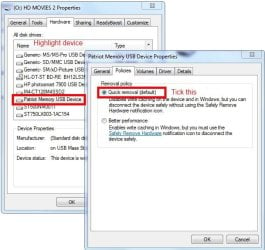
For the drive try this, open Computer right click it, choose Properties. Click the Hardware tab and scroll to the problem device and highlight it and click Properties for it. Open Policies and tick the quick Removal (default) button, OK, OK, Reboot and see if it is back to normal.

remove.JPG
 
Last edited:

My Computer

Computer type
PC/Desktop
Computer Manufacturer/Model Number
Home Built Desktop By DataTech
OS
Windows 7 Ultimate X64 SP1
CPU
Intel i5-2550K, Differing ~4.4-4.8GHz No built in GPU
Motherboard
ASUS P8Z68-V PRO/GEN3
Memory
16GB G.Skill Sniper 1866MHz @ 2133MHz 2x8GB
Graphics Card(s)
ASUS GTX650TIB-DC2OC-2GD5, (650TI Boost)
Sound Card
Onboard Realtek 5-1
Monitor(s) Displays
Samsung P2570HD
Screen Resolution
1920x1080
Hard Drives
Samsung 840 Pro 256GB SSD for OS, 500GB Seagate Constellation (Enterprise drive) for Data
PSU
Corsair HX650W
Case
Inwin Dragon Rider
Cooling
Hyper 212 EVO w/two Noctua fans, push-pull, @1300 RPM
Keyboard
E-Z Eyes, bright yellow keys with large characters
Mouse
steelseries SENSEI Laser Pro Gaming
Internet Speed
48-51Mbs Mbs down, 11 Mbs up Xfinity Cable
Antivirus
Norton Internet Security 2013
Browser
IE 10, Opera, Pale Moon if needed
Other Info
4 case fans, LG BluRay-RE, ASUS DVD-RW, Mr. Fusion power supply, 1.21 gigawatts.
Hi Sparker781,

Are you able to "Open Devices and Printers"?
 

My Computer

OS
Windows 7 Home Premium 32 bit
Sorry for the late response. I am able to open Devices and Printers. As I said this just starting happening to me within the past few days.
 

My Computer

Computer type
PC/Desktop
Computer Manufacturer/Model Number
Dell Inspiron 530
OS
Winodws 7 Ultimate 32 Bit
CPU
2.80 GHz
Memory
3GB
Monitor(s) Displays
AOC
Hard Drives
Main Hard Drive is 500gb

Second Hard Drive is 1TB
Keyboard
Dell Keyboard
Mouse
Dell Optical Mouse
Antivirus
AVG Internet Security 2014
Browser
Mozilla Firefox
Waiting to hear the results of the steps I already gave you. There are other steps if those don't help.
 
a chkdisk did not find anything out of the ordinary. Got any other suggestions?
 

My Computer

Computer type
PC/Desktop
Computer Manufacturer/Model Number
Dell Inspiron 530
OS
Winodws 7 Ultimate 32 Bit
CPU
2.80 GHz
Memory
3GB
Monitor(s) Displays
AOC
Hard Drives
Main Hard Drive is 500gb

Second Hard Drive is 1TB
Keyboard
Dell Keyboard
Mouse
Dell Optical Mouse
Antivirus
AVG Internet Security 2014
Browser
Mozilla Firefox
Do all storage drives not show up to Safely Remove, or just the one? Does it fail to show up there every time?

Run SFC /SCANNOW Command to see if System files are needing repair.

What happened with Britton30"s suggestion?
 
Well

Tried "For the drive try this, open Computer right click it, choose Properties. Click the Hardware tab and scroll to the problem device and highlight it and click Properties for it. Open Policies and tick the quick Removal (default) button, OK, OK, Reboot and see if it is back to normal." I did that but that has not fixed the issue. I am running the scannow so ill let you know the results of the outcome
 

My Computer

Computer type
PC/Desktop
Computer Manufacturer/Model Number
Dell Inspiron 530
OS
Winodws 7 Ultimate 32 Bit
CPU
2.80 GHz
Memory
3GB
Monitor(s) Displays
AOC
Hard Drives
Main Hard Drive is 500gb

Second Hard Drive is 1TB
Keyboard
Dell Keyboard
Mouse
Dell Optical Mouse
Antivirus
AVG Internet Security 2014
Browser
Mozilla Firefox
Back
Top