Solved USB trouble

hallbl06

New member
Local time
7:31 PM
Messages
35
I'm having trouble with my USB drives. When I plug a flash drive or other devices such as camera or cell phones in the USB drives, the computer makes a sound like it recognizes them but they never show up anywhere on the computer. I have plugging them into all 3 USB drives on the computer and that doesn't make a difference.

I've tried searching the internet but I don't exactly understand how to do most of the solutions... can anyone explain to me in simple terms how to fix this problem? Thanks!
 

My Computer

Computer type
Laptop
Computer Manufacturer/Model Number
Compaq
OS
Windows 7 Home Premium 64 bit
1. Plug in the external USB device, make sure it is turned on (if you hear the ping from Windows it probably is!)

2. Click on Start and right mouse click on My Computer
3. Left click on Manage
4. in the new window in the left pane click on Storage
5. click on Dick Management


Wait for windows to make up its mind. Ignore the top part of the middle pane, look in the bottom half. Do you see anything in there that might be your USB? If you do post a screen shot.
 

My Computer

Computer type
PC/Desktop
OS
windows 7 ultimate x64

My Computer

Computer type
PC/Desktop
Computer Manufacturer/Model Number
Custom
OS
Windows 7 Ultimate x64
CPU
AMD FX(tm)-6100 Six-Core Processor
Graphics Card(s)
AMD Radeon HD 7700 Series
Sound Card
OnBoard
Screen Resolution
1920x1080
Keyboard
Rapoo Wireless Keyboard E-1050
Mouse
Rapoo Wireless Optical Mouse E-1010
Antivirus
G-Data Internet Security
Browser
Google Chrome
1. Plug in the external USB device, make sure it is turned on (if you hear the ping from Windows it probably is!)

2. Click on Start and right mouse click on My Computer
3. Left click on Manage
4. in the new window in the left pane click on Storage
5. click on Dick Management


Wait for windows to make up its mind. Ignore the top part of the middle pane, look in the bottom half. Do you see anything in there that might be your USB? If you do post a screen shot.

Quit d*cking around LOL.
 

My Computer

Computer type
PC/Desktop
Computer Manufacturer/Model Number
Home built (GeneO industries)/Model 4
OS
Windows 10 Pro. EFI boot partition, full EFI boot
CPU
i7 4770k 4.4GHz (44-44-43-43 turbo) @ 1.248V
Motherboard
ASUS Maximus VI Hero
Memory
16GB (8GBx2) @2200 MHz G.skill Sniper 10-11-10-30-1, 1.6V
Graphics Card(s)
MSI GTX 970 Gaming 4G
Sound Card
Onboard SupremeFX Audio
Monitor(s) Displays
NEC Spectraview 2490WUXi-SV
Screen Resolution
1920 x 1200
Hard Drives
Samsung 850 Pro 256GB (OS), Samsung 2x 128GB 840 Pro SSD in RAID0, 3x WD Blue 6Gb/s 1TB RAID0, WD 2TB Black external USB 3.0, 2TB WD20EARS Green external USB 3.0, 2x 500GB Seagate and 1 750 GB external USB, 1x 350GB external USB3
PSU
Seasonic X-850 (2012 KM3 model)
Case
Fractal Design Define R4
Cooling
NH-D14, NF-F12, NF-A15; NF-P14, NF-P12,NF-A14, S12A PWM
Keyboard
Cooler Master Storm Quickfire Rapid - Brown
Mouse
Logitech G602
Internet Speed
126.4 Mb/s down, 24.3 Mb/s up
Other Info
USB 3.0 x8 , SATA III x8, eSATA, USB 2.0 x6. Samsung DVD R/W drive.

WEI: CPU 7.8, Memory 7.9, Graphics 7.9, Disk 7.9
I don't see anything that it could be....
 

Attachments

  • forum.png
    forum.png
    34.9 KB · Views: 5

My Computer

Computer type
Laptop
Computer Manufacturer/Model Number
Compaq
OS
Windows 7 Home Premium 64 bit
1. Plug in the external USB device, make sure it is turned on (if you hear the ping from Windows it probably is!)

2. Click on Start and right mouse click on My Computer
3. Left click on Manage
4. in the new window in the left pane click on Storage
5. click on Dick Management


Wait for windows to make up its mind. Ignore the top part of the middle pane, look in the bottom half. Do you see anything in there that might be your USB? If you do post a screen shot.

An embarrassing typo I hope. :o
 

My Computer

Computer type
PC/Desktop
Computer Manufacturer/Model Number
Self built using existing case
OS
Windows 7 Home Premium 64 bit sp1
CPU
Intel i5 3570 3.4Ghz Ivy Bridge SKT 1155 quad core
Motherboard
Gigabyte Z77-HD3 SKT 1155 2xSata 3, 4x USB 3.0
Memory
G-Skill Rip Jaws 16Gb (8x2) DDR3 -1600 PC3 12800 CL 10 red
Graphics Card(s)
Gigabyte NVIDIA GT610 1Gb DDR3 810/1200 PCI-E 2.0 Silent
Sound Card
NVIDIA High Definition & Realtech High Definition Audio
Monitor(s) Displays
2 x Philips 226V4L 16:9 aspect ratio
Screen Resolution
1920 x 1080 HD
Hard Drives
Samsung 840 Pro 256gb SSD, SATA 3.
Hitachi Touro Portable 1tb, USB 3.0 HDD used for image b/ups.
PSU
Corsair VS450
Case
Codeng
Cooling
PSU fan & CPU fan
Keyboard
Logitech
Mouse
Logitech Wireless trackball M570
Internet Speed
Wireless 3G. 3mg down & 550kb up.
Antivirus
Bitdefender Internet Security 2020
Browser
Opera (Current Version) & Firefox
Other Info
MS Office 2013 Pro. Davis weather station software. MGE Nova 600 avr UPS.
click on Dick Management

Unfortunately yes, it is a typo. The word should have been Disk.


@Halbll06


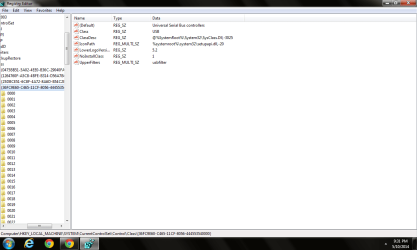
1. Click the "Start" button, type "regedit" (without quotation marks) in the “Search" box and then press “Enter”.
2. Navigate to the following key:

HKEY_LOCAL_MACHINE\SYSTEM\CurrentControlSet\Control\Class\{36FC9E60-C465-11CF-8056-444553540000}

3. Right click the {36FC9E60-C465-11CF-8056-444553540000} entry, choose "Export", select “Desktop” in the “Save in” box and type "backup" (without quotation marks) in “File Name”. Click “Save”.

Please Note: The backup file is on the Desktop and named “backup.reg”. We can simply restore the registry by double-clicking the “backup.reg” file.

4. Highlight this key ({36FC9E60-C465-11CF-8056-444553540000} ), on the right pane, and then check if “Upperfilters” and “Lowerfilters” value are present. If so, please right click on the values and select "Delete" to remove them.
5. Restart the computer to check the issue.
 

My Computer

Computer type
PC/Desktop
OS
windows 7 ultimate x64
Okay I got to step 4... is that what it was supposed to look like? I right clicked on "Upperfilters" and deleted them.. Restarted the computer. Flash drive still didn't work
 

Attachments

  • forum.png
    forum.png
    27.6 KB · Views: 3

My Computer

Computer type
Laptop
Computer Manufacturer/Model Number
Compaq
OS
Windows 7 Home Premium 64 bit

My Computer

Computer type
PC/Desktop
Computer Manufacturer/Model Number
Hewlett-Packard
OS
Windows 7 Ultimate x64
CPU
Intel Core i5-2410M
Motherboard
Hewlett-Packard 1651
Memory
2 x 4 GB ELPIDA 667Mhz 1.5V
Graphics Card(s)
Radeon (TM) HD 7650M
Hard Drives
750GB WD7500BPVT
With the USB device plugged in go back to Computer > Manage but this time click on Device Manager. Do you have any unknown devices? Do you have anything showing under Portable devices?
Any unknown device uninstall then unplug the USB drive and reboot and plug the USB drive back in.
Anything under portable device right click and choose properties and post back with result.
 

My Computer

Computer type
PC/Desktop
OS
windows 7 ultimate x64
There was an unknown device listed under System Devices. I uninstalled it, took out the unplugged the USB and restarted. As soon as the plugged the USB back in after the restart the unknown showed up again.

I didn't even see anything that said Portable devices...
 

My Computer

Computer type
Laptop
Computer Manufacturer/Model Number
Compaq
OS
Windows 7 Home Premium 64 bit
Right click C:\WINDOWS\system32\drivers\usbstor.sys->Properties. Click the Details tab. Write down the file version number displayed.

Now navigate to C:\Windows\System32\DriverStore\FileRepository. Scroll down and look for folder names that begin usbstor.inf. Open the folder with the most recent date. Right click on the usbstor.sys file in that folder and check its file version number.

Does it match the other version number? If yes, then copy the usbstor.inf and usbstor.pnf files in there to C:\WINDOWS\inf\. If asked if you should replace or keep both files choose replace.

Reboot.Try inserting your flash drive
If you can't see some of the folders named above you might have to unhide system and hidden files and allow extensions for known file types form Control Panel > Folder settings
 

My Computer

Computer type
PC/Desktop
OS
windows 7 ultimate x64
There were two folders that began with usbstor.inf. They both had the same date and time on them but only the first one had the same version number. I copied the files like you said and rebooted. It keeps making the sound when the usb is plugged in or removed but it's still not showing up.
 

My Computer

Computer type
Laptop
Computer Manufacturer/Model Number
Compaq
OS
Windows 7 Home Premium 64 bit
Ah, yes but was that the most recent folder? You might have a mismatch between the driver files. What make and model is your computer?
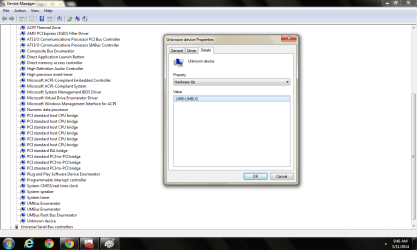
And can you go back to device manager, right-click the unknown device and click Properties. Then click the Details tab, and then from the drop-down, select "Hardware Ids" and post a screenshot.
 

My Computer

Computer type
PC/Desktop
OS
windows 7 ultimate x64
My computer is a Compaq Presario CQ56. I noticed this time while in device manager that under the general category the device status says "No drivers are installed for this device."
 

Attachments

  • Untitled.png
    Untitled.png
    40.8 KB · Views: 4

My Computer

Computer type
Laptop
Computer Manufacturer/Model Number
Compaq
OS
Windows 7 Home Premium 64 bit

My Computer

Computer type
PC/Desktop
OS
windows 7 ultimate x64
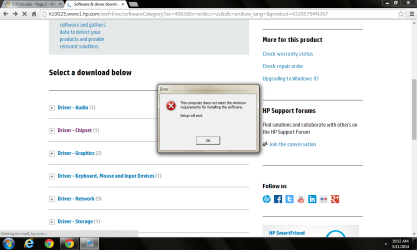
I tried to install the chipset drivers and got an error message
 

Attachments

  • Untitled.png
    Untitled.png
    45.6 KB · Views: 3

My Computer

Computer type
Laptop
Computer Manufacturer/Model Number
Compaq
OS
Windows 7 Home Premium 64 bit
I tried to install the chipset drivers and got an error message

That chipset driver is probably not the right driver that is intended for that laptop model. Compaq Presario CQ56 has several different models which have Intel or AMD chipsets. It would be much helpful if you could provide more specific system information about your laptop. You can use Speccy - System Information to get your laptop's hardware specifications.
 

My Computer

Computer type
PC/Desktop
Computer Manufacturer/Model Number
Hewlett-Packard
OS
Windows 7 Ultimate x64
CPU
Intel Core i5-2410M
Motherboard
Hewlett-Packard 1651
Memory
2 x 4 GB ELPIDA 667Mhz 1.5V
Graphics Card(s)
Radeon (TM) HD 7650M
Hard Drives
750GB WD7500BPVT
Frozwire is correct, the model number should have a combination of letters and numbers after CQ56. Find the exact model on Compaq website.
What happened when you tried to use the drivers from the FileRepository?
 

My Computer

Computer type
PC/Desktop
OS
windows 7 ultimate x64
Is this what the model number should look like? Compaq Presario CQ56-115DX.... I found the product number by pressing fn+esc and then plugged that into the compaq website.

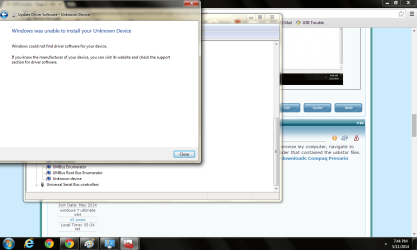
Cyanna: I got this message shown in the screen shot when I tried to use the FileRepository drivers
 

Attachments

  • Untitled.png
    Untitled.png
    54.3 KB · Views: 2

My Computer

Computer type
Laptop
Computer Manufacturer/Model Number
Compaq
OS
Windows 7 Home Premium 64 bit
Back
Top