Solved USB trouble

My Computer

Computer type
PC/Desktop
Computer Manufacturer/Model Number
Hewlett-Packard
OS
Windows 7 Ultimate x64
CPU
Intel Core i5-2410M
Motherboard
Hewlett-Packard 1651
Memory
2 x 4 GB ELPIDA 667Mhz 1.5V
Graphics Card(s)
Radeon (TM) HD 7650M
Hard Drives
750GB WD7500BPVT
cyanna: I'm having some trouble checking for the missing drivers. I clicked on your link and two options come up, Check for updates with scan now AND select your operating system.. I tried the first option and it makes me install some software. So I did that and once it's done I get a message saying 0 products were found. So I tried the other one, put in my operating system (windows 7 64 bit). That brings up drivers but nothing that says chipset drivers.
 

My Computer

Computer type
Laptop
Computer Manufacturer/Model Number
Compaq
OS
Windows 7 Home Premium 64 bit
working night today. Just to recap: you have tried several USB devices and they ALL have the same problem? This is the same for all three USB ports? Any other problems with the laptop? How long has this problem been present? You are on Windows 7 Home Premium 64 bit?
 

My Computer

Computer type
PC/Desktop
OS
windows 7 ultimate x64
I've tried plugging two iphones into all three usb ports as well as a flash drive.. None of them work. The iphones will charge but that's all they do. However, I do have another flash drive that will work in all three ports and a mouse that works in all three as well. No, I haven't really had any other trouble with the laptop. I've had this problem for a month or two. Yes Windows 7 Home Premium 64 bit.
 

My Computer

Computer type
Laptop
Computer Manufacturer/Model Number
Compaq
OS
Windows 7 Home Premium 64 bit
Lol I tried all those steps.. The last one (delete and reinstall itunes) made the iphone show up in itunes but it still doesn't show up in computer
 

My Computer

Computer type
Laptop
Computer Manufacturer/Model Number
Compaq
OS
Windows 7 Home Premium 64 bit
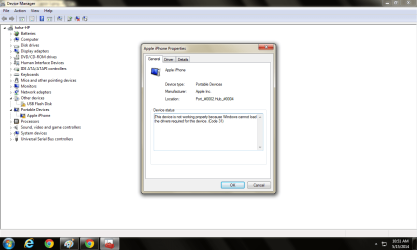
Some how I got the iphone and the flash drive to show up in device manager but they both have yellow triangle exclamation points by them. I right clicked on them and selected properties. I've posted the error codes below for each of them.
 

Attachments

  • error 1.png
    error 1.png
    39.3 KB · Views: 0
  • error 2.png
    error 2.png
    40.5 KB · Views: 0

My Computer

Computer type
Laptop
Computer Manufacturer/Model Number
Compaq
OS
Windows 7 Home Premium 64 bit
looks like you need drivers for those things. If the flash drive is not an iSomething-or-Other right click and choose update driver and see what happens.
For the iPhone the drivers should instal when you install iTunes. This is about the extent of my knowledge with regards to iThings .....:(
 

My Computer

Computer type
PC/Desktop
OS
windows 7 ultimate x64
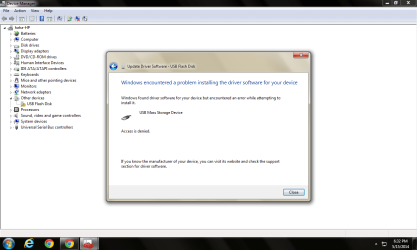
The screen shot is what happened when I tried to update the driver for the non iSomething - flash drive. The flash drive doesn't have anything written on it other than 2GB so I have no idea who the manufacturer is.

haha I'll try to figure out the iphone on my own or find someone that knows something about them... i'm kind of iphone illiterate too when it comes to everything except calling and texting!
 

Attachments

  • Untitled.png
    Untitled.png
    43 KB · Views: 2

My Computer

Computer type
Laptop
Computer Manufacturer/Model Number
Compaq
OS
Windows 7 Home Premium 64 bit
Last edited:

My Computer

Computer type
PC/Desktop
Computer Manufacturer/Model Number
Custom Built
OS
Windows 10 Pro
CPU
AMD Ryzen 5 2400G Processor with Radeon RX Vega 11 Graphics
Motherboard
ASRock X470 Master SLI/AC AM4 AMD Promontory X470 SATA 6Gb/s
Memory
G.SKILL Ripjaws V Series 16GB (2 x 8GB) 288-Pin DDR4 SDRAM D
Graphics Card(s)
2047MB NVIDIA GeForce GTX 1060 6GB (EVGA)
Sound Card
Motherboard Built in
Monitor(s) Displays
Acer R240HY bidx 23.8-Inch IPS HDMI DVI VGA (1920 x 1080) Wi
Screen Resolution
1920 x 1080
Hard Drives
1TB Sandisk SSD PLUS (Main drive)
500 GB Seagate 7200 RPM (Games)
500 GB Western Digital 7200 RPM (Virtual Machines)
PSU
CORSAIR TX Series TX650M 650W 80+ Gold Modular Power Supply
Case
CORSAIR CARBIDE SPEC-02 Mid-Tower Gaming Case, Red LED Fan
Cooling
220mm, two 120mm, and four 60mm fans
Keyboard
Wired Dell keyboard
Mouse
Wireless Logitech mouse
Internet Speed
250mb down, 30mb up
Antivirus
Panda Cloud Antivirus
Browser
Chrome-ish x64
Other Info
Your awesome for reading this.
1. Plug in the external USB device, make sure it is turned on (if you hear the ping from Windows it probably is!)

2. Click on Start and right mouse click on My Computer
3. Left click on Manage
4. in the new window in the left pane click on Storage
5. click on Dick Management


Wait for windows to make up its mind. Ignore the top part of the middle pane, look in the bottom half. Do you see anything in there that might be your USB? If you do post a screen shot.

Um....you have a big typo in this...you put D#ck management instead of disk management lol
 

My Computer

Computer type
PC/Desktop
Computer Manufacturer/Model Number
custom built
OS
Windows 7 ultimate 64-bit
CPU
Intel I7 2600K 3.4ghz
Motherboard
Asus Evo P8P67
Memory
Corsair 16gb ddr3 1600mhz
Graphics Card(s)
Nvidia Geforce gt 430
Sound Card
Sound Blaster Titanium x-fi pci express
Monitor(s) Displays
Dell E198WFP
Hard Drives
1 western digital 2TB drive.
PSU
Antec 1200 watt
Case
Inwin Dragon Rider
Cooling
6 case supplied cooling fans
Keyboard
logitech mk700
Mouse
logitech m705
Internet Speed
25-50mbps download; 10mbps upload(i think)
Antivirus
avg free 2014
Browser
mozilla firefox
Other Info
Also have a pretty bad speaker setup which is a klipsch promedia 5.1 surround speaker setup with huge subwoofer and lg blu ray player/writer. Also a hp officejet pro 8600 plus wireless all in one and a logitech s7500 webcam.
1. Plug in the external USB device, make sure it is turned on (if you hear the ping from Windows it probably is!)

2. Click on Start and right mouse click on My Computer
3. Left click on Manage
4. in the new window in the left pane click on Storage
5. click on Dick Management


Wait for windows to make up its mind. Ignore the top part of the middle pane, look in the bottom half. Do you see anything in there that might be your USB? If you do post a screen shot.

Um....you have a big typo in this...you put D#ck management instead of disk management lol

:roflmao:
 

My Computer

Computer type
PC/Desktop
Computer Manufacturer/Model Number
Custom Built
OS
Windows 10 Pro
CPU
AMD Ryzen 5 2400G Processor with Radeon RX Vega 11 Graphics
Motherboard
ASRock X470 Master SLI/AC AM4 AMD Promontory X470 SATA 6Gb/s
Memory
G.SKILL Ripjaws V Series 16GB (2 x 8GB) 288-Pin DDR4 SDRAM D
Graphics Card(s)
2047MB NVIDIA GeForce GTX 1060 6GB (EVGA)
Sound Card
Motherboard Built in
Monitor(s) Displays
Acer R240HY bidx 23.8-Inch IPS HDMI DVI VGA (1920 x 1080) Wi
Screen Resolution
1920 x 1080
Hard Drives
1TB Sandisk SSD PLUS (Main drive)
500 GB Seagate 7200 RPM (Games)
500 GB Western Digital 7200 RPM (Virtual Machines)
PSU
CORSAIR TX Series TX650M 650W 80+ Gold Modular Power Supply
Case
CORSAIR CARBIDE SPEC-02 Mid-Tower Gaming Case, Red LED Fan
Cooling
220mm, two 120mm, and four 60mm fans
Keyboard
Wired Dell keyboard
Mouse
Wireless Logitech mouse
Internet Speed
250mb down, 30mb up
Antivirus
Panda Cloud Antivirus
Browser
Chrome-ish x64
Other Info
Your awesome for reading this.
1. Plug in the external USB device, make sure it is turned on (if you hear the ping from Windows it probably is!)

2. Click on Start and right mouse click on My Computer
3. Left click on Manage
4. in the new window in the left pane click on Storage
5. click on Dick Management


Wait for windows to make up its mind. Ignore the top part of the middle pane, look in the bottom half. Do you see anything in there that might be your USB? If you do post a screen shot.

Um....you have a big typo in this...you put D#ck management instead of disk management lol

:roflmao:

LOL!!!
 

My Computer

Computer type
PC/Desktop
Computer Manufacturer/Model Number
custom built
OS
Windows 7 ultimate 64-bit
CPU
Intel I7 2600K 3.4ghz
Motherboard
Asus Evo P8P67
Memory
Corsair 16gb ddr3 1600mhz
Graphics Card(s)
Nvidia Geforce gt 430
Sound Card
Sound Blaster Titanium x-fi pci express
Monitor(s) Displays
Dell E198WFP
Hard Drives
1 western digital 2TB drive.
PSU
Antec 1200 watt
Case
Inwin Dragon Rider
Cooling
6 case supplied cooling fans
Keyboard
logitech mk700
Mouse
logitech m705
Internet Speed
25-50mbps download; 10mbps upload(i think)
Antivirus
avg free 2014
Browser
mozilla firefox
Other Info
Also have a pretty bad speaker setup which is a klipsch promedia 5.1 surround speaker setup with huge subwoofer and lg blu ray player/writer. Also a hp officejet pro 8600 plus wireless all in one and a logitech s7500 webcam.
First, and foremost, a big LOL on the typo! That's one of the funniest typo's I've seen in awhile!! :party:

I skimmed through the thread. I was going to suggest we start at the beginning and follow the sequence of steps that should occur till i saw your last post: USB Mass Storage driver "Access Denied"

I've seen a number of cases with that symptom recently, and in each case so far, has been malware related. Follow the links in post #2 http://www.sevenforums.com/drivers/...possible-uninstall-code-28-a.html#post2773380

Re-test with a flash drive. It only uses windows drivers so should be easiest to reinstall
 

My Computer

Computer type
PC/Desktop
Computer Manufacturer/Model Number
Dell Optiplex 360 and Optiplex 755
OS
Desk 1: Win 7 Pro x32; Desk 2: Windows 10 x64
Hard Drives
500GB Crucial SSD in both Desktops
Other Info
Buffalo 6TB NAS, Raid 1
First, and foremost, a big LOL on the typo! That's one of the funniest typo's I've seen in awhile!! :party:

I skimmed through the thread. I was going to suggest we start at the beginning and follow the sequence of steps that should occur till i saw your last post: USB Mass Storage driver "Access Denied"

I've seen a number of cases with that symptom recently, and in each case so far, has been malware related. Follow the links in post #2 http://www.sevenforums.com/drivers/...possible-uninstall-code-28-a.html#post2773380

Re-test with a flash drive. It only uses windows drivers so should be easiest to reinstall

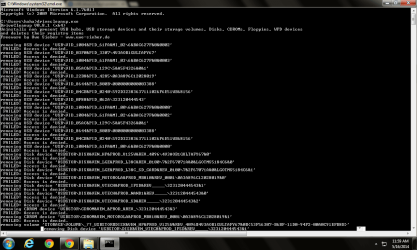
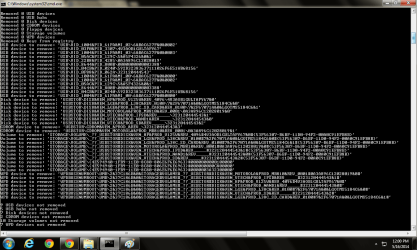
It removed a bunch of junk but the flash drive still isn't working
 

My Computer

Computer type
Laptop
Computer Manufacturer/Model Number
Compaq
OS
Windows 7 Home Premium 64 bit
OK. Next thing to check. Right click the device again->Properties. Select the Details tab. Use the pull down menu and look closely to see if entries for
> Class Upper Filters
> Class Lower Filters

There may or may not be items with these names. Take a close look and select each if there.
> Does it display a list of filter names?
> Select each name to see its provider
> Report name and provider of any upper/lower filter present
 

My Computer

Computer type
PC/Desktop
Computer Manufacturer/Model Number
Dell Optiplex 360 and Optiplex 755
OS
Desk 1: Win 7 Pro x32; Desk 2: Windows 10 x64
Hard Drives
500GB Crucial SSD in both Desktops
Other Info
Buffalo 6TB NAS, Raid 1
No upper or lower filters are present
 

My Computer

Computer type
Laptop
Computer Manufacturer/Model Number
Compaq
OS
Windows 7 Home Premium 64 bit
@hallbl06

You ran the bat as admin?

Right click run as administrator?
 

My Computer

Computer type
PC/Desktop
Computer Manufacturer/Model Number
Custom Built
OS
Windows 10 Pro
CPU
AMD Ryzen 5 2400G Processor with Radeon RX Vega 11 Graphics
Motherboard
ASRock X470 Master SLI/AC AM4 AMD Promontory X470 SATA 6Gb/s
Memory
G.SKILL Ripjaws V Series 16GB (2 x 8GB) 288-Pin DDR4 SDRAM D
Graphics Card(s)
2047MB NVIDIA GeForce GTX 1060 6GB (EVGA)
Sound Card
Motherboard Built in
Monitor(s) Displays
Acer R240HY bidx 23.8-Inch IPS HDMI DVI VGA (1920 x 1080) Wi
Screen Resolution
1920 x 1080
Hard Drives
1TB Sandisk SSD PLUS (Main drive)
500 GB Seagate 7200 RPM (Games)
500 GB Western Digital 7200 RPM (Virtual Machines)
PSU
CORSAIR TX Series TX650M 650W 80+ Gold Modular Power Supply
Case
CORSAIR CARBIDE SPEC-02 Mid-Tower Gaming Case, Red LED Fan
Cooling
220mm, two 120mm, and four 60mm fans
Keyboard
Wired Dell keyboard
Mouse
Wireless Logitech mouse
Internet Speed
250mb down, 30mb up
Antivirus
Panda Cloud Antivirus
Browser
Chrome-ish x64
Other Info
Your awesome for reading this.
Back
Top