usb wifi adapter not working right, need help

fighter

New member
Local time
11:05 AM
Messages
19
hi
i have bought the following item
500mW 300Mbps 802.11n/g/b Wifi USB Wireless LAN Adapter - eBay (item 260533568467 end time Jan-08-10 11:43:54 PST)

it's from a company named kinamax
i am using windows 7 32 bit, and i downloaded the latest drivers from ralink site

my problem is that i can connect to routers, but i dont get internet
i thought that maybe the adapter is bad but i can actually enter the router settings from the browser, which means it's working but something prevents it from working fully

i also tried at another computer with windows xp, but same problem, but with an other 802.11g adapter it does not have this problem and can surf on the net

in other words it's the popular no internet access problem

please help me, thanks
 

My Computer My Computer

OS
Windows 7
The router might not learnt of the new adapter yet. Is the router set to auto config-DHCP?
 

My Computer My Computer

Computer Manufacturer/Model Number
Lenovo ThinkPad T60
OS
Windows 7 Ultimate 64Bit
CPU
GenuineIntel Intel(R) Core(TM) DuoCore T2400 @ 1.83GHz
Motherboard
Intel(R) 82801G (ICH7 Family)
Memory
2.00 GB
Graphics Card(s)
Mobile Intel(R) 945 Express Chipset
Sound Card
SoundMAX Integrated Digital HD Audio
Monitor(s) Displays
ThinkPad Display
Screen Resolution
1400x1050
Hard Drives
100Gb SATA
Keyboard
Standard Keyboard
Mouse
HID-compliant Mouse
Internet Speed
Cable Broadband - 54Mbps
Other Info
Intel(R) PRO/1000 PL Network Connection
11a/b/g Wireless LAN Mini PCI Express Adapter
Welcome!

Sounds like a router configuration issue. Make sure your default gateway is set right. Also call your ISP. Often times you need to "register" the new router with them before they will grant you internet access.

Can you connect to any other computers in your network?
 

My Computer My Computer

Computer Manufacturer/Model Number
Custom
OS
Windows 7 Professional x64
CPU
Intel i7 2600K OC'd @ 4620 MHz
Motherboard
Asus P8Z68-V Pro
Memory
16GB GSkill Sniper 2133 Mhz (4x4GB)
Graphics Card(s)
EVGA GeForce GTX 480 SuperClocked+
Sound Card
Realtek High Definition Audio
Monitor(s) Displays
2x Acer S273HLbmii 27"
Screen Resolution
2 x 1920x1080
Hard Drives
64GB Crucial M4 SSD

Storage: Hitachi 1TB 5400RPM, Samsung 1.5TB 5400RPM
PSU
Corsair HW Series 750w (modular)
Case
Cooler Master HAF 932 Advanced Blue Edition
Cooling
CM Hyper 212+ CPU cooler, 3x 230mm + 1x 140mm case fans
Keyboard
Logitech MK320 (wireless)
Mouse
Logitech MK320 (wireless)
Internet Speed
30 Mb/s : 2 Mb/s
UPDATE:

the problem was that the motherboard built in lan and the usb wifi had a tackle
so i fixed it by doing a bridge, is there something better other than bridging? or it's fine this way?
also, if i change it into soft ap mode, it will use the internet from the modem i have on this computer? (thats how i am writing this post) or i still have to do sharing from the dialer of the adsl?


and one more question that bugged me:
i have seen that when i try soft ap mode, it asks me for a password and automatically sets it on wpa2, it's in the ralink utility software, is there a way to make it not to use a password at all or at least wep? (thats for my nintendo ds)

thanks
 

My Computer My Computer

OS
Windows 7
You are bridging your Local Area Network with your USB network?...and it solved the internet issue?
 

My Computer My Computer

Computer Manufacturer/Model Number
Lenovo ThinkPad T60
OS
Windows 7 Ultimate 64Bit
CPU
GenuineIntel Intel(R) Core(TM) DuoCore T2400 @ 1.83GHz
Motherboard
Intel(R) 82801G (ICH7 Family)
Memory
2.00 GB
Graphics Card(s)
Mobile Intel(R) 945 Express Chipset
Sound Card
SoundMAX Integrated Digital HD Audio
Monitor(s) Displays
ThinkPad Display
Screen Resolution
1400x1050
Hard Drives
100Gb SATA
Keyboard
Standard Keyboard
Mouse
HID-compliant Mouse
Internet Speed
Cable Broadband - 54Mbps
Other Info
Intel(R) PRO/1000 PL Network Connection
11a/b/g Wireless LAN Mini PCI Express Adapter
yeah, looks like they tried to take the same gateway or something
anyway now i can connect to a router and surf, or connect my adsl modem and surf

i'll explain what i am doing:
i have bought this wifi usb so i can make a soft ap and share my adsl internet with my wii and nintendo ds
why usb? because that when i wanna shut it off i just take the usb out of the port and it's off

so basically: i use usb to connect game consoles and other wifi devices with my adsl modem

now that it is fixed i have another question to who that is familiar with ralink utility
is there a way to make the softap use wep key or not use one at all and be unsecured network? that is beacause that my nintendo ds does not support other than wep

thanks
 

My Computer My Computer

OS
Windows 7

My Computer My Computer

Computer Manufacturer/Model Number
Lenovo ThinkPad T60
OS
Windows 7 Ultimate 64Bit
CPU
GenuineIntel Intel(R) Core(TM) DuoCore T2400 @ 1.83GHz
Motherboard
Intel(R) 82801G (ICH7 Family)
Memory
2.00 GB
Graphics Card(s)
Mobile Intel(R) 945 Express Chipset
Sound Card
SoundMAX Integrated Digital HD Audio
Monitor(s) Displays
ThinkPad Display
Screen Resolution
1400x1050
Hard Drives
100Gb SATA
Keyboard
Standard Keyboard
Mouse
HID-compliant Mouse
Internet Speed
Cable Broadband - 54Mbps
Other Info
Intel(R) PRO/1000 PL Network Connection
11a/b/g Wireless LAN Mini PCI Express Adapter
nope, wish i could have this ralink utility version, because that mine is newer and does not let me choose wep encryption
 

My Computer My Computer

OS
Windows 7
If you could get your hands on that version, try to see if it has the required option. I'd give it a ago, up to you. It might not even be a relink utility issue, rather your network, adapter.
 

My Computer My Computer

Computer Manufacturer/Model Number
Lenovo ThinkPad T60
OS
Windows 7 Ultimate 64Bit
CPU
GenuineIntel Intel(R) Core(TM) DuoCore T2400 @ 1.83GHz
Motherboard
Intel(R) 82801G (ICH7 Family)
Memory
2.00 GB
Graphics Card(s)
Mobile Intel(R) 945 Express Chipset
Sound Card
SoundMAX Integrated Digital HD Audio
Monitor(s) Displays
ThinkPad Display
Screen Resolution
1400x1050
Hard Drives
100Gb SATA
Keyboard
Standard Keyboard
Mouse
HID-compliant Mouse
Internet Speed
Cable Broadband - 54Mbps
Other Info
Intel(R) PRO/1000 PL Network Connection
11a/b/g Wireless LAN Mini PCI Express Adapter
ok here is a new question:
i have a ethernet and wireless usb, when both enabled, it causes the wifi one not to be able to surf and stuff
if i disable the ethernet (where my modem is connected) the wifi works alright
it seems that the adresses are conflicting or something, is it possible to configure it somehow so when both ethernet and wireless are enabled, the wireless will still be able to surf on routers?
if i will bridge them again, it will mess with the softap
 

My Computer My Computer

OS
Windows 7
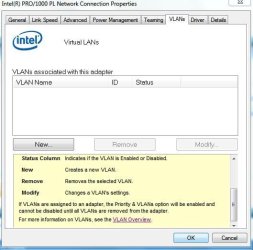
What about creating a VLAN for your LAN? The VLAN Overview sounds interesting :D
Noname.jpg
 

My Computer My Computer

Computer Manufacturer/Model Number
Lenovo ThinkPad T60
OS
Windows 7 Ultimate 64Bit
CPU
GenuineIntel Intel(R) Core(TM) DuoCore T2400 @ 1.83GHz
Motherboard
Intel(R) 82801G (ICH7 Family)
Memory
2.00 GB
Graphics Card(s)
Mobile Intel(R) 945 Express Chipset
Sound Card
SoundMAX Integrated Digital HD Audio
Monitor(s) Displays
ThinkPad Display
Screen Resolution
1400x1050
Hard Drives
100Gb SATA
Keyboard
Standard Keyboard
Mouse
HID-compliant Mouse
Internet Speed
Cable Broadband - 54Mbps
Other Info
Intel(R) PRO/1000 PL Network Connection
11a/b/g Wireless LAN Mini PCI Express Adapter
sounds cool but i dont have this feature, sounds like the intel wfi is pretty good
just now i changed the ethernet configuration to have 10.0.0.137 gateway rather than 10.0.0.138
because that for some reason the wifi insists to work on 10.0.0.138
but it causes the ethernet to say it's on unidentified network
i would like to have the ethernet on automatic setting and do the change at the wifi properties, but i dont kow what ip, subnet and gateway to do so it will still work
 

My Computer My Computer

OS
Windows 7
Why not leave the ethernet connection as dhcp, and create an adhoc wireless connection for other devices to connect to your W7. Then for internet, you can bridge the LAN and the adhoc wireless connection.
 

My Computer My Computer

Computer Manufacturer/Model Number
Lenovo ThinkPad T60
OS
Windows 7 Ultimate 64Bit
CPU
GenuineIntel Intel(R) Core(TM) DuoCore T2400 @ 1.83GHz
Motherboard
Intel(R) 82801G (ICH7 Family)
Memory
2.00 GB
Graphics Card(s)
Mobile Intel(R) 945 Express Chipset
Sound Card
SoundMAX Integrated Digital HD Audio
Monitor(s) Displays
ThinkPad Display
Screen Resolution
1400x1050
Hard Drives
100Gb SATA
Keyboard
Standard Keyboard
Mouse
HID-compliant Mouse
Internet Speed
Cable Broadband - 54Mbps
Other Info
Intel(R) PRO/1000 PL Network Connection
11a/b/g Wireless LAN Mini PCI Express Adapter
nah nevermind but thanks anyway, i fixed it by setting the gateway of the ethernet as 10.0.0.137
now both working same time

the only thing that annoys me now is the utility that launches wpa encryption without to ask me as there is no option to set encryption

but i dont think that there are other software that will be compatible with this ralink, especially support it's 802.11n

too bad because the asus wlan thing is awesome, wish i could use it
but maybe there is some hack like they did to the nintendo wifi usb connector
 

My Computer My Computer

OS
Windows 7
Back
Top