My mobo specs are included in my profile. It's an Asus mobo. Just the other day I purchased a Seagate GoFlex Desk USB 3 External drive.
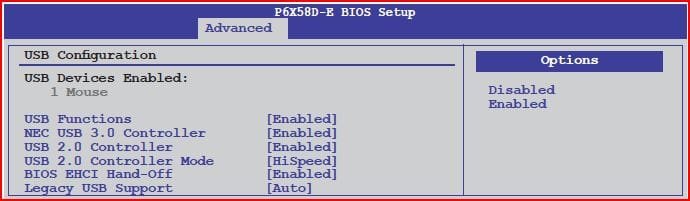
I have checked my settings in Device manager and it appears that I only have "high speed" performance.I have the latest NEC drivers from Asus. If I try to connect the drive to a USB 2 port, I get a message saying that the device would operate faster in Superspeed. I don't get such a balloon when I connect the drive to the blue USB3 port.
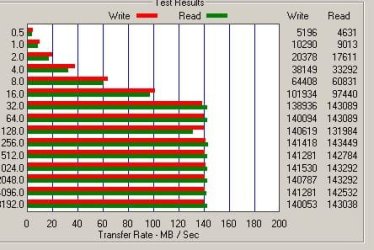
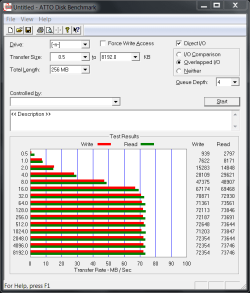
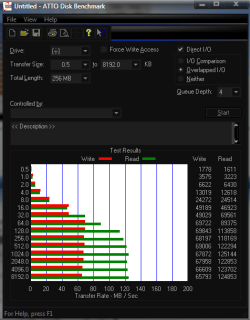
Any ideas on how to get my drive to run at USB3? I need to make an entire system backup and it's dang slow right now...averaging 35 MB/sec.
I have checked my settings in Device manager and it appears that I only have "high speed" performance.I have the latest NEC drivers from Asus. If I try to connect the drive to a USB 2 port, I get a message saying that the device would operate faster in Superspeed. I don't get such a balloon when I connect the drive to the blue USB3 port.
Any ideas on how to get my drive to run at USB3? I need to make an entire system backup and it's dang slow right now...averaging 35 MB/sec.
My Computer
- Computer type
- PC/Desktop
- Computer Manufacturer/Model Number
- Asus P6X58D-E, Lenovo
- OS
- Windows 7, Windows 10 Pro
- CPU
- Intel Core i7 930
- Motherboard
- Asus X58 P6X58D-E
- Memory
- G.SKILL F3-12800CL9T-6GBNQ 6GB DDR3 3X2GB DDR3-1600 CL 9-9-9
- Graphics Card(s)
- ATI Radeon HD 5700
- Hard Drives
- Seagate Barracuda 1TB x2 SATA3 6GB/S 7200RPM 64MB
WD 1TB SATA3
- PSU
- Coolermaster Silent Pro 700W Modular Power Supply