Use Windows 7 imaging routine on the same/source disk

loninappleton

New member
Member
VIP
Local time
1:31 PM
Messages
892
Just now I've seen a lot of questions here on using Macrium. I have tried that myself and I only wound up with a bunch of rescue disks and no ISO cd. While there seems to be a lot of enthusiasm for it here, any of the recent backup or clone progs have been confusing to me. Or worse-- a Linux prog like Clonezilla have eaten the source drive much less any target.

My question is still on a safe and workable backup strategy. Win 7 contains a system image option on the Recovery Environment Disk and gives an option for it from the program itself.

My usual backup is just to clone using Norton Ghost from the cd keeping in mind to run chkdsk first-- it seems to avoid a lot of problems. Maybe older is best but this process must have a simple answer that Sevenforums has discovered over the years.

--> To begin with, just say if the Win 7 Image option is any good and how does it differ from Macrium and all the other programs like Acronis and Paragon.

I now have enough disk space on one HD to create the image on the same drive just as a test.

There is only one partition. My understanding is that a folder is made to store the image but I know little more from reading the procedures.
 

My Computer

Computer type
PC/Desktop
Computer Manufacturer/Model Number
custom
OS
Windows 7 x64 Ultimate
CPU
AMD Athlon II x3 450
Motherboard
MSI 880GM
Memory
2 GB
Hard Drives
various
Browser
Firefox, Opera
Storing your system image on the same drive as your OS drive is not a good idea. Why: because if your drive fails you cannot restore the image. If you choose to do this then the image needs to be on a partition other than the OS partition.

I've used Windows inbuilt system imaging and Macrium extensively with no problems. Macrium is definitely the best option. I don't understand your problems with Macrium. BTW you should store system images on a separate drive (preferably external drive) and not DVDs. Use a DVD/USB flash drive for the rescue media.
 

My Computer

Computer type
PC/Desktop
Computer Manufacturer/Model Number
Own build
OS
Windows 7x64 Home Premium SP1
CPU
Intel i7 2600k
Motherboard
ASUS P8Z68 Deluxe
Memory
G.Skill Ripjaws (DDR3-1600) 2x4GB
Graphics Card(s)
Nvidia GeForce GTS 450; Intel HD Graphics 3000(GT2+)
Monitor(s) Displays
Dell Ultrasharp IPS panel U2311H, Samsung SyncMaster P2350
Screen Resolution
1920x1080
Hard Drives
Samsung 850 Pro SSD 256GB, Samsung SSD 840 120GB, Seagates 1TB Barracuda ST31000528AS x2
PSU
Seasonic M12II 520W
Case
Lian Li Lancool PC-K60
Cooling
Case: 1x120mm, 3x140mm CPU: Hyper 212+
Keyboard
Logitech MK520 (wireless)
Mouse
Logitech MK520
Internet Speed
6-7 Mbps
Antivirus
Norton Security Premium, Malwarebytes on 2 (MSE on 3rd PC)
Browser
FireFox
Other Info
Audio: Logitech Z523 2.1

My Computer

Computer type
PC/Desktop
Computer Manufacturer/Model Number
Home made Desktop
OS
Windows 10 Pro. 64/ version 1709 Windows 7 Pro/64
CPU
Intel i7-6800K @ 4.3
Motherboard
ASUS X-99 Deluxe II
Memory
Corsair Platinum 16 gig @2400
Graphics Card(s)
EVGA GTX 1070 OC
Monitor(s) Displays
Asus 27" LED LCD/VE278Q
Screen Resolution
1920-1080 or 1280-720 HDMI
Hard Drives
INTEL SSD 730-240 Gb Sata 3.0/
PSU
EVGA Platium 1200W
Case
Phanteks Luxe Tempered Glass 8 fans/ one radiator
Cooling
XSPC/ Water Cooled CPU
Keyboard
Das 4 Professional
Mouse
Logitech M705/MX Anywhere 2-S
Internet Speed
100 mbits
Antivirus
Microsoft Security Essentials/ Malwarebytes Premium 3.0/ SAS
Browser
I.E. 11 default/Firefox/ ISP Time Warner Cable/Spectrum
Other Info
LG BluRay Burner/
Sound system-KLipsch-THX/
Icy Dock ssd Hot Swap bays.
These things make sense and are logical.
I have some older HDs . My plan for this practice is to use a sacrifice HD for practice.
First use administrative tools to do a simple reformat on that one.
The just go through the make an image option in Win7. Win7 should see the newly
formated/wiped drive. If a 'folder is needed in the process it should be evident.

Will answer Macrium Separate.
 

My Computer

Computer type
PC/Desktop
Computer Manufacturer/Model Number
custom
OS
Windows 7 x64 Ultimate
CPU
AMD Athlon II x3 450
Motherboard
MSI 880GM
Memory
2 GB
Hard Drives
various
Browser
Firefox, Opera
No need to waste your time with an inferior Windows imaging. Macrium is a better tool.
 

My Computer

Computer Manufacturer/Model Number
HP, Dell, Gateway, Toshiba - 4 laptops and 2 desktops
OS
Vista, Windows7, Mint Mate, Zorin, Windows 8
CPU
from 1.6GHz Duo to i7
Monitor(s) Displays
2x HP w2207
Hard Drives
5x HDD, 7x SSD, 12x Externals
Keyboard
with trackball - no mices
Mouse
Trackball mice
Internet Speed
DSL 6000
mjf has given some good advice. I also have used the built in Windows 7 backup and Macrium. I now only use Macrium Reflect. It's easy to use.

This tutorial by whs with it's video should help you.

http://www.sevenforums.com/tutorials/73828-imaging-free-macrium.html

There's 101 pages showing below whatever video runs.

I have seen a Macrium Quick Start with sections. I recall starting at the top which
is making a Recovery disk. I have that. Must have had the program on my system.

But what I'm not following is how the Macrium program will run from the cd drive
to clone a disk as an example: a bootable ISO .

I have the Recovery disk made. If I have to start fresh with a Macrium free version for
Win7 64 is there a direct link to do so?

But my goal is to be able to clone a drive as is possible with Acronis, Ghost etc from the removable media which seems most practical and safe... safe here meaning not wiping something by accident.

I have diverted from the making of images only slightly. What I need is a fresh start
with the Macrium program.
 

My Computer

Computer type
PC/Desktop
Computer Manufacturer/Model Number
custom
OS
Windows 7 x64 Ultimate
CPU
AMD Athlon II x3 450
Motherboard
MSI 880GM
Memory
2 GB
Hard Drives
various
Browser
Firefox, Opera
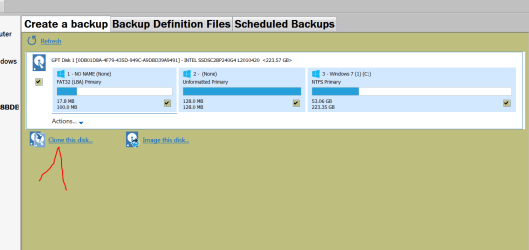
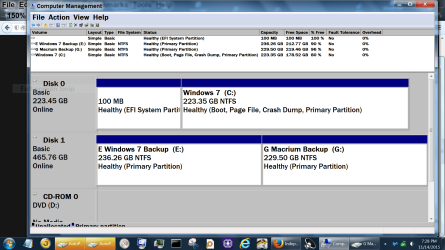
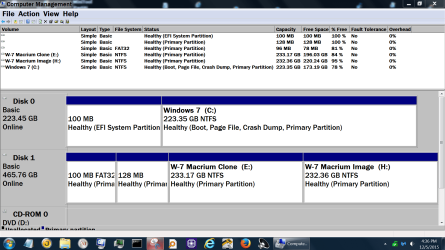
I use Macrium to do all my Clones from ssd to ssd and they have always worked. I Clone the complete drive with Windows 7. I have the clone ssd out of my computer at this time so I can show it to you.

Select the drive you want to clone and then where you want the Clone to go.

Clone Today Only.PNG

I found a old pictures of how things look when done.

Capture.PNGDisk management today.PNG

Disk Management Dec 5 2015.PNG
 

My Computer

Computer type
PC/Desktop
Computer Manufacturer/Model Number
Home made Desktop
OS
Windows 10 Pro. 64/ version 1709 Windows 7 Pro/64
CPU
Intel i7-6800K @ 4.3
Motherboard
ASUS X-99 Deluxe II
Memory
Corsair Platinum 16 gig @2400
Graphics Card(s)
EVGA GTX 1070 OC
Monitor(s) Displays
Asus 27" LED LCD/VE278Q
Screen Resolution
1920-1080 or 1280-720 HDMI
Hard Drives
INTEL SSD 730-240 Gb Sata 3.0/
PSU
EVGA Platium 1200W
Case
Phanteks Luxe Tempered Glass 8 fans/ one radiator
Cooling
XSPC/ Water Cooled CPU
Keyboard
Das 4 Professional
Mouse
Logitech M705/MX Anywhere 2-S
Internet Speed
100 mbits
Antivirus
Microsoft Security Essentials/ Malwarebytes Premium 3.0/ SAS
Browser
I.E. 11 default/Firefox/ ISP Time Warner Cable/Spectrum
Other Info
LG BluRay Burner/
Sound system-KLipsch-THX/
Icy Dock ssd Hot Swap bays.
Back
Top