Solved Use windows back-up feature or Macrium, create partitions first?

@Vonda
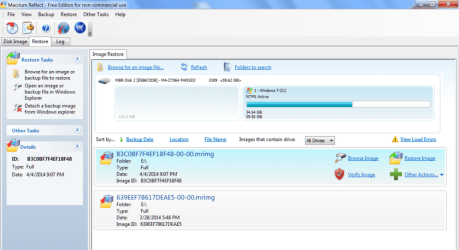
A safe partial check of an image you made is to simply browse it.
You do this by going:
Restore>Browse image
Click on the partition box (eg. C )
then you get a new mounted drive that you can browse through with Windows Explorer. Just look and you are not going to affect the image. When you are done select "Detach a backup image".

You can copy files or folders from a mounted image using this procedure.
 

My Computer My Computer

At a glance

Windows 7x64 Home Premium SP1Intel i7 2600kG.Skill Ripjaws (DDR3-1600) 2x4GBNvidia GeForce GTS 450; Intel HD Graphics 300...
Computer type
PC/Desktop
Computer Manufacturer/Model Number
Own build
OS
Windows 7x64 Home Premium SP1
CPU
Intel i7 2600k
Motherboard
ASUS P8Z68 Deluxe
Memory
G.Skill Ripjaws (DDR3-1600) 2x4GB
Graphics Card(s)
Nvidia GeForce GTS 450; Intel HD Graphics 3000(GT2+)
Monitor(s) Displays
Dell Ultrasharp IPS panel U2311H, Samsung SyncMaster P2350
Screen Resolution
1920x1080
Hard Drives
Samsung 850 Pro SSD 256GB, Samsung SSD 840 120GB, Seagates 1TB Barracuda ST31000528AS x2
PSU
Seasonic M12II 520W
Case
Lian Li Lancool PC-K60
Cooling
Case: 1x120mm, 3x140mm CPU: Hyper 212+
Keyboard
Logitech MK520 (wireless)
Mouse
Logitech MK520
Internet Speed
6-7 Mbps
Antivirus
Norton Security Premium, Malwarebytes on 2 (MSE on 3rd PC)
Browser
FireFox
Other Info
Audio: Logitech Z523 2.1
ESC is used on HPs to get to the temporary boot order of the BIOS.
 

My Computer My Computer

At a glance

Vista, Windows7, Mint Mate, Zorin, Windows 8from 1.6GHz Duo to i7
Computer Manufacturer/Model Number
HP, Dell, Gateway, Toshiba - 4 laptops and 2 desktops
OS
Vista, Windows7, Mint Mate, Zorin, Windows 8
CPU
from 1.6GHz Duo to i7
Monitor(s) Displays
2x HP w2207
Hard Drives
5x HDD, 7x SSD, 12x Externals
Keyboard
with trackball - no mices
Mouse
Trackball mice
Internet Speed
DSL 6000
@Vonda
A safe partial check of an image you made is to simply browse it.
You do this by going:
Restore>Browse image
Click on the partition box (eg. C )
then you get a new mounted drive that you can browse through with Windows Explorer. Just look and you are not going to affect the image. When you are done select "Detach a backup image".

You can copy files or folders from a mounted image using this procedure.
Thank you, I'll try that.
 

My Computer My Computer

At a glance

Widows 7 home premium 64 bitAMD phenom(tm) 11 x 4 processor 3.00 GHz8.00 GBATI Radeon HD 5450
Computer Manufacturer/Model Number
HPE-400f
OS
Widows 7 home premium 64 bit
CPU
AMD phenom(tm) 11 x 4 processor 3.00 GHz
Motherboard
?
Memory
8.00 GB
Graphics Card(s)
ATI Radeon HD 5450
Sound Card
?
Monitor(s) Displays
HP vs17
Hard Drives
1 TB Sata
Mouse
usb
Internet Speed
download 15 mbps
ESC is used on HPs to get to the temporary boot order of the BIOS.
Do insert the rescue disk before shutting down the PC or after when the bios page is open?
 

My Computer My Computer

At a glance

Widows 7 home premium 64 bitAMD phenom(tm) 11 x 4 processor 3.00 GHz8.00 GBATI Radeon HD 5450
Computer Manufacturer/Model Number
HPE-400f
OS
Widows 7 home premium 64 bit
CPU
AMD phenom(tm) 11 x 4 processor 3.00 GHz
Motherboard
?
Memory
8.00 GB
Graphics Card(s)
ATI Radeon HD 5450
Sound Card
?
Monitor(s) Displays
HP vs17
Hard Drives
1 TB Sata
Mouse
usb
Internet Speed
download 15 mbps
Before shutting down, else the BIOS will not regocnize it at power-on. And after power-on, keep tapping ESC. In the little window, highlight the CD/DVD drive - with the up/down keys.. Then Enter.
 

My Computer My Computer

At a glance

Vista, Windows7, Mint Mate, Zorin, Windows 8from 1.6GHz Duo to i7
Computer Manufacturer/Model Number
HP, Dell, Gateway, Toshiba - 4 laptops and 2 desktops
OS
Vista, Windows7, Mint Mate, Zorin, Windows 8
CPU
from 1.6GHz Duo to i7
Monitor(s) Displays
2x HP w2207
Hard Drives
5x HDD, 7x SSD, 12x Externals
Keyboard
with trackball - no mices
Mouse
Trackball mice
Internet Speed
DSL 6000
Thank you.
 

My Computer My Computer

At a glance

Widows 7 home premium 64 bitAMD phenom(tm) 11 x 4 processor 3.00 GHz8.00 GBATI Radeon HD 5450
Computer Manufacturer/Model Number
HPE-400f
OS
Widows 7 home premium 64 bit
CPU
AMD phenom(tm) 11 x 4 processor 3.00 GHz
Motherboard
?
Memory
8.00 GB
Graphics Card(s)
ATI Radeon HD 5450
Sound Card
?
Monitor(s) Displays
HP vs17
Hard Drives
1 TB Sata
Mouse
usb
Internet Speed
download 15 mbps
You are welcome. If you want to go the full cycle - image ==> recovery - I really urge you o make a small test partition with a bit of data and experiment with that. Much safer than risking your OS partition.
 

Attachments

  • 2014-04-25_1133.png
    2014-04-25_1133.png
    33.8 KB · Views: 1

My Computer My Computer

At a glance

Vista, Windows7, Mint Mate, Zorin, Windows 8from 1.6GHz Duo to i7
Computer Manufacturer/Model Number
HP, Dell, Gateway, Toshiba - 4 laptops and 2 desktops
OS
Vista, Windows7, Mint Mate, Zorin, Windows 8
CPU
from 1.6GHz Duo to i7
Monitor(s) Displays
2x HP w2207
Hard Drives
5x HDD, 7x SSD, 12x Externals
Keyboard
with trackball - no mices
Mouse
Trackball mice
Internet Speed
DSL 6000
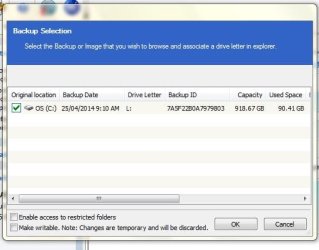
I'll wait with a test recovery until I feel more comfortable with using Macrium. I got as far to the browsing part, but how do I get it to show in Windows Explorer from here: (picture)
 

Attachments

  • Capturetest.JPG
    Capturetest.JPG
    34.6 KB · Views: 8

My Computer My Computer

At a glance

Widows 7 home premium 64 bitAMD phenom(tm) 11 x 4 processor 3.00 GHz8.00 GBATI Radeon HD 5450
Computer Manufacturer/Model Number
HPE-400f
OS
Widows 7 home premium 64 bit
CPU
AMD phenom(tm) 11 x 4 processor 3.00 GHz
Motherboard
?
Memory
8.00 GB
Graphics Card(s)
ATI Radeon HD 5450
Sound Card
?
Monitor(s) Displays
HP vs17
Hard Drives
1 TB Sata
Mouse
usb
Internet Speed
download 15 mbps
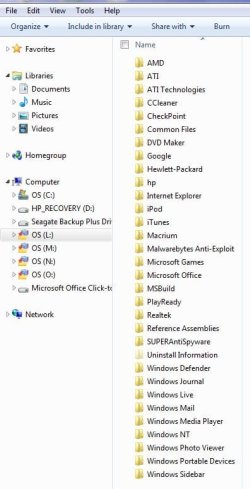
If you poke OK button, you should see Windows Explorer open up for drive L, which is your image file.

This should appear to you as a replica of your actual drive C.

If you had made an image of your data drive instead of C, you could use this procedure to view pictures of your cat or whatever is on D.

Note that in your picture, Macrium has assigned L to the image file under the drive letter.
 

My Computer My Computer

At a glance

Windows 7 Home Premium SP1, 64-bitIntel Skylake i5-6600K, not overclocked8 GB HyperX DDR4-2666 (2 x 4 GB)none; graphics are integrated on CPU
Computer type
PC/Desktop
Computer Manufacturer/Model Number
Ignatz Special; 4 speed manual gearbox; factory air conditioning; one of one
OS
Windows 7 Home Premium SP1, 64-bit
CPU
Intel Skylake i5-6600K, not overclocked
Motherboard
AsRock Z170M Extreme 4, micro ATX
Memory
8 GB HyperX DDR4-2666 (2 x 4 GB)
Graphics Card(s)
none; graphics are integrated on CPU
Sound Card
onboard: Realtek ALC1150; external: USB Behringer UF0-202
Monitor(s) Displays
Dell S2340M 23 inch IPS
Screen Resolution
1600 x 900
Hard Drives
System: Crucial MX100 series SSD, 128 GB;
Data: Samsung Spinpoint 103SJ, 1 TB;
Backup: WD Caviar Green WD30EZRX-00D8PB0, 3 TB
PSU
Rosewill SilentNight 500 watt fanless, semi-modular
Case
Antec Solo II
Cooling
Noctua NH-U12S; Noctua F12 intake, Noctua S12A exhaust
Keyboard
Microsoft 200 6JH-00001 USB
Mouse
Dell or Microsoft optical wired; USB
Antivirus
Microsoft Security Essentials and Malwarebytes Premium
Browser
Pale Moon
Other Info
All fans PWM; speeds at idle: CPU circa 500 rpm; intake circa 600 rpm; exhaust circa 600 rpm; CPU temps 27 idle and 47 C load in a warm room (27 C/81 F) when running Intel Extreme Tuning Utility stress test.
Ah OK, I got that part. With data drive you mean "my Documents" I was trying to see if it would also copy the contents of my e-mail folder, but when I click on windows mail, it seems that only the program itself comes up.
 

Attachments

  • wm.JPG
    wm.JPG
    48.3 KB · Views: 0

My Computer My Computer

At a glance

Widows 7 home premium 64 bitAMD phenom(tm) 11 x 4 processor 3.00 GHz8.00 GBATI Radeon HD 5450
Computer Manufacturer/Model Number
HPE-400f
OS
Widows 7 home premium 64 bit
CPU
AMD phenom(tm) 11 x 4 processor 3.00 GHz
Motherboard
?
Memory
8.00 GB
Graphics Card(s)
ATI Radeon HD 5450
Sound Card
?
Monitor(s) Displays
HP vs17
Hard Drives
1 TB Sata
Mouse
usb
Internet Speed
download 15 mbps
On an HP (I think that's what you have), the correct key is probably Escape or F9.

Don't be nervous about it. If it won't boot, much better that you find out now, when it's not critical and you aren't in a jam.

If it won't boot, you just make another rescue disk and test it.

If it does boot, you have a near certainty you can restore the Macrium image after a disaster.
I tested (twice) just now to boot from the rescue disc, but it went to the regular desk top. I did get the boot sequence and highlighted the dvd drive and clicked the F4 to boot.
 

My Computer My Computer

At a glance

Widows 7 home premium 64 bitAMD phenom(tm) 11 x 4 processor 3.00 GHz8.00 GBATI Radeon HD 5450
Computer Manufacturer/Model Number
HPE-400f
OS
Widows 7 home premium 64 bit
CPU
AMD phenom(tm) 11 x 4 processor 3.00 GHz
Motherboard
?
Memory
8.00 GB
Graphics Card(s)
ATI Radeon HD 5450
Sound Card
?
Monitor(s) Displays
HP vs17
Hard Drives
1 TB Sata
Mouse
usb
Internet Speed
download 15 mbps
Ah OK, I got that part. With data drive you mean "my Documents" I was trying to see if it would also copy the contents of my e-mail folder, but when I click on windows mail, it seems that only the program itself comes up.

All I meant was that whatever is on the partition that you imaged should also be within the image file. To include my Documents and the contents of your email folder if they are kept on the imaged partition. I have no idea of where Windows Mail keeps anything or anything at all about it.
 

My Computer My Computer

At a glance

Windows 7 Home Premium SP1, 64-bitIntel Skylake i5-6600K, not overclocked8 GB HyperX DDR4-2666 (2 x 4 GB)none; graphics are integrated on CPU
Computer type
PC/Desktop
Computer Manufacturer/Model Number
Ignatz Special; 4 speed manual gearbox; factory air conditioning; one of one
OS
Windows 7 Home Premium SP1, 64-bit
CPU
Intel Skylake i5-6600K, not overclocked
Motherboard
AsRock Z170M Extreme 4, micro ATX
Memory
8 GB HyperX DDR4-2666 (2 x 4 GB)
Graphics Card(s)
none; graphics are integrated on CPU
Sound Card
onboard: Realtek ALC1150; external: USB Behringer UF0-202
Monitor(s) Displays
Dell S2340M 23 inch IPS
Screen Resolution
1600 x 900
Hard Drives
System: Crucial MX100 series SSD, 128 GB;
Data: Samsung Spinpoint 103SJ, 1 TB;
Backup: WD Caviar Green WD30EZRX-00D8PB0, 3 TB
PSU
Rosewill SilentNight 500 watt fanless, semi-modular
Case
Antec Solo II
Cooling
Noctua NH-U12S; Noctua F12 intake, Noctua S12A exhaust
Keyboard
Microsoft 200 6JH-00001 USB
Mouse
Dell or Microsoft optical wired; USB
Antivirus
Microsoft Security Essentials and Malwarebytes Premium
Browser
Pale Moon
Other Info
All fans PWM; speeds at idle: CPU circa 500 rpm; intake circa 600 rpm; exhaust circa 600 rpm; CPU temps 27 idle and 47 C load in a warm room (27 C/81 F) when running Intel Extreme Tuning Utility stress test.
I tested (twice) just now to boot from the rescue disc, but it went to the regular desk top. I did get the boot sequence and highlighted the dvd drive and clicked the F4 to boot.

Not sure I'm following that.

In my experience, if you boot from the rescue disk, you should arrive at the Macrium interface, looking just like it does if you open it from your desktop.

I assume you got the boot menu by using either Escape or F9 or some other key?

And used your arrow (up/down) keys to highlight the DVD drive?

But you then clicked F4???? I would think the proper choice would be to hit the enter key after selecting the DVD drive. Not sure what F4 is in that situation. Did you see a message at the bottom of the screen to choose F4 to boot or something like that? If you did, that would just force the PC to boot back to the desktop---which you would not want in this case.

Try it again, go to the menu, highlight the DVD drive, and hit enter key and tell us what happens.
 

My Computer My Computer

At a glance

Windows 7 Home Premium SP1, 64-bitIntel Skylake i5-6600K, not overclocked8 GB HyperX DDR4-2666 (2 x 4 GB)none; graphics are integrated on CPU
Computer type
PC/Desktop
Computer Manufacturer/Model Number
Ignatz Special; 4 speed manual gearbox; factory air conditioning; one of one
OS
Windows 7 Home Premium SP1, 64-bit
CPU
Intel Skylake i5-6600K, not overclocked
Motherboard
AsRock Z170M Extreme 4, micro ATX
Memory
8 GB HyperX DDR4-2666 (2 x 4 GB)
Graphics Card(s)
none; graphics are integrated on CPU
Sound Card
onboard: Realtek ALC1150; external: USB Behringer UF0-202
Monitor(s) Displays
Dell S2340M 23 inch IPS
Screen Resolution
1600 x 900
Hard Drives
System: Crucial MX100 series SSD, 128 GB;
Data: Samsung Spinpoint 103SJ, 1 TB;
Backup: WD Caviar Green WD30EZRX-00D8PB0, 3 TB
PSU
Rosewill SilentNight 500 watt fanless, semi-modular
Case
Antec Solo II
Cooling
Noctua NH-U12S; Noctua F12 intake, Noctua S12A exhaust
Keyboard
Microsoft 200 6JH-00001 USB
Mouse
Dell or Microsoft optical wired; USB
Antivirus
Microsoft Security Essentials and Malwarebytes Premium
Browser
Pale Moon
Other Info
All fans PWM; speeds at idle: CPU circa 500 rpm; intake circa 600 rpm; exhaust circa 600 rpm; CPU temps 27 idle and 47 C load in a warm room (27 C/81 F) when running Intel Extreme Tuning Utility stress test.
Ah OK, I got that part. With data drive you mean "my Documents" I was trying to see if it would also copy the contents of my e-mail folder, but when I click on windows mail, it seems that only the program itself comes up.

Your email folder is most likely in a hidden folder by default, you can unhide them to browse for the "AppData" folder,

http://www.sevenforums.com/tutorials/394-hidden-files-folders-show-hide.html

Did you enable Windows Mail in win 7?

From your other thread, I noticed you have Office and Windows live essentials installed.

If you are using Windows Live Mail,

C:\Users\(Your User Name)\AppData\Local\Microsoft\Windows Live Mail

If you are using Outlook from Office,

C:\Users\(Your User Name)\AppData\Local\Microsoft\Outlook

Don't forget to re-hide those folders when you're done.
 

My Computer My Computer

At a glance

Win 10 Pro x64Intel I5-2500K @3.3GHz16GB G.Skill Ripjaws X (4x4GB)EVGA GeForce 750 Ti SC 2GB
Computer type
PC/Desktop
Computer Manufacturer/Model Number
Self Built
OS
Win 10 Pro x64
CPU
Intel I5-2500K @3.3GHz
Motherboard
Asrock P67 Extreme4
Memory
16GB G.Skill Ripjaws X (4x4GB)
Graphics Card(s)
EVGA GeForce 750 Ti SC 2GB
Sound Card
ASUS Xonar DG 5.1 Channels 24-bit 96KHz PCI Interface Sound
Monitor(s) Displays
auria eq2367
Screen Resolution
1920 x 1080
Hard Drives
250GB Samsung 850 EVO SSD
1TB WD Blue
1TB Hitachi
PSU
SeaSonic X 650W 80 Plus Gold
Case
Corsair Obsidian 750D
Cooling
Corsair H60, Three 140mm case fans
Keyboard
Logitech Wireless Keyboard K520
Mouse
Logitech Wireless Mouse M310
Internet Speed
Wave Broadband ~ 100 dn 5 up
Antivirus
Windows Defender, Malwarebytes Premium
Browser
Edge, IE11, Chrome
Other Info
Laptop specs: HP g7-1365dx /
CPU: AMD A6-3420M APU with Radeon(tm) HD Graphics /
RAM: Crucial 8Gb (2x4Gb) /
SSD: Crucial M4-CT128M4SSD2 ATA Device/ FW 000F /
GFX: AMD Radeon HD 6520G /
OS: Windows 10 Pro x64
I tested (twice) just now to boot from the rescue disc, but it went to the regular desk top. I did get the boot sequence and highlighted the dvd drive and clicked the F4 to boot.

Not sure I'm following that.

In my experience, if you boot from the rescue disk, you should arrive at the Macrium interface, looking just like it does if you open it from your desktop.

I assume you got the boot menu by using either Escape or F9 or some other key?

And used your arrow (up/down) keys to highlight the DVD drive?

But you then clicked F4???? I would think the proper choice would be to hit the enter key after selecting the DVD drive. Not sure what F4 is in that situation. Did you see a message at the bottom of the screen to choose F4 to boot or something like that? If you did, that would just force the PC to boot back to the desktop---which you would not want in this case.

Try it again, go to the menu, highlight the DVD drive, and hit enter key and tell us what happens.
Yes, I did highlight the dvd drive and a statement at the bottom said to use F4.
I shall now try with clicking 'enter"
 

My Computer My Computer

At a glance

Widows 7 home premium 64 bitAMD phenom(tm) 11 x 4 processor 3.00 GHz8.00 GBATI Radeon HD 5450
Computer Manufacturer/Model Number
HPE-400f
OS
Widows 7 home premium 64 bit
CPU
AMD phenom(tm) 11 x 4 processor 3.00 GHz
Motherboard
?
Memory
8.00 GB
Graphics Card(s)
ATI Radeon HD 5450
Sound Card
?
Monitor(s) Displays
HP vs17
Hard Drives
1 TB Sata
Mouse
usb
Internet Speed
download 15 mbps
No, it did not work this way either. I shall burn a new cd and come back with the result of the next try.
 

My Computer My Computer

At a glance

Widows 7 home premium 64 bitAMD phenom(tm) 11 x 4 processor 3.00 GHz8.00 GBATI Radeon HD 5450
Computer Manufacturer/Model Number
HPE-400f
OS
Widows 7 home premium 64 bit
CPU
AMD phenom(tm) 11 x 4 processor 3.00 GHz
Motherboard
?
Memory
8.00 GB
Graphics Card(s)
ATI Radeon HD 5450
Sound Card
?
Monitor(s) Displays
HP vs17
Hard Drives
1 TB Sata
Mouse
usb
Internet Speed
download 15 mbps
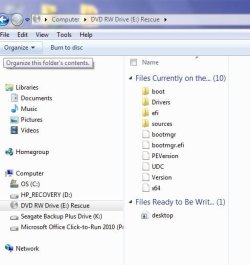
Here is what I did, I burned a new rescue disc and went through the same procedure. This time it ask me to boot from cd/dvd which I did. Then the regular desktop came up. When I opened the E drive with the rescue disc, it showed the files in the attachment. Is this what I need to do a restore when it becomes necessary or did I make another mistake?
 

Attachments

  • boot rescue.JPG
    boot rescue.JPG
    35.8 KB · Views: 7

My Computer My Computer

At a glance

Widows 7 home premium 64 bitAMD phenom(tm) 11 x 4 processor 3.00 GHz8.00 GBATI Radeon HD 5450
Computer Manufacturer/Model Number
HPE-400f
OS
Widows 7 home premium 64 bit
CPU
AMD phenom(tm) 11 x 4 processor 3.00 GHz
Motherboard
?
Memory
8.00 GB
Graphics Card(s)
ATI Radeon HD 5450
Sound Card
?
Monitor(s) Displays
HP vs17
Hard Drives
1 TB Sata
Mouse
usb
Internet Speed
download 15 mbps
Apparently another mistake.

All that picture shows is what is on the burned disk. Not what you need. You want to see the Macrium interface. Just like you opened Macrium directly from your desktop.

It looks like your burned disk is either not bootable or you are making the wrong choice when you get to the menu where it asks you to choose your boot device--where you should choose the DVD drive.

Since I don't know what the actual choices seen on your menu are, it's hard for me to say if you are choosing the wrong item.

What are the choices you see??

It's also possible you are making the boot disk incorrectly--making some wrong choices or perhaps burning it incorrectly.

WHS would be the guy to make sure you are walking through the steps to make the disk correctly. Let him comment in this thread.

I think you made a "Win PE" disc. Is that correct? While you wait for WHS, you might try using the other method using Linux. It's just another choice from the menu in Macrium when you start to make a rescue disk. Linux-based disks are generally not as reliable, but you've got nothing to lose by trying it and seeing if it will boot your PC.

If you use the Linux method, booting from that disc will NOT lead you to the Macrium interface. Instead, you will boot slowly and see some text messages on your screen as Linux loads. Nothing with graphics. It will be all text and you will see some progress indicators and be asked to make certain choices.

In the meantime, spell out the actual choices shown on your boot menu when you choose F9 or Escape or whatever it is.
 

My Computer My Computer

At a glance

Windows 7 Home Premium SP1, 64-bitIntel Skylake i5-6600K, not overclocked8 GB HyperX DDR4-2666 (2 x 4 GB)none; graphics are integrated on CPU
Computer type
PC/Desktop
Computer Manufacturer/Model Number
Ignatz Special; 4 speed manual gearbox; factory air conditioning; one of one
OS
Windows 7 Home Premium SP1, 64-bit
CPU
Intel Skylake i5-6600K, not overclocked
Motherboard
AsRock Z170M Extreme 4, micro ATX
Memory
8 GB HyperX DDR4-2666 (2 x 4 GB)
Graphics Card(s)
none; graphics are integrated on CPU
Sound Card
onboard: Realtek ALC1150; external: USB Behringer UF0-202
Monitor(s) Displays
Dell S2340M 23 inch IPS
Screen Resolution
1600 x 900
Hard Drives
System: Crucial MX100 series SSD, 128 GB;
Data: Samsung Spinpoint 103SJ, 1 TB;
Backup: WD Caviar Green WD30EZRX-00D8PB0, 3 TB
PSU
Rosewill SilentNight 500 watt fanless, semi-modular
Case
Antec Solo II
Cooling
Noctua NH-U12S; Noctua F12 intake, Noctua S12A exhaust
Keyboard
Microsoft 200 6JH-00001 USB
Mouse
Dell or Microsoft optical wired; USB
Antivirus
Microsoft Security Essentials and Malwarebytes Premium
Browser
Pale Moon
Other Info
All fans PWM; speeds at idle: CPU circa 500 rpm; intake circa 600 rpm; exhaust circa 600 rpm; CPU temps 27 idle and 47 C load in a warm room (27 C/81 F) when running Intel Extreme Tuning Utility stress test.
When the CD is done booting, the desktop should look something like the picture. It may ask you a question first regarding drivers, just skip (continue) that.
 

Attachments

  • 2014-04-25_1834.png
    2014-04-25_1834.png
    54.9 KB · Views: 0

My Computer My Computer

At a glance

Vista, Windows7, Mint Mate, Zorin, Windows 8from 1.6GHz Duo to i7
Computer Manufacturer/Model Number
HP, Dell, Gateway, Toshiba - 4 laptops and 2 desktops
OS
Vista, Windows7, Mint Mate, Zorin, Windows 8
CPU
from 1.6GHz Duo to i7
Monitor(s) Displays
2x HP w2207
Hard Drives
5x HDD, 7x SSD, 12x Externals
Keyboard
with trackball - no mices
Mouse
Trackball mice
Internet Speed
DSL 6000
After pressing escape, this comes up:
Please select boot device
-----------------------------
ST31000528AS
--------------------------
HP DVD-RAM GH60L
--------------------
Realtek PXE 803 D00
------------------------------
Seagate Backup+
------------------------------
Move up or down to selection
Enter to select boot device
F4 to boot using defaults
--------------------------
This time a made sure I clicked "enter" then a window came up: press any key to boot from cd-rom.
 

My Computer My Computer

At a glance

Widows 7 home premium 64 bitAMD phenom(tm) 11 x 4 processor 3.00 GHz8.00 GBATI Radeon HD 5450
Computer Manufacturer/Model Number
HPE-400f
OS
Widows 7 home premium 64 bit
CPU
AMD phenom(tm) 11 x 4 processor 3.00 GHz
Motherboard
?
Memory
8.00 GB
Graphics Card(s)
ATI Radeon HD 5450
Sound Card
?
Monitor(s) Displays
HP vs17
Hard Drives
1 TB Sata
Mouse
usb
Internet Speed
download 15 mbps
Back
Top