Used Paragon Migrate OS To SSD (Success):Now Disk Management Confusion

billbruen

New member
Local time
5:14 PM
Messages
9
Location
Lancs UK

I migrated my Win 7 OS from my 'C' drive to a OCZ Vertex 4 256Gb SSD. No problems, everything works fine.

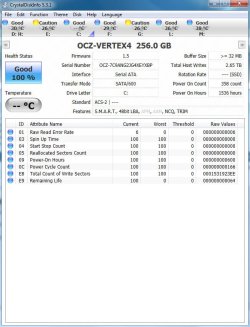
But recently I was in 'Disk Management' and couldn't make sense of what I was seeing:my SSD was showing as drive 'H' with a capacity of 931Gb!

Depending on which tool I use, I get slightly different reports (Belarc: Disk Management: CrystalDiskInfo)

Anyone ever had similar confusion? and what did you do?

Probably doesn't help that when I reuse old hard disks, I usually leave Windows on them.

As I say, everything is working fine, but clearly there is some confusion around and I don't like that.

I want my reporting software to give me accurate information.
 

My Computer My Computer

At a glance

Win 7 Home Premium 64-Bit SP1Intel Core2 Duo E8400 O/C 3.9 GHz8 GbRadeon HD 4870
Computer type
PC/Desktop
Computer Manufacturer/Model Number
Custom Build
OS
Win 7 Home Premium 64-Bit SP1
CPU
Intel Core2 Duo E8400 O/C 3.9 GHz
Motherboard
Asus P5K Premium
Memory
8 Gb
Graphics Card(s)
Radeon HD 4870
Sound Card
Sound Blaster X-Fi Xtreme
Monitor(s) Displays
Dell U2311H
Screen Resolution
1920 x 1080
Hard Drives
1 x OCZ Vertex 4 SSD
3 x Internal SATA Hard Drives
3 x External Hard Drives
PSU
Corsair HX620W Modular
Case
Corsair Carbide 400R
Keyboard
LogiTech Internet 350 Wired
Mouse
Microsoft WheelMouse Optical Wired
Internet Speed
Sky Broadband 10.75 Mbps Down 0.95 Mbps Up Ping 49ms
Antivirus
aVast Free
Browser
Chrome and Explorer 10
Other Info
Webcam LogiTech Pro C920
Corsair SP2500 2:1 Speaker System
Brother HL-2270DW Wireless B/W Laser Printer
Canon iP4700 Colour Printer
Epson Perfection V300 Photo Scanner
Can you post a screenshot of your Disk Management? Follow this tutorial

Also, if you are booting from your SSD then it is the drive C.
Maybe the drive H is the old hard drive?
 

My Computer My Computer

At a glance

Win 7 Pro 64-bit 7601AMD Phenom 9650 QuadCore, revision DR-B35 GB yes I run 2x 2GB and 1x 1GB, different b...NVIDIA GeForce 9800 GT 512 Mb, unknown manufa...
Computer type
PC/Desktop
Computer Manufacturer/Model Number
custom built
OS
Win 7 Pro 64-bit 7601
CPU
AMD Phenom 9650 QuadCore, revision DR-B3
Motherboard
ASUS M4A78
Memory
5 GB yes I run 2x 2GB and 1x 1GB, different brand, spank me.
Graphics Card(s)
NVIDIA GeForce 9800 GT 512 Mb, unknown manufacturer.
Sound Card
Crappy Realtek Integrated Audio
Monitor(s) Displays
Fujitsu Siemens P19-3P
Screen Resolution
1280 x 1024 x 32 bits @ 60 Hz Oh yeah, 4:3 rocks!
Hard Drives
(1) MAXTOR S TM3320613AS SATA Disk Device (2) STM35004 18AS SATA Disk Device (3) TOSHIBA USB 2.5"-HDD
PSU
whatever, around 450w
Case
Scavenged from old company PC, 10+ years old
Cooling
CPU fan, GPU fan, case fan, nothing fancy
Keyboard
Microsoft, PS/2, white.
Mouse
Optical, logitec.
Internet Speed
effective max speeds: 70-ish kB/s down 30-ish kB/s up
Antivirus
Avira, free edition.
Browser
Firefox with FXChrome to make it look like Google Chrome :P
Other Info
Was discarded by previous owner due to "horrible performance".
Was running Win Xp from a IDE drive. Yeah. Was a pain.
SATA II drive and Win7 and it zips away! Yay!
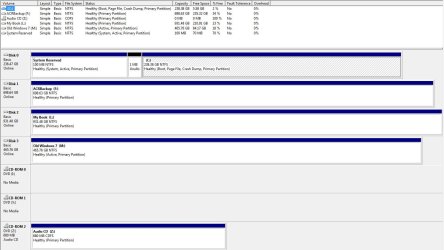
OK here's my Disk Management screenshot.....

DiskMan.jpg

Seeing such a garbled picture in Disk Man, I'm not quite sure what to believe: can I believe the Volume names are correct?

Here's a view taken with CrystalDiskInfo, which shows my OCZ as drive 'c'.....

Crystal.jpg
 

My Computer My Computer

At a glance

Win 7 Home Premium 64-Bit SP1Intel Core2 Duo E8400 O/C 3.9 GHz8 GbRadeon HD 4870
Computer type
PC/Desktop
Computer Manufacturer/Model Number
Custom Build
OS
Win 7 Home Premium 64-Bit SP1
CPU
Intel Core2 Duo E8400 O/C 3.9 GHz
Motherboard
Asus P5K Premium
Memory
8 Gb
Graphics Card(s)
Radeon HD 4870
Sound Card
Sound Blaster X-Fi Xtreme
Monitor(s) Displays
Dell U2311H
Screen Resolution
1920 x 1080
Hard Drives
1 x OCZ Vertex 4 SSD
3 x Internal SATA Hard Drives
3 x External Hard Drives
PSU
Corsair HX620W Modular
Case
Corsair Carbide 400R
Keyboard
LogiTech Internet 350 Wired
Mouse
Microsoft WheelMouse Optical Wired
Internet Speed
Sky Broadband 10.75 Mbps Down 0.95 Mbps Up Ping 49ms
Antivirus
aVast Free
Browser
Chrome and Explorer 10
Other Info
Webcam LogiTech Pro C920
Corsair SP2500 2:1 Speaker System
Brother HL-2270DW Wireless B/W Laser Printer
Canon iP4700 Colour Printer
Epson Perfection V300 Photo Scanner
I would say, Disk 2 is the SSD,should be Disk 0.

Also you have four ACTIVE Partitions one for each OS?
 

My Computer My Computer

At a glance

ME/XP/Vista/Win7
OS
ME/XP/Vista/Win7
Umm, could be, but why has Disk Man got it wrong and not labeled it as OCZ Disc 0?

Can I recover from this confusion? If I disconnect all drives apart from SSD Boot and reconnect them one by one, will the OS identify and renumber/rename/'reletter' them correctly do you think?

As for multiple Active partitions, I've no idea whether that's a bad thing: May be unnecessary, but does it do any harm?

I guess it stems from my bad practice of reusing old hard disks without reformatting them. Could that be having an effect on the confusion?
 

My Computer My Computer

At a glance

Win 7 Home Premium 64-Bit SP1Intel Core2 Duo E8400 O/C 3.9 GHz8 GbRadeon HD 4870
Computer type
PC/Desktop
Computer Manufacturer/Model Number
Custom Build
OS
Win 7 Home Premium 64-Bit SP1
CPU
Intel Core2 Duo E8400 O/C 3.9 GHz
Motherboard
Asus P5K Premium
Memory
8 Gb
Graphics Card(s)
Radeon HD 4870
Sound Card
Sound Blaster X-Fi Xtreme
Monitor(s) Displays
Dell U2311H
Screen Resolution
1920 x 1080
Hard Drives
1 x OCZ Vertex 4 SSD
3 x Internal SATA Hard Drives
3 x External Hard Drives
PSU
Corsair HX620W Modular
Case
Corsair Carbide 400R
Keyboard
LogiTech Internet 350 Wired
Mouse
Microsoft WheelMouse Optical Wired
Internet Speed
Sky Broadband 10.75 Mbps Down 0.95 Mbps Up Ping 49ms
Antivirus
aVast Free
Browser
Chrome and Explorer 10
Other Info
Webcam LogiTech Pro C920
Corsair SP2500 2:1 Speaker System
Brother HL-2270DW Wireless B/W Laser Printer
Canon iP4700 Colour Printer
Epson Perfection V300 Photo Scanner
Should mention that I've been getting messages from BBC iPlayer, that, what it calls Disc 'C', is too small to accept further downloads.
 
Last edited:

My Computer My Computer

At a glance

Win 7 Home Premium 64-Bit SP1Intel Core2 Duo E8400 O/C 3.9 GHz8 GbRadeon HD 4870
Computer type
PC/Desktop
Computer Manufacturer/Model Number
Custom Build
OS
Win 7 Home Premium 64-Bit SP1
CPU
Intel Core2 Duo E8400 O/C 3.9 GHz
Motherboard
Asus P5K Premium
Memory
8 Gb
Graphics Card(s)
Radeon HD 4870
Sound Card
Sound Blaster X-Fi Xtreme
Monitor(s) Displays
Dell U2311H
Screen Resolution
1920 x 1080
Hard Drives
1 x OCZ Vertex 4 SSD
3 x Internal SATA Hard Drives
3 x External Hard Drives
PSU
Corsair HX620W Modular
Case
Corsair Carbide 400R
Keyboard
LogiTech Internet 350 Wired
Mouse
Microsoft WheelMouse Optical Wired
Internet Speed
Sky Broadband 10.75 Mbps Down 0.95 Mbps Up Ping 49ms
Antivirus
aVast Free
Browser
Chrome and Explorer 10
Other Info
Webcam LogiTech Pro C920
Corsair SP2500 2:1 Speaker System
Brother HL-2270DW Wireless B/W Laser Printer
Canon iP4700 Colour Printer
Epson Perfection V300 Photo Scanner
Reading your screen shot, it looks like you're STILL booting from the 240GB drive, not from the SSD. Plus, I would think either the 100MB partition or the OS partition on the SSD would need the boot flag.

If it were me, I would disconnect all but the SSD and see if you can still boot. I suspect that will not work -- because of the lack of a boot flag.
 

My Computer My Computer

At a glance

Win7 Pro 32-bit, Win8 Pro 32-bitAMD Phenom II X6 1090T4GB ddr3 1300AMD HD 4290 onboard
Computer type
PC/Desktop
Computer Manufacturer/Model Number
Custom
OS
Win7 Pro 32-bit, Win8 Pro 32-bit
CPU
AMD Phenom II X6 1090T
Motherboard
Gigabyte
Memory
4GB ddr3 1300
Graphics Card(s)
AMD HD 4290 onboard
Sound Card
Builtin Realtek HD Audio
Monitor(s) Displays
Samsung 24" widescreen, LG 23" widescreen
Screen Resolution
1920x1200/1920x1080
Hard Drives
Kingston 256GB SSD
Keyboard
Logitech Illuminated Keyboard
Mouse
Logitech M705 wireless mouse
Antivirus
Norton Av 2013
Browser
IE v10
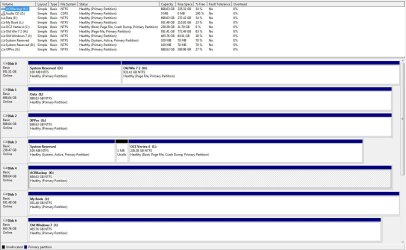
OK this is everything disconnected, except for my 3 external drives....

Disk 2 has become Disk 0 and tagged as 'Boot',, but not identified as OCZ Vertex......booted fine.....

Curious isn't it?

SSD Only.jpg
 

My Computer My Computer

At a glance

Win 7 Home Premium 64-Bit SP1Intel Core2 Duo E8400 O/C 3.9 GHz8 GbRadeon HD 4870
Computer type
PC/Desktop
Computer Manufacturer/Model Number
Custom Build
OS
Win 7 Home Premium 64-Bit SP1
CPU
Intel Core2 Duo E8400 O/C 3.9 GHz
Motherboard
Asus P5K Premium
Memory
8 Gb
Graphics Card(s)
Radeon HD 4870
Sound Card
Sound Blaster X-Fi Xtreme
Monitor(s) Displays
Dell U2311H
Screen Resolution
1920 x 1080
Hard Drives
1 x OCZ Vertex 4 SSD
3 x Internal SATA Hard Drives
3 x External Hard Drives
PSU
Corsair HX620W Modular
Case
Corsair Carbide 400R
Keyboard
LogiTech Internet 350 Wired
Mouse
Microsoft WheelMouse Optical Wired
Internet Speed
Sky Broadband 10.75 Mbps Down 0.95 Mbps Up Ping 49ms
Antivirus
aVast Free
Browser
Chrome and Explorer 10
Other Info
Webcam LogiTech Pro C920
Corsair SP2500 2:1 Speaker System
Brother HL-2270DW Wireless B/W Laser Printer
Canon iP4700 Colour Printer
Epson Perfection V300 Photo Scanner
label C: OCZ Vertex, as you did with the HDD.
 

My Computer My Computer

At a glance

ME/XP/Vista/Win7
OS
ME/XP/Vista/Win7
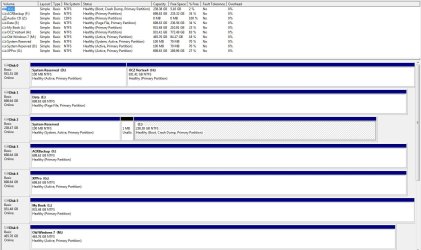
OK, this is the picture after some more playing around.

I've marked the Active disks as Inactive and renamed the C drive as OCZ.......

Diskman2.jpg
 

My Computer My Computer

At a glance

Win 7 Home Premium 64-Bit SP1Intel Core2 Duo E8400 O/C 3.9 GHz8 GbRadeon HD 4870
Computer type
PC/Desktop
Computer Manufacturer/Model Number
Custom Build
OS
Win 7 Home Premium 64-Bit SP1
CPU
Intel Core2 Duo E8400 O/C 3.9 GHz
Motherboard
Asus P5K Premium
Memory
8 Gb
Graphics Card(s)
Radeon HD 4870
Sound Card
Sound Blaster X-Fi Xtreme
Monitor(s) Displays
Dell U2311H
Screen Resolution
1920 x 1080
Hard Drives
1 x OCZ Vertex 4 SSD
3 x Internal SATA Hard Drives
3 x External Hard Drives
PSU
Corsair HX620W Modular
Case
Corsair Carbide 400R
Keyboard
LogiTech Internet 350 Wired
Mouse
Microsoft WheelMouse Optical Wired
Internet Speed
Sky Broadband 10.75 Mbps Down 0.95 Mbps Up Ping 49ms
Antivirus
aVast Free
Browser
Chrome and Explorer 10
Other Info
Webcam LogiTech Pro C920
Corsair SP2500 2:1 Speaker System
Brother HL-2270DW Wireless B/W Laser Printer
Canon iP4700 Colour Printer
Epson Perfection V300 Photo Scanner
I also relettered my three external drives as, 'J, 'K', 'L'

Disk 0 ('D'), ('H') is bit of a mystery....don't know how it got split into two partitions.

As it's just a storage drive now, I guess it's safe to merge the partitions, or even reformat?
 

My Computer My Computer

At a glance

Win 7 Home Premium 64-Bit SP1Intel Core2 Duo E8400 O/C 3.9 GHz8 GbRadeon HD 4870
Computer type
PC/Desktop
Computer Manufacturer/Model Number
Custom Build
OS
Win 7 Home Premium 64-Bit SP1
CPU
Intel Core2 Duo E8400 O/C 3.9 GHz
Motherboard
Asus P5K Premium
Memory
8 Gb
Graphics Card(s)
Radeon HD 4870
Sound Card
Sound Blaster X-Fi Xtreme
Monitor(s) Displays
Dell U2311H
Screen Resolution
1920 x 1080
Hard Drives
1 x OCZ Vertex 4 SSD
3 x Internal SATA Hard Drives
3 x External Hard Drives
PSU
Corsair HX620W Modular
Case
Corsair Carbide 400R
Keyboard
LogiTech Internet 350 Wired
Mouse
Microsoft WheelMouse Optical Wired
Internet Speed
Sky Broadband 10.75 Mbps Down 0.95 Mbps Up Ping 49ms
Antivirus
aVast Free
Browser
Chrome and Explorer 10
Other Info
Webcam LogiTech Pro C920
Corsair SP2500 2:1 Speaker System
Brother HL-2270DW Wireless B/W Laser Printer
Canon iP4700 Colour Printer
Epson Perfection V300 Photo Scanner
Well, this thread appears to have died the death, so let me try another allied question.

I'm looking to increase the free space on my 'C' drive SSD. The Users folder there (138Gb), looks very tempting to try and move to another HDD.

I can see on the Interweb that this is apparently possible: some claim to have done it successfully: the methods of doing it vary: some say dangerous, don't do it.........

Has anybody in here done this successfully, and if so what was your method.
 

My Computer My Computer

At a glance

Win 7 Home Premium 64-Bit SP1Intel Core2 Duo E8400 O/C 3.9 GHz8 GbRadeon HD 4870
Computer type
PC/Desktop
Computer Manufacturer/Model Number
Custom Build
OS
Win 7 Home Premium 64-Bit SP1
CPU
Intel Core2 Duo E8400 O/C 3.9 GHz
Motherboard
Asus P5K Premium
Memory
8 Gb
Graphics Card(s)
Radeon HD 4870
Sound Card
Sound Blaster X-Fi Xtreme
Monitor(s) Displays
Dell U2311H
Screen Resolution
1920 x 1080
Hard Drives
1 x OCZ Vertex 4 SSD
3 x Internal SATA Hard Drives
3 x External Hard Drives
PSU
Corsair HX620W Modular
Case
Corsair Carbide 400R
Keyboard
LogiTech Internet 350 Wired
Mouse
Microsoft WheelMouse Optical Wired
Internet Speed
Sky Broadband 10.75 Mbps Down 0.95 Mbps Up Ping 49ms
Antivirus
aVast Free
Browser
Chrome and Explorer 10
Other Info
Webcam LogiTech Pro C920
Corsair SP2500 2:1 Speaker System
Brother HL-2270DW Wireless B/W Laser Printer
Canon iP4700 Colour Printer
Epson Perfection V300 Photo Scanner

My Computers My Computers

  • At a glance

    Windows 11 ProRyzen 9 5900X32GB G Skill DDR4-3600EVGA RTX 3080 FTW 3 Ultra
    Computer type
    PC/Desktop
    Computer Manufacturer/Model Number
    ALWAYS UNDER CONSTRUCTION
    OS
    Windows 11 Pro
    CPU
    Ryzen 9 5900X
    Motherboard
    Asus X570 Crosshair Viii Hero
    Memory
    32GB G Skill DDR4-3600
    Graphics Card(s)
    EVGA RTX 3080 FTW 3 Ultra
    Sound Card
    On Board/Sennheiser PC37X Headset
    Monitor(s) Displays
    3 X Asus 27"
    Screen Resolution
    2560x1440
    Hard Drives
    2 X 1 TB NVME drives
    PSU
    EVGA 850
    Case
    Phanteks Eclipse P400A
    Cooling
    EVGA 280 AIO
    Keyboard
    Logitech G510s/ Logitech G13
    Mouse
    Logitech G502
    Internet Speed
    24/1
    Antivirus
    ESET/MBAM Pro/SAS Pro
    Browser
    Chrome/ Firefox/ Edge
  • At a glance

    Windows 11 ProIntel Ultra 9 288V32 GB LPDDR5X 8533
    Computer type
    Laptop
    System Manufacturer/Model Number
    Dell 16 Plus
    OS
    Windows 11 Pro
    CPU
    Intel Ultra 9 288V
    Memory
    32 GB LPDDR5X 8533
    Monitor(s) Displays
    16" Mini-LED HDR600 Touch 90 Hz
    Screen Resolution
    2560X1600
    Hard Drives
    1 TB NVME
Thanks for pointing me towards that post.....I'll give it a try.

Yes I did change the Boot options.....as I indicated, I had/have no problems with booting, it was just the confusing picture presented by Disk Management that offended my sensibilities!

I have given up trying to understand what caused the Disk Man confusion......instead, I have just set about 'changing' the Disk Man 'picture' of my hard disks, so that they look 'right' to me.

By dint of renaming, relettering, reformatting, deleting old 'Windows' folders, getting rid of my 'active' disks and using Diskpart to get rid of my Dynamic disk, I have pretty well achieved what I wanted.

BTW, I found Diskpart to be extremely useful (never used it before). It can achieve what a lot of Partition Managers apparently can't, when it comes to handling 'dynamic' disks.

For what it's worth, two other free utility programs I wouldn't be without for cleaning up my disks are: 'Take Ownership'
Add "Take Ownership" to Explorer Right-Click Menu in Win 7 or Vista
and 'Unlocker' UNLOCKER 1.9.2 BY CEDRICK 'NITCH' COLLOMB
 

My Computer My Computer

At a glance

Win 7 Home Premium 64-Bit SP1Intel Core2 Duo E8400 O/C 3.9 GHz8 GbRadeon HD 4870
Computer type
PC/Desktop
Computer Manufacturer/Model Number
Custom Build
OS
Win 7 Home Premium 64-Bit SP1
CPU
Intel Core2 Duo E8400 O/C 3.9 GHz
Motherboard
Asus P5K Premium
Memory
8 Gb
Graphics Card(s)
Radeon HD 4870
Sound Card
Sound Blaster X-Fi Xtreme
Monitor(s) Displays
Dell U2311H
Screen Resolution
1920 x 1080
Hard Drives
1 x OCZ Vertex 4 SSD
3 x Internal SATA Hard Drives
3 x External Hard Drives
PSU
Corsair HX620W Modular
Case
Corsair Carbide 400R
Keyboard
LogiTech Internet 350 Wired
Mouse
Microsoft WheelMouse Optical Wired
Internet Speed
Sky Broadband 10.75 Mbps Down 0.95 Mbps Up Ping 49ms
Antivirus
aVast Free
Browser
Chrome and Explorer 10
Other Info
Webcam LogiTech Pro C920
Corsair SP2500 2:1 Speaker System
Brother HL-2270DW Wireless B/W Laser Printer
Canon iP4700 Colour Printer
Epson Perfection V300 Photo Scanner
My Computers My Computers

  • At a glance

    Windows 11 ProRyzen 9 5900X32GB G Skill DDR4-3600EVGA RTX 3080 FTW 3 Ultra
    Computer type
    PC/Desktop
    Computer Manufacturer/Model Number
    ALWAYS UNDER CONSTRUCTION
    OS
    Windows 11 Pro
    CPU
    Ryzen 9 5900X
    Motherboard
    Asus X570 Crosshair Viii Hero
    Memory
    32GB G Skill DDR4-3600
    Graphics Card(s)
    EVGA RTX 3080 FTW 3 Ultra
    Sound Card
    On Board/Sennheiser PC37X Headset
    Monitor(s) Displays
    3 X Asus 27"
    Screen Resolution
    2560x1440
    Hard Drives
    2 X 1 TB NVME drives
    PSU
    EVGA 850
    Case
    Phanteks Eclipse P400A
    Cooling
    EVGA 280 AIO
    Keyboard
    Logitech G510s/ Logitech G13
    Mouse
    Logitech G502
    Internet Speed
    24/1
    Antivirus
    ESET/MBAM Pro/SAS Pro
    Browser
    Chrome/ Firefox/ Edge
  • At a glance

    Windows 11 ProIntel Ultra 9 288V32 GB LPDDR5X 8533
    Computer type
    Laptop
    System Manufacturer/Model Number
    Dell 16 Plus
    OS
    Windows 11 Pro
    CPU
    Intel Ultra 9 288V
    Memory
    32 GB LPDDR5X 8533
    Monitor(s) Displays
    16" Mini-LED HDR600 Touch 90 Hz
    Screen Resolution
    2560X1600
    Hard Drives
    1 TB NVME
Back
Top