User Account Control - UAC - Change Notification Settings

How to Change UAC Notification Settings in Windows 7


   Information
When turned on, User Account Control helps prevent potentially harmful programs from making changes to your computer in Windows 7 by notifying and asking you for permission before letting the program run or install.

This will show you how to change the User Account Control (UAC) for when to be notified about changes to your computer.

You must be logged in as an administrator to be able to do the steps in this tutorial.


   Note
For more detailed information about UAC, see:
Standard Account:
A standard user account lets a person use most of the capabilities of the computer, but permission from an administrator is required if you want to make changes that affect other users or the security of the computer.
When you use a standard account, you can use most programs that are installed on the computer, but you can't install or uninstall software and hardware, delete files that are required for the computer to work, or change settings on the computer that affect other users. If you're using a standard account, some programs might require you to provide an administrator password before you can perform certain tasks.
Administrator Account:
An administrator account is a user account that lets you make changes that will affect other users. Administrators can change security settings, install software and hardware, and access all files on the computer. Administrators can also make changes to other user accounts.
When you set up Windows, you'll be required to create a user account. This account is an administrator account that allows you to set up your computer and install any programs that you would like to use.
To help make the computer more secure, this administrator account may be asked with a UAC prompt to provide their password or confirmation before allowed to make changes that affect other users, or when running anything elevated (Run as Administrator) since running elevated will allow it to have access to the entire computer.
   Warning
Turning off UAC by setting it to the lowest bottom level of "Never notify" will also disable Protected Mode in Internet Explorer.

This means that you will not be able to have 64-bit IE10 unless you leave UAC turned on.

   Tip
If you set UAC to "Never notify" to be disabled, then you could rebuild the icon cache afterwards to remove the UAC shield overlay icon on applications and shortcuts that required elevation to run.


OPTION ONE

Change UAC Setting through User Accounts


1. Open the Control Panel (icons view).

2. Click on the User Accounts icon.

3. Click on the Change User Account Control settings link. (See screenshot below)
User_Accounts.jpg
4. If prompted by UAC, click on Yes to approve.

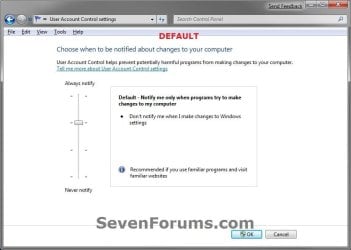
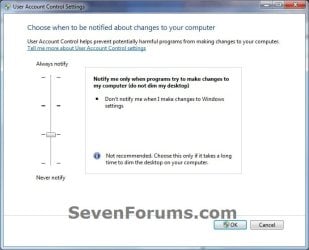
5. Adjust the slider to the level of protection of how much you want to be notified from UAC. (See screenshots below)

6. Click on OK when done.
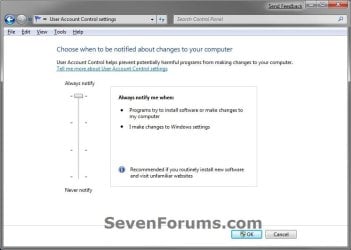
UAC_Level-1_Always_Notify.jpg
UAC_Level-2_Default.jpg
UAC_Level-3_No_Dim.jpg
UAC_Level-4_Never_Notify.jpg
7. If prompted by UAC, click on Yes to approve.

8. If you have just turned UAC off, then you will need to click on restart the computer, or manually restart the computer, to apply the changes. (See screenshot below)
NOTE: Simply turning on UAC or changing the UAC level without turning it off will not require a restart.

Turn_Off.jpg


OPTION TWO

Change UAC Settings Using a REG File Download


1. To Have UAC Always Notify You
NOTE: This is level 1. See the first screenshot under step 6 in METHOD ONE. This will notify you of all changes made by programs to your computer, and changes you make to Windows 7 settings.
A) Click on the Download button below to download the file below.
UAC_Level-1.reg


Download


B) Go to step 5.
2. To Have the Default UAC Notification
NOTE: This is level 2. See the second screenshot under step 6 in METHOD ONE. This will only notify you when programs try to make changes to your computer, and not when you make changes to Windows 7 settings.
A) Click on the Download button below to download the file below.
UAC_Level-2_Default.reg

Download


B) Go to step 5.
3. To Have UAC Notify without Dimming Desktop
NOTE: This is level 3. See the third screenshot under step 6 in METHOD ONE. This will only notify you when programs try to make changes to your computer without dimming the desktop, and not when you make changes to Windows 7 settings.
A) Click on the Download button below to download the file below.
UAC_Level-3_No_Dim.reg

Download


B) Go to step 5.
4. To Turn Off UAC Notifications Completely to "Never notify"
NOTE: This is level 4. See the fourth screenshot under step 6 in METHOD ONE. This will disable (turn off) UAC completely. You will not be notified of any changes made by programs to your computer, or that you make to Windows 7 settings.
A) Click on the Download button below to download the file below.
UAC_Level-4.reg

Download


5. Save the .reg file to your desktop.

6. Right click on the downloaded .reg file, and click on Merge.

7. If prompted, click on Run, Yes (UAC), Yes, and OK when prompted.

8. Restart the computer to apply the changes to UAC.

9. When done, you can delete the downloaded .reg file if you like.

That's it,
Shawn


Attachments

Last edited:
I disabled UAC and opted to use Comodo / Spybot S&D Tea Timer. Both ask you about any changes that are trying to be made and asks you if you would like to allow this to happen. Has anyone else tried this and can offer their own opinion on the security implications of handling system changes in this fashion?

The main reason for me doing this (besides the annoyance of those cursed popups asking for permission to do something I had already given the program permission to do)
was this seemed less resource intensive than the windows UAC.
 

My Computer

OS
Windows 7 Home Premium x64
CPU
Intel Core 2 Quad Q6700
Motherboard
Nforce 790i Ultra SLI
Memory
2x2gb Crucial
Graphics Card(s)
GTX 280 O/C Edition
Monitor(s) Displays
Samsung Syncmaster
Hello Pnhearer, and welcome to Seven Forums.

I'm sure that using those programs to basically be almost the same as UAC would provide good security. However, they will use more resources than UAC. Plus, if a program that you always allow full access (white listed) with these programs were to become infected by malware, the malware will now have full access. UAC would have stopped it since you cannot white list a program, but the malware could get through since the infected program was white listed in those programs. Something to think about.

Hope this helps,
Shawn
 

My Computer

Computer type
PC/Desktop
Computer Manufacturer/Model Number
Self built custom
OS
64-bit Windows 11 Pro for Workstations
CPU
Intel i7-8700K OC'd to 5 GHz
Motherboard
ASUS ROG Maximus XI Formula Z390
Memory
64 GB (4x16GB) G.SKILL TridentZ RGB DDR4 3600 MHz
Graphics Card(s)
ASUS ROG-STRIX-GTX1080TI-O11G-GAMING
Sound Card
Integrated
Monitor(s) Displays
2 x Samsung Odyssey G7 27"
Screen Resolution
2560x1440
Hard Drives
1TB Samsung 990 PRO M.2,
4TB Samsung 990 PRO PRO M.2,
TerraMaster F8 SSD Plus NAS
PSU
Seasonic Prime Titanium 850W
Case
Thermaltake Core P3
Cooling
Corsair Hydro H115i
Keyboard
Logitech wireless K800
Mouse
Logitech MX Master 4
Internet Speed
2 Gb/s Download and 100 Mb/s Upload
Antivirus
Malwarebyte Anti-Malware Premium
Browser
Google Chrome
Other Info
Logitech Z625 speaker system,
Logitech BRIO 4K Pro webcam,
HP Color LaserJet Pro MFP M477fdn,
APC SMART-UPS RT 1000 XL - SURT1000XLI,
Galaxy S23 Plus phone
this is very useful and handy to have close by you. I
must try and remember this... thank you for the info
 

My Computer

Computer type
PC/Desktop
Computer Manufacturer/Model Number
Self Built With Help
OS
Windows 7 Ultimate
CPU
Amd Athelon 64x2 Duel core Processor 6000+ 3.10ghz
Motherboard
Asus-MX Se Plus
Memory
4.0 GB
Graphics Card(s)
Radeon HD5450 2.8gb
Sound Card
7.1 Surround
Monitor(s) Displays
Lg Flatron 22inch lcd
Screen Resolution
1680x1050
Hard Drives
western digital 320 gig
PSU
550 w
Case
Standard Atx
Cooling
2 Fans
Keyboard
G15 Gaming keyboard
Mouse
Sky mouse
Internet Speed
ADSL2+ QUAD-1
You're most welcome Coldy. Thank you. :)
 

My Computer

Computer type
PC/Desktop
Computer Manufacturer/Model Number
Self built custom
OS
64-bit Windows 11 Pro for Workstations
CPU
Intel i7-8700K OC'd to 5 GHz
Motherboard
ASUS ROG Maximus XI Formula Z390
Memory
64 GB (4x16GB) G.SKILL TridentZ RGB DDR4 3600 MHz
Graphics Card(s)
ASUS ROG-STRIX-GTX1080TI-O11G-GAMING
Sound Card
Integrated
Monitor(s) Displays
2 x Samsung Odyssey G7 27"
Screen Resolution
2560x1440
Hard Drives
1TB Samsung 990 PRO M.2,
4TB Samsung 990 PRO PRO M.2,
TerraMaster F8 SSD Plus NAS
PSU
Seasonic Prime Titanium 850W
Case
Thermaltake Core P3
Cooling
Corsair Hydro H115i
Keyboard
Logitech wireless K800
Mouse
Logitech MX Master 4
Internet Speed
2 Gb/s Download and 100 Mb/s Upload
Antivirus
Malwarebyte Anti-Malware Premium
Browser
Google Chrome
Other Info
Logitech Z625 speaker system,
Logitech BRIO 4K Pro webcam,
HP Color LaserJet Pro MFP M477fdn,
APC SMART-UPS RT 1000 XL - SURT1000XLI,
Galaxy S23 Plus phone
I just recently turned UAC off, and what a joy it is to open CCleaner, Smart Defrag, Malwarebytes and WinPatrol Plus with one click of my task-bar. I do not use IE9, so I could care less about protected mode. I do not download music, videos or any file sharing stuff, and I only install trusted programs from either File Hippo or CNET. I don't open any email attachments in my Yahoo! account, no matter how funny they may sound.

I use avast! Internet Security, and WinPatrol Plus. I only use Chrome that is sandboxed in AIS and I keep my OS and all my programs up to date.

To me, UAC is counter productive in that it becomes a "click no matter what" warning. Once I install CCleaner, I shouldn't have to click a naggy warning pop-up every single time I want to run it for the rest of my life.
 

My Computer

OS
Windows 7 Home Premium x64 SP1
Hello DBone,

That's fine if it works for you, but just remember that UAC is your last line of defense to help prevent malware from being able to run elevated without your approval first, and having complete access to your computer.
 

My Computer

Computer type
PC/Desktop
Computer Manufacturer/Model Number
Self built custom
OS
64-bit Windows 11 Pro for Workstations
CPU
Intel i7-8700K OC'd to 5 GHz
Motherboard
ASUS ROG Maximus XI Formula Z390
Memory
64 GB (4x16GB) G.SKILL TridentZ RGB DDR4 3600 MHz
Graphics Card(s)
ASUS ROG-STRIX-GTX1080TI-O11G-GAMING
Sound Card
Integrated
Monitor(s) Displays
2 x Samsung Odyssey G7 27"
Screen Resolution
2560x1440
Hard Drives
1TB Samsung 990 PRO M.2,
4TB Samsung 990 PRO PRO M.2,
TerraMaster F8 SSD Plus NAS
PSU
Seasonic Prime Titanium 850W
Case
Thermaltake Core P3
Cooling
Corsair Hydro H115i
Keyboard
Logitech wireless K800
Mouse
Logitech MX Master 4
Internet Speed
2 Gb/s Download and 100 Mb/s Upload
Antivirus
Malwarebyte Anti-Malware Premium
Browser
Google Chrome
Other Info
Logitech Z625 speaker system,
Logitech BRIO 4K Pro webcam,
HP Color LaserJet Pro MFP M477fdn,
APC SMART-UPS RT 1000 XL - SURT1000XLI,
Galaxy S23 Plus phone
Yea, I know there's a risk, but I feel it's so minuscule, that the rewards are worth it......Plus, that's why I make a system image once a month.:)
 

My Computer

OS
Windows 7 Home Premium x64 SP1
Help!

Hi Shawn,
Thanks for the tutorial but when my dad logs onto his admin account how does he change the UAC settings for MY standard user account?

Ali :D
 

My Computer

OS
Windows 7 Home Premium 32 bit
Hello Ali, and welcome to Seven Forums.

The UAC settings are applied to all users on the computer. :)
 

My Computer

Computer type
PC/Desktop
Computer Manufacturer/Model Number
Self built custom
OS
64-bit Windows 11 Pro for Workstations
CPU
Intel i7-8700K OC'd to 5 GHz
Motherboard
ASUS ROG Maximus XI Formula Z390
Memory
64 GB (4x16GB) G.SKILL TridentZ RGB DDR4 3600 MHz
Graphics Card(s)
ASUS ROG-STRIX-GTX1080TI-O11G-GAMING
Sound Card
Integrated
Monitor(s) Displays
2 x Samsung Odyssey G7 27"
Screen Resolution
2560x1440
Hard Drives
1TB Samsung 990 PRO M.2,
4TB Samsung 990 PRO PRO M.2,
TerraMaster F8 SSD Plus NAS
PSU
Seasonic Prime Titanium 850W
Case
Thermaltake Core P3
Cooling
Corsair Hydro H115i
Keyboard
Logitech wireless K800
Mouse
Logitech MX Master 4
Internet Speed
2 Gb/s Download and 100 Mb/s Upload
Antivirus
Malwarebyte Anti-Malware Premium
Browser
Google Chrome
Other Info
Logitech Z625 speaker system,
Logitech BRIO 4K Pro webcam,
HP Color LaserJet Pro MFP M477fdn,
APC SMART-UPS RT 1000 XL - SURT1000XLI,
Galaxy S23 Plus phone
UAC Issue

Brink, I disagree. If I am opening a program regularly and UAC always asks me if I wish to run it - I will always click "yes". I will not know if it became infected malware in the meantime just because UAC comes up. UAC is valuable for the first time you install software, but not when you continually run it later. E.g. if ccleaner became infected, I wouldn't know it, I would just click yes to run. UAC should allow for white listing of programs if people desire it. Too bad Microsoft can't be flexible enough to allow people to make their own decisions program by program. :(
 

My Computer

OS
windows 7 home
Hello mmmmay, and welcome to Seven Forums.

That is one thing people need to be careful of as not to just blindly click on "Yes" for the UAC prompt, and to make sure it's for what you wanted to run first. Unfortunately, it is an easy bad habit to get into.

It would indeed be hard to know if a program was infected if you run as usual without any noticeable problems, but if it was to try and run without you knowing about it, then that is where the UAC prompt would be handy to get to have a chance to deny it and find out why it was trying to run.

An exception list for programs would have defeated the purpose of UAC if a program on the list should be spoofed or hijacked by malware.
 

My Computer

Computer type
PC/Desktop
Computer Manufacturer/Model Number
Self built custom
OS
64-bit Windows 11 Pro for Workstations
CPU
Intel i7-8700K OC'd to 5 GHz
Motherboard
ASUS ROG Maximus XI Formula Z390
Memory
64 GB (4x16GB) G.SKILL TridentZ RGB DDR4 3600 MHz
Graphics Card(s)
ASUS ROG-STRIX-GTX1080TI-O11G-GAMING
Sound Card
Integrated
Monitor(s) Displays
2 x Samsung Odyssey G7 27"
Screen Resolution
2560x1440
Hard Drives
1TB Samsung 990 PRO M.2,
4TB Samsung 990 PRO PRO M.2,
TerraMaster F8 SSD Plus NAS
PSU
Seasonic Prime Titanium 850W
Case
Thermaltake Core P3
Cooling
Corsair Hydro H115i
Keyboard
Logitech wireless K800
Mouse
Logitech MX Master 4
Internet Speed
2 Gb/s Download and 100 Mb/s Upload
Antivirus
Malwarebyte Anti-Malware Premium
Browser
Google Chrome
Other Info
Logitech Z625 speaker system,
Logitech BRIO 4K Pro webcam,
HP Color LaserJet Pro MFP M477fdn,
APC SMART-UPS RT 1000 XL - SURT1000XLI,
Galaxy S23 Plus phone
I know this is old but...

I joined the site to let you know the .reg file for UAC off is incorrect
All values should be zero
 

My Computer

Computer Manufacturer/Model Number
HP
OS
Windows 7 Ultimate x64
CPU
Many
Motherboard
Many
Memory
16 GB
Thank you RNR, and welcome to Seven Forums. The .reg file has been corrected. :)
 

My Computer

Computer type
PC/Desktop
Computer Manufacturer/Model Number
Self built custom
OS
64-bit Windows 11 Pro for Workstations
CPU
Intel i7-8700K OC'd to 5 GHz
Motherboard
ASUS ROG Maximus XI Formula Z390
Memory
64 GB (4x16GB) G.SKILL TridentZ RGB DDR4 3600 MHz
Graphics Card(s)
ASUS ROG-STRIX-GTX1080TI-O11G-GAMING
Sound Card
Integrated
Monitor(s) Displays
2 x Samsung Odyssey G7 27"
Screen Resolution
2560x1440
Hard Drives
1TB Samsung 990 PRO M.2,
4TB Samsung 990 PRO PRO M.2,
TerraMaster F8 SSD Plus NAS
PSU
Seasonic Prime Titanium 850W
Case
Thermaltake Core P3
Cooling
Corsair Hydro H115i
Keyboard
Logitech wireless K800
Mouse
Logitech MX Master 4
Internet Speed
2 Gb/s Download and 100 Mb/s Upload
Antivirus
Malwarebyte Anti-Malware Premium
Browser
Google Chrome
Other Info
Logitech Z625 speaker system,
Logitech BRIO 4K Pro webcam,
HP Color LaserJet Pro MFP M477fdn,
APC SMART-UPS RT 1000 XL - SURT1000XLI,
Galaxy S23 Plus phone
WOW

WOW
that was fast
Finally getting around to scripting an install for 7 now that 8 is out you know....
 

My Computer

Computer Manufacturer/Model Number
HP
OS
Windows 7 Ultimate x64
CPU
Many
Motherboard
Many
Memory
16 GB
I was do nothing when on UAC prompt, and it disappears itself after 5 minutes.
Even I use Aero theme, UAC prompt uses Windows 7 Basic theme unless I set it to not dim my desktop.
 

My Computer

Computer Manufacturer/Model Number
Acer Aspire One 722 (AO722)
OS
Windows 7 Home Premium Service Pack 1 32-bit Build 7601
CPU
AMD C-50 Processor 1.0 Ghz
Memory
2 GB DDR3 RAM (1.73 usable in System Properties)
Graphics Card(s)
AMD Radeon HD 6200 series Graphics
Sound Card
High Definition Audio Device
Monitor(s) Displays
Generic PnP Monitor
Screen Resolution
1366 x 768 (recommended)
Hard Drives
320 GB HDD storage
298.09 GB in Disk Management (REAL)
Keyboard
Built-in on my laptop
Mouse
External mouse
Other Info
Installed Windows 7 Service Pack 1 by 9/9/2012
Hello from the ROK (Republic Of Korea)
Not sure if I need to start a new thread or is this one still active?

I am having an issue requiring some expert advice. I’m trying to reset the UAC back to its recommended default setting. After setting it to the highest level or any other range except Never Notify Me, and restarting the computer, that’s when the problem starts. While trying to log in with my password, It keeps me in a loop. By sending me back to the sign in screen… after changing the setting back (using a different admin account) to Never Notify Me, I can log back in without a hitch. My user folders are in (D) drive. I am wondering if that’s the root cause. Appreciating your assistance.
 

My Computer

Computer type
PC/Desktop
Computer Manufacturer/Model Number
custom build
OS
win7 Ultimate 64
CPU
icore5
Motherboard
Gigabyte P67
Memory
4 Gig
Graphics Card(s)
ATI Radeon HD5700
Sound Card
envy24
Monitor(s) Displays
Samsung SyncMaster T22HD/HP F1905
Screen Resolution
1680x1050
Hard Drives
Samsung
WDC
PSU
650
Case
GMC
Cooling
corsair
Keyboard
Dell
Mouse
MS3000
Internet Speed
slow
Antivirus
Microsoft
Browser
IE
Hello DJ,

It does indeed sound like there is some sort of issue with your user profiles on D instead if the default C. I would recommend to move them back to C, and see how it behaves afterwards.

Hope this helps for now, :)
Shawn
 

My Computer

Computer type
PC/Desktop
Computer Manufacturer/Model Number
Self built custom
OS
64-bit Windows 11 Pro for Workstations
CPU
Intel i7-8700K OC'd to 5 GHz
Motherboard
ASUS ROG Maximus XI Formula Z390
Memory
64 GB (4x16GB) G.SKILL TridentZ RGB DDR4 3600 MHz
Graphics Card(s)
ASUS ROG-STRIX-GTX1080TI-O11G-GAMING
Sound Card
Integrated
Monitor(s) Displays
2 x Samsung Odyssey G7 27"
Screen Resolution
2560x1440
Hard Drives
1TB Samsung 990 PRO M.2,
4TB Samsung 990 PRO PRO M.2,
TerraMaster F8 SSD Plus NAS
PSU
Seasonic Prime Titanium 850W
Case
Thermaltake Core P3
Cooling
Corsair Hydro H115i
Keyboard
Logitech wireless K800
Mouse
Logitech MX Master 4
Internet Speed
2 Gb/s Download and 100 Mb/s Upload
Antivirus
Malwarebyte Anti-Malware Premium
Browser
Google Chrome
Other Info
Logitech Z625 speaker system,
Logitech BRIO 4K Pro webcam,
HP Color LaserJet Pro MFP M477fdn,
APC SMART-UPS RT 1000 XL - SURT1000XLI,
Galaxy S23 Plus phone
Thanks Shawn
That's the culprit.
 

My Computer

Computer type
PC/Desktop
Computer Manufacturer/Model Number
custom build
OS
win7 Ultimate 64
CPU
icore5
Motherboard
Gigabyte P67
Memory
4 Gig
Graphics Card(s)
ATI Radeon HD5700
Sound Card
envy24
Monitor(s) Displays
Samsung SyncMaster T22HD/HP F1905
Screen Resolution
1680x1050
Hard Drives
Samsung
WDC
PSU
650
Case
GMC
Cooling
corsair
Keyboard
Dell
Mouse
MS3000
Internet Speed
slow
Antivirus
Microsoft
Browser
IE
Great news. :)
 

My Computer

Computer type
PC/Desktop
Computer Manufacturer/Model Number
Self built custom
OS
64-bit Windows 11 Pro for Workstations
CPU
Intel i7-8700K OC'd to 5 GHz
Motherboard
ASUS ROG Maximus XI Formula Z390
Memory
64 GB (4x16GB) G.SKILL TridentZ RGB DDR4 3600 MHz
Graphics Card(s)
ASUS ROG-STRIX-GTX1080TI-O11G-GAMING
Sound Card
Integrated
Monitor(s) Displays
2 x Samsung Odyssey G7 27"
Screen Resolution
2560x1440
Hard Drives
1TB Samsung 990 PRO M.2,
4TB Samsung 990 PRO PRO M.2,
TerraMaster F8 SSD Plus NAS
PSU
Seasonic Prime Titanium 850W
Case
Thermaltake Core P3
Cooling
Corsair Hydro H115i
Keyboard
Logitech wireless K800
Mouse
Logitech MX Master 4
Internet Speed
2 Gb/s Download and 100 Mb/s Upload
Antivirus
Malwarebyte Anti-Malware Premium
Browser
Google Chrome
Other Info
Logitech Z625 speaker system,
Logitech BRIO 4K Pro webcam,
HP Color LaserJet Pro MFP M477fdn,
APC SMART-UPS RT 1000 XL - SURT1000XLI,
Galaxy S23 Plus phone
I had a trojan a while ago that disabled UAC. Now I don't get the prompt window for anything. Even if I do run as administrator. I use standard, but know admin pass. I cant access the control panel, and the file gave me this error. "Cannot import c:\users\username\desktop\UAC_Level-1.reg: Not all data was succesfully written to the registry. Some keys are open by the system or other processes" Please help, I need to be prompted for admin password to... well, do anything.
 

My Computer

Computer type
PC/Desktop
OS
7, 64 bit
Back
Top